

Meeting Request Subject Lines: 50+ Examples, Data, and the Mistake Nobody Talks About
You sent a pile of meeting request emails last week and barely got any opens. Your sequences are tight, your offer is solid, your ICP is dialed in. The problem? Seven words sitting in the subject line that nobody bothered to read.
47% of recipients decide whether to open an email based on the subject line alone. And with 42% of all emails opened on mobile, most subject lines get chopped before anyone sees the point.
Three rules matter more than any individual line you write:
- Write your hook in the first 33 characters. That's the safest universal limit across the major device and app combos EmailToolTester tested.
- Categorize by scenario. Cold outreach, warm follow-ups, and internal meetings need completely different approaches.
- Fix your contact data before optimizing copy. A bounced email damages your sender domain more than a bad subject line ever could.
What Makes a Meeting Request Subject Line Work
Front-load the hook in 33 characters. Everything after character 33 is bonus context most mobile users won't see.
Personalize with name, company, or a mutual connection. Personalized subject lines deliver 26-50% higher open rates than generic ones. "[Sarah], quick question about Acme's pipeline" beats "Meeting request" every time.
Include the meeting duration. Adding "15 min" or "20 min" increases acceptance rates 20-30%. Duration reduces perceived commitment, which lowers resistance. It's a small detail that does a lot of heavy lifting.
Match the subject line promise to the email body. If your subject says "Question about [Goal]," the email better open with a question - not a product pitch. Mismatches train recipients to ignore you.
Never fake a thread. Adding "RE:" when there was no prior email is a great way to get filtered or ignored by both people and inbox algorithms.
Test 2-3 subject line variants per campaign with at least 100-200 prospects each. And measure reply rate, not just opens - a high open rate with zero replies means the subject line overpromised. If you want more inspiration, see these email subject line examples.
Ideal Length for Your Subject Line
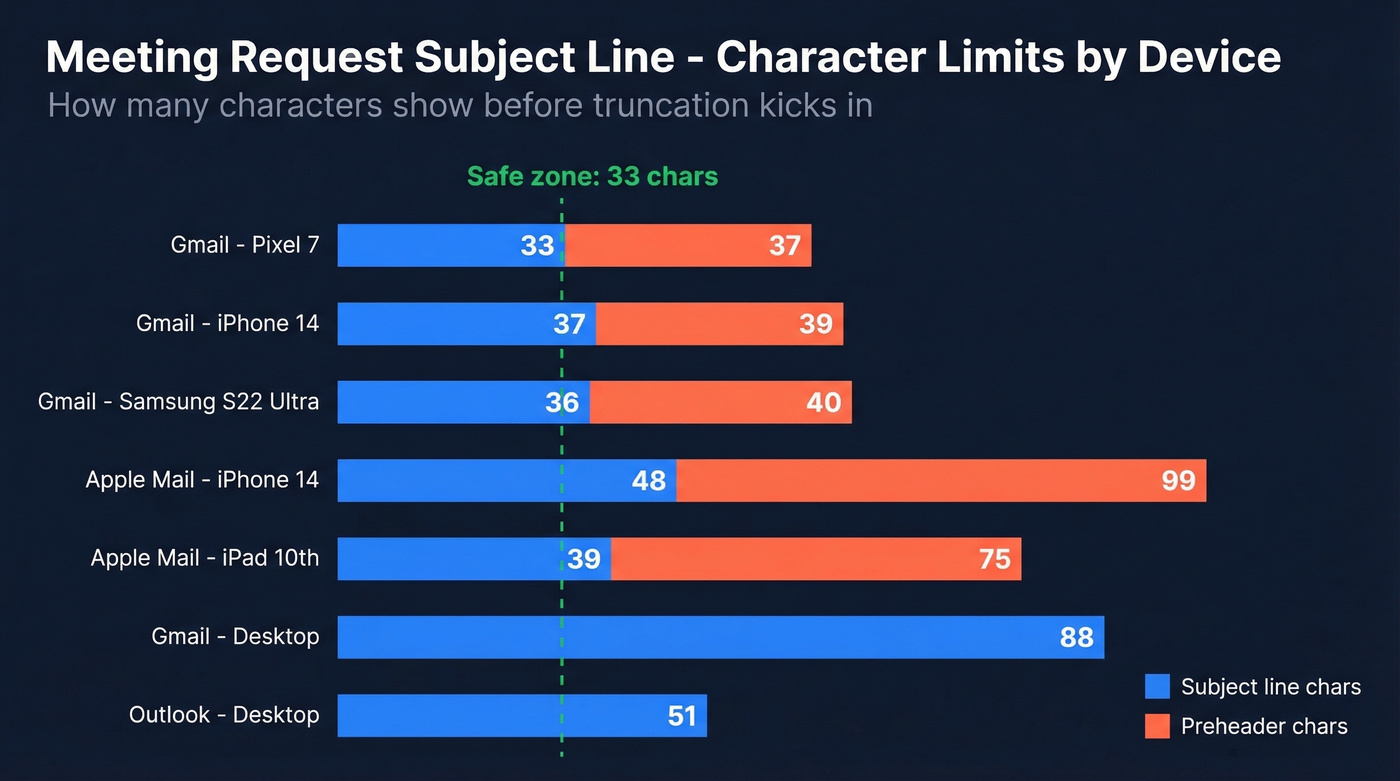
"Keep it under 50 characters" is advice from 2018. The real answer depends on which device and email client your recipient uses. This table, based on EmailToolTester's device-specific testing, shows where truncation kicks in.
| Device / Client | Max Subject Chars | Max Preheader Chars |
|---|---|---|
| Gmail - Pixel 7 | 33 | 37 |
| Gmail - iPhone 14 | 37 | 39 |
| Gmail - Samsung S22 Ultra | 36 | 40 |
| Apple Mail - iPhone 14 | 48 | 99 |
| Apple Mail - iPad 10th | 39 | 75 |
| Gmail - Desktop (~1400px) | ~88 | Varies |
| Outlook - Desktop | ~51 | Varies |
If you want universal visibility, your hook lives in the first 33 characters. Everything after that is bonus context for desktop users. Character width matters too - "Meeting" takes more pixel space than "Quick" because of the wider glyphs.
Write your subject line, then count to 33. If the core message isn't clear by that point, rewrite. (You can also A/B test preview text - see Email Preview Text A/B Testing.)
50+ Subject Lines by Scenario
Cold Outreach (First Touch)
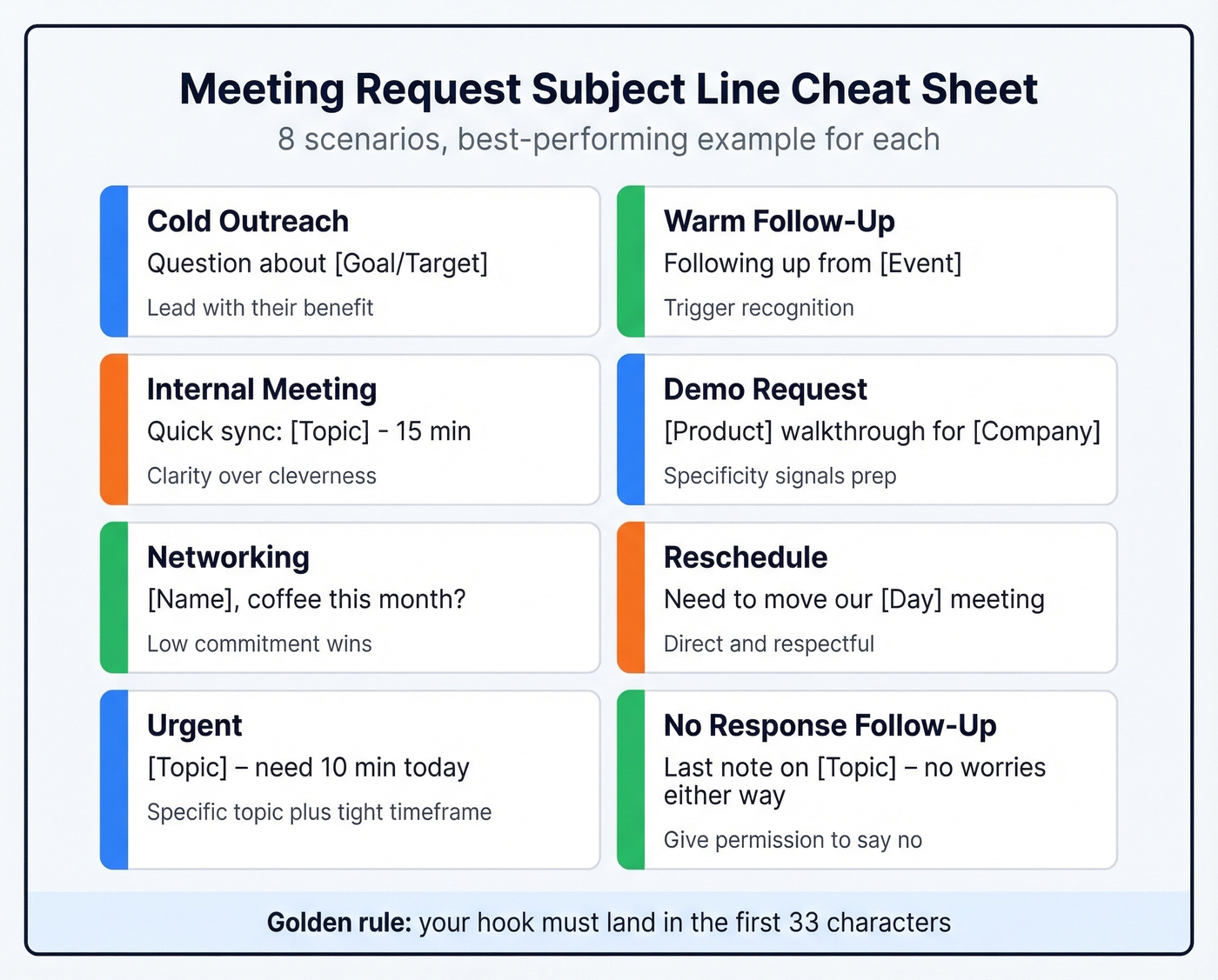
Cold subject lines need to earn attention from someone who doesn't know you. Lead with what's in it for them - they don't recognize your name yet. If you're building a full outbound motion, these sales prospecting techniques pair well with the subject lines below.
- "Quick request"
- "Question about [Goal/Target]"
- "[Mutual contact] suggested we talk"
- "How [Competitor] hit [Benefit]"
- "[First name], 15 min on [Topic]?"
- "Idea for [Company]'s [specific challenge]"
- (Leave it blank) - a salesperson shared this on r/sales as one of their cold email subject lines that "landed meetings"
The blank subject line trick works because it creates a curiosity gap. It also loses its edge fast, so use it once per sequence, max.
Warm Follow-Up (Met Before / Referral)
When the recipient already has context, your subject line's job is recognition, not persuasion. Reference something they already remember. For more follow-up angles, borrow from these sales follow-up templates.
- "Following up from [Event]"
- "[Your Name] - next steps"
- "Great meeting you at [Event]"
- "As promised: [Resource/Topic]"
- "[Mutual connection] intro - [Topic]"
- "Would you be interested in connecting on [Topic]?"
For name-drops, always ask permission before using a mutual contact's name. A referral subject line can lift response rates substantially - but only if the connection is real.
Internal Meetings (1:1, Team Sync)
Colleagues don't need cleverness. They need clarity.
- "Quick sync: [Topic] - 15 min"
- "[Name], 1:1 this week?"
- "Team check-in: [Project] update"
- "[Project] standup - 10 min Thursday"
- "Need your input on [Decision]"
Demo / Presentation Requests
Specificity signals preparation. Generic "demo request" lines get ignored because they scream template. If you're running demos, keep a product demo checklist handy.
- "See [Product] in action - 20 min"
- "[Product] walkthrough for [Their Company]"
- "[First Name], quick demo re: [their pain point]"
- "Built something for [Industry] - worth 15 min?"
Networking
Low commitment plus genuine flattery. The goal is a conversation, not a close.
- "[Name], coffee this month?"
- "Loved your [Talk/Post] - quick chat?"
- "Fellow [Industry/Role] - would love to connect"
- "[Name], your take on [Topic]?"
Reschedule / Cancellation
Direct and respectful. No cleverness needed.
- "Need to move our [Day] meeting"
- "New time for our chat?"
- "Can we shift to [Alternative day]?"
Urgent Meetings
Urgency without spam-trigger formatting. A specific topic with a tight timeframe works better than shouting.
- "[Topic] - need 10 min today"
- "Time-sensitive: [Issue]"
- "[Name], quick call re: [deadline-driven topic]?"
Follow-Up After No Response
Persistence without pressure. Give the recipient an easy re-entry point.
- "Still interested in connecting?"
- "Bumping this - [Topic]"
- "Closing the loop on [Topic]"
- "Did this slip through? [Topic]"
- "Last note on [Topic] - no worries either way"
That last one works because it gives the recipient permission to say no, which paradoxically makes them more likely to say yes. We've seen this pattern consistently outperform more aggressive follow-up lines in our own outreach.

A great subject line is wasted on a bounced email. Prospeo's 5-step verification delivers 98% email accuracy - so every carefully crafted meeting request actually reaches the inbox.
Fix your data before you fix your copy. Start free with 75 verified emails.
The Psychology Behind High-Open Subject Lines
Two cognitive frameworks explain why certain meeting request subject lines outperform others.
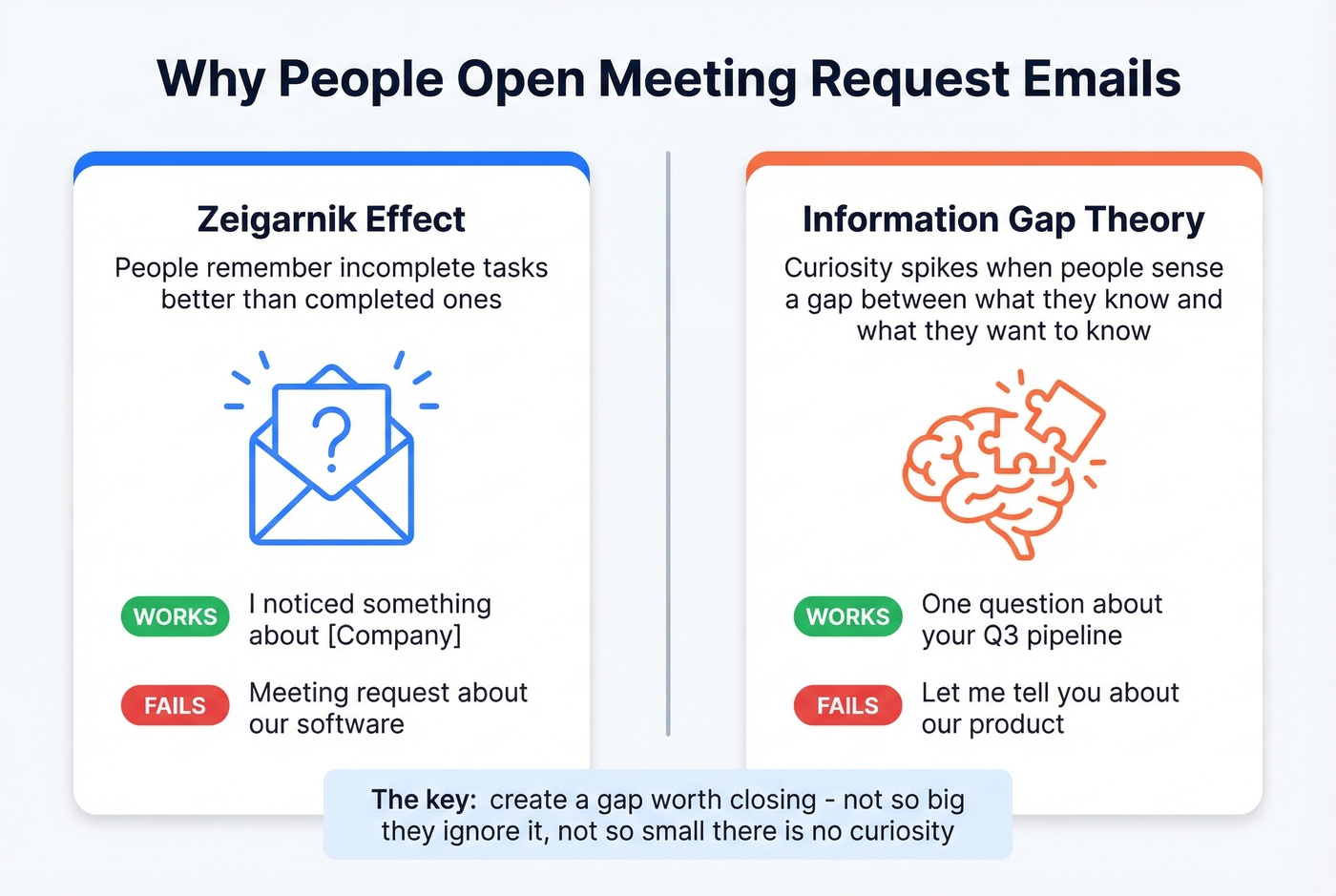
The Zeigarnik effect: People remember interrupted tasks better than completed ones. Applied to subject lines, open loops drive opens. "I noticed something about [Company]" creates an unresolved mental task - the recipient needs to open the email to close it. It's the same reason you can't stop thinking about a half-finished crossword puzzle.
Loewenstein's information gap theory works similarly but through a different mechanism. Curiosity spikes when people perceive a gap between what they know and what they want to know. "One question about your Q3 pipeline" creates a specific, bounded gap. The recipient knows there's a question, doesn't know what it is, and the gap feels small enough to be worth closing.
Contrast these with "Meeting request about our software." That tells the whole story upfront - there's no reason to open. The curiosity is dead on arrival. Whether you're writing to a VP or an individual contributor, the psychology is the same: create a gap worth closing.
Mistakes That Kill Your Open Rate
Most subject lines don't fail because they're boring. They fail because they trigger spam filters before any human sees them. Folderly's guide breaks down the categories that get flagged most often. If you want to go deeper on deliverability, start with this email deliverability guide.
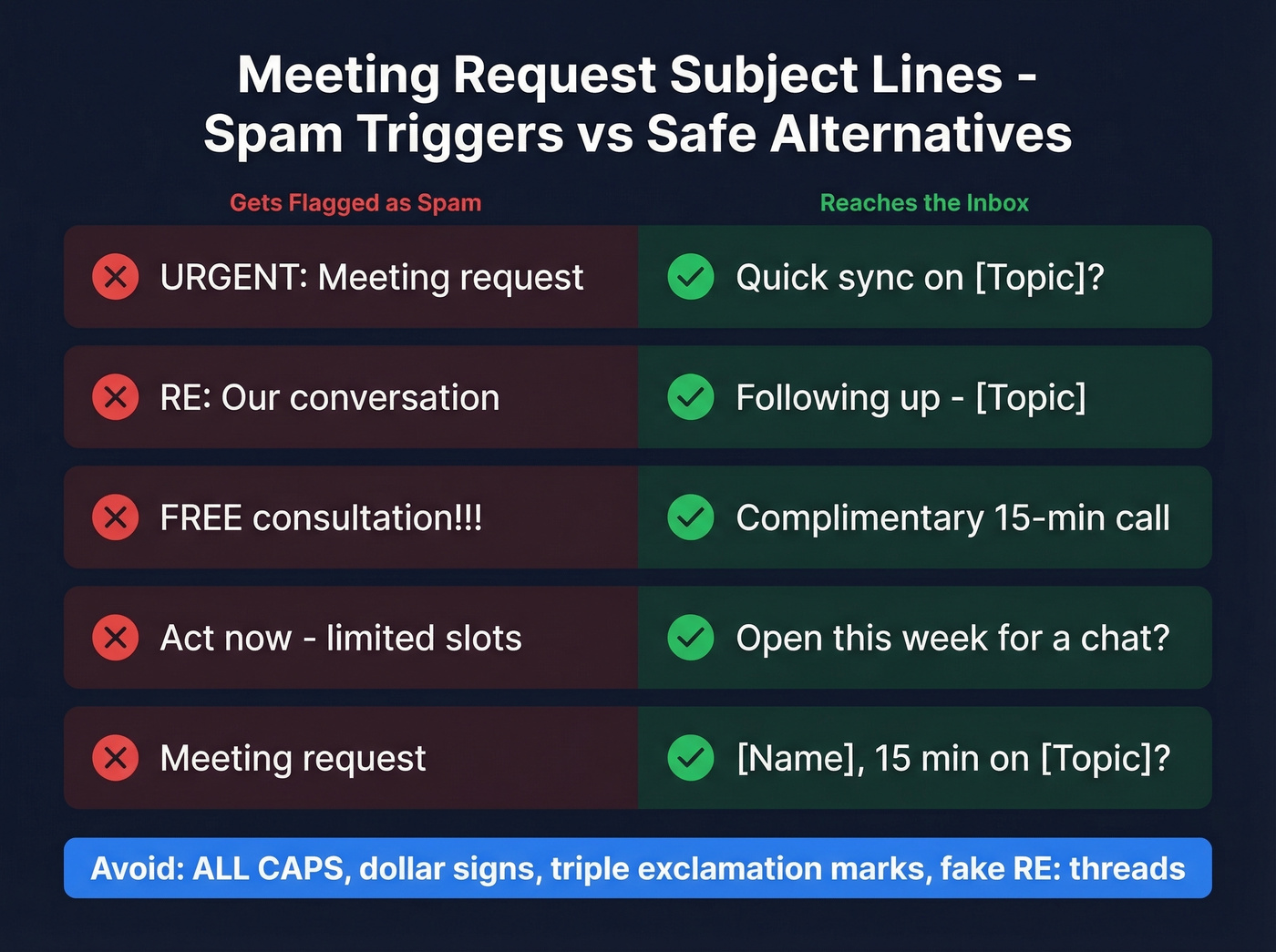
| Don't Write | Write Instead |
|---|---|
| URGENT: Meeting request | Quick sync on [Topic]? |
| RE: Our conversation | Following up - [Topic] |
| FREE consultation!!! | Complimentary 15-min call |
| Act now - limited slots | Open this week for a chat? |
| Meeting request | [Name], 15 min on [Topic]? |
Major providers flag misleading tactics like fake "RE:" threads and excessive punctuation. A single exclamation mark is fine. Three in a row is a spam signal.
Other formatting triggers to avoid: ALL CAPS anywhere in the subject line, dollar signs, and phrases that sound like late-night infomercials. These patterns are exactly what spam filters are trained to catch. (If you're auditing copy, an email spam checker can help spot risky patterns.)
Here's the thing: the subject line you spent 20 minutes crafting doesn't matter if it never reaches the inbox. I've watched teams A/B test variations for weeks while a chunk of their list was bouncing. They were optimizing the paint color on a house with no foundation.
Before the Subject Line - Fix Your Contact Data
Every bounce degrades your sender reputation. Stack enough of them and inbox placement gets worse across the board - even for contacts who would normally reply. A bounced email damages your sender domain reputation, pushing future emails to spam for your entire list.
This is the upstream problem nobody talks about in subject line guides. We've seen teams triple their reply rates not by rewriting copy, but by cleaning their lists first. Prospeo's 5-step email verification catches invalid addresses, spam traps, and honeypots before you hit send, with 98% email accuracy across 300M+ professional profiles and a 7-day data refresh cycle. The free tier gives you 75 email verifications per month - enough to test before committing. If you're troubleshooting list quality, start with email bounce rate benchmarks and fixes.
You just spent 20 minutes writing the perfect subject line. Don't send it to a dead address. Prospeo gives you verified emails and direct dials for 300M+ professionals - refreshed every 7 days, not 6 weeks.
Every meeting request deserves a real inbox. Verified contacts start at $0.01 each.
Meeting Request Email Templates
Cold SDR Template
Subject: Question about [Company]'s [Goal]
Hi [First Name],
I noticed [Company] recently [specific trigger - hiring, funding, product launch]. Teams in [Industry] dealing with [related challenge] typically see [specific outcome] when they [your solution's core action].
Worth a 15-minute call this week to see if it applies?
Warm Account Manager Template
Subject: [First Name] - next steps from [Event/Call]
Hi [First Name],
Great speaking with you at [Event]. You mentioned [specific pain point they raised] - I put together a quick overview of how we've helped [similar company] address that.
Can I walk you through it? 20 minutes, any day this week works.
Internal Team Lead Template
Subject: [Project] sync - 15 min Thursday
Hey team,
Quick sync on [Project] before the Friday deadline. I want to align on [specific decision] and make sure we're not duplicating work on [task].
Thursday 2 PM works for me - drop a time if that doesn't work for you.
Let's be honest: templates are starting points, not scripts. Swap in real details from your prospect's world or skip them entirely. A template that reads like a template defeats the purpose. For more structure, use these cold email follow-up templates.
FAQ
How long should a meeting request subject line be?
Aim for 33 characters to guarantee full visibility across Gmail on Android and iOS. You can stretch to 48 characters for Apple Mail users, but front-load the hook - the first 33 characters are all most recipients see.
What's the best subject line for cold meeting requests?
Lead with a benefit or curiosity hook like "Question about [Goal]" or "[Mutual contact] suggested we talk." Cold recipients don't recognize your name, so the subject must earn the open with relevance, not familiarity. Personalized lines see 26-50% higher open rates.
Should I use emojis in a meeting request subject line?
Skip emojis for cold B2B outreach - they reduce perceived professionalism and can trigger spam filters in some enterprise inboxes. For internal syncs or casual networking emails, a single emoji can match the tone without hurting deliverability.
Does it matter if the recipient's email address is wrong?
A bounced email damages your sender domain reputation, pushing future emails to spam for your entire list. Verify addresses before any outreach campaign - one bad list can undo months of domain warming.
How do I write a subject line for a meeting with someone senior?
Keep it concise and reference a specific reason for reaching out - a mutual connection, a relevant insight, or a time-bound opportunity. "15 min on [specific topic relevant to their role]" outperforms generic phrasing like "Requesting a meeting" because it signals preparation and respect for their time.