

The Multi-Channel Outreach Playbook: Sequences, Tools, and Benchmarks for 2026
Your SDR just got their LinkedIn account restricted for the second time this quarter. Cold email reply rates have fallen off a cliff. And the CEO wants to know why pipeline is down when you're "using all the tools."
Single-channel outreach isn't just underperforming - it's dying. Campaigns using three or more channels see a 287% higher purchase rate than single-channel efforts. That's not a marginal improvement; that's a fundamentally different outcome. But most teams get multi-channel outreach wrong because they treat it like "blast every channel at once" instead of building a deliberate sequence where each touch compounds the last.
What You Need (Quick Version)
Multichannel outreach works when you sequence channels - typically starting with a light social touch like a connection request, then email, then calls - not when you spam everything simultaneously. You need three tools: a sequencer, a data provider with verified emails, and an automation layer. With the right picks, you can run a real cross-channel stack for under $50/month.
Here's the thing most people miss: the #1 reason multichannel fails isn't bad copy. It's bad data. Verify your list before you build a single sequence. And don't scale anything until you've tested it - the 4-step framework below will save you thousands of wasted leads.
What Is Multi-Channel Outreach?
Most guides define it as "using more than one channel." That's technically correct and completely useless. The real concept is progressive familiarity - a deliberate sequence where each channel builds on the last, warming the prospect before you ever ask for a meeting.
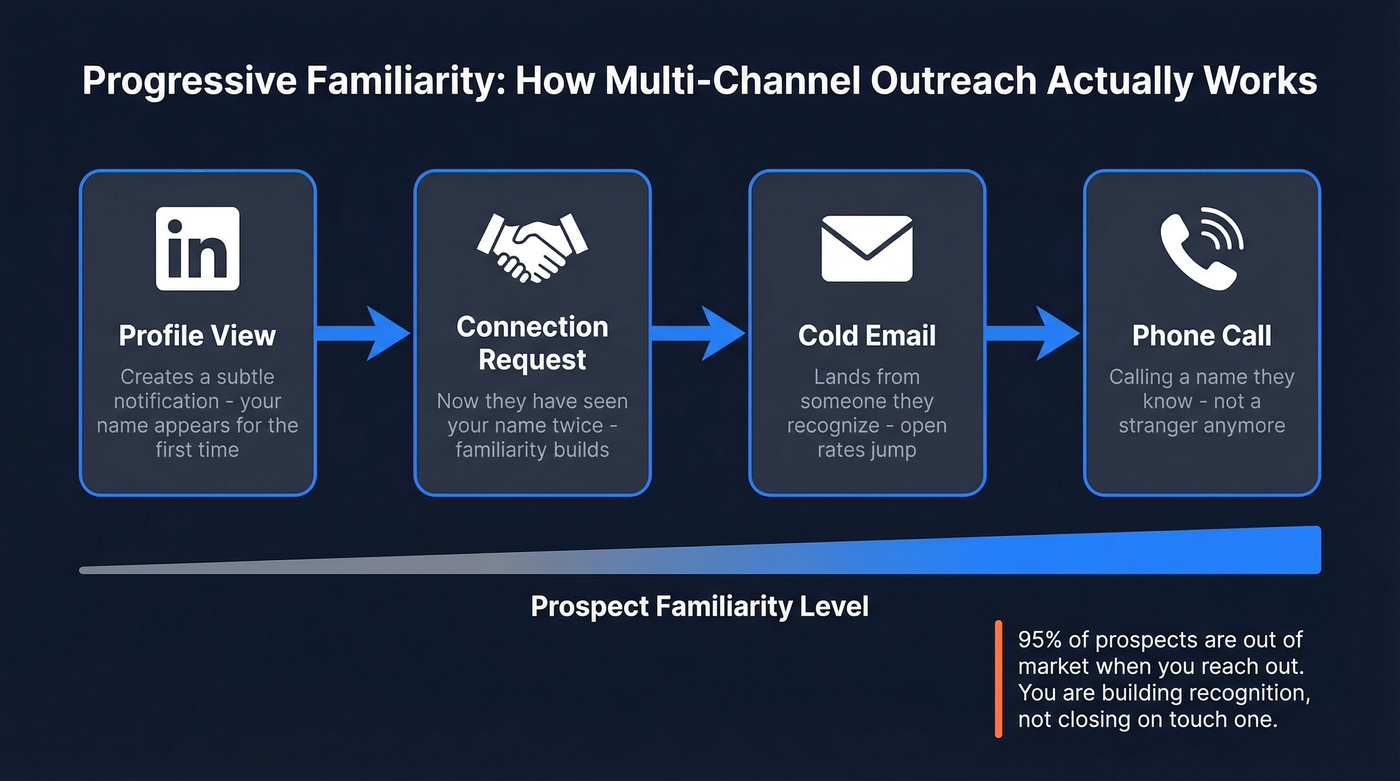
A profile view creates a subtle notification. A connection request makes your name familiar. An email lands in their inbox from someone they've now seen twice. A phone call comes from a name they recognize. Each touch compounds the last.
This is fundamentally different from the "spray and pray" approach where you fire off a LinkedIn message, an email, and a cold call on the same Monday morning. That's not multichannel selling - that's multi-annoyance. As Clément Dumont from The Growth Syndicate puts it, "95% of prospects will be out of market at the moment you reach out." You're not trying to close on the first touch. You're trying to build enough familiarity that when they are in-market, your name is the one they remember.
Channel Breakdown With Benchmarks
Not every channel deserves equal investment. Here's what each one actually delivers based on practitioner data.
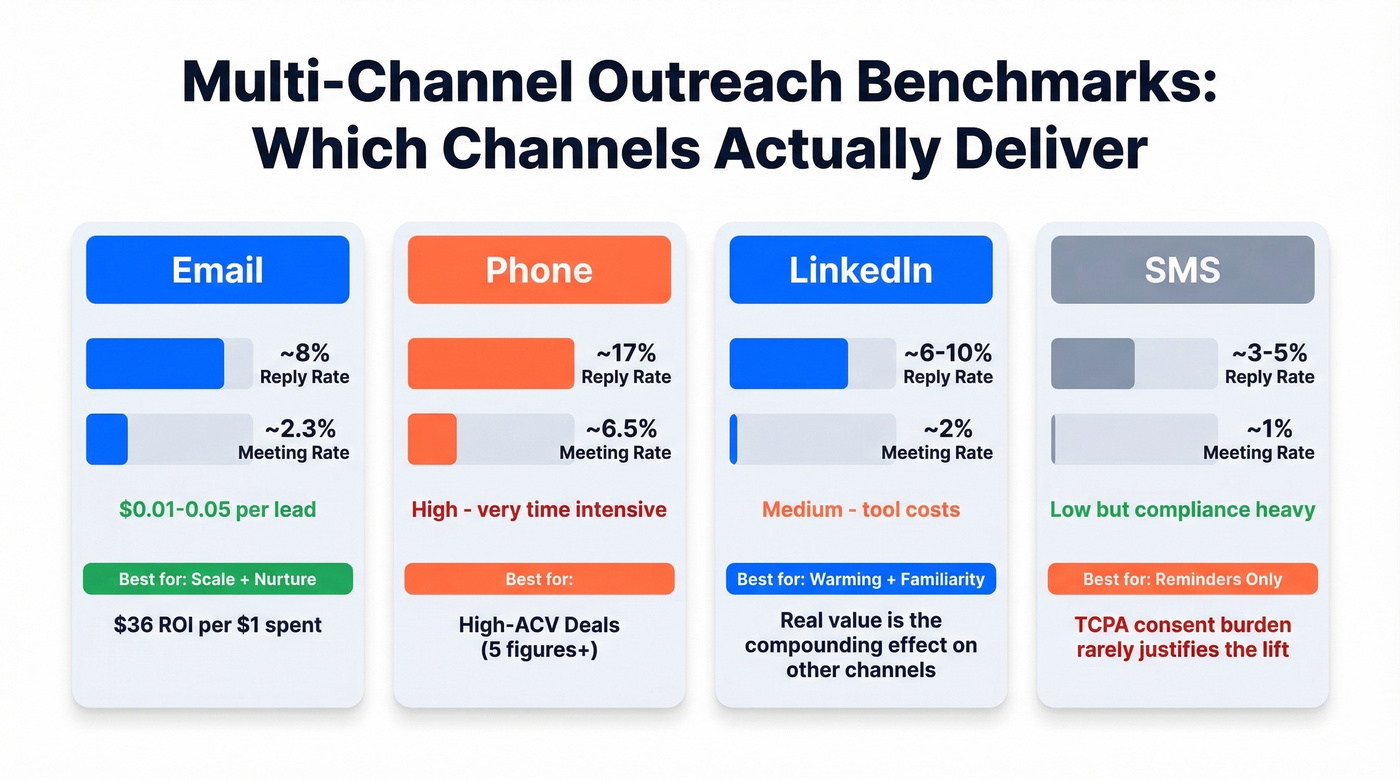
| Channel | Typical Reply Rate | Meeting Conversion | Cost Profile | Best For |
|---|---|---|---|---|
| ~8% | ~2.3% | Low ($0.01-0.05/lead) | Scale + nurture | |
| Phone | ~17% | ~6.5% | High (time-intensive) | High-ACV deals |
| LinkedIn/Social | ~6-10% | ~2% | Medium (tool costs) | Warming + familiarity |
| SMS | ~3-5% | ~1% | Low (but compliance-heavy) | Reminders only |
Email remains the backbone. At $36 ROI per $1 spent, it's the most cost-efficient channel by a wide margin. The problem isn't email itself - it's that everyone's doing it, so reply rates have compressed. That's exactly why you layer other channels on top. If you need a tighter structure, start with a proven B2B cold email sequence before you add more channels.
Phone has the highest per-touch conversion rate at roughly 6.5% meeting rate, but it's brutally time-intensive. Reserve it for deals where the average contract value justifies the effort - five-figure contracts and up. For lower-ticket sales cycles, skip it entirely. If calling is part of your motion, build a repeatable cold calling system so reps don’t freestyle.
LinkedIn response rates run around 10.3% vs email's 5.1% in practitioner benchmarks, but the real value isn't the DM reply rate. It's the warming effect that compounds across your entire sequence, lifting email and phone performance downstream.
SMS is overhyped for B2B cold outreach. The TCPA consent burden rarely justifies the marginal lift. Use it for meeting confirmations, not cold prospecting. WhatsApp and live chat are gaining traction in some B2B workflows, but adoption is still niche outside APAC and LATAM markets.
How to Test and Measure Results
Most teams launch a multichannel sequence and check results three months later. By then, you've burned through thousands of leads with no idea what worked.
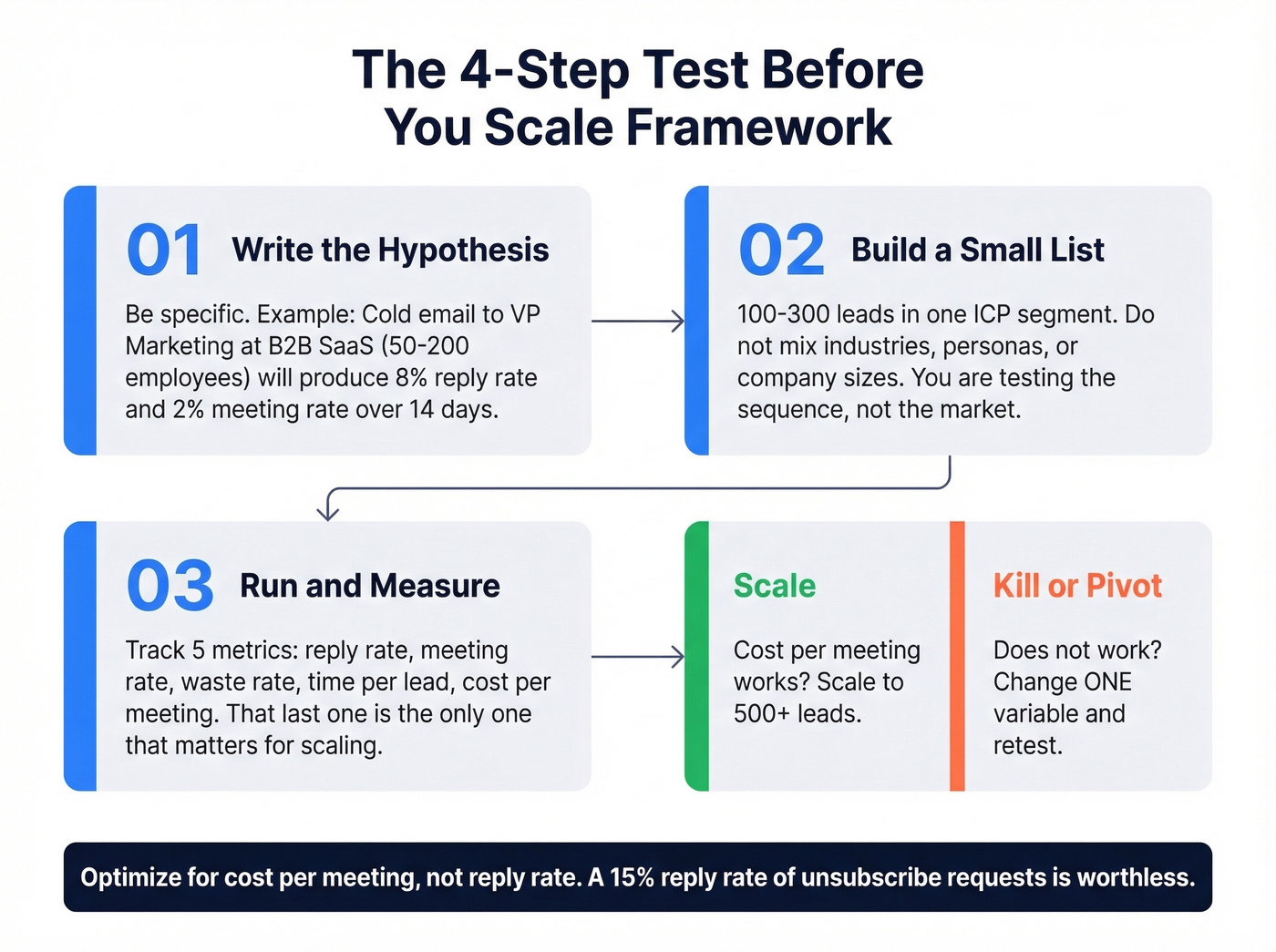
Test before you scale. This framework is the difference between burning cash and building pipeline.
Step 1 - Write the hypothesis. Actually write it down. "Cold email to VP Marketing at B2B SaaS companies (50-200 employees) will produce an 8% reply rate and a 2% meeting rate over 14 days." Specificity forces clarity. If you’re still refining your targeting, use an ideal customer profile template to keep segments clean.
Step 2 - Build a small list. 100-300 leads sharing the same ICP segment. Don't mix industries, personas, or company sizes. You're testing the sequence, not the market.
Step 3 - Run and measure. Track five metrics: reply rate, meeting rate, waste rate (prospects who ignored every touch), time invested per lead, and cost per meeting. That last one is the metric that actually matters for scaling decisions. If you want to benchmark downstream impact, track pipeline health alongside outreach metrics.
Step 4 - Scale or kill. If cost-per-meeting works for your deal economics, scale to 500+ leads. If not, change one variable - the copy, the channel mix, the ICP segment - and retest. Don't change three things at once.
For attribution, keep it simple at small scale. Tag which channel generated the reply in your CRM. First-touch plus reply-source tagging gives you 80% of the insight with 20% of the attribution headache. If your stack is messy, follow a clean process to connect outreach tool to CRM before you scale volume.
One pattern we see repeatedly: teams optimize for reply rate when they should optimize for cost-per-meeting. A 15% reply rate means nothing if those replies are "please remove me from your list."

You just read it: the #1 reason multi-channel outreach fails isn't bad copy - it's bad data. Prospeo gives you 98% verified emails, 125M+ direct dials, and a 7-day refresh cycle so every touch in your sequence reaches a real person. At $0.01 per email, your entire 14-day sequence costs less than one wasted hour chasing bounces.
Verify your list before you build a single sequence.
How to Build a Cross-Channel Sequence
Stop building 20-step sequences. After 10-14 touches, you're not persistent - you're annoying. The 30MPC framework recommends 10-14 touches over 30 days, and that aligns with what we've seen work in practice.
The key principles: sell one problem at a time with theme-based emails, change subject lines when you switch themes, bubble up within the same thread, and phase channels in and out deliberately. LinkedIn drops off after your first theme. Calls phase out after your second. This rhythm prevents fatigue while keeping your name visible. For faster iteration, keep a library of sales follow-up templates you can A/B test by theme.
One agency reported that adding LinkedIn touches before email roughly doubled reply rates from 3-4% to 6-8%. That's the compounding effect of progressive familiarity - and it's why channel ordering within your sequence matters more than channel count.
The 14-Day Sequence
This is the sprint version - high intensity, fast qualification.
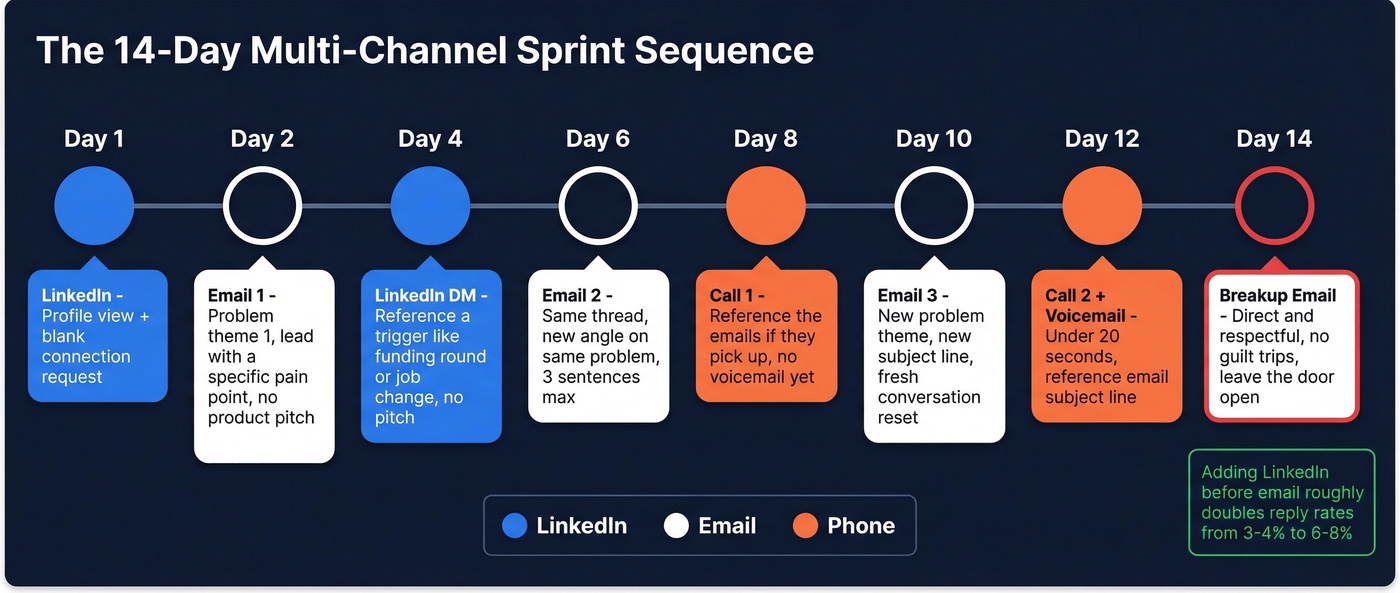
- Day 1 - LinkedIn profile view + connection request. Send it blank.
- Day 2 - Email #1. Problem theme #1. Lead with a specific pain point relevant to their role, not a product pitch. Same thread for all follow-ups in this theme. If you need fresh angles, pull from these cold email subject line examples.
- Day 4 - LinkedIn message. Reference a specific trigger - a funding round, a product launch, a job change. No pitch. The pitch stays in email.
- Day 6 - Email #2. Same thread as Email #1. Bubble up with a new angle on the same problem. Three sentences max.
- Day 8 - Call attempt #1. If they pick up, reference the emails. If not, no voicemail yet.
- Day 10 - Email #3. New problem theme, new subject line. This resets the conversation and gives you a fresh reason to reach out.
- Day 12 - Call attempt #2 + voicemail. Keep the voicemail under 20 seconds. Reference the email subject line so they can find it.
- Day 14 - Breakup email. Direct, respectful, no guilt trips. "Seems like the timing isn't right - happy to reconnect if that changes."
The 30-Day Sequence
The extended version adds a third problem theme and spreads touches more evenly. Structure it in three phases: Theme 1 (Days 1-10) uses all three channels. Theme 2 (Days 11-20) drops LinkedIn - you've already established familiarity. Theme 3 (Days 21-30) drops calls and relies on email only, ending with a breakup.
This phasing is intentional. Each channel has diminishing returns the longer you use it. By rotating channels out, you avoid the "this person won't stop messaging me everywhere" effect that kills deals.
Personalization signals matter more than personalization volume. A funding round, a product launch, a job change - one relevant detail beats ten mail-merge fields. Use company-level triggers like feature updates and headcount growth alongside contact-level triggers like promotions, mutual connections, and post engagement to make each touch feel intentional rather than templated. If you want a deeper system, use a personalized outreach framework to standardize what “relevant” means.
Why Data Quality Makes or Breaks Outbound
You're sending 500 cold emails a week and getting 3 replies. Your sequences are tight, your copy is sharp, and your ICP targeting is solid. So what's broken?
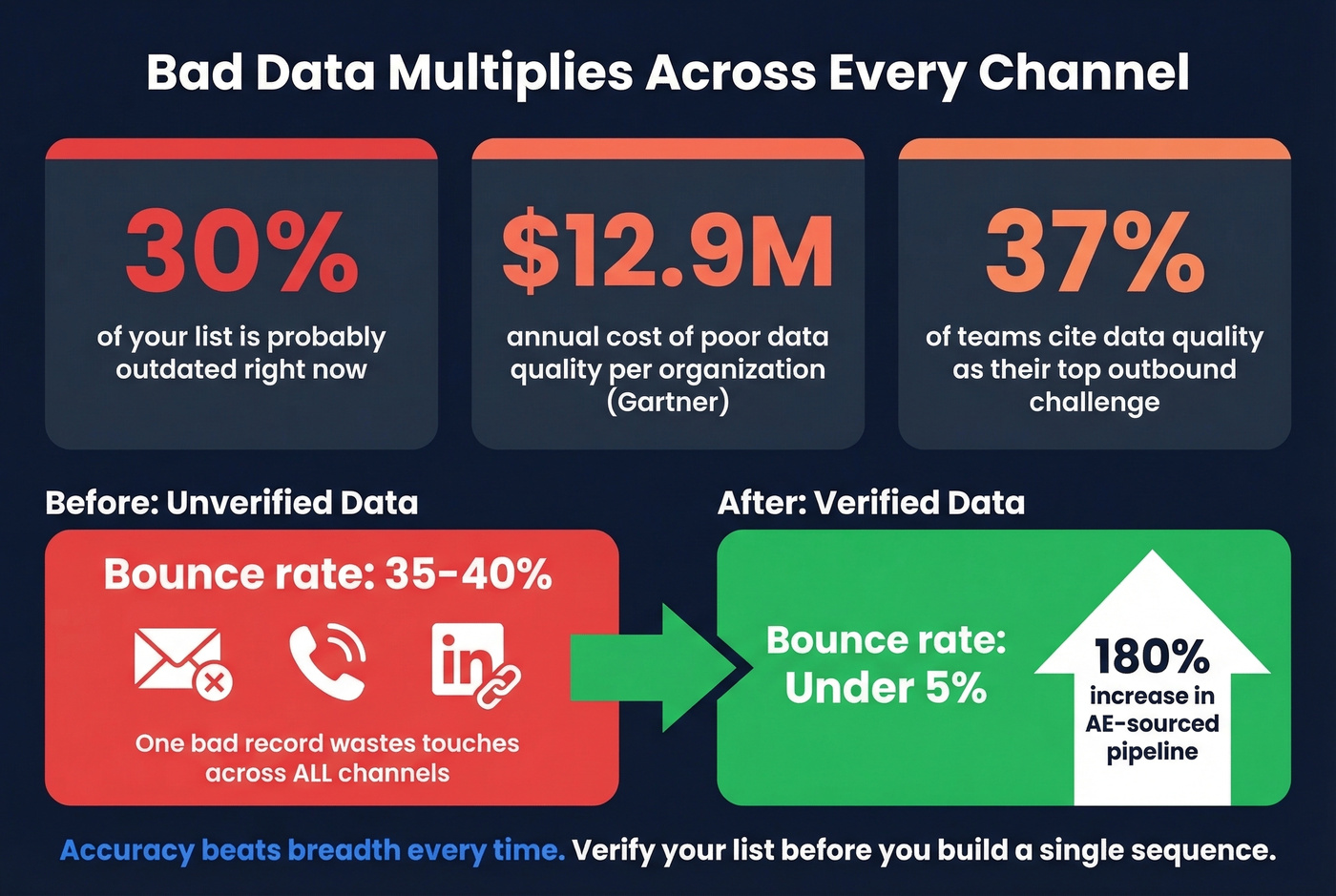
Roughly 30% of your list is probably outdated.
Bad data doesn't just waste one channel - it multiplies across every channel in your sequence. A bad record costs you a bounced email, a dead phone number, and a wasted LinkedIn touch all at once. Gartner estimates poor data quality costs organizations $12.9M annually, and 37% of teams cite data quality as their top challenge when running outbound across multiple channels.

Snyk saw bounce rates drop from 35-40% to under 5% and AE-sourced pipeline increase 180% after switching to verified data. That's not a tool upgrade - that's a pipeline transformation built on clean data. If you’re evaluating vendors, start with these data enrichment services to compare verification-first options.
Let's be honest: if your average deal is under $10k, you probably don't need ZoomInfo-level data. A verification-first tool paired with a good sequencer will outperform an expensive all-in-one platform with stale records. Accuracy beats breadth every time.
Scaling multi-channel sequences means nothing if your contact data decays faster than your cadence runs. Prospeo refreshes every record every 7 days - 6x faster than the industry average. Layer in buyer intent from 15,000 Bombora topics so your emails, calls, and LinkedIn touches hit prospects who are actually in-market right now.
Stop sequencing stale data. Start reaching real buyers.
The Tool Stack You Actually Need
You don't need 10 tools. You need three: a sequencer, a data provider, and an automation layer. Everything else is a nice-to-have. If you’re auditing your stack, start with a ranked list of SDR tools to see what’s worth paying for.
The frustrating reality? Most cheaper tools still can't natively sync with your CRM. That's not "integration" - that's a workaround involving Zapier, webhooks, and prayers. Factor that into your decision.
Tool Comparison
| Tool | Starting Price | Best For | Channels | Watch Out For |
|---|---|---|---|---|
| Prospeo | Free / ~$0.01/email | Verification + enrichment | Email/mobile data | Not a sequencer - pair with one |
| Instantly | $37/mo | Budget email at scale | LinkedIn needs add-on | |
| Lemlist | $69/user/mo | All-in-one multichannel | Email + LinkedIn | Deliverability can drop at scale |
| HeyReach | $79/mo | Agency LinkedIn mgmt | LinkedIn + email | Email less mature |
| Smartlead | $39/mo | Email infrastructure | No native LinkedIn | |
| La Growth Machine | EUR 50-150/mo | True multichannel | Email + LinkedIn + X | Pricier at scale |
| Reply.io | $59/user/mo | Mid-market teams | Email + LinkedIn + calls | Per-user pricing adds up |
| Expandi | $99/seat/mo | LinkedIn personalization | Expensive for small teams | |
| Dripify | $59/seat | LinkedIn-only sequences | No email channel | |
| Woodpecker | $24/mo | Budget cold email | Limited multichannel | |
| QuickMail | $9/mo | Bootstrapped teams | Bare-bones features |
A few notes the table doesn't capture: Waalaxy is often criticized on Reddit for bugs and billing issues - the consensus on r/sales is to avoid it unless you need its specific LinkedIn workflow. And La Growth Machine's pricing jumps quickly from EUR 50 to EUR 150/mo as you add features, which catches people off guard.
Budget Stacks
Under $50/month: Instantly ($37) + Prospeo (free tier) + Make (free tier). This gets you unlimited email accounts, verified contact data, and basic automation workflows. Genuinely enough for a solo founder or early-stage SDR.
$200-500/month: Lemlist or HeyReach + a verification layer + Smartlead for email infrastructure. This is the sweet spot for growing teams that need both LinkedIn and email in one workflow with reliable data underneath.
Agency stack: HeyReach ($79) + Smartlead ($39) + Make. Agencies need to manage multiple client LinkedIn accounts without cross-contamination, and HeyReach handles that well. The actual data flow looks like this: enrichment via API feeds into Smartlead for email sequences, HeyReach manages LinkedIn touches, and Make routes replies and status updates back to the CRM. That architecture keeps client data separated while maintaining a single operational view.
Tools Worth Watching
ReachInbox is gaining traction on Reddit for email deliverability management - if inbox placement is your bottleneck, it's worth a look. ManyReach combines email and LinkedIn in a single interface, making it a compelling option for teams that want simplicity over feature depth. ListKit focuses on pre-verified lead lists, which saves a step if you don't want to build lists yourself.
Skip Dripify if you need anything beyond LinkedIn-only sequences. It doesn't do email, and you'll end up paying for a second tool anyway.
LinkedIn Automation - Avoiding Bans
LinkedIn automation is a calculated risk, not a free channel. Treat it accordingly.
The numbers are sobering: 23% of automation users experience account restrictions within 90 days. Cloud-based tools reduce that risk by roughly 60% compared to browser extensions, but the risk never hits zero. LinkedIn's ToS explicitly prohibits automated access, and they're enforcing it more aggressively than ever - Apollo.io and Seamless.AI were officially banned by LinkedIn in 2025, a clear signal that enforcement is accelerating.
We've seen accounts get restricted after jumping to 40 connection requests per day too quickly. One agency shared the same experience - they now start at 10-15 and ramp over weeks. The penalty model is tiered and unforgiving: Tier 1 restrictions last 1-24 hours, Tier 2 means 3-14 days plus ID verification, and Tier 3 is permanent with less than 15% recovery success.
Here's the safe-operation protocol:
- Start at 10-15 connection requests per day - no exceptions
- Ramp by 5 per day per week over 3-4 weeks
- Stay 30-40% below published daily limits at all times
- Use cloud-based tools, not browser extensions
- Send blank connection requests
- Vary activity timing - don't send at exact 3-minute intervals
- Monitor for restriction warnings and pause immediately if flagged
LinkedIn limits aren't just about daily volume - they're about behavioral patterns. Sending exactly 50 connection requests at exactly 9:00 AM every day looks automated because it is. Introduce randomization in timing, volume, and activity type. Mix connection requests with profile views, post engagement, and group interactions.
If LinkedIn is your only outbound channel, you're one restriction away from zero pipeline. That's why combining channels matters - it's not just about performance, it's about resilience.
Compliance Checklist
This is operational guidance, not legal counsel. Talk to a lawyer for your specific situation. But here's what every outbound operation should have in place.
Email (CAN-SPAM): Clear identification of who's sending and why. Real physical mailing address in every email. Functional opt-out mechanism that works within 10 business days. No deceptive subject lines. If you’re scaling volume, monitor email bounce rate to protect deliverability.
EU Outreach (GDPR): Legitimate interest basis documented for B2B prospecting. Transparency about data processing via a privacy policy link. Honor opt-out and data deletion requests promptly. Data processing agreements with any tools handling EU contact data.
SMS (TCPA): Prior express consent required before sending. Clear opt-out mechanism in every message. Maintain consent records.
LinkedIn: Acknowledge that automation violates ToS - you're accepting the risk. Use tools that minimize detection patterns. Have a backup plan if your account gets restricted.
FAQ
How many channels should I use?
Two to three. Email plus LinkedIn is the minimum viable stack. Add phone if your average deal size exceeds five figures. SMS rarely moves the needle in B2B cold prospecting and adds significant compliance overhead.
What reply rate should I expect?
Practitioners report 6-12% combined reply rates across email and LinkedIn, roughly double what email-only produces at 3-4%. Cold calling adds the highest per-touch conversion at around 6.5% meeting rate but is the most time-intensive channel by far.
How do I avoid LinkedIn account restrictions?
Start at 10-15 connection requests per day, ramp slowly over 3-4 weeks, use cloud-based automation tools, and stay 30-40% below published daily limits. Even with precautions, 23% of automation users get restricted within 90 days - always have a backup channel ready.
How important is data quality for outbound sequences?
It's the single biggest variable. When you're running outbound across multiple channels, every bad record wastes touches simultaneously - a bounced email, a dead phone number, and a wasted LinkedIn message all from the same outdated contact. Fix the data first, then worry about copy and channel mix.