

How to Write a Nudge Email That Actually Gets a Reply
A nudge email lives or dies in the first three seconds. A sales rep on r/sales described the cycle perfectly: proposal sent, two follow-ups, radio silence, then finally a reply - "firefighting operations right now." That's the whole dilemma in one sentence. You need a response, but every follow-up feels like it's one step closer to annoying someone into ignoring you permanently.
Here's the thing: that anxiety is almost always misplaced. The problem isn't that you're following up. It's how you're following up.
What You Need (Quick Version)
- Keep it under 80 words. Short follow-ups consistently outperform longer ones in Instantly's 2026 benchmark data. Your nudge isn't a second pitch - it's a tap on the shoulder.
- Write like a human. Informal tone generates 78% more positive replies than formal. Drop the "I hope this email finds you well."
- Tuesday or Wednesday, 10 AM-1 PM tends to perform best per Instantly's data, though Sales.co found Monday and Thursday strong too. Test your own audience.
- Reference something specific. Subject lines that reference a mutual connection or prior conversation hit 35% open rates vs. 18% for generic ones.
- Verify your contact data first. None of this matters if the email bounces. Stale data is the silent killer of follow-up campaigns.
What Is a Nudge Email?
The term gets used two different ways, and the distinction matters.
In sales and professional contexts, it's a polite follow-up - a message designed to prompt a reply or action from someone who hasn't responded. Benchmark Email uses "nudge" and "reminder" interchangeably, and so do most people. You sent a proposal, they went quiet, you send a gentle reminder. Simple.
In SaaS and product-led growth, the term means something more specific. Encharge defines it as an action-triggered email that pulls users back into the product - not based on a calendar, but based on behavior. A user signed up but never completed onboarding? That's a nudge trigger. Someone hasn't logged in for a week? Another trigger. The timing is driven by what the user did or didn't do, not by an arbitrary sequence schedule.
Both types share the same DNA: short, specific, and designed to reduce friction toward a single action.
2026 Benchmarks and Reply Rates
Let's ground this in real numbers. Instantly's 2026 benchmark report, drawn from billions of cold email interactions, puts the average reply rate at 3.43%. Top quartile campaigns hit 5.5%+, and the elite top 10% exceed 10%. Of all replies, 58% come from the first email in a sequence, with 42% from follow-ups.
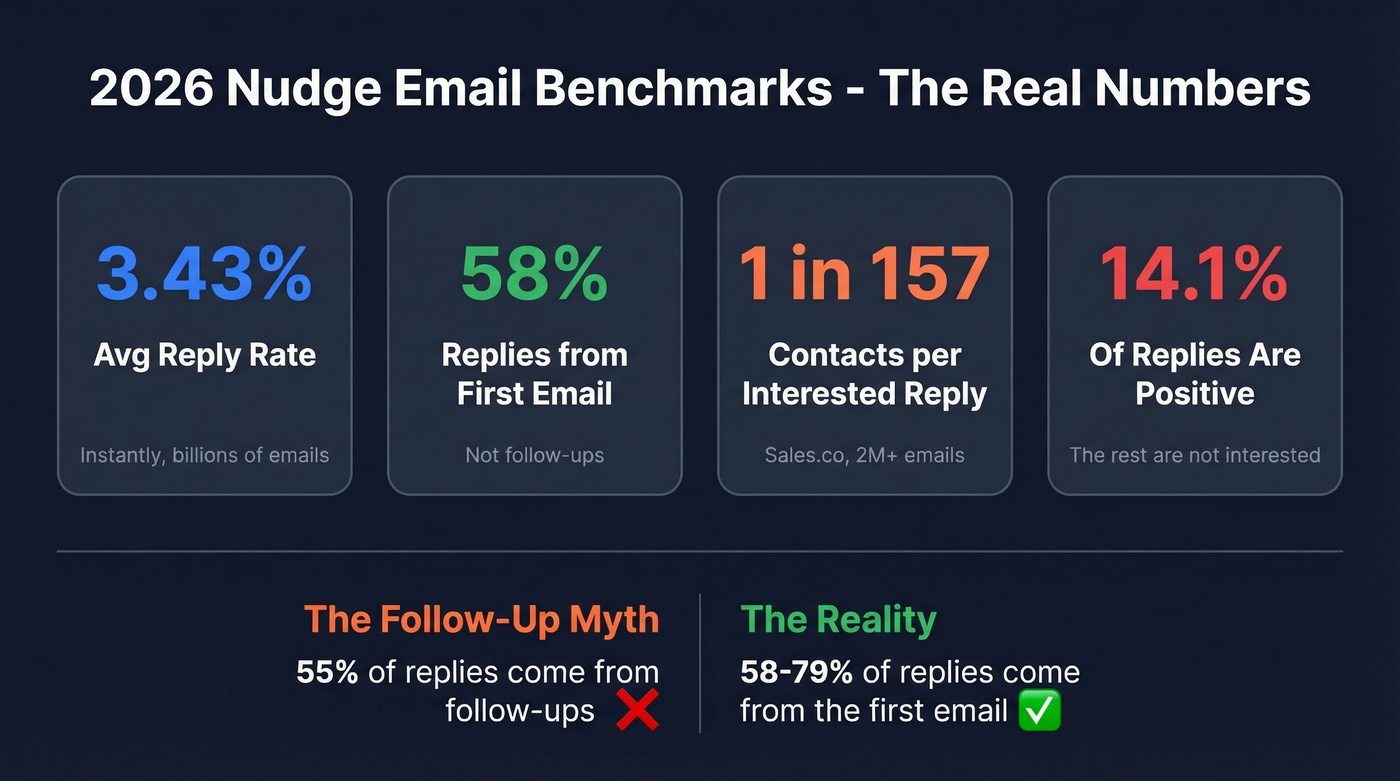
Sales.co's dataset spanning 2024-early 2026 tells a starker story. Across 2M+ emails and 161 campaigns, they measured a 2.09% reply rate - and only 14.1% of those replies were actually positive. That works out to roughly 1 interested reply per 157 contacts emailed. Initial outreach drove 79.4% of all replies, with follow-ups contributing just 20.6%.
The Follow-Up Myth
You've probably seen the stat: "55% of all replies come from follow-ups" (attributed to a QuickMail study of 65M emails, cited by Inframail). But Sales.co's data says 79.4% of replies come from the initial outreach, and Instantly puts first-email replies at 58%. The truth depends heavily on sequence design and what counts as a "reply." Don't use inflated follow-up stats to justify lazy first emails. Your initial message matters more than all your follow-ups combined.
These numbers don't mean follow-ups are pointless. They mean each one has to earn its existence. Restating the same pitch in softer language isn't a nudge - it's spam with a friendlier subject line.
Subject Lines That Actually Work
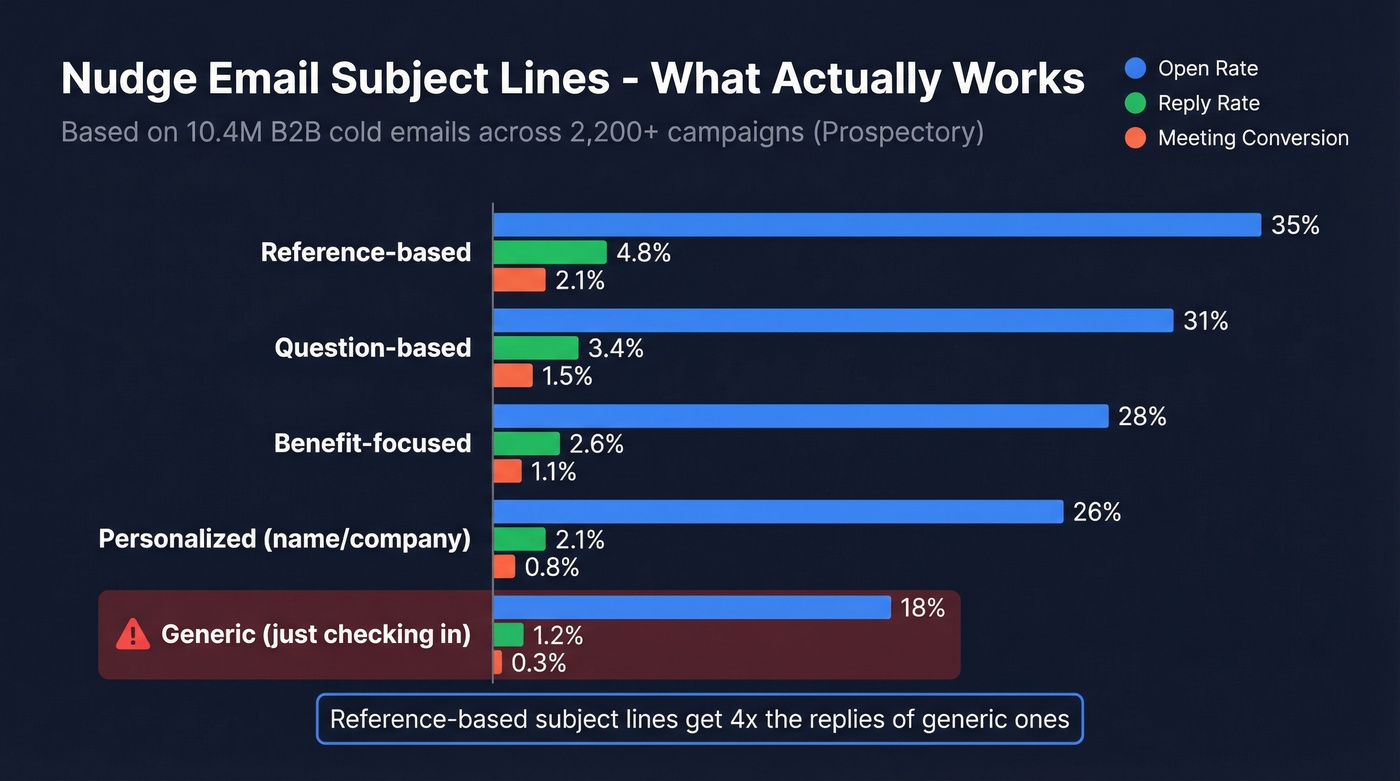
Prospectory analyzed 10.4M B2B cold emails across 2,200+ campaigns and broke down performance by subject line type:
| Subject Line Type | Avg Open Rate | Avg Reply Rate | Meeting Conversion |
|---|---|---|---|
| Reference-based | 35% | 4.8% | 2.1% |
| Question-based | 31% | 3.4% | 1.5% |
| Benefit-focused | 28% | 2.6% | 1.1% |
| Personalized (name/co.) | 26% | 2.1% | 0.8% |
| Generic ("Quick question") | 18% | 1.2% | 0.3% |
"Just checking in" lives in that generic bucket - 18% opens, 1.2% replies. Reference-based subject lines outperform it by nearly 2x on opens and 4x on replies. That's not a marginal difference.
A few more rules from the data: keep subject lines under 5 words for a 31% open rate vs. 19% for 10+ words. Use lowercase - Prospectory reports all-lowercase subject lines hitting 27% opens vs. 22% for title case, a 21% lift across 50,000 emails. Question marks boost opens by 18% on average. And trigger-based subject lines sent within 48 hours of a relevant event produce 2.3x the reply rate compared to sending a week later.
Specificity and timeliness beat cleverness every time.

Reference-based subject lines hit 35% open rates - but only if your email actually lands. Prospeo's 5-step verification delivers 98% email accuracy, so your carefully crafted nudge reaches a real inbox instead of bouncing into the void.
Stop optimizing copy for emails that never arrive.
How to Write a Nudge Email That Gets Results
Five steps. None of them involve writing "per my last email."
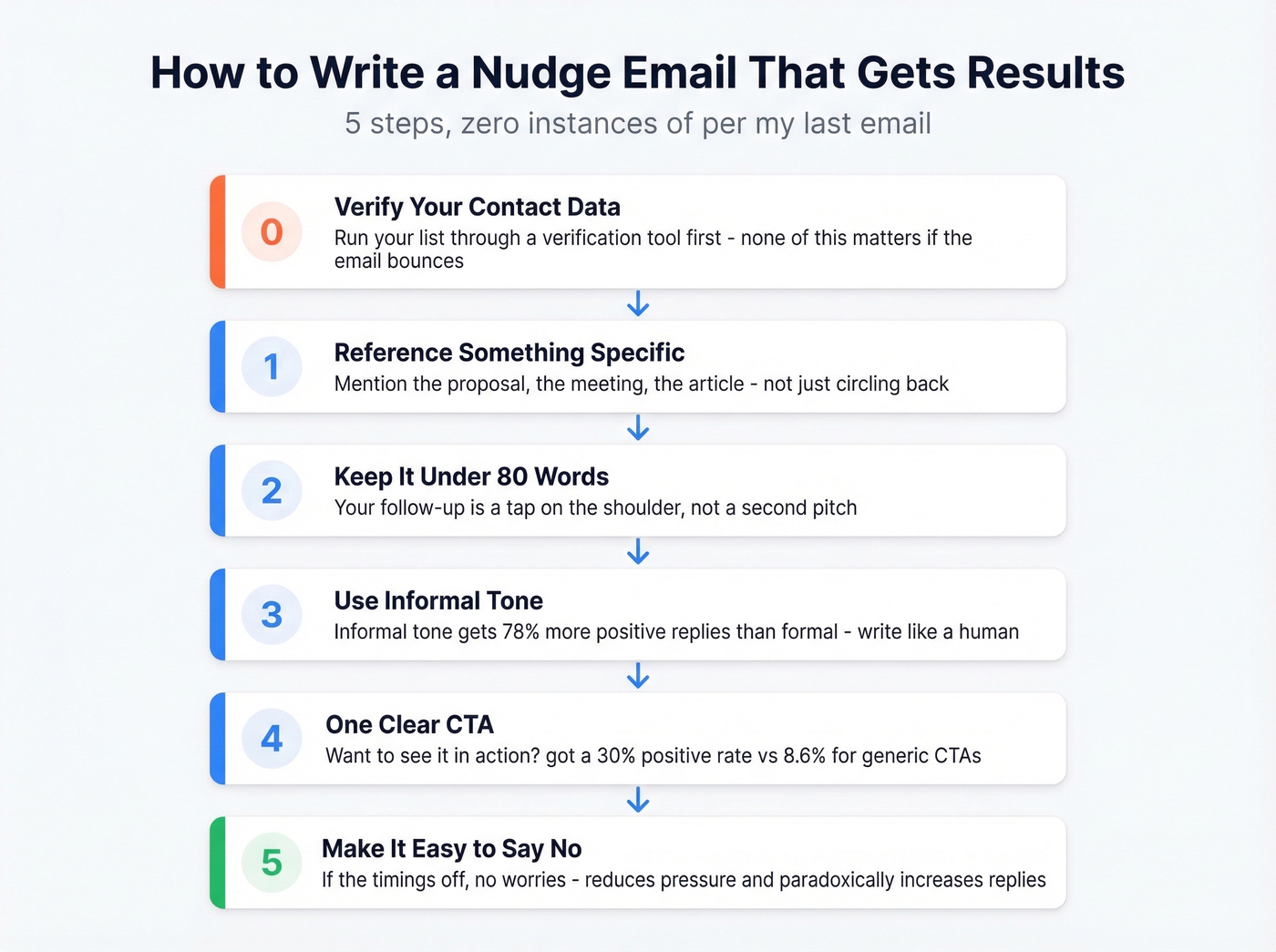
Step 0: Verify your contact data. Before you write a word, make sure the email address is still valid. We've seen teams optimize copy for weeks while a big chunk of their list was bouncing silently. Run your list through a verification tool like Prospeo so your message actually reaches someone. If you want a deeper workflow, start with an email deliverability audit.
Step 1: Reference something specific. Mention the proposal you sent, the meeting they attended, the article they published. "Following up on the pricing breakdown I sent Thursday" beats "Circling back on our conversation" every time. If you need more options beyond that phrase, see How to Circle Back on an Email.
Step 2: Keep it under 80 words. Your follow-up isn't a second chance to make the full pitch. It's a reminder that the first pitch exists. For more copy-paste options, pull from a follow-up email template library.
Step 3: Use informal tone. Write the way you'd message a colleague, not the way you'd draft a contract. Formal language tanks positive reply rates. This is the single most important tip most people ignore. If you're still tempted to open with that classic line, use these "I hope this email finds you well" alternatives.
Step 4: One clear CTA. "Want to see it in action?" produced a 30.05% positive rate in Sales.co's data - 3.5x higher than generic CTAs at 8.59%. Ask for one specific thing. Not three. If your CTA is a meeting, use a dedicated appointment request email.
Step 5: Make it easy to say no. "If the timing's off, no worries - happy to reconnect next quarter" reduces pressure and paradoxically increases honest replies. People respond when they don't feel trapped.
Templates by Scenario
No Response to Cold Email
Subject: re: [original subject line]
Hey [Name], sent this over last [day] - wanted to make sure it didn't get buried. The short version: [one-sentence value prop]. Worth 15 minutes this week?
Keep the thread going. Don't start a new one. Reference the original value prop in one sentence, not a paragraph. If you’re building a full sequence, use a cold email sequence structure.
Post-Proposal Silence
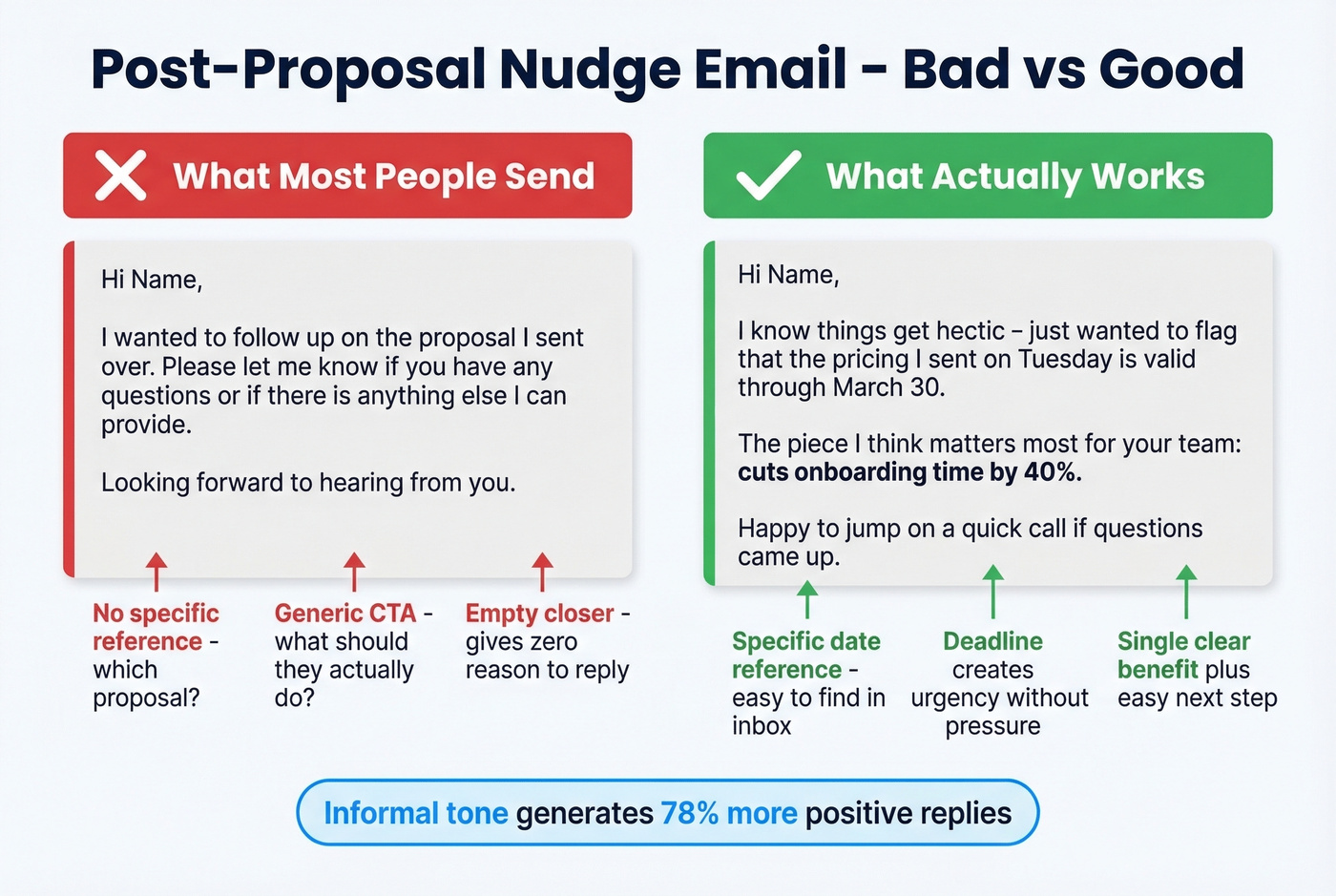
This is the template we'd send to that r/sales rep dealing with "firefighting operations" silence. Here's the bad version first, then the fix:
❌ "Hi [Name], I wanted to follow up on the proposal I sent over. Please let me know if you have any questions or if there's anything else I can provide. Looking forward to hearing from you."
✅ "Hi [Name], I know things get hectic - just wanted to flag that the pricing I sent on [date] is valid through [date]. The piece I think matters most for your team: [single key benefit]. Happy to jump on a quick call if questions came up."
The bad version says nothing. The good version picks the one benefit that resonated, adds a deadline, and makes the next step obvious. That's how to politely nudge someone via email - give them a reason to respond, not just a reminder that you exist. For more proposal-specific follow-ups, see Follow-Up Email After Sending a Proposal.
Payment or Invoice Reminder
Subject: invoice #[number] - due [date]
Hi [Name], quick flag - invoice #[number] for $[amount] was due on [date]. Can you confirm it's in the queue? If there's an issue on your end, let me know and we'll sort it out. I'll follow up again on [date + 5 days] if I haven't heard back.
Friendly but firm. The specific date and amount remove ambiguity, and the escalation hint keeps things moving.
Meeting Confirmation
Subject: tomorrow at [time] - quick agenda
Hey [Name], looking forward to tomorrow. Quick agenda: [1-2 bullet points]. Anything you'd like to add? See you at [time].
Send this one day before. Include an agenda teaser so they feel prepared, not ambushed. If you want more variations, use these meeting confirmation email templates.
Deadline or Offer Reminder
Subject: decision timeline update
Hi [Name], wanted to let you know I have [another offer / a deadline] on [date]. I'm genuinely interested in [their opportunity/deal], so I wanted to give you a heads-up before making a decision. Would it be possible to connect before [date]?
Adapted from templates shared on r/BigLawRecruiting - polite, confident, zero guilt.
Job Interview Follow-Up
Here's what makes this template work, line by line:
"Hi [Name], really enjoyed our conversation about [specific thing discussed]." - Opens with a concrete detail, not a generic thank-you.
"The [project/challenge] you mentioned stuck with me - I've actually [brief relevant experience]." - Proves you were listening and connects your experience to their problem.
"Looking forward to hearing about next steps whenever the timing's right." - Low-pressure close. No "I'm very eager" desperation.
Generic thank-you notes disappear. This one sticks because it references a real moment from the conversation.
Internal Task Reminder
Subject: [task] - need by [day]
Hey [Name], just a nudge on [task] - I need it by [day] to hit the [deadline/deliverable]. Let me know if anything's blocking you and I can help clear it.
Casual, clear, with a deadline and an offer to help. No passive aggression. Knowing how to send a gentle reminder internally is just as important as nailing your external outreach.
Breakup Email (Final Follow-Up)
Subject: closing the loop
Hi [Name], I've reached out a few times and haven't heard back - totally understand if the timing's off. I'm going to close this out on my end, but if things change down the road, I'm easy to find. Wishing you a great [quarter/year].
No guilt. No "I'm disappointed." Just a clean exit with an open door. These get surprisingly high reply rates because they remove all pressure. A thread on r/Entrepreneurs confirmed what we've seen firsthand: breakup emails often outperform the nudges that preceded them, precisely because they signal "I'm not going to keep chasing you."
When to Send Your Follow-Up
| Scenario | First Nudge After | Spacing | Max Touches |
|---|---|---|---|
| Cold email follow-up | 3 days | 3-4 days | 4-7 |
| Post-proposal | 3-5 biz days | 5-7 days | 3-4 |
| Invoice/payment | 1 biz day after due | 3-5 days | 3 |
| Meeting confirmation | 1 day before | - | 1 |
| Trigger-based (event) | Within 48 hours | 3 days | 4-5 |
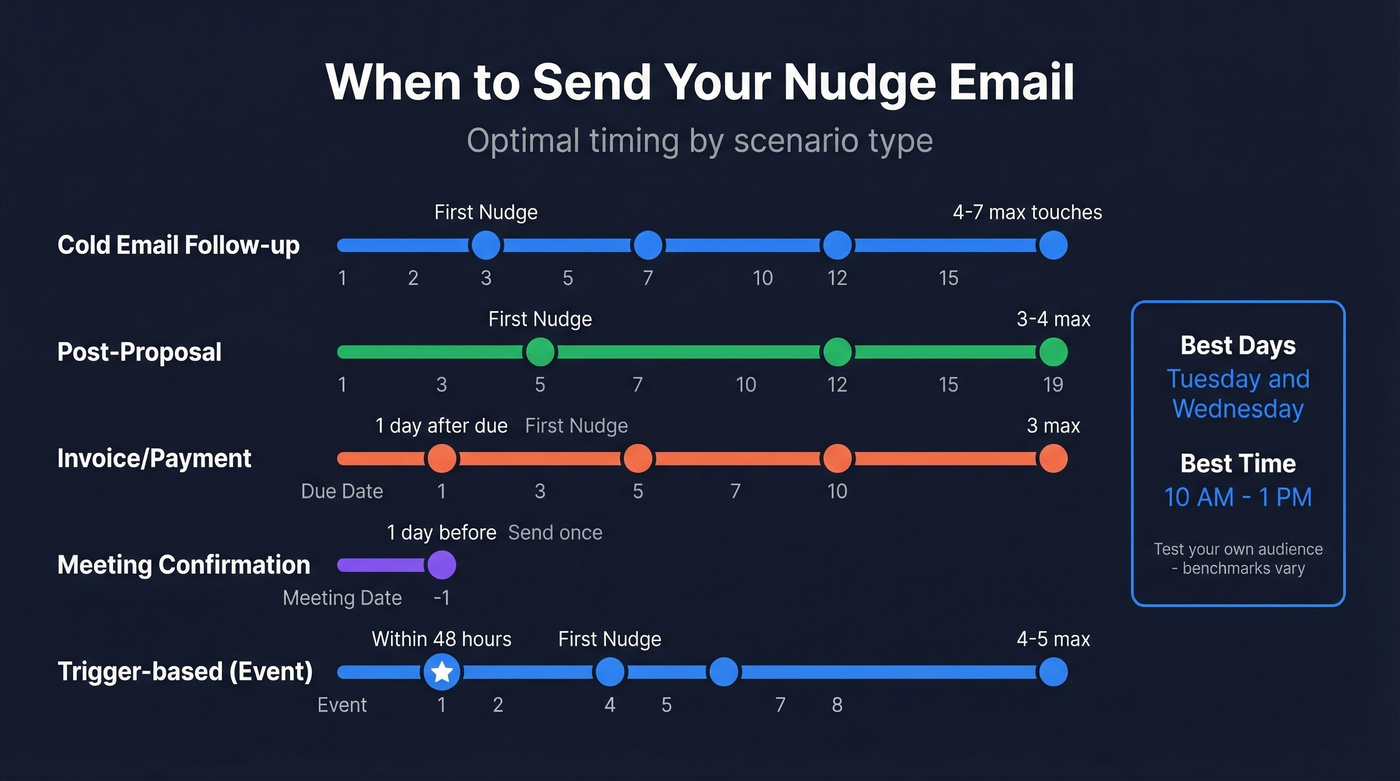
Tuesday and Wednesday consistently show the highest reply rates in Instantly's data. Sales.co found Monday had the highest raw reply rate (1.96%) and Thursday the highest positive rate (10.5%) - which is why testing your own audience matters more than following any single benchmark.
HubSpot's findings point to 11 AM EST as a strong send time, and Twilio SendGrid's analysis is a healthy reminder that benchmarks are starting points, not gospel: in one Memorial Day dataset, they couldn't find a statistically significant "most likely" open time.
Space your touches 3-4 days apart, cap at 4-7 touchpoints total, and remember that trigger-based messages sent within 48 hours of a relevant event produce 2.3x the reply rate of those sent a week later.
Nudge Without Nagging: SaaS Playbook
If you're running a product-led company, behavioral nudges follow completely different rules. These aren't time-based follow-ups - they're behavior-triggered messages fired when a user stalls.
The stakes are real: 40-60% of SaaS users sign up, log in once, and never come back. Userpilot reports that 70% of customers churn within 90 days when onboarding falls short, and the average SaaS activation rate sits at just 36%.
Look, most SaaS guides tell you to build a 5-7 email onboarding drip. In our experience, 2-3 well-timed behavioral nudges outperform a 7-email drip every time. The difference is targeting. A user who hasn't completed their profile after 3 hours needs a different message than one who's been active but hasn't tried a key feature. Encharge's framework calls this "just-in-time onboarding" - send the right message at the moment it matters, not on an arbitrary schedule.
The types that move the needle most are signup abandonment and stuck user messages - Followerwonk saw a 12% higher signup conversion rate from a single abandonment nudge. Feature spotlights and milestone celebrations round out the toolkit, but those first two do the heavy lifting.
Keep each message focused on a single action. One CTA, one step, one reason to come back.
Mistakes That Kill Your Follow-Ups
Mistake 1: "Just checking in" subject lines. Reference-based subject lines hit 35% opens; generic ones scrape 18%. That's the difference between getting read and getting archived. If you need more options, use these email subject line examples.
Mistake 2: Corporate tone. If your message reads like it was reviewed by legal, rewrite it. Read it out loud - if you wouldn't say it to a colleague at lunch, simplify.
Mistake 3: Too many words. Your follow-up isn't a whitepaper. Write your nudge, then cut it in half.
Mistake 4: Vague CTAs. "Let me know your thoughts" produces an 8.59% positive rate. "Want to see it in action?" hits 30.05%. Ask for one concrete thing - a 15-minute call, a yes or no, a date.

Mistake 5: Sending to bad data. Your copy can be flawless, but if the email bounces or reaches someone who left the company six months ago, it's wasted. This is the mistake nobody talks about because it's invisible - you don't get a "this person doesn't work here anymore" reply. You get silence, and you blame your copy. We've watched teams rewrite sequences four or five times before realizing a third of their list was dead addresses. Before you send that next follow-up, run your contact list through a verification tool. It takes minutes and saves your domain reputation. If you’re comparing options, start with an email validation checker.
Every nudge email you send to a stale address kills your domain reputation and wastes a follow-up slot. Prospeo refreshes 300M+ contacts every 7 days - not every 6 weeks like other providers - so you're always nudging real, active inboxes at $0.01 per verified email.
Clean data turns silent prospects into actual replies.
FAQ
How many follow-up emails should I send?
Four to seven touchpoints total, per Instantly's 2026 data. Beyond seven, returns diminish sharply unless each touch adds genuine new value. Space them 3-4 days apart and make sure every message introduces a new angle or reason to reply.
What's the best day to send a nudge email?
Tuesday and Wednesday perform best in Instantly's 2026 benchmarks, with reply rates dropping 27% on weekends. Within those days, aim for 10 AM-1 PM in your recipient's time zone. Sales.co found Thursday had the highest positive reply rate at 10.5%, so test your own audience rather than treating any single benchmark as law.
How do I follow up without being pushy?
Reference something specific from your previous conversation, keep the message under 80 words, and always give the recipient an easy out. Saying "no worries if the timing's off" paradoxically increases reply rates because it removes pressure. Every follow-up should add new context or value, not just repeat your ask.
Should reminder emails be formal or casual?
Casual wins decisively - informal tone generates 78% more positive replies across 2M+ emails in Sales.co's dataset. Write like a human. Drop the "I trust this message finds you well" and get to the point.
How do I make sure my nudge email doesn't bounce?
Verify every address before sending. Stale CRM data is the #1 silent killer of follow-up campaigns. If your bounce rate exceeds 5%, your data needs fixing before your copy does. Skip this step and you'll spend weeks tweaking subject lines while half your emails land nowhere.