

Omnichannel Outreach Sequences: The 2026 Guide
Your SDR ran a 500-contact sequence last month. 140 emails bounced. Domain sender score dropped 15 points. Now even the good emails land in spam, and the entire sequence is dead before a single prospect reads a word.
That's not a messaging problem - it's a data problem. And it's the highest-leverage variable in any omnichannel outreach sequence you'll ever build.
What You Need (Quick Version)
- Clean data first. Verified emails and direct dials - not switchboard numbers. If your list is older than a week, a meaningful chunk is already decaying (see B2B contact data decay).
- A coordinated 7-touch sequence across email, phone, and social over 10 days. Not three channels running independently - channels that talk to each other as part of a unified multichannel sales cadence (use this sales cadence example as a baseline).
- A lean tool stack. Data provider, sequencing platform, CRM. Three tools, not seven (start with a B2B sales stack blueprint).
What "Omnichannel" Actually Means
Most teams say "omnichannel" when they mean "multichannel." The distinction matters.
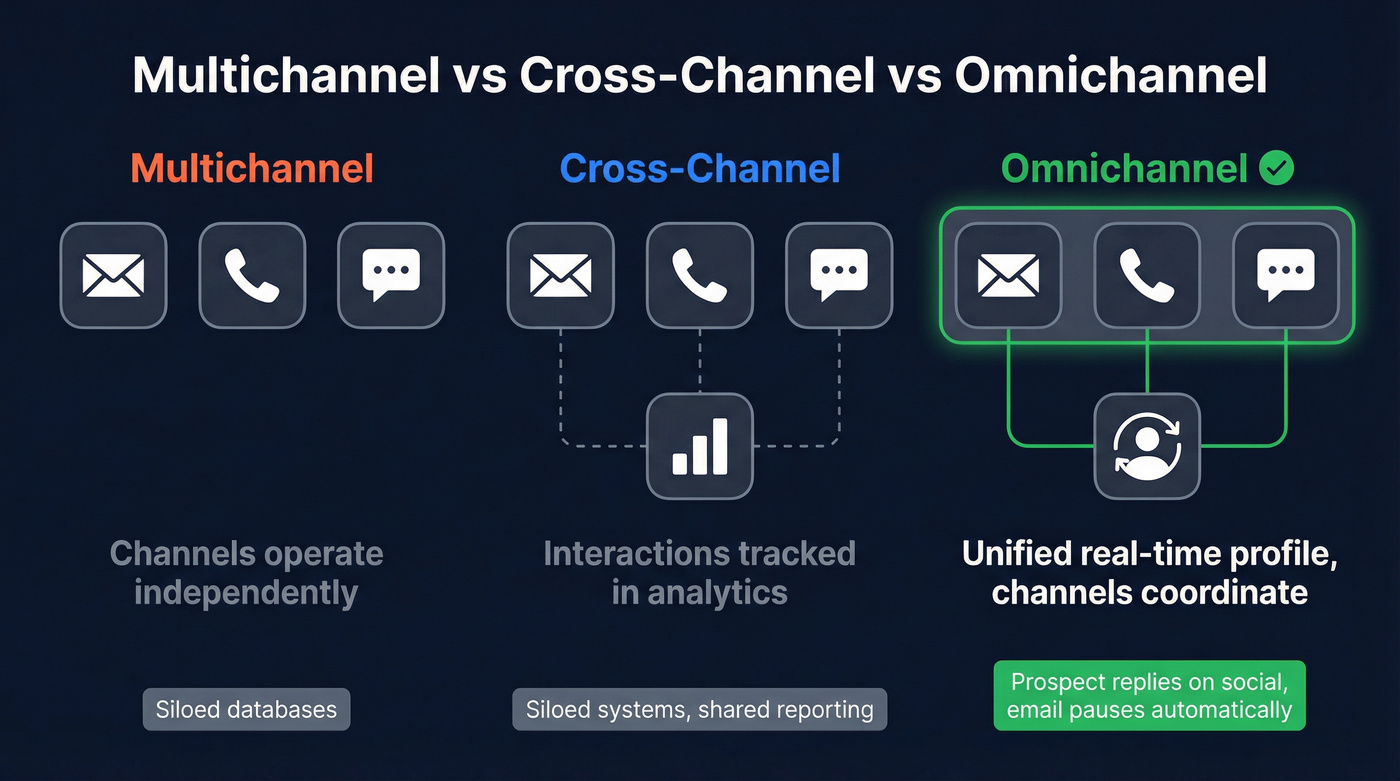
| Approach | How It Works | Data Model |
|---|---|---|
| Multichannel | Multiple channels, independent | Siloed databases |
| Cross-channel | Interactions tracked in analytics | Siloed systems |
| Omnichannel | Unified real-time profile | Channels coordinate |
Here's the test: a prospect replies on social, and that automatically pauses your email sequence. That's omnichannel. If your email keeps firing after a prospect already responded on another channel, you're just multichannel with extra steps.
LinkedIn generates 80% of all B2B leads from social media, which is why it anchors the social layer in most sequences (more on social selling B2B). Coordinated multi-touch prospecting across email, phone, and social yields up to 250% higher conversion rates than single-channel campaigns, and 65% of B2B buyers will switch suppliers if they hit friction across channels. The coordination isn't a nice-to-have - it's the mechanism that makes the whole thing work.
Why Coordinated Sequences Win
Gartner projected that 80% of B2B sales interactions would occur in digital channels by 2025, and that shift has only accelerated. Buyers now use an average of 10 interaction channels, up from 5 in 2016. McKinsey's Rule of Thirds holds: at any stage, roughly one-third of buyers prefer in-person, one-third remote, one-third digital self-serve. You can't predict which third your prospect falls into, so you cover all three.
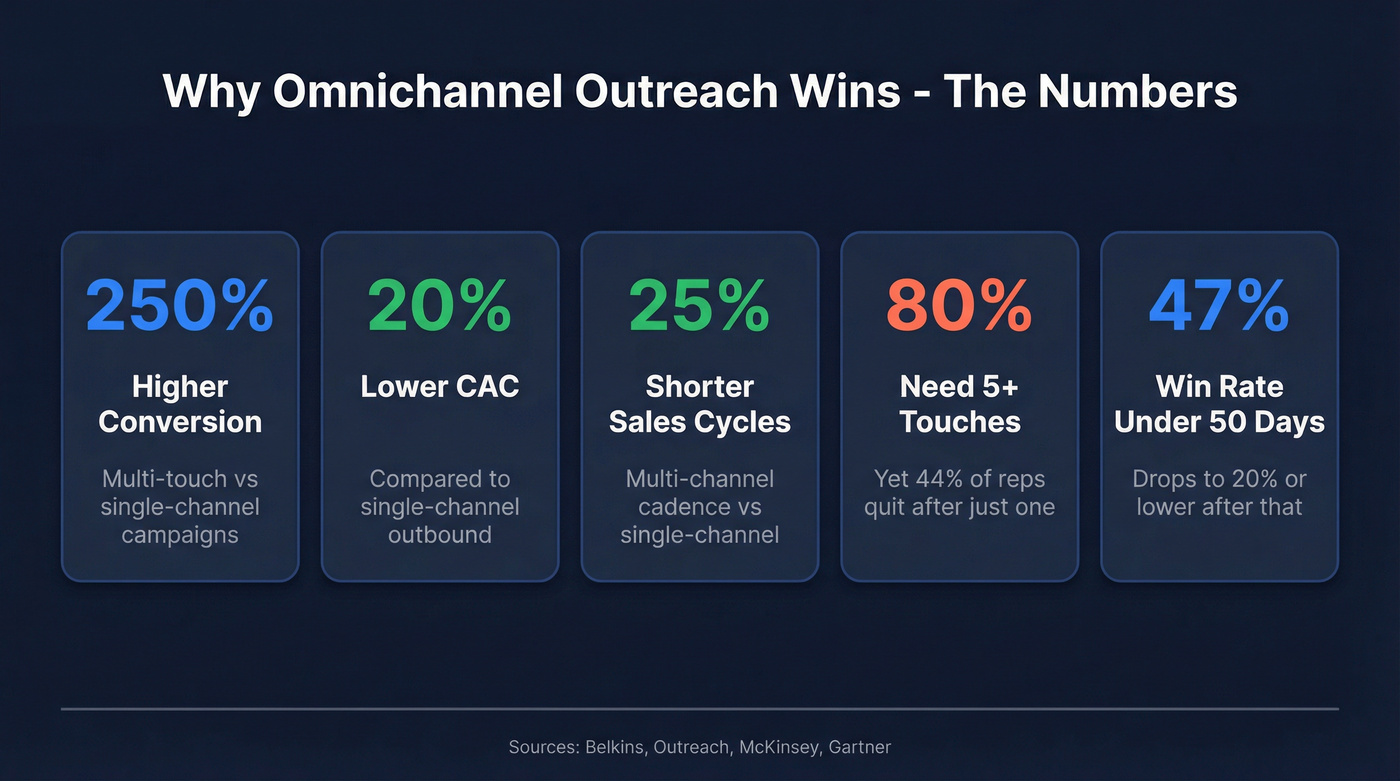
Belkins analyzed 16.5M cold emails, 20M+ outreach attempts, and 5M cold calls. Their finding: a multi-channel outbound cadence delivers 20% higher close rates, 20% lower CAC, and 25% shorter sales cycles compared to single-channel. Meanwhile, 44% of reps give up after one touch - while 80% of deals need five or more to close (see how many touchpoints before a sale).
Speed compounds the advantage. Outreach's data shows opportunities closed within 50 days hit a 47% win rate versus 20% or lower after that threshold. It takes 5-7 touches on average just to reach a contact for the first time. If you're running single-channel and spacing touches too far apart, you're mathematically behind before you start.
Let's be honest: if your average deal size is under $10K, you probably don't need a $150/seat enterprise sequencing platform. A $30/month tool with clean data will outperform a $1,500/month tool fed garbage contacts every time. The data layer is where the real leverage lives.
Your Data Foundation Comes First
No sequence strategy matters if your data is garbage. Roughly 28% of B2B emails become invalid every year due to job changes and role shifts. Average cold email reply rates now sit around 5.1%, down from 7% a year prior. Using generic switchboard numbers instead of direct dials can reduce connect rates by as much as 75% (here’s what a direct dial actually means in practice).
Your sequence is only as good as the list feeding it.
Deliverability checklist before you touch a sequencing tool: SPF, DKIM, and DMARC records configured on every sending domain. New mailboxes warmed starting at 5-10 sends per day, ramping weekly. Inbox rotation across your team. Unsubscribe link in every email. Clear sender identification. US callers: check the DNC registry. European teams: document GDPR legitimate interest.
We've seen this play out firsthand with customers. Meritt's bounce rate dropped from 35% to under 4%, their connect rate tripled to 20-25%, and pipeline went from $100K to $300K per week - all after switching to verified contact data with a 7-day refresh cycle (use an email ID validator before every send).


Every touch in your omnichannel sequence depends on reaching a real person. Prospeo delivers 98% email accuracy and 125M+ verified mobile numbers on a 7-day refresh cycle - so your emails land, your calls connect, and your social touches hit the right buyers.
Stop burning sequences on dead contacts. Start with verified data.
Meritt ran the same omnichannel playbook with bad data and hit 35% bounce rates. After switching to Prospeo's 7-day refresh cycle, bounces dropped under 4%, connect rates tripled, and pipeline jumped from $100K to $300K per week - same team, same sequence.
Your sequence structure is fine. Fix the data layer underneath it.
Building Your Sequence: 7 Touches, 10 Days
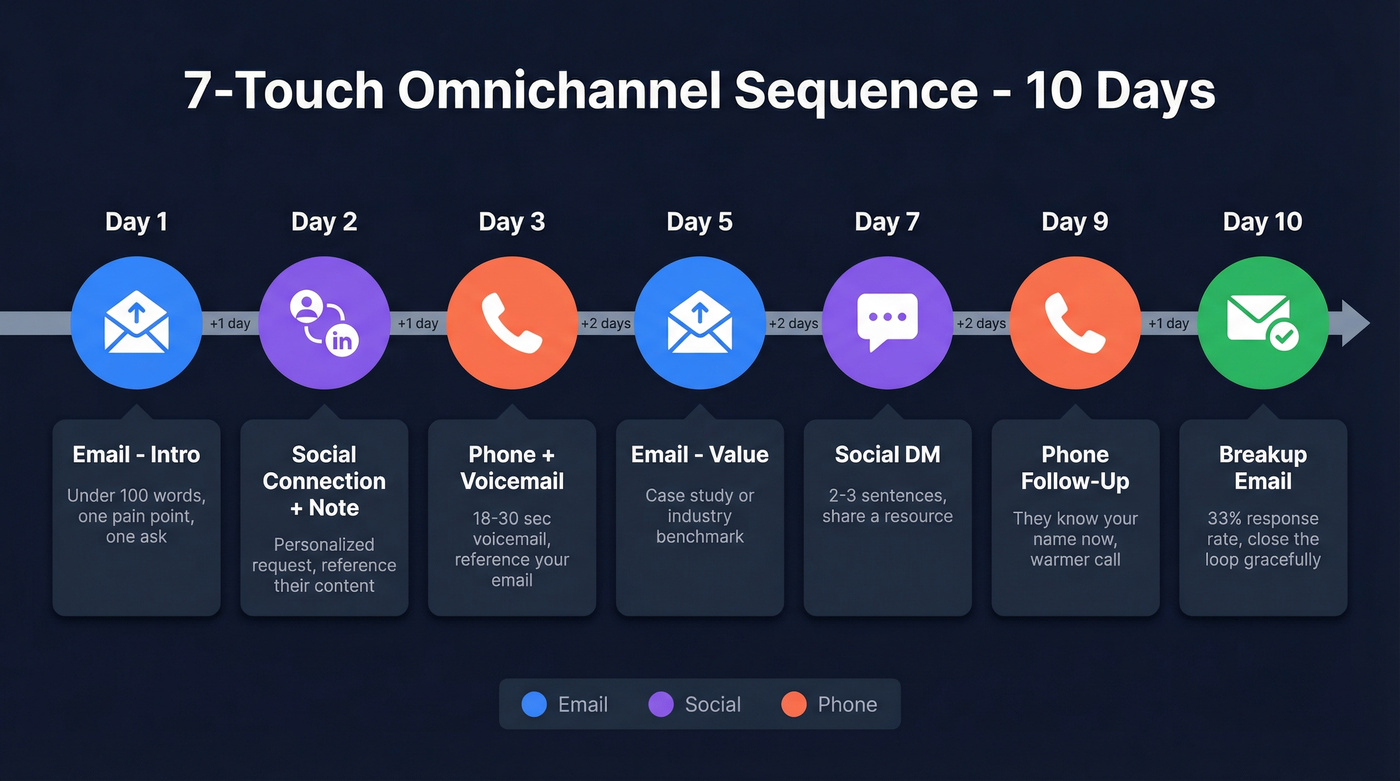
Here's a proven 7-touch, 10-day cadence that coordinates email, phone, and social into a single flow. Adapt the copy to your ICP, but keep the structure and timing tight (pair this with cold email tactics to lift replies).
One thing to understand about the email decay curve: cold email reply rates run about 8.4% on email #1, drop to 7.2% on #2, and slide to 6.8% by #3. Spam complaints triple after four emails to the same contact. This is exactly why you switch channels instead of hammering the inbox.
Day 1 - Email (Intro)
Under 100 words. One pain point, one relevant insight, one clear ask. Subject lines between 36-50 characters generate 32.7% more replies, and personalized subject lines lift opens by 26%. Best send window: Tuesday through Thursday, 6-11am in the prospect's local time.
Day 2 - Social Connection + Note
Send a personalized connection request referencing something specific - a recent post, a mutual connection, a company milestone. A connection request with a personalized note pulls a 9.36% reply rate versus 3.53% without one. Pairing a profile visit with your message pushes reply rates to 11.87%. Plan around connection-request limits, which typically run 20-50 per day depending on account age.
Day 3 - Phone + Voicemail
Reference your email by name. "I sent you a note yesterday about [specific topic] - wanted to put a voice to it." Keep voicemails between 18-30 seconds. Since 97% of cold calls go to voicemail, treat the voicemail as the deliverable, not the live conversation (use these cold call voicemail scripts). Voicemail plus email on the same day yields 40% higher response rates than standalone emails.
Day 5 - Email (Value)
Share a case study, a relevant benchmark, or an insight specific to their industry. This isn't a follow-up - it's a new reason to reply.
Day 7 - Social DM
Two to three sentences max. Reference your previous touchpoints without being pushy: "Saw you accepted my connection - wanted to share [specific resource] that's relevant to what [Company] is doing with [initiative]."
Day 9 - Phone Follow-Up
By now they've seen your name across three channels. The call feels warmer. Reference the social connection or the case study you shared. Cold call conversion benchmarks sit around 2-3%, so the multi-touch warmup is doing real work here. For busy execs, keep voicemails to 8-14 seconds.
Day 10 - Breakup Email
HubSpot's enterprise team found breakup emails generate a 33% response rate. Frame it as closing the loop, not guilt-tripping: "If the timing isn't right, no worries - I'll close this thread. But if [pain point] is still on your radar, happy to pick it up whenever."
Advanced Plays
Multi-threading across buying committees. Buying committees often run 8-13 stakeholders. Engaging 5 maps to a 30% win rate versus 5% when you're single-threaded. Run parallel sequences to different personas within the same account - the economic buyer, the technical evaluator, the champion (see what is multithreading in sales).
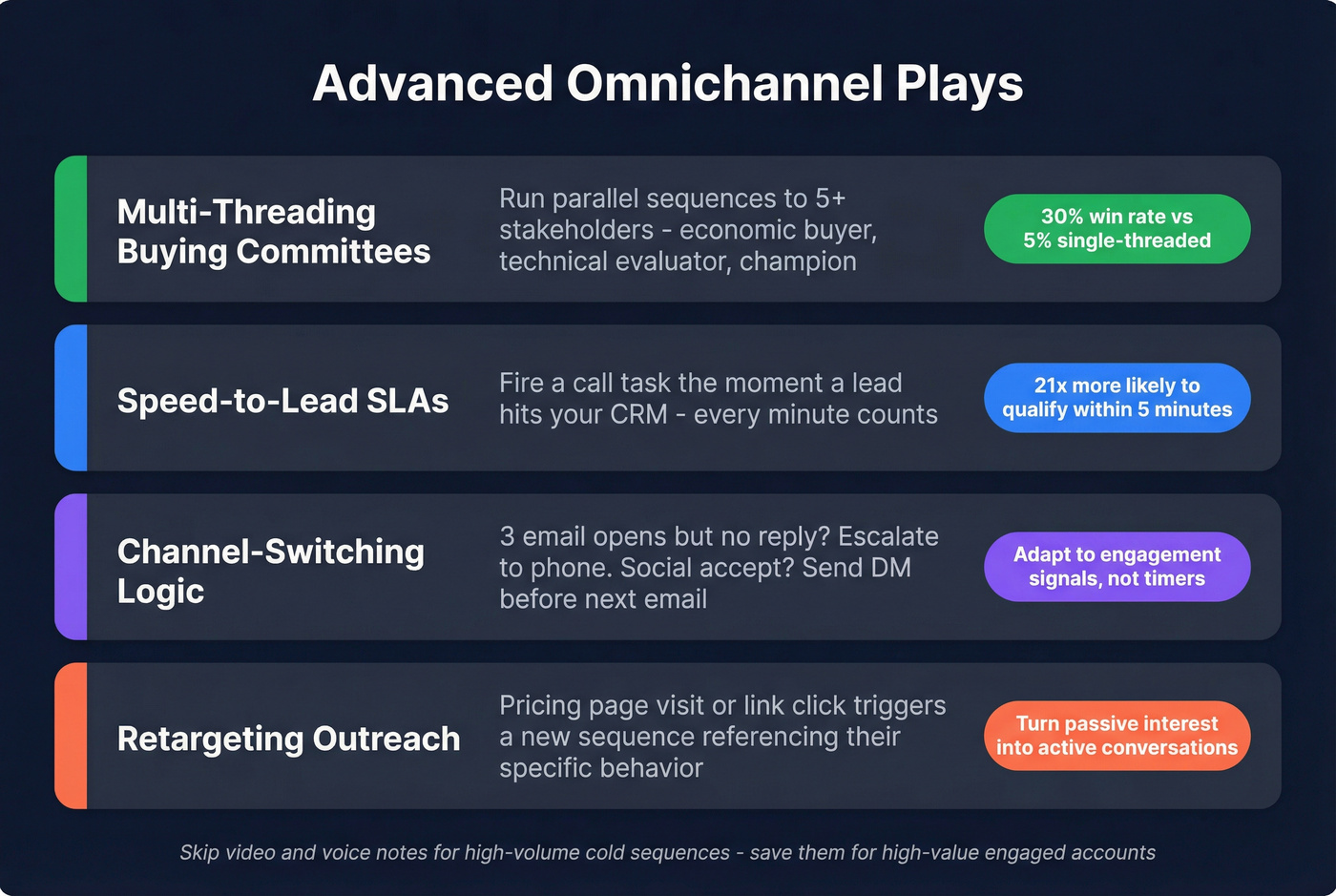
Speed-to-lead SLAs. Leads contacted within 5 minutes are 21x more likely to qualify than those contacted after 30 minutes. If you're running inbound alongside outbound, build a trigger that fires a call task the moment a lead hits your CRM.
Channel-switching logic. If a prospect opens your email three times but doesn't reply, escalate to phone. If they accept your social connection, send a DM before your next email. The sequence should adapt based on engagement signals, not just run on a timer.
Retargeting outreach campaigns. When prospects visit a pricing page, download a resource, or click a link in your email, layer them into a retargeting sequence that references their specific behavior. This turns passive interest into an active conversation.
When to skip video and voice notes. They're high-impact for warm prospects, but easy to overuse. Save them for high-value accounts and engaged contacts, not as a default step in a high-volume cold sequence. If you're running 500+ contacts per rep, the production time doesn't justify the lift.
When Sequences Break
Most broken sequences share the same symptoms:
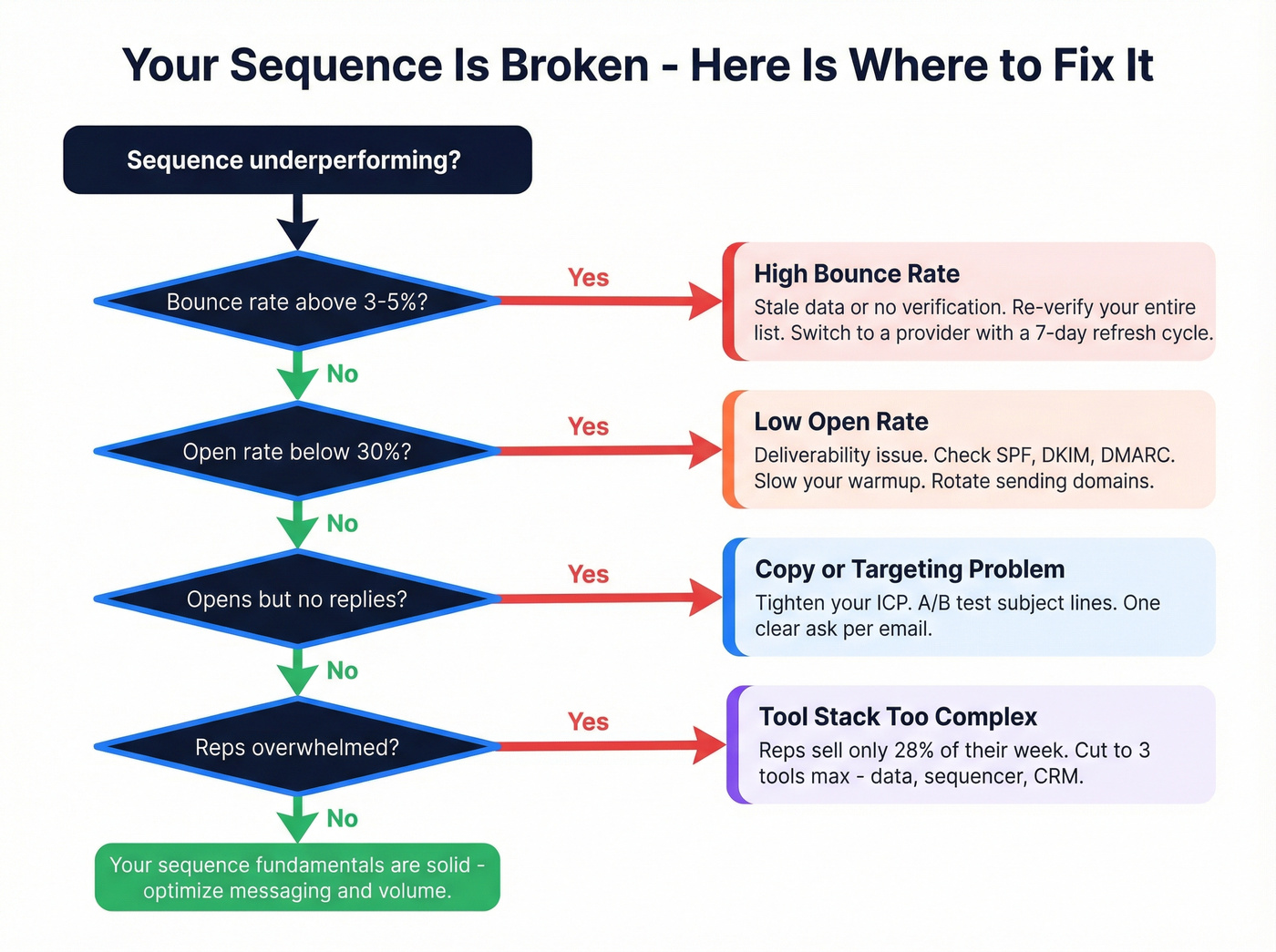
- High bounce rate - Stale data or no pre-send verification. Re-verify your entire list before every campaign. If bounces exceed 3-5%, pause and clean (see hard bounce).
- Low open rate - Deliverability issues. Check SPF/DKIM/DMARC records, slow your warmup ramp, rotate sending domains.
- Opens but no replies - Copy or targeting problem. Tighten your ICP, A/B test subject lines, and make sure your email has exactly one clear ask.
- Reps overwhelmed by manual steps - Stack is too complex. Reps spend only 28% of their week actually selling. If your campaign requires toggling between six tools, you're eating into that already-thin selling time.
Look, the most common complaint we see in r/sales and cold outreach communities is the same: too many tools, too little coordination. Buyers are roughly 69% through their journey before they talk to sales. Your sequence has to add value at every touch - not just "check in" or "circle back." If your reply rates are in the low single digits, the problem is almost always relevance, not volume.
The Omnichannel Tool Stack
The sales engagement platform market is projected to hit $5.7B with 26.4% annual growth - the tooling is maturing fast. But you don't need six tools and four integrations. You need three categories covered: data and verification, sequencing, and CRM.
| Category | Tool | Starting Price | Best For |
|---|---|---|---|
| Data & Verification | Prospeo | Free; ~$0.01/lead | Verified emails + dials, 7-day refresh, 98% accuracy |
| Data & Verification | Clay | Free; from $149/mo | Enrichment orchestration |
| Sequencing | Instantly | $30-$47/mo | SMB, affordable all-in-one |
| Sequencing | Outreach | Custom; $1K-$8K setup | Enterprise + Salesforce |
| Sequencing | HubSpot Sales Hub | $15/seat/mo (Starter) | Teams already on HubSpot CRM |
| Sequencing | Salesloft | ~$75-$125/user/mo | Mid-market coaching |
| Sequencing | La Growth Machine | ~EUR60-EUR180/user/mo | European multi-channel |
Instantly is our top pick for SMB teams. The Growth plan runs $30-$47/mo with deliverability tools built in - warmup and inbox rotation - plus a lead finder pulling from 450M+ contacts. Their Hyper CRM at $97/mo flat with unlimited seats is hard to beat on value.
Outreach is powerful but priced for enterprise. Custom quotes, plus implementation fees of $1,000-$8,000. It carries a 4.3/5 on G2 across 3,400+ reviews and is known for one of the strongest Salesforce integrations in the category. Reviewers consistently mention the same tradeoff: incredible product, steep learning curve, enterprise pricing. Skip this if you're a 5-person SDR team.
HubSpot Sales Hub makes sense if you're already on HubSpot CRM. Starter at $15/seat/mo is affordable, but the real sequencing power lives in Professional at $90/seat/mo or Enterprise at $150/seat/mo.
Clay is a data orchestration layer, not a sequencing tool. It's powerful for waterfall enrichment workflows and AI-powered research, but overengineered for most teams that just need clean data and a sequence running.
Whichever sequencing platform you pick, the data layer underneath it matters more than the platform itself. We've watched teams spend months evaluating sequencing tools while feeding every one of them the same unverified list - and then wondering why nothing converts.
FAQ
How many touchpoints should a sequence have?
Aim for 8-12 touchpoints spread over 2-4 weeks. The 7-touch, 10-day framework above is a proven starting point - 80% of deals require five or more touches to close, and nearly every contact responds within 7 touches or fewer. Space those touches across channels so no single inbox feels overwhelmed.
What's the difference between multichannel and omnichannel?
Multichannel means running independent channels with siloed data - your email tool doesn't know what your phone tool is doing. Omnichannel means a unified prospect profile where channels coordinate automatically. A reply on one channel pauses outreach on the others. That coordination drives the 20-25% conversion lift documented in multi-channel outbound studies.
How do I keep prospect data clean for sequences?
Verify emails before every campaign, use direct dials instead of switchboard numbers, and choose a data provider with a frequent refresh cycle. With 28% of B2B emails going invalid annually, monthly or quarterly cleans aren't enough. A 7-day refresh cycle catches job changes and bounced addresses before they tank your sender reputation.