

Outreach Email Marketing: The 2026 Playbook That Works
You sent 2,000 emails last quarter. You got 6 replies. Zero became customers. If that sounds familiar, you're not alone - it's one of the most common frustrations on r/SaaS, and it's almost never a copywriting problem. It's an infrastructure and data quality problem.
The difference between a 2% and a 6% reply rate isn't better copy - it's a better system. This playbook covers the technical foundation, benchmarks, and tool stack that separate outreach email marketing that works from outreach that lands in spam.
What Outreach Email Marketing Actually Is
Outreach email marketing means emailing people who don't know you yet - prospects, potential partners, investors, influencers - with the goal of starting a conversation. It's different from marketing email in every way that matters: the rules, the format, and the metrics.
Marketing emails use branded templates, images, and HTML layouts. Outreach emails look like something a real person typed - plain text, short, conversational. Marketing emails optimize for click-through rates. Outbound email outreach optimizes for replies.
| Outreach Email | Marketing Email | |
|---|---|---|
| Audience | Cold - don't know you | Opted in |
| Format | Plain text | Branded HTML |
| Goal | Start a conversation | Drive clicks/conversions |
| Volume | Small, targeted | Large batches |
| Key metric | Reply rate | CTR / conversion |
Here's proof the approach works: Laura Lopuch sent 328 cold emails to grow her freelance copywriting business. She hit a 56% open rate, a 9% positive reply rate, and one single email generated nearly $20,000 in revenue. Her business grew 1,400% in four months. That's not a marketing automation story - that's email outreach in its purest form.
What You Need (Quick Version)
Infrastructure and data quality account for roughly 80% of your results. Copy matters, but it's the last 20%. The 2026 average reply rate is 3.43% - the stack below is built to beat it.
The beginner stack that gets this right for about $60-$130/month:
- Instantly.ai for sending with built-in warm-up and inbox rotation (Growth plan starts at $30/mo)
- HubSpot free CRM for tracking conversations and pipeline ($0)
You don't need a $40k/year platform to start booking meetings. You need clean data, authenticated domains, and short emails.
2026 Benchmarks
According to Instantly's 2026 benchmark report, which analyzed billions of cold email interactions across thousands of active workspaces:
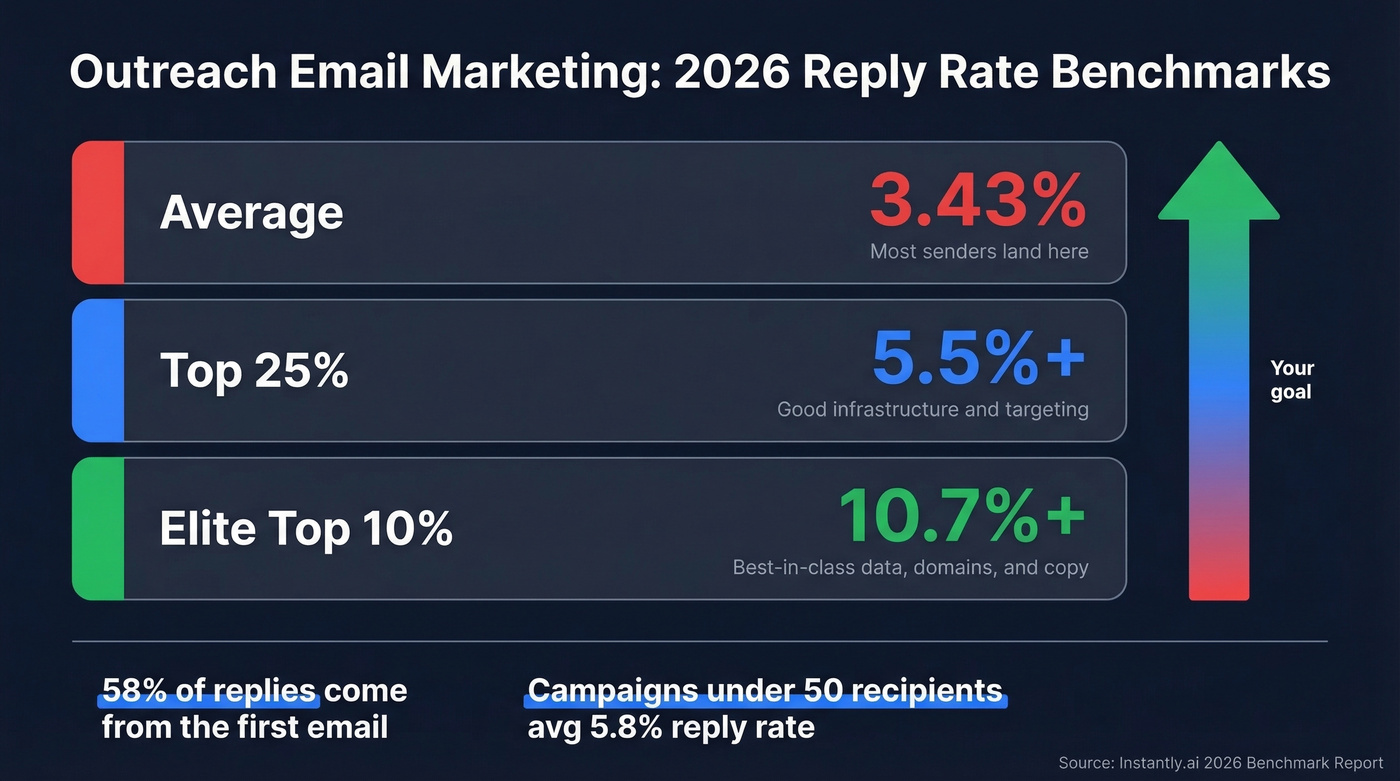
- Average reply rate: 3.43%
- Top quartile: 5.5%+
- Elite (top 10%): 10.7%+
Quick diagnostic: below 30% open rate? Your subject lines or sender reputation need work. Below 2% reply rate? Fix data and deliverability before touching copy.
58% of replies come from the first email. The remaining 42% come from follow-ups, which means skipping follow-ups leaves almost half your replies on the table. The sweet spot is 4-7 touchpoints - beyond 7, diminishing returns set in unless each follow-up adds genuinely new value. Tuesday and Wednesday are peak reply days. Friday is an auto-reply graveyard.
Campaign size matters more than most people realize. Small campaigns with 50 or fewer recipients average 5.8% reply rates. Campaigns over 1,000 recipients drop to 2.1%. Tight targeting beats volume every time.
Here's the thing: 65% of decision-makers still prefer email over phone or social for initial outreach. B2B buyers now use 10+ channels throughout their buying journey, but email remains the starting point. The channel isn't dead - lazy, high-volume execution is.
The Campaign That Doubled Its Reply Rate
One of the best breakdowns we've seen came from an r/Entrepreneur post where an operator detailed exactly how they moved from a 3% to a 6% reply rate. Here's what changed:
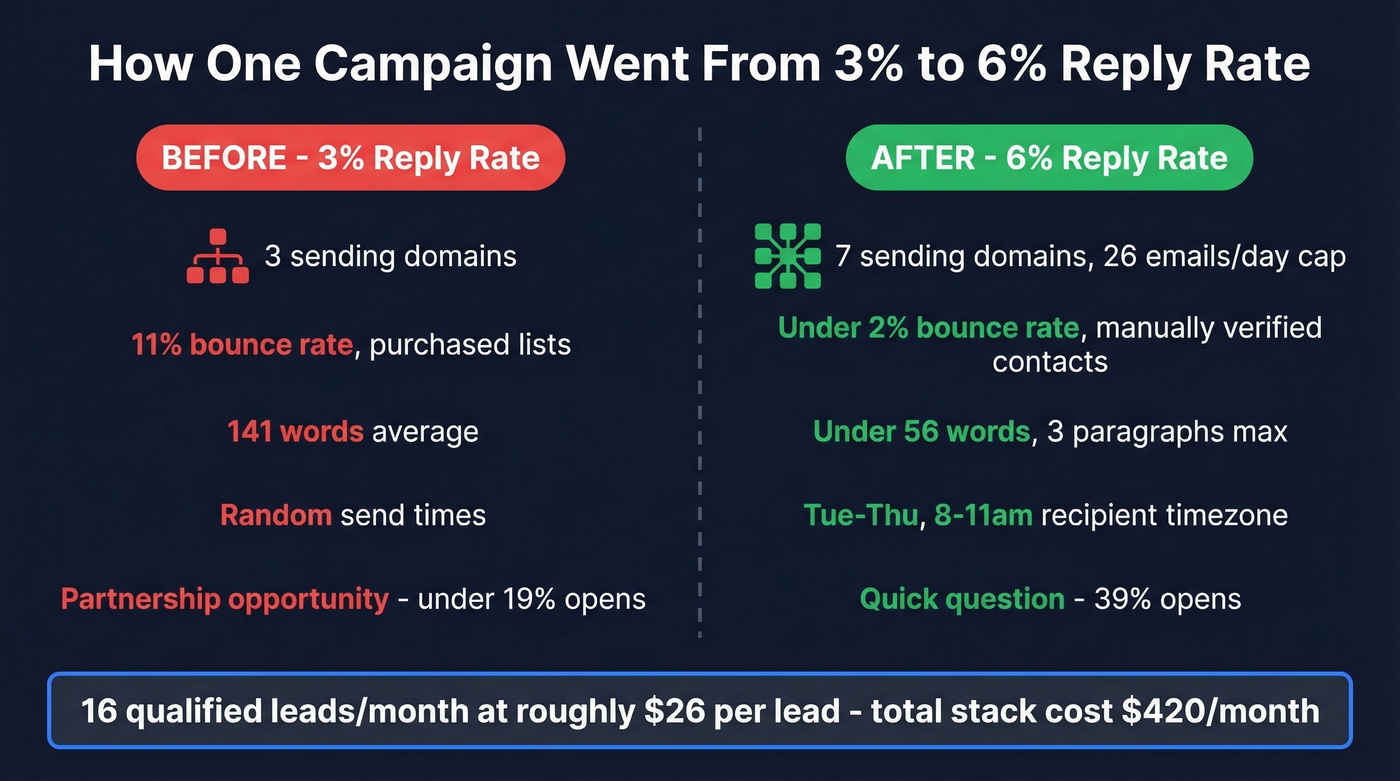
Infrastructure overhaul. They went from 3 sending domains to 7, capping each domain at 26 emails per day. More domains at lower volume meant better sender reputation.
Data quality. They stopped buying lists and started manually verifying contacts. Bounce rate dropped from 11% to under 2%. That single change did more than everything else combined.
Shorter emails. Average email length went from 141 words to under 56. Three short paragraphs max. Reply rates jumped immediately.
Timing. Sending Tuesday through Thursday, 8-11am in the recipient's timezone, improved opens by 16%.
Subject lines. "Quick question" hit 39% opens. Company-name subject lines landed at 33%. "Partnership opportunity" - the kind of subject line that screams template - came in under 19%.
The total stack cost was about $420/month. Output: 16 qualified leads per month. That's roughly $26 per qualified lead from cold email. The lesson isn't any single tactic - it's that infrastructure and data quality drove the biggest gains.
Deliverability - The Technical Foundation
This is the section most outreach guides skip, and it's the reason most campaigns fail. If your authentication records aren't set up correctly, your emails go to spam regardless of how good your copy is.
SPF, DKIM, and DMARC
This is DNS-level stuff. If you've never touched a TXT record, it takes 15 minutes with your hosting provider's docs open. These three records tell mailbox providers your emails are legitimate. All three are now mandatory - Gmail has required them since February 2024, and Outlook enforced compliance for high-volume senders starting May 2025.
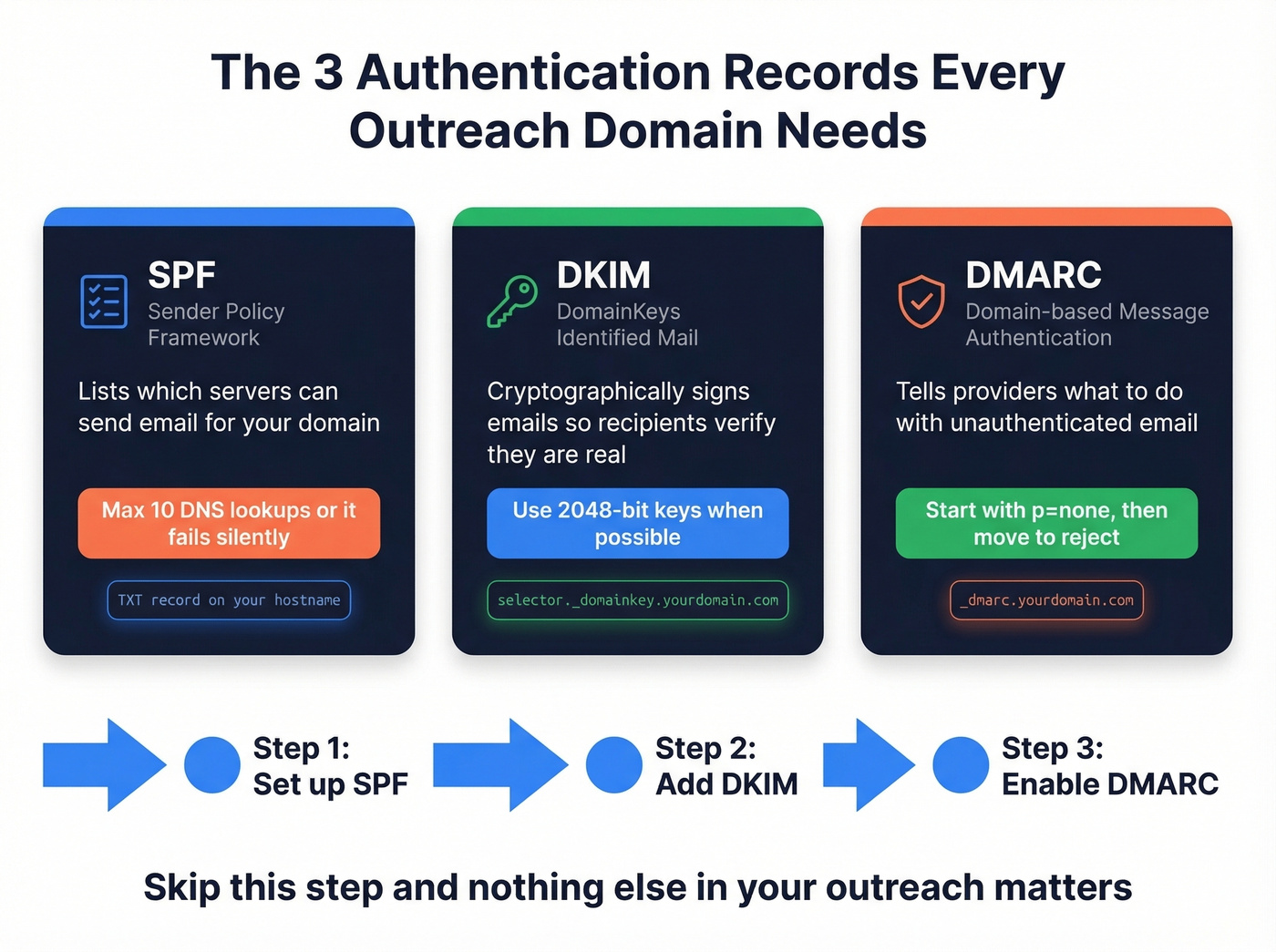
SPF (Sender Policy Framework): Publish one SPF TXT record per hostname listing which servers can send on your behalf. Critical rule - you get a maximum of 10 DNS lookups. Exceed that and SPF fails silently, which means your emails look unauthenticated.
DKIM (DomainKeys Identified Mail): Publish your public key at selector._domainkey.yourdomain.com. Use 2048-bit keys when your provider supports them. This cryptographically signs your outgoing emails so recipients can verify they weren't tampered with. (If you want a quick checklist, see How to Verify DKIM Is Working.)
DMARC (Domain-based Message Authentication): Publish at _dmarc.yourdomain.com. Start with p=none and add rua reporting so you can see who's sending on your behalf. Once you're confident everything's aligned, move to quarantine or reject. For deeper setup details, use this DMARC Alignment guide.
If you skip this step, nothing else in this playbook matters.
Sending Rules From the Trenches
The consensus on r/coldemail is remarkably consistent on operational limits:
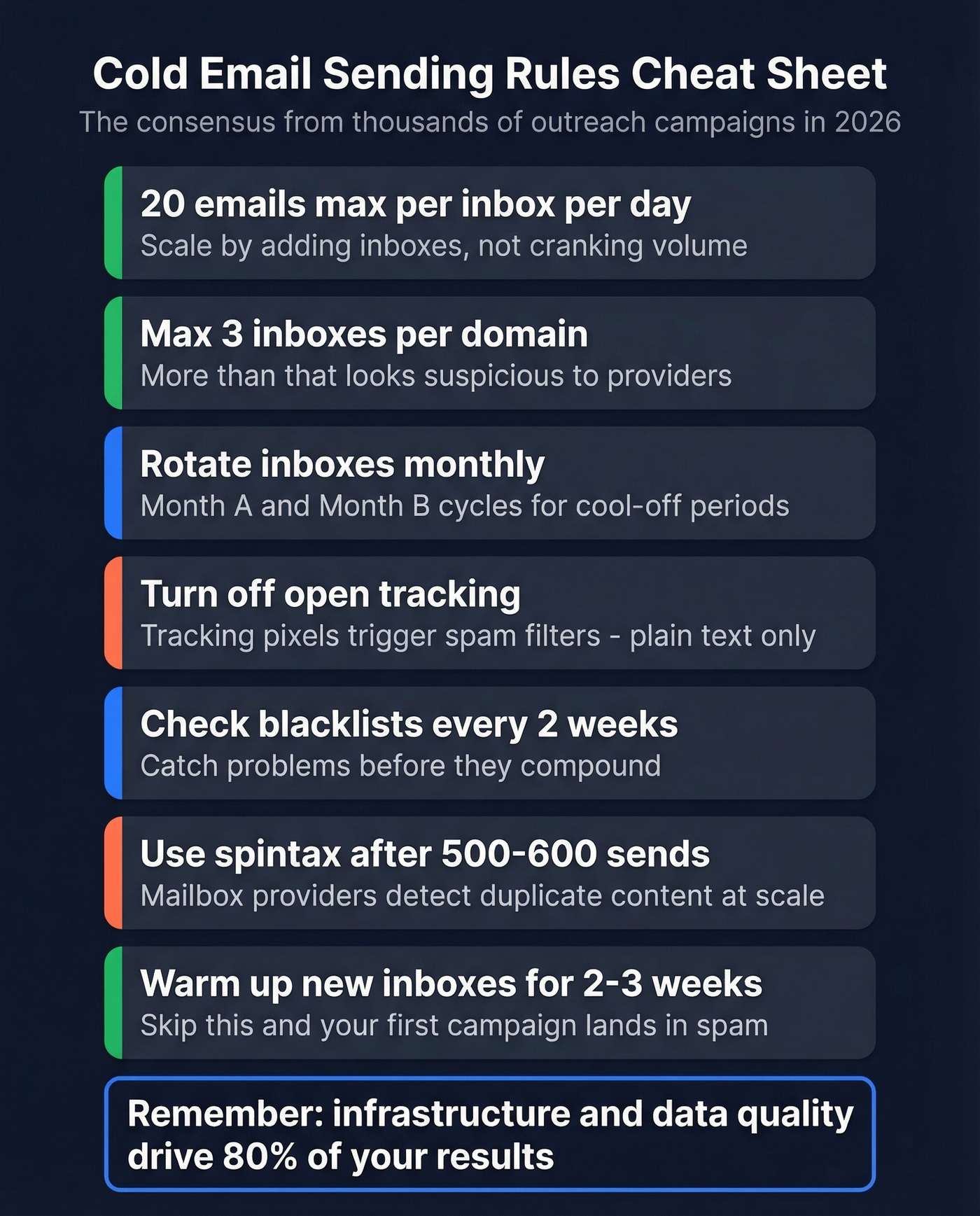
- 20 emails or fewer per inbox per day. Scale by adding inboxes, not by cranking volume. (More on safe limits in Email Velocity.)
- Max 3 inboxes per domain. More than that and the domain starts looking suspicious.
- Inbox rotation. Run month A/month B cycles so inboxes get cool-off periods.
- Turn off open tracking. The tracking pixel is an HTML element that triggers spam filters. Plain text only. If you want the technical why, read Email Tracking Pixels.
- Blacklist checks biweekly. Catch problems before they compound.
- Use spintax after 500-600 identical sends. Mailbox providers detect duplicate content at scale. Space sends to mimic human patterns - blasting 20 emails in 30 seconds looks automated because it is.
- OAuth over app passwords for better security and deliverability signals.
What's warm-up? It means gradually increasing send volume on a new inbox over 2-3 weeks while automated tools exchange emails with other inboxes to build sender reputation. Skip this and your first real campaign lands in spam. (Tool options: Best Unlimited Email Warmup Tools.)

That operator's bounce rate dropped from 11% to under 2% - and it changed everything. Prospeo's 5-step email verification delivers 98% accuracy, so your outreach hits real inboxes instead of spam traps. At $0.01 per email, cleaning up your data costs less than one bad campaign.
Stop burning domains on bad data. Start with emails that actually connect.
Fix Your Data Before Your Copy
If your bounce rate is above 3%, stop sending and fix your data. Every bounced email damages your sender reputation, and reputation damage compounds. We've watched teams rewrite their entire sequence five times when the real problem was a 12% bounce rate destroying their domain score. (Benchmarks + fixes: Email Bounce Rate.)
Data decays fast. People change jobs, companies get acquired, email servers get reconfigured. Catch-all domains accept everything during the SMTP handshake but silently discard invalid addresses later, inflating your bounce rate without warning. If you suspect traps, use this Spam Trap Removal playbook.
Personalization Beyond First Names
Inserting {{first_name}} isn't personalization. It's mail merge. Real personalization means referencing something specific enough that the recipient knows you did actual research.
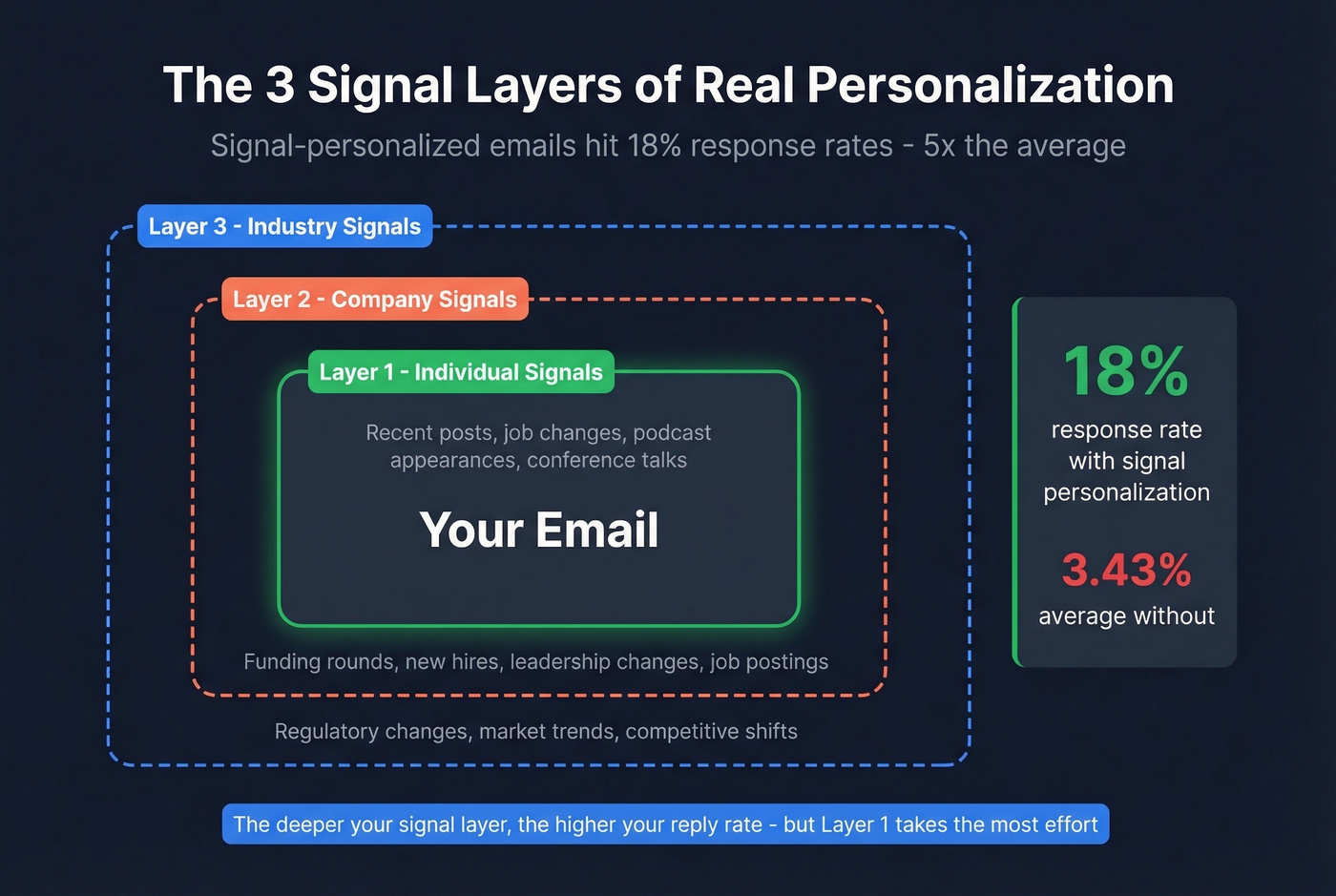
The most practical framework uses three signal layers:
- Individual signals: Recent posts, job changes, podcast appearances, conference talks. These show you know the person.
- Company signals: Funding rounds, leadership changes, job postings, earnings calls. These show you understand their business context.
- Industry signals: Macro trends, regulatory changes, competitive shifts. These show you understand their world.
Signal-personalized emails achieve 18% response rates - more than 5x the average. The effort compounds because personalized emails also get forwarded internally more often. Intent data platforms tracking topics like funding rounds, hiring surges, and technology adoption give you company-level signals without manual research. For a broader system, see Personalized Outreach.
Templates That Get Replies
Every effective cold email follows the same structure: pain, proof, low-friction CTA. Keep it under 80 words. Three short paragraphs max. (If you want more options, use these Cold Email Follow-Up Templates.)
SaaS/Tech:
Subject: Quick question about {{pain_point}}
Hi {{first_name}}, noticed {{company}} just {{specific_signal - e.g., raised Series B, hired 3 SDRs, launched new product}}. When teams hit that stage, {{specific_pain}} usually becomes a bottleneck.
We helped {{similar_company}} cut {{metric}} by {{result}} in {{timeframe}}.
Worth a 15-min call this week?
Agency:
Subject: {{company_name}} + {{your_service}}
Hi {{first_name}}, saw {{company}} is {{signal - e.g., expanding into new market, scaling paid spend}}. We run {{service}} for {{2-3 similar clients}} and typically see {{specific_result}}.
Happy to share what's working. Open to a quick chat Thursday?
General B2B:
Subject: {{first_name}}, quick question
Hi {{first_name}}, {{one-sentence observation about their company or role}}. We work with {{category}} companies on {{problem you solve}}, and {{proof point}}.
Would it make sense to connect for 15 minutes?
Notice what's missing: no "I hope this email finds you well." No four-paragraph company history. No three different CTAs. One ask, one proof point, one reason to reply.
Mistakes That Kill Campaigns
Based on Saleshandy's analysis of common cold email failures, here are the ten that do the most damage:
- Not warming up new accounts. Send 2-3 emails/day for the first 2-3 weeks, gradually increasing.
- Using your primary domain. Buy dedicated sending domains. If they get burned, your main domain stays clean.
- Not cleaning your list. Run every list through verification before sending - catch invalid addresses, spam traps, and catch-all domains before they tank your reputation.
- Writing lengthy emails. Under 80 words. Under 56 is even better.
- No follow-up plan. 42% of replies come from follow-ups. Build a 4-7 step sequence from day one. (More sequences: B2B Cold Email Sequence.)
- Missing unsubscribe link. Required by CAN-SPAM, and a best-practice expectation for GDPR compliance.
- Multiple CTAs. One email, one ask. "Want to chat?" is enough.
- No authentication records. SPF, DKIM, DMARC - all three, every domain.
- Too many emails from one account. Cap at 20/day per inbox. Scale horizontally.
- HTML-heavy emails. Images, fancy formatting, and tracking pixels trigger spam filters. Plain text wins.
Best Tools for Email Outreach in 2026
| Tool | Best For | Starting Price | Free Tier |
|---|---|---|---|
| Prospeo | List building + verification | ~$0.01/email | 75 emails/mo |
| Instantly.ai | Deliverability + sending | $30/mo | No |
| Apollo.io | Free-tier prospecting | $59/user/mo | 100 credits/mo |
| Saleshandy | Agency multi-client | $25/mo | 7-day trial |
| GMass | Gmail-native budget | $25/mo | 50 emails/day |
| Lemlist | Multichannel personalization | $55/user/mo | 14-day trial |
| Woodpecker | Simple deliverability | $29/mo | 7-day trial |
Instantly.ai
Instantly is purpose-built for cold email deliverability. The Growth plan starts at $30/mo and includes 1,000 active contacts, 5,000 monthly emails, built-in warm-up, inbox rotation, and a deliverability dashboard that shows you exactly where your emails are landing. Higher tiers scale to $286/mo for larger operations. The key tradeoff: Instantly doesn't build your prospect list - it sends to the list you bring. That's why most operators pair it with a separate data source for list building and verification.
Apollo.io
Apollo's forever-free plan with 100 credits/month makes it the obvious starting point if you're testing outreach with zero budget. Paid plans start at $59/user/mo, with the Organization tier at $149/mo requiring a minimum of 3 seats. The UI is more complex than most tools on this list, but it includes warm-up, a built-in sequencer, and a large contact database. In our experience, Apollo's email accuracy runs around 79%, so running Apollo contacts through a dedicated verification tool before sending is worth the extra step.
Saleshandy
Use this if you're an agency managing outreach for multiple clients. Saleshandy's multi-client management and sender rotation features are built for that exact workflow, starting at $25/mo on annual billing with a 7-day trial. Skip this if you're a single-brand team - you won't use the multi-client features, and Instantly's deliverability tools are stronger for single-sender setups.
GMass
Gmail-native cold email on a budget. GMass runs inside your Gmail inbox, starts at $25/mo, and includes a "Spam Solver" deliverability testing tool. Professional tier runs $55/mo. It's the simplest option if you're sending around 50 emails/day and don't want to learn a new platform.
Lemlist
Multichannel sequences with image personalization. Lemlist starts at $55/user/mo on annual billing and $69/user/mo monthly, with a 14-day trial. Lemlist shines when you're combining email with other touchpoints and want dynamic images in your sequences, but the per-user pricing adds up fast for teams of 3+.
Woodpecker
Best for solo operators who want fewer knobs to turn. Simple UI, deliverability-focused, starts at $29/mo with a 7-day trial. Woodpecker doesn't try to do everything - it sends cold emails reliably and stays out of your way.
Small, targeted campaigns hit 5.8% reply rates. Prospeo's 30+ search filters - buyer intent, technographics, job changes, headcount growth - let you build hyper-targeted lists of 50 prospects who actually match your ICP. Data refreshed every 7 days, not 6 weeks.
Tight targeting beats volume. Build your next campaign list in minutes.
FAQ
Is cold email legal?
Cold B2B email is legal in most jurisdictions when done correctly. CAN-SPAM requires honest sender identification, a valid physical address, and an easy opt-out mechanism. GDPR allows B2B outreach under "legitimate interest" but requires prompt opt-out handling. The key is compliance infrastructure - unsubscribe links, accurate sender info, and clean data.
How many cold emails should I send per day?
Cap at 20 emails per inbox per day, with a maximum of 3 inboxes per domain. To scale volume, add more domains rather than increasing sends per inbox. A 7-domain setup with 3 inboxes each gives you roughly 420 emails per day while keeping each inbox's reputation healthy.
What's a good reply rate in 2026?
The 2026 average is 3.43%, top quartile hits 5.5%+, and elite campaigns exceed 10.7%. If you're below 2%, don't optimize subject lines - fix your data quality and deliverability setup first.
Do I need a separate domain for cold outreach?
Yes. Never send cold outreach from your primary business domain. Buy dedicated sending domains, set up SPF/DKIM/DMARC on each, and warm them for 2-3 weeks minimum before sending. If a sending domain gets flagged, your primary domain stays untouched.
What's the best free tool to start with?
Prospeo's free tier covers list building and verification with 75 verified emails/month, and HubSpot's free CRM handles pipeline tracking. Pair those with a sending tool trial from Instantly or Saleshandy and you can run a real campaign at zero cost to validate the channel before investing.