

Personalized Video Prospecting: The 2026 Playbook for Sales Teams
You spend three minutes recording a personalized video for a VP of Engineering. You nail the hook, reference their recent product launch, close with a sharp CTA. Then the email bounces. Three minutes of effort vaporized - and a small hit to your domain reputation.
Data quality is the unsexy prerequisite that every video prospecting guide skips. Let's not skip it.
Starting from zero? Use Prospeo for verified prospect data, Loom for recording, and your existing email tool for sending. Total cost: $0 to start (both have free tiers), around $15/user/month once you upgrade Loom. Scale from there once you've proven video works for your audience.
Why Video Outreach Converts
The numbers aren't subtle. An Idomoo survey of 2,510 US and UK adults found personalized video is 3.5x more likely to convert someone into a customer compared to generic video. SalesLoft's benchmarks show +16% open rates, +26% reply rates, and 4x higher CTR when video is included in outreach emails. BombBomb reports 120% higher response rates with video emails across their user base.
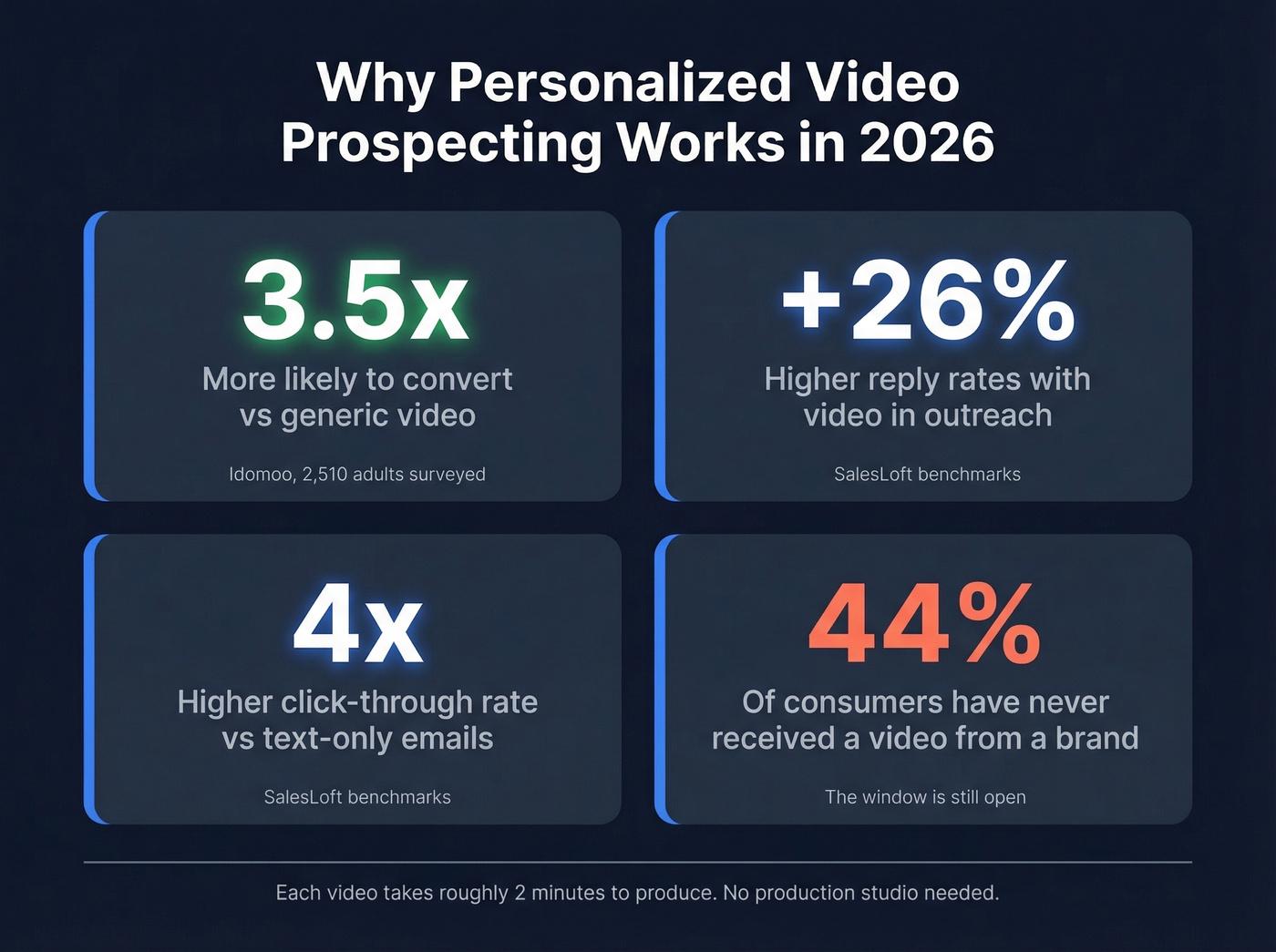
Here's the white space: 44% of consumers say they've never received a video from a brand. That window won't stay open forever.
The effort-to-impact ratio is strong, too. Intercom's team added prospecting videos to cold emails and saw a 19% lift in response rates - each video taking roughly 2 minutes to produce. You don't need a production studio. You need a webcam, a script, and verified contact data.

The Deliverability Problem Nobody Mentions
Gmail and Outlook don't support HTML5 video playback inside emails. You can't embed a video and expect it to play. The move is a clickable GIF thumbnail (keep it under 500KB) linking to a hosted landing page - video thumbnails pull 10.3% CTR vs 6.1% for static images.
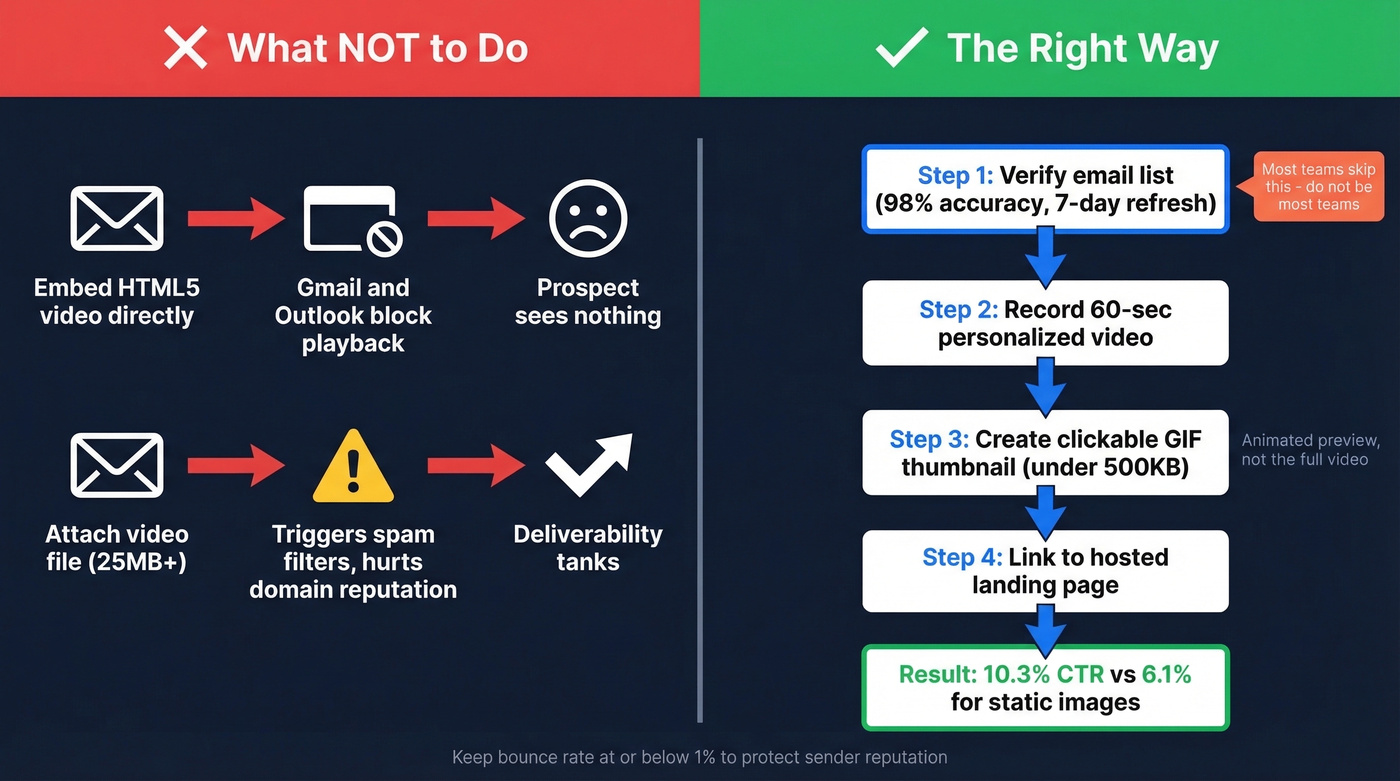
Don't attach video files either. Gmail caps attachments at 25MB, Outlook at 20MB, and large attachments create deliverability issues that hurt your domain reputation over time. Keep your bounce rate at or below 1% (see Email Bounce Rate).
Here's the thing most teams miss: before recording a single video, verify your list. A 2-minute personalized clip sent to a dead email is the most expensive bounce in outbound. We've seen teams waste entire afternoons recording videos for prospects whose emails had gone stale months ago. Run your list through Prospeo's bulk verification - 98% email accuracy, refreshed every 7 days - strip the bounces and catch-alls, and only then open your camera. Snyk cut bounce rates from 35-40% to under 5% after switching their verification workflow, which directly protects the sender reputation you need for video emails to land (more on sender reputation).
How to Create a Personalized Video Pitch
Step 1: Verify Your Prospect Data
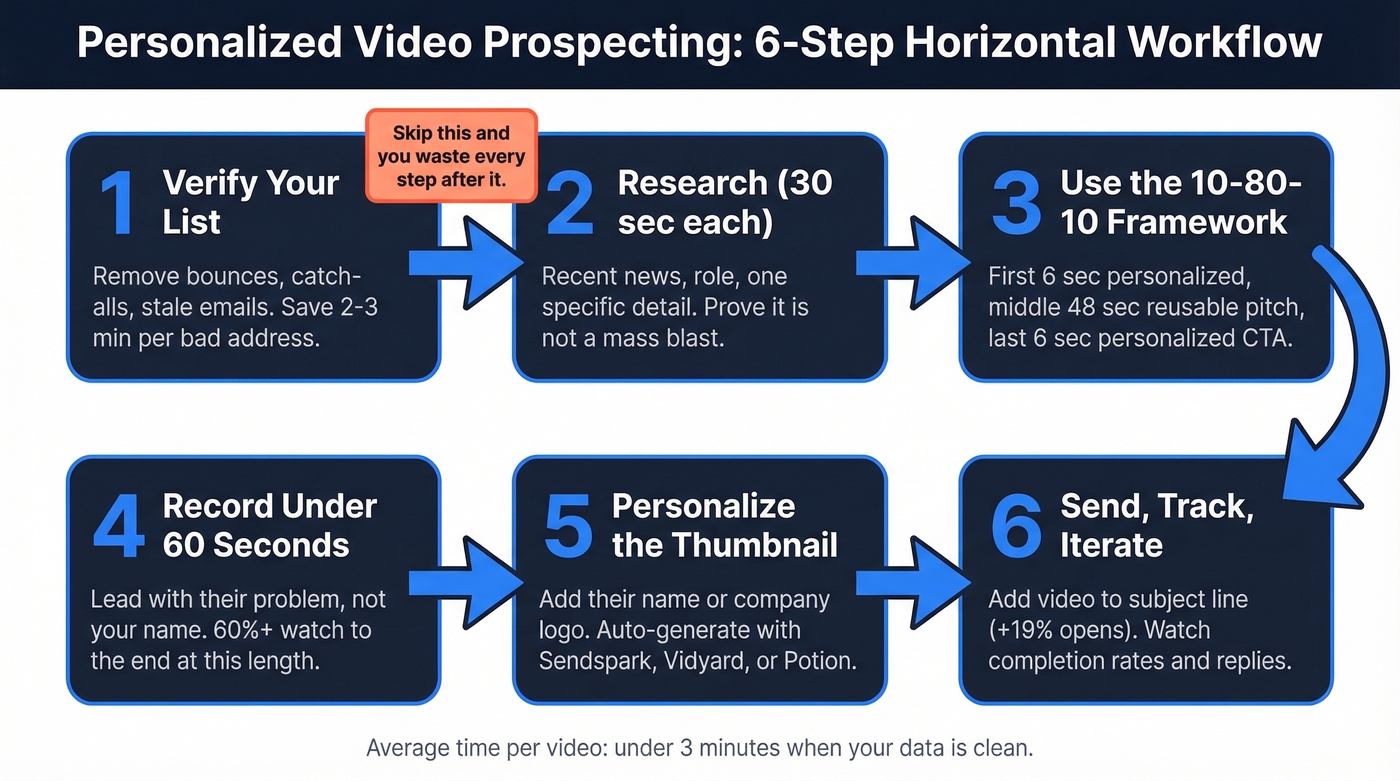
Run your list through an email verification tool. Remove bounces, catch-alls, and stale addresses before you record anything. Every invalid email is 2-3 minutes of wasted effort you can't get back. If you're comparing options, start with email verification basics.
Step 2: Research (30 Seconds Per Prospect)
Check their company's recent news, their role, and one specific detail you can reference. You don't need a deep dive - just enough to prove this isn't a mass blast. A Chrome extension that surfaces technographics and recent job changes can compress this step from minutes to seconds (see firmographic and technographic data).
Step 3: Use the 10-80-10 Framework
Split a 60-second video into three parts. The first 6 seconds and last 6 seconds are personalized - mention their name, company, or a specific trigger event. The middle 48 seconds is your reusable core pitch. This framework, popularized by Leadfeeder, lets you scale without sacrificing the personal touch that makes video work in the first place.
Step 4: Record Under 60 Seconds
Over 60% of viewers watch to the end when a video stays under a minute. Get to value immediately. Save your name and company for the close - lead with what matters to them. If you're using Loom specifically, borrow tactics from this Loom video cold email guide.
Step 5: Personalize the Thumbnail
A custom thumbnail with the prospect's name or company logo increases clicks. Most video tools - Sendspark, Vidyard, Potion - can generate these automatically.
Step 6: Send, Track, Iterate
Add "video" to your subject line - it boosts open rates by ~19%. Then track watch percentage, click-through, and replies. The data tells you what's working faster than your gut will. For more ideas, pull from these email subject line examples.

Every personalized video you send to a bad email is 2-3 minutes wasted and a hit to your domain reputation. Prospeo verifies emails at 98% accuracy on a 7-day refresh cycle - so your 60-second masterpiece actually lands in a real inbox.
Verify your list before you hit record. Start free today.
Mistakes That Kill Your Results
Five things we see teams get wrong repeatedly:
- Too much text around the video. The video IS the message. Keep the email body to 2-3 sentences plus the thumbnail (tighten your email copywriting while you're at it).
- No script. Rambling past 60 seconds is the fastest way to lose a prospect. Write a loose script. Stick to it.
- Bad lighting or audio. You don't need a ring light and a Shure mic, but a dark room with laptop-speaker echo screams low effort.
- Only webcam, nothing else. Mix in screen shares, quick product demos, or a slide with their company's logo. Visual variety keeps attention.
- Not tracking analytics. If you aren't watching completion rates and iterating on length, hook, and format, you're guessing (use a simple funnel metrics view to keep it honest).
B2B Video Prospecting Tools Compared
| Tool | Starting Price | Best For | Key Limitation |
|---|---|---|---|
| Loom | Free (25 videos), $15/user/mo paid | Beginners, simple sends | Limited dynamic personalization |
| Sendspark | $49/mo | Scaling with AI lip-sync | 100 Dynamic Video Minutes on Solo |
| Potion | $99/mo | AI video clones at scale | 750 Dynamic AI videos/month on Starter |
| Vidyard | Free (15 AI videos), ~$59/user/mo | Teams wanting AI + workflow automation | Enterprise add-ons run $2,400-4,800/yr |
| BombBomb | ~$36/mo | Relationship-heavy sales | Dated UI, limited AI features |
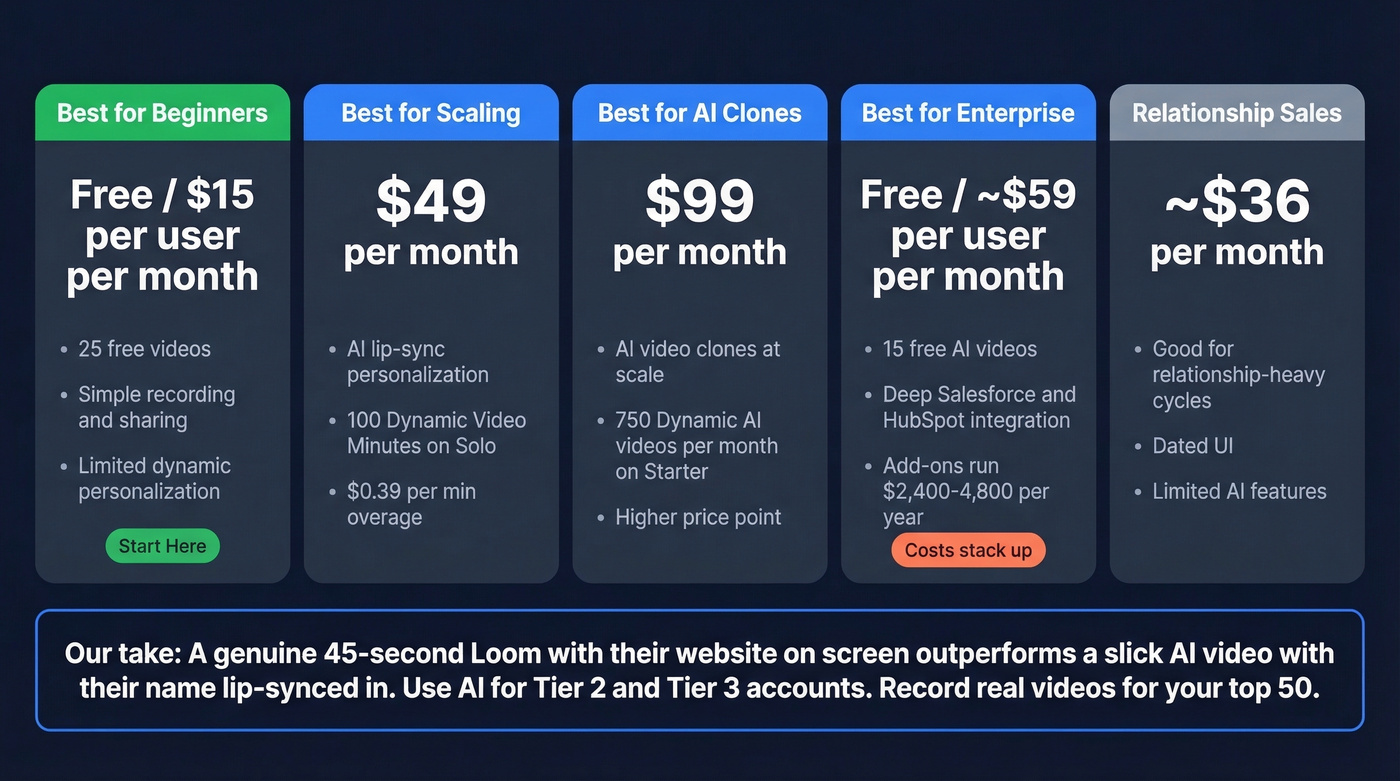
Loom is the obvious starting point. It's free, simple, and you'll know quickly whether video works for your audience. Once you've proven the concept, Sendspark and Potion let you scale with AI-generated personalization - dynamic backgrounds, personalized variables, and lip-synced intros. Sendspark's Solo plan includes 100 Dynamic Video Minutes with $0.39/min overage, which keeps costs predictable. Vidyard is the enterprise play if you need deep Salesforce or HubSpot integration, but the add-on costs stack up fast.
In our experience, most teams don't need AI video clones. A genuine 45-second Loom with a prospect's website pulled up on screen outperforms a slick AI-generated video with their name lip-synced in. Authenticity still wins in 2026. Use AI for your Tier 2 and Tier 3 accounts, and record real videos for your top 50. If you're building a broader stack, compare other SDR tools before you commit.
The 30-second research step gets faster when your data already includes technographics, job changes, and company signals. Prospeo's Chrome extension gives you 40+ data points per prospect - the exact triggers you need to nail your video hook.
Get verified data and video-ready research in one click.
When Video Doesn't Work
Skip personalized video prospecting if your buyers are highly technical - security engineers, infrastructure architects, and similar roles tend to prefer documentation and text they can skim. For time-sensitive follow-ups where speed matters more than polish, a quick text email beats a 3-minute recording session.
And if your prospect data is bad, video outreach is the most expensive way to burn time and domain reputation simultaneously. Real talk: we've watched an SDR team record 40+ personalized videos in a week and bounce on 30% of them because nobody verified the list first. That's not a video problem. That's a data problem. If you're scaling outbound, align this with an email deliverability guide.
The difference between "thoughtful" and "creepy" is whether you've done real research or just mail-merged a first name onto a template. One Reddit thread on r/sales put it well: prospects can smell a fake personalization attempt from the thumbnail.
FAQ
How long should a prospecting video be?
Under 60 seconds. Over 60% of viewers watch to the end at that length. Lead with value in the first 6 seconds - your name and title can wait until the close.
Can you embed video directly in email?
No. Gmail and Outlook don't support inline video playback. Use a clickable GIF thumbnail under 500KB linking to a hosted landing page for reliable delivery.
What's the cheapest way to start with video outreach?
Loom's free tier (25 videos) plus Prospeo's free plan (75 email verifications/month) and your existing email tool. Total cost: $0. Upgrade once you've proven video moves the needle for your audience.
Does a personalized video pitch beat text-only cold email?
In most B2B sales cycles, yes - SalesLoft data shows +26% reply rates and 4x higher CTR with video included. But the lift depends on your buyer persona. Test video against your current baseline before overhauling your entire sequence.