

Product Demo Guide: Plan, Build, Deliver, and Measure
91% of buyers already know who you are before they hop on a call. They've visited your site, skimmed your features page, maybe watched a competitor's demo. And then your rep opens with a 45-minute feature tour nobody asked for.
That's why most product demos fail - not because the software is bad, but because the demo doesn't respect the buyer's time or context.
What Is a Product Demo?
A product demo is a structured presentation - live, recorded, or interactive - that shows a prospect how your product solves their specific problem. That's the textbook definition. The reality is messier.
In practice, it's any format where a prospect experiences your product firsthand rather than reading about it, from a two-minute interactive walkthrough embedded on your homepage to a 30-minute live call with a solutions engineer sharing their screen. Demonstrations span everything from in-store sampling to trade show presentations, but this guide focuses on B2B software demos - the kind that close deals.
Sales reps get about 5% of a customer's time during a buying cycle. That's it. And 60% of buyers visit your website before they'll even accept a meeting. So by the time someone agrees to a demo, they've already formed opinions. They don't need a product tour. They need proof that you understand their problem and can solve it faster than the other three vendors they're evaluating.
Josh Aranoff, VP of Global Solutions Engineering at Procore, put it well: "Customers expect more than a technical demo; they want a partner who understands their business and can align solutions with their goals." We've seen teams run hundreds of demos a quarter with sub-30% conversion to next steps - not because the product was weak, but because every demo was the same generic walkthrough regardless of who was watching. An exec cares about ROI and time-to-value. A technical evaluator cares about integrations and security. Showing both the same thing is like giving everyone the same shoe size and hoping it fits.
The companies winning at demos in 2026 aren't just better presenters. They've systematized the entire process - from format selection to script customization to post-demo engagement tracking. Let's break down how.
Types of Product Demos
Picking the wrong format for the wrong stage is one of the fastest ways to lose a deal. Here's how the five main formats map to the buyer journey.
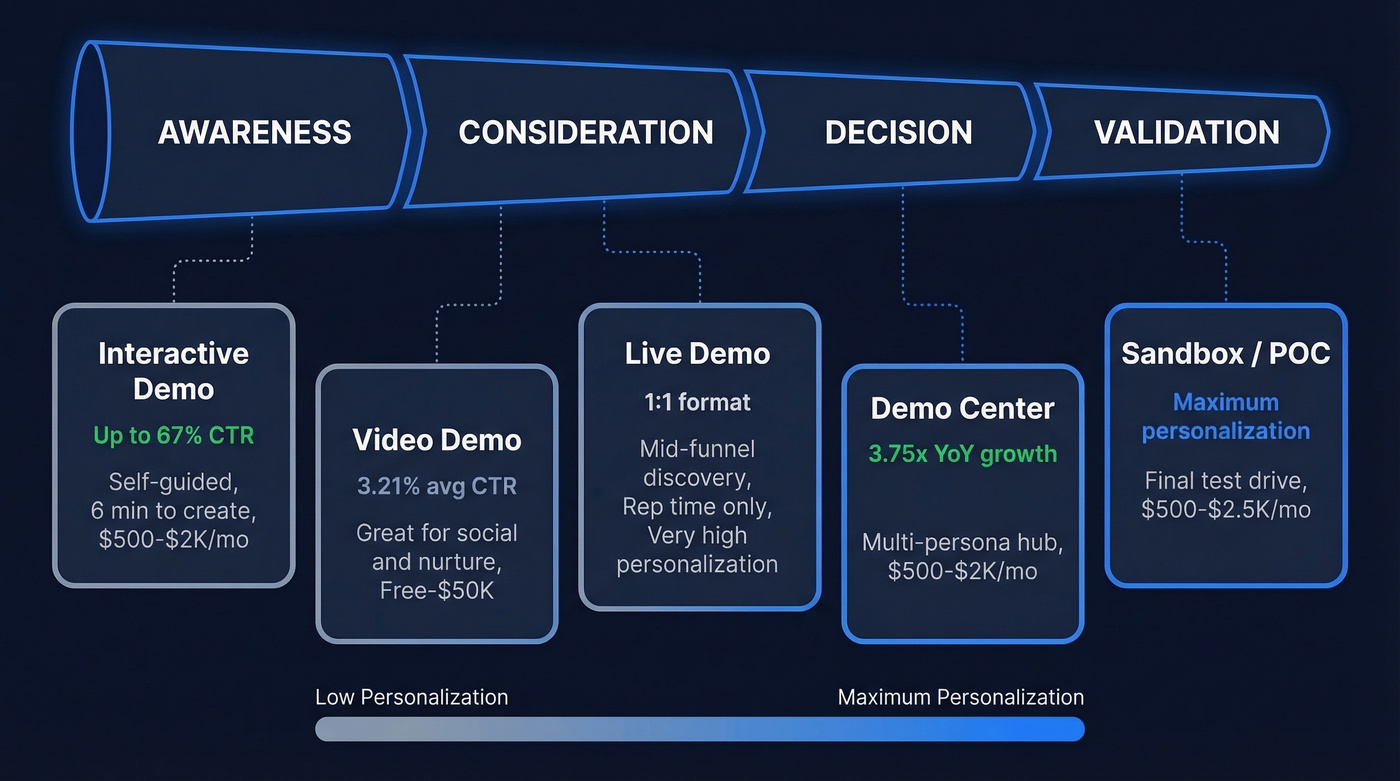
| Format | Best For | Avg CTR | Cost Range | Personalization |
|---|---|---|---|---|
| Interactive | TOFU website, outreach | Up to 67% (top 1%) | $500-$2K/mo | High |
| Video | Awareness, social, nurture | ~3.21% | Free-$50K | Low-Medium |
| Live | Mid-funnel, discovery | N/A (1:1 format) | Rep time only | Very High |
| Sandbox/POC | Decision stage, validation | N/A (1:1 format) | $500-$2.5K/mo | Maximum |
| Demo Center | Website hub, multi-persona | 10-25% (estimated) | $500-$2K/mo | High |
Interactive demos are the breakout category. The average interactive demo takes just six minutes to create in Arcade, and the CTR gap between interactive and video is staggering - top interactive demos hit 67% CTR versus the ~3.21% industry average for video. That alone explains why 29.2% more B2B websites added a "Take a Tour" CTA in 2024 versus 2023, per Navattic's 2025 State of the Interactive Demo report.
Self-guided demos work best at the top of funnel - embedded on your website or sent in BDR outreach. They let prospects explore at their own pace before committing to a call. First demos give a high-level live overview with minimal customization. Industry and persona demos add mid-funnel relevance, while custom SE-led demos go deep on the prospect's specific environment. POCs are the final test drive before a decision.
Demo centers are one of the biggest trends we're tracking. Navattic's report shows a 3.75x increase in demo center usage year-over-year. Instead of a single product demonstration, companies build hubs with multiple interactive walkthroughs organized by persona, use case, or industry. The top 1% of website demos overwhelmingly use this approach.
Video demos still have their place for social distribution, nurture sequences, and brand-controlled storytelling. But for anything where you want the prospect to engage and self-qualify, interactive wins.
Anatomy of an Effective Demonstration
Whether you're building an interactive walkthrough or prepping for a live call, every effective demo shares seven structural elements. Skip any and you're leaving conversion on the table.
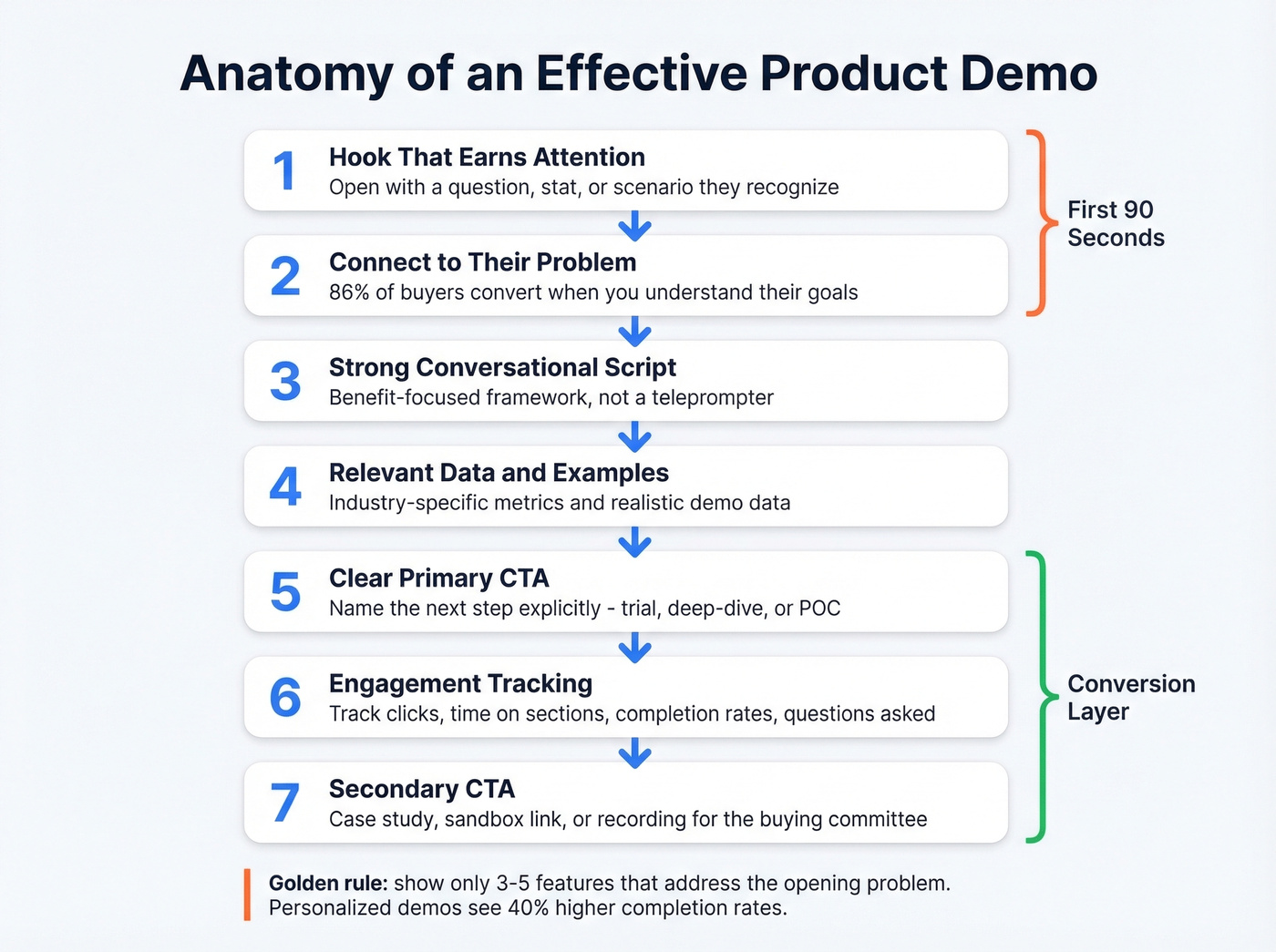
1. A hook that earns attention. Open with a question, a surprising stat, or a scenario the prospect recognizes. "What if your team could cut onboarding time by 60%?" beats "Welcome to our platform overview."
2. Connection to the prospect's problem. Within the first 90 seconds, name the specific pain point. 86% of buyers are more likely to convert when companies understand their goals. Generic intros signal you didn't do your homework.
3. A strong script. Not a word-for-word teleprompter - a concise, conversational framework that keeps you benefit-focused. More on this in the script templates section below.
4. Relevant data and examples. Use industry-specific metrics, realistic demo data (not "Acme Corp" placeholders), and case studies that mirror the prospect's situation. The prospect should see themselves in the demo, not your marketing team's imagination.
5. A clear primary CTA. What's the next step? A trial? A technical deep-dive? A POC? Name it explicitly. Don't end with "any questions?" and hope for the best.
6. Engagement tracking. For interactive demos, track clicks, time on sections, completion rates, and which features get the most attention. For live demos, note questions asked and objections raised - this data feeds your follow-up strategy.
7. A secondary CTA. Not everyone converts on the first pass. Offer a resource - a case study, a sandbox link, a recorded version they can share internally. The average buying committee has 6-10 people. Your champion needs ammunition.
What This Looks Like in Practice
Imagine you're demoing a project management tool to a VP of Engineering. You don't open with a feature tour of Gantt charts and Kanban boards. You open with: "Your team ships 12 releases a quarter across three time zones. Right now, how do you know if a sprint is off-track before standup?"
Then you show exactly one view - the real-time sprint health dashboard - with data that mirrors their team size and release cadence. You spend eight minutes on three features that map to the three pain points they raised in discovery. That's it. No sidebar tour, no settings walkthrough, no "and we also have..."
The golden rule: show only 3-5 features that directly address the opening problem. Feature overload is the single most common demo mistake. It signals you don't understand the buyer's priorities. Personalized demos see completion rates up to 40% higher than generic versions.
How to Plan and Build a Demo
Planning starts with four decisions: goal, audience, story, and format. Get these wrong and no amount of polish saves you.
Goal drives everything. In the first 3-5 minutes of a sales demo, you need to prove you're worth a deeper conversation. An onboarding demo needs to show time-to-value. A marketing demo needs to generate leads. Each has different success criteria, content depth, and CTAs.
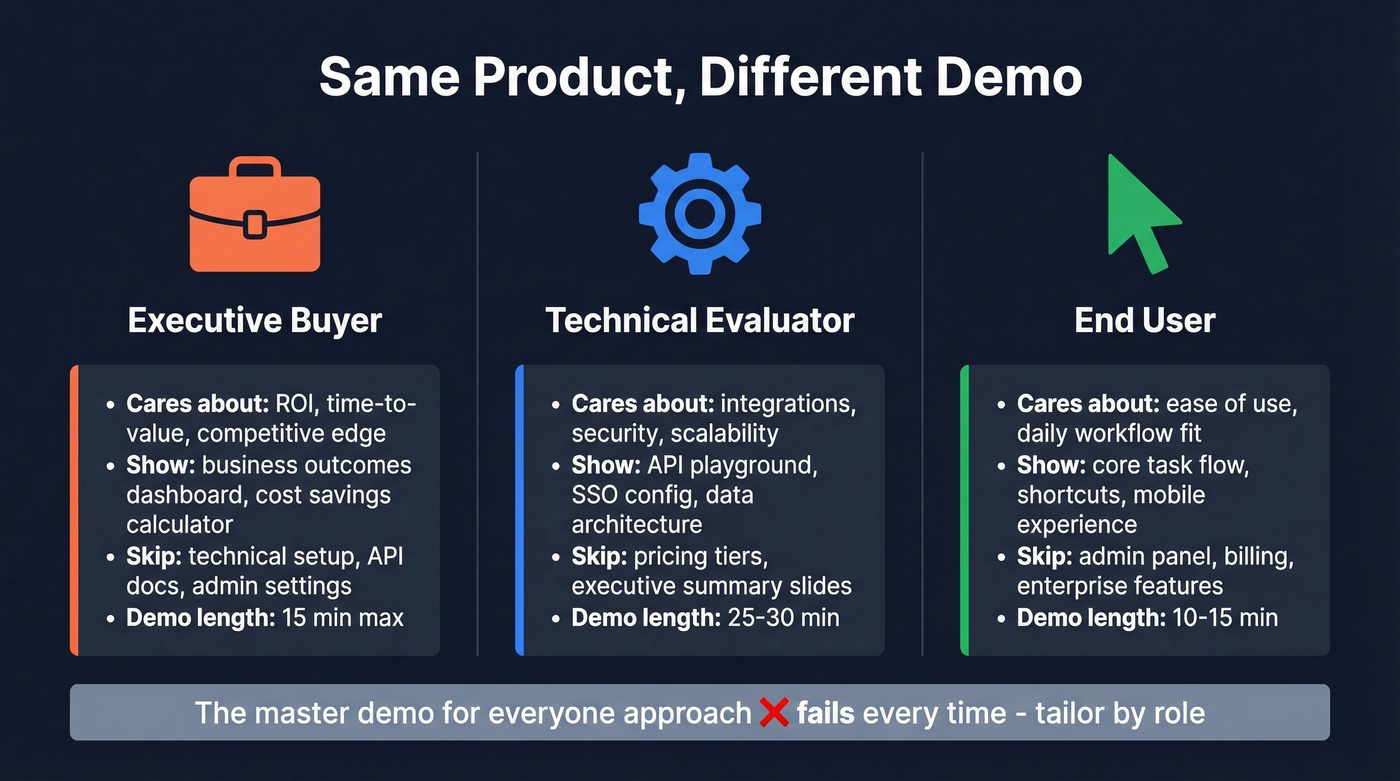
Audience determines what you show. Exec buyers want ROI and competitive differentiation. Technical evaluators want integrations, security, and scalability. End users want ease of use. The "master demo for everyone" approach fails every time.
Story follows the Problem -> Solution -> Value arc. Open with the pain, show how you solve it, quantify the outcome. Keep it to 3-5 features maximum.
Format depends on budget, speed, and use case:
| Demo Format | Cost Range | Speed to Create | Best For |
|---|---|---|---|
| Screen recording | Free-$12.50/mo | Minutes | Internal, async |
| Professional video | $10K-$50K+ | Weeks | Brand, awareness |
| Interactive platform | $500-$2K/mo | Hours | TOFU, sales, PLG |
| Custom in-house | Highest | Months | Full control |
| Sandbox | $500-$2.5K/mo | Days-weeks | POC, validation |
One decision many teams skip: ungating. 70% of the top 1% of interactive demos are ungated, and ungated demos show 10% higher engagement. Gate the follow-up meeting, not the demo itself.

Ungating gets more eyes on your demo. But none of that matters if you're building demos for prospects you can't actually reach. We've watched teams spend hours customizing a demo for a prospect whose email bounces and whose phone number is disconnected - wasted prep time on a deal that never had a chance to start. Before you build a single demo, verify your prospect list. Tools like Prospeo let you upload a CSV or run your list through an API and get 98% email accuracy plus verified mobile numbers, so every demo you build has a real audience on the other end.
If you're tightening your ICP before you build, start with an Ideal Customer Profile and align it to your B2B sales funnel so the demo matches the stage.

You just read that 86% of buyers convert when you understand their goals. That starts before the demo - with the right contacts. Prospeo's 30+ filters let you build prospect lists by buyer intent, tech stack, and job changes so every demo is hyper-relevant.
Stop demoing to the wrong people. Start with better data.
Demo Script Templates
Before writing any script, do the pre-work: research the prospect's challenges and industry context, pull CRM insights on what content they've viewed, and tailor by role. An exec gets an ROI-focused script. A technical evaluator gets integrations and security. Here are seven templates that cover every scenario.
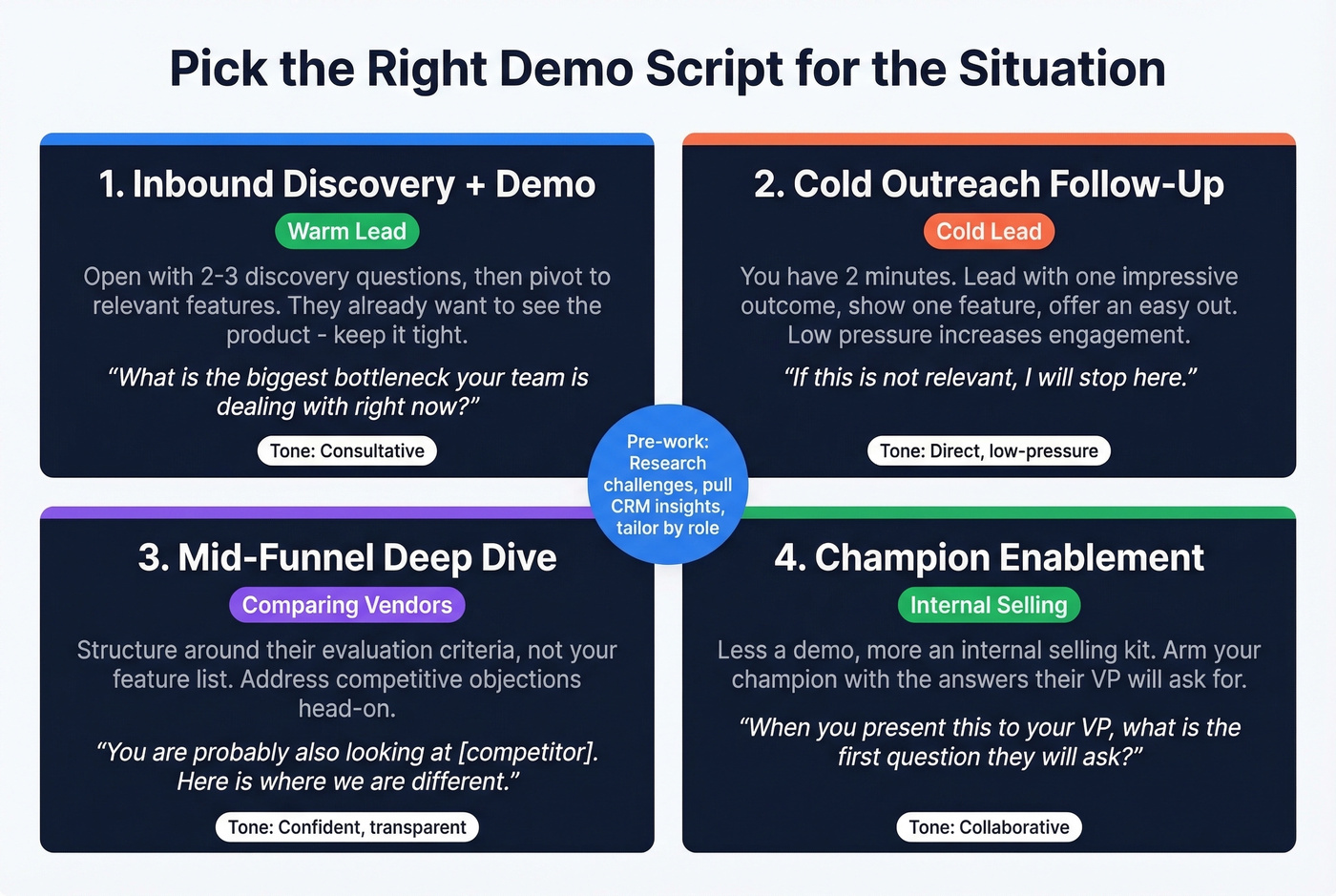
1. Inbound Discovery + Demo Combo. The prospect requested a demo, so they're warm. Open with 2-3 discovery questions to confirm their pain point, then pivot directly into the relevant features. Keep it tight - they already want to see the product.
Example opener: "Before I show you anything, I want to make sure I'm showing you the right things. What's the biggest bottleneck your team is dealing with right now?"
2. Cold Outreach Follow-Up. You've got two minutes to prove value before they mentally check out. Lead with the single most impressive outcome for their role, show one feature that delivers it, and offer an easy out: "If this isn't relevant, I'll stop here." That low-pressure framing actually increases engagement.
3. Mid-Funnel Deep Dive. The prospect is comparing vendors. Structure this around their evaluation criteria, not your feature list. Address competitive objections head-on: "You're probably also looking at [competitor]. Here's where we're different." Skip this template if the prospect hasn't confirmed they're evaluating alternatives - you'll plant doubt where there was none.
4. Champion Enablement. Your contact needs to sell internally. This one is less a demo script and more an internal selling kit. Here's a mini-dialogue to illustrate the framing:
You: "When you present this to your VP, what's the first question they'll ask?" Champion: "How fast can we get it running?" You: "Perfect. Let me show you the implementation timeline so you can walk them through it."
Focus on the metrics their boss cares about. Include a clear "why now" and "what happens if we don't act" narrative.
5. Technical Validation. Skip the marketing language entirely. Focus on integrations, security certifications, API documentation, scalability benchmarks, and data handling. The audience is engineers and IT - they'll tune out the moment you start talking about "transforming workflows."
Example opener: "I'm going to skip the slides and go straight into the API docs and our staging environment. Stop me anytime you want to dig into something."
6. Pre-Close Onboarding Preview. The deal is nearly done but the buyer is nervous about implementation. Walk through the first 30 days: setup, training, migration, and time-to-value milestones. This reduces last-minute cold feet.
7. Self-Serve Marketing Demo. Under 3 minutes, no narration required. Frame it as a guided tour with clear chapter titles and a CTA at the end. This is your website's 24/7 sales rep - it needs to work without context.
Every script should be buyer-focused, interactive where possible, and backed by product visuals rather than slides. The best demos feel like a conversation, not a presentation.
How to Deliver a Live Demo
Live demos are where deals are won or lost. The benchmark is 15-30 minutes - a demo isn't product training. Here's the structure that works.
Join five minutes early. Test your screen share, confirm the demo environment is stable, and have your backup plan ready - a recorded version or screenshots if the live product goes down. Then follow this flow:
- Quick intros (1-2 minutes). Name, role, agenda. Confirm the time you have.
- Discovery questions (3-5 minutes). Ask about their company, current challenges, and what gaps they're trying to fill. Even if you've done discovery before, re-confirm - priorities shift between calls.
- Pain-to-feature mapping (8-15 minutes). For each pain point they raised, show the specific feature that solves it. Narrate what you're doing as you do it. Move at a deliberate pace.
- Q&A (3-5 minutes). Don't rush this. The questions they ask tell you where they are in the buying process.
- Next steps (1-2 minutes). Name the specific next action and get agreement before you hang up.
Here's our honest take: if your average deal size is under $10K, you probably don't need live demos at all for first touch. An interactive demo on your website will qualify prospects better than a 30-minute call, and your reps can spend their live demo time on mid-funnel deals where personalization actually moves the needle. Save the live call for when the prospect has already self-educated and has specific questions - that's when a human conversation creates real value.
If you need a tighter delivery framework, borrow a few remote sales meeting tips and standardize your sales communication so every rep runs the same play.
Mistakes That Kill Demos
Going too fast. Your audience processes what they see with a slight delay. If they're thinking "What are you showing me?" you've already lost them. One practitioner on a Medium thread about demo delivery put it bluntly: "Slow down by 30% from what feels natural. You'll still be too fast."
Low enthusiasm. If you're not excited about the product, nobody else will be. Smile, vary your tone, drop in a relevant observation. Monotone kills demos faster than bugs do.
Not testing your flows. Last-minute deploys, untested data, broken integrations - nothing destroys credibility faster than a demo that crashes. Run through every scenario with the exact data you'll use. Freeze the environment before the call.
How to Measure Demo Performance
This is where most teams drop the ball. They run demos, track "demos completed," and call it a day. That's like measuring marketing by "emails sent."
Inbound Demo Funnel Benchmarks
If you're running inbound demo requests, here are the 2026 benchmarks from RevenueHero's dataset:
| Metric | Healthy | Great | Elite |
|---|---|---|---|
| Lead qualification rate | 60-70% | 70-80% | 90%+ |
| Demo-to-meeting conversion | 50-60% | 60-70% | 70%+ |
These numbers vary dramatically by segment. Real estate software companies hit 93.84% qualification rates. Healthcare software sits at 52.11%. If you're below the "healthy" threshold for your industry, tighten your ICP targeting and embed scheduling directly into the demo request flow - don't make prospects wait for a follow-up email.
Interactive Demo Benchmarks
For self-serve interactive demos, Arcade's analysis of 37,000 demos gives us the clearest benchmarks available:
| Metric | Average | Top 25% | Top 1% |
|---|---|---|---|
| Play rate | 38% | 63% | 98% |
| Completion rate | 58% | 74% | 100% |
| Final CTR | 8% | 16% | 67% |
| Time spent | 0.32 min | 0.52 min | - |
The optimization levers are clear. Adding an intro chapter increases play rate by 72%. The best-performing demos average 12 steps and 9 product images - and the top 1% use 16% fewer steps than the median. Shorter and more visual wins.
89% of visitors interact with a demo on a dedicated landing page, and inbound leads are 70% more likely to sign up for a trial when they view a demo first. Prospects who view an interactive demo are 6x more likely to convert, and demo-to-opportunity conversion can be 3x higher than isolated product pages. One team highlighted in Navattic's report generates 100+ leads per month from the tour alone.
If you're building a measurement system, treat demos like a funnel and track funnel metrics alongside your sales conversion rate.
Engagement-Triggered Sales Plays
Here's the thing: the most valuable part of demo analytics isn't the dashboard - it's what you do with the signals. Four plays that turn engagement data into pipeline.
3+ views in 48 hours -> SDR outreach. Someone is actively evaluating. Don't wait for them to fill out a form. Reach out with a personalized message referencing what they spent time on.
5+ unique viewers from one account -> AE expand. You've penetrated the buying committee. The average buying committee has 6-10 people, and teams that track multi-viewer engagement close deals 33% faster. Time to loop in champion enablement.
Closed-lost contact revisits the demo -> re-engage. Priorities change, budgets reset, champions switch jobs. Champions change roles or lose influence in 20% of active deals - which is exactly why closed-lost revisits are worth watching. A closed-lost prospect who comes back to your demo is a warmer lead than most of your inbound.
High time on integrations section -> send technical one-pager + loop in SE. This prospect is in evaluation mode and cares about how your product fits their stack. Don't make them ask - proactively send the technical details.
Beyond engagement signals, track your KPIs across three buckets: engagement metrics like completion rate, time per step, repeat visits, and quit rate; sales metrics like demo-to-deal, time to close, and post-demo revenue growth; and operations metrics like platform costs, load time, and uptime. Context matters - repeat visits can signal genuine interest or confusion with your UX. Look at the pattern, not the number in isolation.
Demo Tools Compared
The tool market breaks into four categories: video recording, video editing/hosting, interactive demo platforms, and sandbox environments. Here's what's worth evaluating.
Video Tools
| Tool | Best For | Starting Price |
|---|---|---|
| Loom | Async video demos | Free / $12.50/mo |
| Clipchamp | Quick edits | Free / ~$12/mo |
| Vidyard | Sales video tracking | Free / paid from ~$15-$30/mo |
| Vyond | Explainer videos | $49/mo |
Interactive Demo Platforms
| Tool | Best For | Starting Price |
|---|---|---|
| Navattic | TOFU website tours | ~$500-$2,000+/mo |
| Storylane | No-code product tours | Free plan / ~$40-$150+/mo |
| Arcade | PLG/social walkthroughs | Free plan / ~$30-$100+/mo |
| Consensus | Enterprise personalization | ~$1,000-$3,000/mo |
| Walnut | Sales demo personalization | ~$500-$2,000+/mo |
| Reprise | Enterprise demo environments | Custom pricing |
| Demostack | Full demo cloning | Custom pricing |
Sandbox Environments
| Tool | Best For | Starting Price |
|---|---|---|
| TestBox | Live product POCs | ~$1,000-$3,000+/mo |
| CloudShare | Training + POC environments | ~$500-$2,000+/mo |
The consensus on r/SalesOperations from practitioners who've tested multiple tools: Navattic and Storylane are strong for top-of-funnel website tours with easy no-code embedding, though some users note Navattic's analytics feel basic compared to Consensus. Arcade excels at lightweight, story-like walkthroughs for PLG and social but feels more like a marketing tool than a CRM-connected sales motion. Consensus wins on personalization by viewer type and detailed click tracking, with the added benefit of deflecting early-stage SE time by letting prospects self-educate first. Storylane's weakness, per multiple practitioners, is limited sales handoff data - great for marketing, less useful for reps who need to know exactly what a prospect engaged with.
Every dollar spent on demo tooling is wasted if the prospect's email bounces or their phone number is disconnected. Verified contact data is the foundation the rest of the stack depends on - something worth sorting out before you commit budget to any platform on this list. If you're evaluating vendors, compare options in our guide to data enrichment services and keep a shortlist of SDR tools that fit your motion.
The average buying committee has 6-10 people, and your champion needs to loop them all in. Prospeo gives you verified emails and direct dials for every stakeholder - 98% email accuracy, 125M+ mobile numbers, refreshed every 7 days.
Reach the full buying committee, not just the one person who showed up.
FAQ
How long should a product demo be?
15-30 minutes for live demos; under 3 minutes for self-serve interactive or video demos. Anything longer and you're doing product training, not selling. The top 1% of interactive demos average 12 steps and finish in under a minute.
Should I gate my interactive demo?
No. 70% of top-performing interactive demos are ungated, and ungated demos show 10% higher engagement. Gate the follow-up meeting or trial signup, not the demo itself.
How many features should I show?
Three to five, maximum. Each should directly address a specific pain point the prospect raised in discovery. Feature overload signals you don't understand the buyer's priorities - and personalized demos see 40% higher completion rates.
What's a good demo-to-meeting conversion rate?
50-60% is healthy, 60-70% is strong, and 70%+ is elite based on RevenueHero's 2026 benchmarks. Below 50% means you should tighten ICP targeting and embed scheduling directly into your demo request flow.
How do I make sure my demo reaches the right prospect?
Verify contact data before building the demo. Bounced emails and disconnected numbers waste hours of prep time. Run your list through a verification tool before investing in customization so every demo you build has a real audience on the other end.