

Product Demo Videos: How to Create Demos That Actually Drive Revenue
A prospect asks for a demo, you send a link, and... nothing happens. No reply, no meeting booked, no trial started. The uncomfortable truth is most product demo videos are built like feature tours, so buyers bounce the second they don't see their problem reflected back at them.
94% of customers say seeing product videos during the sales process builds confidence in their purchase decision. And 57% of buyers now make purchase decisions without ever talking to sales. Your demo video isn't "marketing content" anymore - it's a core part of the sales motion, and if it's weak, deals stall silently.
What You Need (Quick Version)
Most demos fail because they're about the product instead of about the buyer's story. Fix that, and the rest - editing, polish, fancy motion graphics - becomes optional.
Here's the stack that works for most teams:
- Record fast with Loom for quick async screen recordings
- Edit clean with Descript, where you edit the transcript and the video follows
- Go interactive with Supademo or Arcade for click-through demos and step-level analytics
- Verify before you send with Prospeo, which checks emails in real time so your demo actually reaches the inbox
We've run dozens of tool bake-offs, and the winners are almost always the ones that reduce cycle time: script, record, ship, measure, update.
What Is a Product Demo Video?
A product demo video is a short, buyer-facing walkthrough that shows how a product works in a real workflow so someone can decide whether it's worth buying. That definition applies equally to SaaS, where you show the workflow, and e-commerce, where you show the product in use, the setup experience, and the outcomes a buyer can expect.
It's not a brand video, and it's not a feature reel. A good demo shifts the buyer from "what does this do?" to "how would this work for us?" in 60-90 seconds, then gives them a clear next step. Demos work across wildly different price points, too. Consensus analyzed demos ranging from a $20 Rust-Oleum consumer product to multimillion-dollar Siemens industrial turbines, and the pattern holds: when buyers can see the product in context, they move forward faster.
Why Demo Videos Drive Revenue
Buyers want to self-educate. TrustRadius data shows 87% want to self-serve part or all of the buying journey, and that's exactly what a good demo enables. Inbound leads who view an interactive demo are 70% more likely to sign up, and prospects who engage with one get onto sales calls two weeks faster than those who don't.
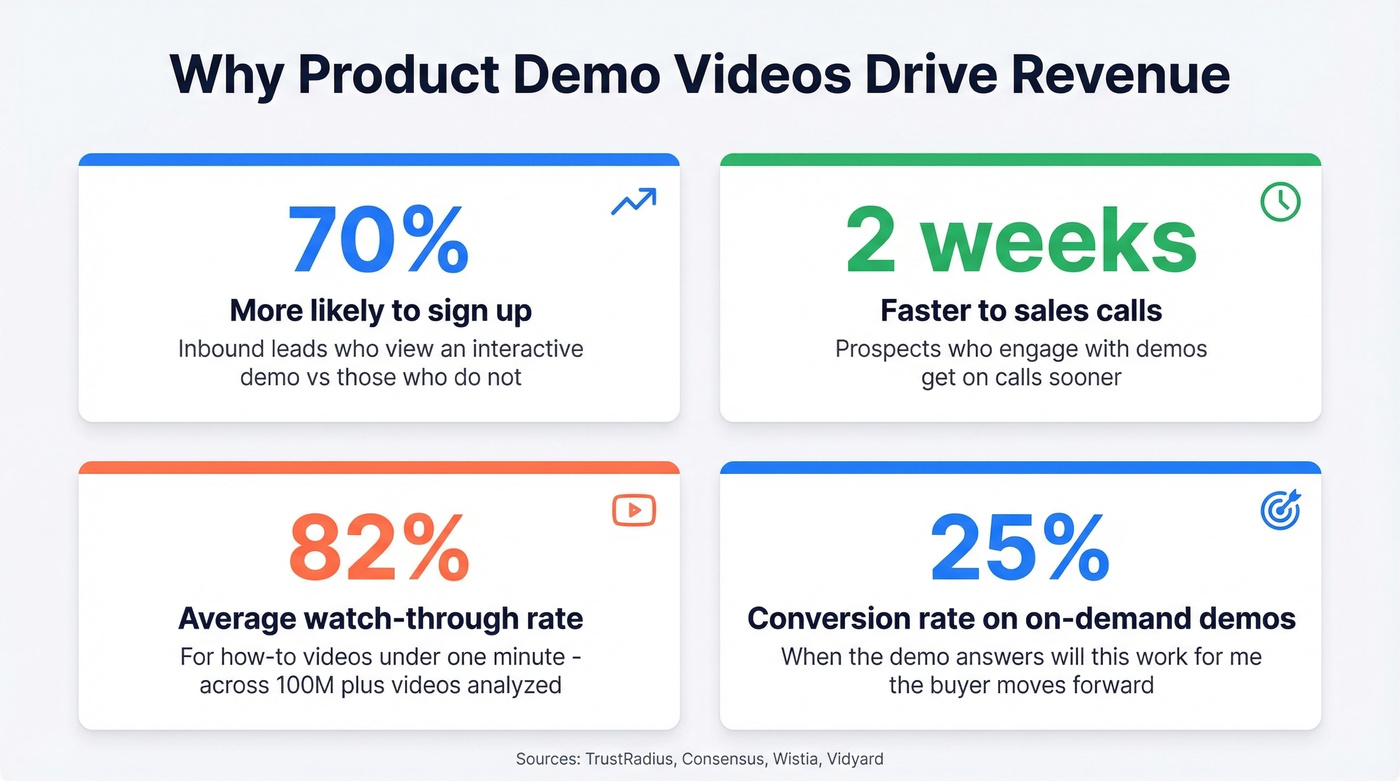
Short demos perform better than teams expect. Across 100M+ videos analyzed, viewers watch 82% of a how-to video under one minute. That's a massive signal: tight, practical walkthroughs get finished.
On the conversion side, on-demand demos can be monsters. One company shared an on-demand demo with a 25% conversion rate, and that tracks with what we see in practice - when the demo answers the buyer's "will this work for me?" question, it pulls meetings forward. Teams that have committed to using video for sales consistently report shorter deal cycles and higher win rates because prospects arrive at live calls already educated. The boring CRO answer matters too: adding a demo video to a landing page typically lifts conversion 10-20%. Not because video is magic - because it reduces uncertainty.
The barrier to producing these keeps dropping. AI-assisted video creation jumped from 18% to 41% year-over-year, and captions usage is up 572% since 2021. You no longer need a production team to ship something effective.
Types of Demo Videos
There are two useful ways to classify demos: format and funnel job. Here's a practical taxonomy combining length guidance from Atlassian's demo format breakdown with creative options from What a Story's production guide.
Demo Formats and Lengths
| Type | Typical Length | What It Is | When It Works |
|---|---|---|---|
| Intro demo | 2-3 min | High-level value prop + core workflow | Website, outbound |
| Walkthrough demo | 15-30 min | Full workflow deep dive | Replacing live demos |
| Custom demo video | 5-15+ min | Tailored to one account | Enterprise deals |
| Live demo | 30-60 min | Video call demo | Complex evaluations |
| Animated UI demo | 60-120 sec | Motion-designed UI walkthrough | Awareness, launches |
| Live-action demo | 60-120 sec | Human presenter + product | Trust, category creation |
| Hybrid demo | 60-180 sec | Mix of UI capture + live-action | Mid-funnel clarity |
| Launch demo | 30-90 sec | New feature reveal | Existing users |
| Teaser demo | 15-45 sec | Curiosity hook, no full reveal | Ads, social |
| App demo | 60-180 sec | Mobile-optimized walkthrough | Mobile-first products |
Funnel-Stage Mapping
| Funnel Stage | Best Demo Types | Goal |
|---|---|---|
| Awareness | Teaser, animated UI, live-action | Create interest fast |
| Consideration | Intro demo, hybrid, app demo | Explain workflow fit |
| Decision | Walkthrough, interactive, custom | Prove capability + ROI |
| Purchase | Custom, live demo, onboarding preview | De-risk adoption |
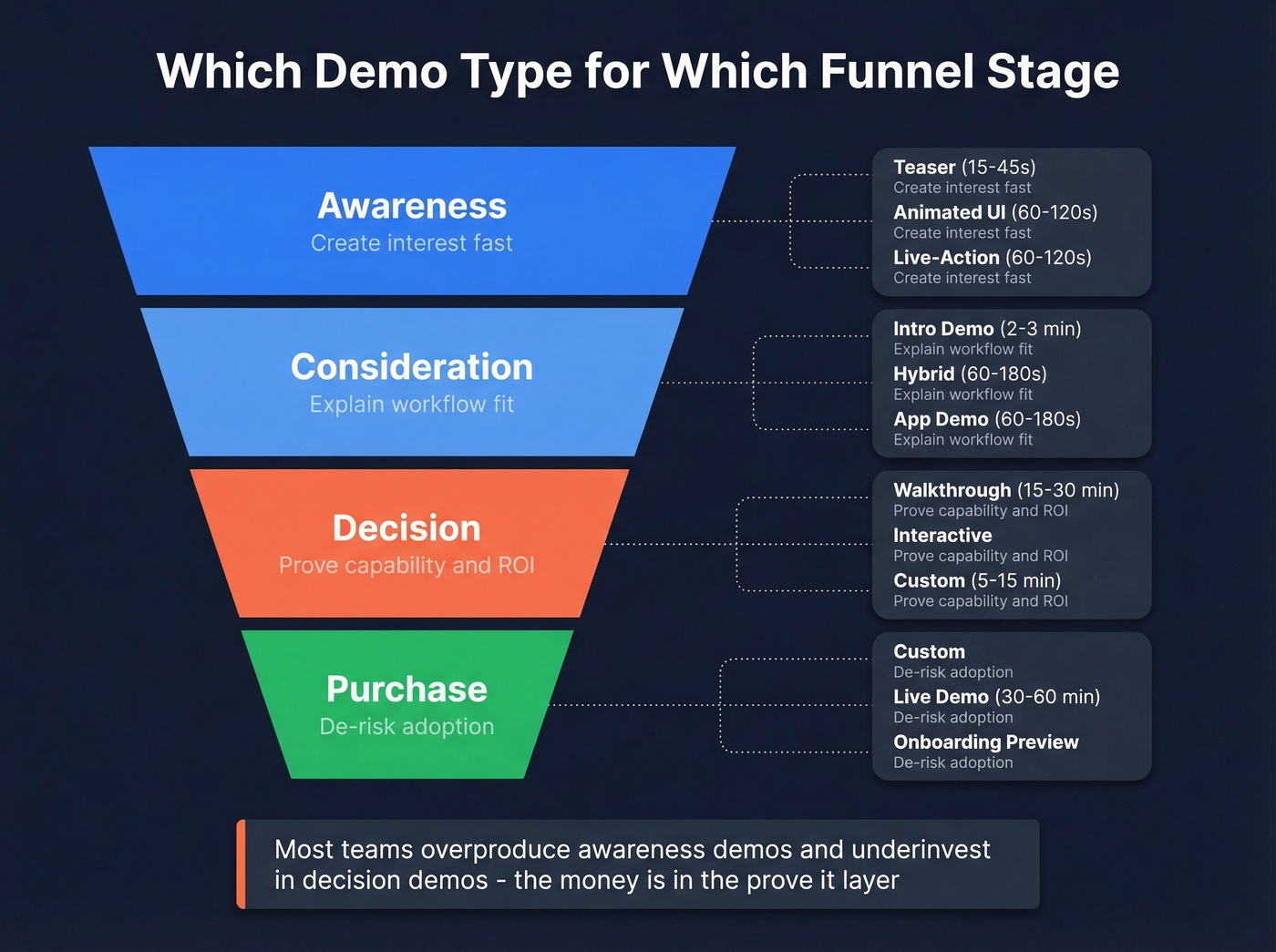
Here's the thing: most teams overproduce awareness demos and underinvest in decision demos. The money's in the "prove it" layer - the walkthrough that answers "will this actually work in our stack?" Nobody ever lost a deal because their teaser wasn't cinematic enough.
How to Script Your Demo
The 5-Part Script Framework
You've got 3-5 minutes to prove a sales demo is worth a deeper conversation, which means every second of your script needs to earn the next one. The cleanest structure we've seen for on-demand demos follows five beats: set the agenda, tell the story, address competition, reveal solution, CTA. It's simple, and it prevents the #1 demo failure mode: wandering around the UI hoping the buyer "gets it."
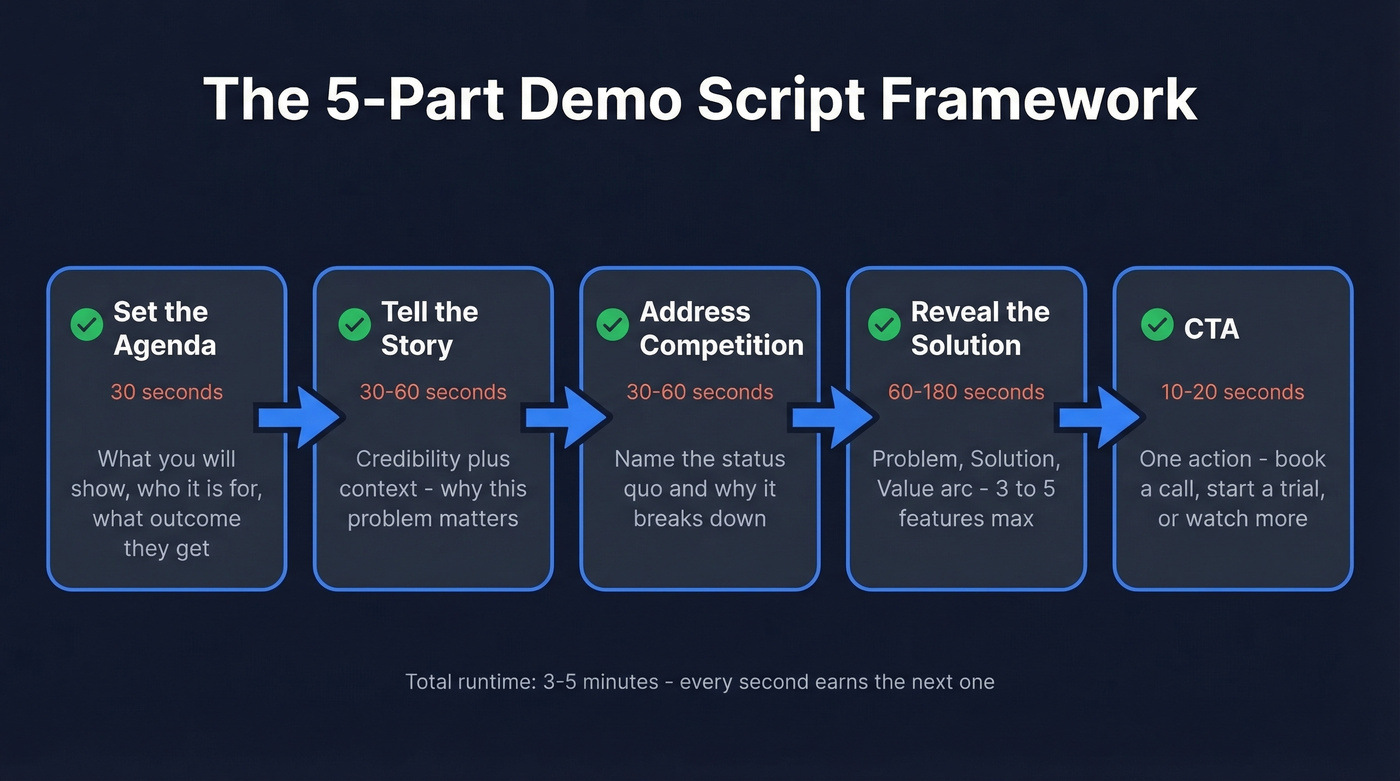
- Set the agenda (30 seconds). What you'll show, who it's for, and what outcome they'll get. Use a "power of three" structure to keep it tight.
- Tell the story (30-60 seconds). Credibility plus context. Why this problem matters, and why you're qualified to solve it.
- Address the competition (30-60 seconds). Not a vendor smackdown - just name the status quo and why it breaks down.
- Reveal the solution (60-180 seconds). The demo itself. Follow a Problem, Solution, Value arc and show 3-5 features max, each tied directly to the opening problem.
- CTA (10-20 seconds). One action. Book a call, start a trial, or watch the deeper walkthrough.
We've tested scripts that "feel too structured" against scripts that "feel natural." The structured ones win because they respect attention and make the value legible in a single pass.
Scripts for Every Sales Scenario
Seven demo script formats map cleanly to real sales moments:
- Inbound discovery + demo combo (8-12 min). Confirm pain, then show one workflow that solves it.
- Cold follow-up value preview (1-2 min). A quick "here's what you'd get" with an easy opt-out.
- Mid-funnel deep dive (10-20 min). Comparison-stage demo that answers "why you vs. them?"
- Champion enablement (3-6 min). A shareable internal pitch your champion can forward to the buying committee.
- Technical validation (10-25 min). Integrations, security, data model, admin controls.
- Pre-close onboarding preview (5-10 min). Show the first 30 days so adoption feels inevitable.
- Self-serve marketing demo (under 3 min). Tight narrative, one workflow, one CTA.
You don't need seven videos on day one. Start with one self-serve marketing demo and one mid-funnel deep dive, then iterate based on where deals actually stall.

You just built a killer demo video. Now make sure it actually lands. Prospeo verifies emails in real time with 98% accuracy, so your personalized demo links reach decision-makers - not dead inboxes. At $0.01 per email, bad data is no longer an excuse for stalled deals.
Stop sending demo videos into the void. Verify every email first.
Great Demo Checklist
This checklist forces you to earn attention and end with action. Treat these as requirements, not suggestions.
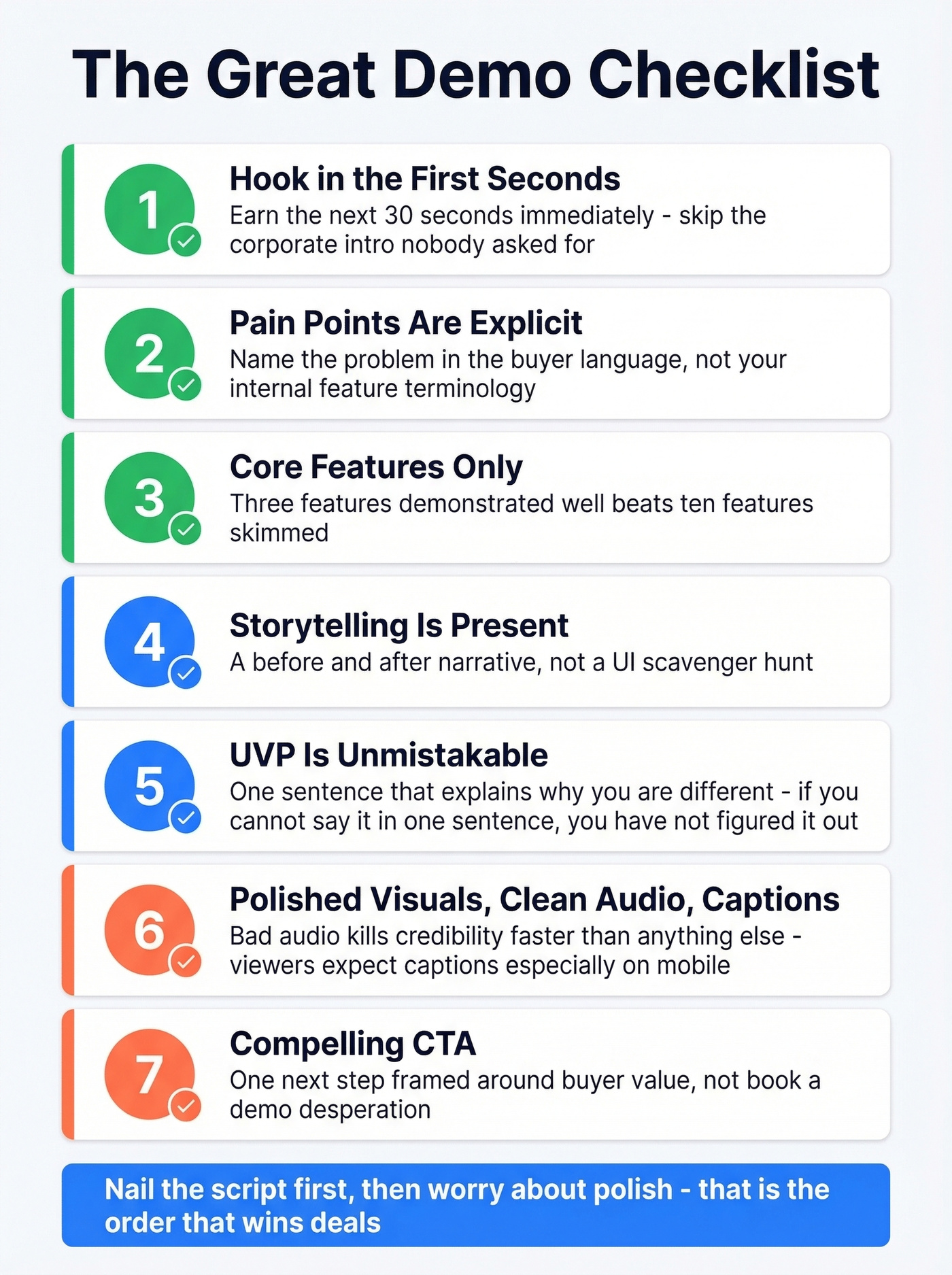
- Hook in the first seconds. You earn the next 30 seconds immediately or you lose the viewer. The most common demo failure isn't production quality - it's opening with a corporate intro nobody asked for.
- Pain points are explicit. Name the problem in the buyer's language, not your internal feature terminology. If the viewer doesn't hear their pain in the first minute, they're gone. (If you need examples, start with these pain points.)
- Core features only. Show the minimum set that proves the outcome. Three features demonstrated well beats ten features skimmed.
- Storytelling is present. A before/after narrative, not a UI scavenger hunt.
- UVP is unmistakable. One sentence that explains why you're different. If you can't say it in one sentence, you haven't figured it out yet.
- Polished visuals, clean audio, and captions. Bad audio kills credibility faster than anything else. With captions usage up 572% since 2021, viewers expect them - especially on mobile and in open offices where sound is off by default.
- Compelling CTA. One next step framed around buyer value, not "book a demo" desperation.
I've watched teams spend weeks animating perfect UI transitions while the hook and CTA were basically missing. That's backwards. Nail the script first, then worry about polish.
Best Tools for Creating Product Demo Videos in 2026
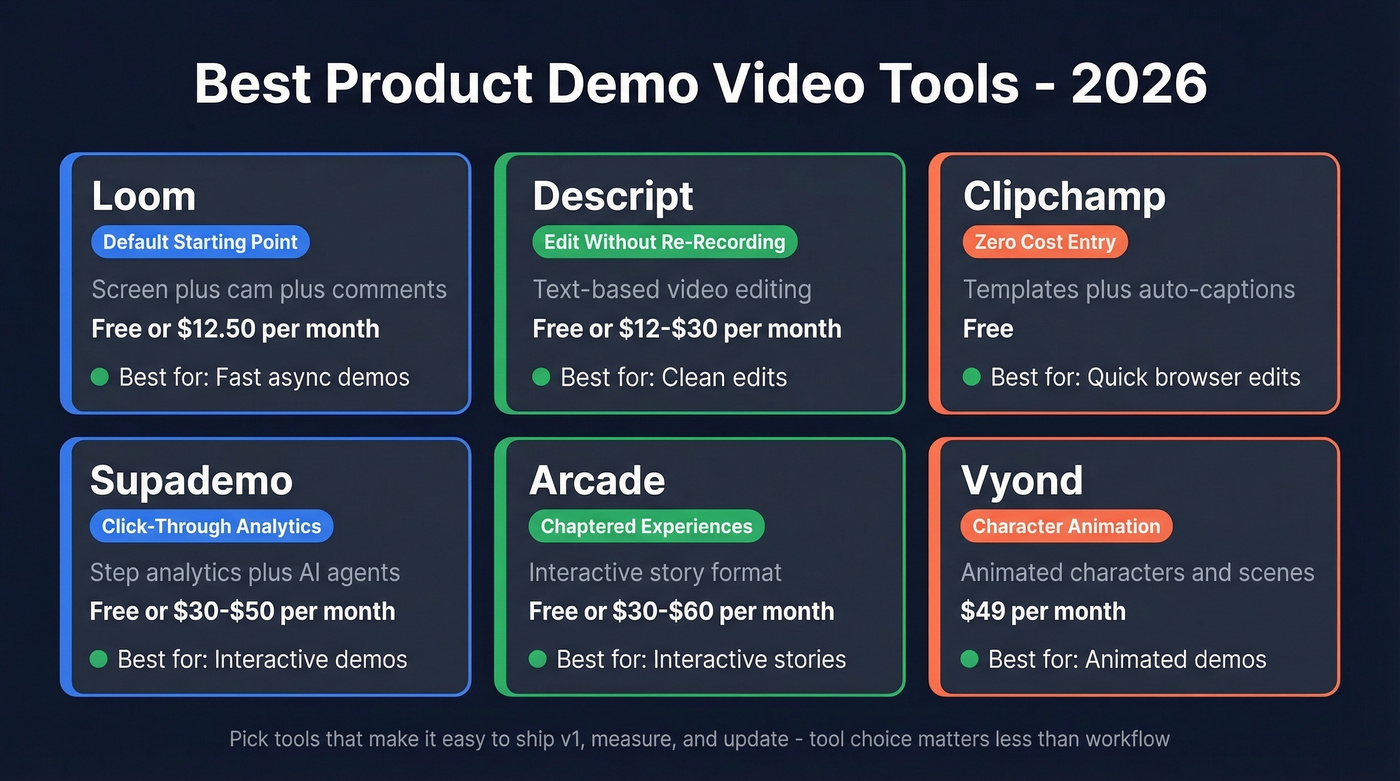
Tool choice matters less than workflow. Pick tools that make it easy to ship v1, measure, and update - because your UI will change and your messaging will evolve.
Quick Comparison
| Tool | Best For | Key Feature | Starting Price |
|---|---|---|---|
| Loom | Fast async demos | Screen + cam + comments | $0 / $12.50/mo |
| Descript | Clean edits | Text-based editing | $0 / ~$12-$30/mo |
| Clipchamp | Quick browser edits | Templates + auto-captions | $0 |
| Supademo | Interactive demos | Step analytics + AI agents | $0 / ~$30-$50/mo |
| Arcade | Interactive stories | Chaptered experiences | $0 / ~$30-$60/mo |
| Vyond | Animated demos | Characters and scenes | $49/mo |
Loom - The Default Starting Point
Loom is the obvious default for 80% of SaaS teams because it removes friction: hit record, talk through the workflow, ship the link. Free plan available, paid starts at $12.50/mo billed annually. The underrated part is collaboration - viewers can leave timestamped comments and reactions directly on the shared link, which turns a one-way demo into a lightweight conversation. If you're stuck debating tools, start here and move on when you've earned the complexity.

Descript - Skip This If You Never Re-Record
Edit the transcript, and the video follows. That's the entire pitch, and it's the reason Descript exists in your stack. Free tier available, paid plans start around $12-$30/month. For teams doing weekly releases, Descript saves you from re-recording everything just to remove three awkward sentences or update one screen. The re-recording cycle is the single biggest pain point practitioners complain about in demo production - the consensus on r/sales and r/SaaS is that re-recording kills momentum faster than anything else, and Descript's text-based editing is the cleanest fix.
Clipchamp - The "Good Enough" Editor
Browser-based, fast, and built for non-editors. Free for basics, and premium features often come bundled with Microsoft 365. Clipchamp's auto-caption generation is particularly useful - drop in your screen recording, generate subtitles in multiple languages, and export. Use it for quick cuts, captions, and lightweight polish when you don't want to learn a full editing suite.
Supademo - When Prospects Need to Explore
Supademo is for interactive demos you drop into a landing page or outbound sequence. It supports tracking sessions, dropoffs, and individual viewers, and their AI Demo Agent can guide prospects through the experience dynamically. Free tier covers basic use; paid plans start around $30-$50/month and scale with seats and volume. Worth it when you need prospects to explore, not just watch.
Arcade - The Data-Backed Pick
Here's what makes Arcade interesting: they publish benchmarks from a 37,000-demo dataset, which is rare and genuinely useful. Best-performing demos average about 12 steps and 9 product images - a concrete target you can design around. Their "intro chapter" feature increases play rate by 72%, and top-quartile demos hit 16% final CTR. Free tier available, paid plans start around $30-$60/month per creator. Storylane, Walnut, and Navattic also compete in the interactive demo space - expect $500-$2,000+/mo at scale. (If you're comparing platforms, see Storylane alternatives.)
Vyond - When You Shouldn't Screen-Record
Sometimes screen recording is the wrong move. If your product is conceptual, your UI changes weekly, or you need an animated explainer that survives redesigns, Vyond at $49/mo is the pick. It's not a demo replacement for SaaS - it's a strong companion for awareness-stage storytelling where characters and scenarios communicate value better than a cursor clicking through menus.
How Much Do Demo Videos Cost?
The cost question is usually a proxy for "do we need to hire an agency?" Most teams don't.
| Approach | What You Get | Typical Cost |
|---|---|---|
| DIY tools | Record + basic edit | $0-$50/mo |
| Interactive platforms | Click-through + analytics | $500-$2,000+/mo |
| Pro production | High polish, slow updates | $2,500-$10,000/min |
DIY means Loom and Clipchamp plus a lightweight editor if you want transcript-based edits. Interactive platforms include Supademo, Arcade, Storylane, Navattic, and Walnut. Professional production is where budgets get real: $10,000-$50,000+ per project is normal, and $2,500-$10,000 per finished minute is a common range for high-end work.
Look, you don't need a $50K budget. You need a script and Loom. Upgrade when you've proven the messaging works and distribution is dialed in.
Interactive Demos vs. Video Demos
Interactive demos aren't "better video." They're a different buyer experience: the prospect clicks, explores, and self-qualifies. Video is still the fastest way to tell a story at the top of funnel.
What Actually Changes
| Dimension | Video Demo | Interactive Demo |
|---|---|---|
| Maintenance | Re-record to update | Swap screens/steps |
| Personalization | Doesn't scale | Tokens + branching paths |
| Analytics | Views + drop-off | Step-level intent signals |
| Buyer experience | Passive watching | Active exploration |
Across 37,000 interactive demos, Arcade's benchmarks show a 38% average play rate, 58% completion, and 8% final CTR. Top 25% demos hit 16% CTR, and the top 1% reaches 67%. Two details worth stealing: adding an intro chapter increases play rate by 72%, and interactive demos drive 7.2x more engagement than video in the same dataset.
When to Use Which
Use video for top-of-funnel awareness: teasers, intros, "here's the workflow in 90 seconds." Video is unbeatable when you need to set a narrative quickly and emotionally.
Use interactive for mid-funnel consideration. Let buyers explore the parts they care about and capture intent signals that tell sales which features actually matter to that account.
Use both for enterprise deals: video to set the narrative, interactive to let stakeholders self-serve, and a custom demo for the final mile. In our experience, the interactive demo doesn't win because it's "more engaging" - it wins because it gives sales a clean signal about which features the buyer actually touched. That intent data is worth more than a polished video nobody clicks through.
Five Mistakes That Kill Demos
Feature dumping. Open with the problem, then show the smallest workflow that proves value. Follow a Problem, Solution, Value arc and cap it at 3-5 features. If you're showing more than five features, you haven't decided what your demo is about.
Outdated UI. About 30% of companies struggle with outdated demos, and it's a credibility killer when buttons don't match reality. Design your demo around stable workflows, not pixel-perfect UI tours. Interactive platforms help here because you swap screenshots instead of re-recording.
Generic demos with zero personalization. The "one demo for everyone" approach is why demos feel irrelevant to buyers. Create 2-3 variants by persona or use case, then let sales add a 20-second personalized intro. Even minimal personalization - mentioning the prospect's industry or company size - changes the dynamic completely. (This gets easier when you’ve done real B2B buyer persona research.)
No CTA, or a buried CTA. Place the CTA where attention is still high. Lead gen forms convert 58% when placed in the third quarter of a 1-3 minute video. Waiting until the final frame is often too late because drop-off accelerates in the last 15 seconds.
Bad prospect data and weak distribution. This one frustrates us more than anything because we see it constantly: teams spend weeks building a great demo, then send it to an unverified list and wonder why nobody responds. Bounced emails burn your sender reputation and waste the asset you worked so hard to create. (If deliverability is slipping, start with these email deliverability factors.)
How to Distribute Your Demo
Distribution matters more than production. A beautifully produced demo nobody sees is just internal entertainment.
Dedicated landing pages are your best default. Visitors interact with demos 89% of the time on a dedicated page versus 55% when the demo is embedded into an existing page. That's a massive gap, and it argues for giving your demo its own URL rather than burying it halfway down a feature page.
Product pages work well for consideration-stage buyers who are already comparing options. Homepage hero placement only makes sense if your product is easy to understand quickly - otherwise you'll confuse top-of-funnel traffic with a demo that assumes too much context.
For email outreach, send the demo to a tight segment, not your whole database. Pair it with one sentence of context and one CTA. Reps should send personalized Loom intros that point to the "real" demo asset, creating a warm handoff between the human and the polished walkthrough. Embedding video for the sales process this way - async demo first, live call second - lets reps spend their time on prospects who've already shown intent. (If you need a structure, use a proven cold email cadence.)
What to skip: posting a demo once and hoping it "does numbers." Sending the same demo to every persona. Hiding the CTA behind three clicks.
Let's be honest about one thing most demo guides ignore: before you send that demo to 200 prospects, verify the list. Bounced emails burn your sender reputation and waste the demo you spent weeks building. Prospeo verifies emails in real time with 98% accuracy, and the free tier starts at $0.01/email - there's no reason to send a demo to an unverified list. (If you want a step-by-step workflow, see how to confirm an email address.)
FAQ
How long should a demo video be?
Aim for 60-90 seconds for teasers and intros, 2-3 minutes for website demos, and 15-30 minutes for detailed walkthroughs. Viewers watch 82% of how-to videos under one minute, so shorter is almost always better for top-of-funnel content.
How much does a professional demo cost?
DIY with Loom or Clipchamp runs free to $50/mo. Interactive platforms cost $500-$2,000+/mo. Professional production ranges from $2,500-$10,000 per finished minute. Start DIY, then upgrade once distribution and messaging are proven.
What's the difference between interactive and video demos?
Video demos are passive, watch-only assets. Interactive demos let prospects click through a guided product experience and deliver 7.2x more engagement. Best-performing interactive demos average about 12 steps and 9 product images.
Do I need a script for my demo?
Yes - without one, demos turn into rambling feature tours. Use a Problem, Solution, Value narrative, keep the agenda to 30 seconds, and limit yourself to 3-5 features tied directly to the buyer's pain.
How do I get my demo in front of the right prospects?
Put it on a dedicated landing page, include it in outbound sequences, and arm reps with personalized Loom intros. Verify your prospect list before sending - bounced emails waste your demo and hurt deliverability.
57% of buyers decide without talking to sales - which means your async demo video IS the pitch. Pair it with Prospeo's 143M+ verified emails and 125M+ direct dials to make sure the right prospects actually see it. Teams using Prospeo book 35% more meetings than Apollo users.
Great demos deserve verified contacts. Find them in seconds.
A great product demo video doesn't "go viral." It gets watched by the right accounts, at the right moment, and it makes the next step feel obvious. (To tighten the full motion, map it to a B2B sales funnel and track the right sales cycle metrics.)