

How to Write a Product Introduction Email to Client That Gets Replies
The average cold email reply rate is 5.8%. That's from a Belkins study of 16.5 million emails.
Most advice out there covers "business introduction emails" - how to introduce yourself or your company. A product introduction email to a client has a different job entirely: make a specific person care about a specific product in under 90 words. That's a copywriting problem, not a networking one, and it demands a different playbook.
The Essentials
Before you write anything, nail these:
- Under 90 words for cold prospects, under 150 for existing clients
- One feature + one result - skip the feature dump
- Soft CTA - "Worth a look?" beats "Can we schedule 30 minutes?" (more email call to action examples here)
- 6-8 sentences hit a 6.9% reply rate in the 16.5M-email dataset
- Send on Thursday (6.87% reply rate vs 5.29% on Monday) - see more data on the best time to send cold emails
- Subject line: 6-8 words, specific to the recipient (use these email subject line examples)
- Verify every address before sending - bounced emails torch your domain (see email bounce rate benchmarks)
What Bad Product Emails Look Like
A rep on r/sales posted their intro email asking for feedback. They sold 50+ product lines, and the email showed it: a multi-paragraph pitch covering everything they offered, an attached PDF brochure, and a hard ask for an in-person visit "next week." The thread roasted them, and rightfully so.
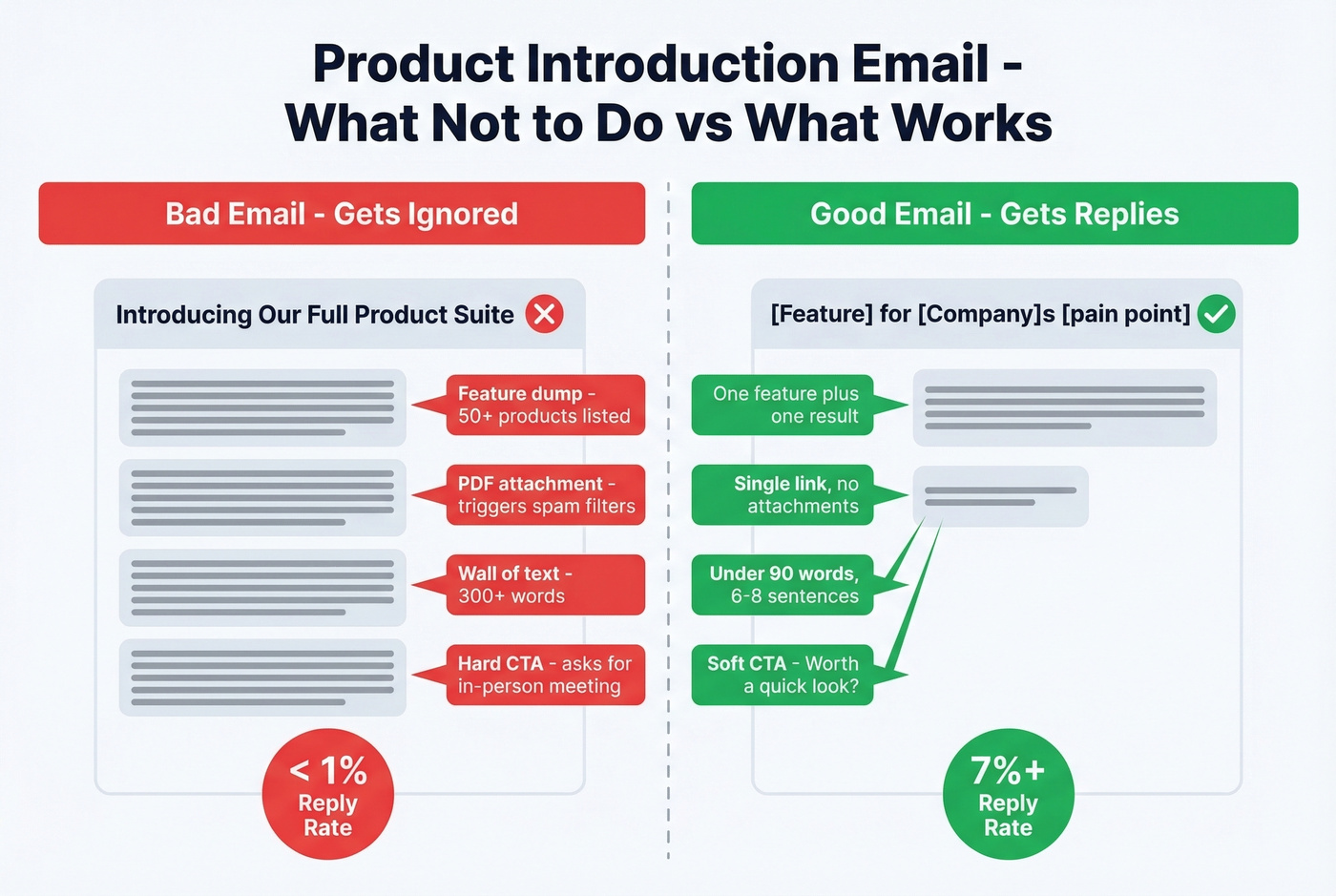
What went wrong:
- Feature dump - listing dozens of product categories overwhelms the reader. Pick one.
- PDF attachment - triggers spam filters and signals "this is marketing."
- Length - if your email looks like homework, it's getting archived.
- Pushy CTA - asking for an in-person meeting on a first touch is a big ask from a stranger.
Copy Rules That Drive Replies
Stop writing long emails. The best product introduction emails are under 90 words. If you can't explain what your product does for this specific person in that space, you don't understand your product well enough.
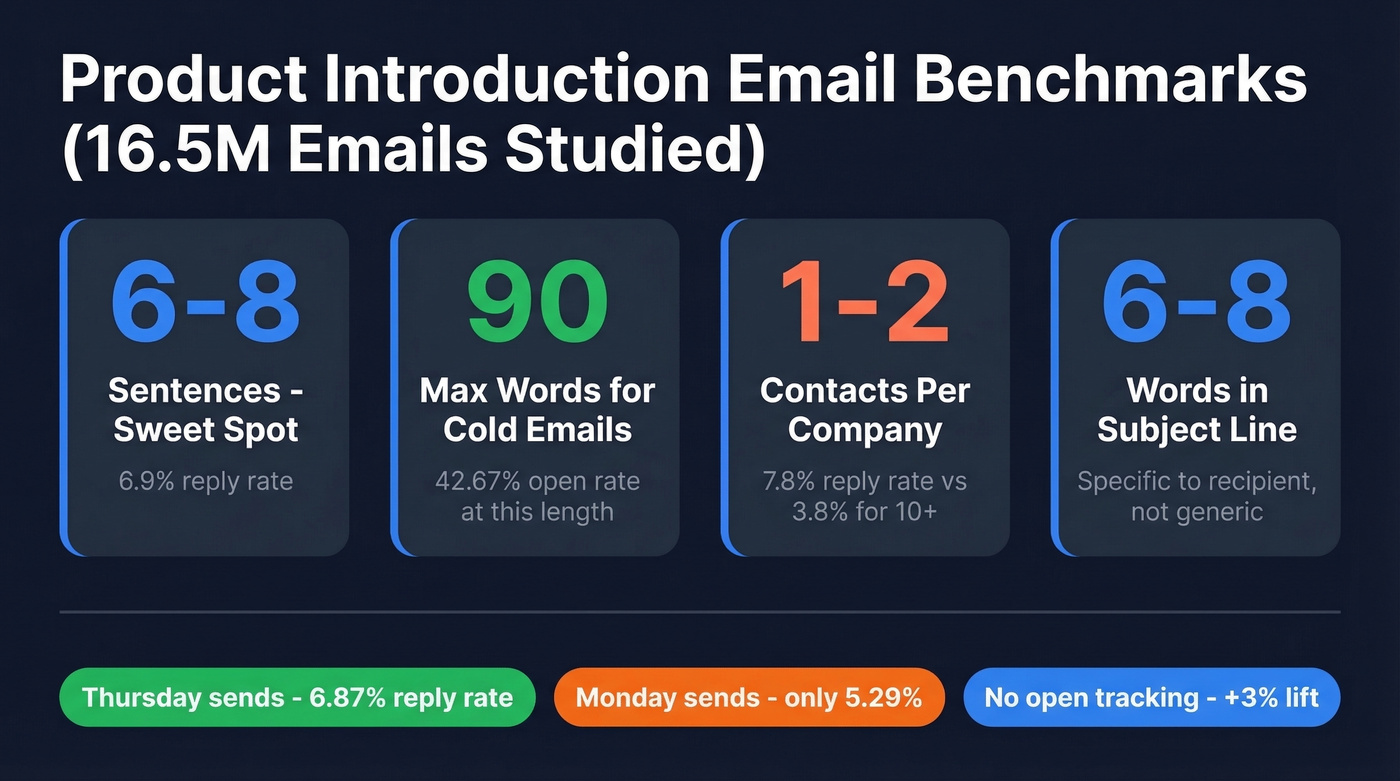
Emails with 6-8 sentences hit a 42.67% open rate and 6.9% reply rate - the sweet spot across 16.5 million messages. Keep paragraphs to two sentences max. Include one link maximum. Ask only one question. Make your CTA soft: "Worth a conversation?" beats "Can we book 30 minutes Tuesday?"
Personalization gets the open; the offer gets the reply. Make it specific and low-friction - a relevant case study, a 2-minute demo, a free audit. Target narrowly, too: emailing 1-2 contacts per company pulls a 7.8% reply rate, which is double the 3.8% you get blasting 10+ contacts at the same org.
For subject lines, keep them to 6-8 words and make them specific. "[First Name], quick idea for [Company]" beats "Introducing Our Revolutionary Platform" every single time.

You just spent time crafting a tight, 90-word product introduction email. Don't waste it on a dead inbox. Prospeo's 5-step verification catches bad addresses at 98% accuracy - one team dropped their bounce rate from 35% to under 4% and tripled their connect rate.
Verify 75 emails free and protect your domain today.
5 Ready-to-Use Templates
1. Cold Prospect - Feature + Case Study
Lead with proof, not promises. This is the most common format for introducing a new product to a client, and it works because it pairs a single feature with a concrete outcome.
Subject: [Feature] for [Company Name]'s [pain point]
Hi [First Name],
[Company Name] runs [specific process], so [specific challenge] likely eats time.
We built [Feature Name] to fix that. [Client Name] used it to [specific result - e.g., "cut onboarding time from 3 weeks to 4 days"].
Worth a quick look? Here's a [2-min demo / case study]: [link]
[Your Name]
2. Existing Client - New Product
For current customers who'd benefit from a new release. Shorter is better here because they already know you.
Subject: Improve your [pain point] with [Product Name]
Hi [First Name],
We just launched [Product Name] - built for teams dealing with [pain point].
It [one key benefit, stated as outcome]. Early users are seeing [specific metric].
Want a 15-minute walkthrough? [Calendar link]
[Your Name]
3. CSM Handoff + Upsell Discovery
A new CSM inherits an account and needs to re-engage while opening the door to expansion. The numbered list keeps it scannable and gives the recipient a reason to say yes - it's about them, not you.
Subject: Your new CSM - [Your Name]
Hi [First Name],
I'm [Your Name], your new CSM at [Company]. I'd love 15 minutes to align on:
- What success looks like for your team right now
- How you're feeling about [product/service]
- Any goals for Q[X] we can support
[Calendar link] - or just reply with a time that works.
[Your Name]
4. Post-Event or Referral Intro
Use when you have a warm trigger - a conference, webinar, or mutual connection.
Subject: Following up from [Event / Mutual Connection]
Hi [First Name],
Great connecting at [event] - your point about [specific topic] stuck with me.
We help teams like yours [one outcome]. Thought [Product Name] might fit given what you mentioned about [their challenge].
Worth a 10-minute call this week? [Calendar link]
[Your Name]
5. SaaS Trial - Feature Spotlight
A Day 4 email for trial users who haven't explored a key feature. Short, action-oriented.
Subject: Try [Feature Name] - 2-minute setup
Hi [First Name],
Most [Product] users don't discover [Feature Name] until week two. Here's the shortcut:
- Go to [Settings/Dashboard location]
- Click [specific button]
- [One-sentence result they'll see]
Takes 2 minutes. [Link to tutorial]
Questions? Just reply.
[Your Name]
Best Send Times and Follow-Up Rules
Thursday pulls a 6.87% reply rate versus 5.29% on Monday. Evenings between 8-11 PM peak at 6.52% - counterintuitive, but people read email when they're not stuck in meetings.
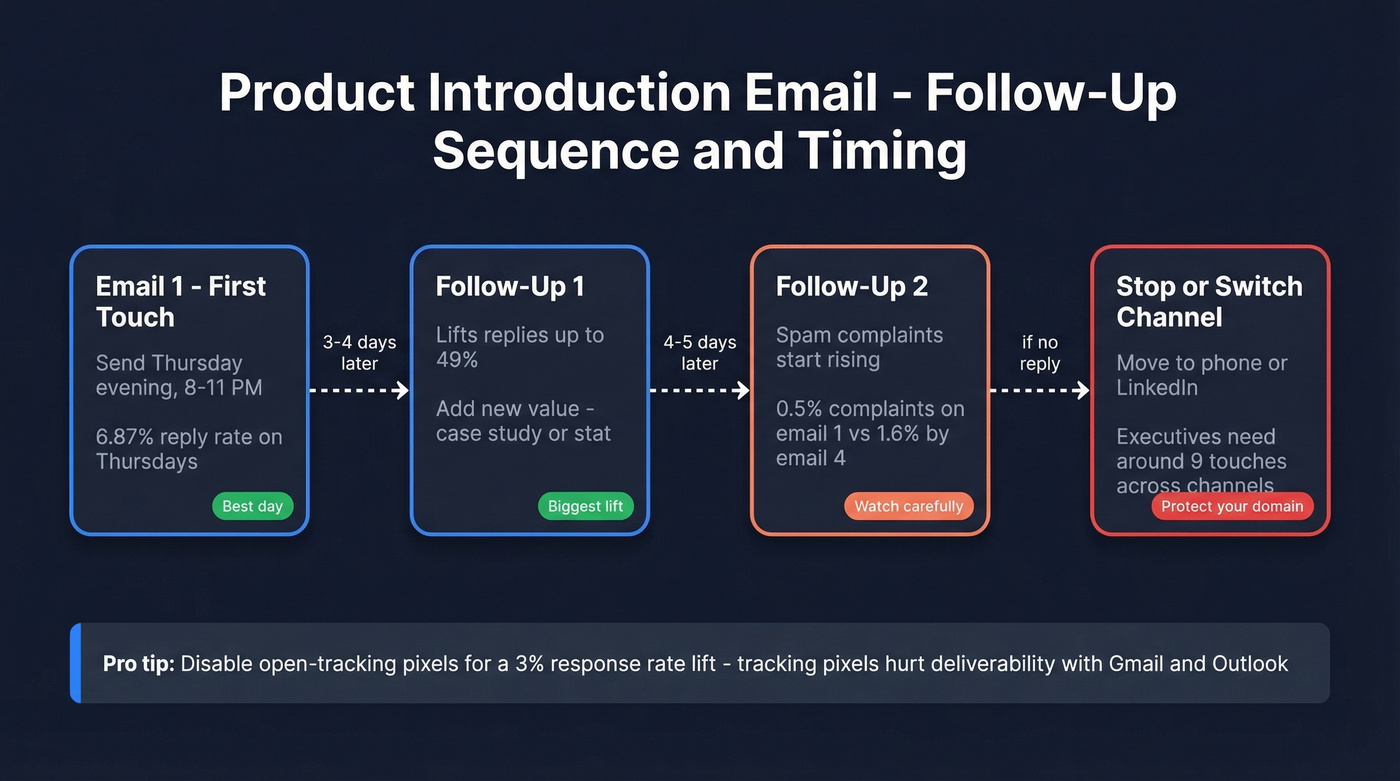
Your first follow-up can lift replies up to 49%. Don't drag a sequence out forever, though: spam complaints rise from 0.5% on the first email to 1.6% by the fourth, and that's domain-damaging territory. For executives, plan for around 9 touches spread across email, phone, and social (use these sales follow-up templates to structure it).
Here's something we've seen make a real difference: disable open-tracking pixels. The data shows a 3% response rate lift when they're turned off, likely because tracking pixels hurt deliverability with major inbox providers. (If you want the technical why, see email tracking pixels.)
Verify Before You Send
None of these templates matter if you're sending to dead addresses. Bounces tank your sender reputation, and once your domain's flagged, every product introduction email to a client lands in spam - no matter how good the copy is. If you're troubleshooting placement, start with an email deliverability guide.
We've seen this firsthand. One team using Prospeo's verification dropped their bounce rate from 35% to under 4%, which tripled their connect rate to 20-25%. The platform runs a 5-step verification process at 98% accuracy, and the free tier gives you 75 emails per month. Paid plans run about $0.01 per email - cheap insurance for your domain.

Every template above needs one thing to work: a verified email for the right person. Prospeo gives you 300M+ professional profiles with 30+ filters to find decision-makers by role, company size, tech stack, and buyer intent - then delivers 98%-accurate emails at $0.01 each.
Stop guessing who to email. Find and verify the right contact in seconds.
7 Mistakes That Kill Product Emails
- Feature-dumping instead of highlighting one feature + one result
- Going over 150 words - if it looks like a wall of text, it's dead on arrival
- Multiple CTAs - one ask per email, period
- Attaching a PDF instead of linking to a page - attachments trigger spam filters
- No unsubscribe link - it's not just bad practice, it's a CAN-SPAM compliance risk
- No SPF/DKIM/DMARC authentication - your emails land in spam before anyone reads them (use these SPF record examples to sanity-check setup)
- Sending to unverified addresses - run your list through a verification tool before every campaign (more options: Bouncer alternatives)
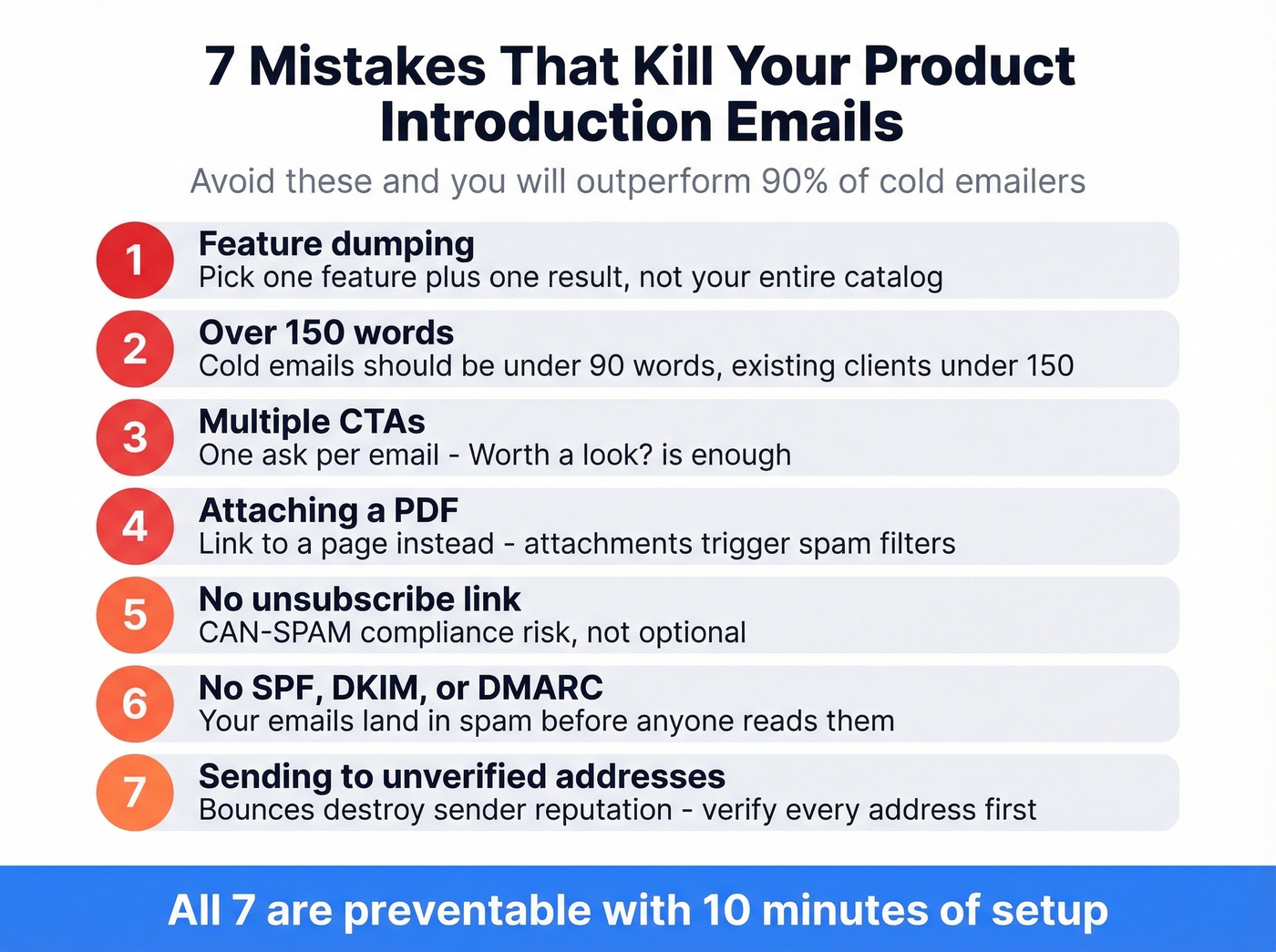
Let's be honest: most of these are preventable with 10 minutes of setup. The teams that skip them are the ones complaining about "email being dead."
FAQ
How long should a product introduction email be?
Under 90 words for cold prospects, under 150 for existing clients. In the 16.5M-email study, the 6-8 sentence range produced a 6.9% reply rate - the highest of any length bracket.
Should I attach a product brochure or PDF?
No. Attachments trigger spam filters and reduce inbox placement rates. Include one link maximum - to a landing page, case study, or short demo. Let them click if they're interested.
What's a good reply rate for product intro emails?
The average cold email reply rate is 5.8%. If you're hitting 7%+ on product introductions, you're outperforming most teams. Above 10% means your targeting and copy are both dialed in.
How do I keep product emails out of spam?
Set up SPF, DKIM, and DMARC authentication for your sending domain. Keep complaint rates under 0.2%. Verify every address before sending - a 5-step verification process catches invalid addresses, spam traps, and honeypots before they damage your reputation.