

Professional Introduction Email Examples That Actually Get Replies
The average cold email reply rate is 3.43%. For every 100 introduction emails you send, about 97 people ignore you. One Reddit founder documented their reply rate dropping from 8% to 3% over 18 months - and only clawed it back to 6% after rebuilding everything from scratch.
Most guides hand you a template and wish you luck. We're going to do something more useful: break down what the data says works, give you templates for 10 specific scenarios, and cover the deliverability and follow-up mechanics that determine whether your email gets read at all.
What Makes an Intro Email Work
Nail these five things and you're ahead of 90% of self-introduction emails sitting in someone's inbox right now:
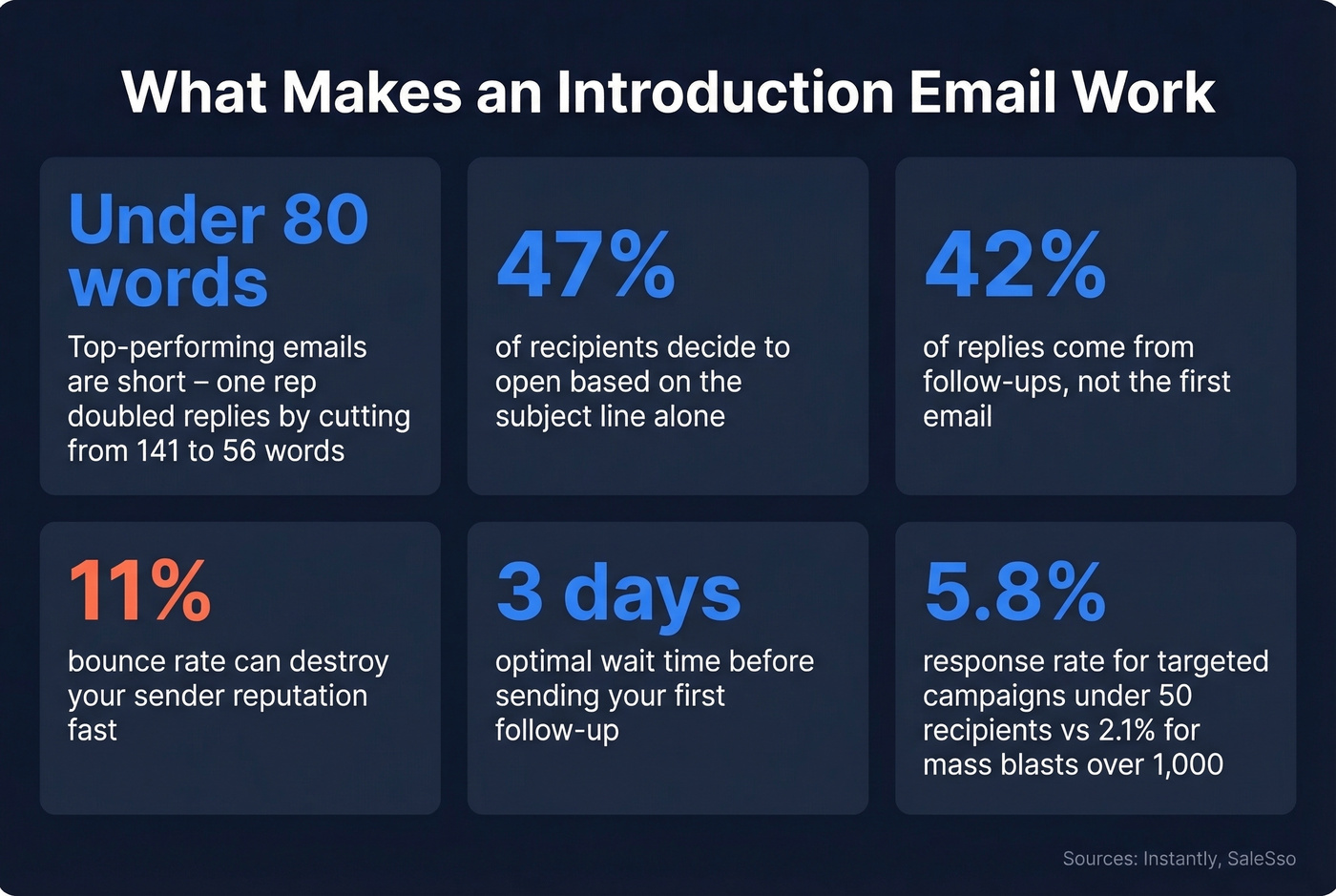
- Under 80 words. Top-performing campaigns run emails under 80 words. One operator cut from 141 words to 56 and doubled their reply rate.
- Purpose over resume. Nobody cares about your background until they care about your reason for writing.
- Question or name-drop in the subject line. 47% of recipients decide to open based on the subject line alone.
- Verify the address first. An 11% bounce rate can destroy your sender reputation fast.
- Follow up after 3 days. 42% of replies come from follow-ups, not the first email.
- Keep campaigns small and personalized. Targeted campaigns under 50 recipients average 5.8% response rates - about 2.8x the 2.1% rate of mass blasts over 1,000 recipients.
Before/After Teardown of an Introduction Email
Here's a real introduction email posted by a new Customer Success Manager on Reddit, followed by the fix.
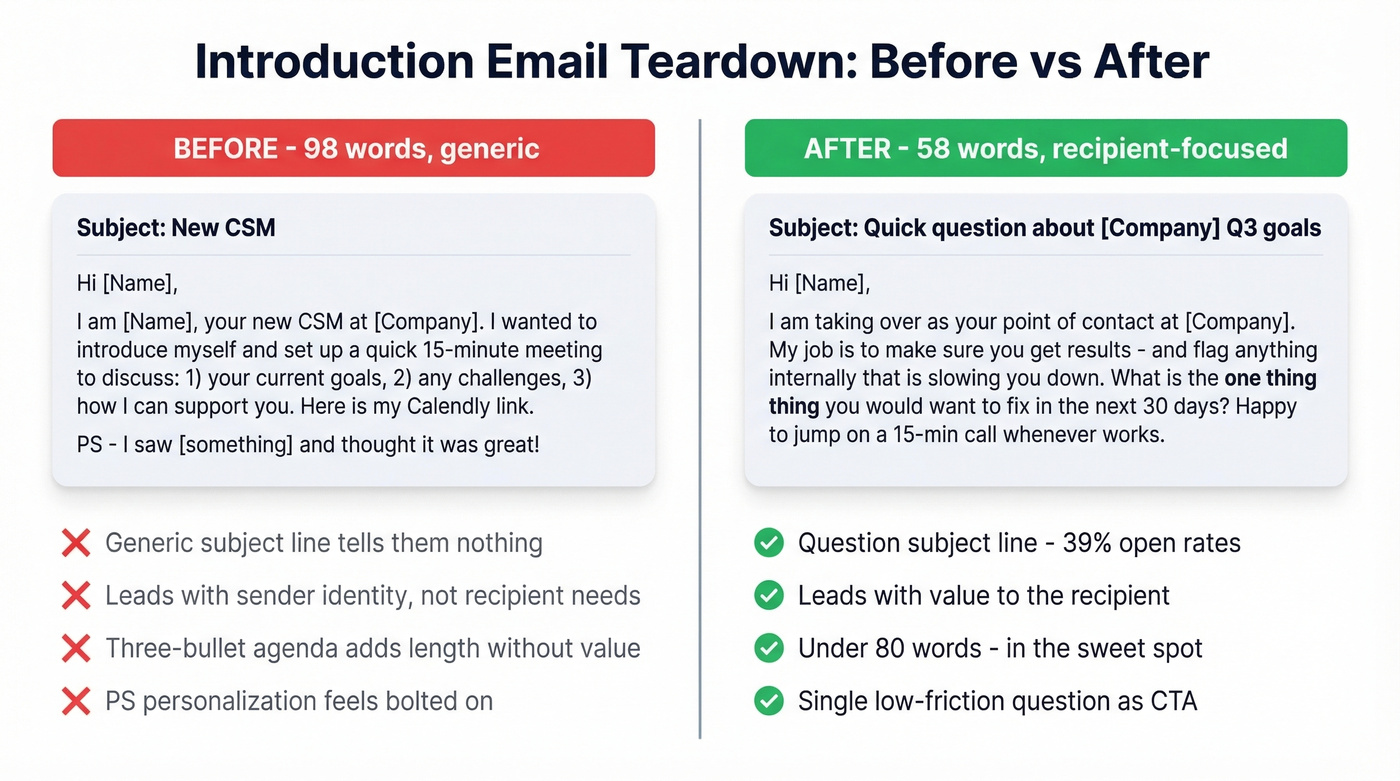
Before (the original):
Subject: New CSM
Hi [Name], I'm [Name], your new CSM at [Company]. I wanted to introduce myself and set up a quick 15-minute meeting to discuss: 1) your current goals, 2) any challenges you're facing, 3) how I can support you going forward. Here's my Calendly link. PS - I saw [something from their social media or website] and thought it was great!
The subject line is generic - "New CSM" tells the recipient nothing about why they should open it. The body leads with the sender's identity, not the recipient's needs. The three agenda bullets add length without adding value. And the PS personalization feels bolted on - practitioners on r/CustomerSuccess call this kind of thing "tacky peacocking."
After (the rewrite):
Subject: Quick question about [Company]'s Q3 goals
Hi [Name], I'm taking over as your point of contact at [Company]. My job is to make sure you get results - and flag anything internally that's slowing you down. What's the one thing you'd want to fix in the next 30 days? Happy to jump on a 15-min call whenever works.
The subject line uses a question format, which pulled ~39% open rates in one operator's 62-day campaign rebuild. The body leads with what the sender does for the recipient, not a biography. It's 58 words. The CTA is a single, low-friction question instead of a three-bullet agenda. This kind of rewrite - turning a generic message into something recipient-focused - can double reply rates.
Subject Lines That Get Opens
Your subject line is the whole game. 47% of recipients decide whether to open based on the subject line alone, and 69% report emails as spam based on it too.
If you want more options to test, pull from a swipe file of email subject line examples and iterate fast.
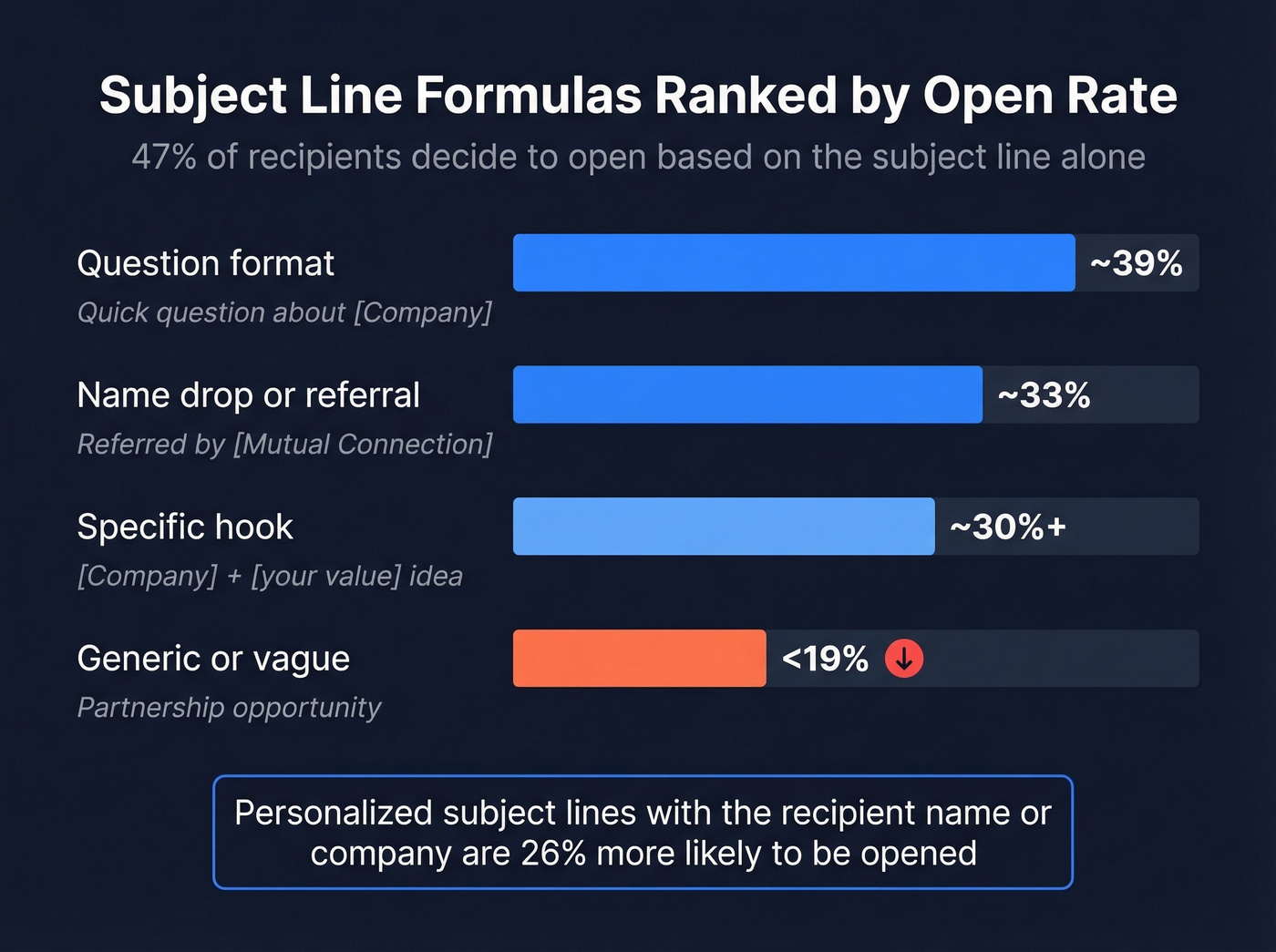
| Formula | Example | Open Rate Signal |
|---|---|---|
| Question | "Quick question about [Company]" | ~39% opens |
| Name drop / referral | "Referred by [Mutual Connection]" | ~33% opens |
| Specific hook | "[Company] + [your value] idea" | ~30%+ opens |
| Generic / vague | "Partnership opportunity" | <19% opens |
Question-based subject lines pull 21% higher open rates than statements. Personalized subject lines - ones that include the recipient's name or company - are 26% more likely to be opened.
"Partnership opportunity" is the subject line equivalent of "Dear Sir or Madam." Skip it.
10 Introduction Email Templates
Every template below follows the under-80-word rule and includes a subject line. Copy, customize, send.
1. Cold Sales Outreach
Compare these two openings. The first is the default cold email that practitioners consistently flag as a delete trigger:
❌ "I'm reaching out because we help companies like yours improve their sales pipeline..."
✅ The version that works:
Subject: Quick question about [Company]'s [specific challenge]
Hi [Name], I noticed [Company] is [specific observation - hiring SDRs, expanding into EMEA, etc.]. We help teams like yours [one-sentence value prop]. Would it make sense to share how [similar company] handled this? Happy to send a 2-min case study - no call needed.
The CTA is low-effort - a case study, not a meeting. That distinction matters. We've seen case-study CTAs outperform meeting requests by 2-3x in cold outreach.
If you’re building a full sequence (not just a single intro), use a proven B2B cold email sequence structure.
2. Networking / Event Follow-Up
Subject: Good meeting you at [Event]
Hi [Name], great connecting at [Event] - your point about [specific topic] stuck with me. I'd love to continue that conversation. Would you be open to a 15-minute coffee chat next week?
References a specific moment, proving you actually talked. Short and warm.
3. New Job - Introducing Yourself
Subject: Hey from the new [Your Role]
Hi [Name], I'm [Your Name], just started as [Role] on the [Team] team. I'll be working on [brief scope]. I'd love to learn what you're focused on and where our work overlaps. Got 15 minutes this week?
Purpose-driven, not biographical. Asks to learn, not to impress.
4. New Client / Account Takeover
Subject: Your new point of contact at [Company]
Hi [Name], I'm taking over your account from [Previous Contact]. My priority is making sure nothing falls through the cracks during the transition. What's the most important thing I should know about your setup right now?
Acknowledges the transition, centers the client's needs, asks one clear question.
If you need more variations for handoffs and ownership changes, see these handoff email templates.
5. Referral-Based Introduction
This is the highest-converting template on the list. A referral name in the subject line drives ~33% opens, and the body immediately explains why the referral was made.
Subject: [Mutual Connection] suggested I reach out
Hi [Name], [Mutual Connection] mentioned you're working on [specific challenge]. I've helped [similar company/role] with [relevant result]. Worth a quick chat?
Keep the entire email under 50 words. The referral does the heavy lifting - don't dilute it with a company pitch.
6. Partnership or Collaboration Request
Subject: [Your Company] + [Their Company] idea
Hi [Name], I run [Your Company/Role] and we share a lot of the same audience as [Their Company]. I have an idea for [specific collaboration - co-webinar, integration, content swap]. Would you be open to a 15-minute call to explore it?
A specific collaboration idea beats vague "let's partner" language every time.
For more partnership-specific outreach, use a dedicated cold email for business partnership framework.
7. Mentorship Request
Subject: Your [specific work/talk] inspired a question
Hi [Name], I came across your [article/talk/project on specific topic] and it shifted how I think about [specific thing]. I'm early in my career in [field] and would be grateful for 15 minutes of your perspective on [one specific question]. Completely understand if timing doesn't work.
Shows you've done homework, asks one specific question, and gives an easy out.
8. Internal Cross-Team Introduction
Subject: Quick intro - [Your Team] x [Their Team]
Hi [Name], I'm [Your Name] on the [Your Team] team. We're kicking off [project/initiative] and I think there's overlap with what your team is doing on [specific area]. Would love to sync for 15 minutes so we're not duplicating effort.
Frames the meeting as saving them time, not adding to their calendar.
9. Job Application Follow-Up
Subject: Following up on [Role Title] application
Hi [Name], I applied for the [Role] position last week and wanted to follow up. My background in [one relevant skill/experience] maps directly to [specific thing from the job description]. I'd welcome the chance to discuss how I can contribute. Happy to work around your schedule.
One specific skill matched to one specific requirement. Don't restate your entire resume.
10. Introducing Two People (Double Opt-In)
Subject: Intro: [Person A] ([Company A]) <> [Person B] ([Company B]) - [topic]
Hi [Person A] and [Person B], you both agreed to connect, so here's the intro. [Person A] is [one-sentence context]. [Person B] is [one-sentence context]. I think you'd have a great conversation about [specific topic]. I'll drop to BCC - take it from here!
Both parties already consented. The BCC move keeps the introducer out of the scheduling thread.

An 11% bounce rate kills your sender reputation - and your intro emails never reach the inbox. Prospeo's 5-step verification delivers 98% email accuracy, so every introduction you craft actually lands. At $0.01 per verified email, bad data is no longer an excuse.
Stop perfecting emails that bounce. Start sending to verified addresses.
The Double Opt-In Introduction
The single opt-in intro - where you CC two people and say "you should meet!" - forces the recipient into an awkward position. They didn't ask for this. Now they have to either respond or look rude.
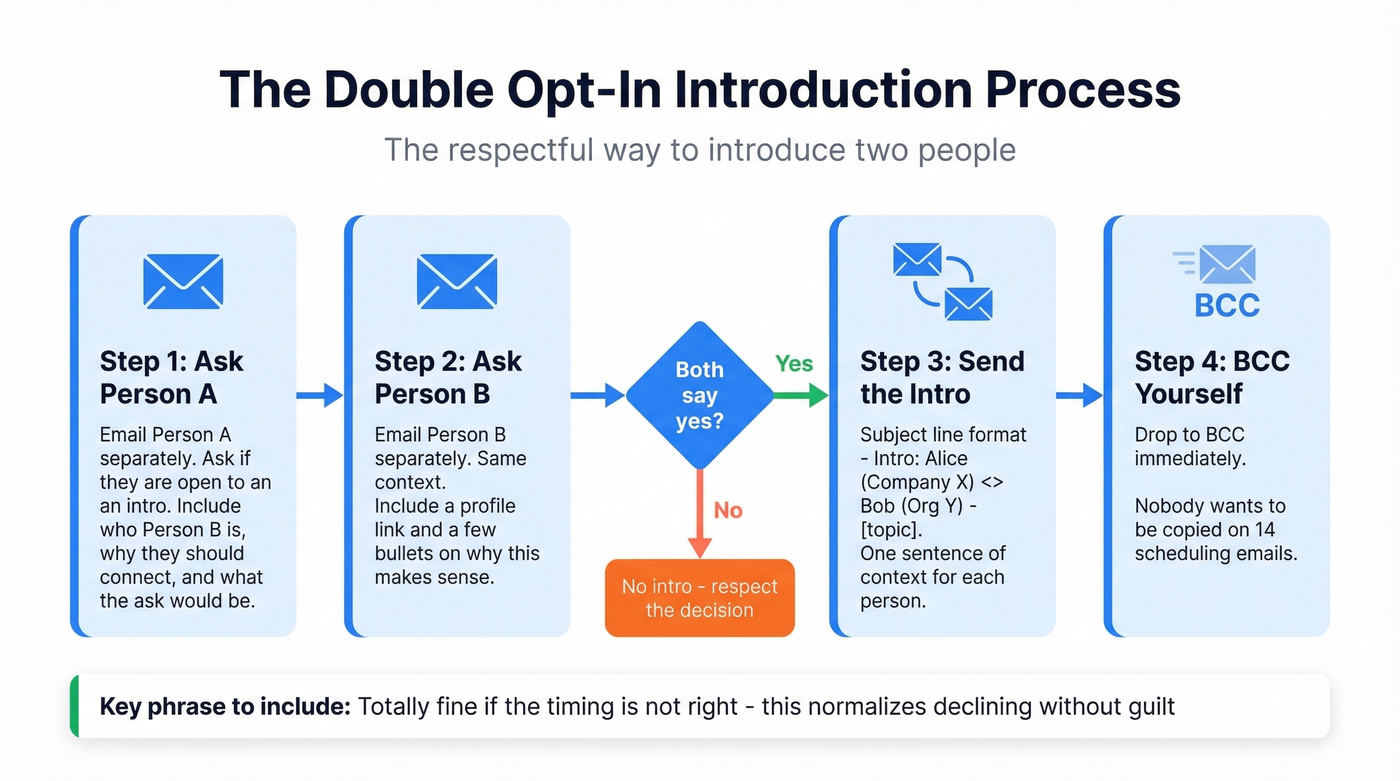
Here's the right approach:
- Email Person A separately. Ask if they'd be open to an intro. Include context: who the other person is, why you think they should connect, and what the ask would be.
- Email Person B separately. Same thing. Include a profile link and a few bullets on why this makes sense.
- If both say yes, send the intro. Use a subject line like "Intro: Alice (Company X) <> Bob (Org Y) - [topic]."
- BCC yourself from the start. Nobody wants to be copied on 14 scheduling emails.
The key is making it easy to say no. "Totally fine if the timing isn't right" normalizes declining without guilt. That's what makes double opt-in feel respectful instead of presumptuous.
Mistakes That Kill Introduction Email Replies
These patterns get your business introduction email deleted, ignored, or flagged as spam.
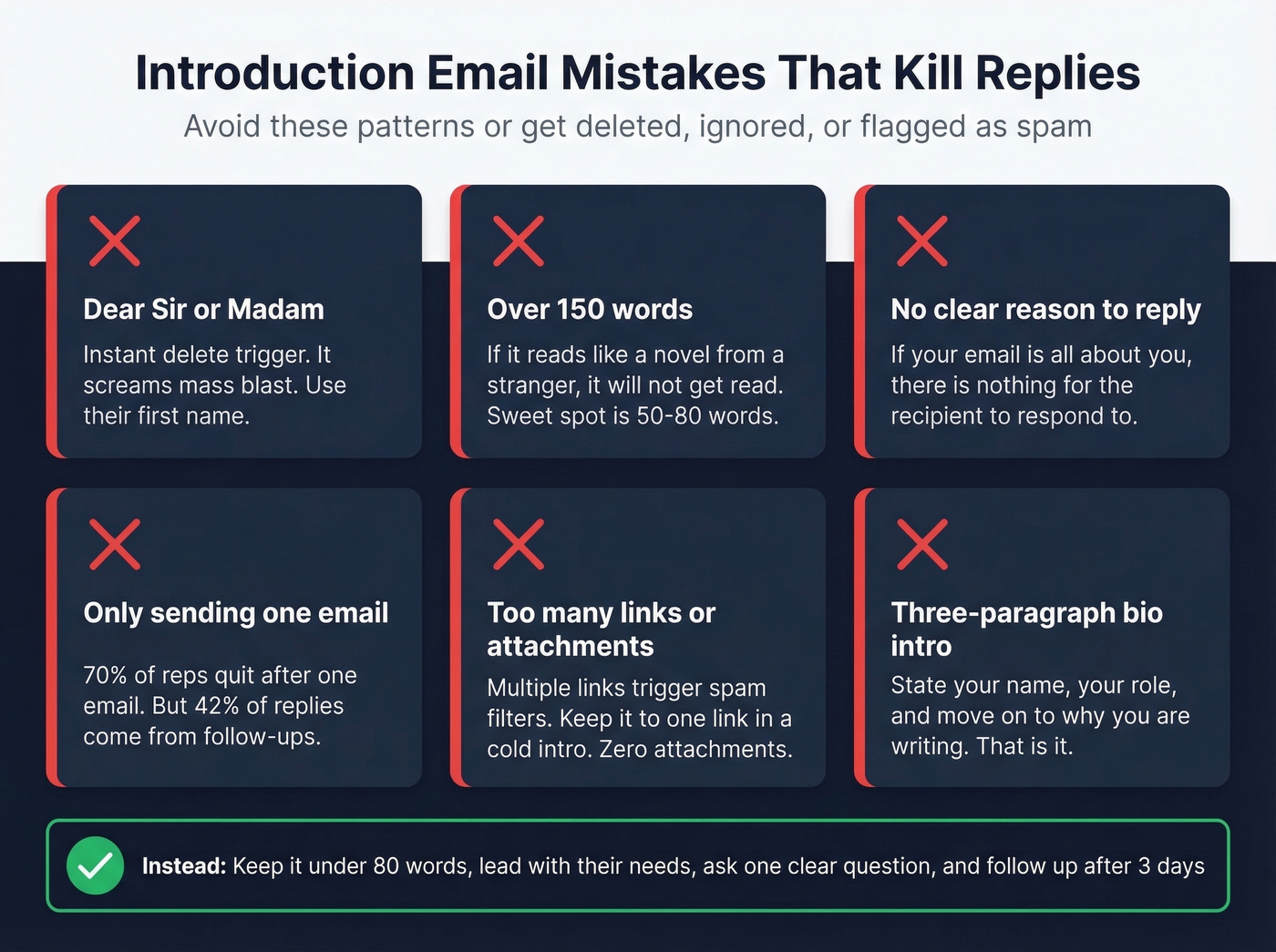
"Dear Sir or Madam" or "To Whom It May Concern." Instant delete trigger. It screams mass blast. Use their first name - skip "Mr./Mrs." unless you're certain of someone's preference.
Over 150 words. If your email reads like a novel from a stranger, it won't get read. The sweet spot is 50-80 words.
No clear reason to reply. If your email is all about you - your background, your company, your achievements - there's nothing for the recipient to respond to. Lead with purpose.
Only sending one email. 70% of reps quit after one email. But 42% of replies come from follow-ups. You're leaving almost half your results on the table.
Too many links or attachments. Multiple links trigger spam filters. Keep it to one link in a cold intro. Zero attachments.
Biographical intros that run three paragraphs. State your name, your role, and move on to why you're writing. That's it.
No email signature - or a bloated one. Keep your signature to 4 lines max: name, title, company, one contact method. Signatures with inspirational quotes, banners, and 6 social icons add visual clutter that undermines a concise intro.
Why Your Intro Email Might Not Arrive
You can write the perfect introduction email and it won't matter if it bounces.
One Reddit operator documented their bounce rate sitting at 11% - which was actively destroying their sender reputation. After switching to manual verification and cleaning their list, they got it under 2%. Every bounce tells the receiving mail server you're sending to addresses that don't exist. Do that enough times and your entire domain gets flagged - your emails start landing in spam for everyone, not just the bad addresses.
That same operator scaled from 3 sending domains to 7, capping each at 26 emails per day. Combined with verification, that alone dropped their bounce rate from 11% to under 2%. Their total stack cost: roughly $420/month for 16 qualified leads.
Here's the thing: if your deal sizes are under five figures, you probably don't need a $15,000/year data platform. But you absolutely need verified email addresses. Bad data is one of the biggest reasons intro emails fail - not bad copy. Before you send any introduction email to a prospect, verify the address. Prospeo handles this in real time with 98% accuracy, catching invalid addresses, spam traps, and catch-all domains before they tank your sender reputation.
If you want to go deeper on protecting inbox placement, start with how to improve sender reputation and keep an eye on email velocity.

Targeted campaigns under 50 recipients get 2.8x the reply rate - but only if you're reaching real people. Prospeo gives you 30+ filters to build hyper-targeted lists from 300M+ profiles, with emails refreshed every 7 days so your intro lands at the right address.
Build the list that makes your introduction emails actually convert.
Follow-Up Strategy After Your Intro
58% of replies come from the first email. That means 42% come from follow-ups. If you're sending one email and moving on, you're abandoning almost half your potential replies.
The cadence that works: 3-7-7. Send your intro email on Day 0. First follow-up on Day 3. Second follow-up on Day 10. Third on Day 17. Following up within 24 hours actually hurts your chances by ~11% - it feels desperate. Waiting three days for the first nudge increases replies by roughly 31%.
Step 2 emails that feel like replies outperform formal follow-ups by ~30%. Don't write "Just following up on my previous email." Instead, reply to your own thread with something new - a relevant article, a quick observation about their company, a one-line question. Make it feel like a conversation, not a drip sequence.
We've seen this pattern across dozens of outreach campaigns: the teams that treat follow-ups as new value - not reminders - consistently hit 5%+ reply rates while everyone else hovers around 3%. Let's be honest, most people give up way too early.
If you want plug-and-play copy, use these sales follow-up templates (and for cold outreach specifically, these cold email follow-up templates).
FAQ
How long should a professional introduction email be?
Under 80 words. Emails between 50-80 words consistently outperform longer messages in reply rate. That's enough to state your purpose, include one clear CTA, and nothing more. One operator doubled replies by cutting from 141 words to 56.
What's the best day to send an introduction email?
Tuesday through Thursday, with Wednesday performing strongest. Send between 8-11 AM in the recipient's time zone. One operator reported a 16% improvement in opens just by restricting sends to this window.
How many follow-ups should I send after an intro email?
Two to three follow-ups using a 3-7-7 cadence - first follow-up after 3 days, then 7 days apart. 42% of replies come from follow-ups, so stopping after one email leaves nearly half your results on the table.
Should I include my background in an intro email?
No - lead with your purpose and what you can do for the recipient. State your name, your role, and move immediately to why you're writing. Every strong professional introduction email example prioritizes the recipient's needs over the sender's credentials.