

Sales Capacity Planning: The 2026 Guide That Actually Works
You build the annual plan in January. Twelve reps, $6M target, $500K quota each - the math checks out on a whiteboard. By March, two reps have quit, the Q1 hire is still ramping, and your "fully staffed" team is producing at 60% of plan. The board wants to know what happened.
You planned headcount, not sales capacity. And reps spend 60% of their time on non-selling tasks, so even the reps you do have aren't producing what the spreadsheet assumed.
Let's fix that.
The Short Version
- Capacity isn't quota. It's the realistic revenue your current team can produce, adjusted for ramp, attrition, and actual selling time.
- Use the bottom-up model (Opportunity -> People -> Revenue), not top-down (Target / Headcount).
- Measure in Ramped Rep Equivalents (RREs), not headcount. A rep in month two of a six-month ramp isn't a full rep.
- Re-plan monthly on a rolling three-quarter horizon. Annual plans break by Q2.
- The fastest capacity gain isn't hiring - it's eliminating wasted selling time.
What Is Sales Capacity?
Sales capacity is the realistic revenue output your current team can deliver in a given period, accounting for ramp time, attrition, non-selling work, and territory coverage. It's not a target. It's not a wish. It's a physics-based estimate of what your team can actually produce.
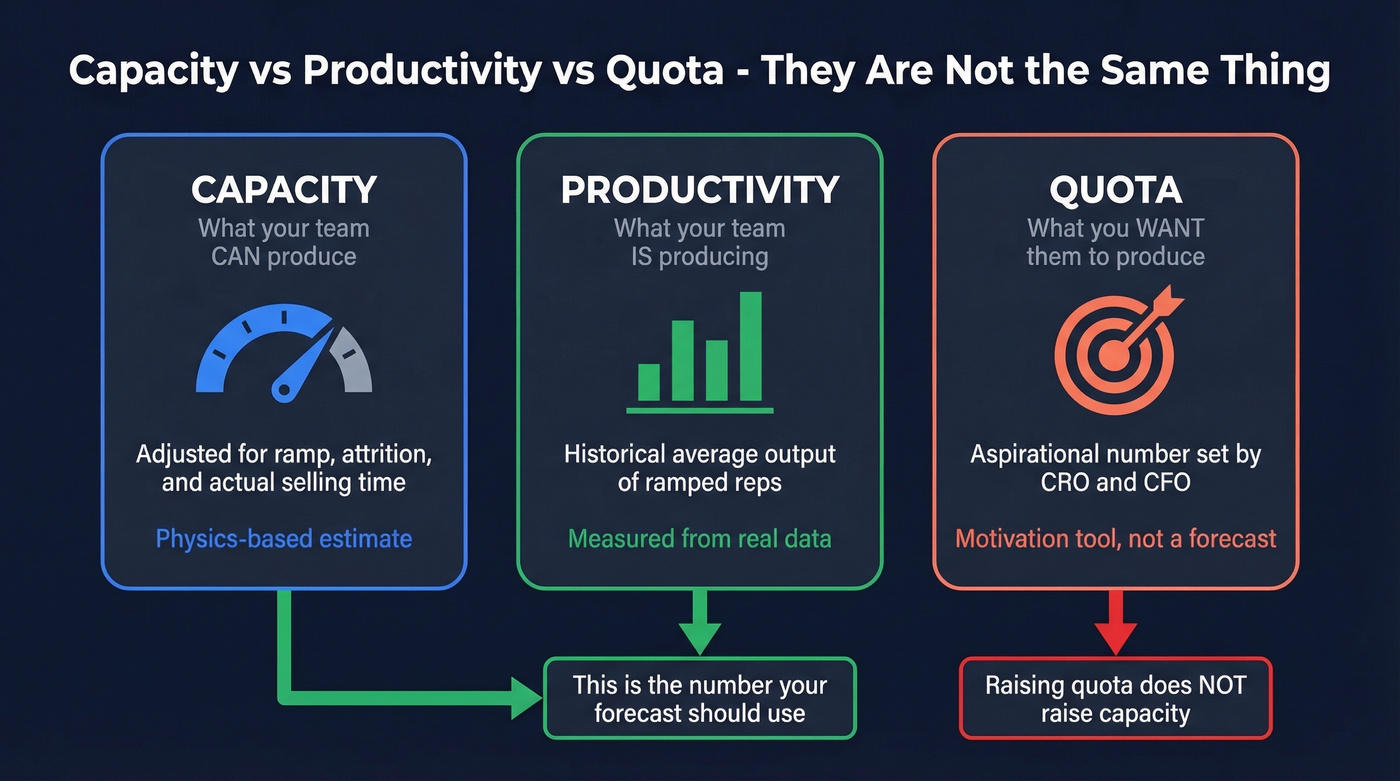
Three concepts sound similar but mean very different things:
- Capacity is the expected annualized contribution of a ramped rep, multiplied across your team and adjusted for reality.
- Productivity is the actual average output of your ramped reps - what they're really closing, based on historical data.
- Quota is a compensation and motivation number agreed between the CRO and CFO. It's aspirational by design.
Here's the thing: raising quotas doesn't raise capacity. It's easy to bump a number in a spreadsheet. It's much harder to increase the productive output of a human sales team. When you set quota above capacity, you get missed targets, lower attainment, frustrated reps, and eventually attrition - which further reduces capacity. We've watched teams ride that vicious cycle straight into a hiring crisis, and it's painful every time.
Why Capacity Planning Matters
Done right, capacity planning moves the revenue needle more than almost any other RevOps activity. A McKinsey survey found that optimizing sales force sizing and resource allocation can increase revenue by 10-20%. Harvard Business Review research suggests strategic capacity management can boost profitability by 15-20% in a single year.
The consequences of getting it wrong cut both ways. Over-hire and you're burning cash on reps who don't have enough pipeline to stay busy - morale craters, attainment drops, and your best people leave. Under-hire and you're leaving revenue on the table while your existing team drowns. There's no comfortable middle ground without a real model.
Reps spend 60% of their time on non-selling tasks. Your capacity isn't just about bodies - it's about how much of each person's time actually touches revenue. That's why sales team capacity planning deserves as much rigor as your demand gen strategy (and your lead generation workflow).
Key Benchmarks for Your Model
Every sales capacity model needs baseline assumptions. These are the benchmarks we use as defaults - override them with your own data when you have it, but never leave a cell blank because you "don't have the data."
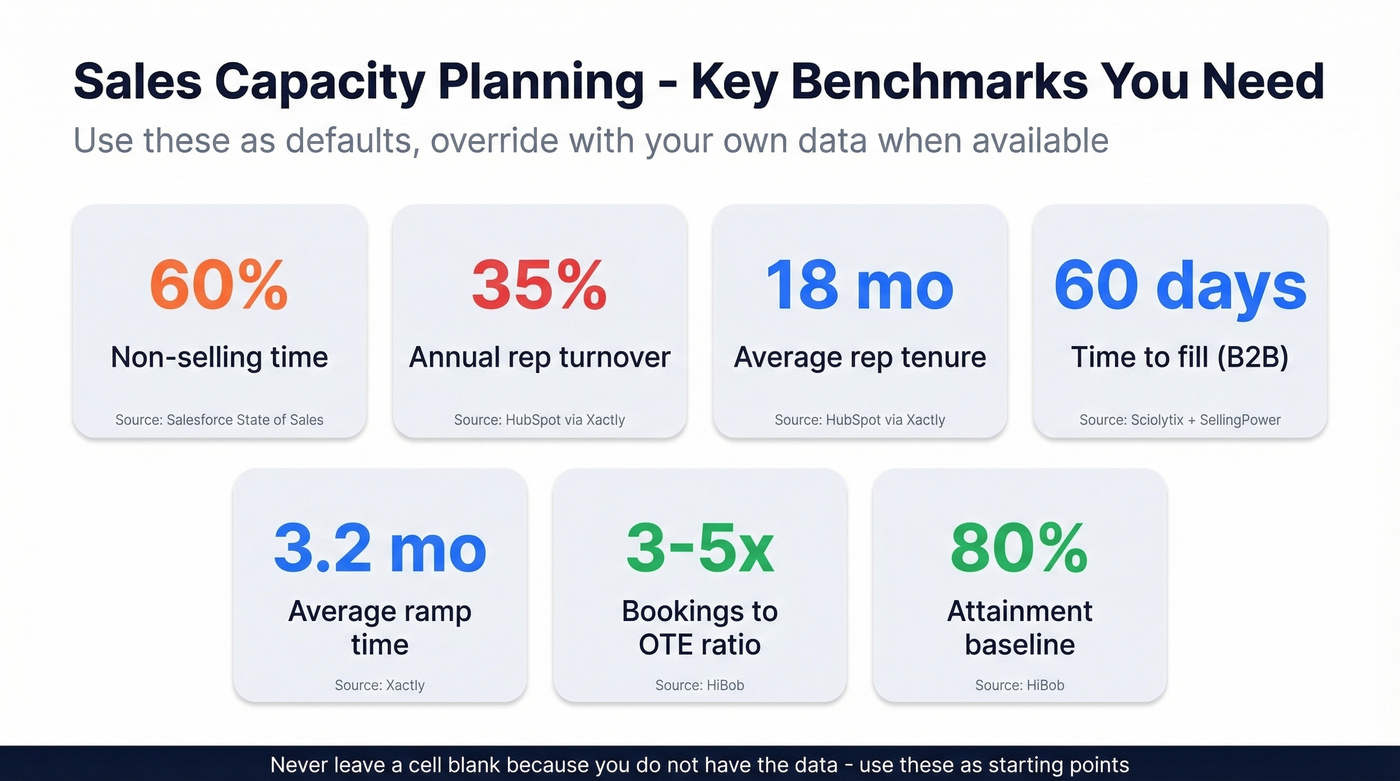
| Metric | Benchmark | Source |
|---|---|---|
| Non-selling time | 60% | Salesforce State of Sales |
| Rep turnover (annual) | 35% | HubSpot via Xactly |
| Average rep tenure | 18 months | HubSpot via Xactly |
| Time-to-fill (B2B sales) | 60 days | Sciolytix + SellingPower |
| Average ramp time | 3.2 months | Xactly |
| Bookings-to-OTE ratio | 3.0-5.0x | HiBob |
| Attainment baseline | 80% | HiBob |
The #1 Mistake: Top-Down Planning
Most capacity planning guides teach the same flawed approach: take your revenue target, divide by quota, and that's your headcount. It's clean. It fits on one slide. And it's wrong.
A practitioner on r/FPandA put it bluntly: the standard approach of setting quota as a ratio of OTE or dividing a team target by headcount ignores the most important variable - whether there's enough opportunity flow to support the number. Think of quota as the fuel tank and meetings or opportunities as the fuel. Making the tank bigger doesn't create more fuel.
The right sequence is Opportunity -> People -> Revenue, not Target -> People. Start with your pipeline reality: how many qualified opportunities does your team actually generate per month? What's the conversion rate? What's the average deal size? Work from those numbers up to the revenue your team can realistically produce, then figure out if you need more people (and validate assumptions against sales pipeline benchmarks).
Top-down planning feels safe because it starts with the number the board wants. But it creates a cascade of bad decisions. When the model says you need 15 reps to hit $10M and you only have 12, the instinct is to raise quota on the 12. That leads to missed targets, lower attainment, and the attrition spiral we talked about earlier. An r/SaaS thread captured the frustration well - teams relying on spreadsheet-based top-down models called them "error prone" and disconnected from pipeline reality. They're right.

Your capacity model is only as good as the pipeline feeding it. Prospeo gives your reps 300M+ verified contacts with 98% email accuracy - so opportunity flow never becomes the bottleneck. At $0.01 per email, scaling pipeline costs less than one rep's lunch.
Stop planning around bad data. Start building pipeline that matches your capacity model.
Five Capacity Planning Models
| Model | Best For | Complexity | Accuracy | Recommended? |
|---|---|---|---|---|
| Top-Down | Sanity check only | Low | Low | As a check only |
| Bottom-Up | Teams under 50 reps | Medium | High | Yes - primary |
| Territory-Based | Enterprise w/ segments | Medium-High | High | For field sales |
| Workload-Based | High-volume/transactional | Medium | Medium-High | For SDR teams |
| Dynamic Hybrid | Mature RevOps (50+ reps) | High | Highest | Gold standard |
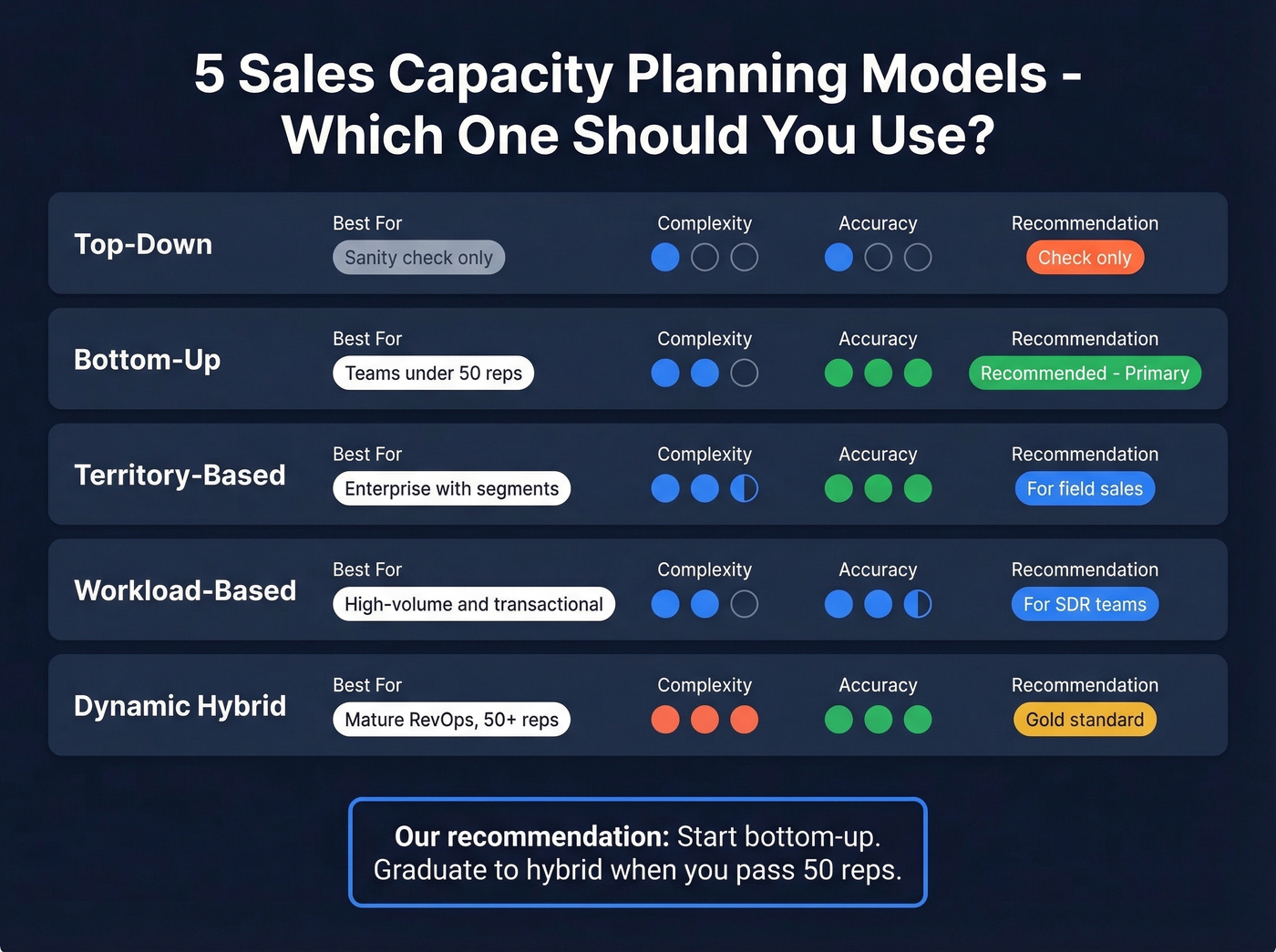
Top-Down means revenue target / quota x attainment rate. Use this only as a sanity check. If it diverges from your bottom-up number by more than 20%, something's wrong with your assumptions.
Bottom-Up starts with opportunity flow, conversion rates, and average deal size. Calculate what your current team can realistically close, then determine if you need more reps. This is the right primary model for most teams.
Territory-Based modeling assigns capacity by geography, segment, or vertical. Each territory gets its own pipeline assumptions and rep allocation. It's essential for enterprise teams where a rep covering financial services in the Northeast has fundamentally different capacity than one covering tech in the Bay Area.
Workload-Based calculates the activities required per deal - calls, demos, proposals - multiplies by deals needed, converts to hours, then divides by available selling hours per rep. This works well for high-volume transactional sales and SDR capacity planning specifically (see sales activities you can model).
Dynamic Hybrid combines bottom-up modeling with scenario analysis and monthly re-forecasting. Sophisticated teams add Monte Carlo simulation for demand volatility. Operations researchers call this the "news vendor problem" - order too many newspapers and you eat the cost, order too few and you miss sales. The same logic applies to sales headcount. This is the gold standard for mature RevOps teams, but it requires clean data and dedicated planning resources.
Our recommendation: start bottom-up. Graduate to hybrid when your team passes 50 reps and you have a RevOps function that can maintain the model.
How to Build a Capacity Model
Gather Your Inputs
You need two data sources: your CRM - specifically bookings, pipeline, conversion rates, and deal velocity - and your HRIS for start dates, departures, role changes, and planned hires. Lative offers a free two-tab template worth grabbing: one tab for simple capacity calculations with quota and ramp inputs, and a second for scenario analysis where you toggle hiring schedules, attrition rates, and productivity improvements.
Calculate Ramped Rep Equivalents
Ramped Rep Equivalents convert your mixed-tenure team into a single number that represents fully productive capacity. This concept, popularized by Dave Kellogg's bookings productivity model, is the foundation of any serious capacity plan.
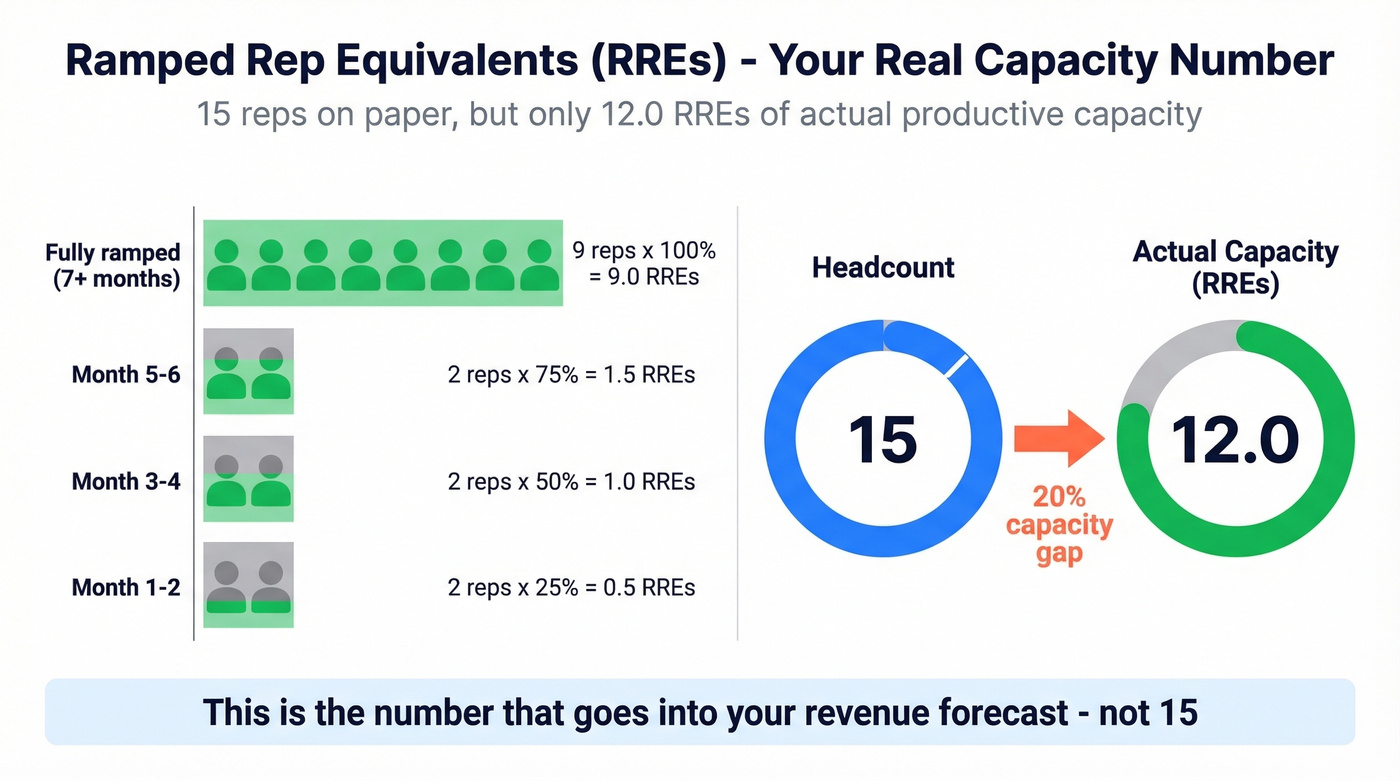
A worked example with 15 reps:
| Tenure Group | Count | Ramp % | RREs |
|---|---|---|---|
| Fully ramped (7+ mo) | 9 | 100% | 9.0 |
| Month 5-6 | 2 | 75% | 1.5 |
| Month 3-4 | 2 | 50% | 1.0 |
| Month 1-2 | 2 | 25% | 0.5 |
| Total | 15 | 12.0 |
Your 15-person team has the productive capacity of 12 fully ramped reps. That's the number that goes into your revenue forecast - not 15.
Model Attrition and Hiring Lead Time
With 35% annual turnover, a 15-rep team loses roughly five reps per year. Each departure creates about 5.2 months of reduced capacity: 60 days to fill the role plus 3.2 months to ramp the replacement. Multiply across five departures and you've lost roughly 26 rep-months - more than two full-year equivalents. If that number surprises you, it should.
Build Scenarios
Create three scenarios: best case, expected, and worst case. Vary your hiring timeline, attrition rate, and ramp speed across each. Add a "judgment row" at the bottom - a leadership override from the KellBlog methodology for factors the model can't capture, like a major product launch or a market downturn.
A simple quarterly view with a realistic ramp curve:
| Q1 | Q2 | Q3 | Q4 | |
|---|---|---|---|---|
| Starting reps | 12 | 14 | 15 | 16 |
| New hires | 3 | 2 | 3 | 2 |
| Departures | 1 | 1 | 2 | 1 |
| Ending reps | 14 | 15 | 16 | 17 |
| RREs | 10.5 | 12.3 | 13.1 | 14.8 |
| ARR capacity ($K) | $5,250 | $6,150 | $6,550 | $7,400 |
Notice how Q1 headcount is 12 but capacity is only 10.5 RREs. That gap is where most plans fall apart.
Matching Capacity to Demand
Building a capacity model in isolation is only half the job. Stage 2 Capital frames this as a two-lens problem:
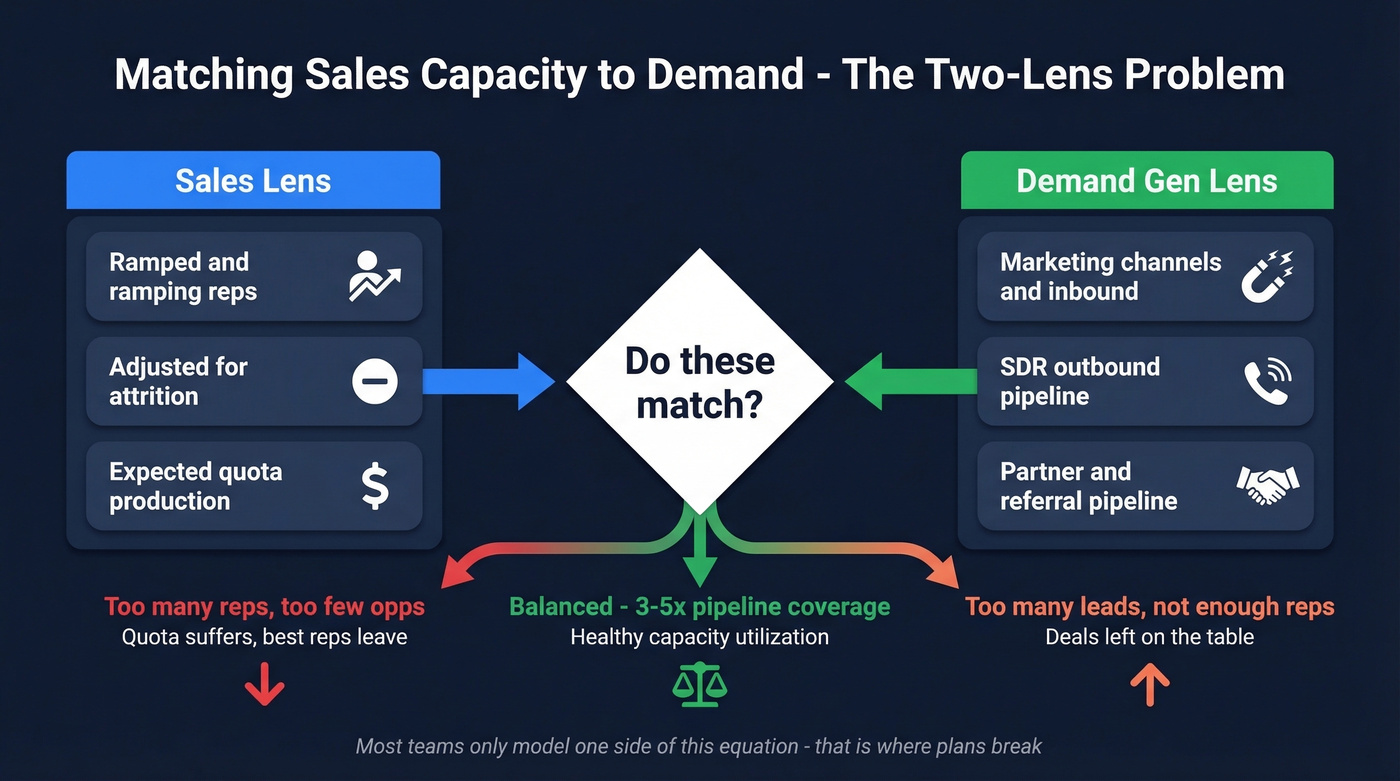
The sales lens asks: given our ramped and ramping reps, adjusted for attrition, how much quota production can we realistically expect?
The demand gen lens asks: given our marketing channels, SDR outbound, and partner pipeline, how many qualified opportunities will we generate?
When these two numbers don't match, bad things happen. Too many reps chasing too few opportunities means quota production suffers and your best reps start interviewing elsewhere. Too many leads with not enough rep capacity means you're leaving deals on the table. Most teams only model one side of this equation - a mistake that shows up as either idle reps or abandoned leads.
The standard heuristic is 3-5x pipeline coverage: you need three to five dollars in qualified pipeline for every dollar of quota. If your capacity model says you can produce $10M but your pipeline model only shows $25M in coverage, you're short at 2.5x. Either generate more pipeline or adjust your revenue expectations downward (and track it with pipeline health).
A RevOps leader on r/revops described the failure mode well: teams that don't plan capacity proactively only realize they're underwater after churn spikes or backlog builds. By then, the revenue miss is already baked in. Dashboards show you what happened - capacity planning shows you what's coming.
The Hidden Capacity Drain: Bad Data
One constraint almost never shows up in planning models: bad prospect data.
Picture an SDR dialing 200 numbers in a day. They connect on maybe 15. Half their emails bounce. They spend an hour researching contacts who left the company six months ago. That's not a productivity problem - it's a capacity problem. Every minute spent on dead data is a minute not spent selling.
This is where data quality becomes a capacity lever. After adopting Prospeo, GreyScout cut rep ramp time from 8-10 weeks to 4 weeks while doubling their sales team. Snyk's 50 AEs reduced prospecting time while growing AE-sourced pipeline by 180%. Those aren't marginal gains - they're capacity multipliers that show up directly in your RRE calculations (especially if you standardize lead enrichment).
How to Increase Capacity Without Hiring
If your average contract value is under $25K, your fastest path to more revenue is almost never another headcount req. It's removing friction from the reps you already have. Before you hire, exhaust these five levers - they're faster, cheaper, and often more impactful.
Fix your data quality first. Run your prospect list through an enrichment tool with verified contact data (compare options in data enrichment services). At roughly $0.01 per email with Prospeo, it's the cheapest capacity gain available - 83% of leads come back with contact data, and you only pay for valid results.
Automate CRM entry and admin tasks. If reps spend 60% of their time on non-selling work, even a 10% reduction in admin time adds meaningful selling hours. Sequence tools, auto-logging, and AI note-takers all help (see sequence management).
Optimize territories to balance workload. Uneven territories mean some reps are overloaded while others are underutilized. Rebalance quarterly based on opportunity density, not just geography.
Coach to reduce cycle time. A 10% reduction in average sales cycle length is equivalent to a 10% increase in capacity. Focus coaching on deal progression, not just activity metrics.
Align capacity with demand gen. If marketing is generating more qualified opportunities than your team can work, that's a capacity problem worth solving before you hire. Skip the headcount req and fix the bottleneck first (often by improving sales prospecting techniques).
The fastest capacity gain isn't hiring - it's eliminating wasted selling time. Prospeo's Chrome extension and CRM enrichment put verified emails and direct dials on every prospect in one click, so reps spend time closing instead of searching for contact info.
Give every rep on your team an extra hour of selling time per day.
Common Mistakes to Avoid
Planning to 100% utilization. Teams often operate at 115-130% of true capacity once meetings, reporting, and internal work are included. Consistently overworked employees are 2.6x more likely to seek new employment and 63% more likely to take sick days. Build slack into your model or you'll model yourself into an attrition spiral.
Using quota as a proxy for capacity. When you set quota above what reps can realistically produce, you get missed targets and turnover - which further reduces capacity. It's the most common mistake and the most expensive.
Ignoring seasonality. Enterprise software revenue can be 60%+ back-half loaded. If your capacity model assumes linear quarterly production, your H1 will always look like a disaster and your H2 will look like a miracle. Separate what's caused by industry buying cycles from what's caused by your own hiring and ramp timing.
Planning annually instead of monthly. Annual plans are stale by February. Re-forecast monthly on a rolling three-quarter horizon. It takes an hour if your model is built right, and it catches problems before they become revenue misses.
Not modeling attrition. With 35% annual turnover, a 60-day fill time, and a 3.2-month ramp, every departure creates about a 5.2-month capacity gap. If that number isn't in your model, your model is fiction.
FAQ
What's the sales capacity formula?
Capacity = Ramped Rep Equivalents x Steady-State Productivity x Attainment Rate. Adjust for ramp curves, attrition, and non-selling time. Use actual historical productivity from your CRM, not quota - quota is aspirational, productivity is real.
How often should I update my capacity plan?
Monthly, on a rolling three-quarter horizon. Annual plans break by Q2 because they can't absorb unexpected departures or hiring delays. Monthly re-forecasting takes about an hour with a well-built model and catches problems 60-90 days earlier.
What's the difference between SDR and AE capacity?
SDRs are measured in meetings or qualified opportunities per month; AEs are measured in ARR closed per quarter. Model them separately - they have different ramp times (SDRs: ~6 weeks, AEs: ~3.2 months), turnover rates, and productivity drivers.
How does bad data reduce sales capacity?
Reps dialing invalid numbers or emailing outdated contacts lose 5-10 hours per week on dead leads. Verified, fresh data eliminates most of that waste - GreyScout cut ramp time in half after switching to a verified data provider, directly increasing their RRE count.
What tools do teams use for capacity planning?
Most start in Google Sheets or Excel, and that works fine for teams under 50 reps. Larger teams graduate to FP&A platforms like Pigment or Anaplan, or forecasting tools like Forecastio or Clari. The underlying model matters more than the software running it.