

15 Sales Email Templates for New Clients That Actually Get Replies in 2026
The average cold email reply rate is 3.43%. The top 10% of campaigns hit 10.7%+. That's roughly a 3x gap, and it's not because top performers have a better sales email template for new clients sitting in a Google Doc somewhere. It's because they've built the system around the template: verified data, authenticated domains, and emails short enough that a busy VP actually reads them in the 2.7 seconds before they hit delete.
We've watched teams triple reply rates without changing a single word of copy - just by fixing deliverability and data quality. The templates below work. But only if you set up the infrastructure first.
What "New Clients" Actually Means
"New client" means three very different things, and using the wrong template for the wrong stage tanks your response rate.
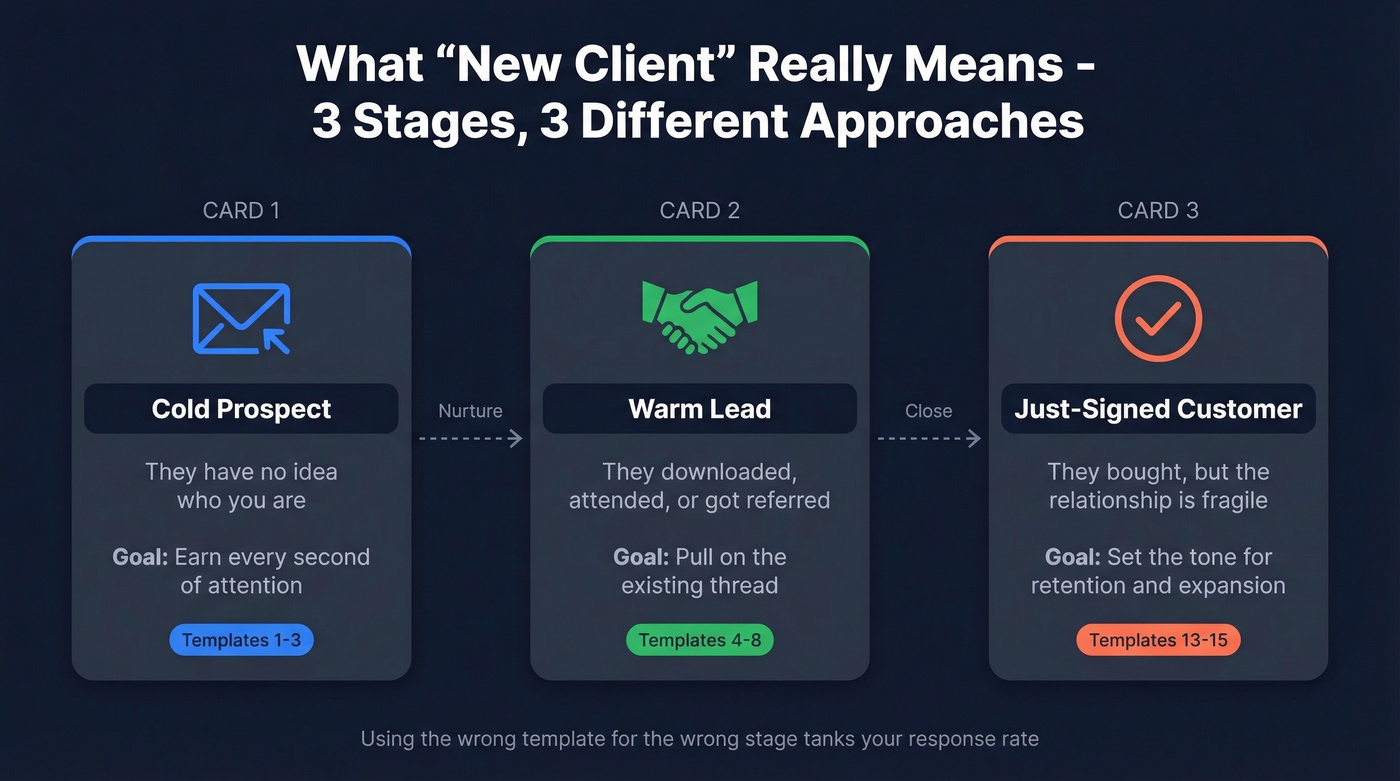
Cold prospect - you've never spoken. They don't know you exist. Pure outbound, and the email needs to earn every second of attention.
Warm lead - they downloaded your whitepaper, attended your webinar, or got referred by a mutual connection. There's a thread to pull on.
Just-signed customer - they've bought, but the relationship is fragile. Onboarding emails set the tone for retention, expansion, and referrals. Getting this sequence right is what separates teams that keep customers from teams that churn them.
Quick Picks
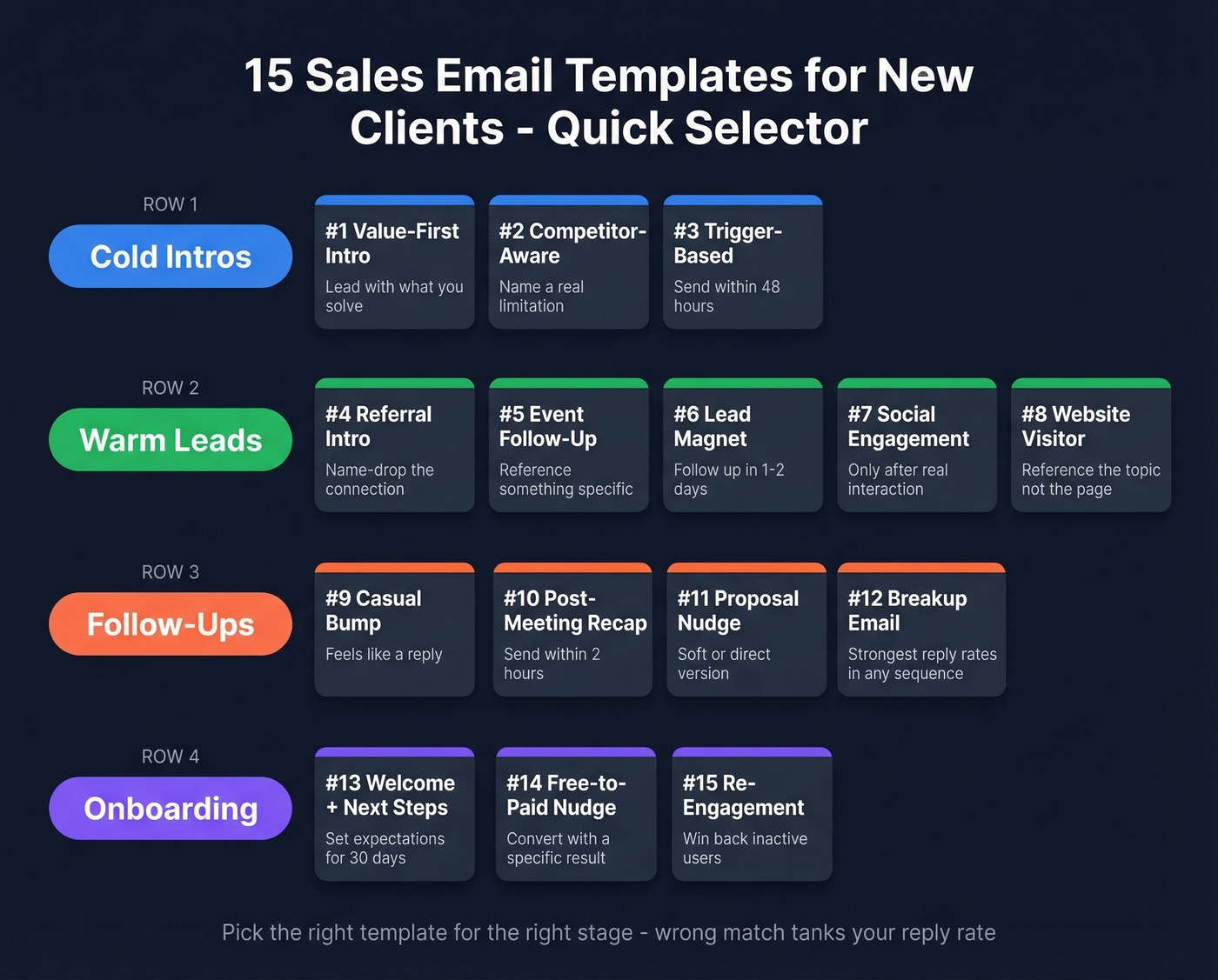
| Scenario | Template | One-Line Description |
|---|---|---|
| Cold first touch | Value-First Intro | Lead with what you solve, not who you are |
| Referral | Referral Intro | Name-drop the connection, keep it tight |
| Website visitor | Site Visit Follow-Up | Reference their browsing without being creepy |
| Post-webinar | Event Follow-Up | Reference a specific moment from the session |
| After first email | "Feels Like a Reply" | Casual bump that doesn't scream "sequence" |
| New customer | Welcome + Next Steps | Set expectations for the first 30 days |
| Upsell | Free-to-Paid Nudge | Convert trial users with a specific result |
Before You Send a Single Email
Templates are worthless if they land in spam. Here's the setup checklist most guides skip entirely.
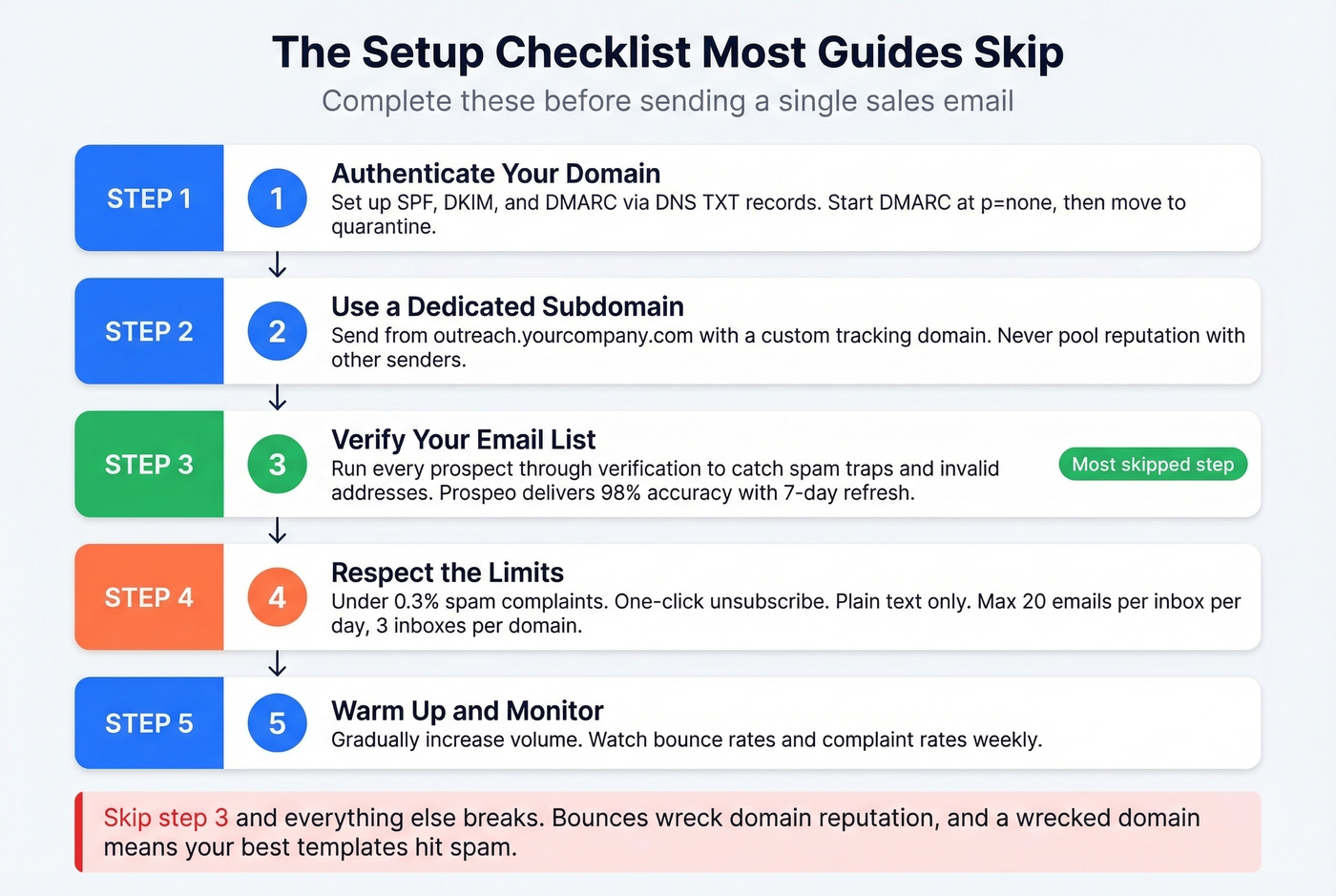
Set up SPF, DKIM, and DMARC via DNS TXT records. Gmail enforced these for bulk senders in February 2024, and Outlook followed in May 2025. Start DMARC at p=none for monitoring, then move to quarantine or reject once you've confirmed alignment. Send cold outreach from a dedicated subdomain like outreach.yourcompany.com and set up a custom tracking domain - shared tracking domains pool your reputation with other senders, which is a risk you don't need.
Respect the limits. Keep spam complaint rates below 0.3%. Include one-click unsubscribe in every email. Send plain text - no images, no HTML templates, no attachments. Cap volume at roughly 20 emails per inbox per day, max 3 inboxes per domain (see email velocity for safe sending limits).
Verify your list before anything else. This is the step most teams skip, and it's the one that destroys everything downstream. Sending to invalid addresses causes bounces, bounces wreck your domain reputation, and a wrecked domain means even your best templates hit spam. We run every prospect list through Prospeo's verification before launching a sequence - the 5-step verification catches spam traps and honeypots, delivers 98% email accuracy, and refreshes data every 7 days so you're not emailing people who changed jobs last month. When Snyk's 50-person sales team cleaned their list this way, bounce rates dropped from 35-40% to under 5% (more on email bounce rate benchmarks and fixes).

Subject Lines That Get Opened
A Belkins study of 5.5 million emails found personalized subject lines hit a 46% open rate versus 35% without - a 31% lift. Reply rates jumped even more: 7% personalized versus 3% without.
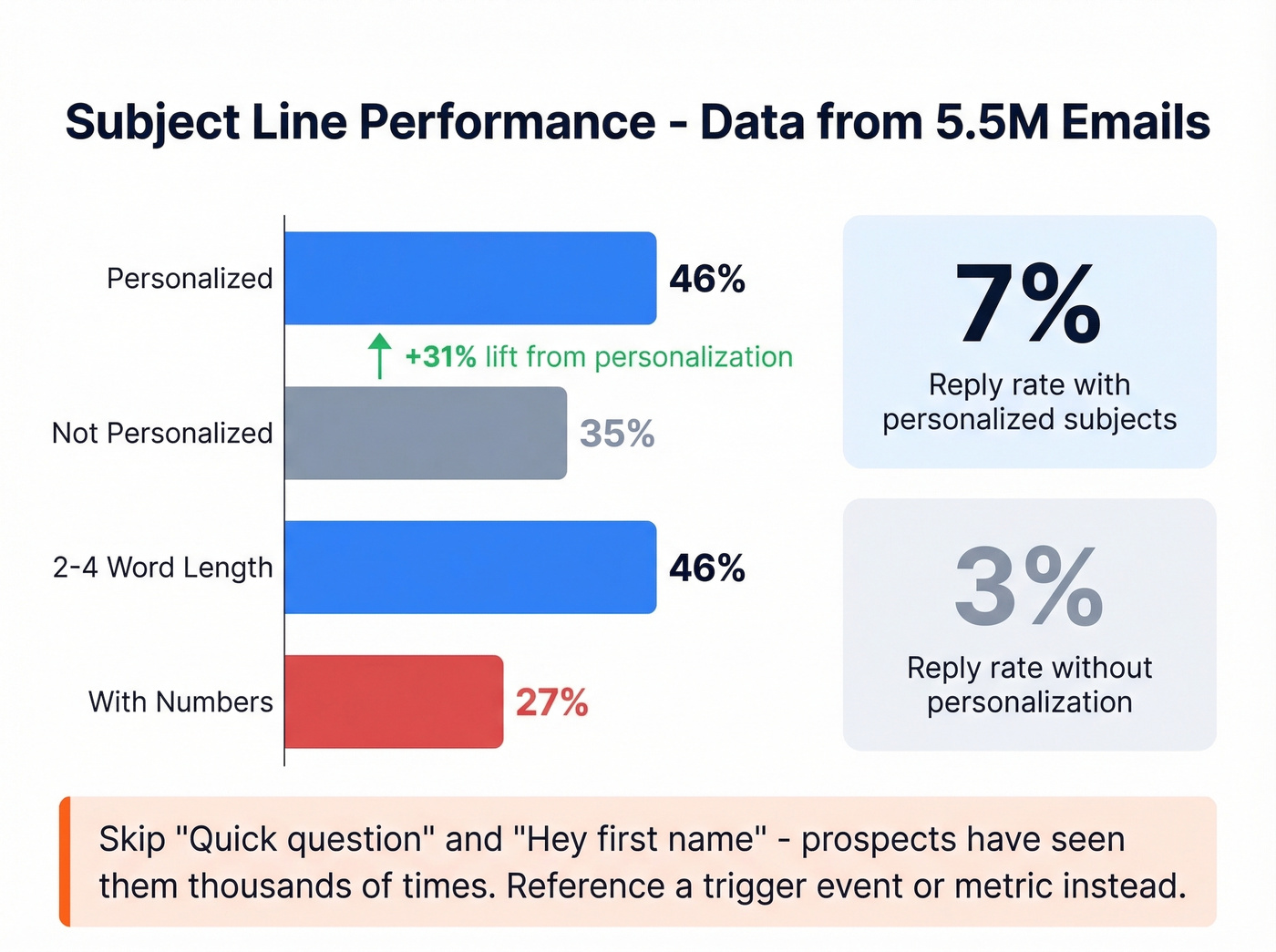
Keep it to 2-4 words. That length hit 46% open rates. Performance drops steadily after 7 words (use these prospecting email subject lines patterns to iterate faster).
Questions outperform statements. Question-style subject lines averaged 46% open rates, the top-performing format. Numbers hurt slightly - 27% open rate versus 28% without - so skip the "3 ways to..." format.
The consensus on r/coldemail is that "Quick question" and "Hey {first name}" are burned out. Prospects have seen them thousands of times. Reference something specific instead: a trigger event, a metric, or a mutual connection.

Every template above assumes one thing: your emails actually reach the inbox. Snyk's 50 AEs dropped bounce rates from 35% to under 5% using Prospeo's 5-step verification. At $0.01 per email with a 7-day data refresh, you're never emailing stale contacts or spam traps.
Fix your data before you fix your copy. Start with 75 free verified emails.
15 Templates That Earn Replies
Cold Intro Templates
Template 1: Value-First Intro
Subject: Cutting [specific metric] at {{company}}
{{First name}}, noticed {{company}} is scaling the {{department}} team - usually means {{specific pain point}} becomes a bottleneck fast.
We helped {{similar company}} cut {{metric}} by {{result}} in {{timeframe}} without adding headcount.
Worth a look?
When to use: First cold touch to a researched prospect. Opens with their world, not yours. Single-question CTA keeps friction near zero.
Template 2: Competitor-Aware Intro
Here's the thing: this template outperforms every other cold template we've tested, but only when you can name a genuine limitation. Vague competitor bashing backfires instantly.
Subject: How {{competitor}} handles this
{{First name}}, teams using {{competitor tool}} usually hit a wall with {{specific limitation}}.
We built {{your product}} specifically to solve that - {{one-line proof point}}.
Interested in a 2-minute comparison?
Don't guess the competitor. Check their job postings and tech stack data for confirmation before sending.
Template 3: Trigger-Based Intro
Subject: Congrats on the raise
{{First name}}, saw {{company}} just closed your Series {{X}}. Congrats.
Post-funding, most teams we work with prioritize {{relevant outcome}} - we helped {{similar company}} get there in {{timeframe}}.
Make sense to chat this week?
Timing is everything here. Send within 48 hours of the trigger - a funding round, leadership hire, acquisition, or product launch. After that window, the signal goes stale (here’s a deeper playbook on how to track sales triggers).
Warm Lead Templates
Template 4: Referral Intro
Subject: {{Referrer name}} suggested I reach out
{{First name}}, {{referrer}} mentioned you're working on {{specific initiative}} and thought we might be able to help.
We {{one-line value prop}} - helped {{referrer's company}} with {{result}}.
Happy to share details if it's relevant.
Send within 24 hours of getting the referral. The referrer's name does the heavy lifting - trust is borrowed, not earned.
Template 5: Webinar/Event Follow-Up
Subject: The {{topic}} question from Thursday
{{First name}}, great seeing you at {{event}}. Your question about {{specific topic}} stuck with me.
We have a case study on exactly that - {{company}} solved it by {{approach}} and saw {{result}}.
Want me to send it over?
If you can't reference something specific they said or asked, skip this template and use Template 6 instead. A generic "Thanks for attending!" blast is worse than not following up at all.
Template 6: Lead Magnet Download
Subject: Next step after the {{resource name}}
{{First name}}, you grabbed our {{guide/report}} on {{topic}} - hope it was useful.
Most teams reading that are trying to solve {{core problem}}. We helped {{similar company}} {{specific result}}.
Worth a quick conversation?
Send 1-2 days after the download. Don't wait a week. Intent decays fast.
Template 7: Social Engagement Follow-Up
Subject: Your take on {{topic}}
{{First name}}, saw your comment on {{post topic}} - especially the point about {{specific insight}}. Spot on.
We're working on something related at {{your company}}. Quick overview: {{one sentence}}.
Curious to hear your thoughts.
Only use this after genuine engagement - a comment, share, or post that shows they care about a topic you address.
Template 8: Website Visitor Follow-Up
This is the template most guides skip, and it's a goldmine if you handle it right. The key: reference the topic, never the specific page. "I saw you visited our pricing page" is creepy. This version isn't.
Subject: {{Relevant topic}} at {{company}}
{{First name}}, we've been seeing interest from {{industry}} teams exploring {{topic area your visited pages cover}}.
{{One-line result from a similar company}}.
Would a quick walkthrough be useful?
Pair this with intent data tools to confirm the prospect's company is actively researching your category before sending (see intent based segmentation for a practical approach).
Follow-Up Templates
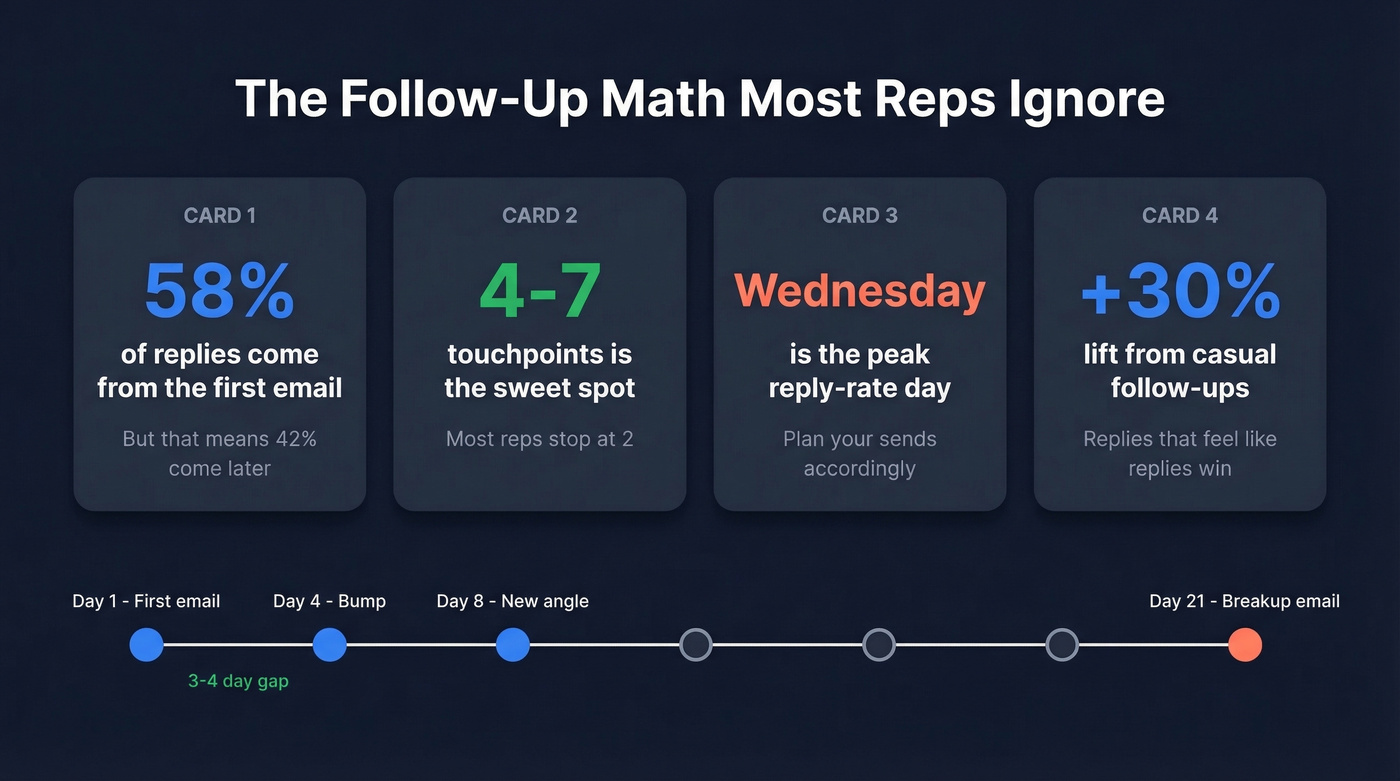
58% of replies come from the first email, but follow-ups drive the remaining 42%. The sweet spot is 4-7 touchpoints. Wednesday is the peak reply-rate day. And follow-ups that feel like replies outperform formal follow-ups by roughly 30%.
Template 9: "Feels Like a Reply"
Subject: Re: {{original subject line}}
Bumping this - figured it might've gotten buried.
Short version: we help {{type of company}} {{specific outcome}}. {{One proof point}}.
Still relevant?
Send 3-4 days after your first email. Keep the "Re:" to mimic a reply thread (more options in these sales follow-up templates).
Template 10: Post-Meeting Recap
Subject: Next steps from our call
{{First name}}, thanks for the time. Quick recap:
You mentioned {{pain point}}. We discussed {{solution}}. Next step: {{action + owner + date}}.
I'll send {{deliverable}} by {{day}}.
Send within 2 hours of the meeting. Speed signals professionalism and creates accountability.
Template 11: Post-Proposal Nudge
Version A (Soft):
{{First name}}, checking in on the proposal from {{date}}. If it helps, I can walk through {{specific section}} on a 10-minute call - that's usually where questions come up.
Version B (Direct):
{{First name}}, want to make sure the proposal doesn't go stale. The {{specific offer/discount}} is valid through {{date}}. Worth a quick call to finalize?
Use Version A when the deal is warm but slow. Use Version B when you have a time-bound element to work with.
Template 12: The Breakup Email
Subject: Should I close your file?
{{First name}}, I've reached out a few times and haven't heard back - totally fine.
I'll close out your file for now. If {{specific problem}} comes back up, I'm here.
Loss aversion is real. Breakup emails consistently pull the strongest reply rates of any position in a sequence.
Welcome and Onboarding Templates
Template 13: Welcome + Next Steps
Subject: Welcome aboard - here's what happens next
{{First name}}, thrilled to have {{company}} on board.
This week: {{task 1 + link}}. By day 14: {{milestone}}. Your contact: {{name + email}}.
Questions before we kick off?
Send the day of contract signing. Don't wait. This welcome email sets the tone for everything that follows - treat it as the first touchpoint in your onboarding campaign, not a one-off message.
Template 14: 30-Day Check-In
Subject: How's the first month going?
{{First name}}, you're about 30 days in. Are you seeing progress on {{specific goal from sales process}}?
If anything's off track, let's sort it now rather than at renewal.
Calendar this during onboarding so it doesn't slip. This is where retention starts.
Template 15: Free-to-Paid Nudge
Subject: Your trial results so far
{{First name}}, you've {{specific usage metric - e.g., "sent 43 campaigns"}} since starting your trial.
Teams at that usage level typically see {{outcome}} on a paid plan because {{one reason - e.g., "higher sending limits unlock full sequences"}}.
Want me to walk through the options?
Send at 60-70% through a free trial, when usage data shows genuine engagement. If they haven't used the product, don't send this - send a re-engagement email instead.
The 2026 Template Formula
Every template above follows the same underlying structure. Once you see it, you can write your own sales email for new clients in any situation.
Context signal -> Specific value -> One proof point -> Soft CTA. Four elements, two-sentence paragraphs, one question, one link or zero. "Worth a look?" and "Interested?" outperform "Let's book 30 minutes" every time. Low-friction offers like "I'll audit your top 3 landing pages and send a Loom" beat meeting requests consistently.
The consensus on r/sales is that winning cold emails are under 80-90 words max. We've tested this extensively, and the data holds. Top performers on r/SaaS are also using tools like Clay to auto-generate personalized first lines from profile data - that personalization is what separates 3% reply rates from 10% (see personalized outreach for a repeatable system).
Let's be honest about what's dead: long-form emails, multiple CTAs, image-heavy HTML, "Quick question" subject lines, and "I'd love to pick your brain." If your template has more than two paragraphs, it's too long. If it has more than one link, you're increasing your spam risk. A/B test your subject lines and CTAs weekly - small changes compound fast (use this email call to action guide to tighten CTAs).
Copywriting Frameworks for Outreach
AIDA (Attention-Interest-Desire-Action) works best for cold intros. Grab attention with a relevant observation, build interest with a specific capability, create desire with a result, close with a single action.
PAS (Pain-Agitate-Solution) shines when you know the prospect's problem. Name the pain, twist the knife, present the solution. Example: "Your CRM data is decaying faster than you think. Every month you wait, your pipeline gets less reliable. A weekly data refresh catches the rot before it spreads." That's PAS in three sentences.
BAB (Before-After-Bridge) is perfect for case-study-driven outreach. Paint the "before" state, show the "after" result, bridge with how.
Pick the framework that matches awareness level. Cold and unaware? AIDA. Knows the problem? PAS. Needs proof? BAB.
Legal Requirements You Can't Ignore
| Regulation | Region | Consent | Max Penalty | Key Requirements |
|---|---|---|---|---|
| CAN-SPAM | US | Opt-out | $51,744-$53,088/email | Physical address, truthful subject, opt-out within 30 days |
| GDPR | EU/EEA | Legitimate interest (B2B) | EUR 20M | Document LIA, honor data rights, have DPA |
| CASL | Canada | Opt-in | Varies | Prior consent, unsubscribe within 10 business days, keep records 3 years |
For US outreach, CAN-SPAM is opt-out - you can email cold, but every message needs accurate sender info, a truthful subject line, your physical mailing address, and a working unsubscribe link honored within 30 days. GDPR allows B2B cold email under Article 6(1)(f) legitimate interest, but you need a documented Legitimate Interest Assessment. CASL is the strictest - consent first, always.
Most teams get compliance right on the basics and wrong on the details. The physical address requirement catches people. Document everything.
Trigger-based templates only work when you catch the signal in time. Prospeo's 30+ search filters - including funding events, job changes, and headcount growth - surface the right prospects the moment they become relevant. 300M+ profiles, refreshed weekly.
Stop guessing who to email. Find prospects with buying signals today.
FAQ
How long should a sales email to a new client be?
Under 80 words. Instantly's 2026 benchmark data confirms short emails outperform longer ones. Stick to two-sentence paragraphs, one question, and a single CTA.
What's a good reply rate for cold outreach?
Average is 3.43%. Above 5% means you're outperforming most outbound teams. Below 2%, something's broken - usually list quality or deliverability, not copy.
How many follow-ups should I send?
Four to seven touchpoints. 58% of replies come from the first email, but follow-ups drive the rest. Beyond seven, returns diminish sharply and you risk spam complaints.
Should I verify email addresses before sending?
Always - it's the single highest-ROI step in outbound. Bounces from invalid addresses damage domain reputation, which means even perfect templates land in spam.
Is cold emailing new prospects legal?
Yes, in most jurisdictions with proper compliance. CAN-SPAM requires opt-out mechanisms and a physical address - penalties reach $51,744+ per email. GDPR allows B2B cold email under legitimate interest. CASL requires prior consent.