

Sample Email Blast Templates: 10 Copy-Paste Examples for 2026
Your boss needs this sent by EOD. Every template site wants you to create an account, pick a color scheme, and drag blocks around for twenty minutes before you see a single word of copy. You don't need a design tool. You need a sample email blast template with real copy - subject lines, body text, and CTAs you can send right now.
Every template below is plain text. No drag-and-drop builder required.
What's an Email Blast, Exactly?
People use "blast," "drip," and "automation" interchangeably. They're not the same thing.
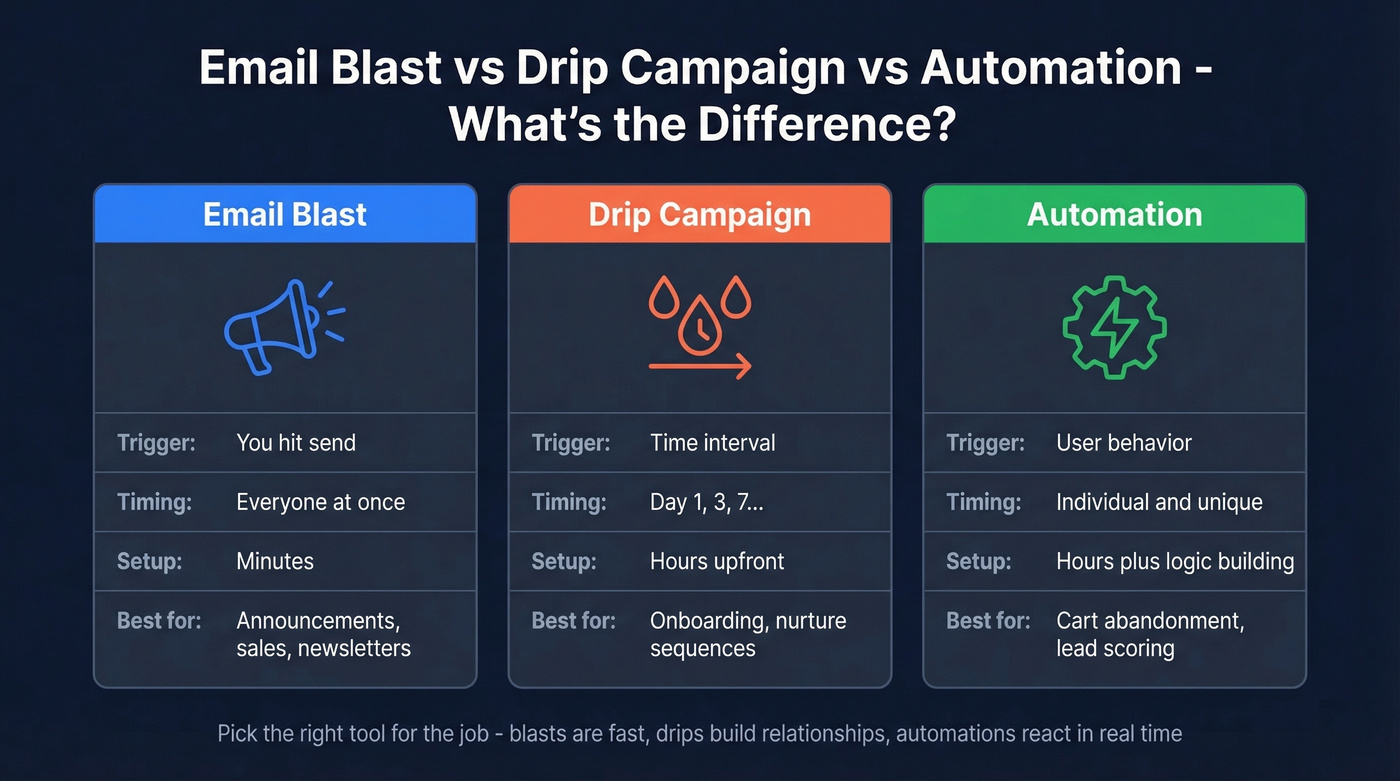
| Email Blast | Drip Campaign | Automation | |
|---|---|---|---|
| Trigger | You hit "send" | Time interval | User behavior |
| Timing | Everyone at once | Day 1, 3, 7... | Individual |
| Setup | Minutes | Hours upfront | Hours + logic |
| Best for | Announcements, sales, newsletters | Onboarding, nurture | Cart abandonment, scoring |
Blasts work for announcements, flash sales, newsletters, and event invites. They don't work for cold outreach or sensitive account issues. If you're emailing people who didn't opt in, that's not a blast - that's a spam complaint waiting to happen.
10 Copy-Paste Email Blast Templates
You don't need 30 templates. You need 3-4 great ones you customize. Here are 10 covering the scenarios that actually come up.
1. Product Announcement
Subject: New: {feature_name} is live
Hi {first_name},
We just shipped {feature_name}, and it solves the exact problem you've told us about. Here's what it does: {one-sentence benefit}. It's live in your account right now, no update needed.
-> [See {feature_name} in action]
Why it works: One feature, one benefit, one CTA. No feature dump. The reader knows exactly what changed and what to do next.
2. Flash Sale / Discount
Subject: {first_name}, 24 hours left for {X}% off
This one's quick. We're running {X}% off everything through midnight {date}. No code needed; the discount applies at checkout. If you've been on the fence, this is the nudge.
-> [Shop the sale]
Pro tip: Urgency only works when it's real. If the sale "ends tonight" every week, your list will learn to ignore you.
3. Company Update
Subject: A quick update from {company}
Hi {first_name},
A few things have changed at {company} and we wanted you to hear it from us first. {2-sentence summary of update}. Nothing changes on your end - we just wanted to keep you in the loop.
-> [Read the full update]
4. Event Invite
Subject: You're invited: {event_name} on {date}
We're hosting {event_name} on {date} at {time} {timezone}. {One sentence on what attendees will learn or experience}. Spots are limited and we'd love to see you there.
-> [RSVP now]
5. Newsletter Digest
Subject: This week: {topic_1} + {topic_2}
Here's what we published this week:
- {topic_1} - {one-line summary} [Read ->]
- {topic_2} - {one-line summary} [Read ->]
- {topic_3} - {one-line summary} [Read ->]
Pick one, read it with your coffee. See you next week.
6. Re-engagement
Subject: We miss you, {first_name}
It's been a while since you logged in. No guilt trip - just wanted to let you know we've added {new feature or content} since your last visit. If {company} isn't useful anymore, no hard feelings. Hit unsubscribe below.
-> [See what's new]
P.S. If you do come back, {specific thing they'll find} is worth checking out first.
Why it works: Giving people permission to leave builds more trust than begging them to stay. The P.S. adds a concrete reason to click without being pushy.
7. Welcome Blast
Subject: Welcome to {company} - here's what's next
Hey {first_name}, welcome aboard. Here's the one thing to do right now: {single next step}. That'll get you 80% of the value in about 5 minutes. If you get stuck, reply to this email. A real person reads it.
-> [Get started]
8. Seasonal / Holiday
Subject: Our {holiday} picks for you
{Holiday} is {timeframe} away. We pulled together our top picks so you don't have to scroll: {2-3 product/content highlights}. Everything ships by {date} if you order today.
-> [See the {holiday} collection]
9. Feature Highlight
Subject: You're not using {feature_name} yet
Most people don't know about {feature_name}, but it's one of the most useful things in your account. It {one-sentence explanation}. Takes about 2 minutes to set up.
-> [Try {feature_name}]
Common mistake: Highlighting three features at once. Pick one. If you have three worth sharing, that's three separate emails.
10. Customer-Only Promo
Subject: {first_name}, this one's just for you
You've been with us since {date/month}. As a thank you, here's {offer} - exclusive to existing customers. It's good through {expiry_date}. No code, no catch.
-> [Claim your offer]

Great templates don't fix bad lists. Teams using Prospeo cut bounce rates from 35% to under 4% - because every email is verified through a 5-step process before it ever hits send. At $0.01 per email and 98% accuracy, your next blast actually reaches real inboxes.
Start with 75 free verifications - no contract, no sales call.
Email Blast Checklist: Before You Hit Send
Subject Lines
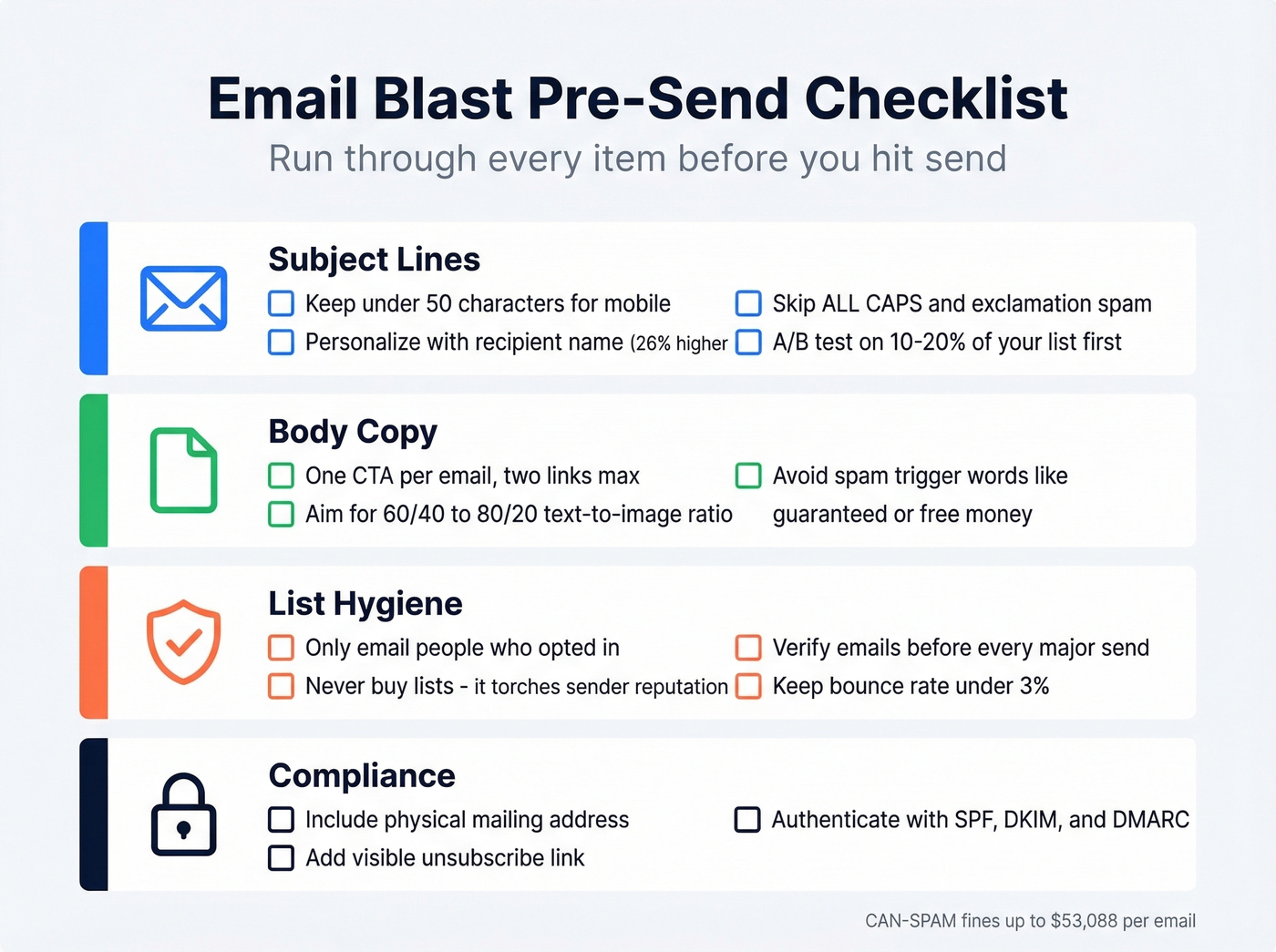
- Keep under 50 characters - anything longer gets truncated on mobile
- Personalizing with the recipient's name lifts open rates by 26%+
- Skip ALL CAPS, "FREE!!!", and "Act now!" - these are spam filter magnets
- A/B test two subject lines on 10-20% of your list before sending to the rest
If you want more swipeable ideas, pull from these subject lines and adapt them to your offer.
Body Copy
- One CTA per email, two links maximum
- Aim for a 60/40 to 80/20 text-to-image ratio - image-heavy emails hurt deliverability
- Avoid spam trigger words like "guaranteed," "free money," and "no obligation"
If your clicks are low, tighten your email copy before you touch design.
List Hygiene
Look, most blasts don't fail because of bad copy. They fail because the list is garbage. Only email people who opted in. Never buy lists - it's the fastest way to torch your sender reputation. Clean stale contacts and verify emails before every major send to keep your bounce rate at 3% or less.
We've seen teams go from 15% bounce rates to under 3% just by running verification before each blast. Prospeo handles this with 98% accuracy, and you get 75 free verifications to start.
Segmented blasts drive 6x higher transaction rates than unsegmented ones. Even basic segmentation by role or engagement level makes a measurable difference - especially if you’re building targeted email campaigns.
Send Timing
Best send times vary by audience, but Tue-Thu mornings consistently perform well across industries. Test your own list - your data beats any benchmark. If you’re also doing outbound, compare against the best time to send playbook.
Compliance
The fines are real. CAN-SPAM violations run up to $53,088 per email, CASL penalties hit $10M for businesses, and GDPR fines reach EUR 10M. Every blast must include:
- A physical mailing address
- A visible unsubscribe link
- An honest subject line
For deliverability, you also need SPF, DKIM, and DMARC authentication. Gmail and Yahoo have been cracking down on mass senders - this isn't optional anymore if you care about inbox placement. Use a full email deliverability checklist, and keep an eye on sender reputation as you scale.
Building a blast list from scratch? Prospeo's database has 143M+ verified emails across 300M+ professional profiles. Use 30+ filters to segment by job title, industry, intent signals, and more - so your blast hits the right people, not just any people.
Stop blasting generic lists. Target the exact audience that converts.
2026 Email Blast Benchmarks
Here's what "good" looks like, based on MailerLite's analysis of 3.6M campaigns across 181K accounts:
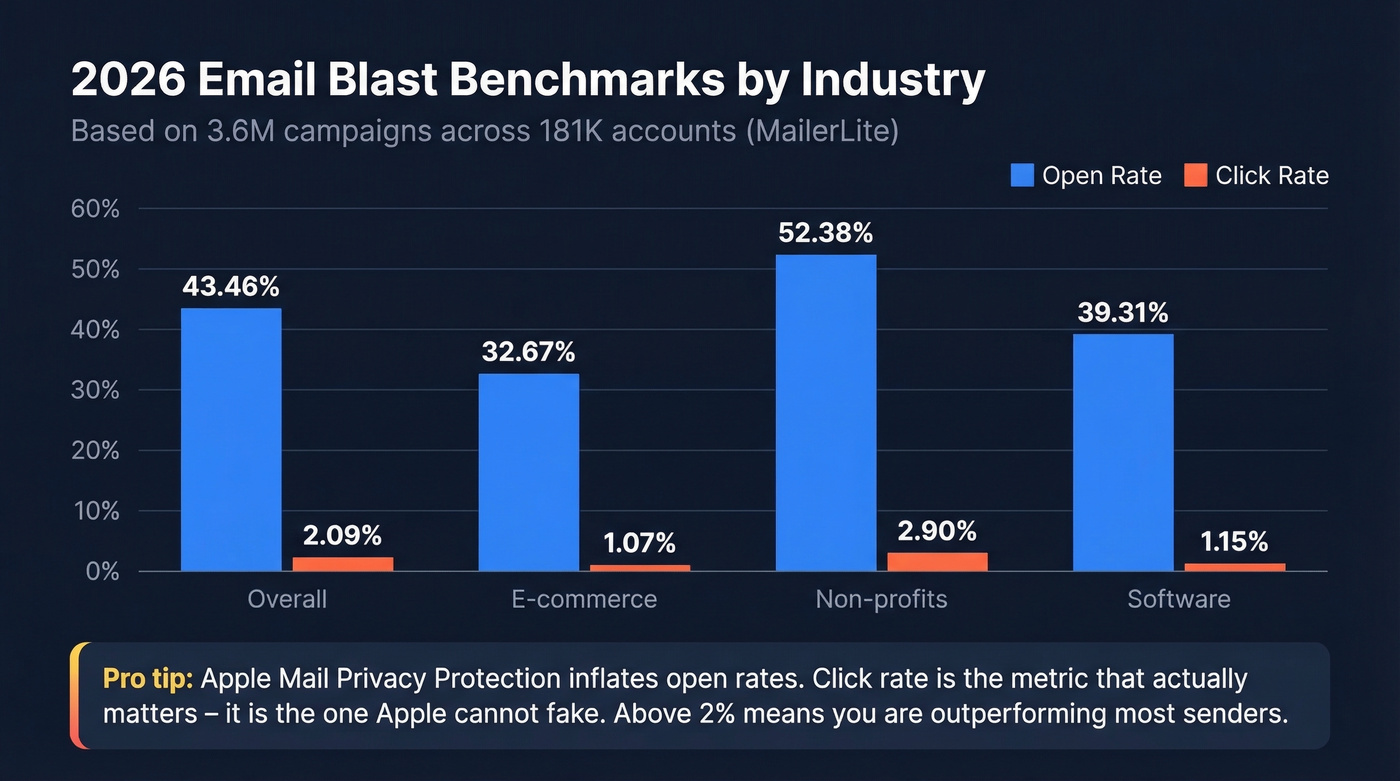
| Metric | Overall | E-commerce | Non-profits | Software |
|---|---|---|---|---|
| Open rate | 43.46% | 32.67% | 52.38% | 39.31% |
| Click rate | 2.09% | 1.07% | 2.90% | 1.15% |
| Click-to-open | 6.81% | - | - | - |
| Unsubscribe | 0.22% | - | - | - |
Apple Mail Privacy Protection inflates open rates, so real opens are lower than these numbers suggest. In our experience, click rate is the metric that actually matters - it's the one Apple can't fake. If yours is above 2%, you're outperforming most senders. (If you want to calculate it cleanly, use the click rate formula.)
One thing we tell our own customers: if your open rate looks amazing but your click rate sits below 1%, your subject lines are doing their job and your body copy isn't. Fix the email, not the subject line.
Free Tools to Send Your Blast
| Tool | Free Tier Limit | Best For |
|---|---|---|
| Kit | 10K subs, unlimited sends | Best free deal, period |
| Sender | 2,500 subs, 15K/mo | Small biz, generous limits |
| MailerLite | 500 subs, 12K/mo | Clean UI, great templates |
| Brevo | 100K contacts, 300/day | Large lists, low volume |
| EmailOctopus | 2,500 subs, 10K/mo | Simple, no-frills sending |
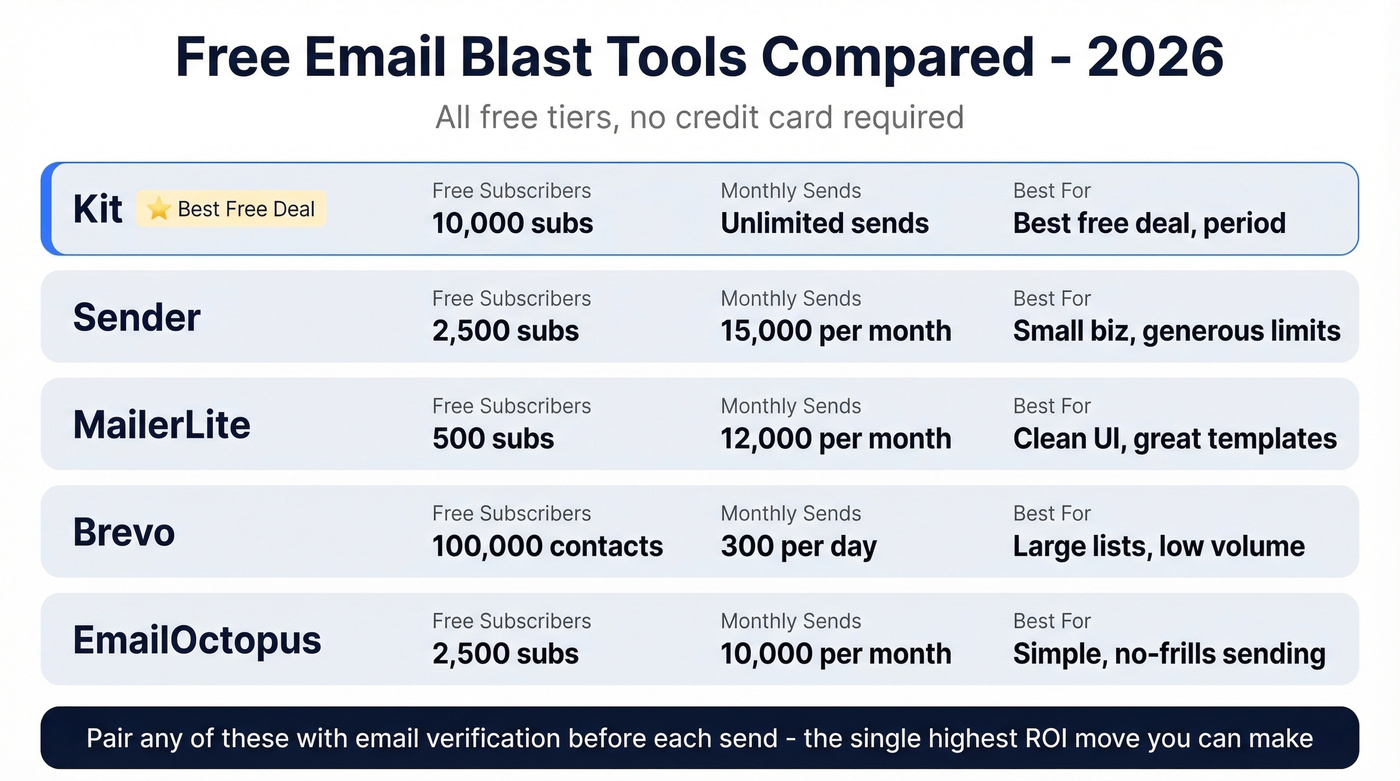
All limits per Zapier's 2026 roundup, which tested 60+ tools. Kit's 10,000-subscriber free tier with unlimited sends is the standout - most competitors cap you at 500-2,500 subscribers.
For teams that already have a sending tool but need better contact data going in, pairing any of these with an email verification step before each send is the single highest-ROI move you can make. If you’re sending at scale, follow the best way to send bulk email without getting blacklisted guide.
FAQ
How often should I send email blasts?
Once a week is the sweet spot for most lists. If your unsubscribe rate climbs above 0.3% per send, you're mailing too often. Test frequency with a small segment before committing to a cadence.
What's the difference between a blast and a drip?
A blast sends one message to your entire list at once. A drip sends a timed sequence triggered by a signup or purchase. Use blasts for announcements and promotions, drips for onboarding and lead nurturing.
How do I keep my blast out of spam?
Authenticate your domain with SPF, DKIM, and DMARC, then verify your list before every major send. The biggest factor is list quality: verified, opted-in contacts with bounce rates under 3%. Skip this step and even the best sample email blast template won't save you.
Can I use these templates in any email platform?
Yes. Every template above is plain text, so you can paste it into Mailchimp, Kit, Brevo, MailerLite, or any ESP. Just swap the merge tags (like {first_name}) for your platform's equivalent.