

Sequence Email Send Limits: 2026 Guide for Every Tool
You've got 1,800 contacts queued in HubSpot, a sequence ready to fire, and a 500/day sending cap that'll take about four days to clear the backlog. Meanwhile, your email provider account has its own ceiling, and somewhere between those two numbers is the actual safe limit - the one that keeps you out of spam folders. With over 361 billion emails sent daily worldwide, providers are throttling harder than ever, and that gap between "what the tool allows" and "what you should actually send" is where most deliverability problems start.
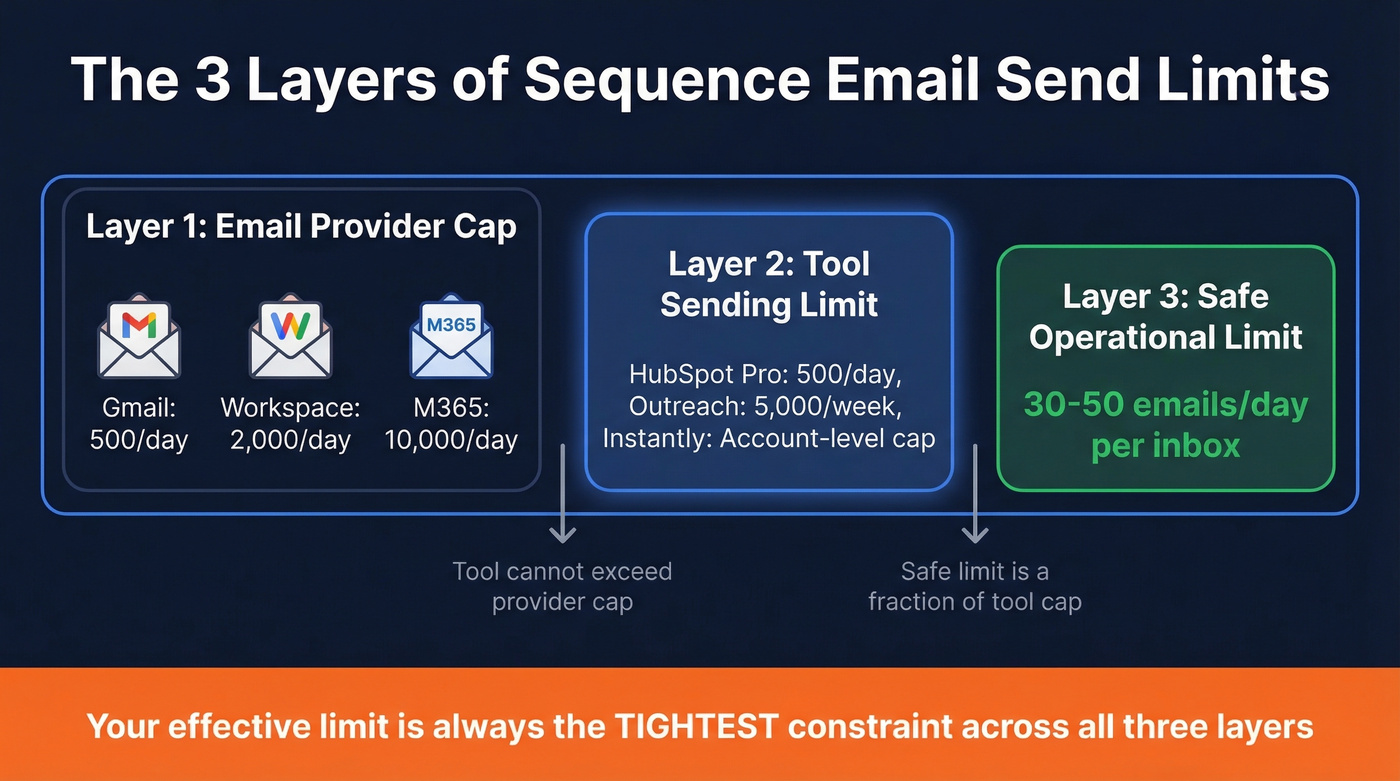
Three layers of sequence email send limits govern every outbound message: provider caps, tool limits, and safe operational limits. Confuse any two of them and you'll torch a domain.
The Quick Version
- Your email provider sets the ceiling. Gmail caps you at 500/day (100 via SMTP), Workspace at 2,000/day (trial: 500), and Microsoft 365 at 10,000 recipients/day. Your sequencing tool can't force your provider to send beyond these caps.
- Safe operational limit for cold outbound is 30-50 emails/day per inbox. That's a fraction of what your provider technically allows, and it's the number that actually matters for deliverability. Understanding your email sequence daily limit is what separates teams that land in the inbox from those that land in spam. (If you want to go deeper on speed + volume, see email velocity.)
- To send more, add mailboxes - don't raise limits. And verify every email before it enters a sequence. Bounces waste finite send slots and damage the domain reputation you're trying to protect. (Related: email bounce rate.)
Email Provider Limits
Your email provider is the hard ceiling. No sequencing tool can override it.
| Provider | Daily Cap | Safe Per-Min Rate* | Window Type | Pricing | |---|---:|---:|---|---| | Gmail (free) | 500/day (100 via SMTP) | ~10-15/min | Rolling 24hr | Free | | Google Workspace | 2,000/day (trial: 500) | ~20-30/min | Rolling 24hr | ~$6/user/mo | | Microsoft 365 | 10,000 recipients/day | ~20/min | Rolling 24hr | ~$6/user/mo | | Outlook.com | 5,000/day | ~20/min | Rolling 24hr | Free |
Per-minute rates are recommended safe sending speeds, not provider-enforced hard caps.
One gotcha that trips up teams constantly: at the provider level, each recipient counts as one send. Email one person and CC 19 others, and that's 20 toward your daily limit, not one. This is how teams blow through provider caps without realizing it.
Some sequencing tools count "sends" differently inside the tool - certain platforms don't count CC/BCC toward their tool-level sequence cap - but your provider still counts every recipient.
The "rolling 24-hour window" matters too. Your limit doesn't reset at midnight. It resets 24 hours after each individual send. If you blasted 400 emails at 3 PM yesterday, those slots don't free up until 3 PM today. Providers built these caps to protect their infrastructure and reputation, not to help you run outbound.
Tool-by-Tool Sending Caps
Here's the master comparison across major sequencing platforms. Some limits are documented; others (marked with ~) are estimates based on common operational patterns. (If you're evaluating platforms, this ties closely to implementing a sales engagement platform.)
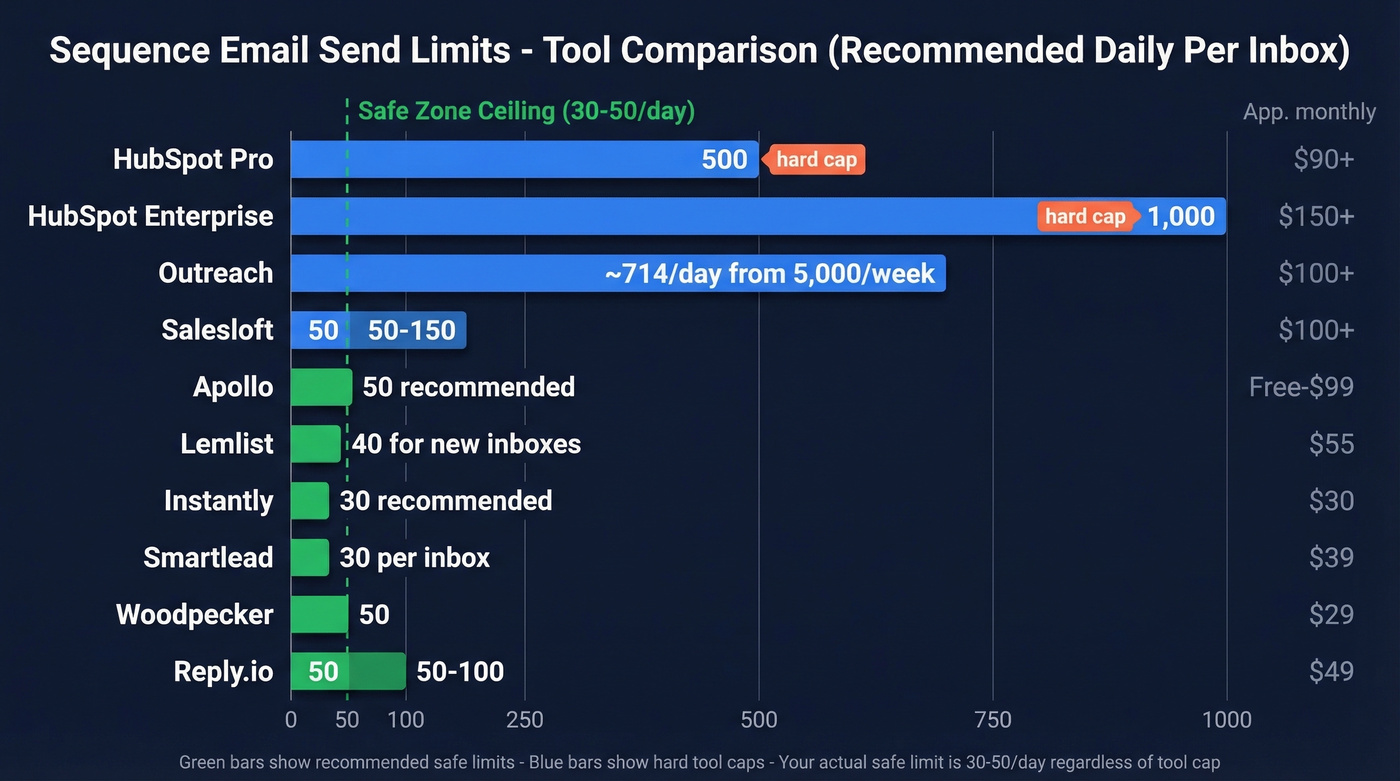
| Tool | Default/Day/Inbox | Max/Day | Warmup Excluded? | ~Price |
|---|---|---|---|---|
| HubSpot Pro | 500 | 500 | No native warmup | ~$90+/user/mo |
| HubSpot Enterprise | 1,000 | 1,000 | No native warmup | ~$150+/user/mo |
| Apollo | 50 (recommended) | Admin-set | No native warmup | Free-$99/user/mo |
| Outreach | Admin-set | 5,000/week/mailbox | No native warmup | ~$100+/user/mo |
| Instantly | 30 (recommended) | Account-level cap | Yes | ~$30/mo |
| Lemlist | 40 (new inboxes) | Global daily cap | Yes (Lemwarm) | ~$55/user/mo |
| Mixmax | Admin-set | 100-1,000/user/day | Unverified | ~$29-69/user/mo |
| Salesloft | ~50-150 | Admin-set | No native warmup | ~$100+/user/mo |
| Smartlead | ~30 (per inbox) | Account-level cap | Yes | ~$39/mo |
| Woodpecker | ~50 | Admin-set | Yes | ~$29/mo |
| Reply.io | ~50-100 | Admin-set | Yes | ~$49/user/mo |
| Salesmate | 500/day (Pro) | 1,000/day (Business) | No native warmup | ~$23-40/user/mo |
Let's dig into the tools with the most important nuances.
HubSpot's 500/Day Ceiling
HubSpot's sequence sending limit on Sales Hub Professional is a hard 500 emails per day, and Enterprise doubles it to 1,000 per day. There's also a 50-contact batch-add limit for enrolling contacts into sequences. The consensus on r/sales and r/hubspot is that the combination of a 500/day cap with a 50-contact batch-add limit makes scaling outbound "painfully slow" - and we've heard the same frustration from teams we work with.
One important nuance: HubSpot also lets admins customize per-day and per-minute send limits for connected personal email accounts, and HubSpot measures the daily limit over a rolling 24-hour period. In practice, your effective cap becomes the tightest constraint among (1) your provider's cap, (2) HubSpot's subscription sequence cap, and (3) any admin-configured send limit. These layered recipient limits are why many teams hit walls before they even realize what's throttling them.
The economics don't help either. Upgrading from Professional to Enterprise just to double your send limit means a meaningful per-seat price jump. For teams running serious outbound, a dedicated sequencing tool alongside HubSpot CRM is often the smarter play. (More on the operational side: sequence management.)
Outreach - Watch What Gets Counted
Outreach enforces a hard cap of 5,000 emails per week per mailbox. That sounds generous until you realize what counts toward it: emails sent from the Outreach Platform, Outreach Everywhere, and the Outreach Outlook add-in.
Here's the thing: you can hit your org limits without sending a single sequence email. Outreach's "daily email in/out" limits can include inbound, outbound, and synced emails - including emails not sent via Outreach (like Outlook sends or extension sends). Admins need to monitor and adjust these limits proactively, or reps will get the dreaded "User exceeded their Org's daily email in/out limit" error mid-sequence.
CC emails count toward domain limits too. If your team loves CC, you can burn through domain throttles faster than you think.
Instantly - Best Value for Scale
Instantly runs a dual-limit system purpose-built for volume. There's an Account Limit (max campaign emails/day for each inbox across all campaigns) and a Campaign Limit (max campaign emails/day across all inboxes assigned to that campaign). Warmup emails don't count toward either.
Their recommended baseline is 30 campaign emails per day per inbox. The scaling formula is clean: multiply connected accounts by 30 to get your recommended campaign limit. Ten inboxes = 300 emails/day. Twenty inboxes = 600/day. Campaign Slow Ramp increases sending by 2 campaign emails until you hit your cap. For teams figuring out how to send bulk cold emails without destroying deliverability, Instantly's inbox rotation model is the gold standard right now. (If you're building sequences from scratch, see B2B cold email sequence.)
Lemlist - Rolling Window, Global Cap
Lemlist's global daily limit is a rolling 24-hour cap per sending address across all active campaigns (first emails + follow-ups). Lemwarm emails don't count toward the Lemlist global daily limit, but Lemlist still recommends managing your total daily volume as: campaign sends + Lemwarm + manual replies.
Their recommended total daily volume per mailbox/provider is around 60-70 emails/day. For new mailboxes (under 1 year), Lemlist strongly recommends staying under 40 campaign emails/day to keep total volume in that 60-70/day range. If multiple campaigns share the same address, the global limit applies across all of them with no prioritization - excess emails simply queue for the next window.

When you're capped at 30-50 emails per inbox per day, every bounce is a wasted slot. Prospeo's 98% email accuracy and 5-step verification mean virtually zero bounces eating into your sequence limits.
Stop burning send slots on bad data - verify before you sequence.
Safe Limits vs. Technical Caps
The limit your tool lets you set is almost never the limit you should actually use. Google Workspace allows 2,000 emails per day. That doesn't mean you should send 2,000 cold emails per day from a single inbox. You'd be in spam jail within a week.
Apollo recommends keeping your daily cap at or below 50 emails per day, and in our testing across multiple tools, that 30-50/day range holds as the reliable baseline for cold outbound. The spam complaint threshold that triggers reputation damage is 0.1% - one complaint per thousand emails. At higher volumes, you hit that threshold faster than you'd think. (If you're troubleshooting placement, use an email spam checker and review your email deliverability guide.)
Per-minute velocity matters just as much as daily totals. Sending 200 emails in a 15-minute burst at 9 AM looks nothing like natural human behavior. Safe per-minute rates: Workspace at 20-30/min, Gmail at 10-15/min, and Microsoft 365 at ~20/min. Staying under your daily cap doesn't guarantee inbox placement - sending patterns and spikes matter just as much as raw volume.
I'll say it plainly: if you're closing deals under $10K, you probably don't need more than 5 inboxes and 150 sends/day. Most teams obsess over scaling volume when they'd get better results writing sharper copy for a smaller, verified list. Volume is a crutch for bad targeting. (For copy upgrades, start with email copywriting.)
How to Ramp New Mailboxes
New mailboxes have zero reputation. Jumping straight to your tool's maximum limit is the fastest way to land in spam.
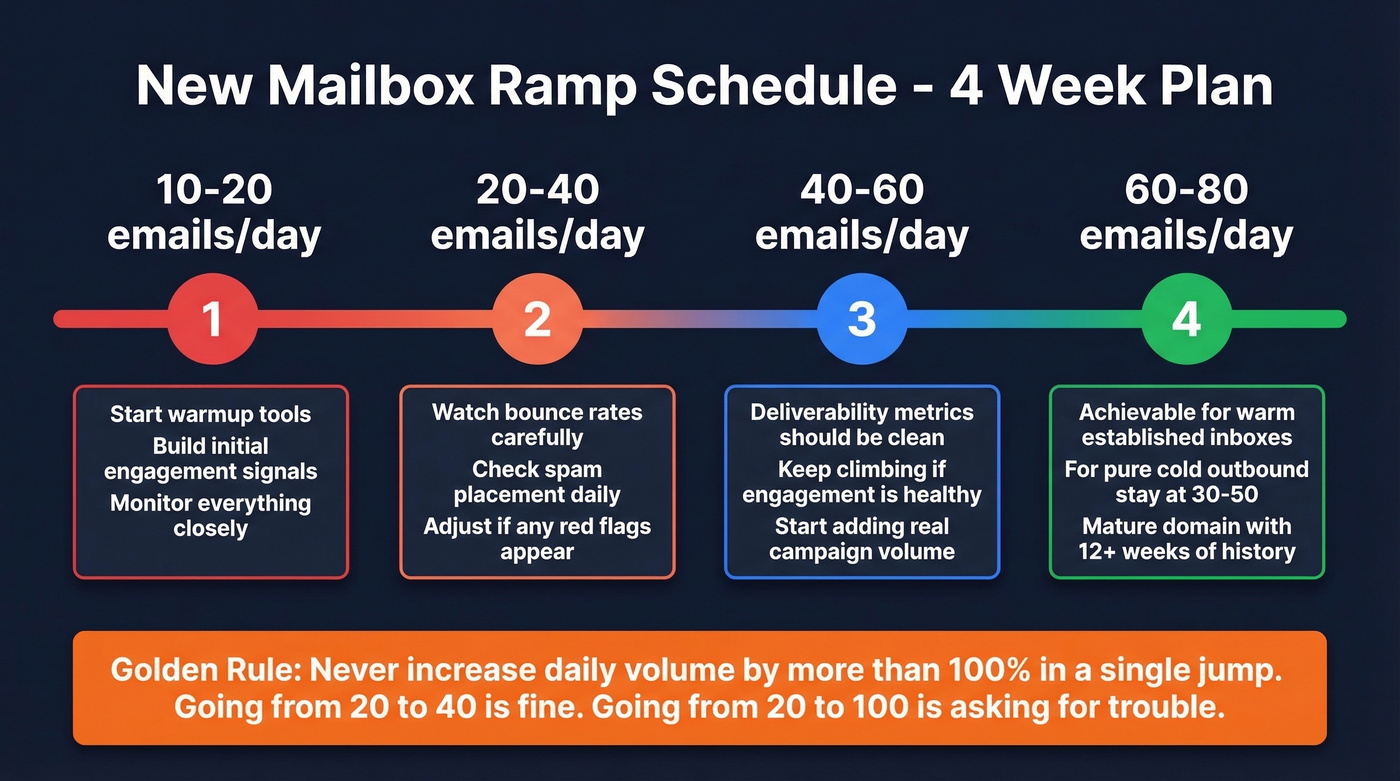
- Week 1: 10-20 emails/day. Let warmup tools build initial engagement signals.
- Week 2: 20-40 emails/day. Monitor bounce rates and spam placement closely.
- Week 3: 40-60 emails/day. If deliverability metrics look clean, keep climbing.
- Week 4: 60-80 emails/day. This is achievable for warm, established inboxes with strong engagement metrics. For pure cold outbound to unengaged lists, stay closer to 30-50.
Domain maturity matters here. Domains under 90 days old need the full four-week ramp. Fully mature domains - those with 12+ weeks of consistent, healthy sending - can handle higher starting volumes. The key rule: never increase daily volume by more than roughly 100% in a single jump. Going from 20 to 40 is fine. Going from 20 to 100 is asking for trouble. (If you're actively repairing reputation, see how to improve sender reputation.)
Scaling Beyond Your Limits
Adding mailboxes is always the answer, not raising limits. The formula is simple:
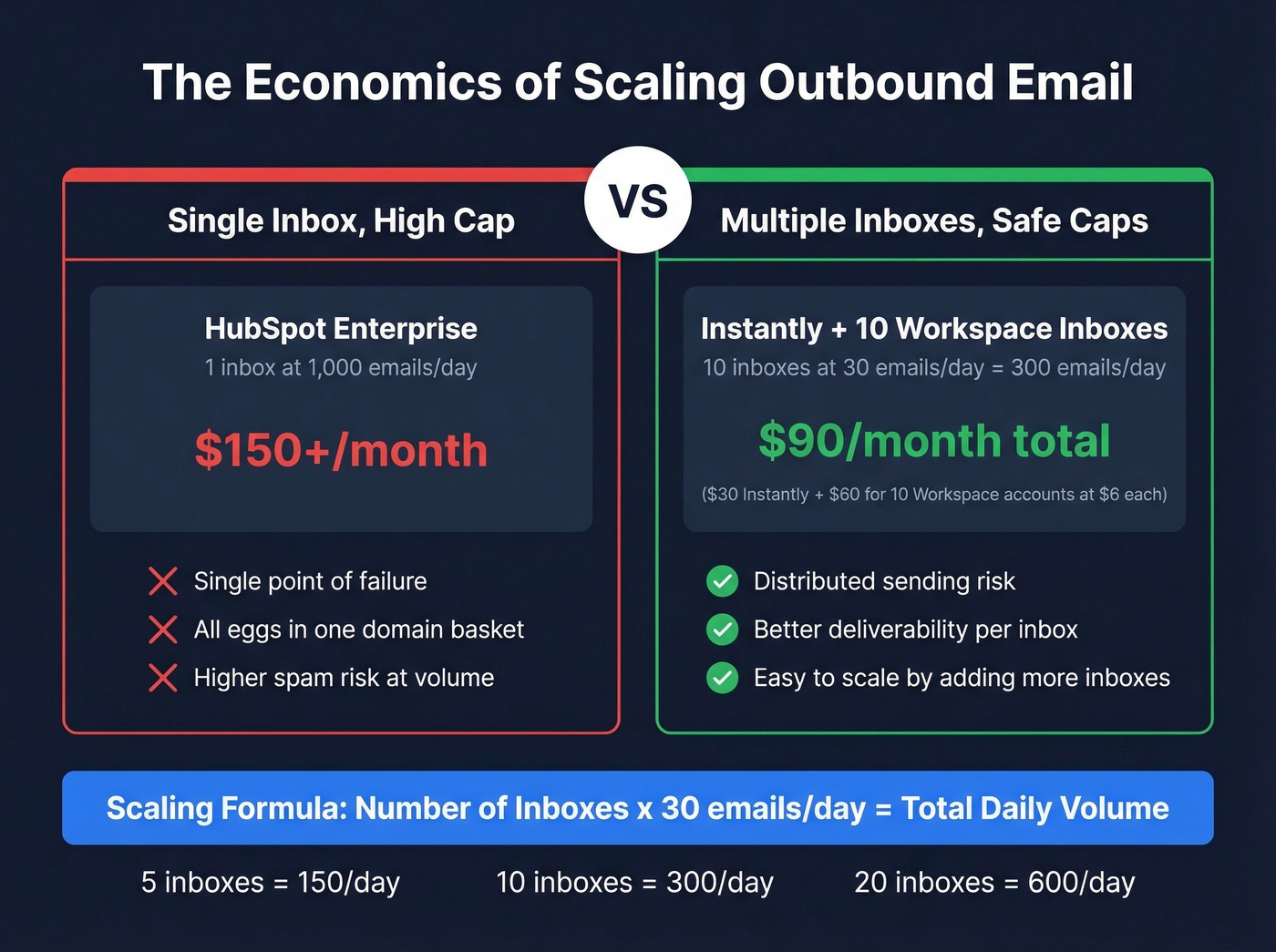
(# of inboxes) x safe daily limit = total daily volume
Ten inboxes at 30 emails/day = 300 emails/day. Twenty inboxes at 30/day = 600. Instantly and Smartlead are purpose-built for this rotation model - both let you connect dozens of inboxes and distribute sends automatically. This is the only reliable way to send bulk cold emails at scale without triggering provider-level throttling. (If you're choosing tooling, compare options in our SDR tools roundup.)
Compare the economics: HubSpot Enterprise typically costs ~$150+/user/month for a 1,000/day cap. Instantly is around $30/month. Even after buying 10 Workspace accounts at $6/user/month, you're at $90/month total for 300 emails/day with far better deliverability than a single inbox pushing 1,000.
Mistakes That Burn Your Sending Limits
Every one of these wastes finite daily send slots, damages domain reputation, or both.
Sending without warmup is the single most common reason cold email campaigns fail in week one. New inboxes need 2-4 weeks of warmup before carrying sequence volume. Skip this and your first campaign lands in spam before a single prospect reads it.
The Outreach synced-email trap catches teams who don't audit their org settings. Outreach org limits can include inbound, outbound, and synced emails - including emails not sent via Outreach. If reps are active in their inbox, they can exhaust the org cap before a single sequence email fires. Check your Outreach org settings before blaming the tool.
The recipient-counting gotcha burns teams running internal sequences with CC fields. At the provider level, one email CCing 20 people uses 20 send slots, not one. Strip unnecessary CCs from every sequence template.
Burst-sending at 9 AM is a red flag for email providers. Queuing 200 emails to fire at 9:00 AM sharp creates an unnatural spike that gets flagged immediately. Spread sends across a 4-6 hour window with randomized delays between messages.
Sequencing unverified emails is the most expensive mistake on this list. Every bounce wastes a slot in your daily limit and damages your sender reputation. Stack Optimize, an outbound agency, built to $1M ARR running client campaigns with bounce rates under 3% and zero domain flags across all clients - because they verify every address before it enters a sequence. At roughly $0.01 per email, verification costs less than one wasted sequence slot. Sending bulk cold email without verification is just paying to destroy your own domain.
Scaling outbound by adding mailboxes only works if the contacts you're sending to are real. Teams using Prospeo cut bounce rates below 4% and book 35% more meetings than Apollo users - at $0.01 per email.
Make every send count when daily caps leave zero room for error.
FAQ
Do warmup emails count toward sending limits?
Dedicated cold email tools - Instantly, Lemlist, Smartlead, and Woodpecker - exclude warmup from their tool-level caps. HubSpot and Outreach lack native warmup entirely. Third-party warmup services still count toward your provider's daily ceiling regardless of which sequencing tool you use.
What's the difference between rolling and calendar-day resets?
Rolling windows reset 24 hours after each individual send, meaning slots free up gradually throughout the day. Calendar-day resets clear everything at midnight. Google Workspace and most major providers use rolling windows, which are stricter and harder to game.
Can I raise HubSpot's 500/day cap without Enterprise?
No. The 500/day cap on Sales Hub Professional is hard-coded at the subscription level with no admin override. The better workaround: use a dedicated sequencing tool like Instantly or Lemlist alongside HubSpot CRM and bypass the cap entirely - often at a fraction of the cost.
How many emails per day from a new mailbox?
Start at 10-20/day in week one, ramp to 20-40 in week two, 40-60 in week three, and 60-80 by week four. Domains under 90 days old need the full ramp. Pushing past safe thresholds before your domain builds reputation will undo all your warmup progress.
How does verification protect my daily sending capacity?
Every bounce wastes a send slot and damages domain reputation. Prospeo's 5-step verification - including catch-all handling and spam-trap removal at 98% accuracy - ensures every slot reaches a real, deliverable inbox. That's the difference between 300 productive sends and 270 sends plus 30 bounces that trigger throttling.