

How to Fix "SPF Check Failed" in Gmail
You got a bounce-back from Gmail with the words "SPF check failed" buried in cryptic headers. Your emails aren't landing. Don't touch your DNS yet - diagnose first, then fix the exact problem.
Quick version: Open the bounced email in Gmail, click Show original, and read the Authentication-Results header. Most failures come from a missing include: for a third-party sender or exceeding the 10-DNS-lookup limit (see our full SPF, DKIM, DMARC breakdown if you need a refresher).
What This Error Actually Means
When Gmail rejects your email with an SPF failure, the bounce message looks something like this:
550-5.7.26 This mail has been blocked because the sender is unauthenticated.
550-5.7.26 Gmail requires all senders to authenticate with either SPF or DKIM.
Since February 2024, Google requires every sender to pass at least SPF or DKIM. Bulk senders pushing more than 5,000 emails per day need all three: SPF, DKIM, and DMARC. Fail to comply and Gmail rejects the message outright.
Diagnose the Failure First
Most guides tell you to edit your SPF record immediately. That's backwards. We've seen teams break working records because they skipped the diagnosis step and guessed at the problem - then spent days cleaning up the mess.
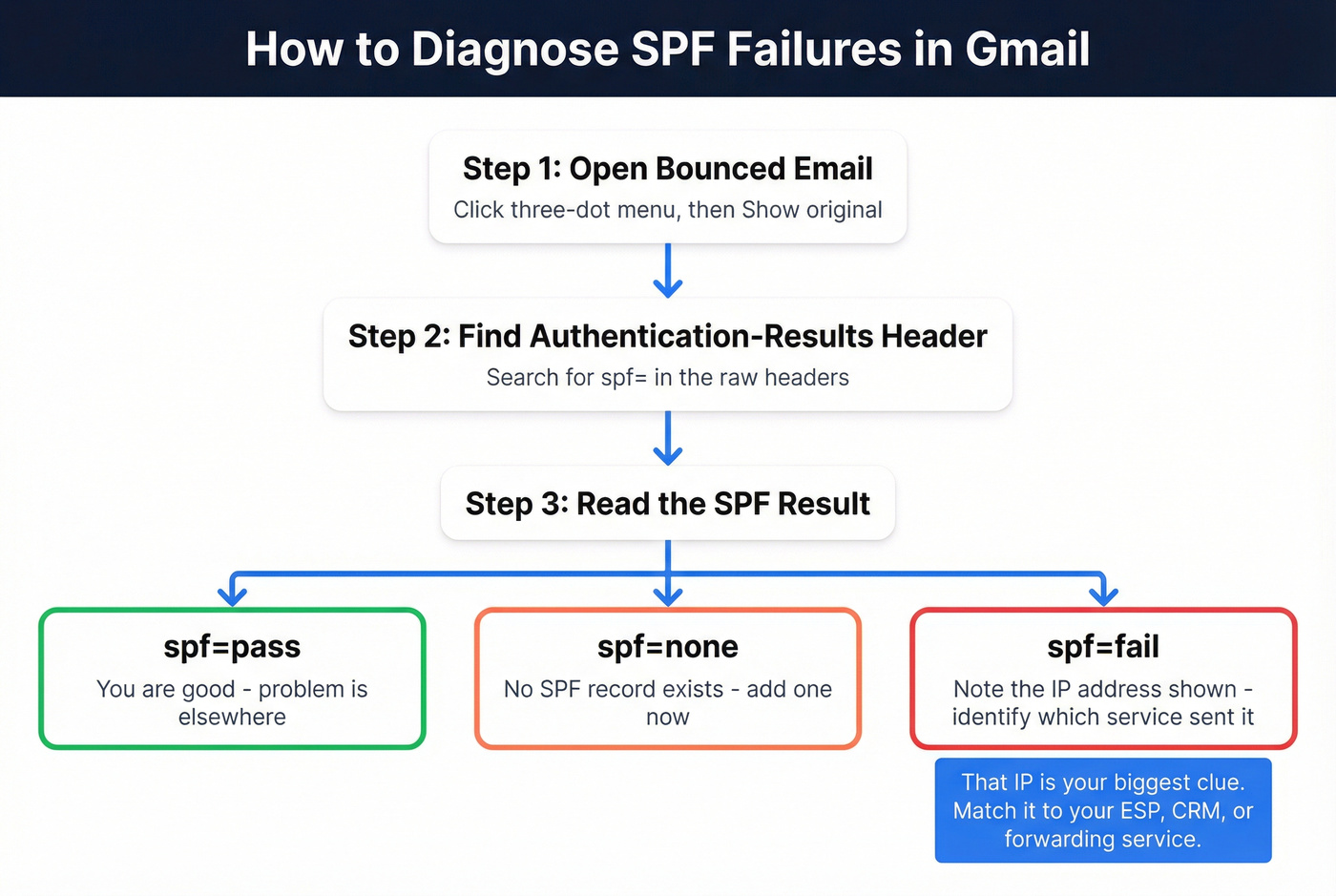
- Open the bounced email in Gmail.
- Click the three-dot menu, then Show original.
- Search for
Authentication-Resultsand find thespf=value.
A pass looks like:
spf=pass (google.com: domain of you@yourdomain.com designates 209.85.220.41 as permitted sender)
A fail looks like:
spf=fail (google.com: domain of you@yourdomain.com does not designate 75.99.116.154 as permitted sender)
That IP address in the failure message is the key. It tells you which server tried to send on your behalf without authorization. Your next move is figuring out whether that IP belongs to a service you actually use - an ESP you forgot to authorize, a CRM sending on your behalf, or a forwarding server you didn't account for. If you're troubleshooting broader inboxing issues, use this alongside an email deliverability checklist.

That unauthorized IP in your bounce-back might be a legit sender - or it might be sending to dead addresses. SPF fixes stop rejections at the door, but bad data destroys your domain reputation from the inside. Prospeo's 5-step email verification catches invalid contacts before they trigger bounces, with 98% accuracy.
Fix your SPF, then fix your list. One without the other is half a solution.
Five Common Causes and Fixes
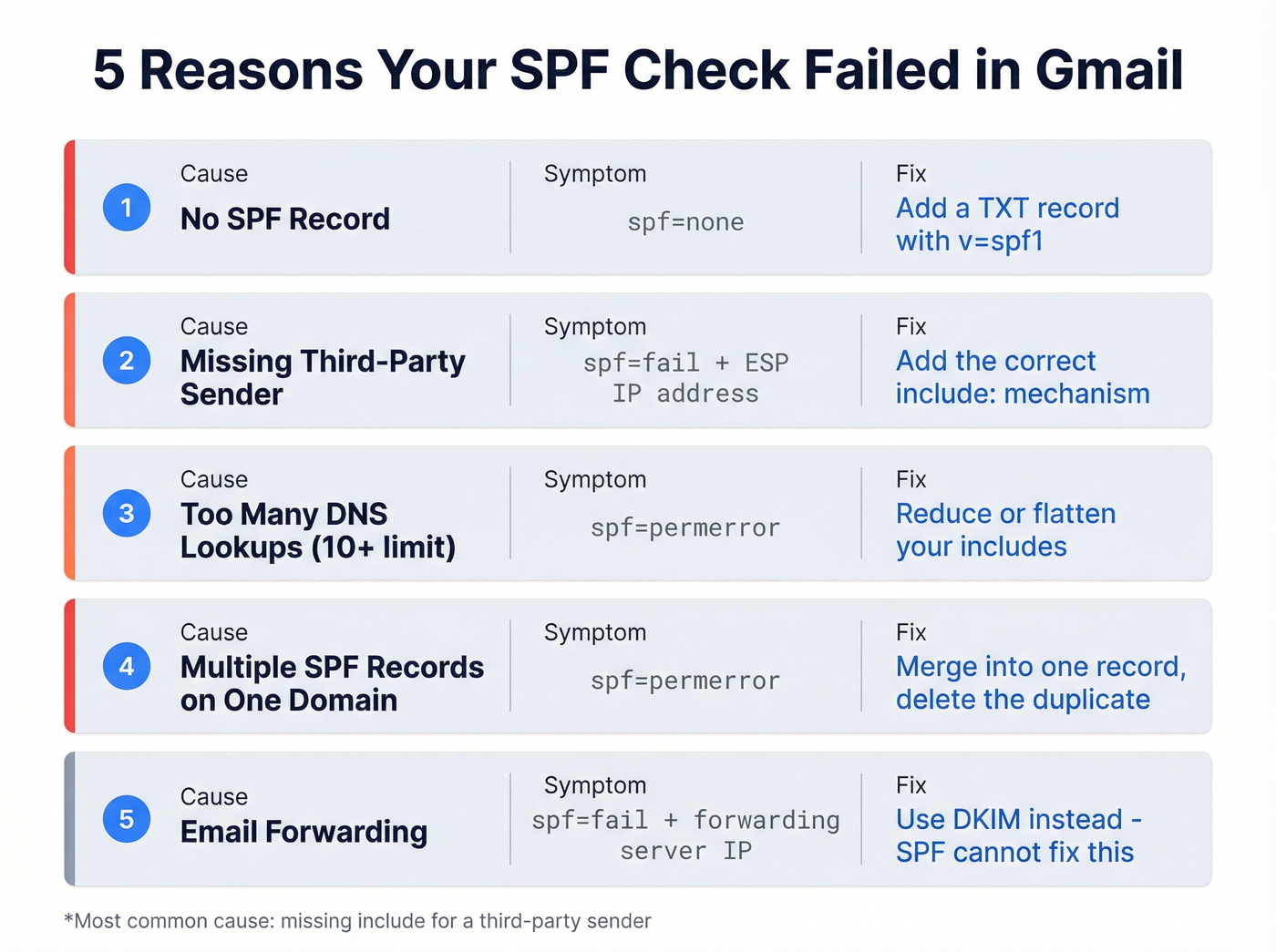
| Cause | Symptom | Fix |
|---|---|---|
| No SPF record | spf=none |
Add TXT record |
| Missing sender | spf=fail + ESP IP |
Add include: |
| 10+ DNS lookups | spf=permerror |
Reduce includes |
| Multiple SPF records | spf=permerror |
Merge into one |
| Email forwarding | spf=fail + forward IP |
Use DKIM instead |
Missing SPF Record
If your domain has no SPF record at all, every email fails. Run nslookup -type=TXT yourdomain.com - if nothing starting with v=spf1 comes back, add this TXT record:
v=spf1 include:_spf.google.com ~all
That's it. One line, one fix.
Third-Party Sender Not Included
This is the single most common cause we see, and it's almost always the same story: someone adds an ESP, sends a campaign, and forgets to update SPF. The fix is straightforward - add the relevant include: mechanism:
v=spf1 include:_spf.google.com include:sendgrid.net ~all
Replace sendgrid.net with your ESP's include value. HubSpot uses mail.hubspot.net, Mailchimp uses servers.mcsv.net, and so on. Every ESP publishes their required include in their setup docs. If you can't find it, search "[ESP name] SPF record" and it'll be the first result. (If this is for outbound, follow a complete SPF DKIM DMARC setup for cold email so you don’t miss alignment details.)
Exceeding the 10-DNS-Lookup Limit
This is where things get annoying. RFC 7208 imposes a hard limit of 10 DNS lookups per SPF evaluation, and mechanisms like include, a, mx, and redirect each consume at least one lookup - sometimes more, because includes can nest other includes inside them. Exceed the limit and you get a PermError, which means all authentication checks fail, even for legitimate senders. There's also a void lookup limit: if too many of your DNS lookups return empty results, SPF evaluation fails with a PermError as well.
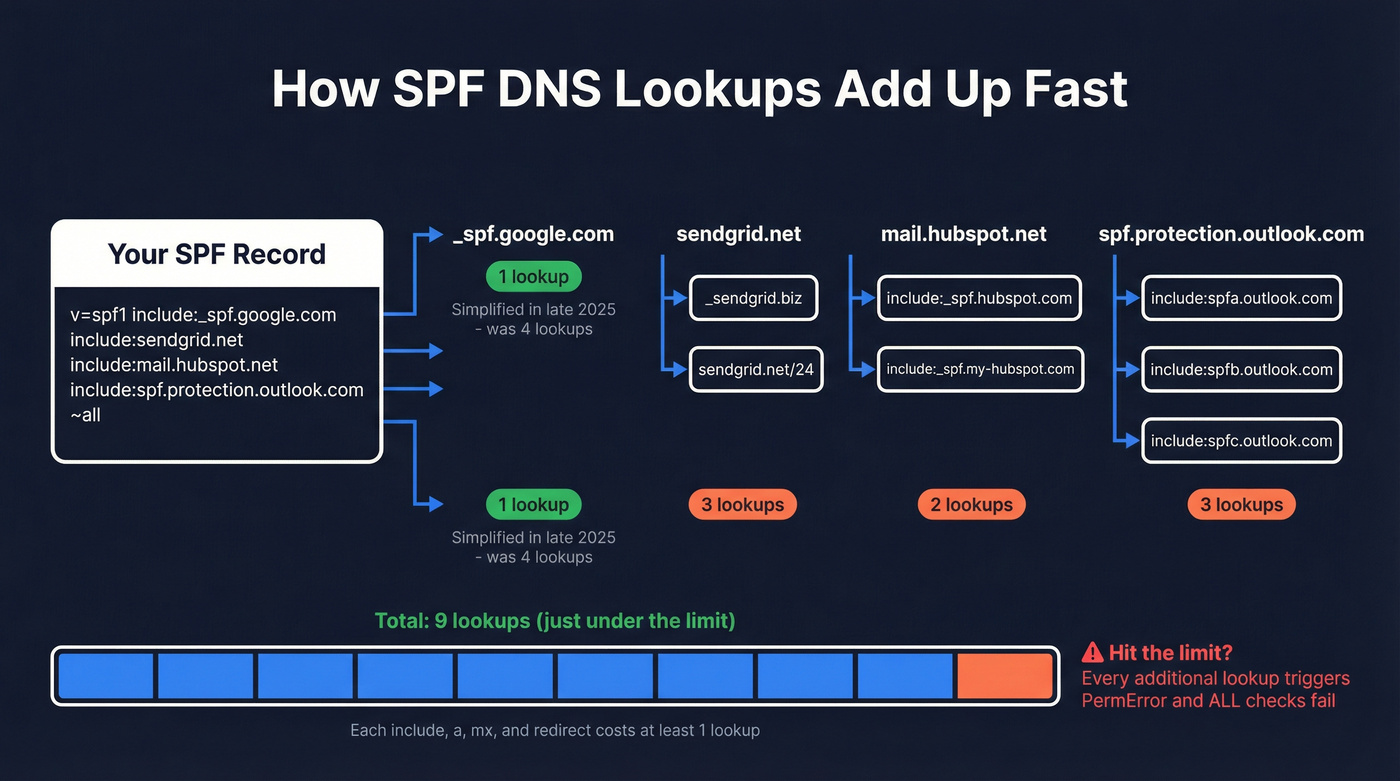
Workspace users got a break in late 2025 - Google simplified
_spf.google.comfrom 4 nested lookups down to 1. If you're still using a workaround, revert to the standard include to benefit automatically.
A warning on "flattening": manually replacing includes with static IPs sounds clever until your ESP rotates their IPs without telling you. Use a flattening service like AutoSPF if you must, but never do it by hand.
Multiple SPF TXT Records
Only one SPF TXT record is allowed per domain. Two records - common when someone adds a new one instead of editing the existing one - cause a PermError. Let's be honest, this happens more often than anyone wants to admit, especially on teams where multiple people have DNS access. Merge all authorized senders into a single record and delete the duplicate.
Email Forwarding Breaking SPF
SPF checks the MAIL FROM domain against the sending server's IP. When an email gets forwarded, the forwarding server's IP isn't in the original sender's SPF record, so the check fails. This isn't a misconfiguration - it's how the protocol works.
Here's the thing: if you're forwarding emails through a third party, SPF will never pass for those messages. The fix is DKIM, which travels with the message regardless of which server relays it. Stop fighting SPF on this one and set up DKIM signing instead (and if you’re auditing your whole stack, start with SMTP authentication).
When SPF Alone Can't Fix It
DKIM is the correct path in three scenarios: email forwarding, Gmail "Send As" with custom domains where the MAIL FROM is gmail.com, and mailing lists that rewrite the Return-Path. DMARC requires either SPF or DKIM to align with your From: domain, so set up both whenever possible.
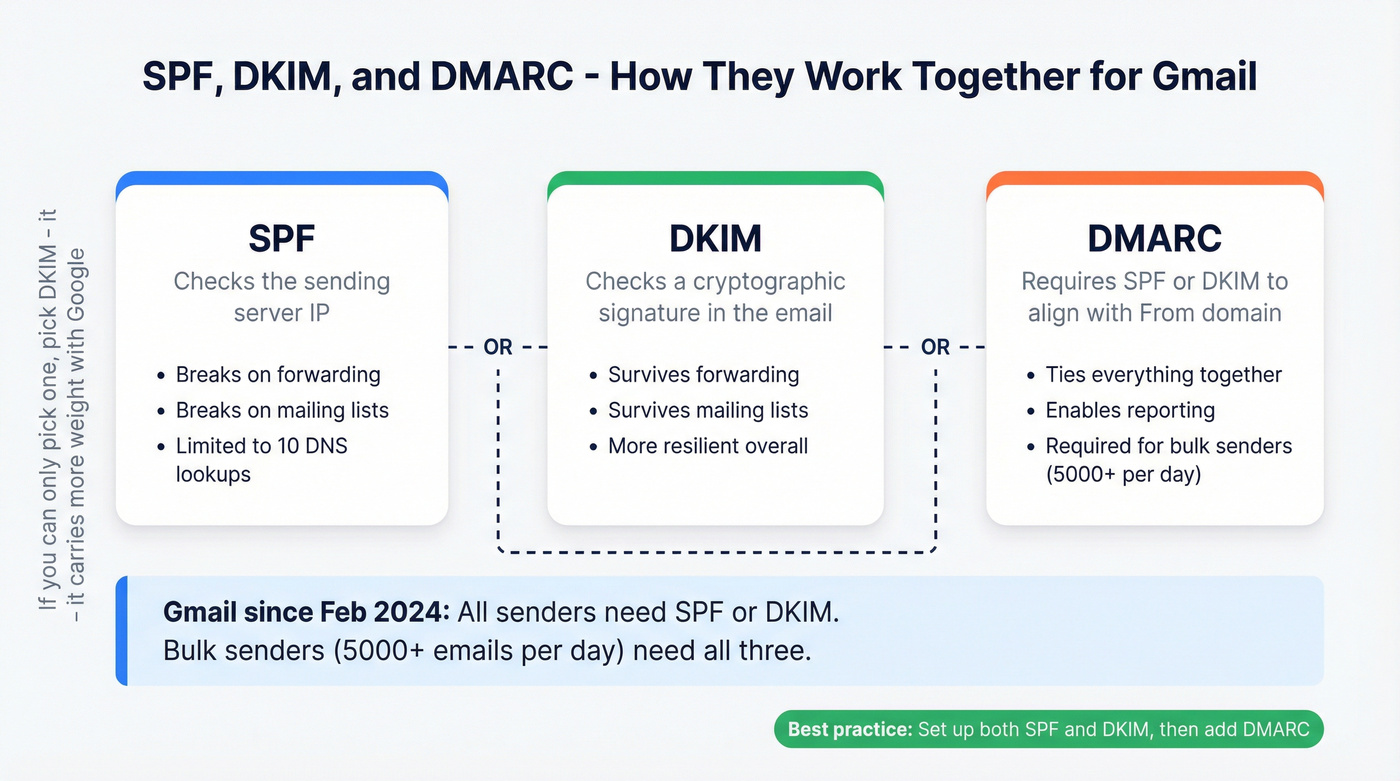
Most deliverability problems blamed on SPF are actually DKIM problems. SPF gets the attention because the error message is louder, but DKIM is the more resilient protocol. If you can only invest time in one, pick DKIM. Google's own sender guidelines reinforce this - they want both, but DKIM carries more weight in practice. For a bigger-picture playbook, see our email deliverability guide.
If you just made DNS changes and things still look broken, wait. DNS propagation takes anywhere from minutes to 48 hours depending on your TTL settings. Give it at least an hour and retest with Gmail's "Show original" before making further changes.
Protect Your Sender Reputation
Fixing your SPF record stops Gmail from rejecting emails at the door. But if you're sending to invalid addresses, those bounces damage your domain reputation just as fast - and reputation damage is harder to undo than a DNS record. We've watched teams fix every authentication issue perfectly and still land in spam because 8% of their list was dead addresses. Prospeo's email verification catches bad addresses before they hit your sequences, with 98% accuracy and a free tier of 75 verifications per month to spot-check any list. If you’re cleaning lists at the source, pair verification with a process for invalid emails and ongoing CRM hygiene.
You just spent hours debugging DNS records to protect your sender reputation. Don't waste that work by emailing unverified contacts. Prospeo verifies emails at 98% accuracy for ~$0.01 each - with 75 free verifications per month to audit any list, no credit card required.
Authentication gets you past the gate. Clean data keeps you out of spam.
FAQ
What does "550-5.7.26 sender unauthenticated" mean?
Gmail rejected the email because the sending server isn't authorized by SPF, and DKIM also failed or wasn't present. Since February 2024, Gmail requires at least one authentication method from all senders. Check your SPF record and DKIM configuration to resolve it.
How do I check my SPF record?
Run nslookup -type=TXT yourdomain.com or use MXToolbox's SPF lookup. You should see one TXT record starting with v=spf1. If you see none or more than one, that's your problem.
Can I have two SPF records on one domain?
No. Multiple SPF TXT records cause a PermError, and all SPF checks fail for every email you send. Merge all authorized senders into one record and delete the extra.
How long do SPF changes take to propagate?
Typically minutes to 48 hours depending on your domain's TTL settings. Wait at least an hour and retest with Gmail's "Show original" before making further changes.
Does email verification help after fixing SPF?
Yes. Authentication fixes stop protocol-level rejections, but sending to invalid addresses still generates bounces that hurt domain reputation. Cleaning your list before sending is the other half of the equation.