

Staffing Agency Introduction Email That Gets Replies
You sent 200 emails last week and got three replies - two of them asking to be removed from your list. The staffing agency introduction email most agencies send reads like a brochure, and hiring managers treat it like one. Here's how to write the version that actually lands meetings.
What You Need (Quick Version)
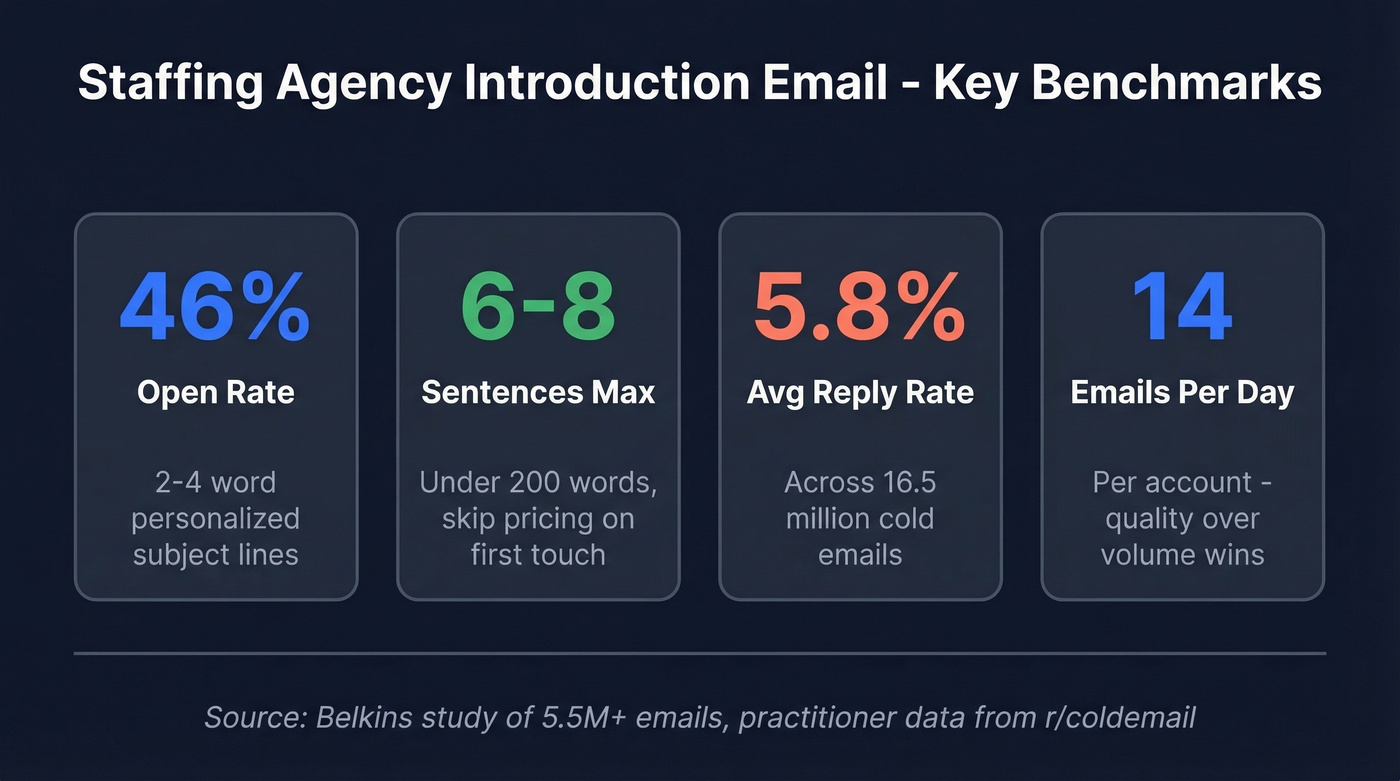
- Subject lines: 2-4 words, personalized. That's a 46% open rate vs. 35% without personalization.
- Body: 6-8 sentences max. Under 200 words. Save pricing for the second touch - your intro sells the meeting, not the fee.
- Lead with a hiring signal or a candidate, not your company bio.
- One follow-up after 5-7 days, then ease off. One-touch sequences with no follow-ups hit an 8.4% reply rate, which tells you a strong first email matters more than persistence.
Why Most Introduction Emails Get Ignored
The average cold email reply rate across 16.5 million emails was 5.8%. Staffing emails typically perform worse - unless you're using hiring triggers. You're competing against dozens of other agencies hitting the same HR inbox with the same "we're a full-service staffing partner" pitch, and that pitch gets deleted on autopilot.
A practitioner breakdown on r/coldemail is blunt about this: high-volume blasting stopped working, and relevance wins now. One recruiter who scaled an IT staffing agency to six figures in profit sends just 14 cold emails per day per account - down from 100-150 per day per account two to three years earlier. Every email references a specific hiring signal. Volume lost. Relevance won.
Subject Lines That Get Opened
A study of 5.5 million emails found that 2-4 word subject lines hit 46% open rates. Question subject lines also averaged 46% opens. Hype words like "ASAP" or generic greetings dragged opens below 36%.
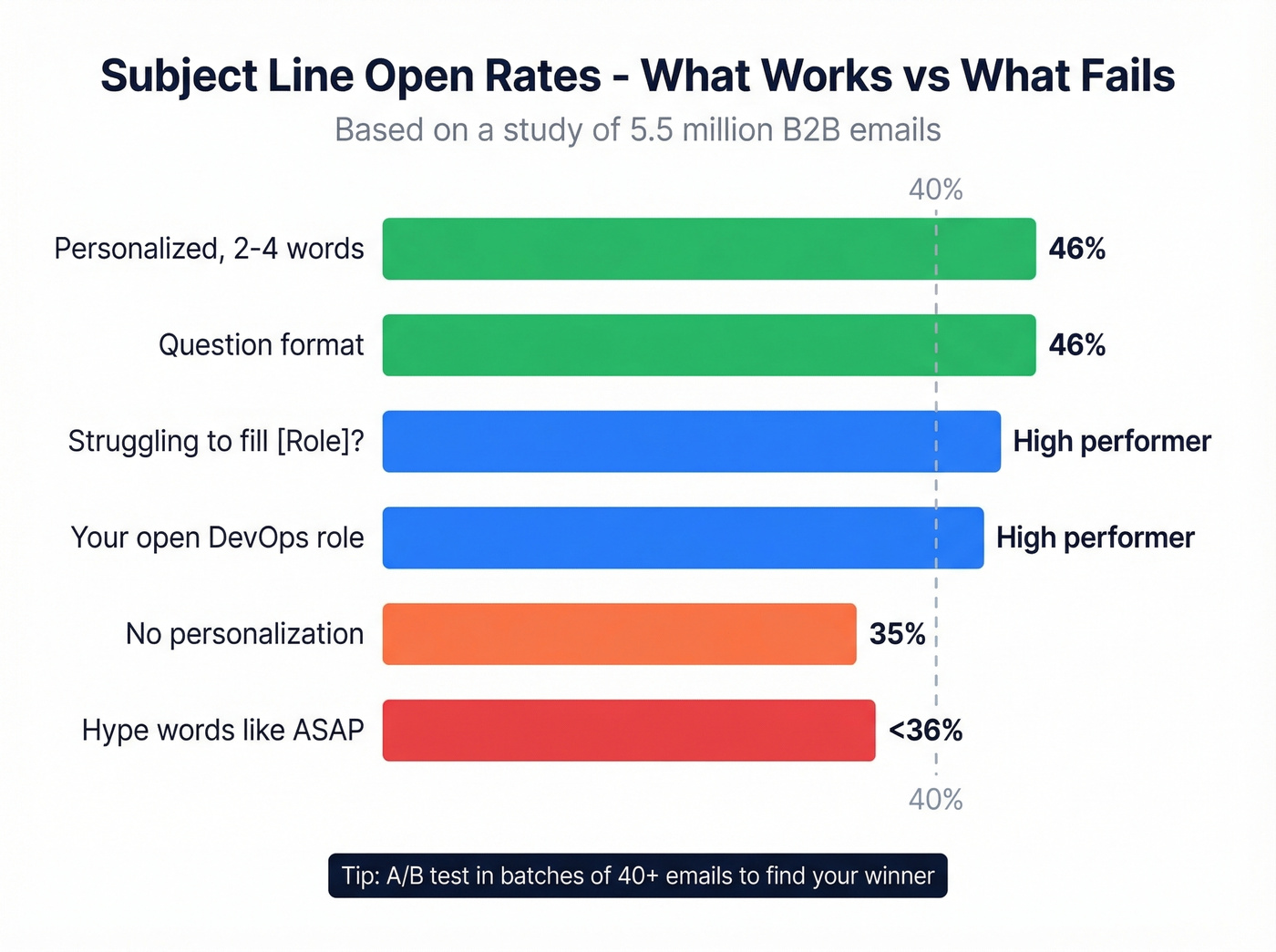
Five that work for staffing:
- Struggling to fill [Role]?
- Your open DevOps role
- Quick question, [First Name]
- [Company] hiring plans
- Saw your job post
No exclamation marks. No "exciting opportunity." A/B test these in batches of 40+ to find what resonates with your market. If you want more options to test, pull from a larger swipe file of subject lines.
Three Templates That Work
Every template below follows the same structure: under 200 words, one proof point, and a soft CTA that asks a question instead of demanding a meeting. Send between 9 a.m. and noon in the prospect's time zone - that's when emails tend to get the highest open rates.
Hiring-Signal-Led Template
Subject: Your 3 open dev roles
Hi Sarah,
I noticed Meridian Tech posted three mid-senior developer roles in the last two weeks - and two have been open for 30+ days. That usually means the pipeline's thin.
We're an IT staffing firm that specializes in backend and full-stack developers in the Southeast. Last quarter, 88% of our placements started within 7 business days of engagement.
Would it help if I sent over two pre-screened profiles that match your stack? No commitment - just a look.
Best, [Your Name]
This works because it proves you've done homework before asking for anything. The hiring signal is the hook; the candidate offer is the CTA. For IT staffing outreach campaigns, this signal-first approach outperforms generic pitches every time - especially when it’s part of a tighter cold email sequence.
Candidate-Led Template
Leading with a real candidate flips the dynamic entirely. You're not asking for business - you're offering a solution to a problem they already have. We've seen staffing agencies double their reply rates just by switching from company-bio openers to candidate-first hooks like this one:
Subject: NP for your ICU openings
Hi James,
I have a board-certified nurse practitioner with 6 years of ICU experience and an active [State] license who's available to start in two weeks. She's worked Level I trauma centers and comes with strong references.
We staff for three hospital systems in the region, and 92% of our placements finalize in under 60 days.
Would she be worth a conversation? I can send her full credentials today.
Best, [Your Name]
This is the strongest introduction email format for a potential client because it leads with immediate value rather than a pitch. The hiring manager doesn't have to wonder what you can do - the proof is sitting right there. If you want more variations, use these cold email templates for staffing agencies as a starting point.
Warm Referral Template
Here's what most agencies send after meeting someone at a conference: "Great meeting you! We'd love to explore how we can work together." Here's what actually gets a reply:
Subject: Met at SIA Executive Forum
Hi Dana,
We spoke briefly at the SIA Executive Forum last month about your warehouse expansion in the Midwest. You mentioned seasonal ramp-up was the biggest headache.
We staff light industrial roles across six Midwest markets and typically fill seasonal surges of 50+ workers within 10 business days.
Worth a 10-minute call next week?
Best, [Your Name]
The difference? Shared context - even a brief conference interaction - plus a specific pain point they mentioned. Generic follow-ups get archived. Specific ones get replies.

Hiring-signal emails only work when you're reaching the right hiring manager. Prospeo gives you 98% accurate emails and 30+ filters - including headcount growth and job postings - so every staffing intro email lands in a real decision-maker's inbox, not a dead end.
Stop guessing who's hiring. Start with verified data.
Follow-Up Sequence
Avionte recommends 8-12 touchpoints over 3-4 weeks for staffing sales, mixing email with phone and social. But here's the tension: adding more emails increases spam complaints from 0.5% on email one to 1.6% by email four. The sweet spot is a 3-touch email cadence supplemented by phone and social - using a few proven sales follow-up templates to keep each touch value-led.
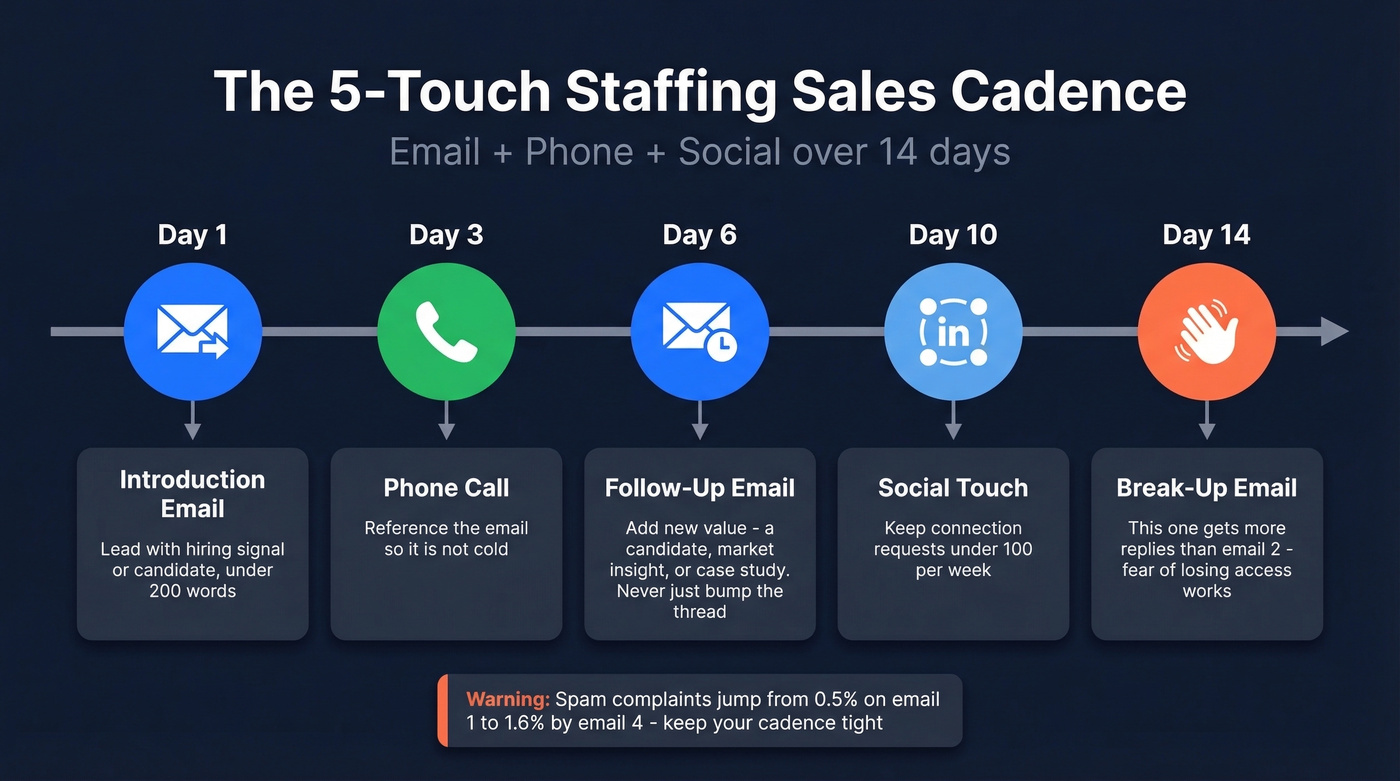
- Day 1: Send your introduction email.
- Day 3: Phone call. Reference the email so it's not cold.
- Day 6: Follow up with new value - a relevant candidate, a market insight, or a case study. Don't just "bump" the thread.
- Day 10: Social touch. Keep connection requests under 100 per week.
- Day 14: Break-up email. "Sounds like timing isn't right - I'll check back next quarter. If anything changes, here's my calendar link."
In our experience, the break-up email generates more replies than the second follow-up. People respond to the fear of losing access - it's counterintuitive, but it works consistently. If you need more options for touch #2 and #3, borrow from these cold email follow-up templates.
Introducing a Colleague to a Client
Sometimes you're not the right person to own the relationship. Maybe a specialist on your team covers the prospect's industry, or you're transitioning accounts. A colleague introduction email to a client follows the same principles - lead with context, not credentials - but adds a warm handoff.
Mention why you're making the introduction, what your colleague brings, and give the client a clear next step. Something like: "I'm connecting you with Alex, who leads our healthcare staffing division and placed 40+ nurses in your region last quarter. He'll reach out this week with a few profiles." This approach also works as an introduction email to existing clients when your team structure changes or a new employee takes over the account. The key is making the transition feel like an upgrade, not a disruption - use a dedicated handoff email template when you want it to feel seamless.
Find the Right Decision-Maker
Look, who you email matters more than what you write. Data across 16.5 million cold emails shows that contacting 1-2 people per company yields a 7.8% reply rate. Email 10+ people at the same company and that drops to 3.8%. Spray-and-pray doesn't just underperform - it actively hurts you.
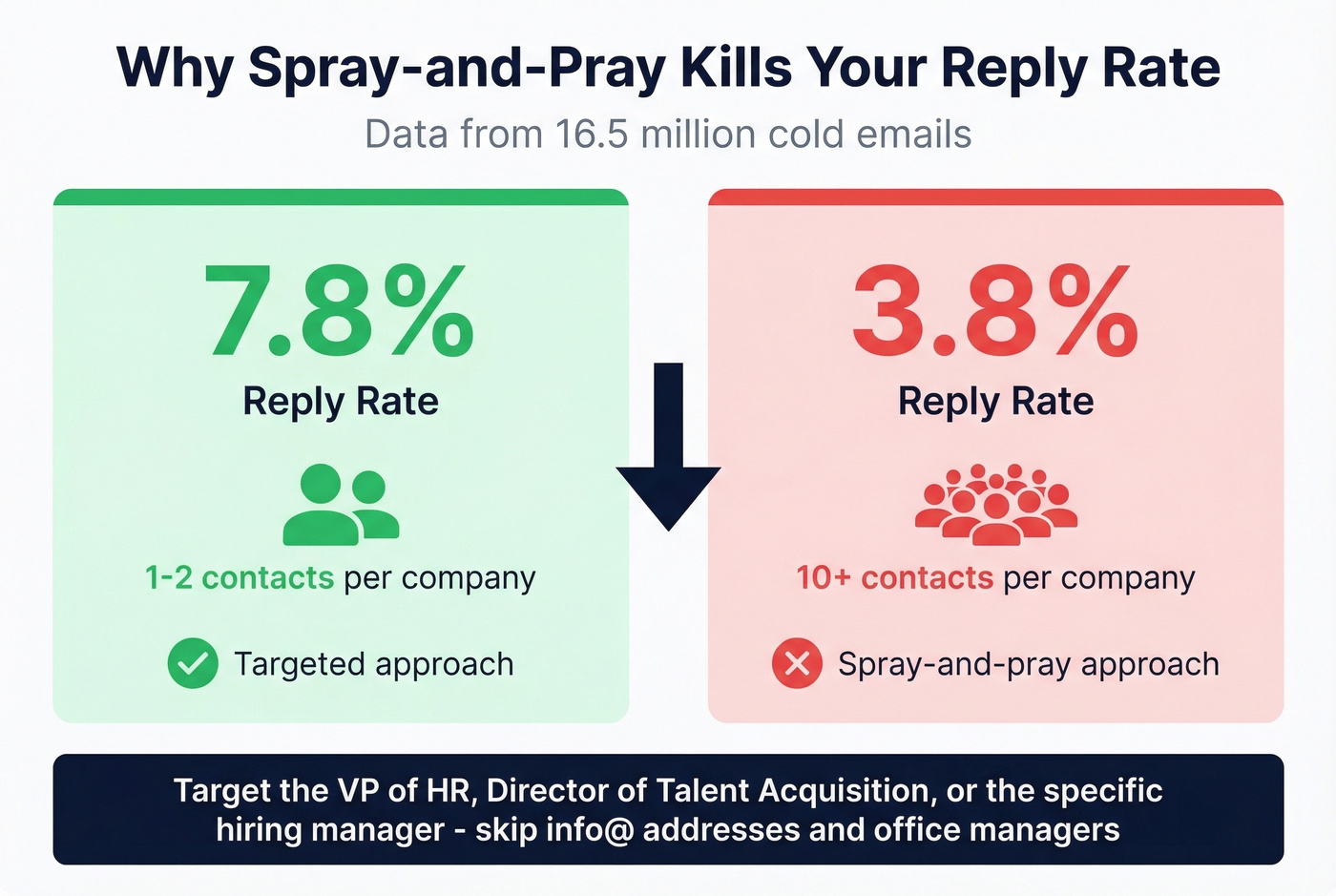
You need the VP of HR, the Director of Talent Acquisition, or the hiring manager for the specific role. Skip the generic info@ addresses and the office manager. Prospeo lets you search by job title and company across 300M+ professional profiles using 30+ filters including headcount growth and job-change signals, then export verified emails with 98% accuracy. The free tier gives you 75 email lookups per month - enough to build a targeted list for your first campaign. If you’re tightening targeting, start with an ideal customer profile and layer in firmographic filters.
Deliverability and Compliance
Your templates won't matter if emails land in spam. And they definitely won't matter if you're violating federal law.
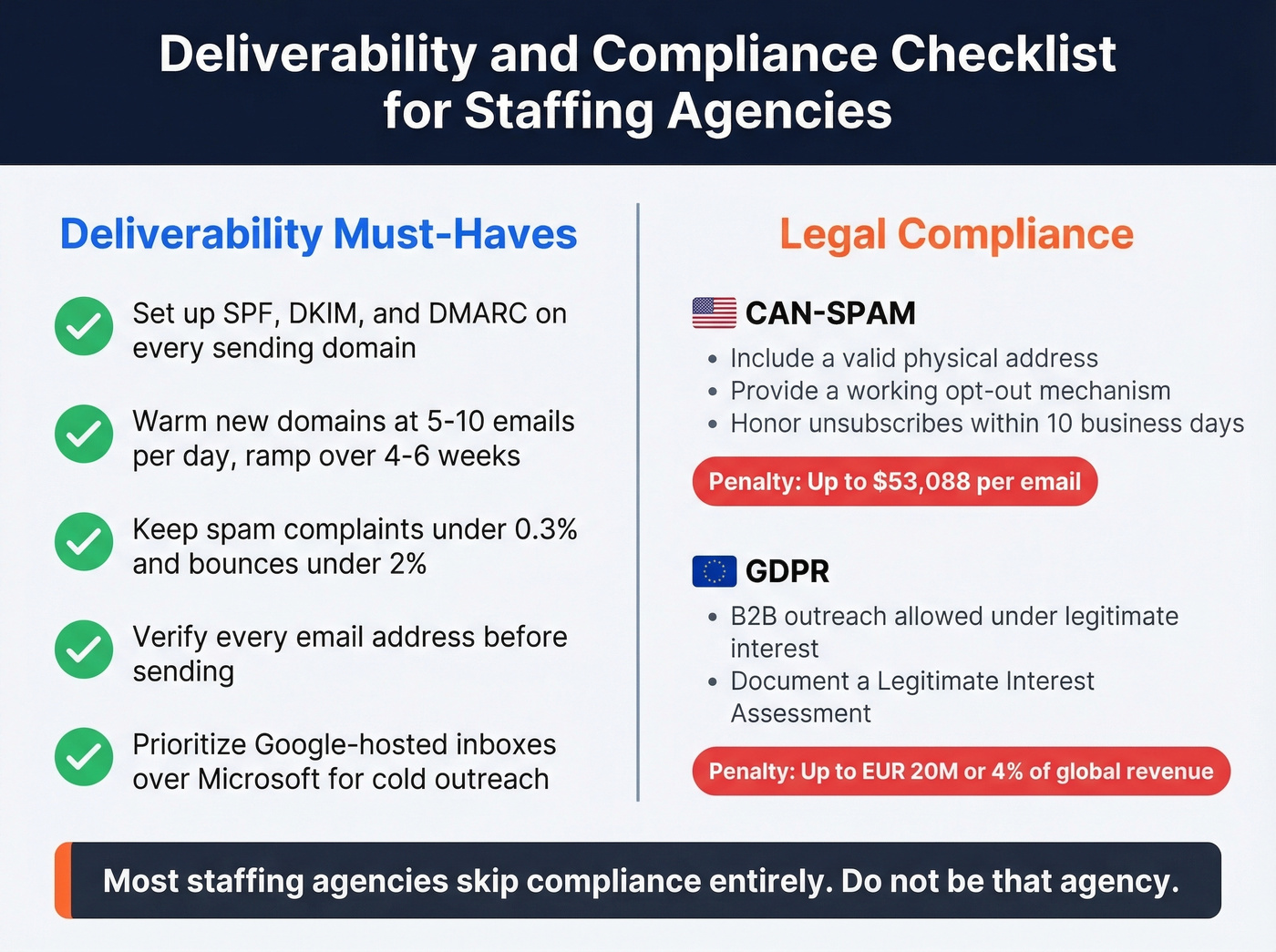
Deliverability checklist:
- Set up SPF, DKIM, and DMARC on every sending domain
- Warm new domains at 5-10 emails per day, ramping over 4-6 weeks
- Keep spam complaints under 0.3% and bounces under 2%
- Verify every address before sending - bad data destroys sender reputation faster than bad copy
- Prioritize Google-hosted inboxes over Microsoft inboxes for cold outreach when you can identify the prospect's email provider
Legal compliance: CAN-SPAM applies to all B2B email. Include a valid physical address, provide a working opt-out mechanism, and honor unsubscribes within 10 business days. Penalties run up to $53,088 per email. If you're emailing EU contacts, GDPR allows B2B outreach under legitimate interest - document a Legitimate Interest Assessment, with penalties reaching EUR 20M or 4% of global revenue.
Most staffing agencies skip compliance entirely. Don't be that agency. For a deeper fix, follow a full email deliverability guide and monitor your email bounce rate.
You're sending 14 hyper-relevant emails a day. Make sure none of them bounce. Prospeo's 5-step email verification and 7-day data refresh keep bounce rates under 2% - the kind of deliverability that staffing agencies like Stack Optimize used to scale past $1M ARR with zero domain flags.
Bad data kills reply rates faster than bad copy.
FAQ
How many cold emails should a staffing agency send per day?
Start at 14 emails per day per account - that's the benchmark from a recruiter who scaled an IT staffing agency to six figures. Warm new domains at 5-10 per day and ramp over 4-6 weeks. Quality targeting using hiring signals and verified contacts beats volume every time.
What's a good reply rate for staffing outreach emails?
The average across 16.5 million cold emails was 5.8%. Staffing agencies using hiring-signal targeting and short, personalized emails can exceed this. One-touch sequences with no follow-ups hit 8.4% - proof that a strong first email matters more than persistence.
What should a staffing agency introduction email to a client include?
A hiring signal or candidate that proves you've done research, one proof point like placement speed or fill rate, and a soft CTA that asks a question rather than demands a meeting. Keep it under 200 words and skip your company bio - nobody reads it.
How do I introduce a new team member to an existing client?
Send a brief transition email from the original contact, mentioning the new employee by name and highlighting their relevant experience - like deeper expertise in the client's industry or faster response times. The outgoing contact should send the email so the client sees continuity, not disruption.