

7 Cold Email Templates for Staffing Agencies That Actually Work
You send 200 emails. You get 3 replies. One's an auto-responder, one's "not interested," and the third ghosts after the first call. The average reply rate sits at 3.43% across industries, and generic "we're a staffing firm, let's chat" emails perform even worse.
The problem isn't cold email. It's what you're putting in the email. Every cold email template for staffing agency outreach in this guide is built for a specific scenario - client acquisition or candidate outreach - with the follow-up cadence and deliverability infrastructure to actually land in inboxes.
Before You Copy Any Template
Internalize these four things before you start sending:
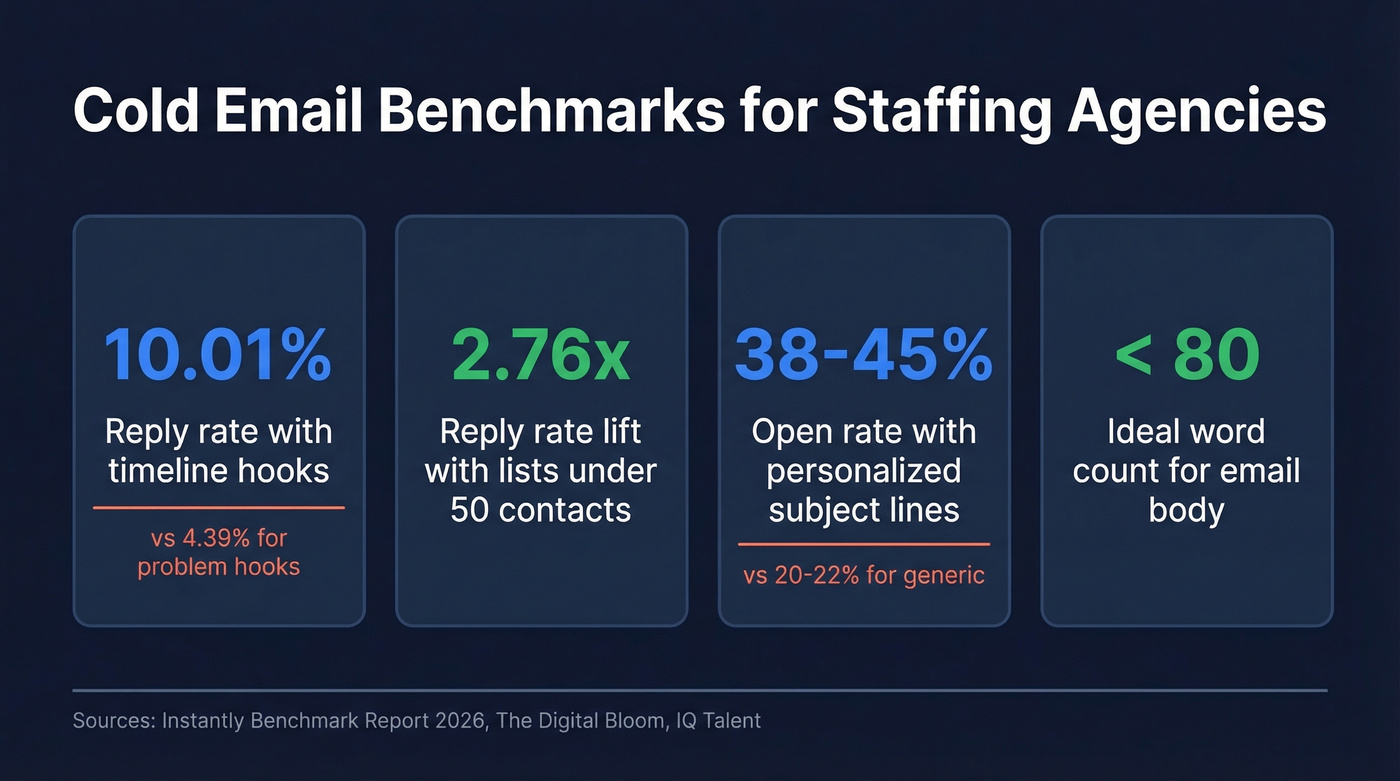
- Lead with candidates, not your agency pitch. A "talent letter" showing real candidate profiles doubles reply rates compared to a generic intro email.
- Use timeline-based hooks. "This role has been open 3 weeks" hits 10.01% reply rates vs 4.39% for problem-based hooks. That's a 2.3x gap.
- Segment ruthlessly. Lists of 50 or fewer contacts lift reply rates by 2.76x. Batch your outreach by industry, role type, or geography - never blast a generic list. (If you need a system, start with an Ideal Customer Profile.)
- Protect your domain. Send from a separate domain, verify every email before sending, and follow up 4-7 times. Infrastructure kills more campaigns than bad copy.
Why Staffing Emails Need a Different Approach
Staffing agencies run two completely different cold email motions. Client acquisition emails target hiring managers and HR leaders - you're selling a service, and 3-10% reply rates count as strong performance. Candidate outreach targets passive talent - 73% of the workforce isn't actively looking - and top recruiters report 30-50% reply rates because you're offering something the recipient actually wants.
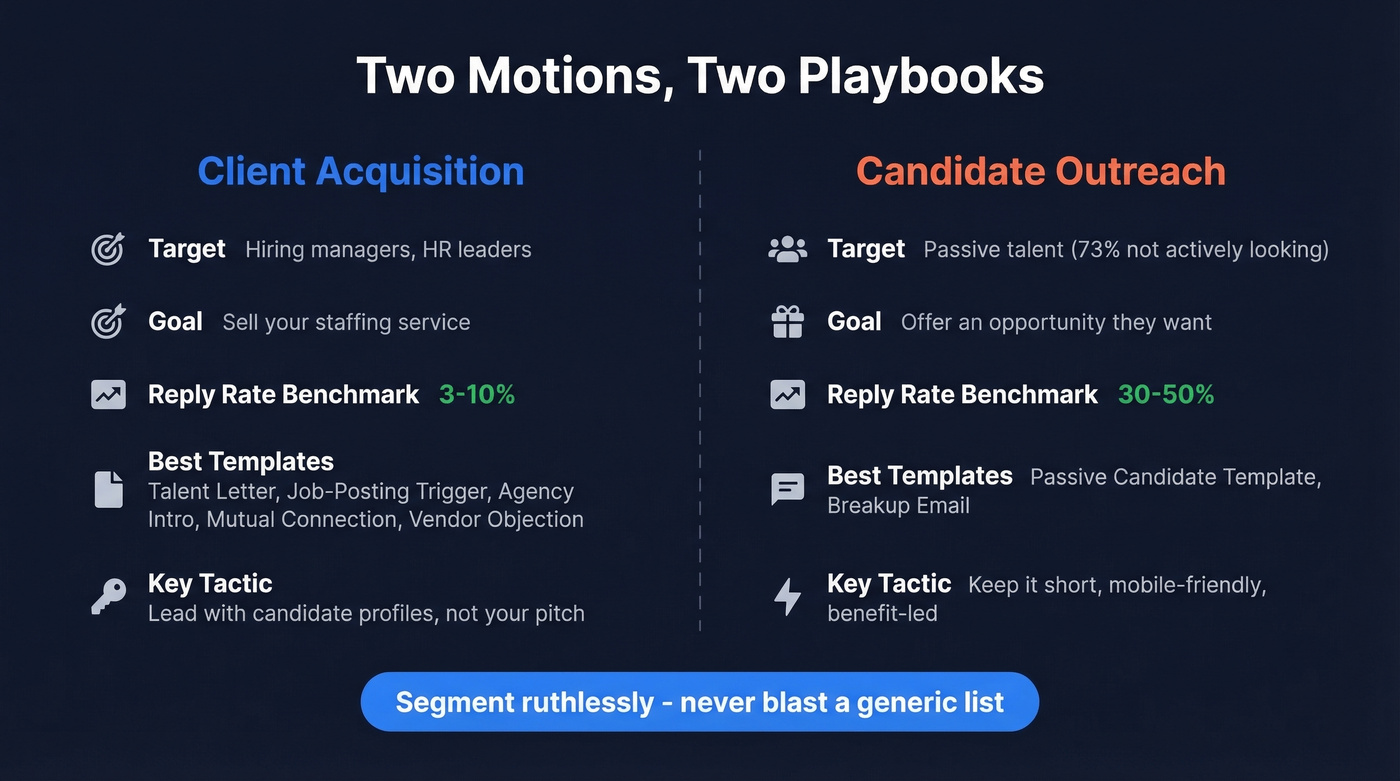
Recognizing this split is what separates effective staffing outreach from generic sales emails. Templates 1-4 and 6 below are client-facing. Template 5 is candidate-facing. Template 7 works for either.
If you're building a repeatable outbound motion, it helps to map these templates into a B2B cold email sequence and keep your targeting tight with sales prospecting techniques.

Every template above fails if it lands on a dead email. Prospeo gives you 98% verified emails for hiring managers and HR leaders - with 30+ filters to segment by industry, headcount growth, and job postings so your staffing outreach hits the right person every time.
Stop wasting perfect templates on bad data. Start free today.
The Templates
Two rules across all of these. First, keep body copy under 150 words - top-performing campaigns average under 80 words, so treat 150 as the ceiling and shorter as almost always better. Second, maintain a 1:2 ratio of "I/my" to "you/your." Every email should be about them, not you. Personalized subject lines hit 38-45% open rates vs 20-22% for generic ones, and you've got about 2.7 seconds before someone decides to open or skip.
That means every email needs to reach the right person. Prospeo's Chrome extension pulls verified contacts from any website or professional profile in one click, so you're not wasting a perfect template on a dead address. (If you're comparing options, see our breakdown of email search tools and email ID finder tools.)
Template 1 - The Talent Letter (Client-Facing)
When to use: Your strongest opener, full stop. We've tested dozens of formats across client campaigns, and the talent letter outperforms every other approach by a wide margin. Lead with candidates, not your pitch.
Subject: 3 {{role_type}} candidates for {{company}}
Body:
Hi {{first_name}},
I work with {{role_type}} talent in {{industry/region}} and have three candidates who'd be a strong fit for {{company}}:
- Candidate A - {{years}} years at {{notable company}}, {{key achievement}}
- Candidate B - {{specialty}}, {{quantified result}}
- Candidate C - {{differentiator}}, available {{timeframe}}
No obligation - happy to send full profiles if any of these look interesting. Would that be useful?
{{signature}}
Template 2 - Job-Posting Trigger (Client-Facing)
When to use: When you spot a role that's been open 2+ weeks. Timeline hooks hit 10% reply rates - more than double the rate of problem-based hooks. Other triggers worth monitoring: recent funding rounds, new office openings, and C-suite changes.
Subject: Your {{role}} posting - quick thought
Body:
Hi {{first_name}},
I noticed your {{role_title}} has been open for about {{X}} weeks. That timeline usually means the candidate pool isn't quite right.
We specialize in {{niche}} and typically deliver 3 vetted candidates within a week. Want me to send a few profiles over?
{{signature}}
Template 3 - Agency Intro (Client-Facing)
This is the safe default when you don't have a specific trigger. Lean on social proof to earn the reply. Some agencies include their fee structure upfront to pre-qualify leads - test this if your rates are competitive.
Subject: {{niche}} hiring at {{company}}
Body:
Hi {{first_name}},
We've placed {{number}}+ {{role_type}} professionals in {{industry}} over the past {{timeframe}}, with an average time-to-fill of {{X}} days.
If {{company}} ever needs bench strength in {{specialty}}, I'd love to be a resource. Worth a 10-minute call?
{{signature}}
Template 4 - Mutual Connection (Client-Facing)
When to use: When you share a connection or placed someone at a related company.
Subject: {{mutual_connection}} suggested I reach out
Body:
Hi {{first_name}},
{{mutual_connection}} mentioned you might be growing your {{department}} team. We recently placed {{role}} at {{their company}} and the hire's been a strong performer.
Would it make sense to connect? Happy to share what we're seeing in the {{niche}} talent market.
{{signature}}
Template 5 - Passive Candidate Outreach
Skip this template if you're only doing client acquisition. But if you recruit passive talent, this is your bread and butter. Keep it short: 61.9% of emails open on mobile, so every word counts.
Subject: {{first_name}} - quick opportunity in {{city/industry}}
Body:
Hi {{first_name}},
Your background in {{skill/role}} caught my attention. I'm working with a {{company_description}} looking for someone with exactly your experience - the role offers {{key_benefit: remote, salary range, growth}}.
Not sure if you're open to exploring, but if you are, I'd love to share details. A 5-minute call would cover it.
{{signature}}
Template 6 - "We Already Have a Vendor"
Subject: Re: {{previous_subject}}
Totally understand - most of our clients started as a second option alongside their existing agency.
We're happy to work overflow or hard-to-fill roles only. No minimums, no retainer. If a tough req comes up, I'm a phone call away.
{{signature}}
Don't compete - complement. This reframe turns a rejection into a foot in the door.
Template 7 - The Breakup Email
Subject: Should I close your file?
Hi {{first_name}},
I've reached out a few times and haven't heard back - totally fine. I'll assume the timing isn't right and close your file on my end.
If anything changes, I'm easy to find. Wishing you and the {{company}} team a great quarter.
{{signature}}
The "should I stop?" framing triggers responses from people who meant to reply earlier. Use it as your closer.
Once your templates are built, A/B test one variable at a time - subject line, CTA, or opening line. Run the variant on 20% of your list, then deploy the winner to the rest. (For more angles, pull from these cold email subject line examples and email subject line examples.)
The Follow-Up Cadence That Works
58% of replies come from your first email, but that means 42% come from follow-ups. Most reps quit after touch two or three. Don't be most reps.
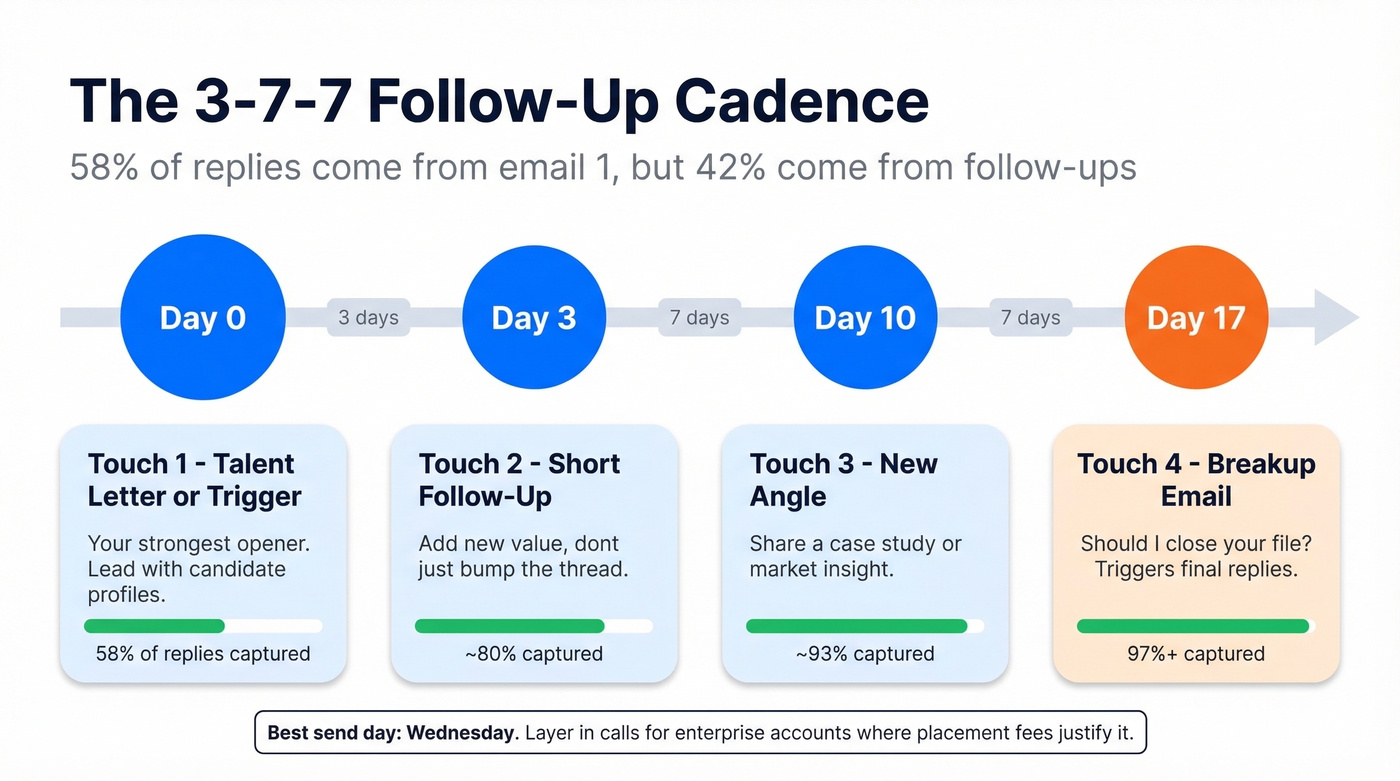
Here's the thing: McKinsey research shows systematic cadences drive 10-20% pipeline improvements. Ad hoc follow-ups don't cut it. We've seen the 3-7-7 cadence work across dozens of staffing campaigns, and it captures the vast majority of replies without burning goodwill:
| Touch | Day | Action | Expected Contribution |
|---|---|---|---|
| 1 | Day 0 | Talent letter or trigger | ~58% of total replies |
| 2 | Day 3 | Short follow-up, add value | Bulk of remaining |
| 3 | Day 10 | New angle or case study | ~93% captured by Day 10 |
| 4 | Day 17 | Breakup email (Template 7) | Final stragglers |
RAIN Group research shows meetings require 8 touches on average, with a sweet spot of 17-21 days across channels. The email-only version above works as your backbone - layer in calls and voicemails if you've got direct dials. Send on Tuesday or Wednesday. Wednesday performs highest across the board.
Let's be honest about something: if your average placement fee is under $5,000, you probably don't need a 12-touch, multi-channel cadence. The 4-touch email sequence above will capture the vast majority of your replies. Save the complex orchestration for enterprise accounts where the math justifies it.
If you want more plug-and-play sequences, borrow from these cold email follow-up templates and sales follow-up templates.
Deliverability Checklist
Your templates don't matter if they land in spam. Anyone serious about cold emailing for staffing agencies needs to nail the infrastructure that keeps you in the inbox:
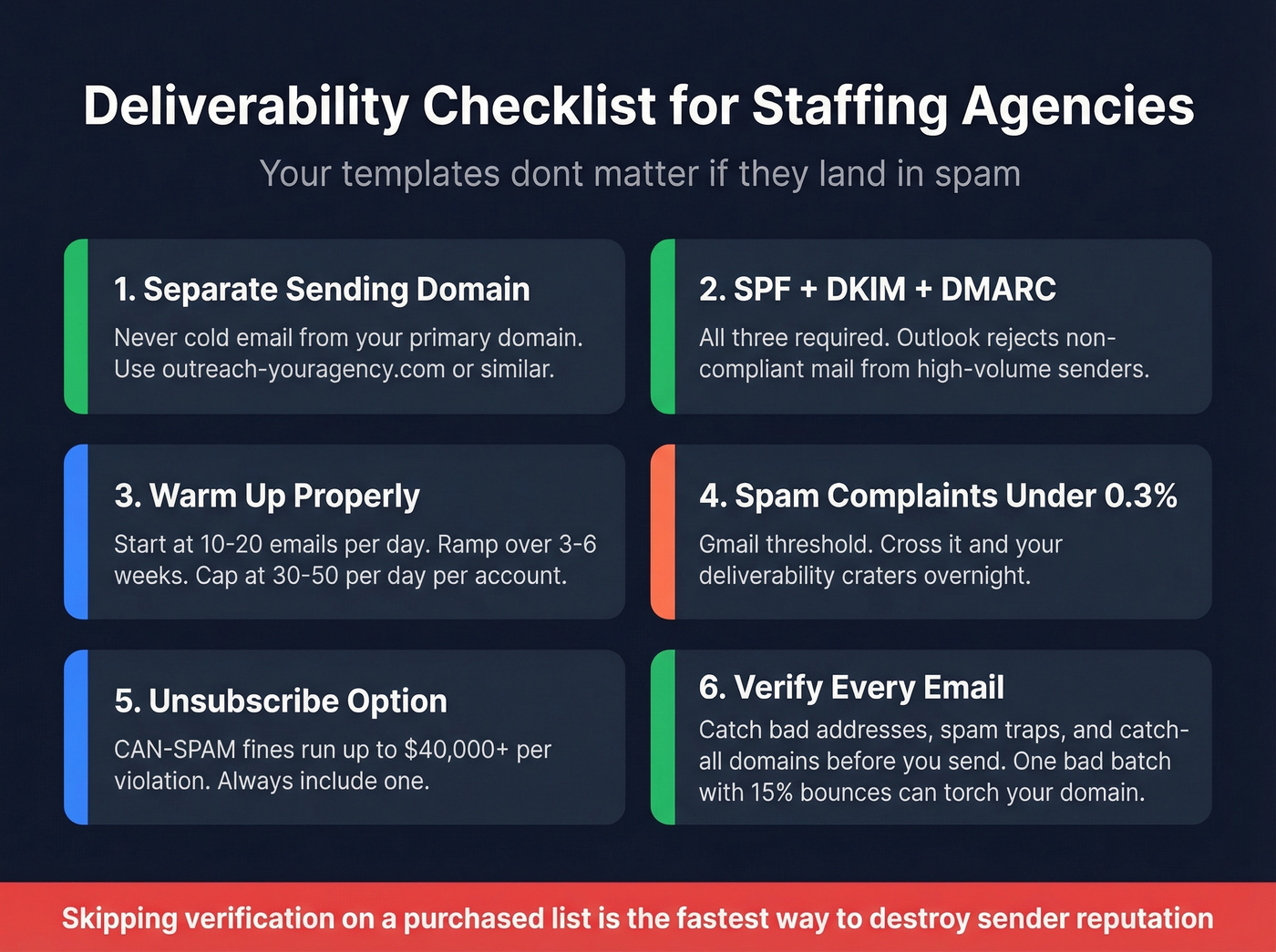
- Separate sending domain. Never cold email from your primary domain. Use something like outreach-youragency.com.
- SPF + DKIM + DMARC. All three. Microsoft Outlook.com started rejecting non-compliant mail from high-volume senders in May 2025. (If you need a deeper setup guide, see DMARC alignment and these SPF record examples.)
- Warm up properly. Start at 10-20 emails/day, ramp over 3-6 weeks, cap at 30-50/day per account during warm-up. (More on safe sending limits in email velocity.)
- Keep spam complaints under 0.3%. That's Gmail's threshold. Cross it and your deliverability craters.
- Include an unsubscribe option. CAN-SPAM fines run up to $40,000+ per violation.
- Verify every email before you send. Prospeo's 5-step verification catches bad addresses, spam traps, and catch-all domains at $0.01 per email. It integrates directly with Instantly, Smartlead, and Lemlist, so verified contacts flow straight into your sequences with no CSV detour. (If you're troubleshooting, start with email bounce rate and this email deliverability guide.)

I've seen agencies torch perfectly good domains because they skipped verification on a purchased list. One bad batch - 15% bounces - and you're spending weeks rebuilding sender reputation. Don't learn that lesson the hard way.
Staffing agencies using Prospeo's Chrome extension pull verified emails and direct dials from any company page or professional profile in one click. That means your talent letters and job-posting triggers reach real decision-makers - not bounced inboxes that torch your domain.
Get 75 free verified emails and protect your sender reputation.
FAQ
How many cold emails should a staffing agency send per day?
Start at 30-50 per account during warm-up, then scale to 100-200 per domain after 3-6 weeks. Always use a separate sending domain - never your primary - and keep spam complaints under 0.3% to protect deliverability.
What's a good reply rate for staffing agency cold emails?
For client acquisition, 3-10% is solid performance. For candidate outreach, top recruiters hit 30-50% because you're offering opportunity, not selling a service. Generic blasts with no personalization average 1-2%.
How do I find hiring managers' emails for cold outreach?
Use a verification tool like Prospeo to pull verified emails from any company website or professional profile. At 98% accuracy and $0.01 per email, it's the fastest way to build a clean list - and native integrations with tools like Instantly, Smartlead, and Lemlist mean verified contacts flow straight into your sequences without manual exports.