

Subject Line Checkers: Which Ones Actually Work in 2026
We typed "Great subject line score 99% you, right?" into four different subject line checkers. It's gibberish. Doesn't mean anything. Send Check It gave it a 99. SubjectLine.com scored it 91. Mailmeteor: 71. Omnisend: 67. Four tools, four scores, zero useful information - because the sentence is nonsense.
That's the core problem with every subject line checker on the market. They test patterns, not meaning. They reward "you," question marks, and power words regardless of whether the line makes any sense at all. Most run the same five checks, spit out a number, and leave you no closer to knowing if your email will get opened.
But these tools aren't useless - they're just misunderstood. The scores don't matter. The feedback does. And 69% of recipients decide whether to mark an email as spam based on the subject line alone, so getting this right has real stakes.
Our Top Picks
Run your subject line through these three, note the common feedback, and ignore the scores:
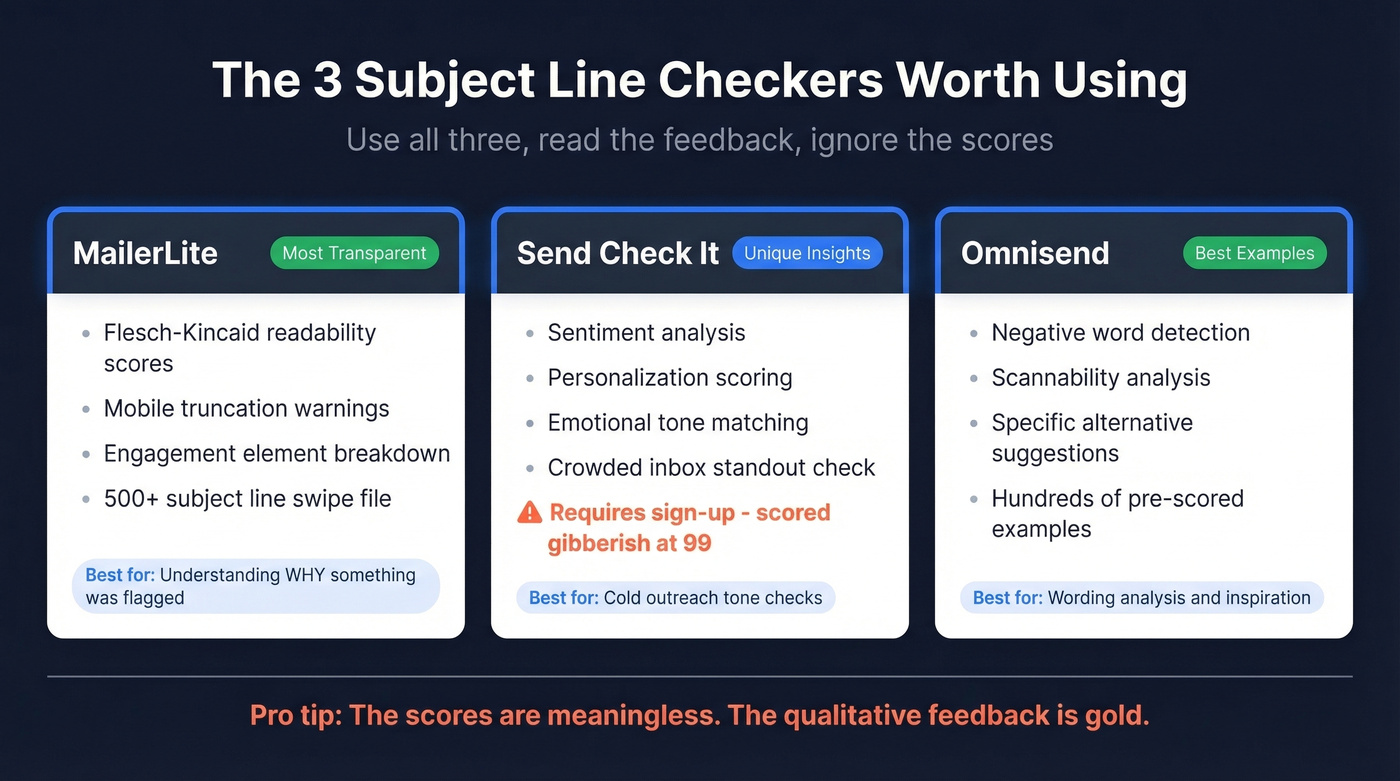
- MailerLite - The most transparent methodology. Shows Flesch-Kincaid readability, mobile truncation warnings, and specific engagement element feedback. You'll understand why it flagged something. Also comes with a 500+ subject line swipe file for inspiration.
- Send Check It - Unique sentiment and personalization analysis that other tools skip. Sign-up is required, and it scored gibberish at 99, so the number means nothing. The qualitative feedback is what you're here for.
- Omnisend - Solid wording analysis with a negative-words check, plus a large library of pre-scored examples. Scores in discrete buckets (67, 75, 83, etc.), which is actually more honest than pretending to have granular precision.
One-line verdict: use all three, read the feedback, ignore the scores.
What These Tools Actually Evaluate
Every tool on this list is free, though some require sign-up and a few gate advanced features behind a paywall. Most evaluate the same handful of things, just weighted differently:
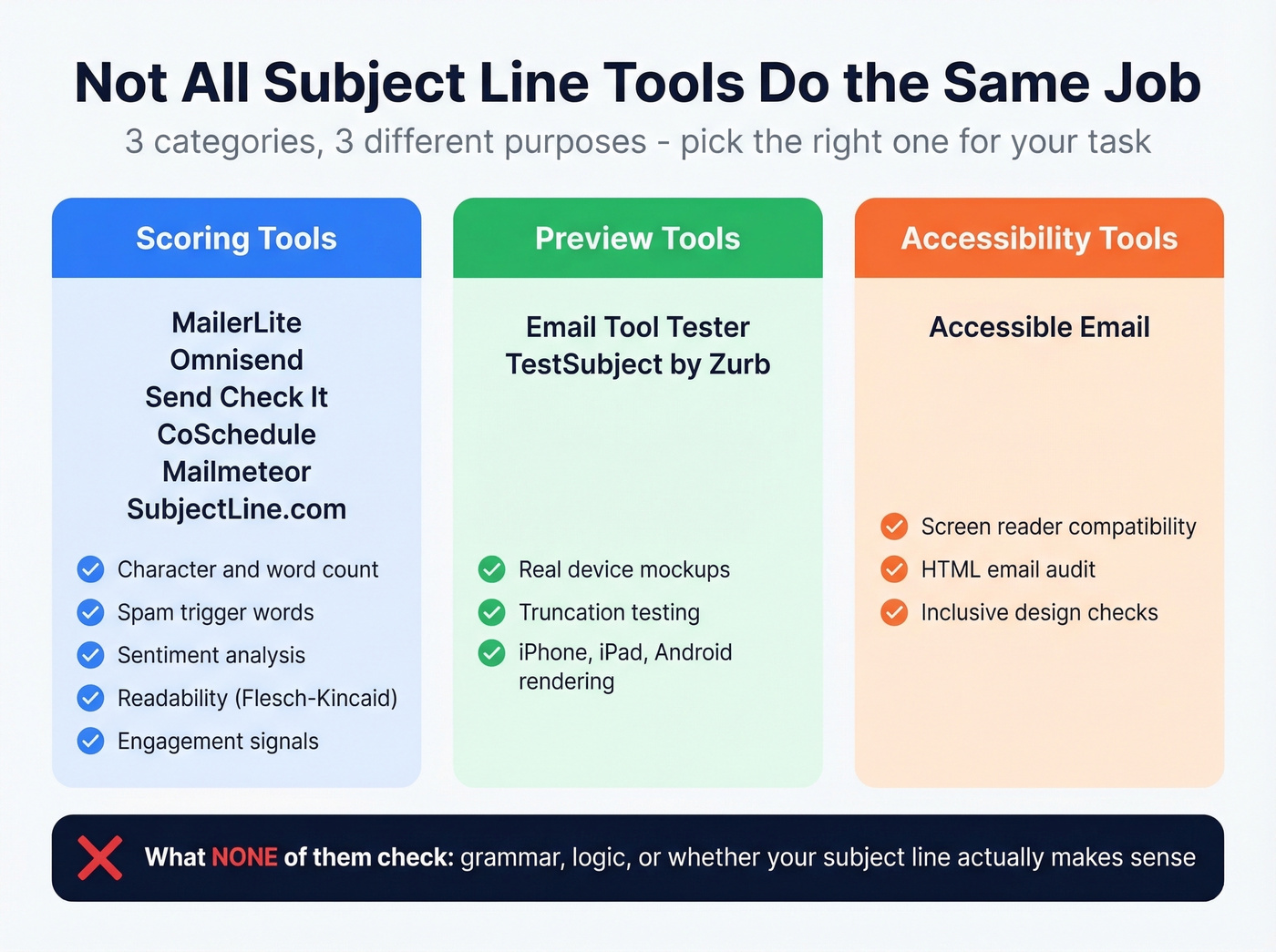
- Character and word count - Is it too long for mobile? Will it get truncated on iPhone (33-41 characters) or Android (35-50)? (More on subject line length in our data guide.)
- Spam trigger words - Does it contain "FREE," "ACT NOW," "GUARANTEED," or other promo language that older filters flagged? See our list of words to avoid.
- Sentiment analysis - Is the tone positive, negative, or neutral? Does it create urgency or curiosity?
- Readability - Flesch-Kincaid or similar scoring. Can a distracted person parse it in half a second?
- Device preview - Some tools show what it looks like in an inbox on different screens.
There's an important distinction between scoring tools (MailerLite, Omnisend, Send Check It), preview tools (TestSubject by Zurb, Email Tool Tester), and accessibility tools (Accessible Email). They serve different jobs. None of them check grammar, logic, or whether your subject line actually makes sense in context - which is how gibberish scores a 99.
Best Free Tools Compared
| Tool | Score Type | Sign-Up? | Device Preview? | Notable Features | Best For |
|---|---|---|---|---|---|
| MailerLite | Readability-based | No | Truncation check | 500+ swipe file | Transparent feedback |
| Send Check It | Sentiment-based | Yes | Artsy/inaccurate | Personalization analysis | Sentiment signals |
| Omnisend | Discrete buckets | No | Artsy/unrealistic | Wording + examples library | Wording analysis |
| CoSchedule | 0-100 score | Yes | Yes | Version history; AI in paid plans | Headline analysis |
| Mailmeteor | Score + predictions | No (limits) | No | AI alternatives | Generating variants |
| InboxArmy | 100-point system | No | Mobile-first | AI alternatives | Spam-risk detection |
| Email Tool Tester | No scoring | No | Real device mockups | Accurate rendering | Preview accuracy |
| SubjectLine.com | Proprietary score | No | No | "800+ rules" | Quick gut check |
| NetAtlantic | Word-balance score | No | No | Word type analysis | Word balance |
| Moosend Refine | Industry context | No | No | Industry benchmarks | Vertical-specific data |
| Accessible Email | No scoring | No | Accessibility audit | HTML/accessibility | Accessibility checks |
| Warmup Inbox | Purpose-specific | No | No | Email-type selector | B2B vs newsletter |
| TestSubject (Zurb) | No scoring | No | Device preview only | Truncation testing | Quick truncation check |
MailerLite
MailerLite's tester is the most transparent of the bunch. It shows Flesch-Kincaid readability scores, flags mobile truncation issues with specific character counts, and calls out engagement elements individually. You're not staring at a mystery number wondering what to fix - every flag comes with a reason.
The truncation check alone justifies using this tool. It saves you from writing a 90-character subject line that gets cut to "New product launch - we're exc..." on every iPhone in your list. MailerLite also maintains a 500+ subject line swipe file as a companion resource, which is handy when you're stuck staring at a blank line. No AI alternatives, no sentiment analysis - just length, readability, and engagement signals. For most people, that's enough.
If you want plug-and-play patterns to test, start with these email subject line formulas.
Send Check It
Send Check It does something the other tools don't: it analyzes whether your subject line feels personal, whether the emotional tone matches your intent, and whether it'll stand out in a crowded inbox. The sentiment and personalization checks are genuinely useful for cold outreach, where tone makes or breaks the open.
The catch? Sign-up is required, and this is the tool that scored gibberish at 99. The inbox preview is artsy and inaccurate - don't rely on it for rendering decisions. Treat the score as background noise and focus entirely on the qualitative feedback, which is where Send Check It earns its spot.
Omnisend
Omnisend takes a different approach: wording analysis first, score second. It checks for negative words, evaluates scannability (numbers, capitalization), and suggests specific alternatives when it flags a problem. The real gem is the example library - hundreds of pre-scored subject lines you can browse when you need inspiration.
The scoring uses discrete buckets - 100, 92, 83, 75, 67, 58, 33 - rather than a continuous scale. Your subject line either hits a bucket or it doesn't. The inbox mockup isn't accurate enough for rendering decisions, but the wording feedback and example library make Omnisend worth bookmarking.
For more examples specifically built for replies, see our B2B email subject lines.
CoSchedule Headline Analyzer
CoSchedule is the crossover pick. If you write both email subject lines and blog headlines, this tool scores both using word bank analysis - checking case, length, numbers, and emojis. The free tier works fine for a quick check, but sign-up is required and the premium features (AI assistance, deeper analysis) sit behind a paywall. You'll hit walls fast if you're a power user.
Mailmeteor
Here's where Mailmeteor stands out: it generates AI alternative subject lines alongside its score. When you're stuck on draft seven of the same line, having a tool suggest fresh angles is genuinely useful. The "performance predictions" are less reliable - this tool scored gibberish at 71, so the predictive model has clear blind spots. Free tier has fair-use limits.
InboxArmy
No sign-up required. A 100-point scoring system with spam-risk detection and mobile-first previews. The qualitative feedback isn't deep enough to be your primary tool, though. Spam-risk detection is the standout feature - everything else is competent but undifferentiated. Best for teams that want a quick spam check without creating yet another account.
Quick Mentions
Email Tool Tester provides real device mockups across iPhone, iPad, and Android - the most accurate rendering previews of any tool on this list. No scoring at all, which is honestly refreshing. Use it purely for checking how your subject line displays.
SubjectLine.com claims "800+ rules" built from 3 billion+ email messages. There's zero transparency into what those rules are or how they're weighted. It scored gibberish at 91.
Email Subject Line Grader (NetAtlantic) scores based on word balance - action words, emotion words, power words - and recommends keeping subject lines to 60 characters or less. Basic but functional.
Moosend Refine adds industry-specific context to its analysis. If you're in e-commerce vs. SaaS vs. media, the benchmarks shift. Worth a look for that angle alone.
Accessible Email focuses on HTML email accessibility rather than subject line optimization. It audits your email for screen reader compatibility - a different job entirely, but important if you care about reaching every subscriber.
Warmup Inbox lets you select your email purpose - newsletter, B2B cold outreach, transactional - and adjusts its scoring criteria accordingly. That purpose-specific approach is a genuine differentiator.
TestSubject by Zurb is preview-only. No scoring, no feedback, just device rendering. Email Tool Tester does this better. Skip it.
Why Scores Conflict Across Tools
Let's revisit the gibberish test. "Great subject line score 99% you, right?" scored:
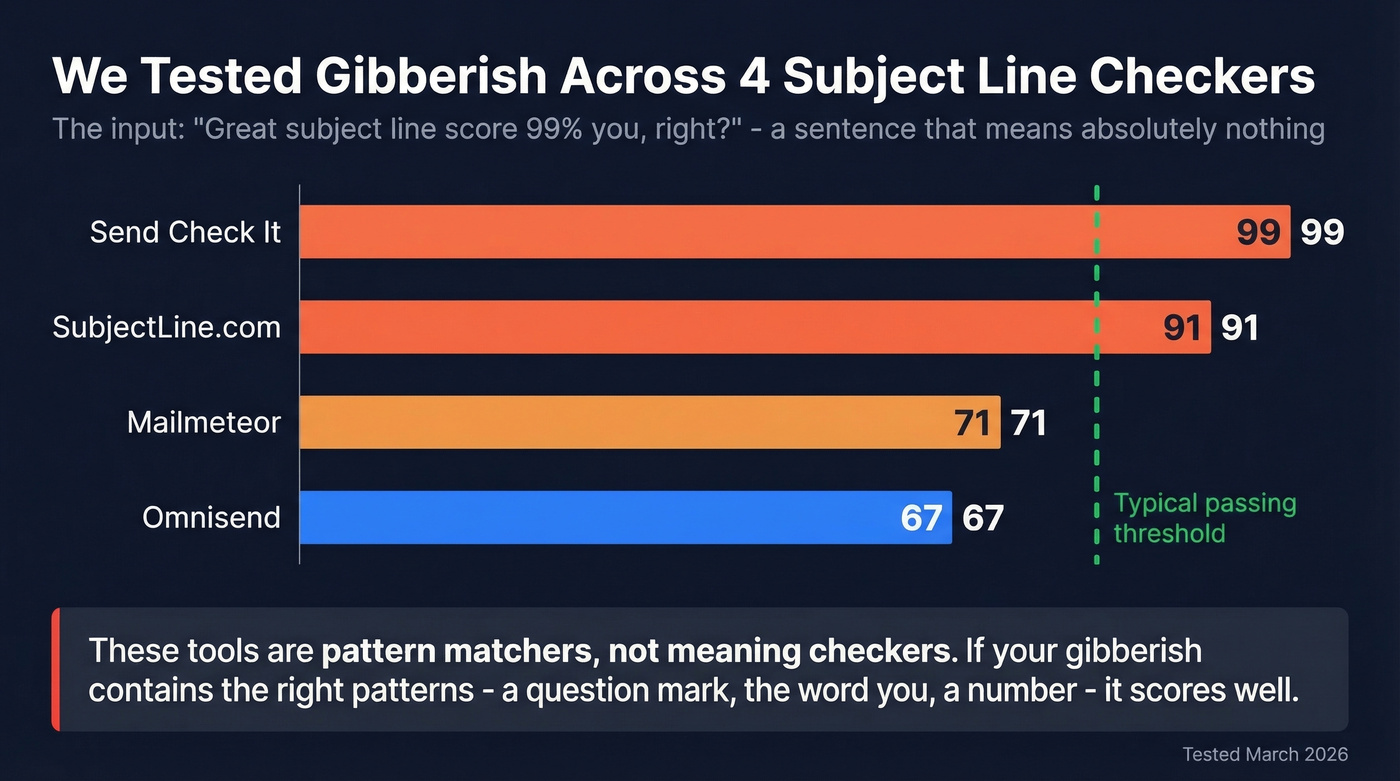
- Send Check It: 99
- SubjectLine.com: 91
- Mailmeteor: 71
- Omnisend: 67
Each tool weights different factors. Send Check It leans heavily on sentiment and personalization signals - the word "you" and the question mark pushed the score up. SubjectLine.com's rules reward similar patterns. Omnisend's discrete bucket system creates natural gaps. Mailmeteor's predictive model landed somewhere in the middle.
None of these tools check spelling, grammar, or logic. They're pattern matchers. If your gibberish happens to contain the right patterns - a question, a number, a second-person pronoun, a "power word" - it'll score well. The practical takeaway: run your subject line through 2-3 tools, read the qualitative feedback they agree on, and throw away the number.
If you need a bigger swipe file, start with these subject line templates.

A perfect subject line is worthless if it bounces. Prospeo's 98% email accuracy and 7-day data refresh mean your carefully tested subject lines reach real inboxes - not dead addresses that tank your domain reputation.
Stop optimizing subject lines for emails that never arrive.
What the Data Actually Says
The best data on subject lines comes from actual A/B tests, not checker scores.
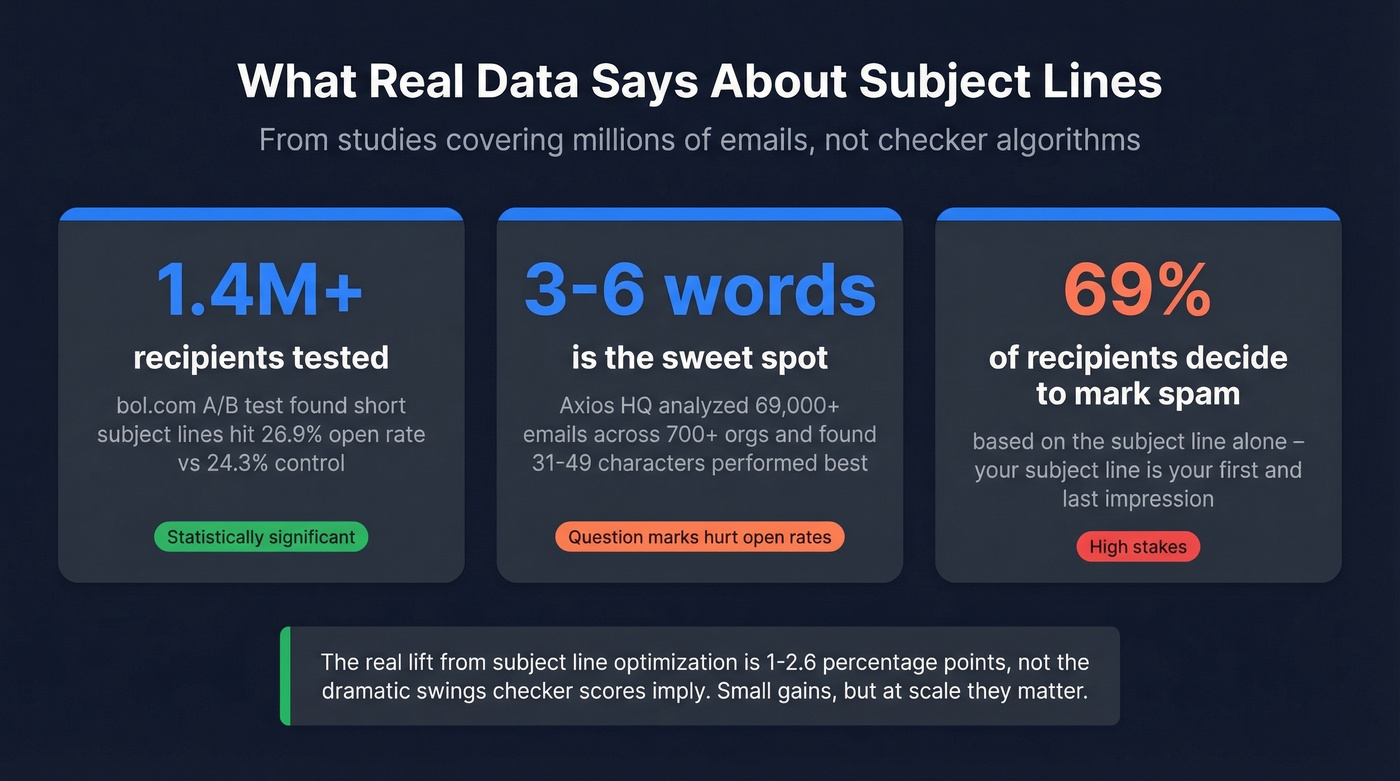
A bol.com study tested four subject line variants across 1,409,963 recipients. The control hit a 24.3% open rate. Short subject lines reached 26.9%. Emotion-inducing lines hit 26.1%. Personalized lines came in at 25.0%. All three variants beat the control with statistical significance - but the lift was 1-2.6 percentage points, not the dramatic swings checker scores imply.
Axios HQ analyzed 69,000+ emails across 700+ organizations and found 3-6 words and 31-49 characters performed best. Question marks hurt open rates. Numbers and dashes had no meaningful effect. One caveat: this data covers internal and employee communications, so results will differ for marketing or cold email.
Twilio SendGrid's Cyber Week data found the average subject line was 6 words, but the best performers were just 2-4 words.
Character limits by device:
| Device/Client | Characters Displayed |
|---|---|
| iPhone | 33-41 |
| Android | 35-50 |
| Gmail (desktop) | ~70 |
| Outlook (desktop) | 50-70 |
| Yahoo (desktop) | ~46 |
If your subject line is over 50 characters, it's getting cut on most mobile devices. That's the single most actionable insight any checker can give you.
If you want more benchmarks to sanity-check your results, compare against the average newsletter open rate.
When to Trust the Feedback
Campaign Monitor documented a case where a subject line that scored poorly on testers achieved a 28.1% open rate. The tools use generic data. They can't account for your audience, your brand voice, your send history, or the relationship you have with your list.
Checkers are useful for catching obvious mistakes - a subject line that's 120 characters long, stuffed with "FREE" and "ACT NOW," written at a college reading level. They'll flag those problems reliably. But they can't predict performance, and treating a score as a target is a recipe for writing bland, pattern-optimized subject lines that sound like every other email in the inbox.
Here's the thing: the consensus on r/coldoutreach and r/sales is that subject line optimization is table stakes, not a differentiator. The consistent best practice is to A/B test with your own audience data. No tool can substitute for that. Checkers are a pre-flight check, not a performance guarantee.
If you're early-stage or sending low volume, you don't need to agonize over subject line optimization at all. Fix your targeting, fix your deliverability, and write subject lines that sound like a human sent them. That'll outperform any score-chasing strategy.
What Matters More Than Your Subject Line
Your subject line is irrelevant if your email never reaches the inbox.
Deliverability is the foundation. SPF, DKIM, and DMARC authentication tell inbox providers you're legitimate. Sender reputation - built on engagement history and bounce rates - determines whether you land in the primary tab or the spam folder. And list quality is the variable most teams underestimate.
Say you send 10,000 emails. Your open rate is 12%, but your bounce rate is 8%. That bounce rate is destroying your sender reputation with every send. Within weeks, even your engaged contacts stop seeing your emails because the inbox provider has flagged your domain. Your subject line could score a perfect 100 on every checker - it doesn't matter if the email bounces or lands in spam.
This is where email verification becomes the real open-rate lever. We've seen teams go from 35% bounce rates to under 4% just by verifying their lists before sending, which directly lifts inbox placement and, by extension, open rates. Prospeo's 5-step verification handles catch-all domains, removes spam traps, and filters honeypots on a 7-day refresh cycle - but the principle applies regardless of which verification tool you use. Fix the foundation first, then worry about whether your subject line has enough "power words." (If you want the full checklist, start with an email validity checker and an email domain check.)
A Practical Optimization Workflow
- Verify your list. Bounces are the fastest way to trash your sender reputation. Any verification tool works - the point is to never skip this step. (Full guide: verify email address online.)
- Check authentication. Confirm SPF, DKIM, and DMARC are properly configured. This takes 10 minutes and prevents deliverability disasters.
- Write 3-5 subject line variants. Keep them to 3-6 words, under 50 characters. Front-load the important words so they survive mobile truncation. If you need examples, use these best cold email subject lines.
- Run through 2-3 checkers. Use MailerLite, Send Check It, and Omnisend. Read the feedback they agree on. Ignore the scores.
- A/B test within your ESP. Your audience data beats any generic checker. Test one variable at a time - length, personalization, emoji, question vs. statement - and let statistical significance decide.
You just spent 20 minutes testing subject lines across three tools. Now make sure those emails land. Prospeo delivers 143M+ verified emails with 5-step verification and spam-trap removal - so your open rates reflect your copy, not bad data.
Great subject lines deserve inboxes that exist.
FAQ
What's the most accurate subject line checker?
No single tool is "most accurate" - they all weight different factors and produce wildly different scores for identical input. MailerLite is the most transparent about its methodology. Use 2-3 tools together and focus on common feedback rather than any individual score. A gibberish sentence scored 99 on Send Check It and 67 on Omnisend.
Do these tools actually improve open rates?
They help you avoid obvious mistakes like excessive length and spam trigger words, but they can't predict performance. The bol.com study across 1,409,963 recipients found short subject lines lifted opens by 2.6 percentage points - real A/B testing with audience data drove that lift, not score optimization.
How long should an email subject line be?
Aim for 3-6 words and under 50 characters. iPhones display only 33-41 characters; Android shows 35-50. The Axios HQ study across 69,000+ emails found 31-49 characters performed best. Front-load your key message so truncation doesn't cut the important part.
Are spam trigger words still relevant?
Modern spam filters rely on sender reputation, engagement history, and authentication (SPF, DKIM, DMARC) far more than individual words. Avoid obvious promo language like "FREE" and "ACT NOW," but don't obsess over word lists. Your domain reputation and list hygiene matter more than any single word in your subject line.
What's the fastest way to improve email open rates?
Verify your email list. Bounces destroy sender reputation, which tanks inbox placement. Clean your list first, authenticate your domain, then optimize subject lines with A/B tests from your own audience data. In our experience, fixing bounce rates from 30%+ down to under 5% does more for open rates than any subject line tweak ever will.