

URL Blacklist Check: How to Find, Fix, and Prevent Every Type of Listing
Your URL blacklist check comes back clean. Every light is green. But emails keep bouncing, and Chrome is throwing a "Deceptive Site Ahead" warning at your prospects.
This exact scenario plays out constantly - there's a Reddit thread in r/sysadmin where a sysadmin discovered their emails only delivered after removing their website URL from the signature. The scanner was checking the wrong type of blacklist entirely. That's the problem most guides skip over, and it's where we're starting.
Quick Diagnosis
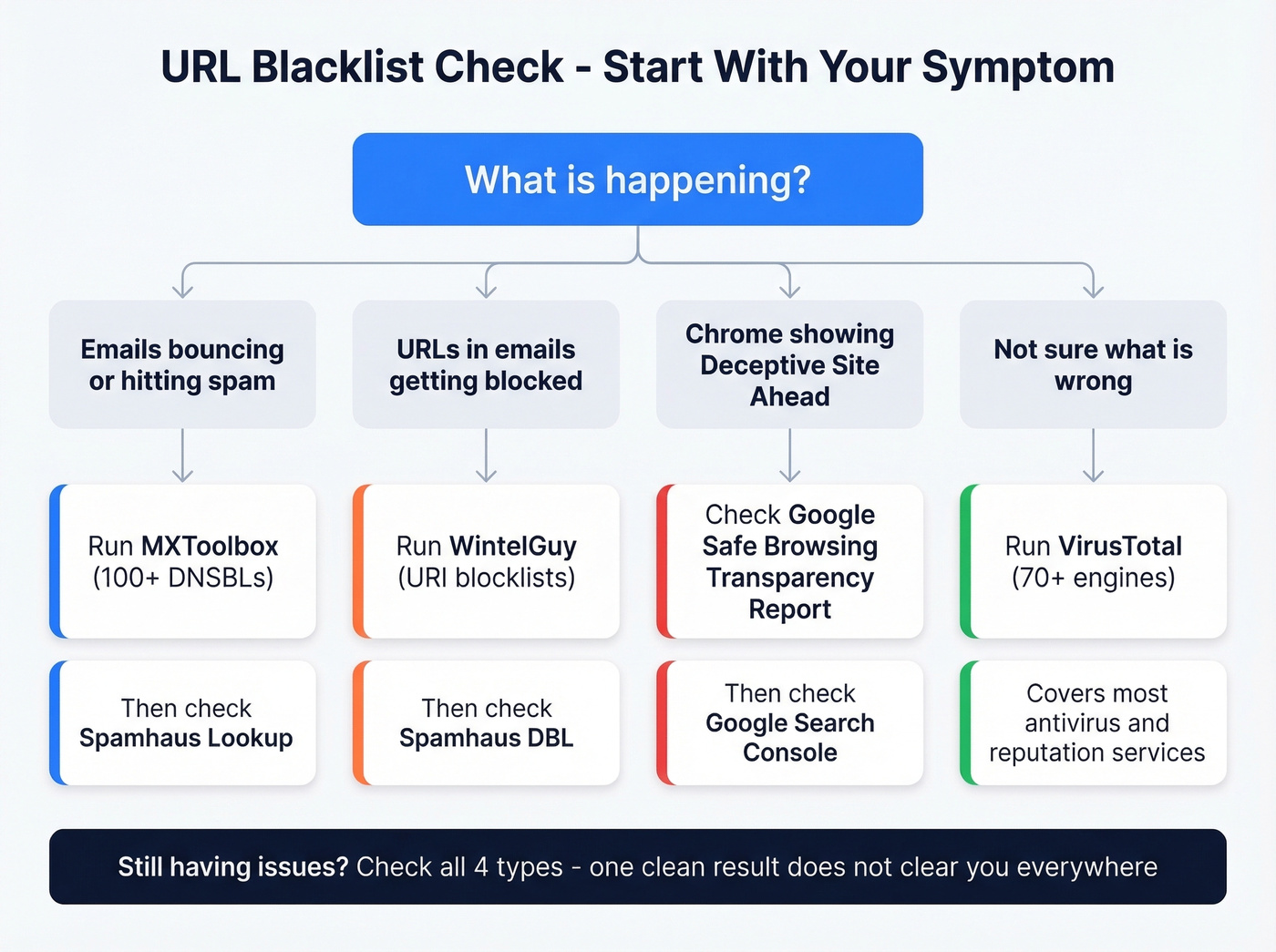
Before you get into the taxonomy, here's what to check based on your symptom:
- Emails bouncing or going to spam? MXToolbox scans 100+ DNSBLs. Pair it with Spamhaus Lookup for the lists that actually matter. If you're troubleshooting bounces, it also helps to understand bounce rate benchmarks and codes.
- URLs inside your emails getting blocked? WintelGuy is purpose-built for URI blocklists. Also check Spamhaus DBL.
- Chrome showing "Deceptive Site Ahead"? That's a web reputation flag, not an email blacklist. Head to the Google Safe Browsing Transparency Report.
- Not sure what's wrong? VirusTotal runs your URL against 70+ engines and covers most major antivirus and reputation services.
These are four different systems. Checking one doesn't clear you on the others.
The 4 Types of Blacklists
Most guides treat blacklists as a single thing. They're not.
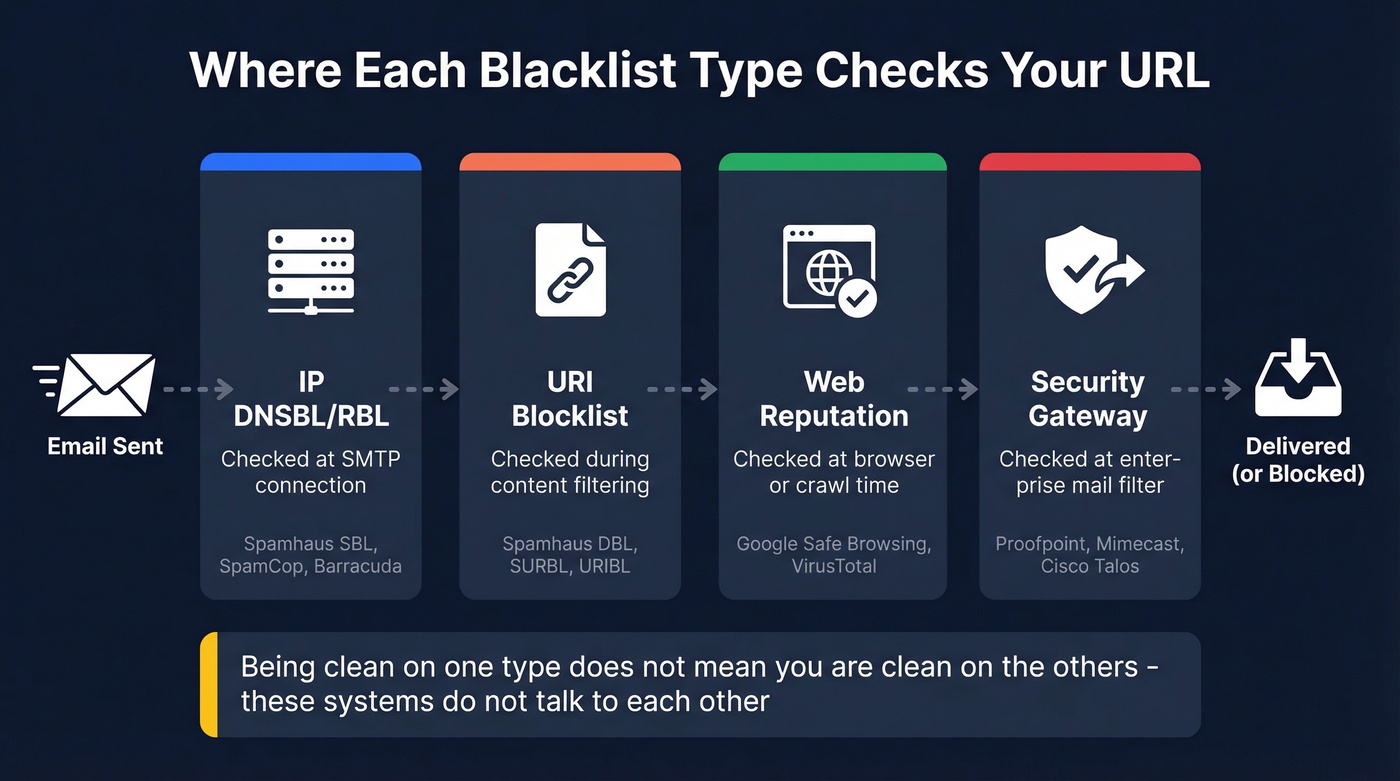
Four distinct types exist, each evaluated at a different point in the delivery chain, each maintained by different organizations, and each requiring different tools to check.
| Type | What It Lists | When Checked | Example Providers | Tool to Check |
|---|---|---|---|---|
| IP DNSBL/RBL | Sending IPs | SMTP connection | Spamhaus SBL/XBL, SpamCop, Barracuda | MXToolbox, MultiRBL |
| URI Blocklist | Domains in email body | Content filtering | Spamhaus DBL, SURBL, URIBL | WintelGuy, Spamhaus |
| Web Reputation | Malware/phishing URLs | Browser/crawl time | Google Safe Browsing | Transparency Report, VirusTotal |
| Security Gateway | URLs + sender rep | Enterprise mail filter | Proofpoint, Mimecast, Cisco Talos | Cisco Talos lookup |
Here's the thing: you can be completely clean on IP DNSBLs and still get blocked because your domain sits on a URI blocklist. Or your website could be flagged by Google Safe Browsing while your email deliverability is perfect. These systems don't talk to each other.
IP DNSBLs are the oldest and most familiar. They list IP addresses that have sent spam, and receiving mail servers check them during the SMTP handshake - before your email content is even read. Spamhaus SBL, SpamCop, and Barracuda are the heavy hitters. If you're trying to get systematic about this, use a dedicated set of email reputation tools rather than ad-hoc checks.
URI blocklists are the ones most people miss. They don't care about your sending IP. They scan the content of emails for domains associated with spam or phishing. If your website domain appears on Spamhaus DBL or SURBL, any email containing a link to your site can get filtered - even if someone else sent it. Major inbox providers rely on these lists to filter messages before they ever reach the recipient.
Web reputation systems like Google Safe Browsing operate at the browser level. Safe Browsing protects over 4 billion devices and will slap a red warning page on your site if it detects malware or deceptive content. Nothing to do with email, but it destroys trust with anyone who clicks through to your site.
Enterprise security gateways - Proofpoint, Mimecast, Cisco Talos - maintain their own proprietary URL reputation feeds. Most don't offer a public lookup. Cisco Talos is the exception; they provide a free reputation lookup at talosintelligence.com that's worth bookmarking.
Running one blacklist checker isn't a thorough check. It's covering one type out of four.
How to Run a Complete Check
IP DNSBLs
Start with MXToolbox. Enter your sending IP or domain, and it scans against 100+ DNSBL/RBL lists simultaneously. Results show which lists you're on, with direct links to each blacklist's delisting page. Fastest path from "am I blacklisted?" to "how do I fix this?"

For broader coverage, MultiRBL aggregates across hundreds of lists and color-codes results by severity - black, brown, yellow, white, and neutralized. An r/cybersecurity thread on aggregated IP lookup tools shows a clear community preference for running multiple checkers rather than trusting any single one. We've found MXToolbox catches the lists that actually matter for deliverability, but MultiRBL is worth running if MXToolbox comes back clean and you're still having issues. If you're sending at scale, also keep an eye on email velocity so you don't trigger reputation hits.
URI Blocklists
This is where most people miss the problem.
WintelGuy is purpose-built for URI blocklist checking - enter a domain or full URL and it queries major URIBL services, including Spamhaus, SURBL, URIBL, Spam Eating Monkey, and JunkEmailFilter. Results come back as Listed/Not Listed/Error with status codes.
One thing to know: status codes are loopback responses (127.0.0.x format) and their meaning varies by provider. A 127.0.0.2 on Spamhaus DBL means something different than 127.0.0.2 on SURBL. Check each provider's documentation if you get a listed result. Being on a list like Spamhaus DBL can tank deliverability across every major inbox provider simultaneously, so don't skip this step. If you suspect traps are involved, follow a proper spam trap removal process before you send again.
Web Reputation
Google Safe Browsing is the big one. Head to the Transparency Report site status checker, enter your URL, and you'll get one of three verdicts: "No unsafe content found," "Site contains harmful programs," or "Deceptive site."
For deeper diagnostics, go to Google Search Console, then Security & Manual Actions, then Security Issues. This shows affected pages, detection timing, and is the channel you'll use to request a review after cleanup.
In our testing, VirusTotal's engine-by-engine breakdown is the fastest way to identify false positives. It runs your URL against 70+ antivirus scanners and URL/domain blocklisting services, showing labels like phishing, malware, suspicious, or clean from each engine. If 68 engines say clean and 2 flag you, that's a very different situation than 15 engines flagging you.

Most URL blacklistings trace back to one root cause: sending to bad email addresses. High bounce rates torch your sender reputation and land your domain on Spamhaus DBL and SURBL. Prospeo's 5-step verification and 98% email accuracy keep bounce rates under 4% - the same threshold that took Meritt's pipeline from $100K to $300K/week.
Stop fighting blacklists. Start with data that never puts you on one.
Best Blacklist Check Tools in 2026
| Tool | Checks | Coverage | Free? | Best For |
|---|---|---|---|---|
| MXToolbox | IP DNSBLs | 100+ lists | Free; paid monitoring | Email blacklist diagnosis |
| MultiRBL | IP + some URI | Hundreds of lists | Free | Broadest single scan |
| VirusTotal | URL/domain rep | 70+ engines | Free (API limited) | Web safety + malware |
| Safe Browsing | Web reputation | Google's DB | Free | Chrome/browser warnings |
| WintelGuy | URI blocklists | Major URIBLs | Free | Domain-in-email blocks |
| Spamhaus | IP + domain | SBL/DBL/PBL | Free | Most impactful lists |
| DNSChecker | IP blacklists | 50+ lists | Free | Quick combined check |
| HetrixTools | IP monitoring | Continuous | Free; paid from ~$15/mo | Ongoing alerts |
| ZeroBounce | IP + domain | 300+ lists | Free; paid from ~$15/mo | Monitoring + validation |
| Sucuri SiteCheck | Malware/web rep | Multiple engines | Free | WordPress/CMS security |
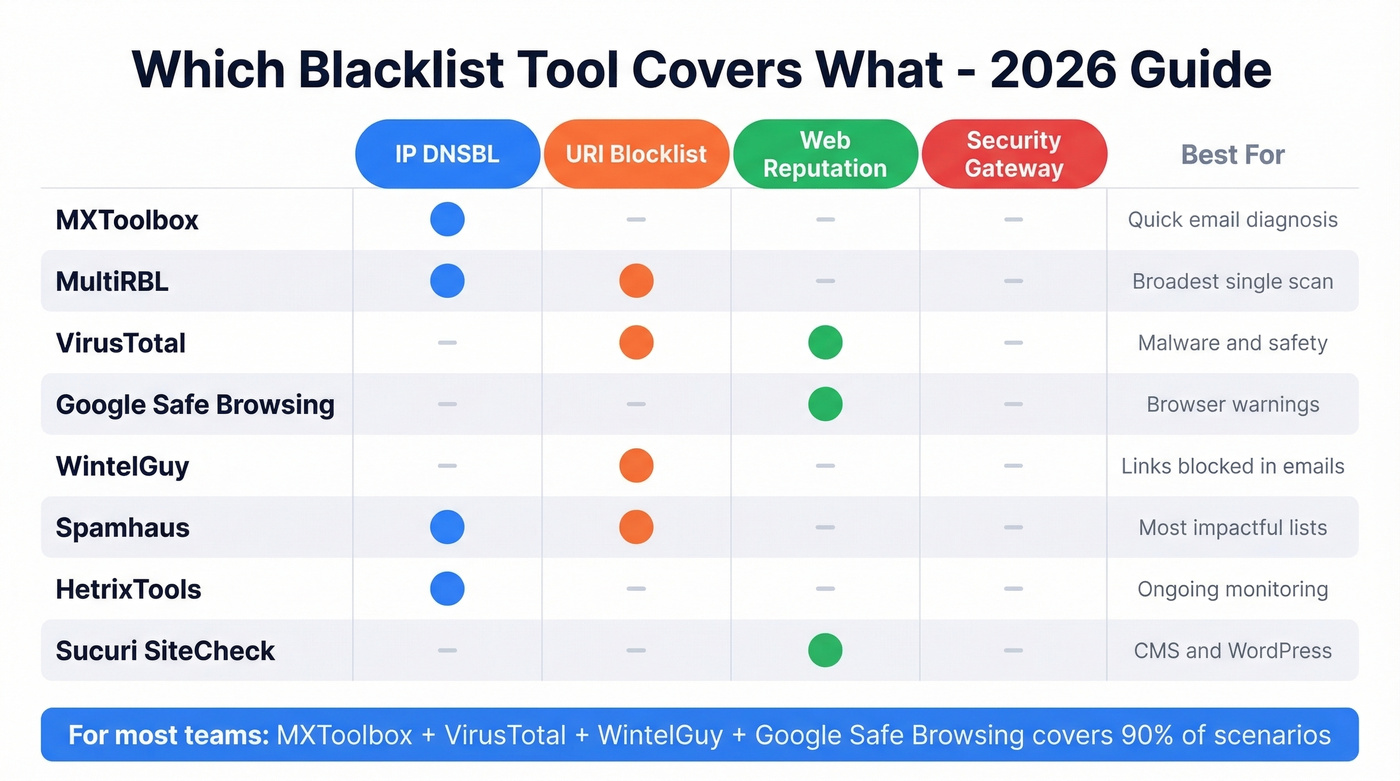
Most of these tools are free for one-off checks. The paid tiers from HetrixTools and ZeroBounce kick in when you want continuous monitoring - automated alerts when you land on a new list. If you're sending any meaningful email volume, that monitoring is worth the cost. Finding out you're blacklisted from a bounce report three days later is three days too late. If you're doing outbound, it's also worth reviewing the best way to send bulk email without getting blacklisted.
Let's be honest: if your deal sizes are under $15k and you're sending fewer than 50,000 emails a month, MXToolbox + VirusTotal covers 90% of your scenarios. Add WintelGuy for URI blocklist issues and Google's Transparency Report for browser warnings. Don't overcomplicate this.
Why You Got Blacklisted
Spam Complaints Exceeded Thresholds
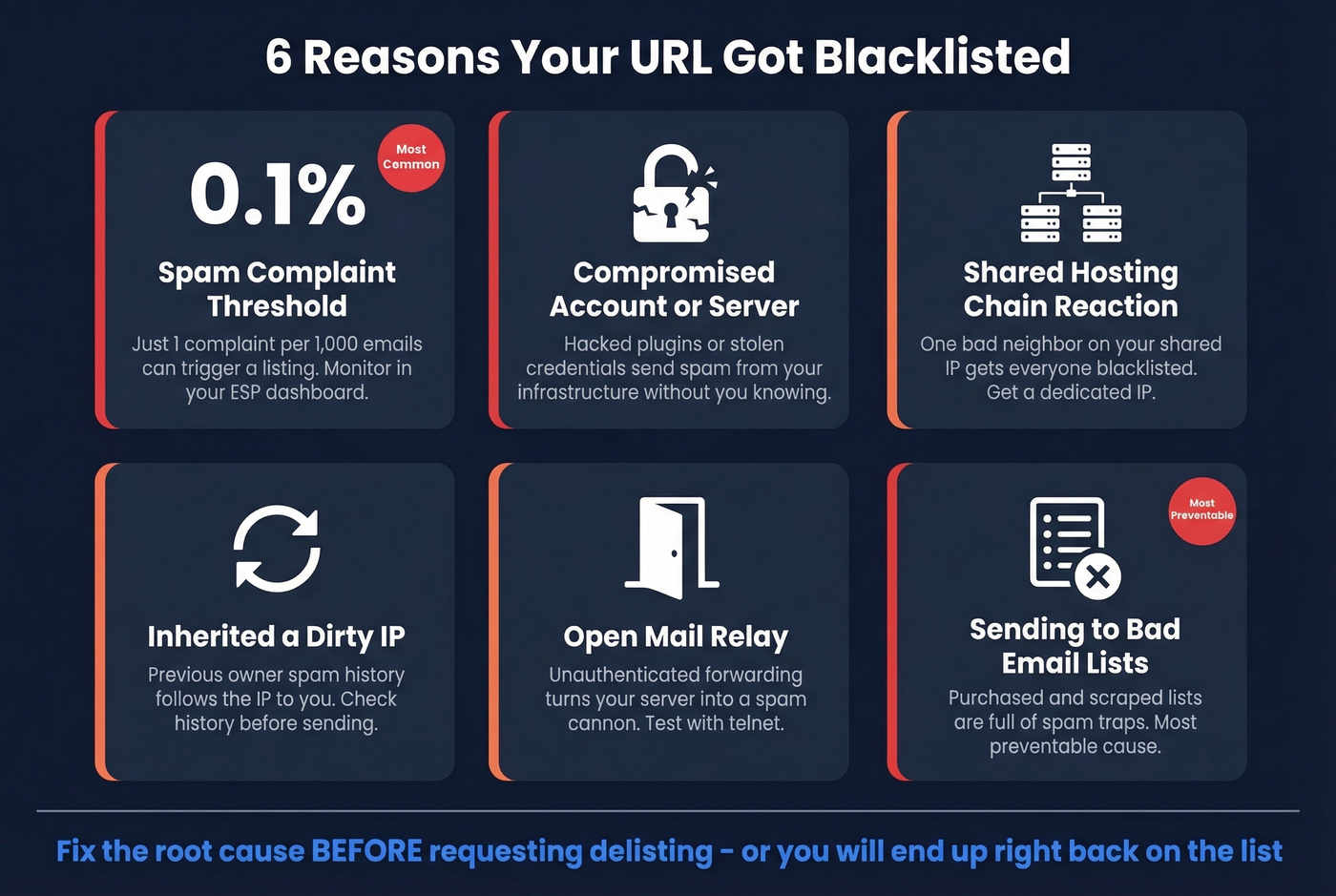
The threshold is lower than most people think. 0.1% complaint rate - that's 1 complaint per 1,000 emails. Exceed that consistently and blacklist operators notice. Monitor complaint rates in your ESP dashboard and pull back volume immediately if you're trending above 0.08%. Tightening your email deliverability fundamentals helps prevent this from compounding.
Compromised Account or Server
A hacked WordPress plugin or stolen email credential starts sending spam from your infrastructure. You won't know until the blacklist hits. Keep CMS plugins updated, enforce strong passwords, and enable two-factor authentication on every account that touches your mail server.
Shared Hosting Chain Reaction
One compromised site on a shared IP sends spam, and the entire IP gets blacklisted - taking every domain on that server down with it. Per MailChannels, this is a daily occurrence for hosting providers. If you're on shared hosting and sending business email, get a dedicated IP or switch to a host with outbound spam filtering.
Inherited a Dirty IP
Sometimes the problem predates you entirely. A previous IP owner's spam history can follow the address to your infrastructure. If you've just provisioned a new dedicated IP and immediately land on blacklists, check its history with MXToolbox and coordinate with your ISP to document the ownership change when submitting delisting requests.
Open Relay
If your mail server accepts and forwards email from unauthenticated senders, it's an open relay - and spammers will find it. A quick telnet SMTP test can confirm whether your server relays unauthenticated messages. Lock it down before requesting any delisting.
Sending to Bad Email Lists
Purchased lists and scraped addresses are loaded with spam traps and honeypots - addresses that exist solely to catch senders who don't verify their data. Hit enough of them and you're on Spamhaus before your second campaign. This is the single most preventable cause of blacklisting, and it's where data quality tools pay for themselves many times over. If you're unsure about compliance risk, see Is it illegal to buy email lists?.
How to Get Delisted
Pre-Delisting Checklist
Before you request removal from anything, fix the root cause. Secure your server, close any open relay, add CAPTCHA to web forms, clean your email lists, configure SPF/DKIM/DMARC, and analyze your mail logs to identify what triggered the listing. Requesting delisting without fixing the problem just gets you re-listed within days. If you need to validate auth quickly, use this guide on how to verify DKIM is working.
Spamhaus (SBL / DBL / PBL)
Stop sending immediately. Confirm your listing via the Spamhaus Lookup Tool - it'll tell you which list (SBL, XBL, DBL, PBL) and provide context. Fix the root cause, then request removal. For a step-by-step playbook, follow our Spamhaus blacklist removal guide.
Who submits the request matters: for SBL, your ISP or network owner must submit. For DBL, the domain owner can request removal using a domain-associated email address, not a freemail provider. For PBL, you can self-remove a static IP directly through the lookup tool if you're running a legitimate mail server. XBL listings pull from CBL data and can clear automatically within hours once the underlying issue is resolved. Expect a response within 1-2 days for manual requests. You can't pay Spamhaus to delist faster.
SpamCop, Barracuda, SORBS, UCEProtect
SpamCop is the easiest - it auto-delists within 24-48 hours if no new spam reports come in. Just stop the offending behavior and wait.
Barracuda processes removal requests in 12-24 hours via their online form. SORBS requires you to create an account before submitting a delisting request, and timelines vary. UCEProtect Level 1 clears automatically after 7 days. They offer a paid "express" delisting option, but it's controversial - paying to delist feels like a shakedown, and many admins refuse on principle.
Google Safe Browsing Removal
Clean the malware or deceptive content first - Google won't clear you until the problem is actually gone. Then go to Search Console, Security Issues, and Request Review. Be specific about what you fixed.
An r/phishing thread documents widespread frustration with this process: users report that Safe Browsing reports don't get action quickly, and the review can take days to weeks with no status updates. Patience is required, but being thorough in your review request helps.
| Blacklist | Method | Timeline | Notes |
|---|---|---|---|
| Spamhaus SBL/DBL | Manual request | 24-48 hrs | ISP for SBL; owner for DBL |
| Spamhaus XBL | Automatic | Hours-24 hrs | Clears after fix via CBL |
| Spamhaus PBL | Self-removal | Immediate | Static IPs only |
| SpamCop | Automatic | 24-48 hrs | Clears if no new reports |
| Barracuda | Request form | 12-24 hrs | - |
| SORBS | Account + request | Variable | Registration required |
| UCEProtect L1 | Wait | 7 days | Paid express available |
| Google Safe Browsing | Search Console | Days to weeks | Clean malware first |
Preventing Future Blacklisting
Most blacklisting starts with bad data. Unverified emails bounce, spam traps fire, and your IP ends up on Spamhaus before your second campaign. Prospeo's 5-step verification catches spam traps and honeypots before they reach your sending tool - 98% email accuracy with a 7-day data refresh cycle, which is the kind of hygiene that keeps you off blacklists in the first place. Beyond list hygiene, here's the prevention stack:
SPF/DKIM/DMARC - configure all three. SPF authorizes your sending IPs, DKIM signs your messages cryptographically, and DMARC tells receivers what to do when checks fail. Non-negotiable for any serious sender. (If you need examples, start with an SPF record example and then review DMARC alignment.)
Remove bounces immediately. Hard bounces should trigger automatic suppression in your ESP. Don't wait for a weekly cleanup.
Monitor complaint rates. Stay under 0.1%. Set up alerts in your ESP so you know the moment you're trending up.
Use dedicated IPs if you're sending more than ~50,000 emails per month. Shared IPs mean shared risk.
Keep CMS and plugins updated. WordPress and plugin vulnerabilities are a leading vector for website compromises that lead to blacklisting.
Set up blacklist monitoring. HetrixTools or ZeroBounce will alert you the moment you land on a new list - catching it in hours instead of days. If you're running outbound at any real scale, skip the manual weekly checks and automate this.
You just ran checks across four blacklist types. Now fix the upstream problem. Every email Prospeo delivers passes catch-all verification, spam-trap removal, and honeypot filtering - refreshed every 7 days, not the 6-week industry average. Stack Optimize built a $1M agency with zero domain flags across all clients using Prospeo data.
Clean data is the only blacklist prevention that actually scales.
FAQ
What's the difference between an email blacklist and a Google blacklist?
Email blacklists (DNSBLs) block your server from delivering mail to recipients. Google's Safe Browsing blacklist flags your website as dangerous in Chrome and search results. They're completely different systems - it's common to have one without the other, so check both if you're unsure which one you're dealing with.
How long does blacklist removal take?
SpamCop auto-clears in 24-48 hours with no new reports. Spamhaus takes 1-2 days after a manual request; XBL can clear within hours. Barracuda processes removals in 12-24 hours. UCEProtect Level 1 requires a 7-day wait. Google Safe Browsing reviews take days to weeks through Search Console.
Can shared hosting get me blacklisted even if I didn't send spam?
Yes. If another site on your shared IP gets compromised and sends spam, the entire IP gets blacklisted, including your domain. This is one of the most common blacklisting scenarios for small businesses. Get a dedicated IP or switch to a host that actively filters outbound spam.
How often should I run a URL blacklist check?
Active senders should run manual checks weekly at minimum. For high-volume outbound, set up continuous monitoring through HetrixTools or ZeroBounce for real-time alerts - every hour you're listed is deliverability damage compounding. Manual spot-checks alone aren't enough above 10,000 emails per month.
What's the best free tool to check all blacklist types at once?
No single free tool covers all four blacklist types. VirusTotal comes closest, scanning your URL against 70+ engines for malware and reputation flags. Pair it with MXToolbox for IP DNSBLs and WintelGuy for URI blocklists. For the data-quality side - preventing listings before they happen - Prospeo's email verification offers 75 free credits per month.