

Video Email: How It Actually Works in 2026
You spend 45 minutes recording a personalized video for a prospect. You nail the demo, the lighting's decent, you even remembered to smile. You hit send. Gmail renders it as a broken image with a red X where your face should be.
That's the video email experience for most people who try it without understanding the mechanics. 93% of marketers say video delivers good ROI - the problem isn't the format, it's the execution.
The Short Version
- Video doesn't autoplay in most inboxes. Gmail, Outlook, and Yahoo all block it. Use a thumbnail with a play button that links to your hosted video.
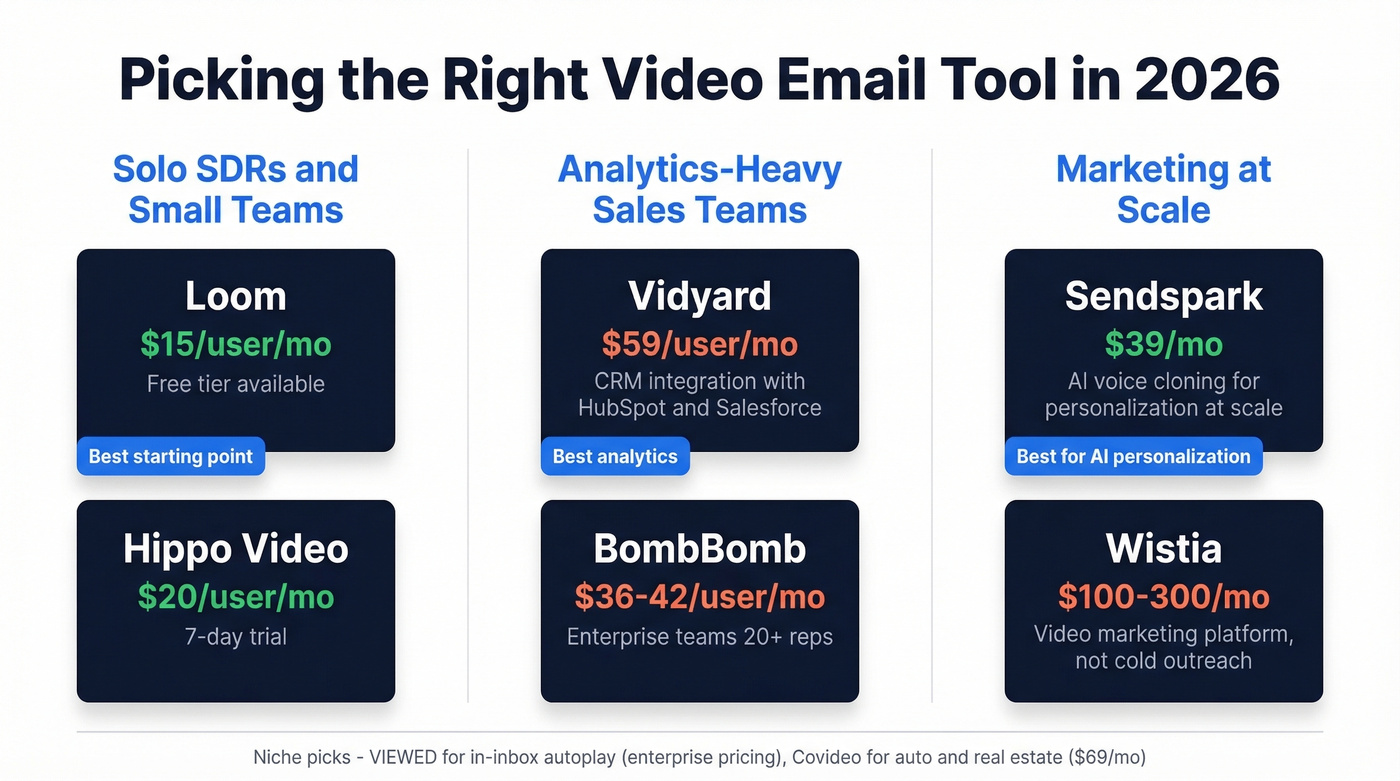
- Pick your tool by use case. Sales prospecting: Loom or Vidyard. Marketing at scale: Wistia or Sendspark. AI-personalized outreach: Sendspark.
What Is Video Email?
It's a thumbnail image with a play button overlay, embedded in an email, that links to a hosted video. That's it. No video file actually plays inside your inbox.
This trips people up constantly. Reddit threads in r/Emailmarketing are full of marketers asking how to get video playing directly in the message, and one common complaint keeps surfacing: "Platforms that allow video to play in email are super expensive." Which is exactly why the thumbnail approach matters. Gmail and Outlook block HTML5 video playback entirely. Apple Mail supports it, but designing for one client while breaking in others isn't a strategy.
The thumbnail approach just works. A SuperOffice study found that including "video" in a subject line increased open rates by 6%. You don't need autoplay - you need a compelling thumbnail and a clear reason to click.
Why Video Outreach Works
Wistia's 2025 State of Video report analyzed 100M+ videos, 2.7M hours of content, and surveyed 1,300+ professionals. The standout finding: how-to videos under one minute held 82% average engagement, and lead generation forms embedded in videos saw nearly 25% completion rates. That's not a marginal lift - that's a different category of performance entirely.
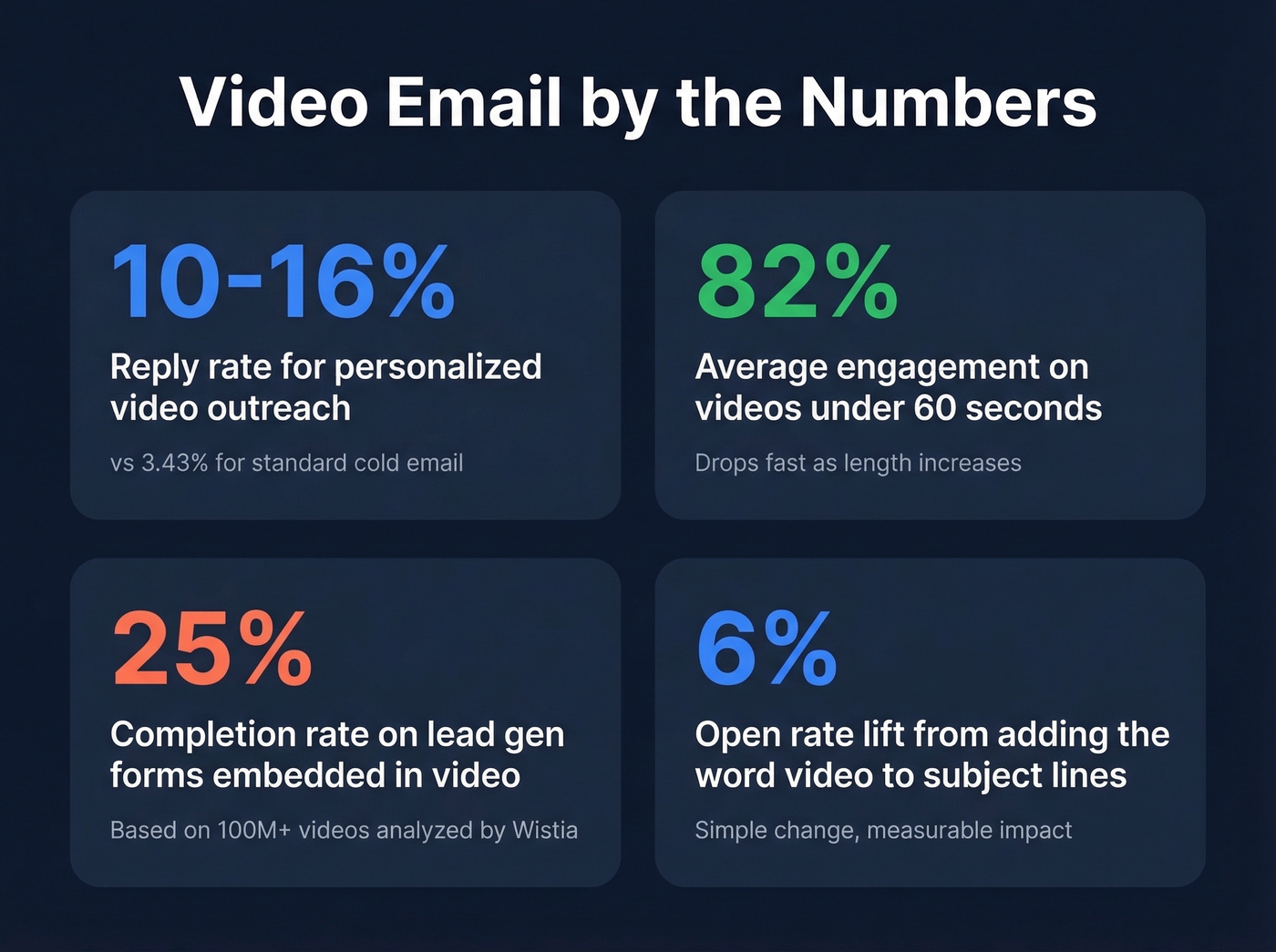
On the sales side, cold email reply rates hover around 3.43%. Personalized video outreach pulls 10-16% reply rates, with deeply personalized videos hitting 30% in some cases. Vidyard benchmarks tie video to outcomes like 28% higher pipeline volume and 27% shorter deal cycles. When you compare video-driven messages vs. text-only head to head, the gap is hard to ignore.
AI-assisted video creation jumped from 18% to 41% adoption in a single year. The production barrier that used to make this channel impractical is disappearing fast. 73% of people prefer a short video to learn about a product, and that preference is only accelerating.
Email Client Compatibility
Before you build anything, understand where video actually works:
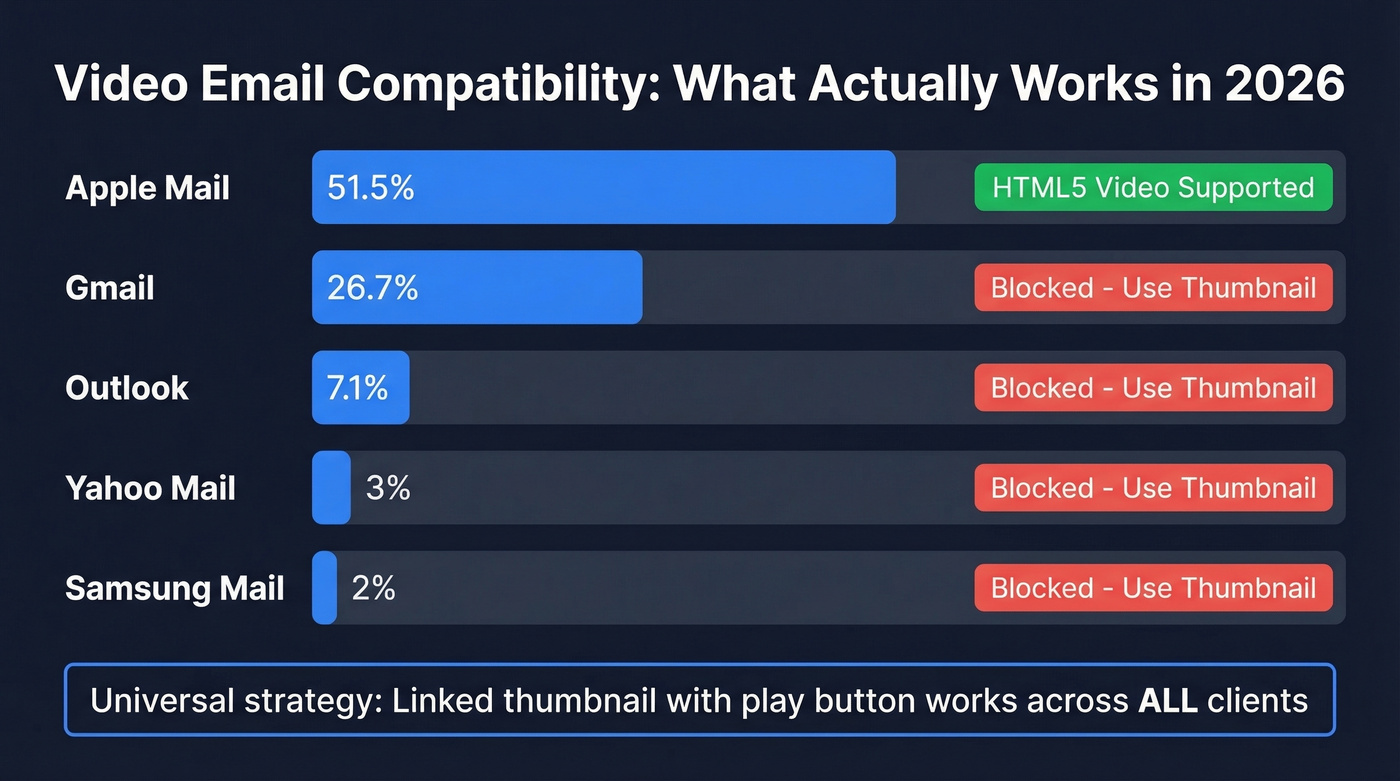
| Email Client | Open Share | HTML5 Video? | Best Approach |
|---|---|---|---|
| Apple Mail | ~51.5% | Yes | Thumbnail or embed |
| Gmail | ~26.7% | No | Thumbnail + link |
| Outlook | ~7.1% | No | Thumbnail + link |
| Yahoo Mail | ~3% | No | Thumbnail + link |
| Samsung Mail | ~2% | No | Thumbnail + link |
Apple Mail's share is tempting, but Gmail and Outlook together cover a third of all opens and will break your embedded video. The universal approach - a linked thumbnail - works across every client.
Keep your assets light. Static thumbnails should stay under 200KB. GIF previews: under 500KB, with 1MB as an absolute ceiling. Gmail clips emails at 102KB of HTML, so a heavy email risks getting truncated before the recipient even sees your thumbnail. Never attach video files directly; attachments and heavy payloads increase spam-filter risk and hurt deliverability.

You just spent 10 minutes recording a personalized video for a prospect. If that email bounces, you've wasted the recording, the editing, and damaged your sender reputation. Prospeo's 98% email accuracy and 5-step verification ensure every video you send actually lands.
Stop wasting video outreach on bad email addresses.
How to Send a Video Email
Step 1: Record and host your video. Use Loom, Vidyard, or Wistia for hosting. YouTube works too, but dedicated platforms give you analytics on who watched and for how long. Keep cold outreach videos under 60 seconds. Nurture videos can run up to two minutes.
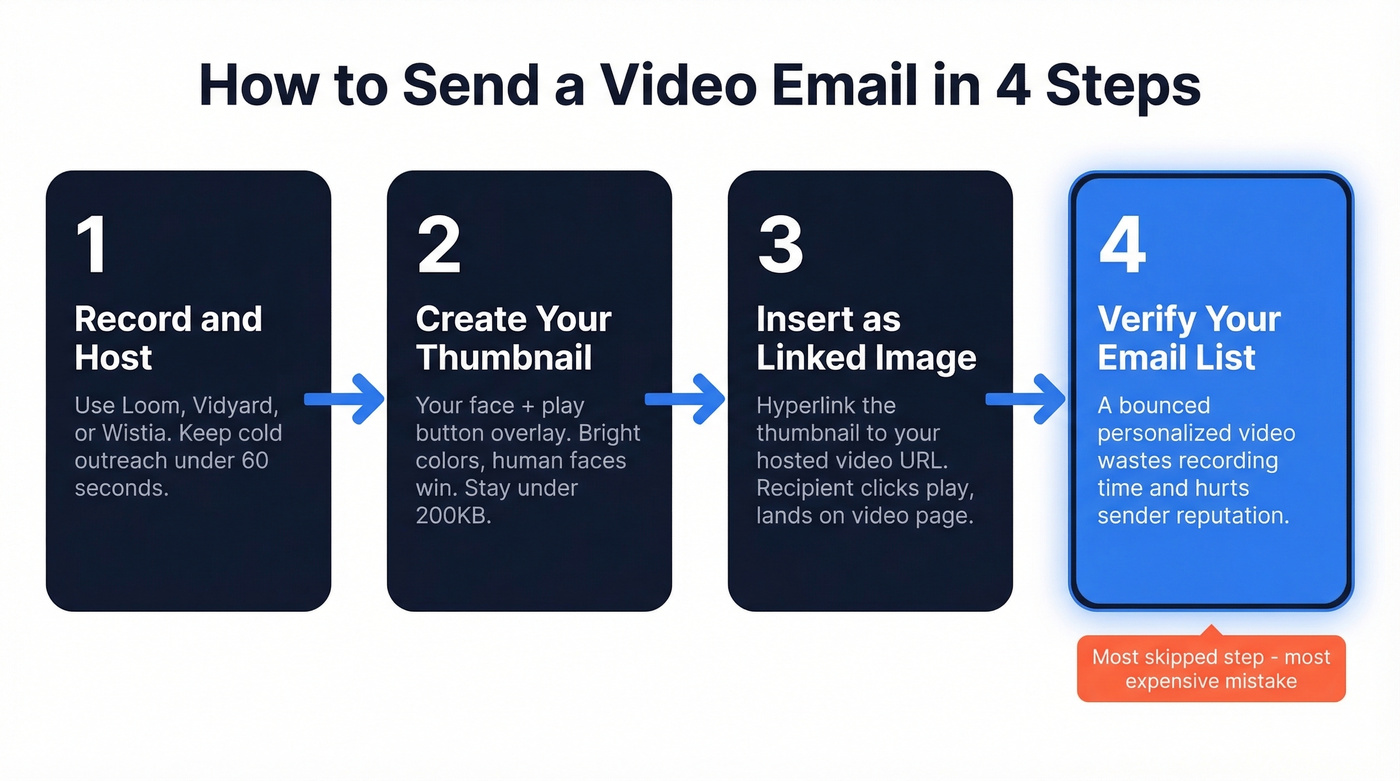
Step 2: Create your thumbnail. This is the single biggest CTR lever. Take a frame from your video - ideally one showing your face - and overlay a play button. Bright colors and human faces outperform generic graphics every time. Most tools generate thumbnails automatically, but a custom one almost always performs better. Test rendering on mobile before sending; over 50% of emails open on phones, and a thumbnail that looks great on desktop can render tiny on a small screen.
Step 3: Insert the thumbnail as a hyperlinked image. In your email editor, add the thumbnail image and hyperlink it to your hosted video URL. The recipient sees what looks like a video, clicks the play button, and lands on your video page. Simple.
Step 4: Verify your recipient list. Here's the thing - this is the step everyone skips, and it's the most expensive mistake you can make. A bounced personalized video wastes the recording time, the editing time, and chips away at your sender reputation.
What a High-Converting Message Looks Like
We've tested dozens of video email structures across cold outreach campaigns. Here's the exact format that consistently pulls 14-16% reply rates:
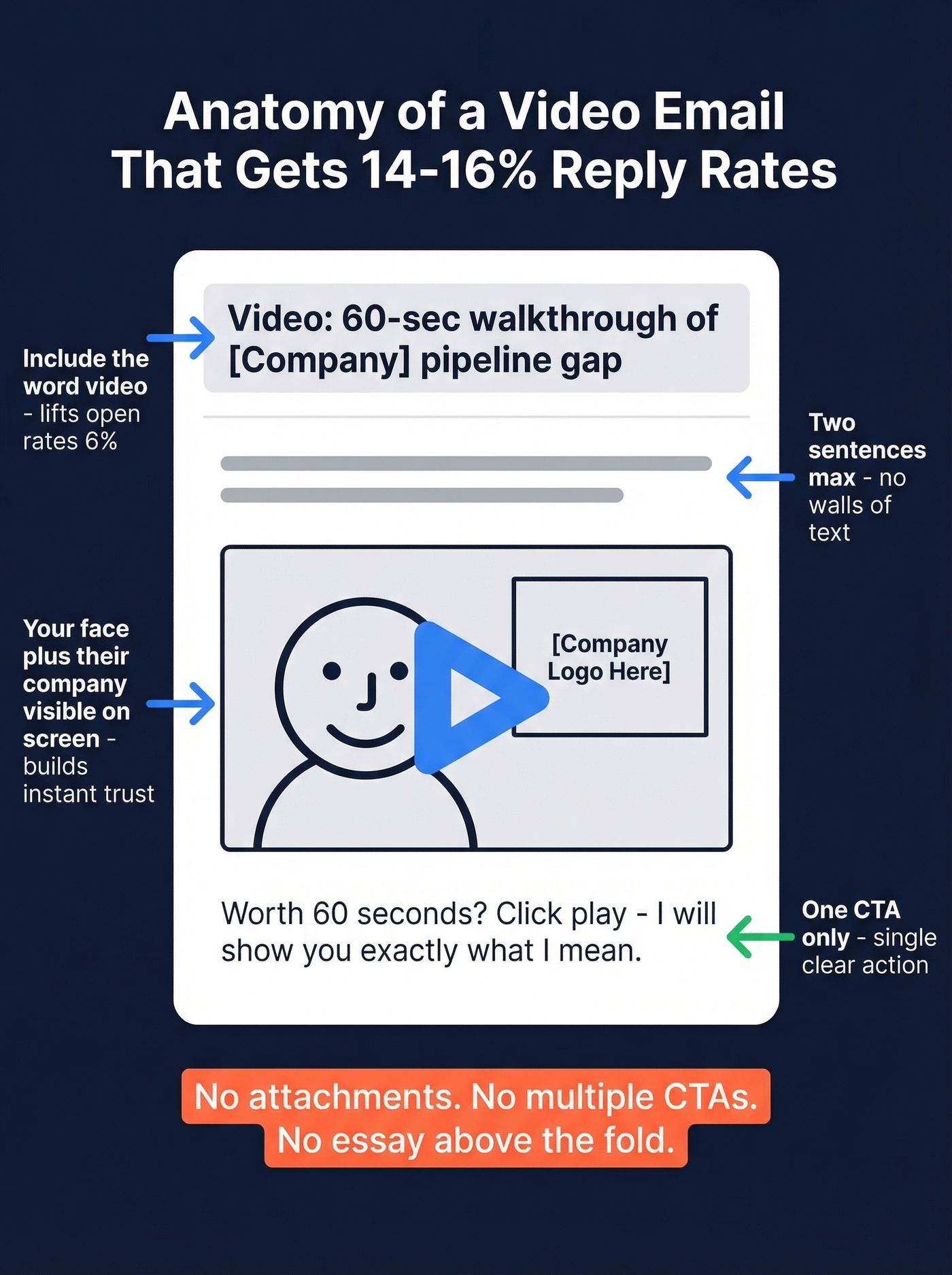
- Subject line: "Video: 60-sec walkthrough of [Company]'s pipeline gap" (more email subject line examples help than you think)
- Body: Two sentences of context, then the thumbnail image hyperlinked to the video. No walls of text. (If you need a full sequence, start with a B2B cold email sequence.)
- Thumbnail: Your face, a visible play button, and the prospect's company logo or website visible on your screen share.
- CTA: One line below the thumbnail: "Worth 60 seconds? Click play - I'll show you exactly what I mean."
That's it. No attachments, no multiple CTAs, no essay above the fold.
Best Video Email Tools in 2026
| Tool | Starting Price | Best For | Free Tier |
|---|---|---|---|
| Loom | $15/user/mo | Sales reps, budget | Yes |
| Vidyard | $59/user/mo | Analytics-heavy sales | Yes (5 vids/mo) |
| Sendspark | $39/mo | AI personalization | - |
| BombBomb | $36/user/mo (annual) | Enterprise sales orgs | No |
| Wistia | ~$100-300/mo for teams | Content marketing | Yes |
| Hippo Video | $20/user/mo | Budget marketing | 7-day trial |
| VIEWED | Enterprise (custom) | In-inbox autoplay | Free trial |
| Covideo | $69/mo | Auto/real estate | No |
Loom
Loom is the default for a reason. At $15/user/month, it gets you 80% of what BombBomb charges $36-42 for. The free tier is usable for testing - unlimited recordings with a 5-minute cap, more than enough for cold outreach since you should be under 60 seconds anyway.
The recording experience is the smoothest in the category: screen, camera, or both, with instant hosting and a shareable link. Many sales reps start with Loom for prospecting because the learning curve is nearly zero. Where Loom falls short is analytics depth - you won't get the CRM-integrated viewing intelligence that Vidyard offers. For solo SDRs and small teams doing fewer than 50 video sends per week, Loom is the obvious starting point. (If you want a full playbook, see Loom video cold email.)
Vidyard
Use this if you need to know exactly who watched your video, when they dropped off, and how that correlates with deal progression. Skip this if you're a solo rep who just needs to record and send quickly.
Vidyard's free tier gives you 5 videos per month - enough to evaluate, not enough to run a real workflow. Paid plans start around $59/user/month and unlock unlimited recording, deeper analytics, and CTA templates. The real value is CRM integration: Vidyard pipes viewing data into HubSpot and Salesforce so reps can see which prospects actually watched. The analytics are a tier above everything else on this list, and for teams running multi-touch sequences where you need to know exactly which video moved a deal forward, nothing else comes close.

Sendspark
I watched a team try Sendspark after struggling with manual video personalization at scale, and the AI voice cloning feature changed their workflow overnight. Record one video, and Sendspark generates personalized versions with the prospect's name, company, and context woven in. It's the closest thing to personalized outreach at 1-to-many scale.
Pricing scales with seats: Solo at $39/mo, Growth at $69/mo for 3 seats, Team at $199/mo for 10 seats. Not cheap, but the math works if manual recording has become your bottleneck.
BombBomb
Enterprise-grade with pricing to match. Core runs $36/user/month billed annually ($42 monthly), and the Core + Copilot tier jumps to $56/user/month billed annually ($70 monthly) with AI creation tools and patented fallback video logic that auto-detects the recipient's email client. Worth it for 20+ rep teams with budget. Overpriced for solo SDRs who can get 90% of the functionality from Loom.
Wistia
Not really a "send video in email" tool - it's a video marketing platform that happens to work beautifully in email workflows. Host your video on Wistia, grab a thumbnail, link it in your email, and track viewing behavior through HubSpot or Marketo integrations. Paid plans typically start around $100-300/month for teams. Best for content marketing teams running video-heavy nurture campaigns, not cold outreach.
The Rest
Hippo Video is budget-friendly at $20/user/month with solid recording and sharing for small marketing teams. A 7-day trial lets you evaluate before committing. VIEWED specializes in true in-inbox autoplay with automatic fallback for unsupported clients - enterprise pricing, requires a sales conversation. Covideo is a niche tool built for automotive and real estate sales at $69/month. Skip it if you're in SaaS or tech.
Sales Best Practices
Subject lines matter more than you think. Including "video" lifts open rates by roughly 6%. Pair it with specificity: "Video: 90-second walkthrough of your pipeline issue" beats "Check out this video" every time. (If you want more patterns, use these prospecting email subject lines.)
Your thumbnail is your ad. Bright colors, a human face, and a visible play button. These three elements consistently outperform abstract graphics or text-heavy thumbnails. GIF thumbnails can lift CTR further, but keep them under 500KB.
Keep it short. Under 60 seconds for cold outreach. Under two minutes for nurture. Wistia's data shows 82% engagement on sub-one-minute how-to videos - that drops fast as length increases.
One CTA per video. Don't ask the viewer to book a call, visit your site, and download a resource in the same video. Pick one action. (If you need help tightening asks, see email call to action.)
Add captions. Caption usage has increased 572% since 2021. Many viewers watch without sound, especially on mobile. Captions aren't optional anymore.
A/B test video vs. non-video. Not every audience responds the same way. Run a clean split test before committing your entire sequence to video.
Let's be honest about something: if your average deal size is under $5k, you probably don't need personalized video at all. A well-written text email with a Loom link in the follow-up will outperform a mediocre personalized video every time. Video email is a high-effort, high-reward channel - don't use it where the math doesn't work.
Verify Before You Send
We've seen teams cut bounce rates from 15% to under 3% just by adding a verification step before video campaigns. A bounced personalized video isn't just a wasted email - it's 45 minutes of creative work gone, plus a ding to your sender reputation that affects every future send from that domain. (If you're troubleshooting, start with email bounce rate and then your email deliverability.)
Prospeo handles this cleanly. Upload your list in bulk, and a 5-step verification process checks every address at 98% accuracy with a 7-day data refresh cycle. The free tier covers 75 verifications a month - enough to test the workflow before scaling.
Video emails pull 10-16% reply rates - but only when they reach real inboxes. Prospeo gives you 143M+ verified emails refreshed every 7 days, so your personalized videos land with decision-makers, not bounce logs. Layer in 30+ filters to find the exact prospects worth recording for.
Find verified contacts first, then hit record.
FAQ
Can you embed a video that plays inside an email?
Only in Apple Mail, which supports HTML5 video and represents about 52% of email opens. Gmail, Outlook, and Yahoo block in-inbox playback entirely. For universal compatibility, use a thumbnail image with a play button that links to your hosted video - this works in every client.
What's the best free tool for sending video emails?
Loom's free tier is the strongest for recording and sharing - unlimited videos capped at 5 minutes. Vidyard Free gives you 5 videos per month with basic analytics. For list verification before sending, Prospeo's free plan includes 75 email verifications.
How long should a sales video be?
Under 60 seconds for cold outreach, under two minutes for nurture campaigns. Wistia's data across 100M+ videos shows 82% engagement on how-to videos under one minute. Cold prospects won't give you two minutes - respect their time and front-load your value prop.
Does putting "video" in the subject line help?
Yes - a SuperOffice study found a 6% increase in open rates when "video" appeared in the subject line. Combine it with a specific hook like "Video: your Q3 pipeline in 60 seconds" rather than a generic "Watch this video." Specificity drives clicks; vagueness gets ignored.