

slug: video-email-prospecting
Video Email Prospecting: How to Get 3x More Replies Without Landing in Spam
Most video email prospecting advice comes from video tool companies. Vidyard, Sendspark, Covideo - they'll tell you video is magic. It's not. One cold email operator sent 217,000 emails in a year and watched reply rates crater from 2.1% to 0.7% as text-only outbound hit a wall. A well-crafted video prospecting email is the pattern interrupt that works - practitioners on r/salesdevelopment report 3x reply lifts - but only when you nail the delivery mechanics.
The vendor guides skip that part. This one doesn't.
What You Actually Need
Three things separate video emails that get replies from those that bounce or land in spam:
- Video goes in Step 2, not Step 1. A/B tests consistently show better performance when the prospect has already seen your name in a text-only opener.
- Never attach or embed video. Use a thumbnail image linking to a hosted page on Loom, Vidyard, or Sendspark. Attachments kill deliverability. Embeds break in most clients.
- Verify every email before you record. A 90-second personalized video that bounces is 90 seconds you don't get back. Run your list through a verification tool first.
Why Video Outreach Gets More Replies
SalesLoft benchmarks show +16% open rates and +26% more replies when video is included. Instantly's deliverability playbook pegs video emails at 200-300% higher CTR when you use the thumbnail-plus-hosted-video method and handle authentication correctly. On Reddit, practitioners describe roughly 20% response-rate lifts, with the best results coming from recordings under 30 seconds.
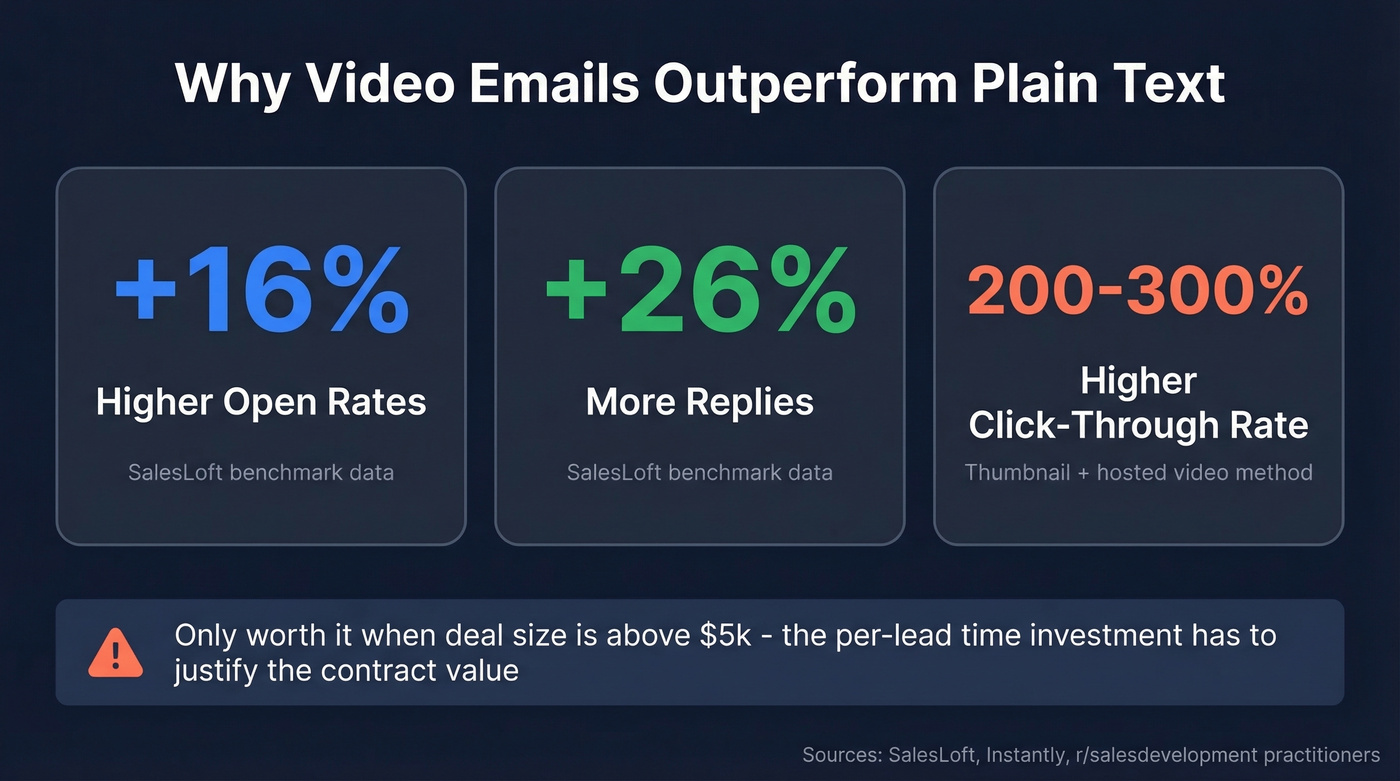
The mechanism is simple. When a prospect sees your face, hears your voice, and watches you reference their company by name, you're no longer one of 47 cold emails. You're a person. That effort gap - you invested 60 seconds, they can see it - is the whole game.
Here's the thing: if your average deal size is under $5k, you probably don't need a video prospecting strategy. The per-lead time investment only pays off when the contract value justifies it. For everyone else, it's the highest-ROI change you can make to an outbound sequence right now.
How to Send Video Sales Emails Without Hitting Spam
It's 2026 and most email clients still can't render embedded video. Gmail and Outlook will show a broken element or strip the embed entirely. This is the single biggest mistake reps make.
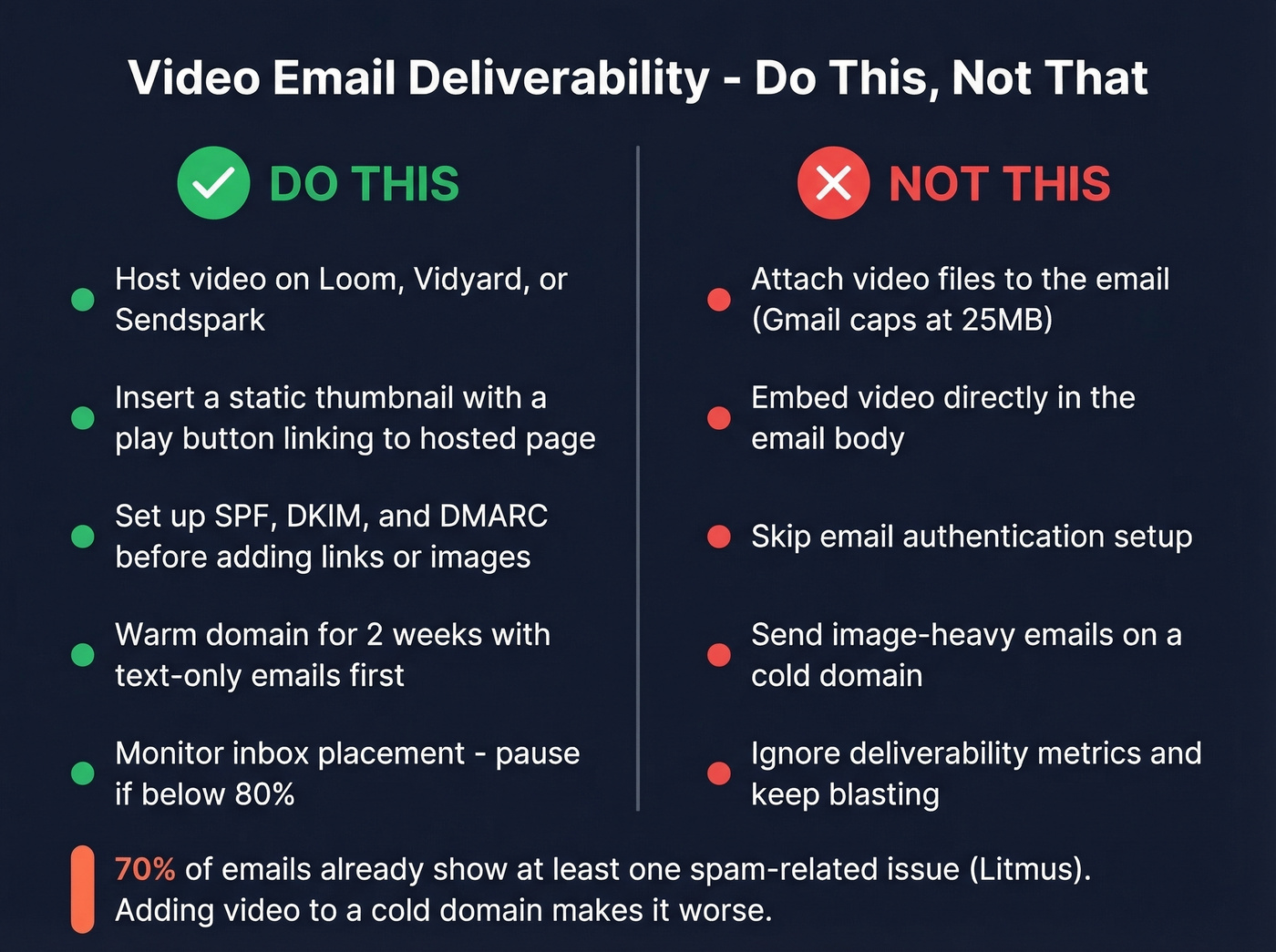
Do this: Host your video on Loom, Vidyard, or Sendspark. Insert a static thumbnail with a play button linking to the hosted page. Set up SPF, DKIM, and DMARC before adding any links or images. Warm the domain first. If inbox placement drops below 90%, investigate immediately. Below 80%? Pause - clean your list, reduce volume, check authentication. (If you need a deeper technical checklist, start with an email deliverability guide and then tighten DMARC alignment.)
Don't do this: Attach video files (Gmail caps at 25MB, and even smaller attachments from unknown senders hurt sender reputation). Embed video directly in the body. Skip warmup - 70% of emails already show at least one spam-related issue according to Litmus, and adding image-heavy emails to a cold domain makes it worse.
We've burned domains testing this. The safest approach is running text-only for the first two weeks of warmup before introducing any image-heavy emails.

Every bounced video email wastes 90 seconds of personalization you can't get back. Prospeo's 5-step verification catches spam traps, honeypots, and catch-all domains before you hit record - with 98% email accuracy on a 7-day refresh cycle.
Verify your video prospecting list for $0.01 per email.
The Step-by-Step Workflow
This isn't a volume play. You're targeting 10-20 high-value leads, not blasting 500 contacts.
- Send a text-only opener (Step 1). Short. Introduce yourself, reference something specific about their business. (If you want proven copy patterns, pull from these sales prospecting techniques and keep your opener tight with prospecting email subject lines.)
- Follow up with video (Step 2). Lead with the prospect's problem, not your product. Keep it 30-60 seconds. Over 60% of viewers finish videos under 60 seconds; anything longer and drop-off spikes hard.
- Use a GIF thumbnail instead of a static image. The subtle motion catches the eye and drives more clicks.
- One clear CTA. "Worth a 15-minute call?" beats "Let me know your thoughts on whether it might make sense to explore further." (More examples: email call to action.)
- Step 3: "Just checking if you got my video?" Low-pressure, creates curiosity, works surprisingly well. (If you need options, swipe these sales follow-up templates or use a cleaner version of just checking in.)
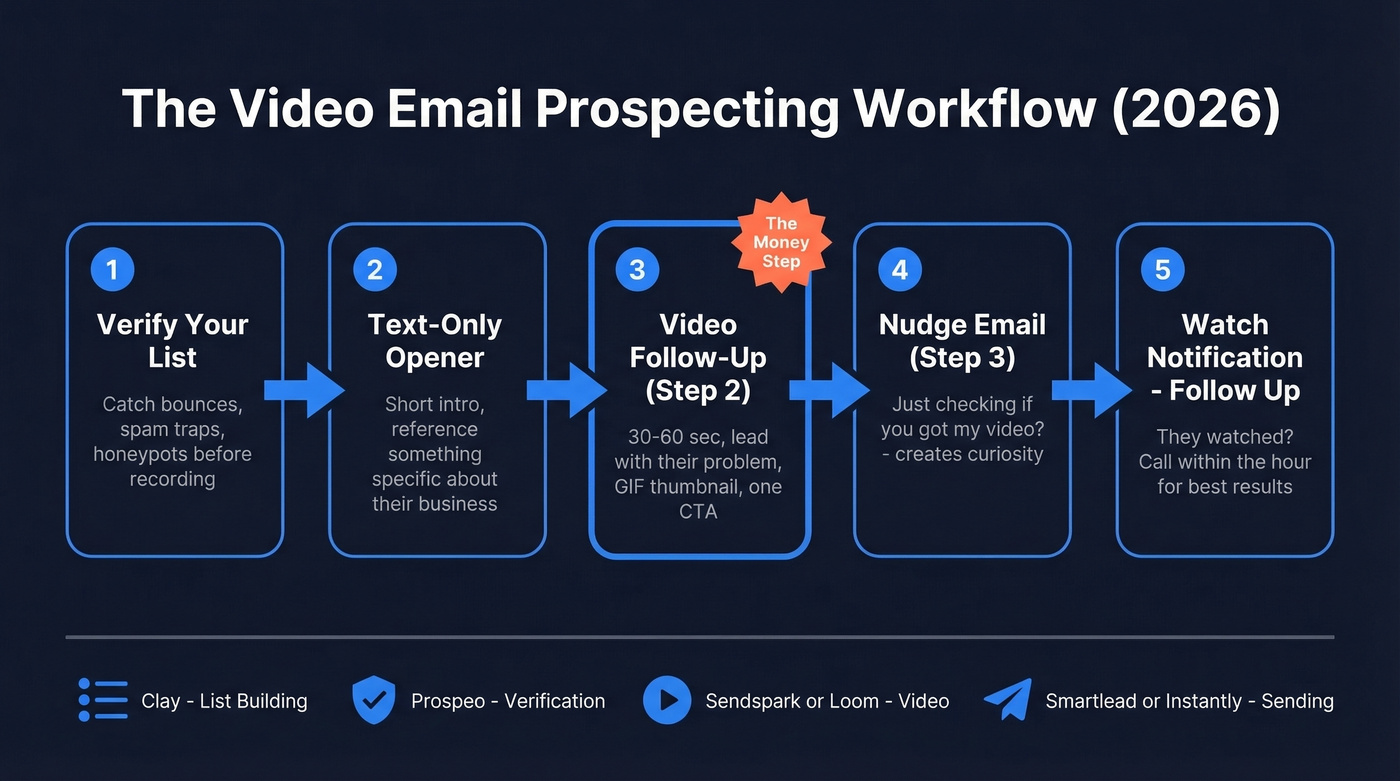
Most video tools notify you when a prospect watches - follow up within the hour for best results. The full practitioner stack is typically Clay for list building, a verification layer, a video tool, and a sending tool like Smartlead or Instantly.
Skip video when: you're running mass outreach to low-value targets, your list isn't verified, or you don't have something genuinely personalized to say. A generic video is worse than a well-written text email. Every time. (If you're scaling volume, read up on safe email velocity first.)
Video Prospecting Tools Compared
| Tool | Starting Price | Best For | G2 Rating | Key Limit |
|---|---|---|---|---|
| Loom | Free (~$15/mo Business) | Solo reps, simple 1:1s | 4.7/5 | Free: 25 videos, 5 min each |
| Sendspark | $49/mo Solo | AI-personalized at scale | 4.8/5 | 100 Dynamic Video Min |
| Vidyard | Free (~$544/user/yr Business) | Enterprise + CRM integrations | 4.5/5 | Free: 5 videos/month |
| BombBomb | $36/user/mo annual | Unlimited video messages | N/A | No AI on Core plan |
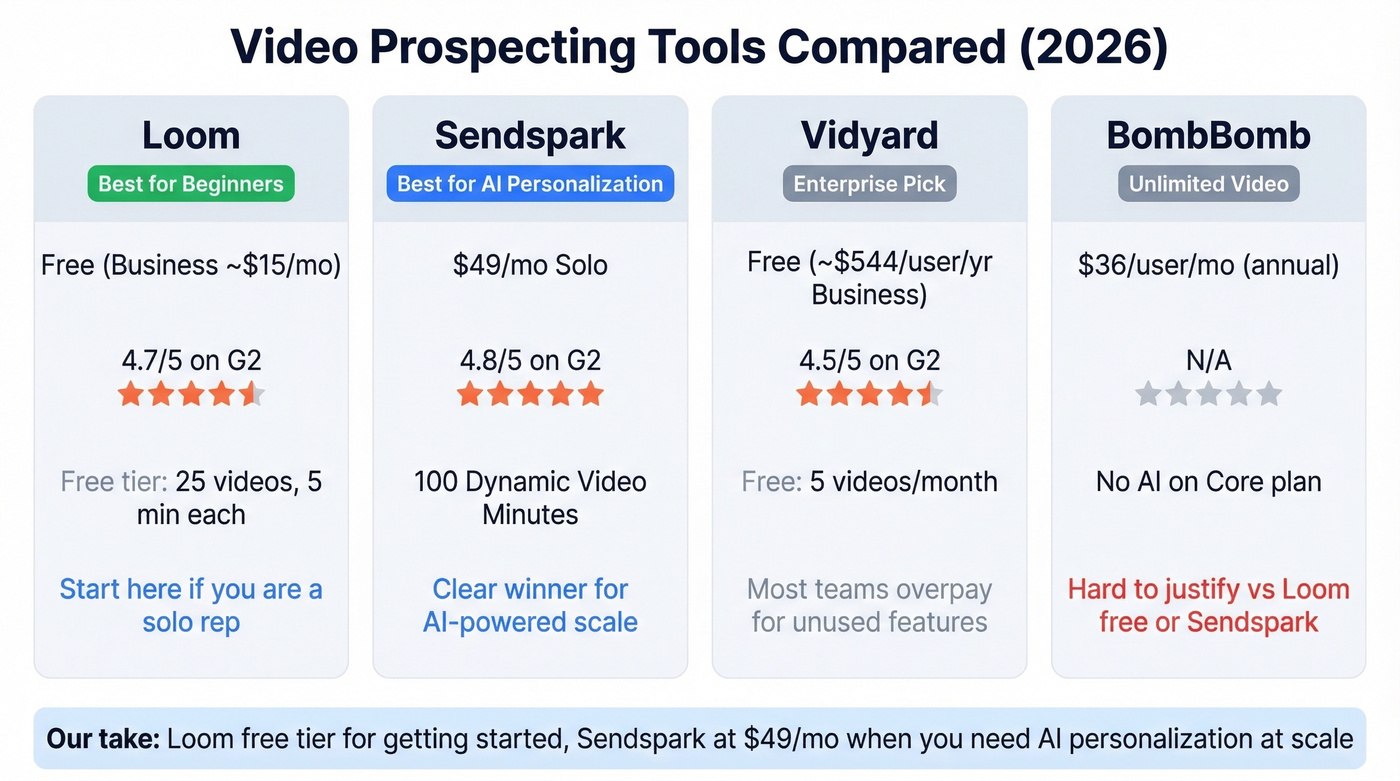
If you're a solo rep getting started, Loom's free tier is the obvious move - 25 videos at 5 minutes each covers a 10-20 lead workflow easily. Sendspark is the clear winner for AI personalization at $49/mo. Vidyard makes sense for enterprise teams needing CRM integrations on its Teams tier, but at roughly $544/user/year, most teams are overpaying for features they won't touch. BombBomb at $36/user/month is hard to justify when Loom is free and Sendspark gives you AI for $13 more. (If you want a Loom-specific playbook, see our Loom video cold email guide.)
Let's be honest about AI-generated video though: if the lip-sync looks off, you've lost the authenticity that makes video work in the first place. We've seen teams get better results from genuine 30-second Loom recordings than polished AI-generated versions that feel uncanny.
Verify Before You Record
Picture this: you spent 90 seconds recording a personalized video for a VP of Sales. You mentioned their Series B, their new VP of Engineering, their EMEA expansion. You hit send. It bounced.
That's 90 seconds gone, and it stings more than a bounced text email ever will.

Sales prospecting videos are the highest-effort-per-touchpoint play in outbound, so every bounce hurts disproportionately. Verify your list before you record a single video - Prospeo's free tier gives you 75 verifications per month, enough for 3-4 rounds of a 20-lead campaign. With a 7-day data refresh cycle and 5-step verification that catches spam traps and honeypots, you're protecting both your time and your domain reputation. (If you're troubleshooting bounces, start with email bounce rate and then confirm how to check if an email will bounce.)
The best video prospecting workflow starts with clean data. Prospeo gives you 75 free verifications per month - enough for 3-4 rounds of a 20-lead campaign. No contract, no sales call, just verified inboxes ready for your personalized videos.
Record with confidence. Every video lands where it should.
FAQ
Can you embed video directly in an email?
No. Gmail, Outlook, and most clients don't render embedded video. Host on Loom, Vidyard, or Sendspark, then insert a thumbnail linking to the hosted page. It works universally and keeps emails lightweight.
How long should a prospecting video be?
Under 60 seconds - ideally 30. Five-second intro, 15-second value statement tied to the prospect's problem, five-second CTA. Completion rates drop sharply past one minute.
Does video email prospecting work with cold email tools?
Yes. The typical stack is a verified contact list, a video tool like Sendspark or Loom, and a sending tool like Smartlead or Instantly. Video goes in as Step 2 - a thumbnail image linking to the hosted video, never an attachment.
What are the best video sales email tips for beginners?
Start with Loom's free tier, keep recordings under 30 seconds, and always lead with the prospect's problem rather than your product. Use a GIF thumbnail to boost clicks, verify every address before recording, and place the video in Step 2 of your sequence - never the cold open.