

Web Design Cold Email Templates That Work in 2026
You sent 50 emails last week using a web design cold email template you found online. Zero replies. Not even a "no thanks." That's not a template problem - it's a system problem. The average professional receives 147 emails a day and deletes 71 of them in under 3.2 seconds. Your cold email isn't competing with other freelance web designers. It's competing with everything else in the inbox.
You don't need 27 templates. You need three and a system that puts them in front of the right people, from an inbox that actually lands.
The System in Three Steps
- Set up a separate sending domain with SPF, DKIM, and DMARC configured.
- Send the mockup template (below) with a 5-email follow-up sequence.
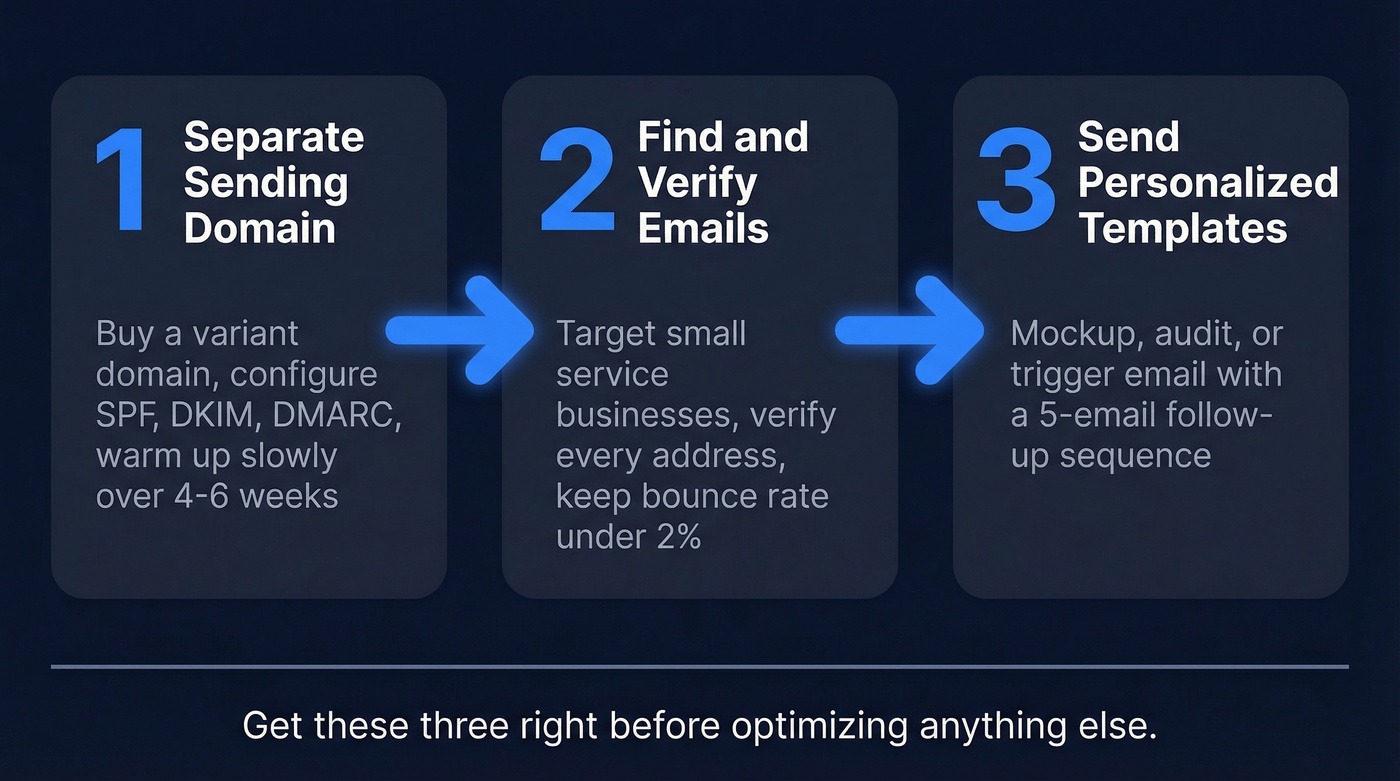
Everything else is optimization. Get these three right first.
Deliverability Setup
Skip this and nothing else matters. Your templates will land in spam.
Buy a separate domain for outreach - something like tryyourname.com. If your sender reputation takes a hit, your main domain stays clean. Then configure SPF, DKIM, and DMARC plus one-click unsubscribe. These are non-negotiable under current bulk sender requirements.
Warm up slowly. Start at 5-10 emails per day and ramp over 4-6 weeks. Don't jump to 100/day overnight - that's how you get flagged. Keep spam complaints below 0.3% and bounces below 2%. Verify every address before it enters your sequence (see Email Bounce Rate and Email Velocity).
Here's the thing: send plain text, not HTML-designed emails. I know - ironic advice for a web designer. But plain text performs better, feels less promotional, and keeps your message focused.
One compliance note worth taking seriously: CAN-SPAM penalties run up to $50,120 per email. GDPR fines hit EUR 20M or 4% of global revenue. Include a real postal address, a clear unsubscribe link, and truthful subject lines.
Finding Prospects and Verified Emails
The best cold outreach template in the world bounces off a bad email address. And sending to info@joesplumbing.com doesn't just waste your time - it actively damages your sender reputation.
Start with public vendor lists from your city or county, local business directories, and industry-specific sites. Look for small service businesses - plumbers, dentists, landscapers, remodelers - that clearly need a better web presence. These owners rarely have in-house marketing teams, which means they're more receptive and easier to close. Avoid tech-savvy companies early on; they're pickier and the sales cycles drag. (If you want a repeatable workflow, use Sales Prospecting Techniques and an Ideal Customer Profile.)


Your mockup template means nothing if it bounces. Prospeo verifies every email through a 5-step process - 98% accuracy, under 2% bounce rate guaranteed. Find decision-maker emails at local businesses for $0.01 each instead of guessing at info@ addresses.
Keep your sender reputation clean and your templates landing in inboxes.
3 Cold Email Templates for Web Designers
Most templates are garbage because they're generic. If your email could be sent by any designer to any business, it's spam. These three work because they force personalization. (For more structure, see AI Cold Email Outreach and Emails That Get Responses.)
The Mockup Email
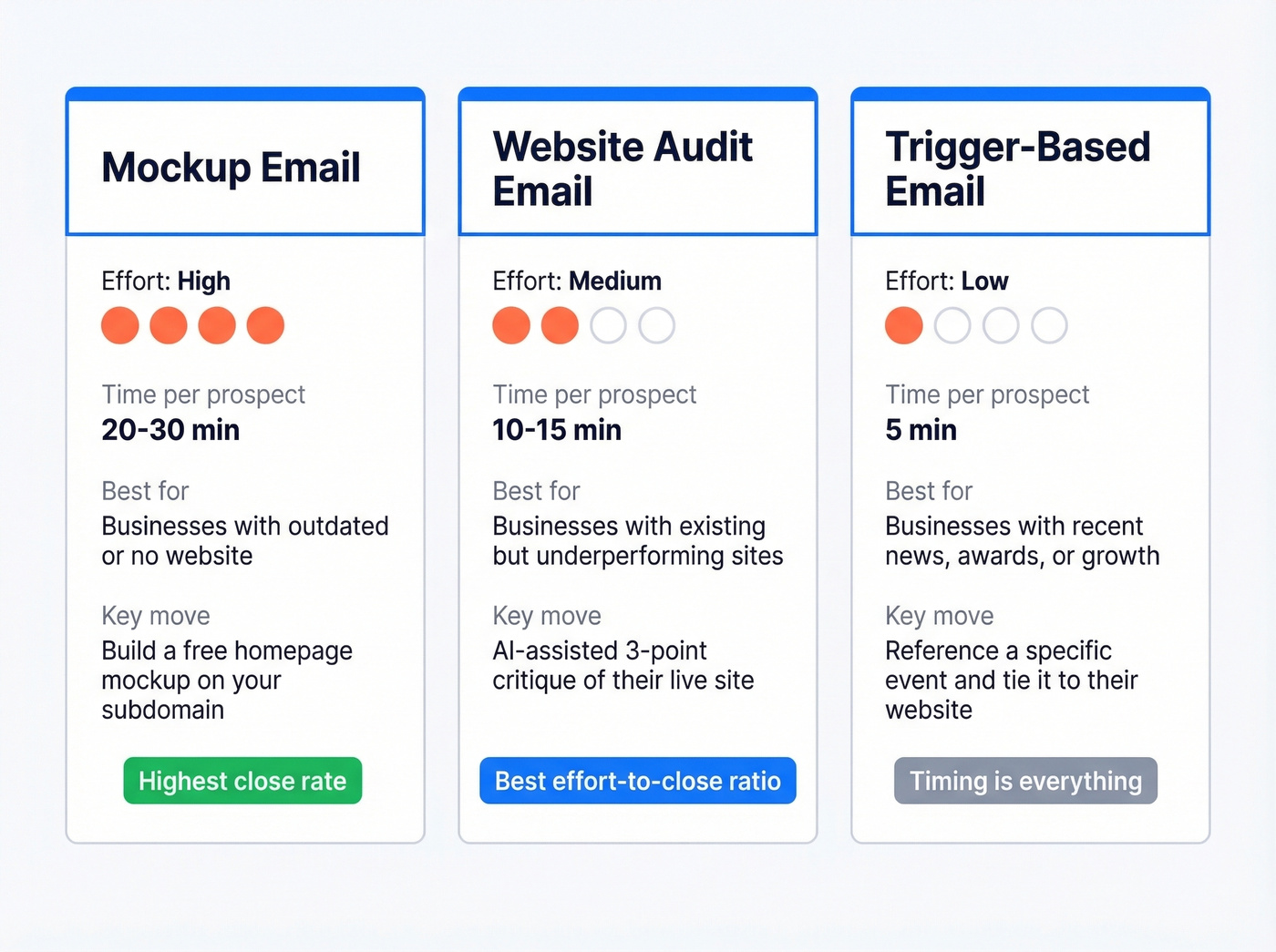
This is the one that closed a $1,500 deal on Reddit - a freelance web designer's first client ever, landed entirely through cold email. The secret: he built a homepage mockup and hosted it on his own subdomain before sending a single message.
Subject: {{first_name}}, Quick Website Question
Hi {{first_name}},
I came across {{business_name}} and had a few ideas for your website. I put together a quick mockup - no strings attached:
[Link to mockup on your subdomain]
Would you be open to a 10-minute call this week to walk through it?
Best, [Your name]
PS - The design files are yours to keep either way.
Use this for: small service businesses with outdated or no websites. Skip this if: you can't invest 20-30 minutes per prospect building a mockup. The personalization is the entire point. Some designers embed a screenshot of the mockup directly in the email body instead of linking - test both approaches.
The Website Audit Email
Let's be honest: this template has a better effort-to-close ratio than the mockup for most web design agencies. You're offering a 3-point critique of their existing site, and AI can handle a lot of the first-draft research.
Run a prompt like "Give me 3 specific website improvement points for [URL] focused on conversion rate and design best practices." Review the output, fix anything generic, then drop the three points into this template:
Subject: 3 things I'd change on {{company}}'s site
Hi {{first_name}},
I took a look at {{website_url}} and noticed a few things that might be costing you leads:
- [Specific CRO issue - e.g., no clear CTA above the fold]
- [Design issue - e.g., mobile layout breaks on the services page]
- [Trust issue - e.g., no testimonials or reviews visible]
Would it be helpful if I put together a quick fix plan?
Don't send this if the prospect's site is actually good. Sending a fake critique to a well-designed site kills your credibility instantly.
The Trigger-Based Email
The triangle approach structures cold emails as greeting, why you're writing, their problem plus your value, then CTA. This template follows that framework and fires when something specific happens - a job posting, a local business award, a news mention, a new location opening. (If you want to systematize this, use How to Track Sales Triggers.)
Subject: Congrats on {{trigger event}}
Hi {{first_name}},
Saw that {{business_name}} just {{trigger event}}. That's a big deal - congrats.
A lot of businesses in your position find their website doesn't reflect the growth. If you're thinking about an update, I'd love to share a few ideas.
Worth a quick chat?
Keep it under 80 words. This one's about timing, not depth.
Subject Lines That Get Opened
A good cold email open rate is around 20%. Hit 30-40% and you're in excellent territory. Keep subject lines under 50 characters to avoid truncation on mobile.
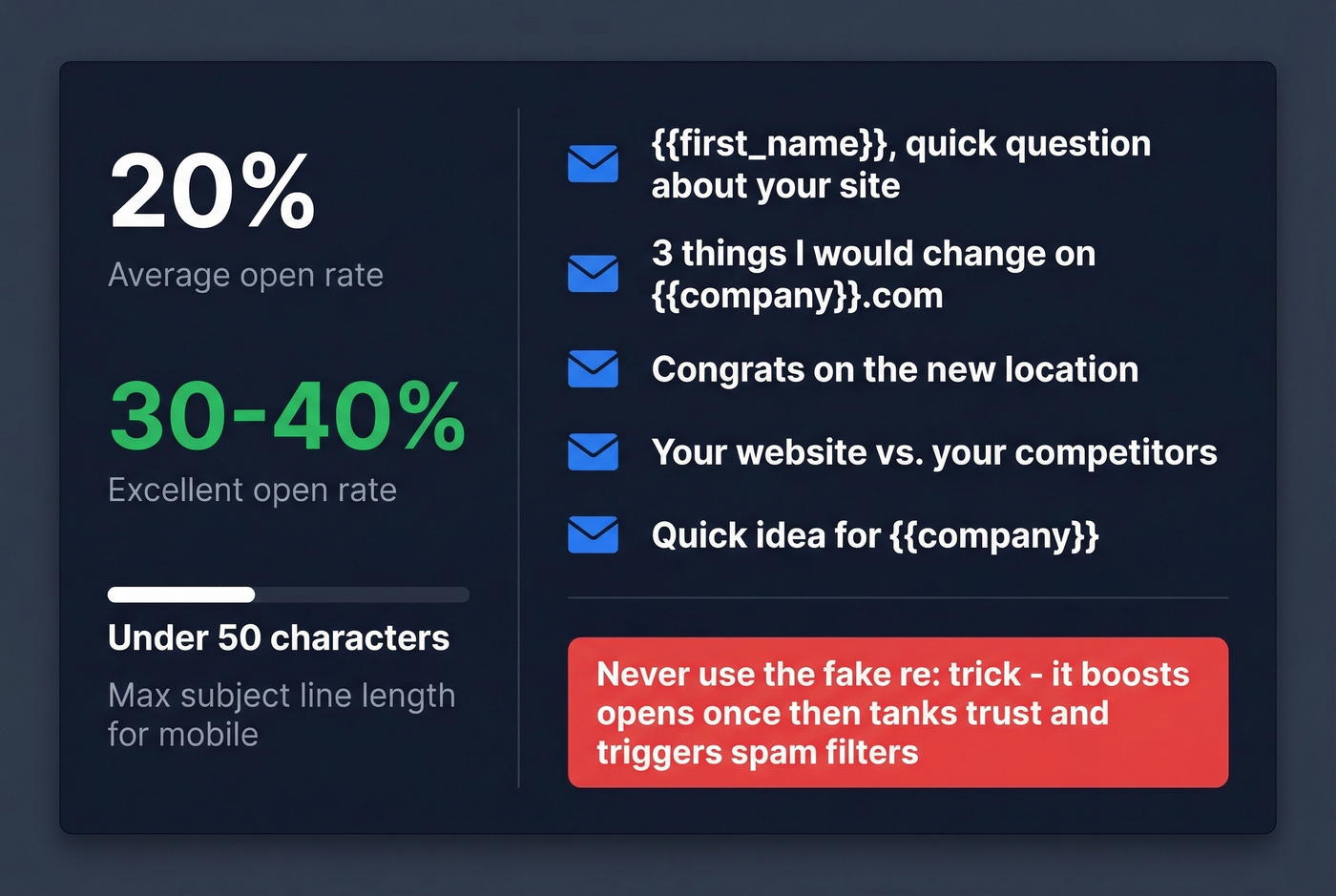
Web-design-specific examples that work:
{{first_name}}, quick question about your site3 things I'd change on {{company}}.comCongrats on the new locationYour website vs. your competitorsQuick idea for {{company}}
Never use the deceptive "re:" trick to fake a reply thread. It boosts opens once, then tanks trust and can trigger spam filters. (More options: Cold Email Subject Line Examples.)
The Follow-Up Sequence
If you're not following up at least 4 times, you're leaving every deal on the table. One practitioner ran a 5-email sequence that hit a 19% response rate - and all 5 meetings came from follow-ups #4 and #5. The first three emails got zero responses. Propeller CRM data backs this up: you're 3x more likely to get a response with 4-7 follow-ups versus 1-3.
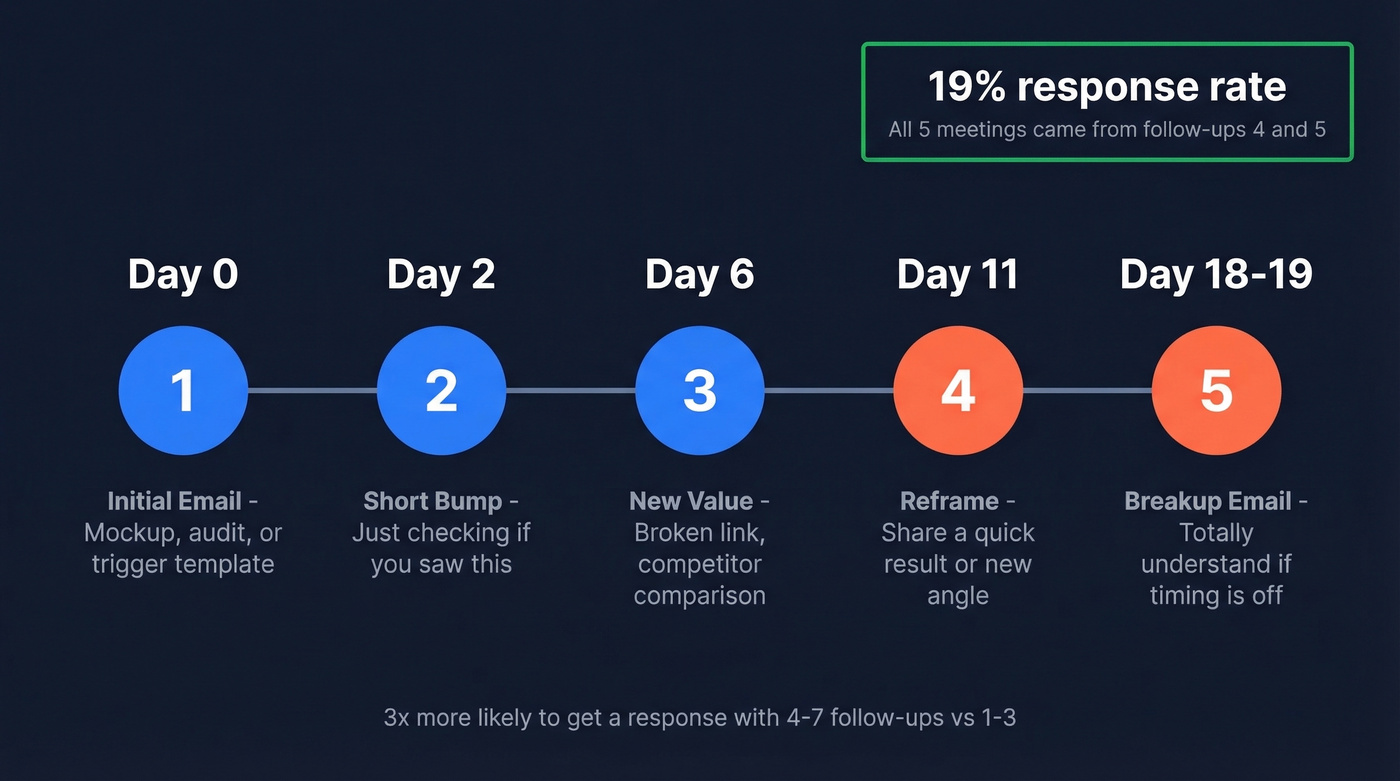
Here's the cadence we recommend:
- Day 0: Initial email (mockup, audit, or trigger template)
- Day 2: Short bump ("Just checking if you saw this")
- Day 6: Add a new value nugget - a broken link you found, a competitor comparison
- Day 11: Reframe the offer or share a quick result
- Day 18-19: Breakup email ("Totally understand if the timing's off")
Vary your send times across follow-ups. The Ambition case study tells the same story at scale: 578 prospects, 6 initial responses, then 67 more from follow-ups - 73 total leads over 6 weeks. That's an 11x increase from persistence alone. (If you want more scripts, use Cold Email Follow-Up Templates or Sales Follow Up Templates.)
When Templates Stop Working
There's a ceiling to cold email templates, and in our experience most web design agencies hit it faster than they expect.
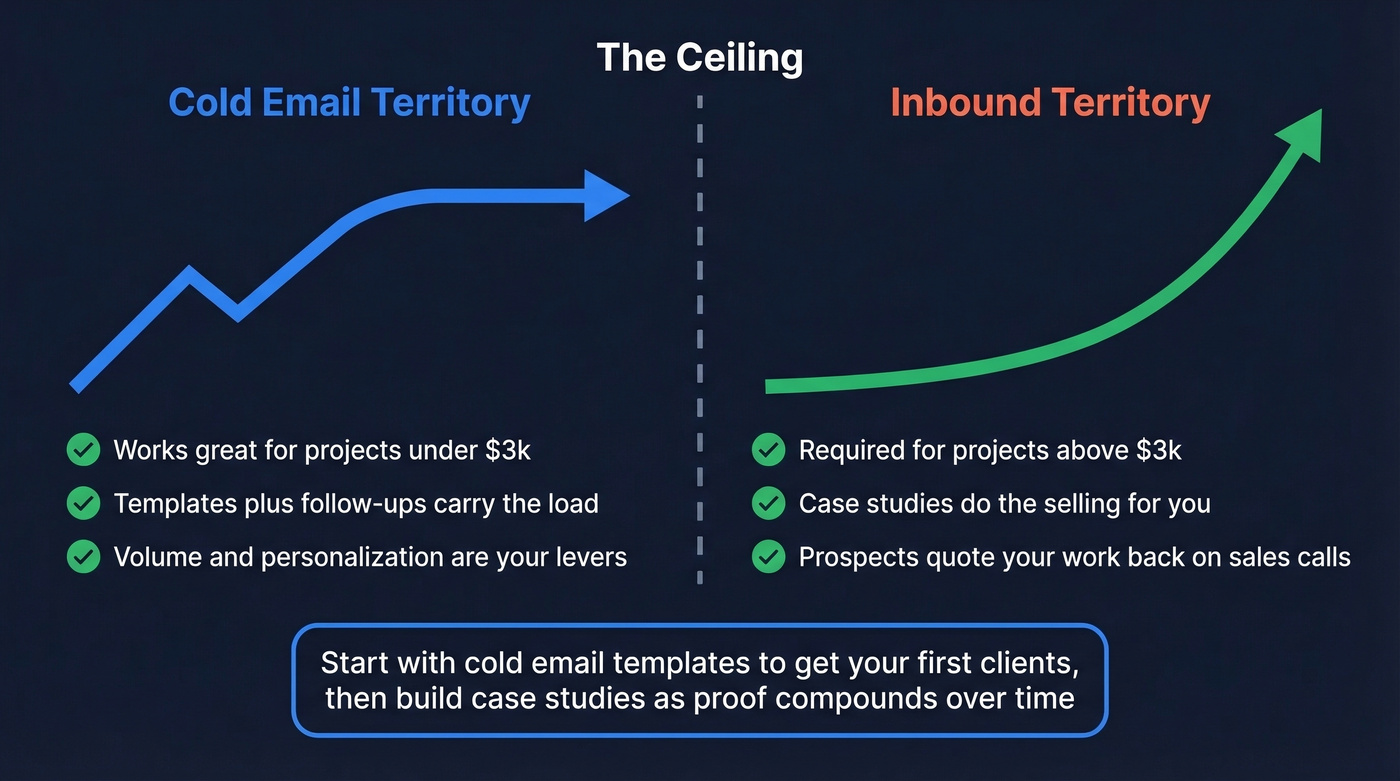
One practitioner on r/b2bmarketing sent 500 emails a week for a year. Replies took 2-3 weeks and were almost always "not interested." The shift that worked: he stopped pitching and started publishing one-page case studies - plain text, structured as problem, what we tried, what changed. He distributed them in small industry groups. Prospects later quoted the case studies back on sales calls. Inbound doubled.
If your average project is under $3k, cold email alone can carry you. Above that, templates get you started but a portfolio of proof keeps you booked. When your cold emails plateau, build the case study and let it do the selling for you.
Building a web design prospect list shouldn't take 15 hours a week. Prospeo's 30+ search filters let you find small business owners by industry, headcount, and location - with verified emails attached. 143M+ verified addresses, refreshed every 7 days.
Spend your time building mockups, not hunting for email addresses.
FAQ
How many cold emails should a web designer send per day?
Start at 5-10 per day on a new domain and ramp over 4-6 weeks. Once warmed up, 30-50 personalized emails per day is a solid target for a solo designer. If replies are dead, it's usually a targeting or personalization problem, not a volume problem.
Do I need a separate domain for cold outreach?
Yes - use a variant like tryyourname.com so a reputation hit doesn't touch your main site. Set up SPF, DKIM, and DMARC before sending anything. This takes 30 minutes and saves months of deliverability headaches.
What's the best template for designers just starting out?
The mockup email. It takes more upfront effort, but it outperforms everything else by a wide margin because the personalization is impossible to ignore. If you can't invest 20-30 minutes per prospect, start with the website audit template and use AI to speed up the research.
How do I pitch web design services without sounding salesy?
Drop the "I offer web design services" opener - everyone ignores it. Lead with something you noticed about their site, offer a concrete insight for free, and close with a low-commitment ask like a 10-minute call. The best outreach reads like a helpful note from a peer, not a sales brochure.
What's a free tool for finding prospect emails?
Prospeo's free tier gives you 75 verified emails and 100 Chrome extension credits per month at 98% accuracy - enough to test your first campaign without spending anything. Hunter offers 25 free searches per month but caps enrichment features, making it harder to run real outreach at any scale.