

slug: what-is-customer-database
What Is a Customer Database? Guide for 2026
Your marketing team just segmented 5,000 contacts for a product launch. 1,100 emails bounced. 400 hit spam traps. Your domain reputation tanked before the campaign even started.
That's what happens when you treat a customer database as a "set it and forget it" project - and why understanding what a customer database actually is matters more than most teams realize.
The Short Version
- A customer database stores every interaction, transaction, and data point about your customers in one structured place - it's the data layer beneath your CRM.
- Start with a simple schema (template below), not a tool purchase.
- Your biggest enemy isn't setup - it's data decay. 75% of B2B data goes stale within 12 months.
Defining a Customer Database
A customer database is a structured collection of information about the people and companies you do business with - contact details, purchase history, interactions, demographics, and firmographic data like company size, industry, and tech stack. More precisely, it's the single source of truth for every data point your business holds about the people who pay you.
Here's the distinction most articles miss: a customer database isn't your CRM. It's the data layer underneath your CRM. The CRM handles workflows - follow-up reminders, deal stages, email sequences. The database is the raw, structured information those workflows run on. You can have one in a spreadsheet, a SQL table, or a CRM. But if the data is garbage, the CRM doesn't matter.
A well-structured customer database holds five categories of data: contact info, transactional data (purchases, subscriptions, invoices), behavioral data (website visits, email opens, support tickets), demographic/firmographic data (job title, company revenue, headcount), and consent records (opt-in dates, communication preferences, legal basis).
Customer Database vs CRM vs CDP vs DMP
Four terms, four different tools. Don't confuse them.
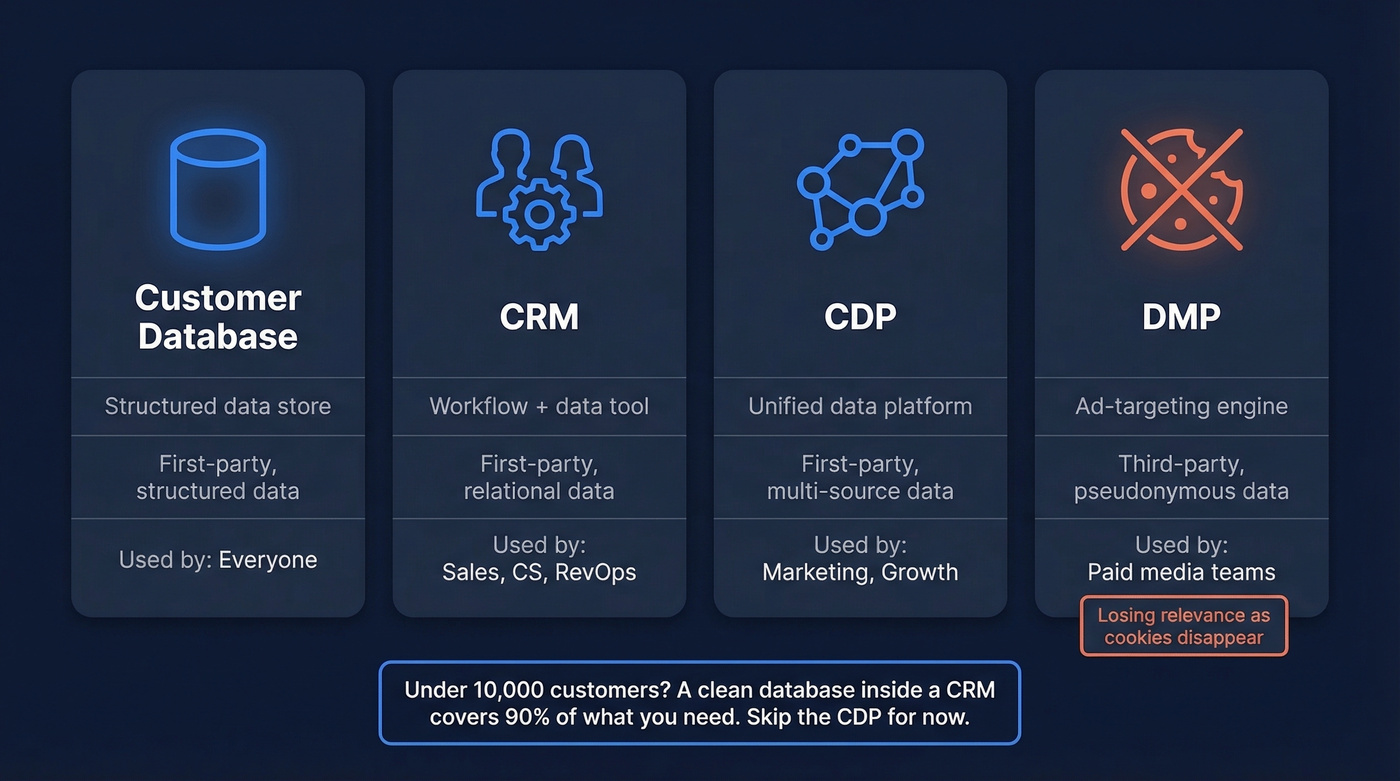
| Customer Database | CRM | CDP | DMP | |
|---|---|---|---|---|
| What it is | Structured data store | Workflow + data tool | Unified data platform | Ad-targeting engine |
| Data type | First-party, structured | First-party, relational | First-party, multi-source | Third-party, pseudonymous |
| Best for | Storing clean records | Sales & service teams | Marketing personalization | Programmatic advertising |
| Who uses it | Everyone | Sales, CS, RevOps | Marketing, growth | Paid media teams |
A CDP unifies data from web, app, in-store, and service interactions into a single customer portrait, while CRMs support sales and service teams with pipeline and relationship management. A DMP deals in anonymous, third-party data for ad targeting - and it's increasingly irrelevant as third-party cookies disappear.
Here's the thing: you probably don't need a CDP yet. If you're under 10,000 customers and your marketing stack isn't stitching together five data sources, a clean database inside a CRM covers 90% of what you need. Save the $50K+ CDP budget until your data complexity actually demands it.
Types of Customer Data
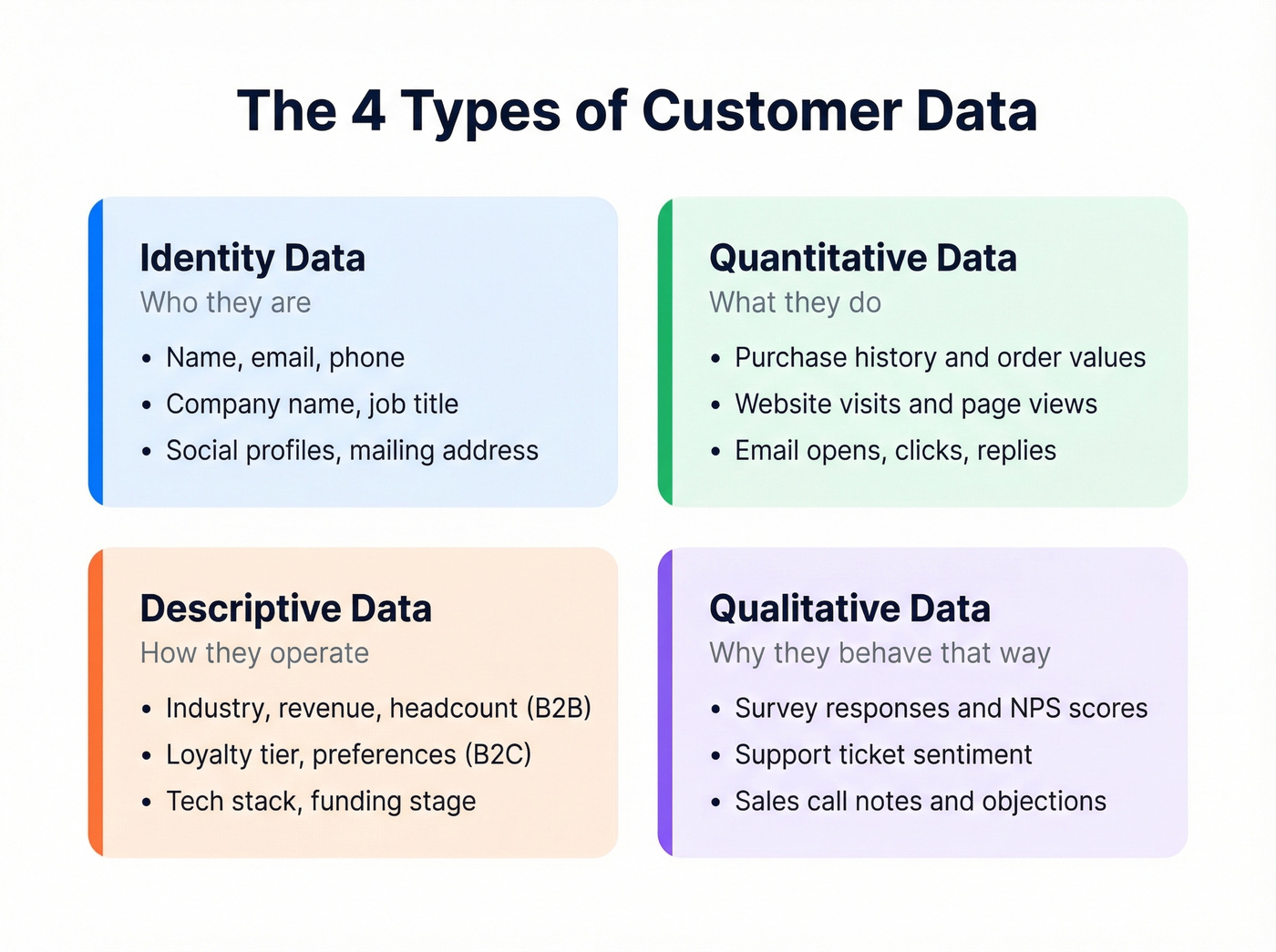
Most guides stop at the definition. Before getting into schema design, it helps to understand what you're actually storing. Customer data falls into four buckets: identity data (who they are), quantitative data (what they do), descriptive data (how they live or operate), and qualitative data (why they behave the way they do).
Here's a practical schema template you can adapt for any B2B or B2C use case.
Core Tables
Customers
| Field | Type | Notes |
|---|---|---|
| customer_id | UUID (PK) | Unique identifier |
| first_name | VARCHAR(50) | |
| last_name | VARCHAR(50) | |
| VARCHAR(100) | Validated at entry | |
| phone | VARCHAR(20) | E.164 format |
| company_name | VARCHAR(100) | B2B only |
| job_title | VARCHAR(100) | B2B only |
| created_at | TIMESTAMP |
Orders
| Field | Type | Notes |
|---|---|---|
| order_id | UUID (PK) | |
| customer_id | UUID (FK) | Links to Customers |
| product | VARCHAR(100) | |
| amount | DECIMAL(10,2) | |
| order_date | TIMESTAMP |
Interactions
| Field | Type | Notes |
|---|---|---|
| interaction_id | UUID (PK) | |
| customer_id | UUID (FK) | Links to Customers |
| channel | VARCHAR(20) | Email, phone, chat |
| type | VARCHAR(30) | Support, sales, marketing |
| created_at | TIMESTAMP |
Consent
| Field | Type | Notes |
|---|---|---|
| consent_id | UUID (PK) | |
| customer_id | UUID (FK) | |
| purpose | VARCHAR(50) | Marketing, analytics, etc. |
| granted | BOOLEAN | |
| granted_at | TIMESTAMP |
B2B vs B2C note: The schema above skews B2B with fields like company_name and job_title. For B2C, swap those for fields like loyalty_tier, purchase_frequency, and product_preferences. B2B records often require additional firmographic fields - revenue, headcount, industry vertical - that B2C databases can ignore entirely. The relational structure stays the same.
Schema Rules That Save You
The progression goes conceptual (what entities exist?) to logical (what fields and relationships?) to physical (what data types and indexes?). Three normalization rules will save you from most headaches.
No comma-separated values. If a customer has multiple tags, create a join table. Stuffing "enterprise, healthcare, east-coast" into one field makes filtering impossible.
No redundant fields. Don't store company_name in both the Customers table and the Orders table. Store it once, reference it by customer_id.
No transitive dependencies. Don't store the customer's email inside the Interactions table. Link back to Customers via the foreign key. This is basic 3NF normalization, and skipping it is how databases become unmaintainable.

You just read why 75% of B2B data goes stale within 12 months. Prospeo refreshes every record on a 7-day cycle - not the 6-week industry average. Enrich your customer database with 50+ data points per contact at 98% email accuracy.
Stop building your database on data that's already decaying.
How to Build a Customer Database
CRM investment can pay back hard - a commonly cited benchmark is $8.71 returned per $1 spent. Here's how to get there.
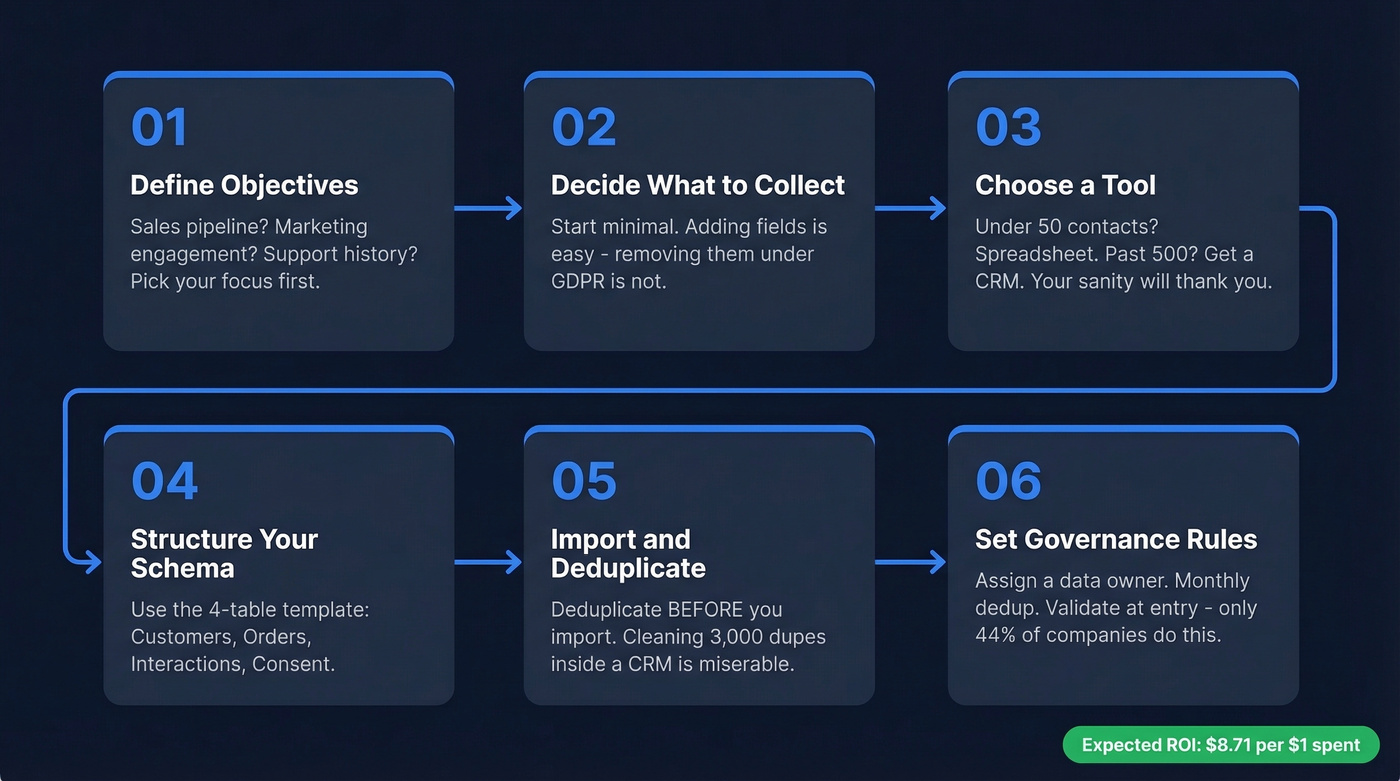
Define your objectives. Are you tracking sales pipeline? Marketing engagement? Support history? The answer determines which fields matter.
Decide what data to collect. Start minimal. You can always add fields - removing them (and the data in them) is harder, especially under GDPR.
Choose a tool. If you've got fewer than 50 customers, a spreadsheet works. Past 500 contacts, skip the spreadsheet. Reddit threads on r/smallbusiness and r/sales are full of people whose Excel files broke because of too many columns, formula spillover, and misaligned rows. Microsoft Access still exists, but it often becomes a dead end for teams that need collaboration and cloud-first access. A CRM pays for itself in sanity. (If you want a quick shortlist, see contact management software and examples of a CRM.)
Structure your fields using the schema above. Copy the four-table template, adapt the fields to your business, and enforce data types from day one.
Import existing data. Deduplicate before you import, not after. Cleaning up 3,000 duplicate records inside a CRM is a miserable afternoon - we've done it, and I wouldn't wish it on anyone.
Set governance rules. Assign a data owner. Schedule dedup cadence (monthly minimum). Validate at entry - only 44% of companies do this automatically, and the other 56% pay for it later. (If email is a core channel, add an email deliverability checklist to governance.)
Why Accurate Data Matters
Your database is only as good as the day you built it. After that, entropy takes over.
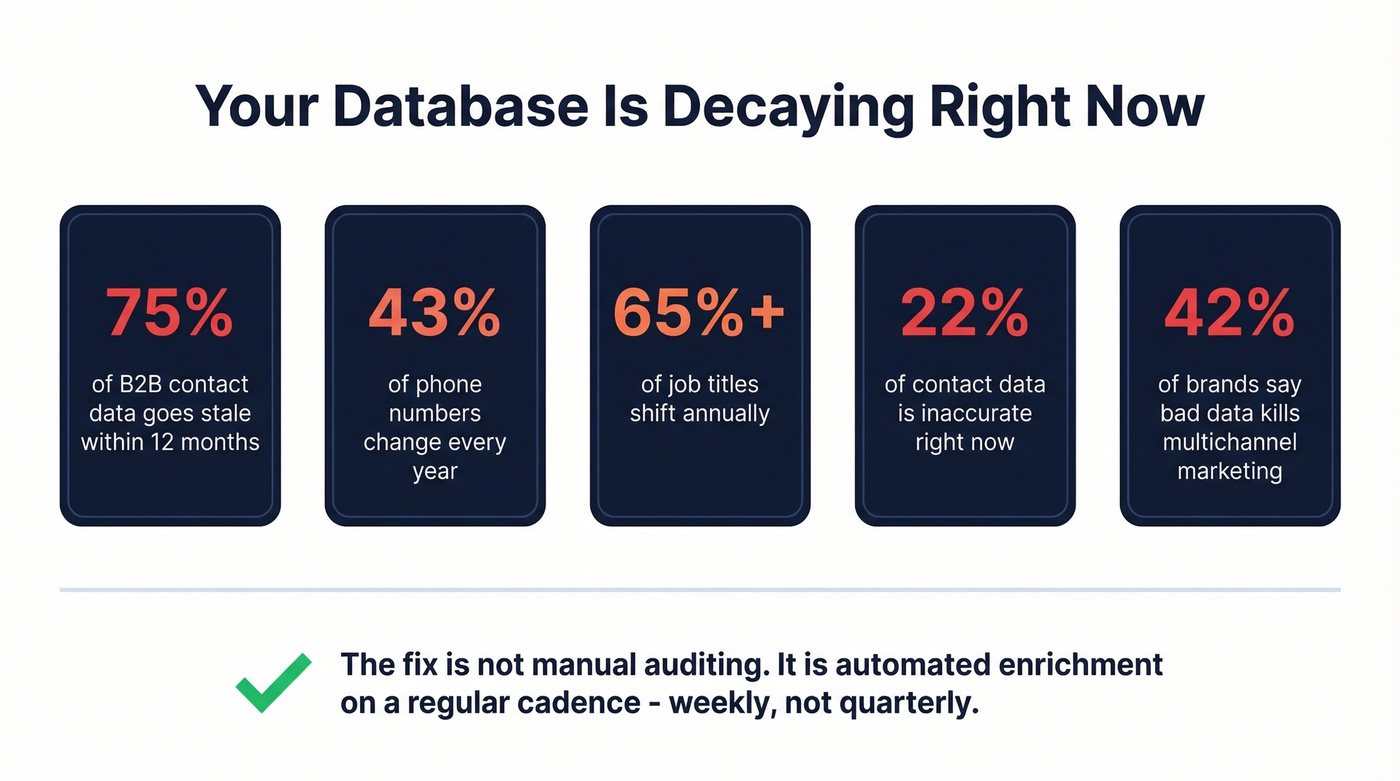
Nearly 75% of B2B contact data becomes outdated within 12 months. About 43% of phone numbers change, over 65% of job titles shift, and organizations estimate 22% of their contact data is flat-out inaccurate at any given time. Meanwhile, 42% of brands cite inaccurate contact data as the biggest barrier to effective multichannel marketing. And 84% of CEOs say they're concerned about data quality - which means 16% haven't looked closely enough.
The fix isn't manual auditing. It's automated enrichment on a regular cadence. (If you're comparing vendors, start with data enrichment services and a practical lead enrichment workflow.)

In our experience, the teams that maintain clean databases aren't doing anything heroic - they're just running enrichment and verification on a schedule instead of waiting for bounce rates to spike. Prospeo handles this with enrichment across 50+ data points per contact, backed by 98% email accuracy and a 7-day refresh cycle compared to the 6-week industry average. Snyk's sales team, for example, saw their bounce rate drop from 35-40% to under 5% after switching to a regular enrichment cadence. That's not a data problem. It's a revenue problem. (To benchmark and fix bounces, use an email bounce rate playbook.)
Privacy and Compliance
If your database doesn't have these controls, you don't have a database - you have a liability.
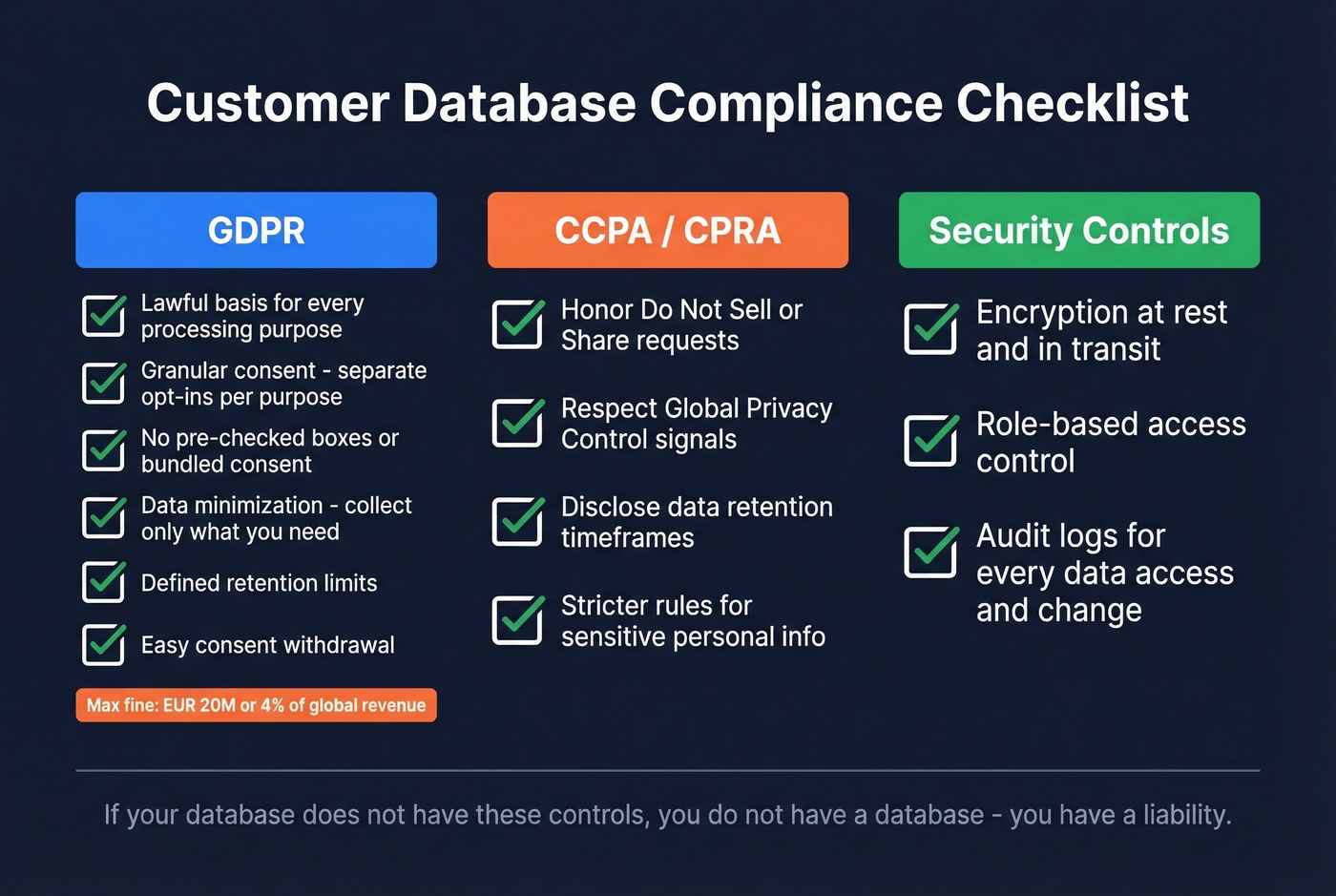
GDPR is the strictest framework most teams encounter. You need a lawful basis for every processing purpose - consent, contract, or legitimate interest. Consent must be granular by purpose, meaning separate opt-ins for marketing vs analytics vs personalization. No pre-checked boxes, no bundled consent. Practice data minimization by collecting only what you need, define purpose limitation so you don't repurpose marketing data for profiling without a new legal basis, and set retention limits so records don't linger indefinitely. Make consent as easy to withdraw as it was to give. Maximum fines reach up to EUR 20M or 4% of global annual turnover, whichever is higher.
CCPA and CPRA add US-specific requirements: honor "Do Not Sell or Share" requests, respect Global Privacy Control browser signals, disclose data retention timeframes, and handle sensitive personal information under stricter rules.
On the security side, three controls are non-negotiable: encryption at rest and in transit, role-based access control so not everyone sees every field, and audit logs for every data access and change.
Best Tools for 2026
Starting from Zero
Google Sheets (free) - fine for under 50 customers. It has sharing permissions, but it lacks admin controls, dedup workflows, and audit tooling. You'll outgrow it fast.
Airtable (free tier; paid plans from ~$20/seat/month) - the spreadsheet-to-database bridge. Relational fields, views, and basic automations without writing SQL. Good for teams that think visually.
HubSpot Free CRM (free tier; paid plans start around ~$20-$30/month) - the best free CRM for marketing-first teams. Contact management, email tracking, and basic reporting at no cost. The upgrade path gets expensive, but the free tier is genuinely useful.
Growing Sales Teams
Not every CRM fits every team. Let's break down the options:
Pipedrive (from ~$15/user/month) is the right pick if your team lives in deal stages - it stays out of the way and does pipeline management better than anyone at this price point. Bigin by Zoho CRM (from ~$7/user/month) is the simplest CRM for micro-businesses and earned PCMag's Editors' Choice for small business CRM. Less Annoying CRM ($15/user/month) does exactly what the name says - no tiers, no upsells, no feature bloat.
Salesforce Starter (from ~$25/user/month) is overkill for 5-person teams, but if you know you're growing past 20 reps, starting here avoids a painful migration later. (If you're evaluating Salesforce, see Salesforce pricing before you commit.)
The migration path we recommend: Sheets to Airtable to HubSpot Free to Pipedrive or Salesforce as you grow. Skip steps if your team size and complexity justify it, but don't jump straight to Salesforce because someone on your board said to.
Keeping Data Accurate
Your CRM is only as good as the data feeding it. Prospeo runs CRM and CSV enrichment returning 50+ data points per contact with a 92% match rate, native integrations with Salesforce and HubSpot, and a free tier covering 75 emails per month so you can test it on a real segment before committing.
Common Mistakes to Avoid
Remember the 5,000-contact scenario from the intro? Every mistake below leads to exactly that outcome.
Buying ready-made contact lists. These are inactive contacts who never opted in. You'll damage your sender reputation, violate GDPR, and waste money. Skip this entirely - there's no shortcut here that doesn't cost you more than it saves. (If you're unsure where the line is, read Is It Illegal to Buy Email Lists?.)
No dedup process. Duplicates multiply silently. By the time you notice, your sales team is calling the same prospect from three different records.
No data ownership. If nobody owns the database, nobody maintains it. Assign a person with authority to enforce standards.
No validation at entry. Garbage in, garbage out. Validate email format, phone format, and required fields before a record hits your database. (For ongoing hygiene, add spam trap removal to your playbook.)
Prioritizing quantity over quality. A 2,000-contact database with 98% accuracy will outperform a 20,000-contact database with 60% accuracy on every metric that matters - reply rate, deliverability, pipeline generated. Every time.

A clean schema means nothing if the contact data inside it bounces. Prospeo's 5-step verification eliminates spam traps and catch-all risks - the exact problems that tanked the campaign in this article's opening. At $0.01 per email, clean data costs less than one bounced send.
Fill every row in your customer database with contacts that actually connect.
FAQ
What types of data belong in a customer database?
Four categories: identity data (name, email, phone), quantitative data (purchases, revenue, login frequency), descriptive data (industry, company size, job title), and qualitative data (survey responses, support feedback). B2B databases add firmographic fields like headcount and tech stack.
What's the difference between a customer database and a CRM?
A customer database is the structured data itself - contact info, purchase history, interactions. A CRM is the software layer that uses that data to manage relationships, automate follow-ups, and run workflows. Every CRM contains a customer database, but not every database requires a CRM.
When should I switch from a spreadsheet to a CRM?
Once you pass roughly 500 contacts, have multiple team members accessing the data, or need automated follow-ups. Spreadsheets lack audit trails, dedup logic, and admin controls. They become a liability at scale - and the migration only gets harder the longer you wait.
How do I keep my customer database accurate?
Run enrichment and verification on a regular cadence - quarterly at minimum, monthly for outbound teams. Pair enrichment with dedup sweeps and validation at entry, and your records stay reliable instead of slowly decaying.