

Why Are Emails Bouncing Back? Every Cause, Code, and Fix
You're staring at a wall of cryptic error messages - 554 5.4.0 wrapping a 451 4.7.650 - and you have no idea whether your domain is toast or your mail server just hiccupped. The stress is real. If you've been wondering why emails keep bouncing back all of a sudden, you're not alone. Let's decode every bounce type, match it to the right fix, and get your deliverability back on track.
What a Bounce-Back Email Actually Is
A bounce-back email - technically called a Non-Delivery Report (NDR) - is an automated message from a mail server telling you your email couldn't be delivered. Think of it as a return-to-sender stamp, but with a diagnostic code attached.
The critical distinction is between two types. Hard bounces carry 5xx SMTP codes and mean permanent failure: the address doesn't exist, the domain is dead, or the server flat-out refuses your mail. Soft bounces carry 4xx codes and mean temporary failure: the mailbox is full, the server is busy, or you've been rate-limited. Servers typically retry soft bounces over 24-72 hours before giving up.
Hard bounces demand immediate action. Soft bounces deserve monitoring. Treating them the same way is how teams either panic unnecessarily or ignore real problems until their sender reputation craters.
The Quick Diagnosis Framework
Before you read another word, here's the three-step approach:
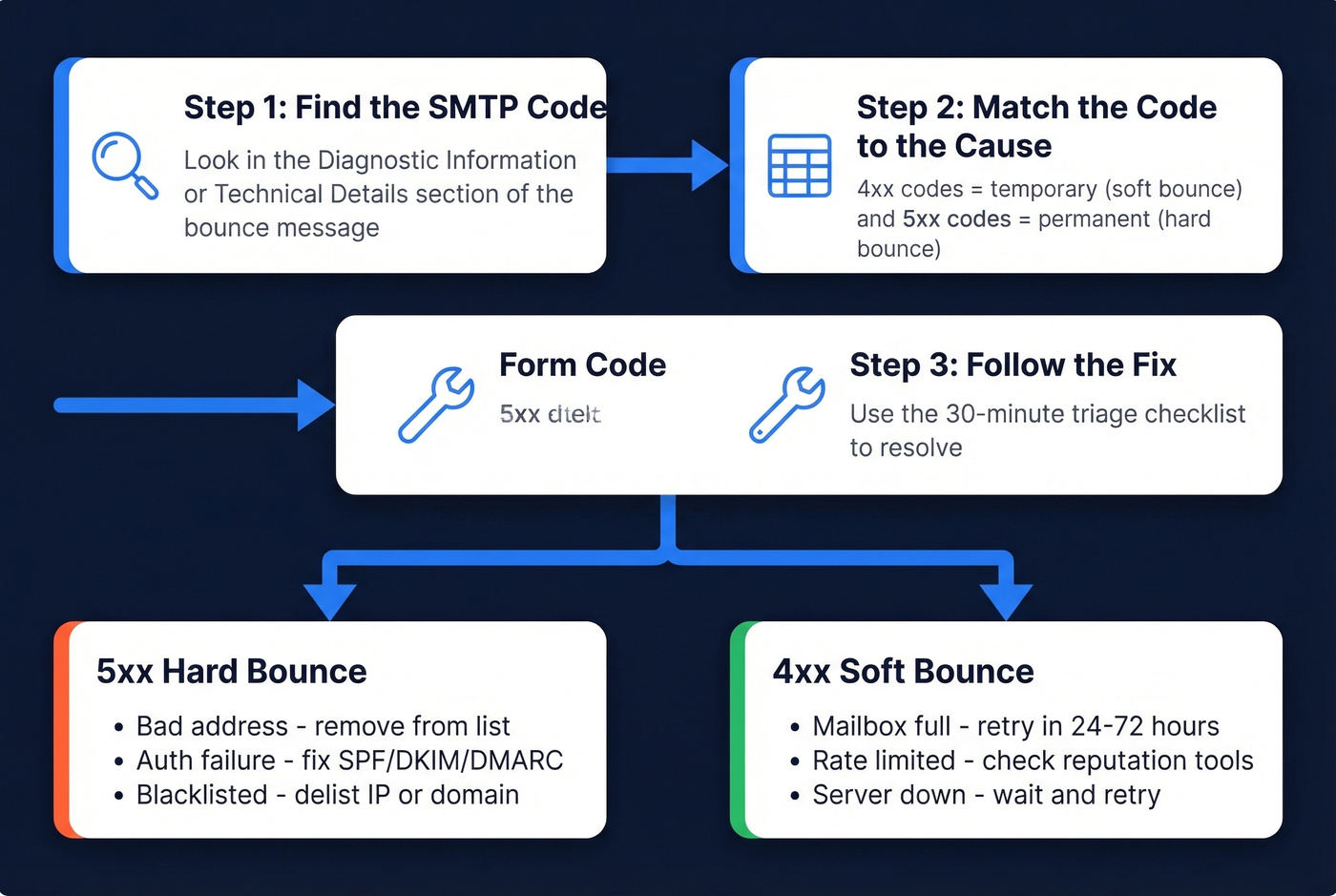
- Find the SMTP code in the bounce message. Look for a 4xx or 5xx number.
- Match it to the cause using the reference table in Section 5 below.
- Follow the 30-minute triage checklist in Section 9 to fix it.
If most of your bounces are hard bounces (5xx), the problem is usually bad contact data, authentication failures, or reputation-based blocking. Invalid addresses, expired domains, typos, missing SPF, DKIM, and DMARC, and poor sender reputation can all produce permanent failures - and the SMTP code tells you which one you're dealing with.
Top Email Bounce Reasons
Bad or Nonexistent Addresses
This is the #1 cause, and it's not close. The address was typed wrong, the person left the company, or the domain expired. You'll see a 550 5.1.1 - "bad destination mailbox address" - or a similar permanent rejection.
Reddit threads about bouncing emails are full of the same panic: someone finally verifies their list, discovers a huge chunk of addresses are dead, and wonders why they didn't check sooner. One r/webdev user described being "really stressed out" after watching bounces pile up for weeks before realizing the root cause was stale data, not a server problem. We see this pattern constantly - the fix is almost always simpler than people expect.
Mailbox and Size Limits
A full mailbox triggers a soft bounce. The server wants to accept your email but physically can't. You'll also bounce if your message exceeds size limits - Gmail and Yahoo cap at 25 MB, Outlook at 20 MB. Strip those massive PDF attachments and use a file-sharing link instead.
Authentication Failures (SPF, DKIM, DMARC)
This one's gotten dramatically worse since 2024. We've watched teams lose weeks troubleshooting server configs when the real issue was a missing SPF record. Missing or misconfigured authentication records used to land you in the spam folder. Now they cause outright rejection at the SMTP level. If you haven't published SPF, DKIM, and DMARC records for your sending domain, you're not just risking spam placement - you're getting bounced.
If you want a deeper technical walkthrough, see our email deliverability guide and this DMARC alignment explainer.
Reputation and Blacklisting
Your IP or domain landed on a blacklist, or your sender reputation dropped low enough that receiving servers throttle you. The telltale sign is a 451 4.7.650 message from Microsoft - "temporarily rate limited due to IP reputation." You'll also see 421 temporary blocks from Gmail. Scan your bounce messages for keywords like "blocked," "blacklist," or "reputation."
For a practical toolkit, use our roundup of email reputation tools and this guide on how to improve sender reputation.
Server and Infrastructure Issues
The recipient's mail server is down, DNS or MX records are misconfigured, or TLS negotiation fails. These are less common for individual senders but show up in bulk. Codes like 449 for DNS lookup failures or 454 for TLS-required-but-unavailable point here. For recipient-side outages, retry later. If it persists, contact the recipient admin.
Content Flagged as Spam
Spam-trigger words in your subject line, suspicious links, or a missing unsubscribe header can all cause rejection. This is common with anti-spam firewall rules that generate code 471 when a message is blocked. If you're sending cold outreach with five tracking links and no unsubscribe option, expect bounces.
To reduce content-based blocks, run messages through an email spam checker and tighten your email copywriting.
The 2026 Authentication Crackdown
Here's the thing: if you set up email authentication two years ago and haven't touched it since, you're probably still bouncing. The rules changed - and they keep tightening.
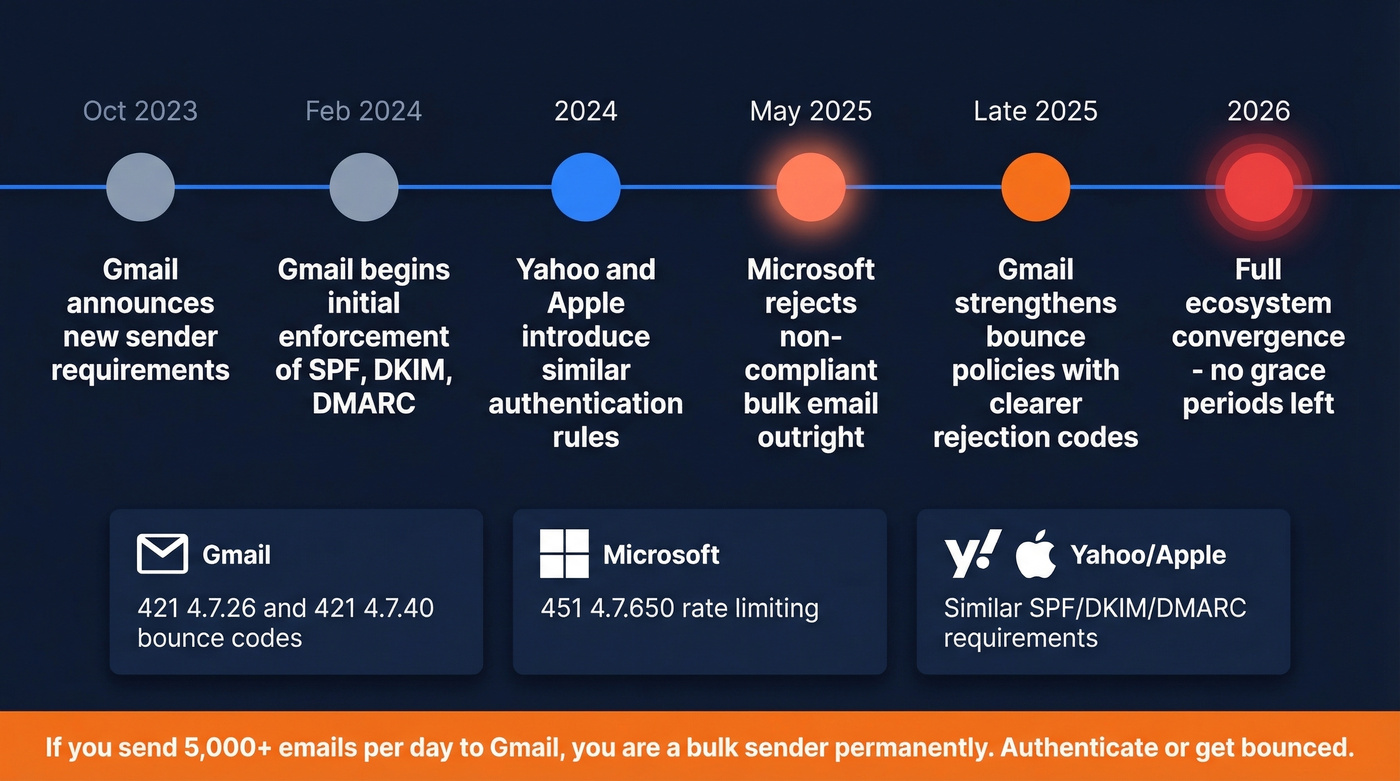
Gmail's enforcement shifted in phases. Requirements were announced in October 2023, initial enforcement began February 2024, and a stronger phase rolled out in late 2025 with clearer rejection messages and more consistent delivery interruptions. The bounce codes you'll see are specific:
421 4.7.26- "This mail has been rate limited because it is unauthenticated. Gmail requires all senders to authenticate with SPF or DKIM."421 4.7.40- "This mail has been rate limited because the sending domain does not have a DMARC policy."
If you send more than roughly 5,000 messages within 24 hours to personal Gmail accounts, you're classified as a bulk sender - and that classification is effectively permanent. Aggregation across subdomains under the same primary domain counts toward the threshold. Once you hit it, compliance requirements apply indefinitely.
It's not just Google. Yahoo and Apple introduced similar requirements in 2024. Microsoft moved to reject non-compliant bulk email outright starting May 2025. The entire ecosystem converged on the same message: authenticate or get bounced. No grace periods left.
Our take: Most bounce problems in 2026 aren't technical mysteries. They're data hygiene problems dressed up in scary SMTP codes. Nine times out of ten, the team panicking over 554 5.4.0 just needs to clean their list - not hire a deliverability consultant.
SMTP Error Code Reference
When you pull up a bounce message, the SMTP code is the first thing to find. Here's what the most common ones mean and what to do about each - including several long-tail codes most guides skip:
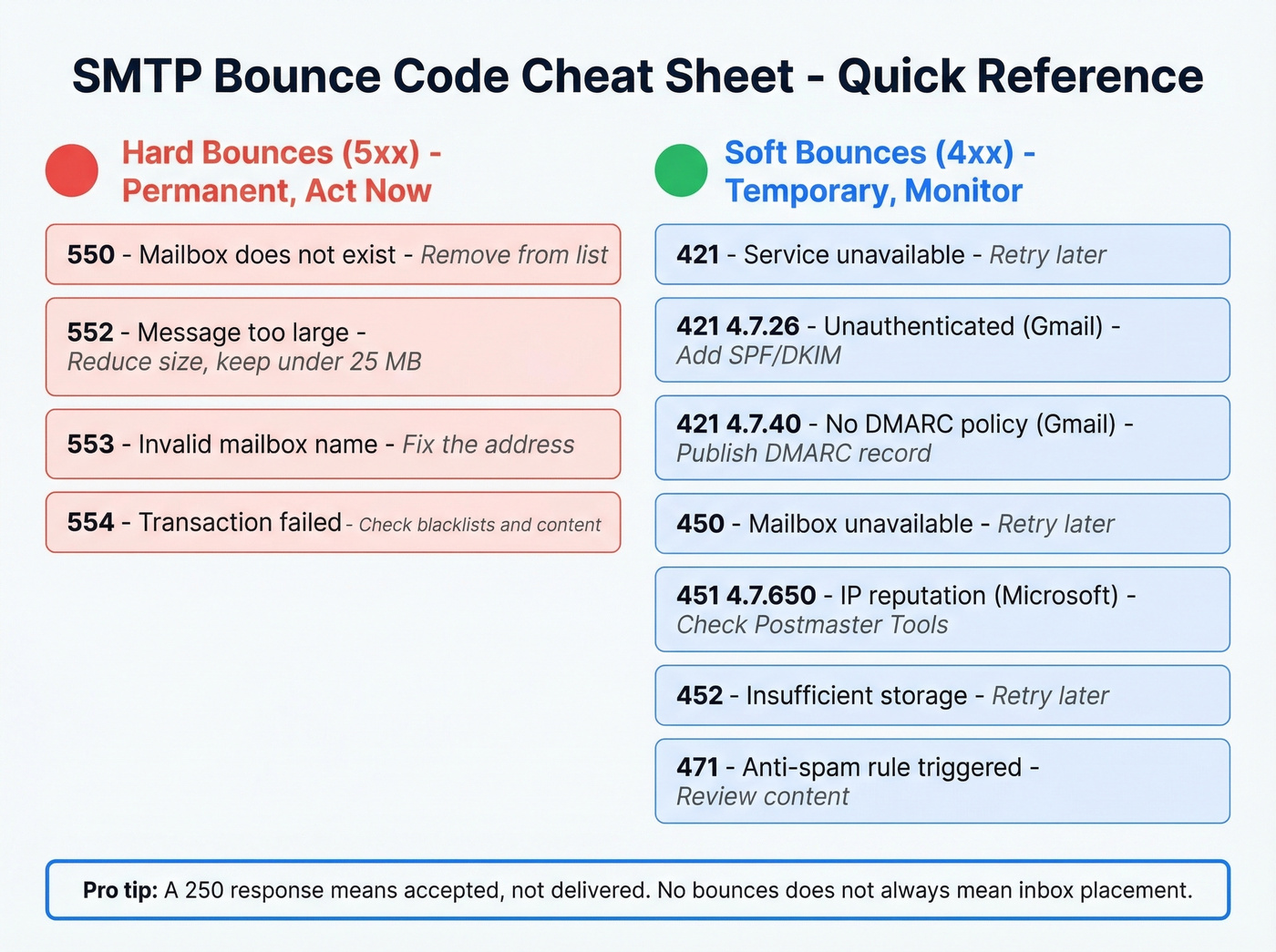
| Code | Meaning | Type | What to Do |
|---|---|---|---|
| 101 | Invalid SSL/TLS configuration | Soft | Verify TLS cert + cipher suite |
| 420 | Firewall/filter blocked | Soft | Review content + contact recipient admin |
| 421 | Service unavailable | Soft | Retry later |
| 421 4.7.26 | Unauthenticated (Gmail) | Soft | Add SPF/DKIM |
| 421 4.7.40 | No DMARC policy (Gmail) | Soft | Publish DMARC |
| 449 | DNS lookup failed | Soft | Check recipient DNS |
| 450 | Mailbox unavailable | Soft | Retry later |
| 451 | Local processing error | Soft | Retry later |
| 451 4.7.650 | IP reputation (Microsoft) | Soft | Check Postmaster Tools + delist |
| 452 | Insufficient storage | Soft | Retry later |
| 454 | TLS required, unavailable | Soft | Check TLS config |
| 471 | Anti-spam rule triggered | Soft | Review content + remove spam triggers |
| 550 | Mailbox doesn't exist | Hard | Remove from list |
| 552 | Storage exceeded / message too large | Hard | Reduce message size; keep attachments under 20-25 MB |
| 553 | Invalid mailbox name | Hard | Fix the address |
| 554 | Transaction failed | Hard | Review content + check blacklists |
One critical nuance from Twilio's SMTP guide: a 250 ("accepted") response doesn't guarantee inbox placement. The receiving server can still filter your message after accepting it. "No bounces" doesn't always mean "delivered to inbox."

Bad addresses cause most bounces - and most bounce panic. Prospeo's 5-step verification with catch-all handling, spam-trap removal, and honeypot filtering delivers 98% email accuracy. Every record refreshes every 7 days, so you're never emailing someone who left the company six weeks ago.
Stop cleaning dead lists. Start with verified data from day one.
How to Read a Bounce Message
Most people see a bounce NDR and their eyes glaze over. Fair enough. Let's break one down.
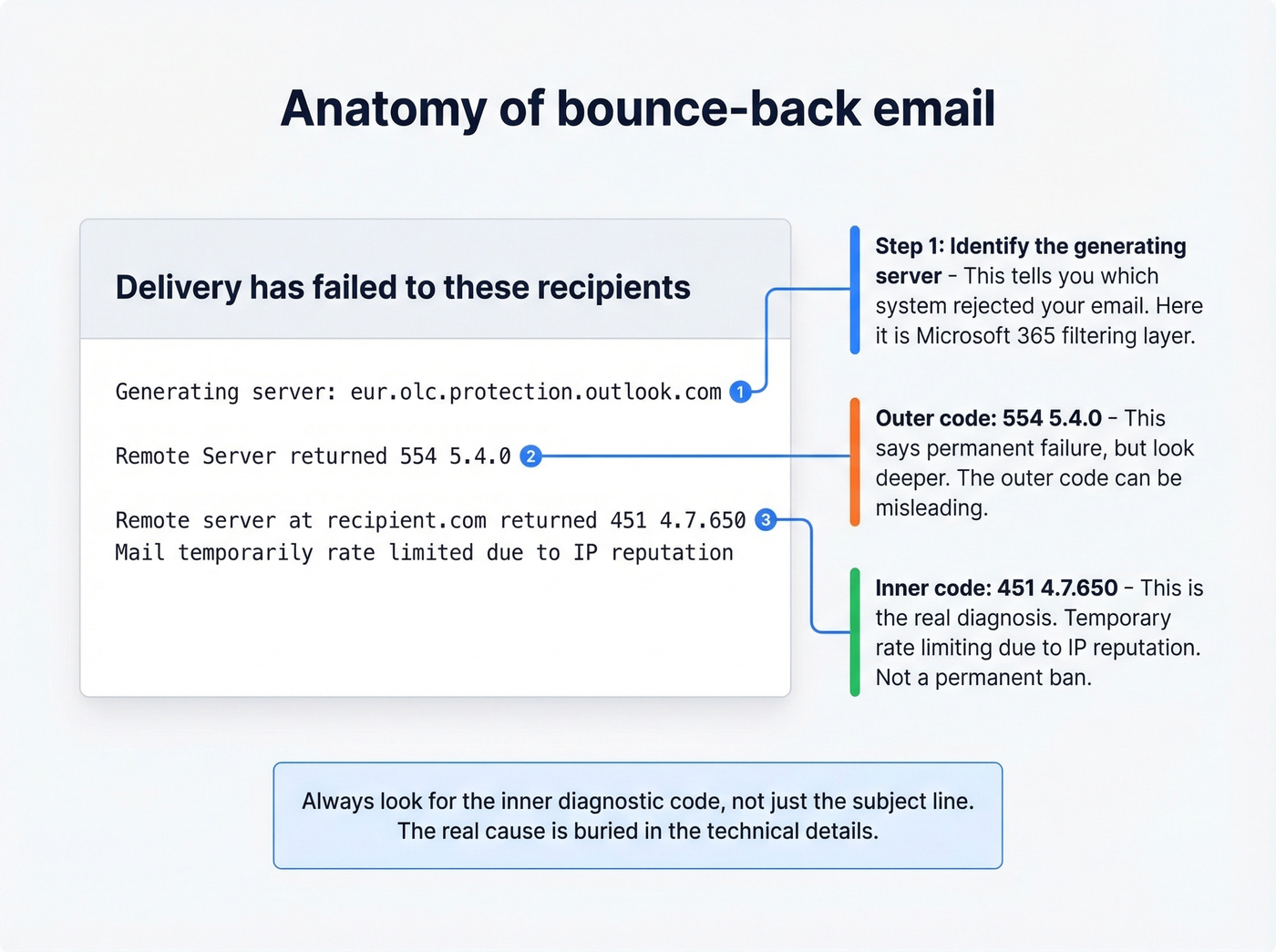
A Reddit user posted a Microsoft 365 NDR that shows a common confusion pattern: the outer code says 554 5.4.0 (permanent failure), but the diagnostic wraps a 451 4.7.650 (temporary rate limiting due to IP reputation). The subject line said "Delivery delayed." The user was worried about ruining their domain reputation - a reaction we see constantly. Confusing? Absolutely. But solvable.
Here's the three-step framework for reading any bounce:
- Find the 4xx or 5xx code. Scan the "Diagnostic Information" or "Technical Details" section. Ignore the headers - look for the number string.
- Identify the generating server. The "Generating server" line tells you which system issued the bounce. In the example above,
eur.olc.protection.outlook.comwas the rejecting system - Microsoft 365's filtering layer. - Match to the reference table. A
451 4.7.650means IP reputation rate limiting. That's a temporary block, not a permanent ban.
If you need to escalate to IT, send the complete bounce message including headers. MxToolbox's Header Analyzer is a free tool that makes the raw headers human-readable.
Backscatter: Bounces You Didn't Send
If you're getting NDRs for messages you definitely didn't send, don't panic - your account almost certainly hasn't been compromised.
This is backscatter. Per Microsoft's documentation, it happens when spammers forge your email address in the 5322.From field (the "P2 sender"). The recipient's server bounces the spam, and the NDR lands in your inbox because your address was the forged sender.
You can't completely prevent receiving backscatter, but you can minimize it. Publish a DMARC record with p=reject - this tells receiving servers to drop messages that fail authentication rather than bouncing them back to the forged address. Backscatterer.org maintains a DNSBL of servers that generate backscatter, though it's not a list of spammers. Give it a few days. The volume typically subsides as the spam campaign moves on.
What Bounce Rate Is Too High?
Mailchimp-derived benchmarks put the average hard bounce rate at 0.21% and soft bounce at 0.70%, for roughly 0.91% total. But averages vary significantly by industry:
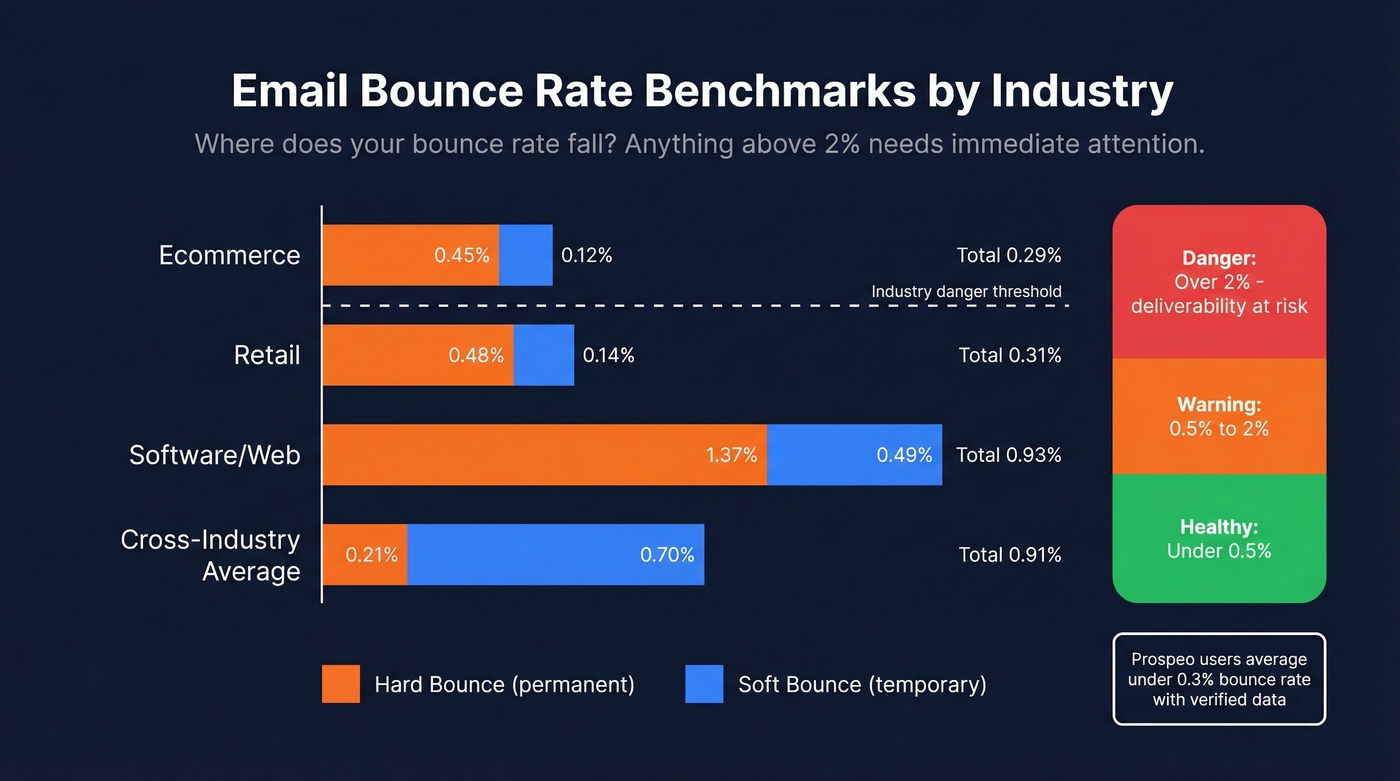
| Industry | Hard Bounce | Soft Bounce | Weighted Avg |
|---|---|---|---|
| Ecommerce | 0.45% | 0.12% | 0.29% |
| Retail | 0.48% | 0.14% | 0.31% |
| Software/Web | 1.37% | 0.49% | 0.93% |
| Telecom | 1.31% | 0.50% | 0.91% |
The practical threshold model is straightforward. Under 2% is healthy. Between 2-5% needs immediate attention - your list hygiene is slipping. Above 5% is critical: your sender reputation is actively degrading, and providers will start blocking future sends entirely.
We've seen teams running 35-40% bounce rates because they were pulling contact data from an outdated provider. Snyk's sales team had exactly this problem - bounce rates between 35-40% - until they switched to verified data. Bounces dropped to under 5%, and AE-sourced pipeline jumped 180%. The fix wasn't a server change. It was better data.
If you want a deeper benchmark breakdown, see our full guide to email bounce rate.
Fix It Now - 30-Minute Triage
If your bounces just spiked, here's the checklist. Work through it in order.
Step 1: Read the bounce code. Pull up the NDR, find the 4xx or 5xx code, and match it to the reference table above. This tells you whether you're dealing with a temporary block or a permanent rejection.
Step 2: Check authentication. Run an SPF, DKIM, and DMARC lookup on your sending domain. Free tools like MxToolbox handle this in seconds. If any record is missing or misconfigured, fix it before sending another email.
Step 3: Check blacklists. Scan your bounce text for "blocked," "blacklist," or "reputation." Then run your sending IP and domain through MxToolbox's blacklist checker. If you're listed, follow the delisting process for each blacklist - most have automated removal requests.
If you suspect a Spamhaus listing, follow our Spamhaus blacklist removal guide.
Step 4: Verify your contact list. In our experience, this step resolves about 80% of bounce spikes. The fastest way to stop bounces at the source is to verify your list before you send. Prospeo's 5-step verification process catches invalid addresses, spam traps, and catch-all domains before they become bounces - with 98% email accuracy across 143M+ verified emails. Upload a CSV, get results in minutes, and remove every address that would've bounced.
If you’re cleaning lists after the fact, use this spam trap removal playbook to reduce long-term damage.
Step 5: Check sending volume and reputation. Open Google Postmaster Tools and review your domain reputation. If you recently ramped up volume without warming your IP, throttle back and increase gradually.
For safe ramping, see our guide to email velocity.
Step 6: Review content and attachments. Strip suspicious links, remove spam-trigger phrases, make sure your unsubscribe header is present, and keep attachments under 20 MB.
Preventing Bounces Long-Term
Fixing a bounce spike is one thing. Preventing the next one is what separates good email operations from reactive firefighting.
The foundation is data hygiene on a schedule. Email addresses decay constantly - people change jobs, domains expire, mailboxes fill up. If you've ever asked yourself why emails keep bouncing back after months of clean sends, address decay is almost always the answer. Quarterly list cleaning is the minimum for most teams, and monthly is better if you're sending at high volume. Stale data is the single biggest driver of preventable bounces, and I'd argue it causes more deliverability damage than every other factor on this list combined.
For marketing lists specifically, double opt-in is worth the friction. It eliminates typos and fake signups at the source, which means fewer hard bounces downstream and a cleaner sender reputation over time.
Monitoring should be continuous, not reactive. Set up Google Postmaster Tools for domain reputation tracking and MxToolbox for blacklist status alerts. The goal is to catch problems before they compound - a small reputation dip on Monday becomes a full block by Friday if you're not watching.
Warm up new domains and IPs properly. Don't blast 10,000 emails from a fresh domain on day one. Ramp gradually over 2-4 weeks, starting with your most engaged contacts and expanding from there. Skip this step and you'll be back in this article reading about 451 4.7.650 codes within a week.
If you're doing outbound, this pairs well with a structured B2B cold email sequence so you can scale without spiking complaints.
Teams that switched to Prospeo cut bounce rates from 35%+ to under 4% - without hiring a deliverability consultant. When 143M+ emails are verified through proprietary infrastructure at $0.01 each, the 30-minute triage checklist becomes unnecessary.
Fix your bounce rate at the source: the data, not the server.
FAQ
What is a bounce-back email?
A bounce-back email (NDR) is an automated server message telling you delivery failed. It contains an SMTP error code - 4xx for temporary failures, 5xx for permanent ones - that explains the exact reason. Check the code against the reference table above to diagnose the issue in seconds.
Hard bounce vs. soft bounce?
Hard bounces carry 5xx codes and are permanent: the address doesn't exist or the server permanently rejects you. Soft bounces carry 4xx codes and are temporary - full mailbox, server busy, rate limiting. Servers retry soft bounces for 24-72 hours before giving up.
Why is my email bouncing back to me?
The most common causes are an invalid recipient address (550), failed authentication like missing SPF/DKIM/DMARC records (421 4.7.26), or poor sender reputation (451 4.7.650). Check the SMTP code in the NDR first - it pinpoints the exact problem.
Can a correctly formatted address still bounce?
Yes. A valid-looking address bounces if the mailbox was deactivated, the recipient's server blocks your domain, or your authentication records are misconfigured. Catch-all domains can even accept the message at the SMTP level but silently discard it later.
What's the fastest way to reduce bounce rates?
Verify every address before sending - this alone eliminates roughly 80% of bounces. Pair that with proper SPF/DKIM/DMARC setup and quarterly list cleaning to stay under the 2% safe threshold.