

Why Are My Emails Going to Junk? 6 Fixes That Work
One in six emails never reaches the inbox. That's the global average from industry benchmark data compiled by Mailreach, citing Validity and Litmus. If your emails are going to junk, the answer usually comes down to authentication gaps, reputation damage, or bad contact data.
Here's the breakdown by provider:
| Provider | Inbox Placement Rate |
|---|---|
| Gmail | 87.2% |
| Yahoo | 86.0% |
| Apple Mail | 76.3% |
| Microsoft (Outlook, Hotmail) | 75.6% |
If you're sending cold outreach and wondering why replies dried up, the answer is probably sitting in someone's junk folder right now. We've seen it happen to teams with perfectly good copy and solid targeting - the problem was never the message, it was the plumbing underneath.
Diagnose Before You Fix
Google Postmaster Tools is the single most useful free deliverability tool. Add your sending domain, verify with a DNS TXT record, and wait 24-48 hours for data. If you're sending very low volume, Google won't show much - you need consistent sends before the dashboards populate.
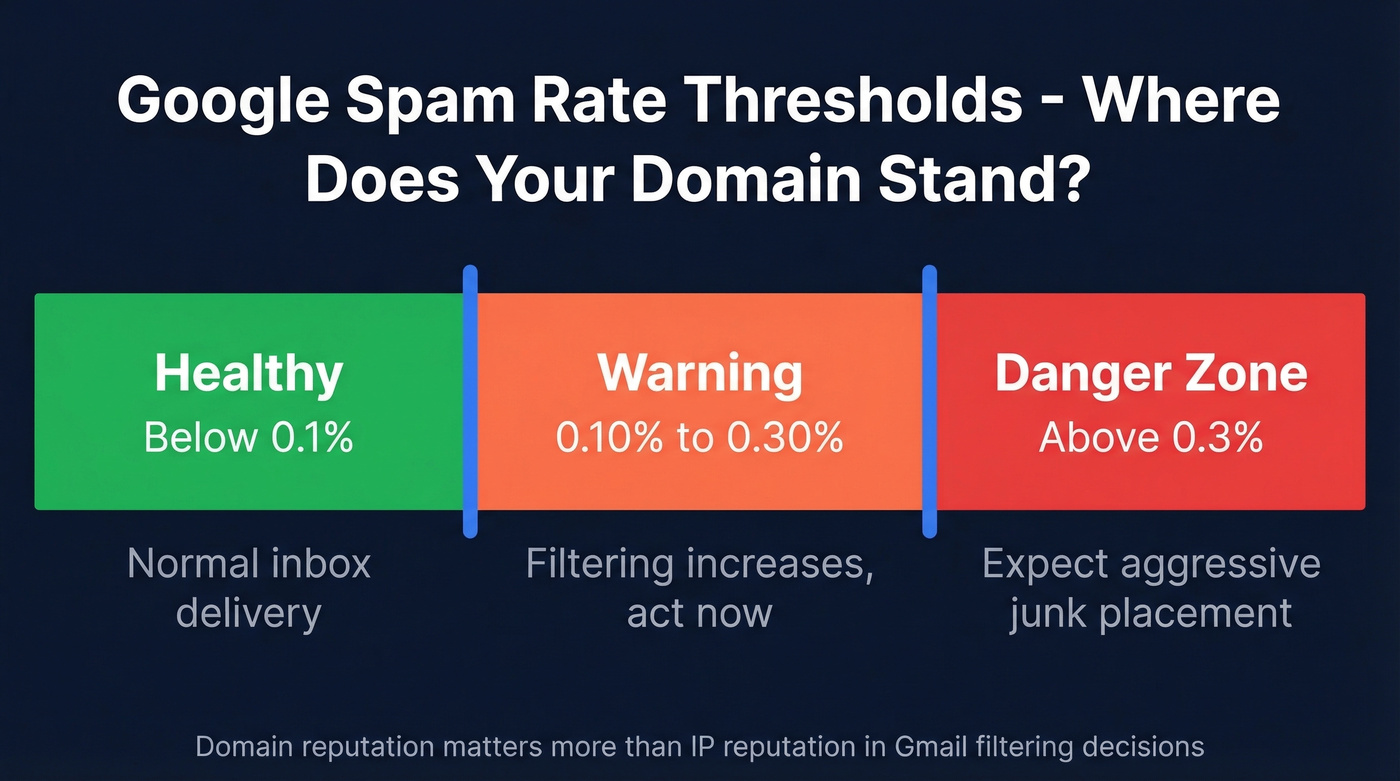
Read the spam-rate dashboard like this:
- Healthy: below 0.1%
- Warning: 0.10%-0.30%
- Danger zone: above 0.3% - expect aggressive filtering
Domain reputation matters more than IP reputation in Gmail's filtering decisions. Even on a shared ESP IP, Gmail judges your domain independently, which means you can't hide behind a clean IP if your domain is flagged. (If you want a deeper playbook, see our email deliverability guide.)
Six Fixes, Most Common First
1. Fix Your Authentication
Since February 2024, Google and Yahoo enforce stricter bulk-sender requirements around authentication and spam controls. Without SPF, DKIM, and DMARC, your messages land in junk instead of the inbox. No exceptions.
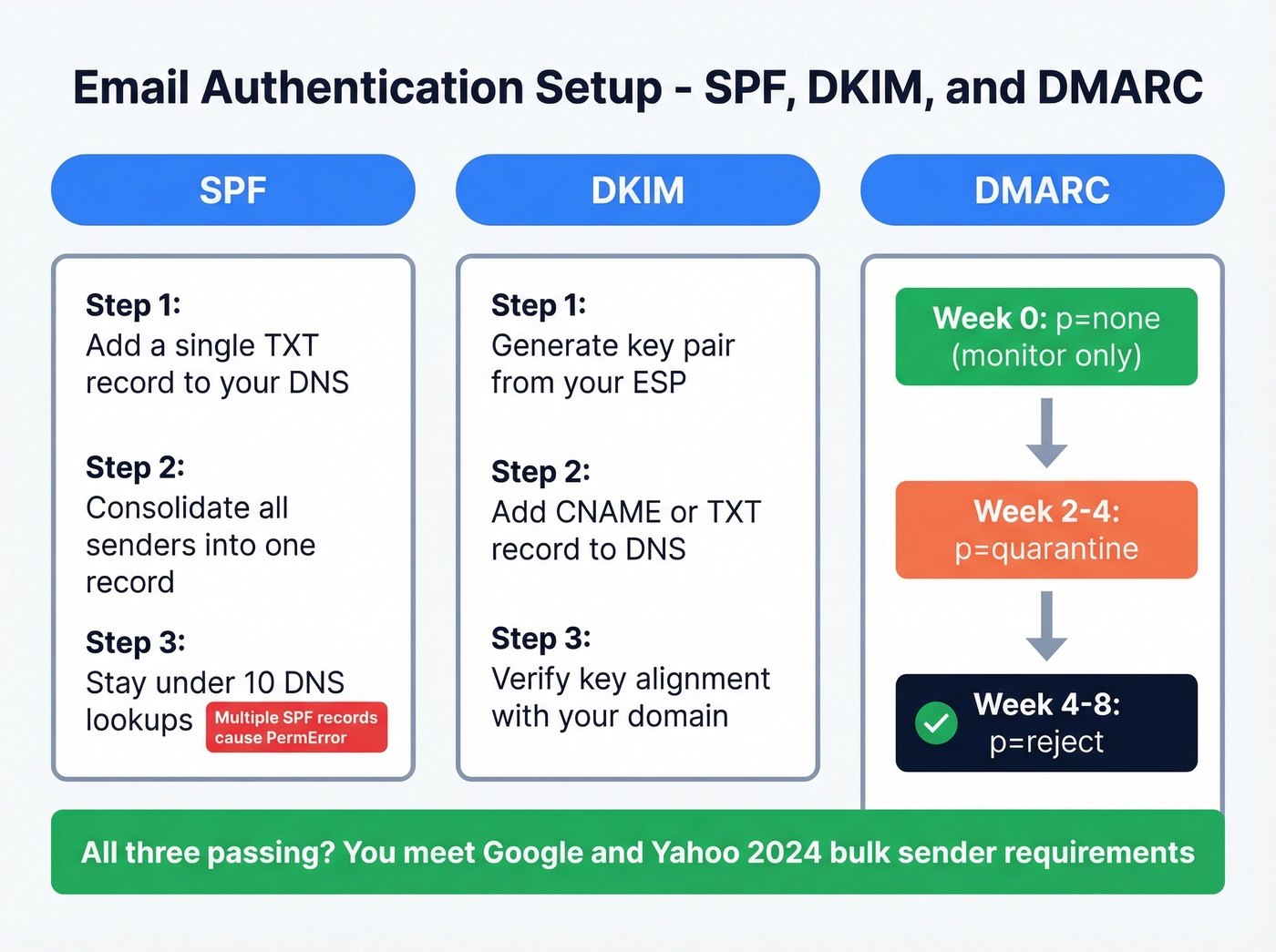
Check what you have right now:
dig TXT yourdomain.com +short | grep spf1
dig TXT _dmarc.yourdomain.com +short
Copy-paste SPF records:
- Google Workspace:
v=spf1 include:_spf.google.com ~all - Microsoft 365:
v=spf1 include:spf.protection.outlook.com ~all
Multiple SPF records on the same domain cause a PermError - consolidate into one. SPF also has a hard limit of 10 DNS lookups; exceed it and authentication fails silently, which is maddening to debug if you don't know to look for it. For more examples, see these SPF record patterns.
DMARC: Start with p=none, move to p=quarantine after 2-4 weeks, then p=reject after 4-8 weeks. (Also worth understanding DMARC alignment if you're still seeing failures.)
2. Check If You're Blocklisted
If emails suddenly bounce with cryptic error codes, run your domain and sending IP through MXToolbox and Spamhaus.
| SMTP Code | Likely Cause | Fix |
|---|---|---|
| 550 5.7.1 | Blocked / blocklist | Check MXToolbox; submit delisting request |
| 554 5.7.1 | Server rejected message | Review content and sender reputation |
| 421 4.7.0 | Temp block - poor rep | Reduce volume; begin warmup |
| 5.7.26 | DMARC/auth failure | Fix SPF/DKIM alignment |
Spamhaus runs SBL (spam sources), XBL (compromised IPs), PBL (residential ranges), and DBL (domain reputation). Identify which list you're on, fix the root cause, and submit a delisting request. Don't just submit the request and hope - if the root cause isn't fixed, you'll end up right back on the list within days. If you need the step-by-step, use our Spamhaus blacklist removal guide.
3. Clean Your Contact List
Here's the thing: bad email data is the fastest way to destroy sender reputation. Every invalid address generates a hard bounce, and once you're over roughly 2% bounces, deliverability drops fast.
Verify every email address before it enters a sequence. Prospeo's 5-step verification catches invalid addresses, spam traps, honeypots, and catch-all domains before they tank your deliverability - 98% accuracy, with a free tier covering 75 emails per month. (More on email bounce rate benchmarks and what they trigger.)

Never buy email lists. We've watched teams nuke a perfectly healthy domain in a single afternoon by importing a purchased list full of dead addresses and spam traps. It's one of the most reliable ways to wreck a domain, and recovery takes weeks. If you're unsure where the line is, read Is It Illegal to Buy Email Lists?.
4. Fix Content and Sending Patterns
- Keep image-to-text ratio around 60/40 - heavy-image emails with minimal text look like marketing spam to filters
- Avoid identical subject lines at scale; Gmail's pattern detection catches this fast (use these cold email subject line examples)
- Spread sends across business hours instead of blasting 500 at 9:01 AM (see email velocity)
- Include a one-click unsubscribe link - required by Google and Yahoo since 2024
Let's be honest: most content-related spam filtering issues aren't about trigger words like "free" or "act now." Those lists are outdated. The real triggers are structural - sending patterns, image ratios, and repetitive templates across hundreds of recipients.
5. Warm Up a New Domain
A brand-new domain has zero reputation. Authentication alone won't change that. Follow a structured warmup ramp:
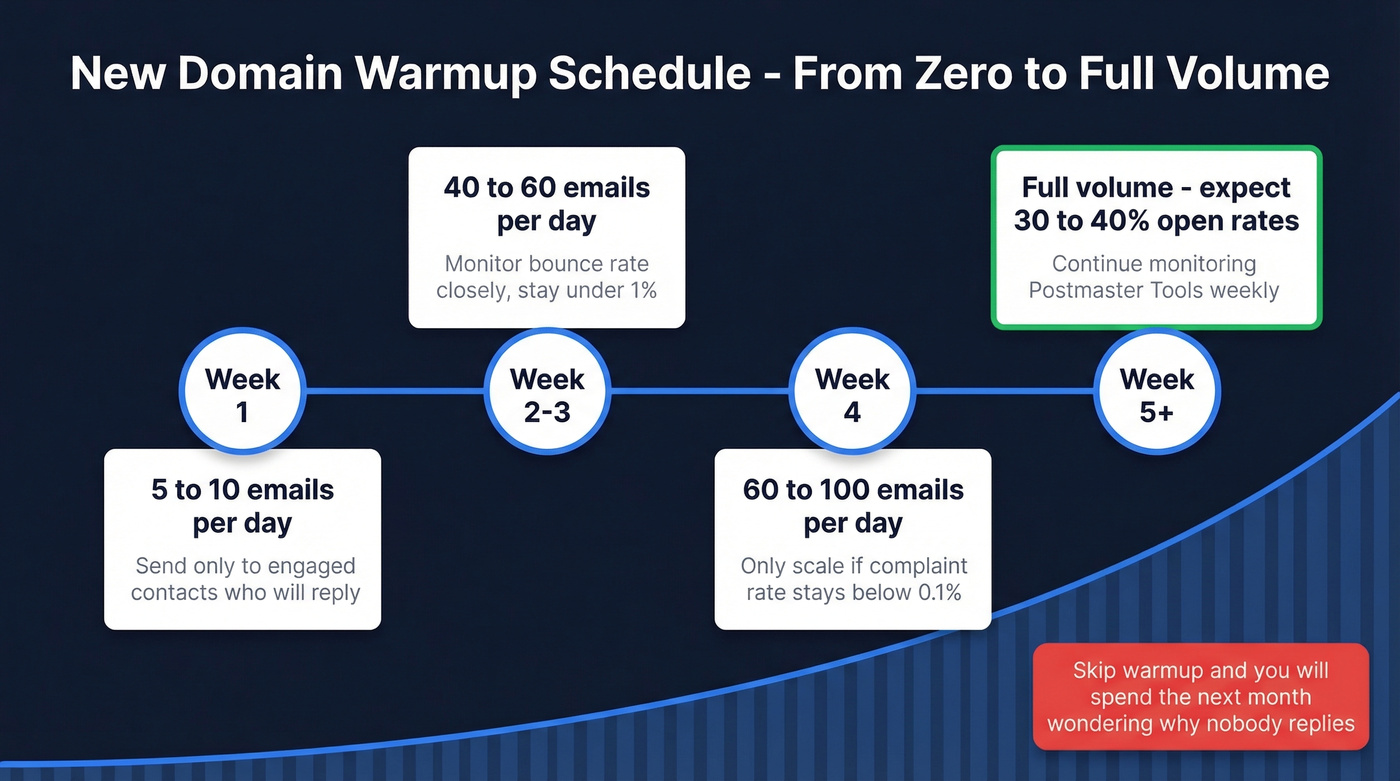
- Week 1: 5-10 emails/day to engaged contacts
- Week 2-3: Scale to 40-60/day
- Week 4: 60-100/day if complaint rate stays below 0.1%
Keep bounce rates under 1% throughout. After warmup, expect 30-40% open rates on cold outreach if your targeting is solid. Skip this step and you'll spend the next month wondering why nobody's replying. If you're choosing tooling, compare unlimited email warmup options.
6. When Recipients' Filters Are the Problem
Sometimes it's not you. Outlook users who aggressively mark emails as junk can over-train their filter to catch similar messages. The fix on their end is resetting junk mail rules and adding your address to safe senders. In Gmail, clicking "not spam" creates a per-recipient feedback loop that improves future delivery.
Not much you can control here except asking recipients to whitelist you - which, admittedly, feels a bit like asking someone to hold the door open while you figure out why your key doesn't work.

Every invalid email you send pushes you closer to the junk folder. Prospeo's 5-step verification catches spam traps, honeypots, and dead addresses before they wreck your sender reputation - 98% accuracy, bounces under 2% guaranteed.
Stop guessing which emails are real. Verify before you send.
"I Did Everything and It's Still Junk"
This is the number one frustration on r/coldemail and r/sales: authentication passes, you're not blocklisted, content looks clean - but Gmail still junks you.
The explanation is almost always the same. New domain plus no engagement history equals no reputation. Gmail weighs opens, replies, and spam reports more heavily than technical setup. Authentication is table stakes, not a silver bullet. If your domain is in its first 30-60 days, no amount of DNS configuration will override zero engagement history. The fix is patience - warm up, send to engaged contacts first, and watch Postmaster Tools weekly. (If you're actively trying to improve sender reputation, this is the core lever.)
Long-Term Deliverability Checklist
If you've worked through the six fixes above, here's what keeps deliverability healthy over time:
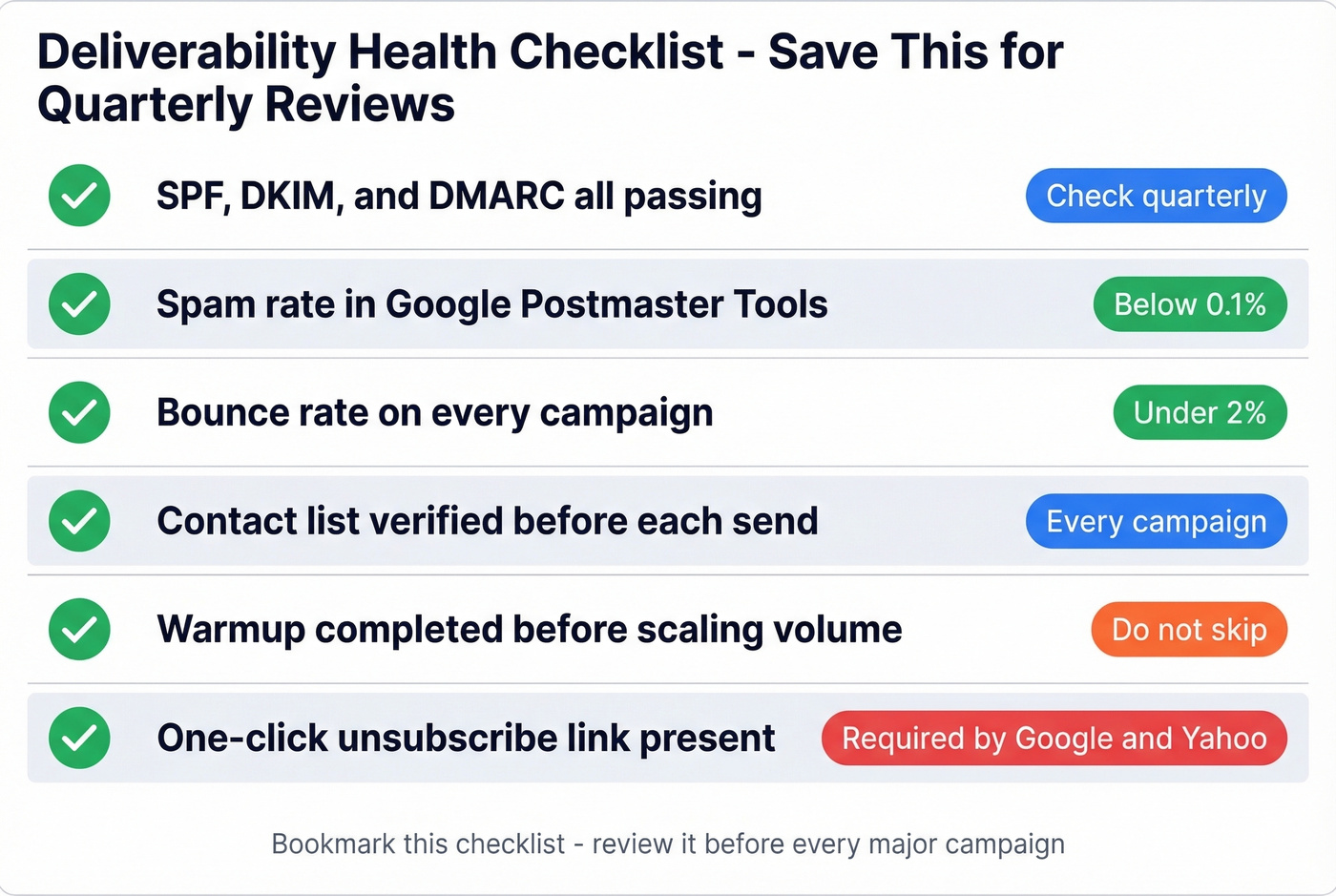
- SPF, DKIM, and DMARC all passing - check quarterly (here’s how to verify DKIM is working)
- Spam rate below 0.1% in Google Postmaster Tools
- Bounce rate under 2% on every campaign
- Contact list verified before each send
- Warmup completed before scaling volume
- One-click unsubscribe link present in every email
FAQ
Why does Gmail junk my emails when SPF/DKIM/DMARC pass?
Gmail weighs engagement signals - opens, replies, spam reports - more heavily than authentication alone. A new domain with zero engagement history has no reputation, so messages get filtered. Warm up gradually and send to engaged contacts first; reputation builds within 2-4 weeks.
How long does it take to repair sender reputation?
With consistent warmup and clean sending, expect 2-6 weeks for measurable improvement. Full recovery from a Spamhaus blocklisting can take 1-8+ weeks depending on the specific list and whether the root cause is fully resolved.
Can bad contact data cause emails to go to junk?
Absolutely. Invalid addresses generate hard bounces, and bounce rates above 2% trigger aggressive spam filtering. Verifying your list before every send - whether through Prospeo or another verification tool - prevents this cycle before it starts.
Teams using unverified data see 35%+ bounce rates and tanked domains. Prospeo users like Snyk cut bounces from 35-40% to under 5% and generated 200+ opportunities per month - because every email was verified before it left the outbox.
Fix your deliverability at the source: the data.