

The Honest Guide to Apollo Cold Email in 2026: What Works, What Doesn't, and the Stack You Actually Need
Your Apollo cold email sequence has been running for two weeks. Open rates look decent - maybe 40%, maybe higher. But replies? Crickets. You check the analytics and it's a graveyard: 0.56% reply rate across 527 leads. Meanwhile, the same list sent through Instantly pulled 5.5%. Same leads. Same copy. Ten times the replies.
That's not a fluke. I've seen this pattern play out across dozens of teams.
Here's the thesis: Apollo is the best B2B database for cold email prospecting. It's not the best tool for sending cold emails. And that distinction is costing you meetings.
What You Need (Quick Version)
The stack that actually works in 2026:

- Apollo - for prospecting and lead data ($49/mo Basic)
- Instantly - for sending and warmup ($30/mo)
Total: under $100/month. This consistently outperforms a $150/month Apollo Organization plan used as an all-in-one. The rest of this guide explains why, walks through setup step by step, and gives you the templates, benchmarks, and stack architecture to make outbound with Apollo actually work.
2026 Cold Email Benchmarks - What Good Looks Like
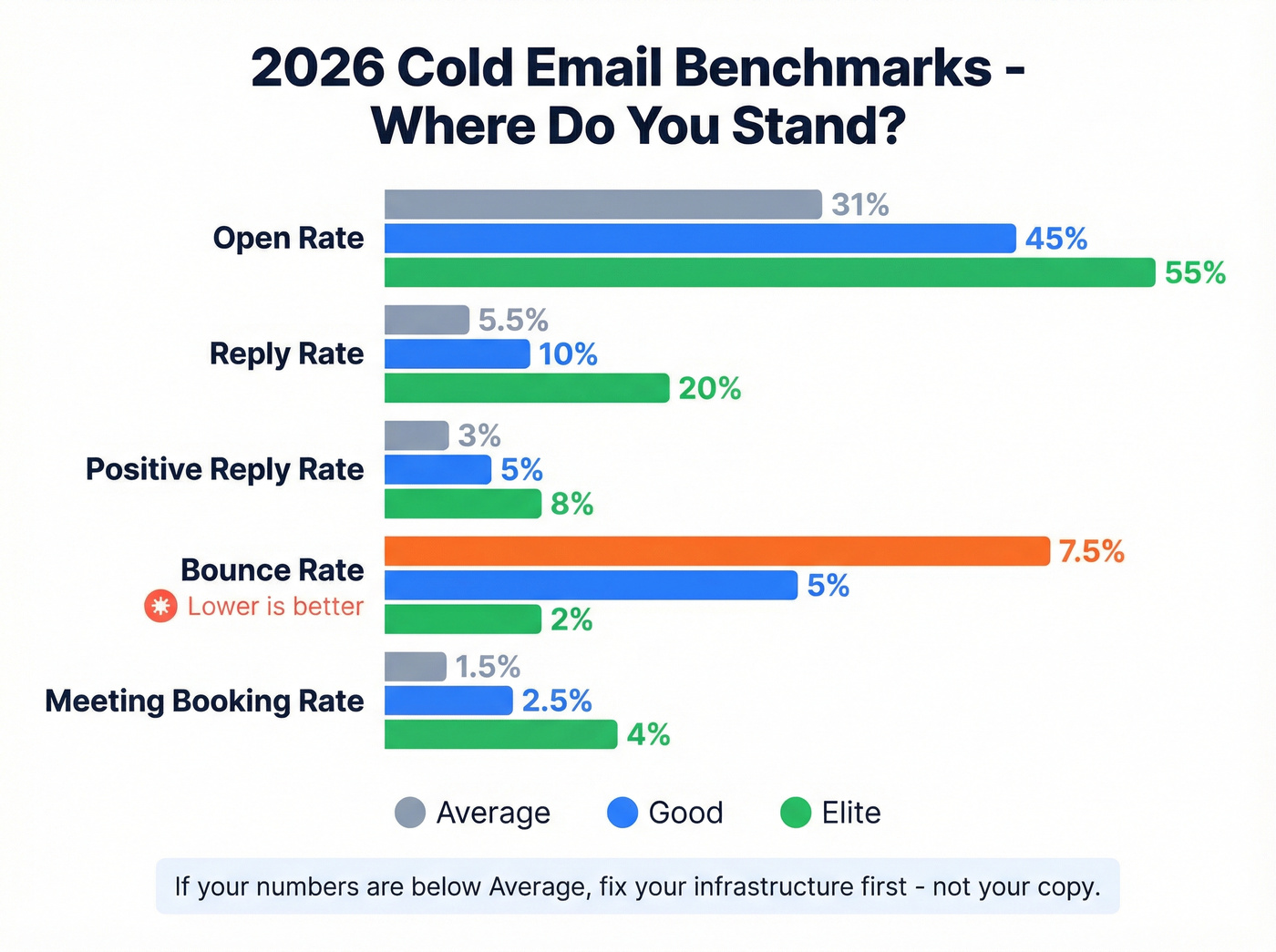
Before you diagnose what's broken, you need to know what healthy looks like. These benchmarks are aggregated from Snov.io, Belkins, Martal Group, Smartlead, Mailshake, and Instantly's own data citing Backlinko studies.
| Metric | Average | Good | Elite |
|---|---|---|---|
| Open rate | 27-35% | 40-50% | 50%+ |
| Reply rate | 5-6% | 10%+ | 15-25% |
| Positive reply rate | 2-4% | 5%+ | 8%+ |
| Bounce rate | 7-8% | Under 5% | Under 2% |
| Meeting booking | 1-2% | 2-3% | 4%+ |
A few things jump out. If your bounce rate is above 5%, stop everything and fix your data. You're burning your domain. The first follow-up adds 40-50% more replies - so if you're running a single-touch sequence, you're leaving half your meetings on the table.
For context, reply rates on Instantly ranged from 2.1% to 16.7% depending on the campaign, proving that approach matters more than tool choice. But infrastructure sets the ceiling. A bad sending setup caps your upside no matter how good your copy is.
The optimal email length? 50-125 words with one clear CTA. Not a paragraph. Not a novel. A tight, specific message that respects the recipient's time.
If your numbers are below the "Average" column, the problem is almost certainly infrastructure (deliverability, warmup, authentication) or data quality - not your copy. Fix the plumbing before you rewrite the emails.
Where Apollo Excels (And Where It Doesn't)
Apollo's Real Strengths for Cold Outreach
There's a reason Apollo dominates the cold email ecosystem. The database is genuinely best-in-class for prospecting.
275M+ B2B contacts with 65+ search filters. You can slice by job title, company size, industry, technographics, funding stage, intent signals - and stack those filters to build hyper-targeted lists in minutes. The intent data integration actually works, surfacing companies actively researching topics relevant to your solution. The multichannel sequence builder supports email, phone calls, LinkedIn touches, and custom action items. AI-assisted sequence creation gets you from zero to a working sequence in under five minutes. And the Chrome extension lets you pull contact data in real-time while browsing company websites or professional profiles - no need to switch back to Apollo's dashboard.
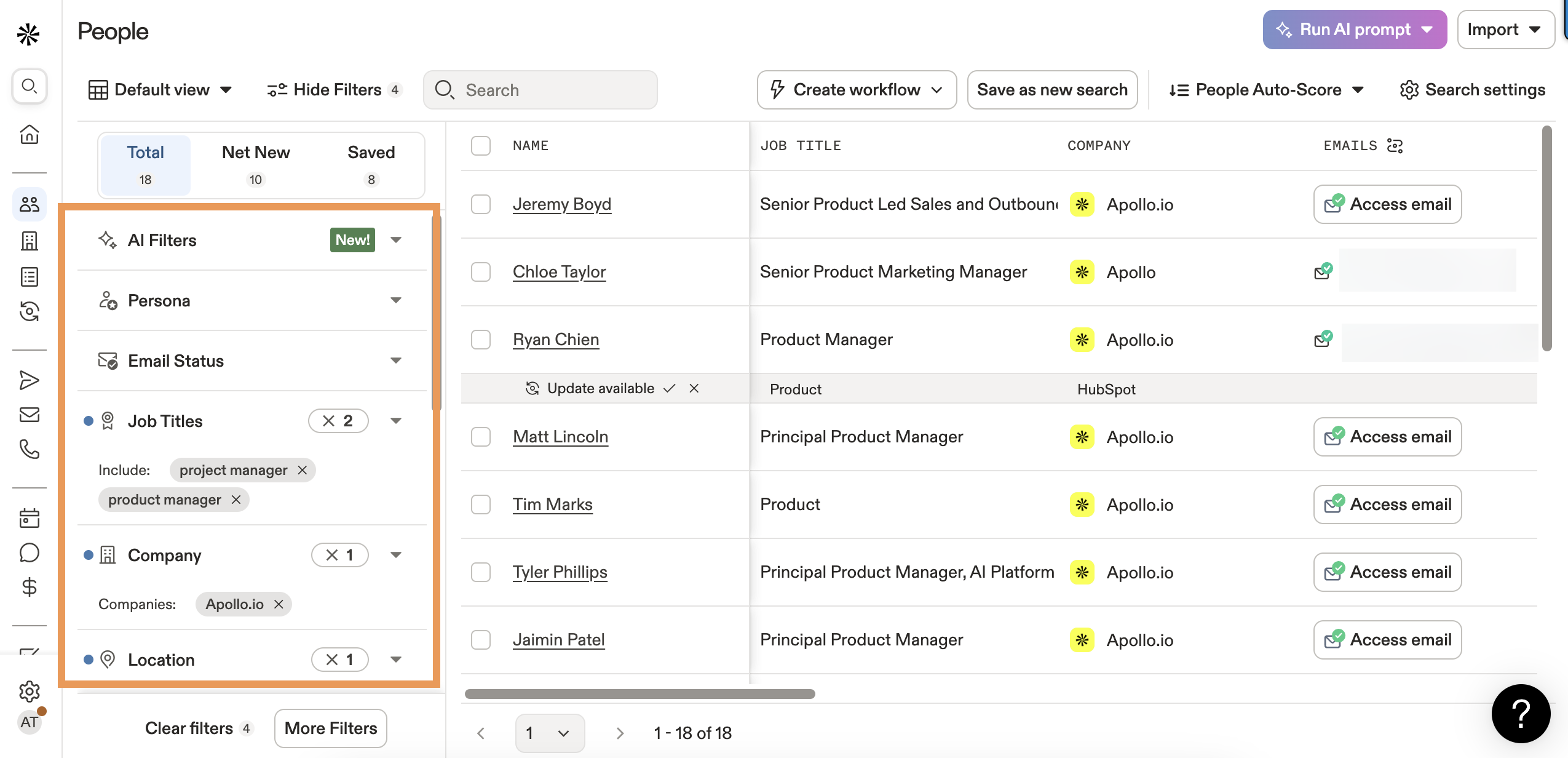
The free plan is genuinely generous: 10,000 email credits/month, basic filtering, and the Chrome extension. It's enough to test whether Apollo's data covers your ICP before committing a dollar.
For teams that need CRM + sequences + dialer + database in one platform, Apollo is the obvious starting point.
Apollo's Honest Limitations
Here's where it gets uncomfortable.
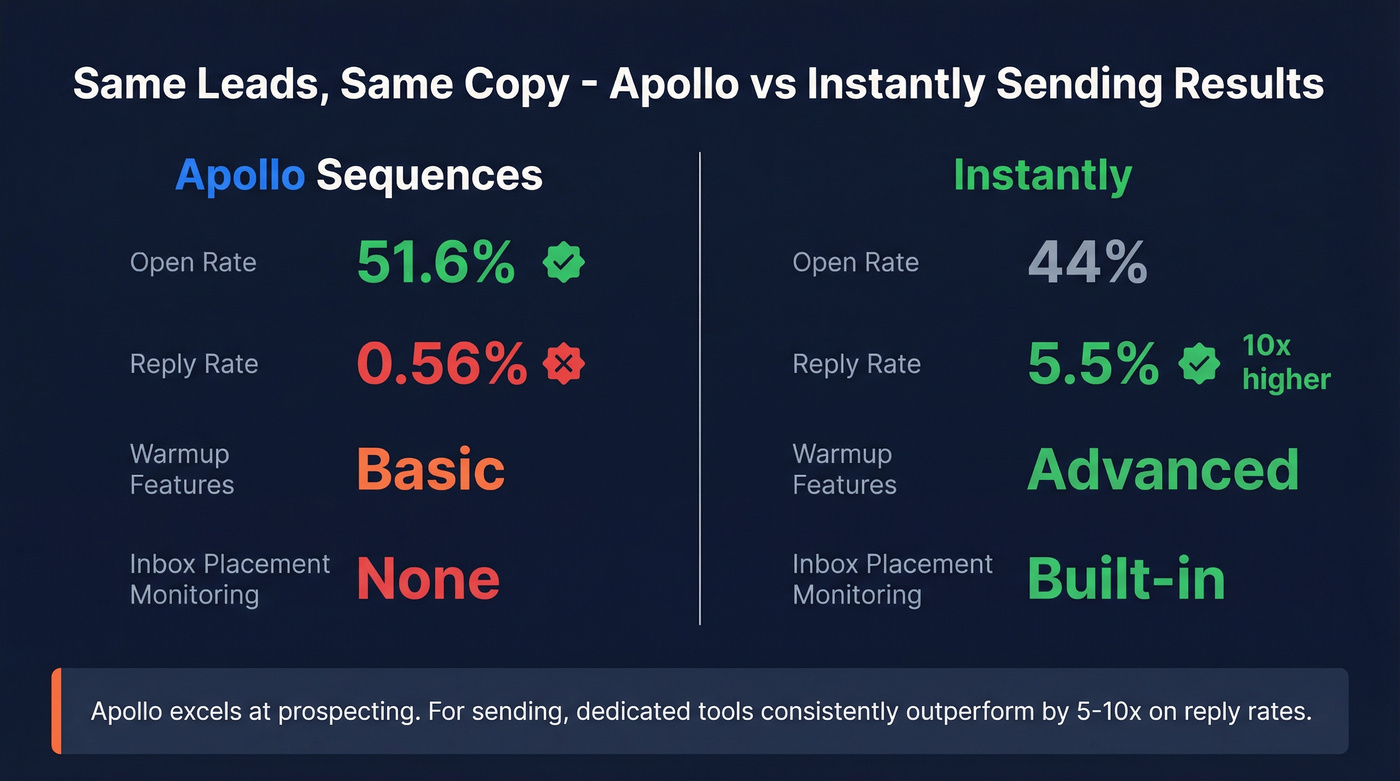
That 527-lead test I mentioned up top? It wasn't an isolated incident. Apollo's open rate was actually higher (51.6% vs Instantly's 44%), which means the emails were getting delivered. But the reply rate was 0.56% vs 5.5%. Same leads. Same messaging. The difference was infrastructure.
The #1 complaint about Apollo on Reddit isn't the database - it's deliverability. Users report emails going to spam even with proper SMTP configuration. One user put it bluntly: "I've been using Apollo for sequencing and have been getting feedback I'm going to Spam. When I send from my Gmail, I'm not going to spam." That's damning.
Apollo's warmup features have gaps. No inbox placement monitoring. No blacklist alerts. No multi-inbox diagnostics. The personalization engine is basic - templates and dynamic variables, but nothing approaching the AI-driven personalization that Instantly or Lemlist offer.
And then there's data accuracy. User-reported accuracy runs 70-80% at best. Bounce rates up to 35% in some cases. For a tool that positions itself as a data platform, that's a problem.
Look - Apollo is a prospecting tool that bolted on a sending engine. The sending engine works. It just doesn't work as well as tools that were built for sending from day one.

Apollo shows a "Verified" badge, but users report 60% catch-all and 21% invalid emails. Prospeo's 5-step verification with catch-all handling, spam-trap removal, and honeypot filtering delivers 98% email accuracy - refreshed every 7 days, not 6 weeks. At $0.01/email, it costs less than one bounced domain repair.
Stop burning your domain on Apollo's unverified "verified" data.
The Data Quality Problem (And How to Fix It)
What "Verified" Actually Means in Apollo
Apollo shows a blue "Verified" badge next to email addresses. You'd think that means the email is confirmed valid.
It doesn't.
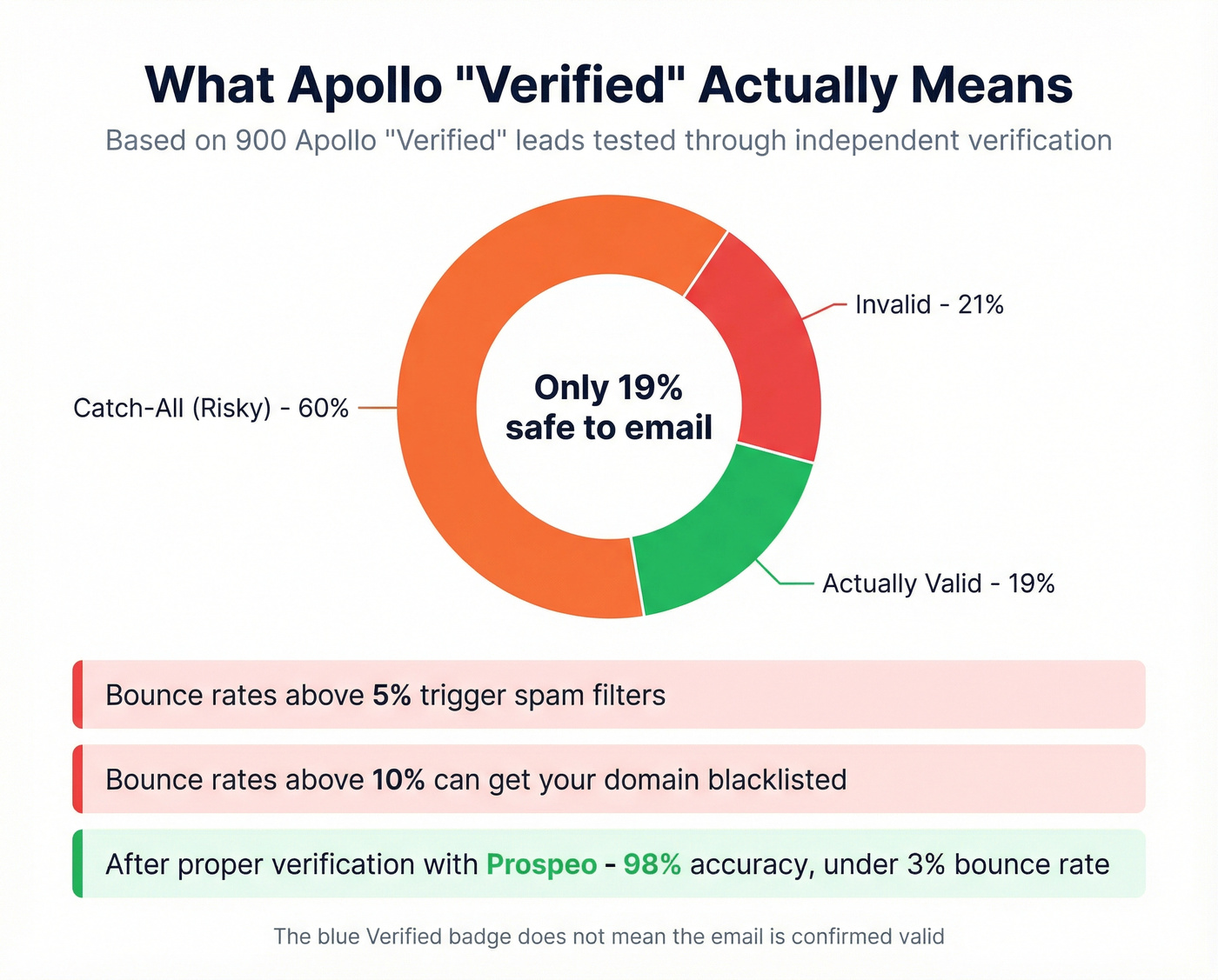
One user exported ~900 Apollo "Verified" leads and ran them through MillionVerifier. The results: 19% valid, 21% invalid, 60% catch-all (risky). That means for every 1,000 "Verified" leads you pull from Apollo, roughly 190 are actually safe to email.
The broader user-reported accuracy of 70-80% is more forgiving, but still means 20-30% of your list is dead weight - or worse, actively damaging your domain reputation. Bounce rates above 5% trigger spam filters. Bounce rates above 10% can get your domain blacklisted.
There's also the "overused data" problem. Everyone's pulling from the same Apollo database. The VP of Sales at that Series B company you're targeting? She's getting 15 Apollo-sourced cold emails a week. Your message isn't just competing with other cold emails - it's competing with the exact same data source.
The Fix - Verify Before You Send
This is where the stack approach pays for itself. Apollo gives you the leads. You need a verification layer to make them safe to email.
Prospeo uses proprietary infrastructure for its 5-step verification process - with catch-all handling, spam-trap removal, and honeypot filtering. The result: 98% email accuracy on 143M+ verified emails, with data refreshing every 7 days versus the industry average of 6 weeks. Unlike most verification tools, it doesn't rely on third-party email providers, which means the verification results are independent of the same infrastructure everyone else is using.

The difference in practice is stark. Stack Optimize, an outbound agency, built from $0 to $1M ARR using Prospeo for verification - maintaining 94%+ deliverability, bounce rates under 3%, and zero domain flags across all clients. That's the kind of infrastructure protection you need when your domain reputation is on the line.
Stack Optimize built a $1M agency keeping bounce rates under 3% across every client. The secret wasn't better copy - it was verifying Apollo leads through Prospeo's proprietary infrastructure before hitting send. 143M+ verified emails, 98% accuracy, zero reliance on third-party providers.
Same Apollo leads, 10x the replies. Verification is the difference.
Technical Setup Checklist
Skip this section at your peril. I've seen teams spend weeks optimizing copy when the real problem was a missing DKIM record.
Domain Authentication (SPF, DKIM, DMARC)
All three are non-negotiable under 2026 Gmail and Yahoo sending standards. Miss any one of them and your emails go straight to spam.
- SPF: Tells receiving servers which IPs can send on behalf of your domain. Verify with GlockApps' free tool.
- DKIM: Cryptographic signature proving the email wasn't tampered with. Google Workspace auto-creates the DKIM key. Verify three values: DKIM_VALID_AU, DKIM_VALID, DKIM_SIGNED.
- DMARC: Policy layer that tells servers what to do with emails that fail SPF/DKIM. Start with
p=none(monitor only), then progress top=quarantine, thenp=rejectas you confirm everything's working.
One gotcha: if you're on Office 365, SMTP AUTH must be enabled for warmup to work. Apollo's own docs flag this, but it trips people up constantly.
Compliance - CAN-SPAM and GDPR
Cold email is legal in most B2B contexts under CAN-SPAM (US) and legitimate interest provisions under GDPR (EU/UK), but you must include an unsubscribe mechanism and honor opt-outs within 10 business days. If you're targeting EU prospects, document your legitimate interest basis and have a Data Processing Agreement ready. Skipping this isn't just risky - it's the fastest way to get your domain permanently flagged by enterprise spam filters.
Secondary Domains and Mailbox Strategy
Never send cold email from your primary domain.
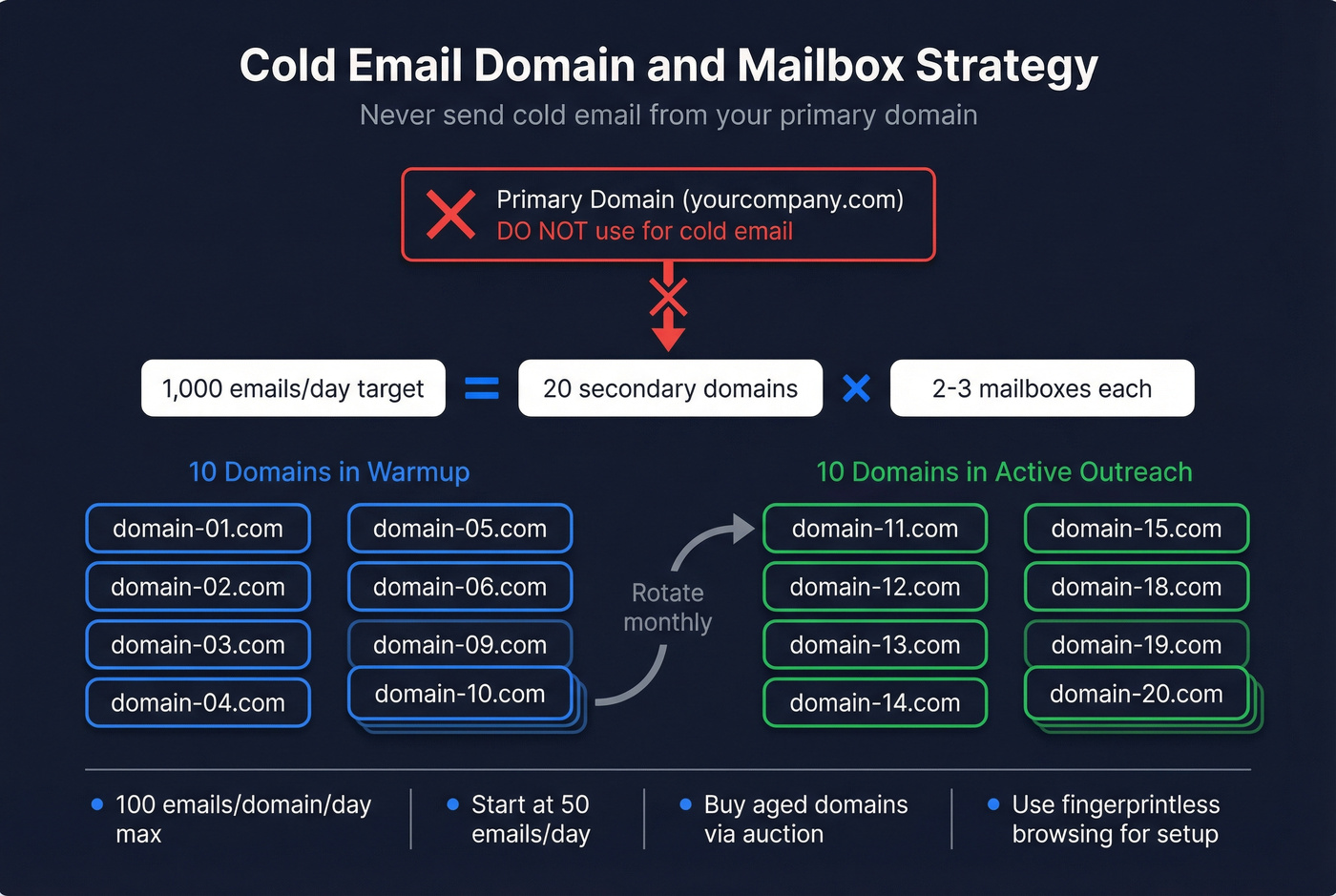
I can't stress this enough. One spam complaint, one blacklist hit, and your entire company's email reputation is toast.
The math: 100 emails per domain per day (including warmup). That's the ceiling. For 1,000 emails/day, you need approximately 20 domains with 2-3 mailboxes each.
Here's the strategy that works:
- Buy aged domains via GoDaddy Auction (domains with existing history perform better than fresh registrations)
- Set up 2-3 Google Workspace mailboxes per domain
- Rotate 10 domains in warmup and 10 in active outreach monthly
- Use fingerprintless browsing when setting up multiple Google Workspace accounts - Google tracks IP patterns and will flag bulk account creation
- Start at 50 emails/day per mailbox and scale gradually
This sounds like a lot of infrastructure. It is. But it's the difference between 0.56% reply rates and 5.5%.
Warmup Strategy - Apollo's Built-In vs. Dedicated Tools
Apollo's Two Warmup Features
Apollo now offers two warmup mechanisms:
Email Warmup (for new mailboxes): Connects to third-party providers that send emails from your mailbox to a private network of inboxes worldwide. These inboxes open, reply, and engage with your messages - simulating real traffic to build sender reputation.
Settings to configure:
- Pacing: Progressive (recommended), Flat, or Randomized
- Volume: Start at 10 emails/day, cap at 40 (never exceed 50)
- Reply rate: Set to 30%, cap at 45%
- Duration: Minimum 2 weeks before sending any outbound
Inbox Ramp Up (for existing mailboxes): Gradually increases your outbound volume on automated sequences. Monitors open rate, reply rate, bounce rate, and spam block rate - alerts you when metrics drop below thresholds. Takes ~2 weeks to complete.
Both features are only available on select paid plans. The free tier doesn't include warmup.
Why Most Practitioners Add a Dedicated Warmup Tool
Apollo's warmup gets your mailbox functional. Dedicated warmup tools get it optimized.
Apollo's warmup lacks inbox placement monitoring (you don't know if you're landing in Primary, Promotions, or Spam), SPF/DKIM/DMARC verification alerts, blacklist monitoring, and multi-inbox diagnostics. That's a lot of blind spots.
Dedicated warmup tools achieve an estimated 15-25% better inbox placement than Apollo's built-in warmup alone. The difference compounds: better inbox placement leads to higher open rates, more replies, more meetings.
The practitioner consensus is clear. One cold email veteran who's sent 5M+ emails put it simply: "I use Instantly's warmup for Apollo campaigns." That's the pattern - Apollo for data, a dedicated tool for warmup and sending.
If you want a standalone warmup tool, MailReach runs $25/inbox/month (drops to $16 at 50+ inboxes) with a 30K+ real inbox network. Lemwarm is another solid option at ~$29/month per inbox. But if you're already using Instantly for sending, its built-in warmup is included at no extra cost.
Building Your Apollo Cold Email Sequence - Step by Step
Sequence Setup in Apollo
Apollo gives you four starting points for building a sequence:
- AI-assisted: Uses your Content Center settings to auto-generate a complete sequence. Fast, decent starting point, but you'll want to customize.
- Template: Pre-built sequences you can modify.
- Clone: Duplicate an existing sequence that's working. The smart move once you have a winner.
- From scratch: Blank canvas. Full control.
Each sequence supports multiple step types:
- Automatic email: Sends on schedule without manual intervention
- Manual email: Queues for your review before sending (useful for high-value prospects)
- Phone call: Adds a call task to your workflow
- LinkedIn: Connection request, send message, view profile, or view posts
- Action items: Custom tasks (send a gift, check their latest blog post, etc.)
A/B testing is available on email steps - you can test two variations and Apollo will track performance. Dynamic variables ({{first_name}}, {{company}}, etc.) personalize at scale. You can also insert AI variables for AI-generated snippets.
Two pro tips: First, always preview emails on real contacts before activating the sequence. Apollo lets you do this, and it catches embarrassing variable failures ("Hi {{first_name}}" showing up literally) before they hit inboxes. Second, Apollo deselects contacts when you navigate away from the list view. Use a naming convention like "[complete] Software - BI Reporting" to track which lists you've already processed.
The 5-Step Multichannel Template
This template consistently performs across industries. Adapt the timing and messaging, but keep the channel mix:
- Day 1 - Email intro: Short (50-75 words), personalized opener, soft CTA. Ask a question, don't pitch.
- Day 2 - LinkedIn connect: Connection request with a brief note referencing your email. No sales pitch.
- Day 4 - Email with case proof: Share a specific result you've driven for a similar company. 75-100 words.
- Day 7 - Phone call: Call the prospect. Leave a voicemail referencing your emails. 30 seconds max. Note: Apollo's built-in dialer uses Twilio VoIP numbers, which some users report get flagged as spam. If call connect rates are low, consider a dedicated dialer.
- Day 10 - Breakup email: "Looks like the timing isn't right. No hard feelings. Here's [resource] in case it's useful later."
For longer sales cycles, extend to a 7-touch sequence over 35 days - adding a value-add touch at Day 8, a question at Day 12, and a different-angle email at Day 18 before the breakup.
Critical rules:
- Single persona per sequence. Don't mix CTOs and Marketing VPs in the same flow.
- 50 emails/day per mailbox as a safe starting limit.
- Never exceed 100 emails per domain (including warmup).
Sending Schedule and A/B Testing
Apollo offers 26+ timezone options. Enable "contact's local timezone" if location data is available - this is the single biggest deliverability lever most people ignore. An email that arrives at 9am local time gets opened. An email that arrives at 2am gets buried.
Default settings skip US holidays (Labor Day, Independence Day, Memorial Day, Thanksgiving, Christmas Eve, Christmas Day, New Year's Day). Keep this on.
Optimal send window: Tuesday through Thursday, 9am-11am in the recipient's timezone. Monday mornings are inbox-clearing time. Friday afternoons are checkout time. Midweek mornings are when people actually read.
For A/B testing, follow this hierarchy:
- Subject lines first - highest-leverage variable
- Openers - the first sentence determines whether they read the rest
- CTA position and phrasing - soft vs. direct, question vs. statement
Test one variable at a time. Run each test for at least 100 sends per variant before drawing conclusions.
Writing Cold Emails That Actually Get Replies
Subject Lines - What 5.5M Emails Tell Us
Belkins analyzed 5.5M cold emails in partnership with Reply.io across all of 2024. The data is clear:
| Factor | Open Rate |
|---|---|
| 2-4 words | 46% |
| Question format | 46% |
| Personalized | 46% vs 35% without |
| CTA in subject | 44.6% |
| 1 word (too vague) | 38% |
| 9-10 words (too long) | 34-35% |
| ALL CAPS | 30% |
| Marketing jargon | Below 36% |
| Numbers in subject | 27% vs 28% without |
The takeaway: short, personalized, question-based subject lines win. Marketing jargon ("Boost your ROI," "Transform your business") actively hurts performance. Numbers in subject lines - contrary to what most guides tell you - slightly decrease open rates.
Practitioner-tested examples with reported response rates:
- "Quick question, [First Name]" - 25-30% response rate. Simple, curiosity-driven, works at scale.
- "[Their Company] and [Your Company]" - 20-25% response rate. Implies a relationship or partnership angle.
- "[Specific thing they posted about]" - 30-35% response rate. Highest-performing but requires manual research per prospect.
The pattern? Anything that sounds like a real person wrote it to a specific person outperforms anything that sounds like a campaign.
Email Body - The 50-125 Word Rule
Optimal cold email length is 50-125 words. One clear CTA.
Here's what to cut:
- Open/click tracking: Tracking pixels add code that spam filters detect. Turn them off.
- Links: Every link is a spam signal. Zero links in your first email. If you must include one later in the sequence, use a naked URL, not a hyperlink.
- Signatures: HTML signatures with images, social icons, and legal disclaimers are spam magnets. Use a plain text sign-off: your name, title, company. Nothing else.
- Images: Zero images in cold emails. Period.
Use soft CTAs. Instead of "Book a 15-minute call," try "Would it make sense to chat about this? A yes or no works." Soft CTAs generate replies (which boost your sender reputation) and also serve as a deliverability signal - if people are replying "no thanks," your emails are still landing in inboxes.
Tiered Personalization - Match Effort to Deal Size
Not every prospect deserves the same level of personalization. Here's the framework:
- Tier 1 (enterprise, high ACV): Manual research. Reference their latest earnings call, a specific initiative, or a recent hire. Custom opener for every email.
- Tier 2 (mid-market): Dynamic variables + AI-generated snippets. Use Apollo's AI variables to pull in company-specific context at scale.
- Tier 3 (high volume, smaller deals): Template-based personalization with {{first_name}}, {{company}}, and industry-specific pain points. Still personal enough to feel human.
If your average deal is under $10k, skip Tier 1 personalization entirely. The math doesn't work. Spending 20 minutes researching a prospect who'll generate $8k in revenue is a losing trade. Save the deep research for deals that justify it.
Offer Strategy - The 12x Difference
This is the insight that changes everything for most teams.
A Free Tier offer outperformed a Free Trial offer by 12x. The Free Tier generated 50 emails per lead acquired. The Free Trial required 600 emails per lead. Same copy. Same targeting. Same sending infrastructure. The only variable was the offer.
If you're getting low reply rates and you've already fixed deliverability, look at what you're asking the prospect to do. "Try our product free forever with limited features" is a fundamentally different ask than "Start a 14-day trial that requires a credit card."
Some practitioners are seeing results by openly acknowledging the email is automated - it builds trust and differentiates from the sea of fake personalization. Worth testing if your audience is technical or startup-savvy.
Choosing the Right Cold Email Software for Business Development
The Practitioner Workflow
The consensus workflow among serious cold email practitioners in 2026: Apollo for data, enrichment/verification layer, dedicated sending tool.

Here's the weekly cadence that works:
- Monday: Prospect and export 500-1,000 leads from Apollo using targeted filters
- Tuesday: Run exports through enrichment - clean job titles, verify emails, check ESP. Only send to Google recipients. One agency tested 4M emails to Google recipients vs 1M to Outlook - the deliverability difference was dramatic enough that they stopped sending to Outlook entirely.
- Wednesday: Import verified leads into your sending tool, set up campaigns
- Thursday-Friday: Monitor, optimize, handle replies
After enrichment, expect 30-40% of Apollo data to change (updated emails, corrected titles, new company info) and 20-30% of emails to be discarded as non-Google ESP or invalid. That's not a bug - that's the enrichment layer doing its job.
Some high-volume practitioners skip Apollo's export entirely and scrape the data via tools like Apify, then run it through enrichment. This avoids Apollo's credit system but adds complexity. For most teams, the standard export workflow is the right call.
For teams that need Clay's full workflow builder (custom AI prompts, multi-step enrichment tables, waterfall logic across dozens of data sources), the Apollo to Clay to Instantly stack is the gold standard. But Clay Explorer starts at ~$149/month. If your enrichment needs are primarily email verification and contact data, you don't need it.
Why Not Use Mailchimp or ActiveCampaign for Cold Email?
This comes up constantly. Can you use Mailchimp for cold email, or run cold outreach through ActiveCampaign?
No. Both platforms explicitly prohibit sending to contacts who haven't opted in. Using Mailchimp for cold outreach will get your account suspended, often within days. ActiveCampaign enforces similar policies and monitors for cold email patterns. These are email marketing platforms designed for newsletters and nurture sequences to existing subscribers, not outbound prospecting to cold lists.
The same applies to HubSpot. While HubSpot CRM cold emailing is technically possible through its Sales Hub sequences, the platform's sending limits are restrictive and it wasn't built for high-volume outbound. A cold email HubSpot integration works better when you use HubSpot as your CRM for managing replies and pipeline - syncing deal data back from your dedicated sending tool - rather than as the sender itself.
If you're evaluating cold email software for business, the key distinction is between platforms built for outbound (Instantly, Smartlead, Lemlist) and platforms built for inbound marketing that happen to have email features. Apollo straddles both worlds, which is exactly why the stack approach works: use Apollo's prospecting strengths, then hand off to purpose-built sending infrastructure.
Stack Cost Breakdown
| Stack | Components | Monthly Cost |
|---|---|---|
| Apollo alone (Basic) | Apollo $49 | ~$49/mo |
| Apollo alone (Pro) | Apollo $79 | ~$79/mo |
| Budget stack | Apollo $49 + verification + Instantly $30 | ~$79-118/mo |
| Full stack | Apollo $49 + Clay ~$149 + Instantly $30 | ~$228/mo |
| Scale stack | Apollo $79 + Clay ~$349 + Instantly $78 | ~$506/mo |
The budget stack at ~$79-118/month outperforms Apollo's Professional plan at $99/month for pure cold email. You get better deliverability, better data quality, and you're not paying for Apollo features you don't use (dialer, CRM, advanced reporting).
The scale stack at ~$506/month is for teams sending 50,000+ emails/month with complex enrichment needs. If that's you, the ROI math works - one closed deal covers months of tooling.
Apollo Pricing Breakdown
Here's the full Apollo pricing breakdown:
| Plan | Annual | Monthly | Key Limits |
|---|---|---|---|
| Free | $0 | $0 | 10,000 email credits/mo, limited mobile/export credits |
| Basic | $49/user/mo | $59/user/mo | Intent data, advanced filters |
| Professional | $79/user/mo | $99/user/mo | Uncapped sending, AI writing, dialer |
| Organization | $119/user/mo | $149/user/mo | 3-user min, call transcripts |
Email credits are unlimited across all paid plans (subject to fair usage). That sounds great until you realize the credit system applies to mobile numbers and exports - and those credits deplete fast at scale.
The hidden costs that catch teams off guard:
- Advanced filters (technographics, intent signals) are gated to higher tiers. The free and Basic plans give you a fraction of Apollo's filtering power.
- Seat reductions aren't allowed mid-term. If you sign an annual contract for 10 seats and only need 7 after Q1, you're paying for 10 all year.
- Mobile credits burn quickly. If your outbound strategy includes phone touches (it should), budget for credit top-ups.
Two data breaches (2018 and 2021) exposed data from 130M+ records combined. Apollo has improved security since, but it's worth knowing if your compliance team asks.
FAQ
Can you send cold emails directly from Apollo?
Yes - Apollo has a built-in sequencer supporting automatic and manual email steps, A/B testing, and multichannel touches including calls and LinkedIn. That said, dedicated sending tools like Instantly consistently outperform Apollo's sequencer on deliverability and reply rates. The 527-lead test showed a 10x reply rate difference: 5.5% on Instantly vs. 0.56% on Apollo with the same leads and copy.
How many cold emails can you send per day with Apollo?
Apollo recommends starting at 50 emails per mailbox per day, with a hard ceiling of 100 emails per domain including warmup volume. For 1,000 emails/day, you need approximately 20 domains with 2-3 mailboxes each, rotating between warmup and active sending monthly.
Why are my Apollo cold emails going to spam?
Common causes: unverified data causing bounces above 5%, missing SPF/DKIM/DMARC authentication, no warmup period, open or click tracking enabled, or sending too many emails from a single domain. Multiple users report identical emails landing in inbox from Gmail but hitting spam through Apollo's sequencer - pointing to infrastructure, not content.
Is Apollo's email data accurate enough for cold outreach?
Apollo's user-reported accuracy runs 70-80%. One audit of "Verified" contacts found only 19% fully valid, with 60% flagged as risky catch-all addresses. Always run Apollo exports through an independent verification tool before sending. Verification costs pennies per lead - a blacklisted domain costs months of lost pipeline.
What's the best tool to pair with Apollo for cold email?
Instantly ($30/mo) for sending and warmup, plus Prospeo for email verification at 98% accuracy. This stack runs under $100/month and consistently outperforms Apollo used as an all-in-one. For teams needing deep enrichment with AI personalization, add Clay between Apollo and your sending tool - though at ~$149/month it's only justified for complex workflows.