

Auto Follow-Up Emails: Strategy, Tools, and the Step Everyone Skips
It's 2026 and your CRM still can't do "if no reply in 3 days, send this" without a plugin. Meanwhile, your SDRs are manually flagging emails, setting calendar reminders, and losing deals in the gaps. The fix isn't more discipline - it's building a proper auto follow-up system with clean data behind it.
Most automated follow-up failures aren't a tool problem. They're a data problem.
The Quick Version
- Send 2-3 follow-ups spaced 3-7 days apart. A 3-7-7 cadence (Day 0, Day 3, Day 10, Day 17) captures 93% of replies by Day 17.
- Each follow-up addresses a different objection. Never just "bumping this to the top of your inbox." Every message needs a new reason to reply.
- Verify your contact list first. Bad data means you're automating bounces, not conversations.
Why Automated Follow-Ups Work
The numbers aren't subtle. Instantly's 2026 benchmark report analyzed billions of cold email interactions and found an average reply rate of 3.43%. But here's the part most people miss: 42% of all replies come from follow-ups, not the initial email. If you're sending one email and moving on, you're leaving nearly half your replies on the table.
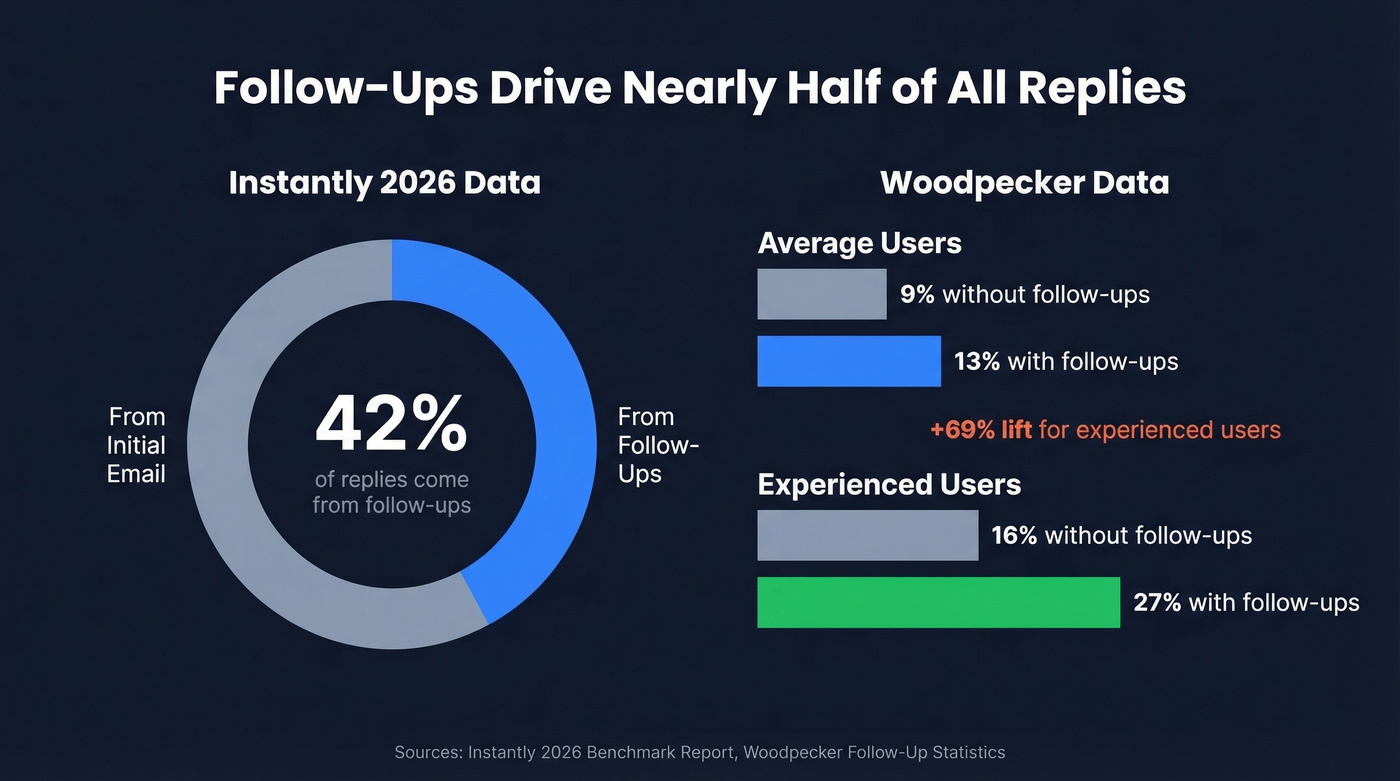
Woodpecker's data tells a similar story. Without follow-ups, their users averaged a 9% reply rate. With at least one follow-up, that jumped to 13%. For experienced users who'd dialed in their messaging, the gap was even wider - 16% without follow-ups versus 27% with them. That's the difference between a pipeline that works and one that doesn't.
You don't need 10 follow-ups. You need 3 good ones.
How Many to Send and When
The sweet spot is 4-7 total touchpoints (initial email plus follow-ups). Beyond that, diminishing returns hit hard.
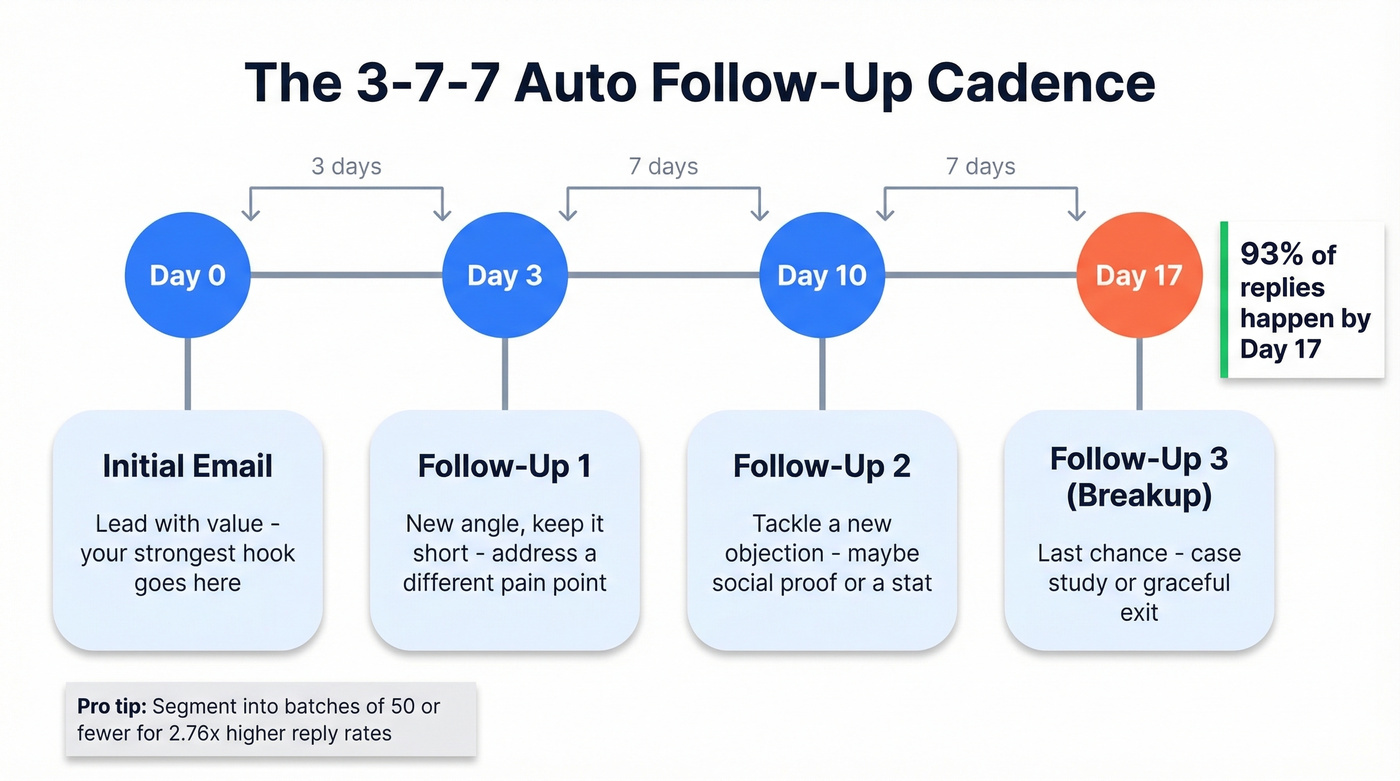
Here's the cadence we've seen work best:
| Touchpoint | Day | Purpose |
|---|---|---|
| Initial email | Day 0 | Lead with value |
| Follow-up 1 | Day 3 | New angle, short |
| Follow-up 2 | Day 10 | Different objection |
| Follow-up 3 | Day 17 | Breakup or case study |
The 3-7-7 spacing gives prospects breathing room without letting the thread go cold. Wait at least 2-3 days before the first follow-up - anything sooner feels pushy. If you want a deeper breakdown of timing rules, see when should i follow up on an email.
One tactic that flies under the radar: segment your lists into cohorts of 50 or fewer contacts. Smaller batches pull 2.76x higher reply rates than mass blasts. You can personalize more, spot deliverability issues faster, and iterate on copy before scaling what works.
And don't obsess over send times. Woodpecker found that day-of-week and time-of-day have no meaningful impact on reply rates. Cadence and copy matter far more than whether you hit "send" at 9:07 AM or 2:15 PM.
Copy That Gets Replies
Here's the thing: most follow-ups fail because they say nothing new. "Just following up" is the email equivalent of a shrug. Every follow-up should address a different objection - no need, value unclear, no urgency, don't want it, or don't trust you. Map one objection per email and you won't run out of angles across three messages. If you need starting points, steal from these follow-up templates.
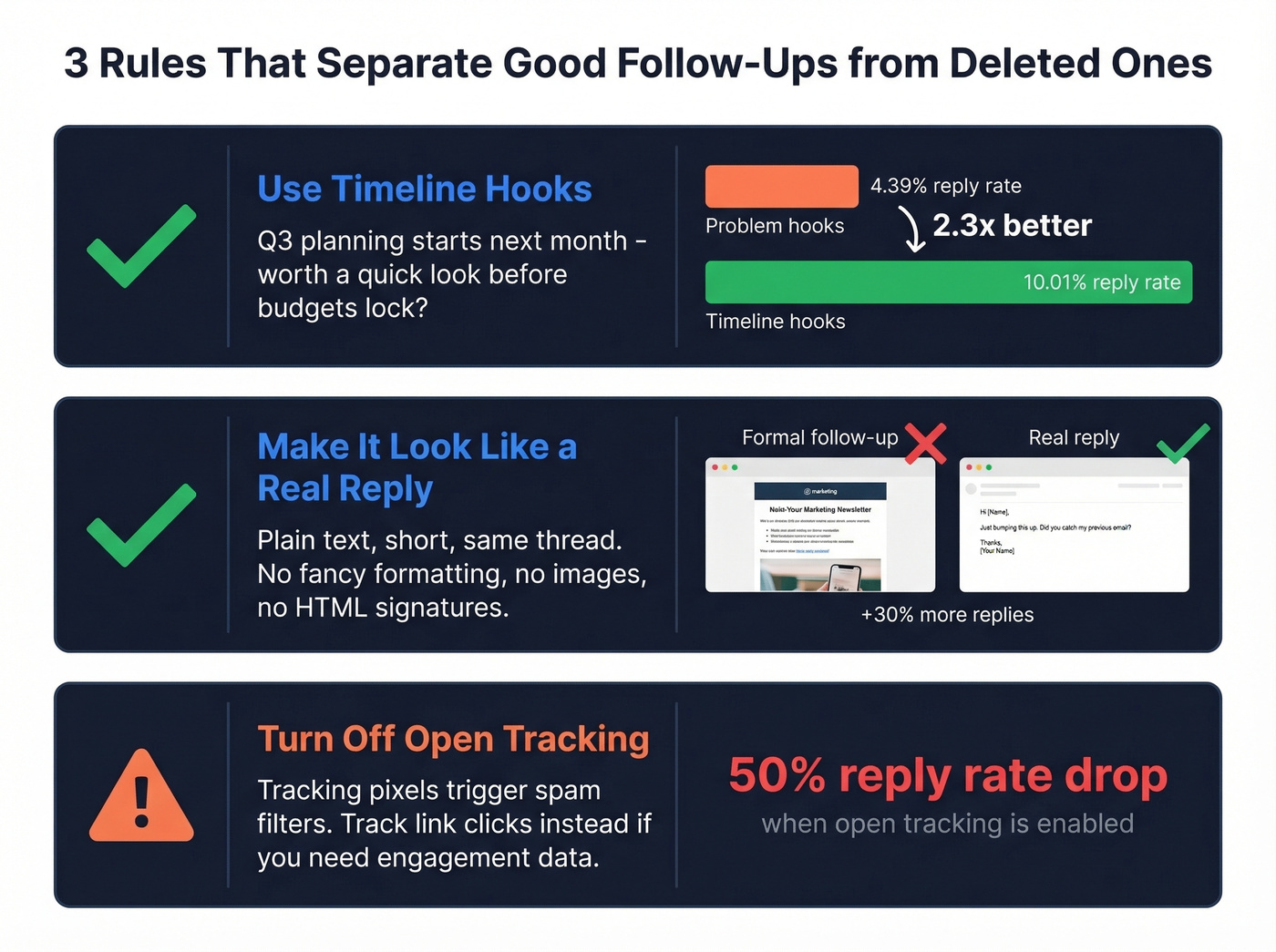
Three principles that move the needle:
- Use timeline hooks, not problem hooks. Timeline-based angles ("Q3 planning starts next month") pull a 10.01% reply rate versus 4.39% for problem-based hooks. That's a 2.3x gap.
- Make it look like a real reply. Plain text, short, sent as a reply in the same thread. Follow-ups that feel like real replies outperform formal follow-ups by roughly 30%. (More on sales communication patterns that don’t sound templated.)
- Turn off open tracking. This is the contrarian take most people aren't ready for. Tracking email opens can cut your reply rate by half. The tracking pixel triggers spam filters. Track link clicks instead if you need engagement data. If you want the technical why, read up on email tracking pixels.
Here's what a timeline-hook follow-up actually looks like:
Hey {{firstName}}, quick thought - most teams lock Q3 budgets by end of June. If {{painPoint}} is on the roadmap, it's worth a 15-min look before planning wraps. Want me to send over the one-pager?
Short, specific, tied to a deadline. No "just bumping this" in sight.

42% of replies come from follow-ups - but only if those follow-ups actually land. Prospeo's 98% email accuracy and 7-day data refresh mean your sequences hit real inboxes, not dead addresses. Meritt cut their bounce rate from 35% to under 4% and tripled pipeline to $300K/week.
Clean your list before you automate a single follow-up.
The Step Everyone Skips: Data Hygiene
Let's be real about what actually kills automated follow-up sequences: bad data. You can write perfect copy, nail your cadence, and pick the best tool on the market - none of it matters if 8% of your emails bounce. If you’re diagnosing issues, start with email bounce rate benchmarks and codes.
The thresholds are unforgiving. Keep overall bounces under 2% and hard bounces under 1%. Hit a 0.3% spam complaint rate and Google/Yahoo will severely throttle your sending. Once your sender reputation tanks, recovery takes 30-60 days. That's a month or two of dead pipeline. (If you’re already in the danger zone, here’s how to improve sender reputation.)

This is where verification fits into the stack. Prospeo verifies emails at 98% accuracy with a 7-day data refresh cycle, so you aren't sending to stale addresses that went dark three months ago. The results speak for themselves: Meritt went from a 35% bounce rate to under 4% after switching, and Stack Optimize runs deliverability above 94% with zero domain flags across all their clients. If you’re comparing vendors, see these data enrichment services and email reputation tools.
Hot take: If your deals average under $15K, you probably don't need a $1,000/month sequencing platform. But you absolutely need clean data. A $30/month tool with verified contacts will outperform a $300/month tool sending to garbage lists every single time.
You just built a killer 3-7-7 cadence with timeline hooks and plain-text follow-ups. Now don't waste it on a list full of bounces. At ~$0.01/email with no contracts, Prospeo costs less than a single bounced sequence costs your domain reputation.
Bad data kills good sequences. Verify first, automate second.
Best Auto Follow-Up Tools in 2026
There are four categories worth knowing:
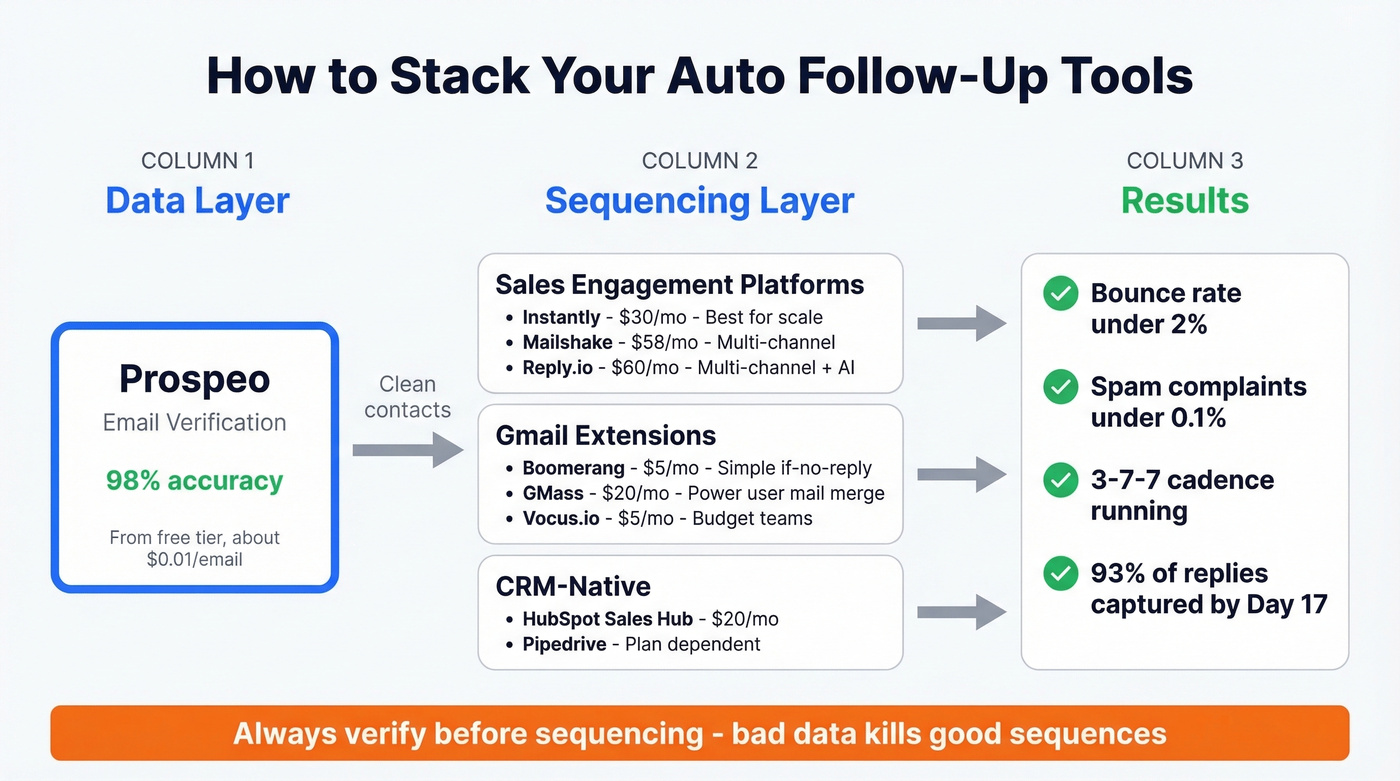
| Tool | Category | Starting Price | Best For |
|---|---|---|---|
| Prospeo | Data verification | Free tier; ~$0.01/email | List cleaning first |
| Instantly | Sales engagement | ~$30/mo | Cold outbound at scale |
| Boomerang | Gmail extension | $4.99/mo | Solo "if no reply" |
| GMass | Gmail extension | $19.95/mo | Mail merge + sequences |
| Vocus.io | Gmail extension | $5/user/mo | Budget Gmail teams |
| Mailshake | Sales engagement | $58/mo | Multi-channel sales |
| Reply.io | Sales engagement | $60/mo | Multi-channel + AI |
| Saleshandy | Sales engagement | $25/mo | Budget outbound |
| HubSpot Sales Hub | CRM-native | $20/mo | HubSpot users |
Gmail Extensions
Skip these if you're running campaigns to more than 200 contacts. They're built for individual follow-ups, not scaled outreach.
Boomerang is the simplest option - you write your email, schedule a follow-up, and if the recipient replies before the trigger date, Boomerang cancels it automatically. At $4.99/mo, it's elegant for solo users who just need "if no reply, send this" without learning a new platform. GMass is the power user's pick, turning Gmail into a lightweight outreach platform with mail merge, automated sequences, and reply detection all inside your inbox. At $19.95/mo, it's the best value for running campaigns from Gmail. Vocus.io rounds out the category at $5/user/mo with Salesforce integration that punches above its price.
Sales Engagement Platforms
Instantly is the go-to for teams running cold outbound at scale, and its benchmark data doubles as some of the most useful sequencing guidance you can steal. At ~$30/mo, it's hard to beat on value. If you’re evaluating options, compare more follow up email software and broader SDR tools.
Mailshake ($58/mo) and Reply.io ($60/mo) add multi-channel capabilities - phone, social, and email in one sequence. For teams that need everything in a single workflow, they're worth the premium. Saleshandy at $25/mo is the budget entry if you just need automated email sequences without the bells and whistles.
CRM-Native Options
HubSpot Sales Hub starts at $20/mo and handles basic sequences natively. If you're already on HubSpot, it's the path of least resistance. Pipedrive can automate follow-ups too, including "no response after X days" triggers, but what you can actually do depends on your plan and whether email sync is enabled - so teams often pair it with a dedicated sequencing tool. (If you’re still shopping, here are examples of a CRM and contact management software to sanity-check fit.)
The Data Layer
Pair any sequencing tool above with email verification before contacts enter your sequences. Upload a CSV, verify in bulk, and push clean contacts to Instantly, Smartlead, or Lemlist via native integrations. With 143M+ verified emails in the database and a 7-day refresh cycle, you're working with data that's actually current - not six-week-old records that have already gone stale.
Mistakes That Kill Results
We've watched teams burn domains by making the same five mistakes. A recurring complaint on r/sales and r/coldemail is that drip sequences feel "robotic." That's usually a symptom of one of these:
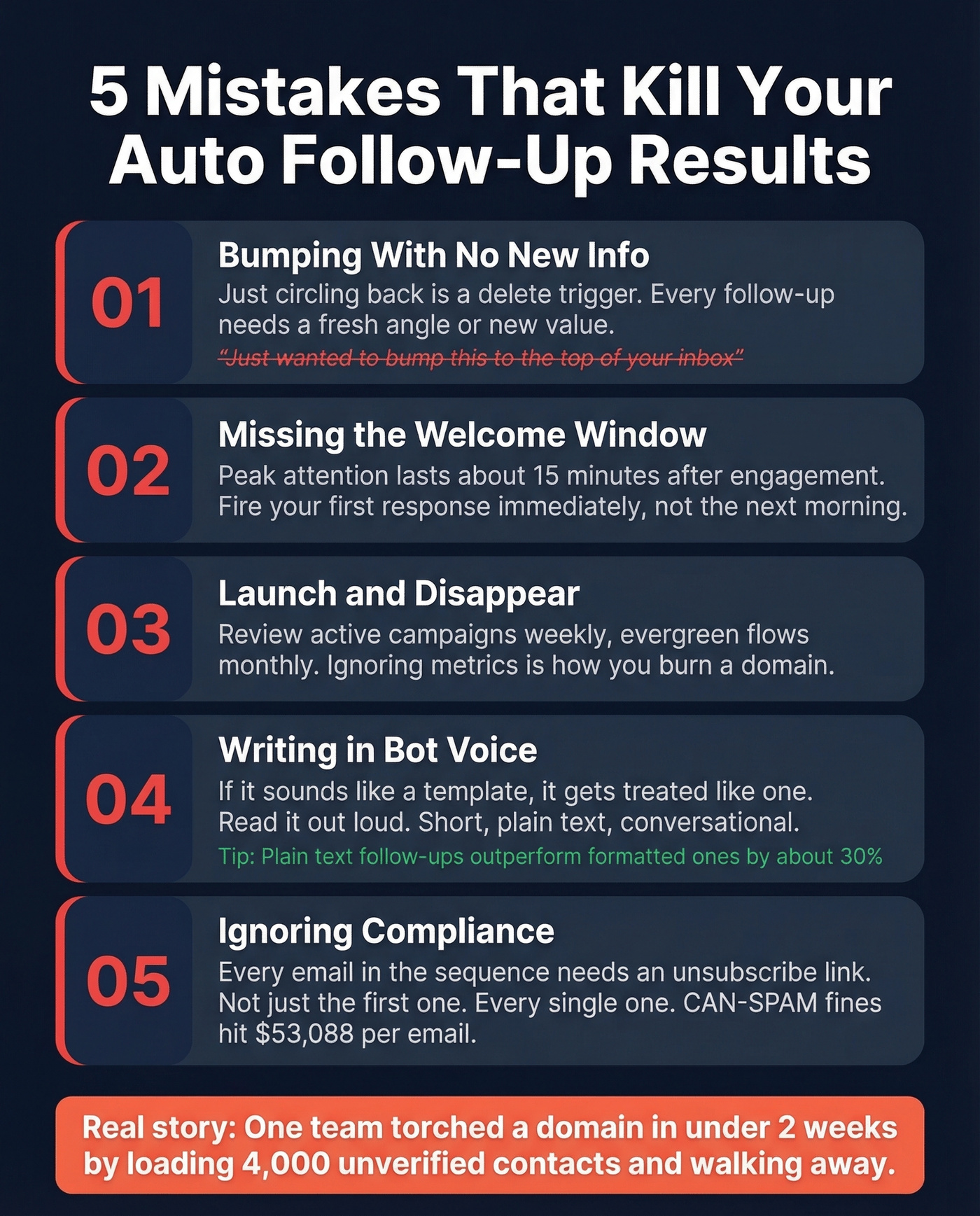
- "Bumping" with no new information. Every follow-up needs a new angle or a new piece of value. "Just circling back" is a delete trigger. If you’re tempted to write it anyway, see how to say just checking in professionally.
- Missing the welcome window. When someone opts in or engages, they're at peak attention for about 15 minutes. Your first automated response should fire immediately, not the next morning.
- "Launch and disappear." Setting up a sequence and never checking metrics is how you burn a domain. Review active campaigns weekly, evergreen flows monthly.
- Bot voice. If your follow-up reads like a template, it gets treated like one. Short, plain text, conversational tone. Read it out loud - if it sounds like a robot, rewrite it.
- Ignoring compliance. Every email in a sequence needs an unsubscribe option. Not just the first one. Every single one.
Look, I've personally seen a team torch a perfectly good domain in under two weeks because they loaded 4,000 unverified contacts into a sequence and walked away. Don't be that team.
Compliance Checklist
The penalties are real and the thresholds are tighter than most teams realize:
| Requirement | Standard | Penalty |
|---|---|---|
| Unsubscribe honored | Within 10 business days | CAN-SPAM: $53,088/email |
| Physical address | In every email | CAN-SPAM: $53,088/email |
| Spam complaints | Under 0.1% (0.3%+ = severe throttling) | Domain throttling |
| GDPR consent | Lawful basis required | EUR 20M or 4% revenue |
| CCPA compliance | Audit-ready list sources | $7,500/violation |
The 2026 wrinkle: regulators are now scrutinizing AI-enriched data sources - scraped job titles, intent signals, purchased lists. If you can't document where your contacts came from, you're exposed. Segment by geography and apply the strictest standard when in doubt.
FAQ
How many follow-ups should I send before stopping?
Two to three follow-ups capture the vast majority of replies - 93% by Day 17 using a 3-7-7 cadence. Beyond 4-7 total touchpoints, returns diminish sharply. Spend your time improving the first three rather than adding a sixth.
Can I automate follow-ups in Gmail without extra tools?
No. Gmail doesn't have a built-in "if no reply, send this" feature. Extensions like Boomerang ($4.99/mo) or GMass ($19.95/mo) add this directly inside Gmail without requiring a separate platform.
Does email verification actually improve follow-up results?
Bounced emails damage sender reputation, pushing even valid follow-ups to spam. Keeping bounce rates under the 2% threshold is the single highest-leverage step before launching any sequence. A free verification tier with 75 emails per month is enough to test the impact on a small batch before committing.
How do I avoid sounding robotic in automated sequences?
Treat each message as a standalone email with its own value - not a reminder that you already emailed. Use plain text, keep it under five sentences, and tie each follow-up to a specific timeline or objection. Recipients engage with fresh angles, not "just checking in" templates.