

Blacklist Removal: The Complete Guide for 2026
Your bounce rate spiked to 40% over the weekend. Monday morning, your inbox is full of delivery failure notifications, and your sales team can't reach prospects. Something put you on a blacklist - and now blacklist removal is your top priority.
The fix depends entirely on what type of blacklist you're dealing with. Let's sort that out first.
What You Need (Quick Version)
Three paths, three very different problems:
Email/IP blacklist? Identify which blacklist flagged you using bounce codes, fix the root cause - compromised account, bad list, missing authentication - then request delisting provider by provider. Don't skip the fix. You'll just get relisted.
Domain blacklist? Different remediation path than IP blacklists. Your domain may have appeared in spam messages even if you didn't send them. Check domain-specific lists, clean up your sending practices, and request removal separately.
Phone/IMEI blacklist? Contact your carrier directly. Bring proof of purchase and ID. Everything else - every "IMEI removal tool" you've seen advertised - is a scam.
If your blacklisting was caused by sending to bad data (and it often is), verify your list with a tool like Prospeo before sending again. Bad addresses and spam traps or honeypots are the fastest way to land on a blacklist.
What Is a Blacklist?
If your IP, domain, or device identifier ends up in a blacklist database, your messages stop arriving. Email servers, carriers, and security providers check these lists in real time to decide whether to accept or reject incoming traffic.
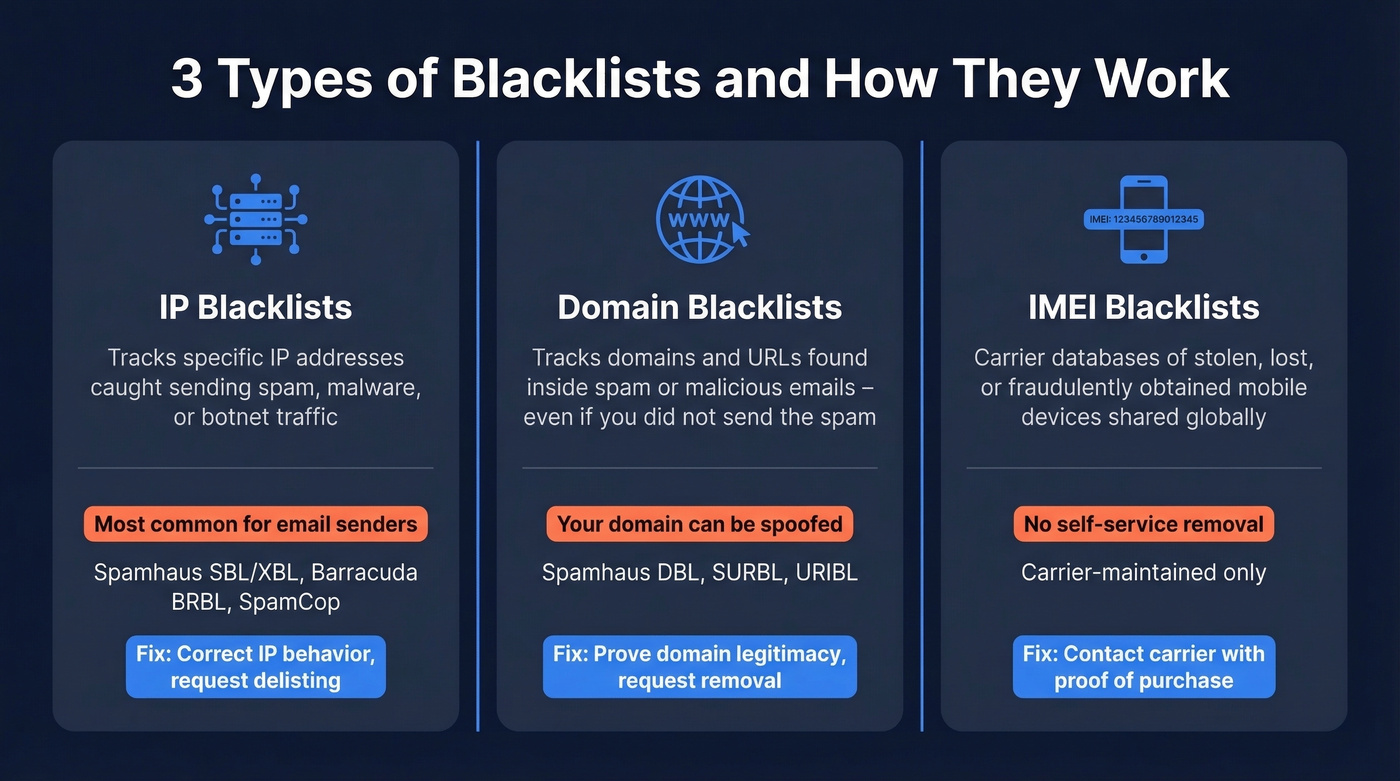
There are three distinct categories, and they work differently.
IP blacklists track specific IP addresses caught sending spam, malware, or botnet traffic. These are the most common type for email senders. If your mail server's IP lands on Spamhaus or Barracuda, your outbound email gets rejected at the door.
Domain blacklists track domains and URLs that appeared inside spam or malicious emails. Here's the critical distinction: being on a domain blacklist doesn't necessarily mean your domain sent the spam. Your domain might have been spoofed or referenced in someone else's messages. The remediation path differs from IP blacklists because you're proving the domain is legitimate, not that an IP stopped sending spam.
IMEI blacklists are carrier-maintained databases of stolen, lost, or fraudulently obtained mobile devices. Carriers share this data globally. Unlike email blacklists, there's no self-service removal - only the carrier that flagged the device can remove it.
Why You Got Blacklisted
Not all listings happen for the same reason. Understanding the category matters because it determines what you need to fix before requesting delisting.
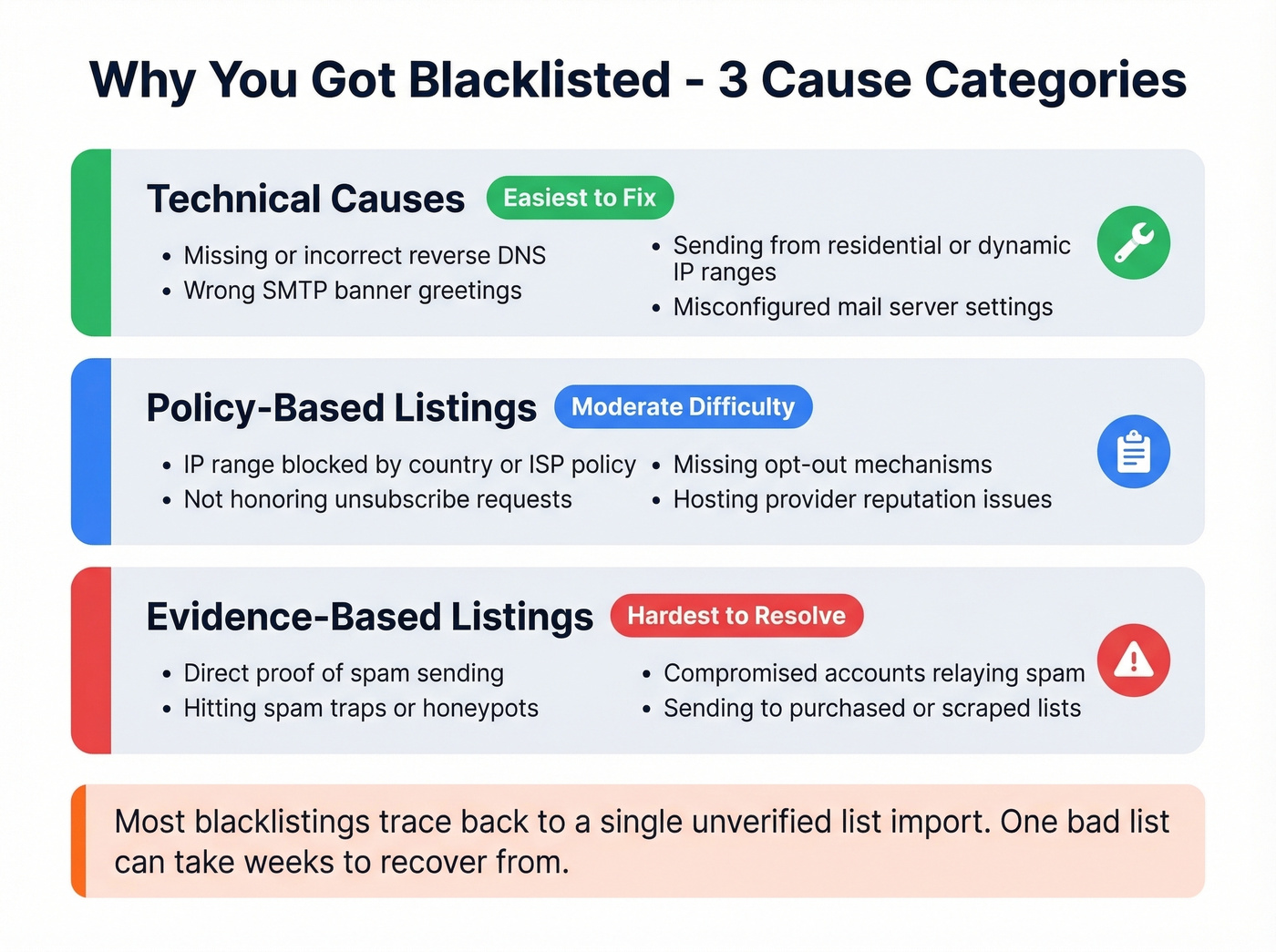
Technical Causes
Configuration problems that make your server look suspicious. Missing or incorrect reverse DNS is the most common - if your IP doesn't resolve to a valid hostname, many blacklists flag it automatically. Wrong SMTP banner greetings, sending from IP ranges associated with residential or dynamic addresses, and misconfigured mail servers all fall here. The fix is straightforward: correct the configuration and request delisting.
Policy-Based Listings
Some blacklist operators block entire IP ranges from certain countries, ISPs, or hosting providers based on policy decisions. Others list you for not honoring unsubscribe requests or lacking proper opt-out mechanisms. These listings aren't about spam evidence - they're about the operator's rules. You'll need to either comply with their specific policies or move to infrastructure that isn't covered by the block.
Evidence-Based Listings
This is the big one. Direct proof of spam, sending to spam traps or honeypots, compromised accounts relaying spam - these generate evidence-based listings that are the hardest to resolve. Spam traps are email addresses specifically designed to catch senders using purchased or scraped lists. Hit enough of them, and you're on Spamhaus before lunch.
In our experience, most blacklistings trace back to a single unverified list import. Someone on the team buys a list or scrapes contacts, loads them into the CRM, and fires off a campaign without verification. That one decision can take weeks to recover from.
How to Identify Which Blacklist Hit You
Before you can fix anything, you need to know exactly which blacklist flagged you. Bounce messages are your first clue.
Bounce Code Cheat Sheet
| Bounce Code | Likely Blacklist | What It Means |
|---|---|---|
550 5.7.1 ... Client host blocked |
Spamhaus | IP on SBL/XBL |
550 SC-001 |
Barracuda | BRBL listing |
550 5.7.606 ... banned sending IP |
Microsoft | Outlook/Hotmail block |
421 ... temporarily deferred |
Various | Greylist or rate limit |
550 5.7.1 ... rejected by DNSBL |
Multiple possible | Check MxToolbox |
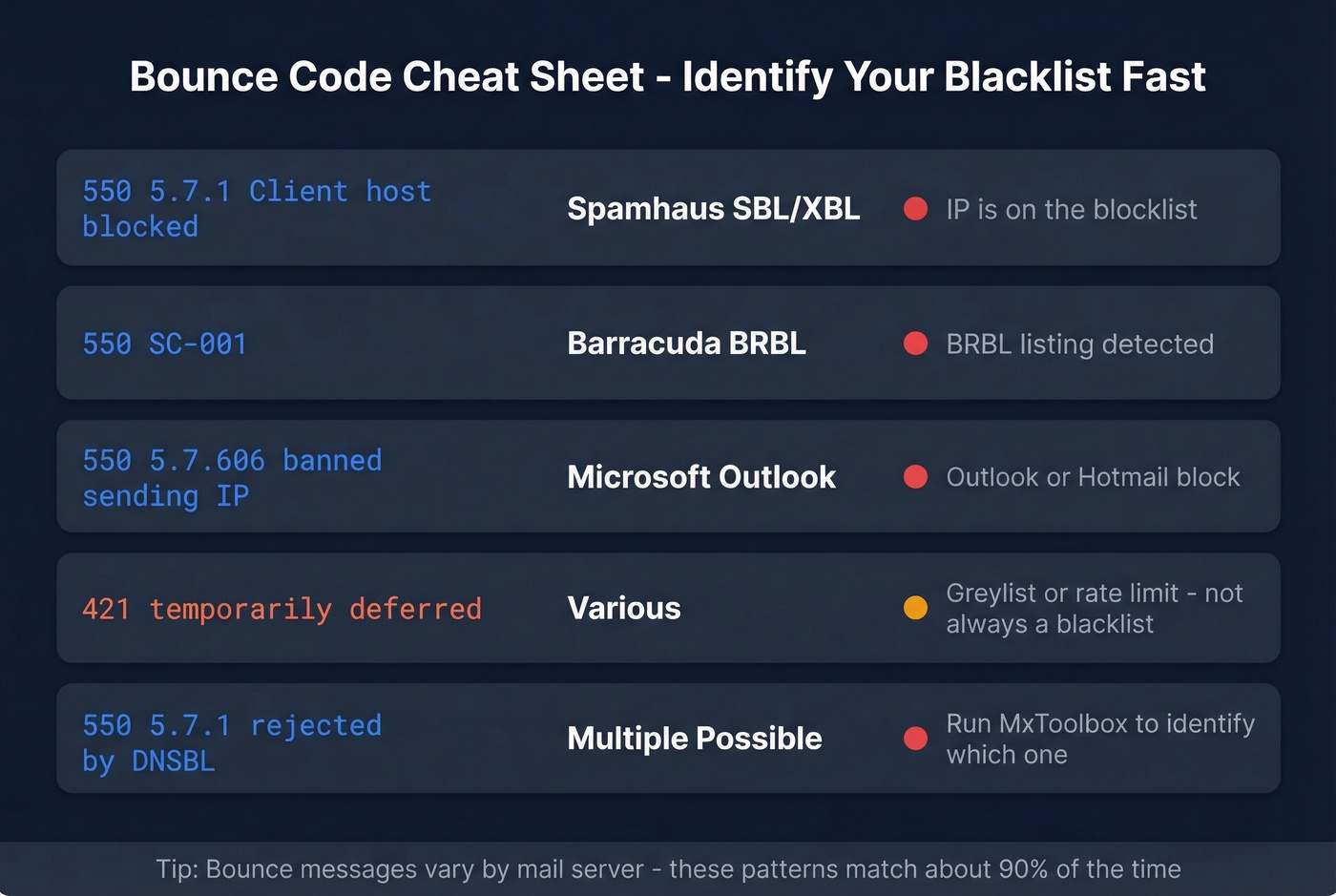
These patterns aren't always exact - some mail servers customize their rejection messages. But they'll point you in the right direction 90% of the time.
Checking Tools
Start with [MxToolbox's blacklist checker](https://blog.mxtoolbox.com/2016/03/22/what-blacklists-do-i-check-and-how - should-i/), which checks 30 blacklists automatically on the free tier. Paid plans check over 100 blacklists multiple times per day.
For Spamhaus specifically, use their dedicated lookup tool - it'll tell you which list you're on (SBL, XBL, DBL, PBL) and why. MultiRBL and BlacklistAlert.org are good secondary checks.
For Gmail-specific diagnostics, Google Postmaster Tools shows your domain's reputation, spam complaint rates, and authentication pass rates - though it requires roughly 100+ daily emails to Gmail before data appears and has a 24-48 hour data lag. Microsoft SNDS does the same for Outlook traffic. Run all of them. Each checks different datasets, and you might be listed on one but not another.


One unverified list import can land you on Spamhaus for weeks. Prospeo's 5-step verification catches spam traps, honeypots, and invalid addresses before they torch your sender reputation - with 98% email accuracy across 143M+ verified contacts.
Stop cleaning up blacklist messes. Send clean data from the start.
Delisting Steps, Provider by Provider
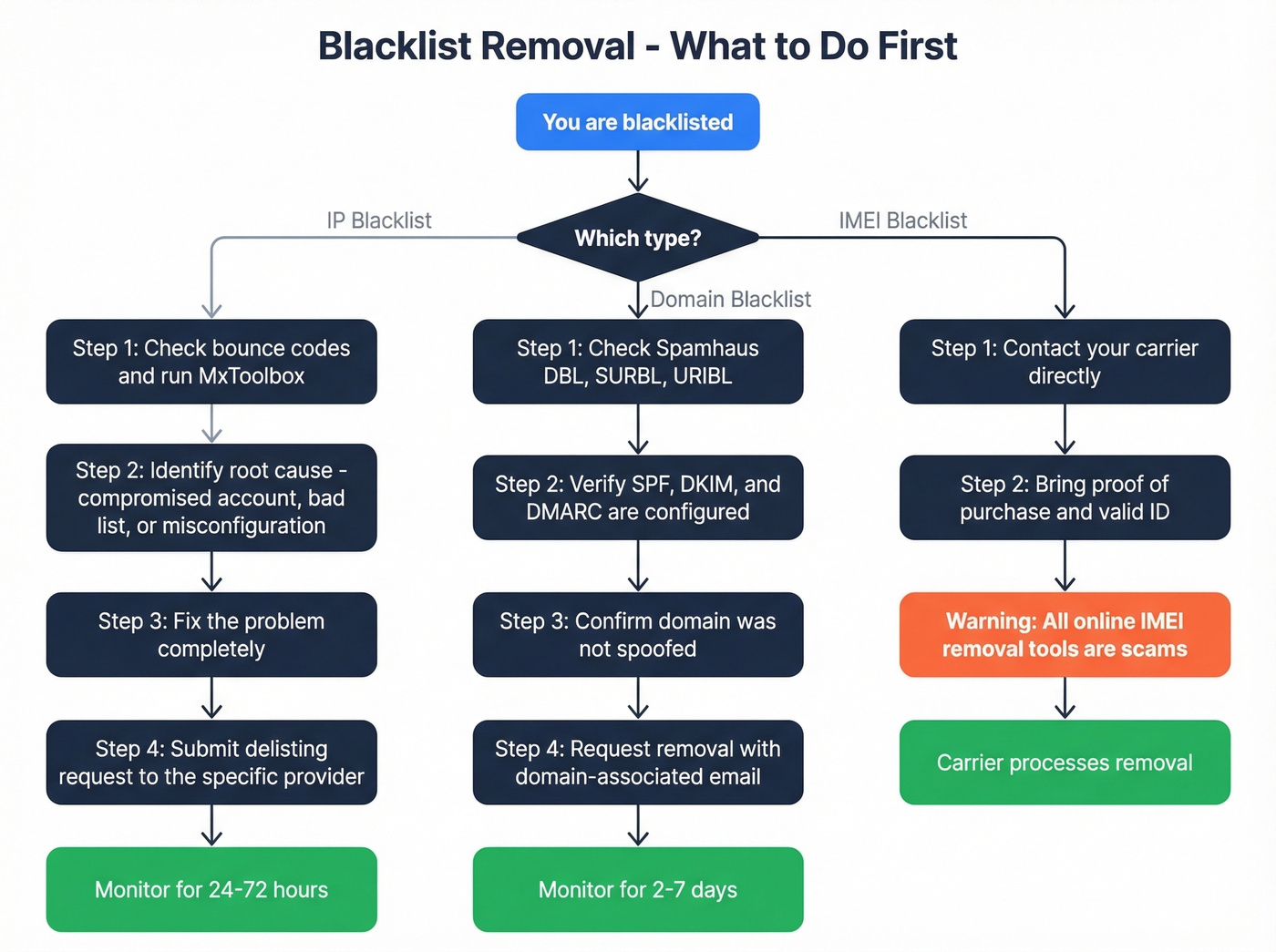
Here's the thing: every blacklist has its own process, its own timeline, and its own quirks. There's no universal "delist me" button.
If you want a broader walkthrough beyond this provider list, use our blacklist delisting guide.
Spamhaus (SBL / XBL / DBL / PBL)
Spamhaus is the most important blacklist to get off. If you're listed there, fix that first - everything else is secondary. Most major email providers check Spamhaus, so a listing there effectively shuts down your outbound email.
Requirements for removal:
- Submit through Spamhaus's ticketing system only - they don't accept email requests
- Must be submitted by the registered owner of the IP or domain
- Don't use a VPN when submitting (they verify your IP)
- Don't use a free or disposable email address - use one associated with the listed IP or domain
- Include what caused the issue, what you did to fix it, when you fixed it, and what you're doing to prevent recurrence
The process varies by list type. SBL listings require the ISP or network owner to submit the request - end users should contact their hosting provider. XBL listings are based on CBL data, so follow CBL's instructions to fix the underlying infection or open proxy; the XBL listing typically clears within hours to 24 hours once the CBL entry is removed. DBL listings allow the domain owner to request removal directly using a domain-associated email. PBL listings offer self-removal for legitimate mail servers running on static IPs - use the lookup tool to initiate it.
Expect 24-72 hours after a valid request. Propagation typically takes 1-2 hours once Spamhaus processes the removal, though some networks take longer to sync.
Barracuda (BRBL)
Barracuda's process is simpler but has one critical gotcha: multiple requests will be ignored. Submit once with valid information and wait.
The removal form requires your email server IP, email address, phone number, and an explanation of what happened and what you fixed. Requests without valid information get tossed. If everything checks out, removal requests are typically investigated and processed within about 12 hours.
One request. Valid info. Wait. That's it.
If you need a deeper Barracuda-specific walkthrough, see our Barracuda blacklist removal guide.
SpamCop
SpamCop is the easiest to get off because you don't have to do anything. It auto-delists - typically after 24 hours of no reports. There's no manual removal form and no request process.
Stop whatever triggered the reports. Once new complaints stop flowing in, SpamCop drops the listing automatically.
Microsoft / Outlook
Microsoft's delisting process has more prerequisites than most. Before you submit anything, work through this checklist:
- Secure any compromised accounts or websites that sent spam
- Verify you're not listed on other blacklists
- Set up SPF records - Microsoft blocks email from IPs not specified in the sender domain's DNS zone
- Configure a proper PTR record for your sending IP
- Run MxToolbox diagnostics to verify your setup passes
- Submit Microsoft's sender information form
Microsoft typically responds within 24-48 hours. But if you skip steps 1-5, your request will either be denied or ignored. They enforce SPF compliance strictly.
SORBS
SORBS requires you to create an account before requesting delisting. Look up your IP, follow the delisting link in the results, and submit your request. Expect days rather than hours. Not the fastest process, but generally straightforward if you've fixed the underlying issue.
UCEProtect
UCEProtect operates on three levels, and the approach differs for each. Level 1 listings auto-expire after 7 days with no action required. Level 2 and Level 3 listings affect entire IP ranges and require your hosting provider or network operator to intervene.
Skip UCEProtect's paid "express delisting." Level 1 listings expire in 7 days anyway. The consensus among mail admins on r/sysadmin is unanimous: it's not worth the money.
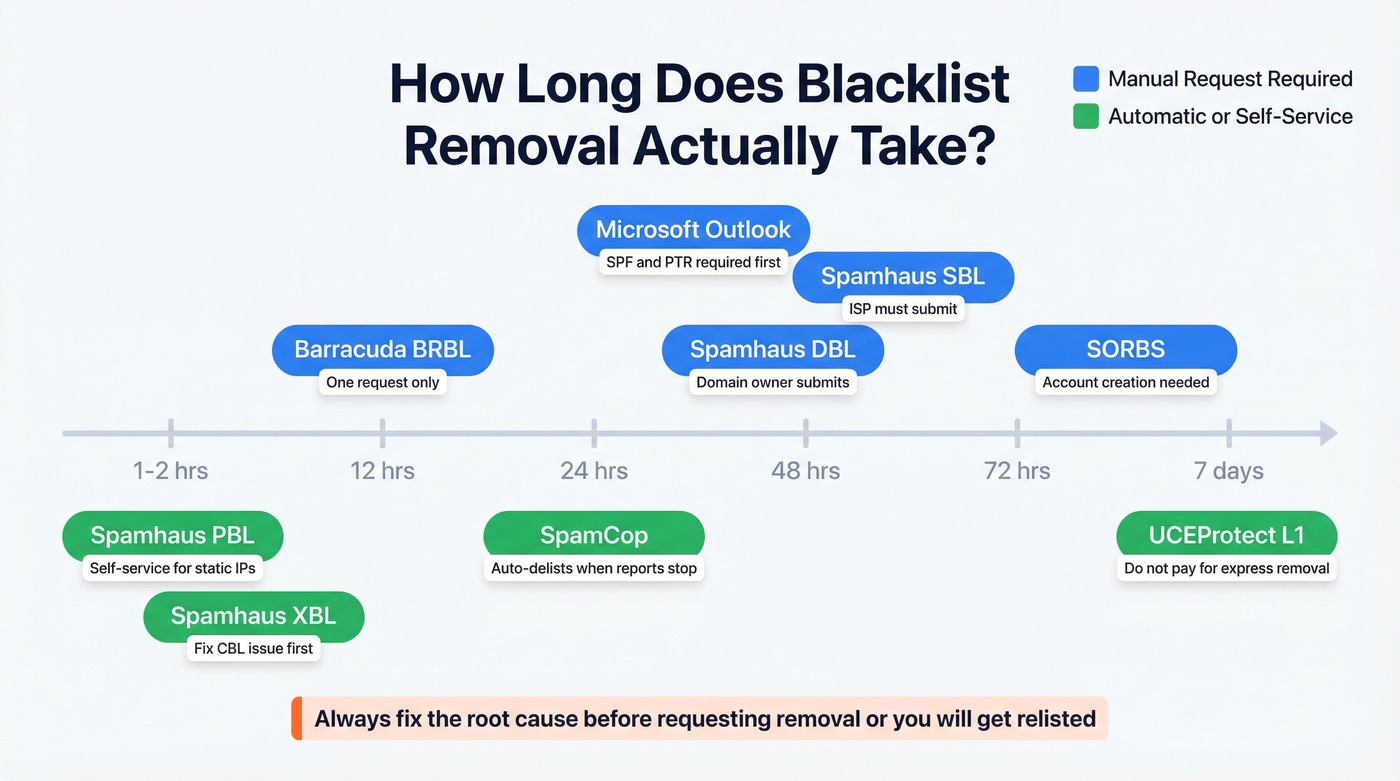
Removal Timeline Summary
| Blacklist | Removal Type | Timeline | Key Gotcha |
|---|---|---|---|
| Spamhaus SBL | Manual (ISP submits) | 24-72 hrs | No VPN, no free email |
| Spamhaus XBL | Fix via CBL | Hours-24 hrs | Fix infection/proxy first |
| Spamhaus DBL | Manual (domain owner) | 24-72 hrs | Domain-associated email |
| Spamhaus PBL | Self-service (static IP) | 1-2 hrs | Legit mail servers only |
| Barracuda | Manual form | ~12 hrs | One request only |
| SpamCop | Automatic | ~24 hrs | Just stop the spam |
| Microsoft | Manual form | 24-48 hrs | SPF/PTR required first |
| SORBS | Manual (account) | Days (variable) | Account creation required |
| SURBL/URIBL | Manual request | 2-7 days | Domain/URI focused |
| UCEProtect L1 | Automatic | 7 days | Don't pay for express |
The Hardest Blacklists to Get Off
Most blacklists have a clear delisting process: fix the problem, submit a request, wait. Some don't play by those rules.
The fact that Proofpoint routinely ignores delisting requests for weeks - while blocking legitimate mail to millions of iCloud and Apple Mail users - is one of the most frustrating realities in email deliverability. One mail admin managing 10+ domains reported submitting 5+ requests over a month with zero response. Another found that switching to a different IP in the same subnet didn't help, suggesting Proofpoint blocks at the subnet level, not just individual IPs.
The only path that sometimes works: escalate through your hosting provider, document everything, and be persistent. If your host has a direct relationship with Proofpoint, that helps. If they don't, you're in for a long wait.
UCEProtect Level 2 and Level 3 listings are similarly painful because they're not about your IP - they're about your entire network range. You can't fix these yourself. Your hosting provider or upstream network operator has to intervene, and that adds layers of bureaucracy and delays that can stretch into weeks.
Phone / IMEI Blacklist Removal
The Only Legitimate Path
If your phone's IMEI is blacklisted, there's exactly one legitimate way to get it removed: contact the carrier that blacklisted the device. Bring proof of purchase, a valid ID, and be prepared to resolve any outstanding bills or disputes tied to the device.
The carrier will review your case and, if everything checks out, remove the IMEI from their database. Expect 3-10 business days depending on the carrier and the complexity of the case. If the device was reported stolen and you're not the original owner, the carrier will likely refuse entirely. At that point your options are limited: use the device on Wi-Fi only, or sell it to a reputable buyback service for parts.
Why "Removal Tools" Are Scams
If someone's selling you an "IMEI blacklist removal tool," they're scamming you. Full stop.
The IMEI is permanently embedded in the device hardware and can't be changed through software. Carrier blacklist databases are designed to prevent external manipulation, and carriers share blacklist data globally - there's no backdoor. Red flags include upfront payment demands, requests for personal information (identity theft risk), software downloads (malware), and fake testimonials. In many countries - including the US, UK, and EU - altering an IMEI is a criminal offense. Don't attempt it, and don't pay someone who says they can do it for you.
How to Stay Off Blacklists for Good
Getting delisted is the emergency response. Prevention is the actual strategy.
If your average contract value is under $50k/year, you probably can't afford a second blacklisting. The revenue lost during even a 48-hour delisting window dwarfs the cost of doing prevention right. Treat list hygiene and authentication like insurance, not a nice-to-have.
Authentication Checklist
Four records, all non-negotiable:
- SPF - tells receiving servers which IPs are authorized to send for your domain
- DKIM - cryptographically signs your messages to prove they haven't been tampered with
- DMARC - tells receivers what to do when SPF or DKIM fails (and sends you reports)
- rDNS/PTR - your IP resolves to a valid hostname that matches your sending domain
If you haven't set all four, stop reading and go do that first. Add TLS encryption while you're at it - Google and Microsoft both factor it into reputation scoring.
If you want a step-by-step setup path, start with our guide on how to authenticate email.
List Hygiene Prevents Relisting
Bad data is the fastest way to land on a blacklist. Every invalid address you send to is a bounce. Enough bounces trigger spam filters. Hit a spam trap or honeypot, and you're listed within hours.
We've seen teams go from a 35% bounce rate to under 4% just by running their lists through verification before sending. Prospeo's 5-step verification catches spam traps, honeypots, and invalid addresses at 98% accuracy - and the free tier gives you 75 verifications per month, so there's no excuse to skip it.
If you're troubleshooting bounces specifically, use our email bounce rate guide to map causes to fixes.
Monitor Your Reputation
Set up Google Postmaster Tools and watch two numbers: keep your spam complaint rate below 0.1%, and never let it exceed 0.3%. Your SPF, DKIM, and DMARC pass rates should all be near 100%. If any of these slip, you'll know before a blacklist catches you.
Microsoft SNDS provides similar visibility for Outlook traffic. Set up feedback loops with major ISPs so you're notified when recipients mark your messages as spam. And run a blacklist check at least weekly - MxToolbox makes this trivial.
Look, most blacklistings are preventable. Clean lists, proper authentication, and active monitoring catch 95% of problems before they escalate. The teams that get blindsided on Monday morning are almost always the ones who skipped one of these three.
Bounce rates spiking to 35-40% is exactly what triggers blacklistings. Teams switching to Prospeo cut bounce rates under 4% - because every email passes catch-all verification, spam-trap removal, and honeypot filtering before it ever reaches your outbox.
Replace the data that got you blacklisted. Emails start at $0.01 each.
FAQ
How long does blacklist removal take?
SpamCop auto-delists in about 24 hours after reports stop. Barracuda processes valid requests in roughly 12 hours. Spamhaus clears within 24-72 hours after a valid submission. UCEProtect Level 1 expires automatically after 7 days. Microsoft responds within 24-48 hours. Proofpoint can take weeks with no guarantee of response.
Can I speed up the delisting process?
Fix the root cause first, submit one clean request with full documentation, and wait. Submitting multiple requests to Barracuda gets you ignored entirely. The fastest path is doing it right the first time - complete remediation before you file anything.
What if I'm on a shared IP that got blacklisted?
Contact your hosting provider - they own the IP's reputation. For Spamhaus SBL listings, the ISP or network owner must submit the request, not end users. If shared-IP blacklisting keeps recurring, move to a dedicated IP where you control the sending reputation entirely.
Is it illegal to change a phone's IMEI?
In the US, UK, and EU, altering an IMEI is a criminal offense carrying fines or jail time. Even where it's technically legal, carriers detect and block modified devices. Don't attempt it - and don't pay anyone who claims they can do it for you.
How do I prevent getting blacklisted again?
Set up SPF, DKIM, DMARC, and rDNS - all four are non-negotiable. Verify your email lists before sending to remove spam traps and honeypots automatically. Monitor your reputation with Google Postmaster Tools and keep your spam complaint rate below 0.1%.