

Email Deliverability Issues: How to Diagnose & Fix (2026)
Your deliverability tools show 9.5 out of 10. GlockApps says you're fine. Mail-tester agrees. And yet your open rates just cratered from 30% to 4%.
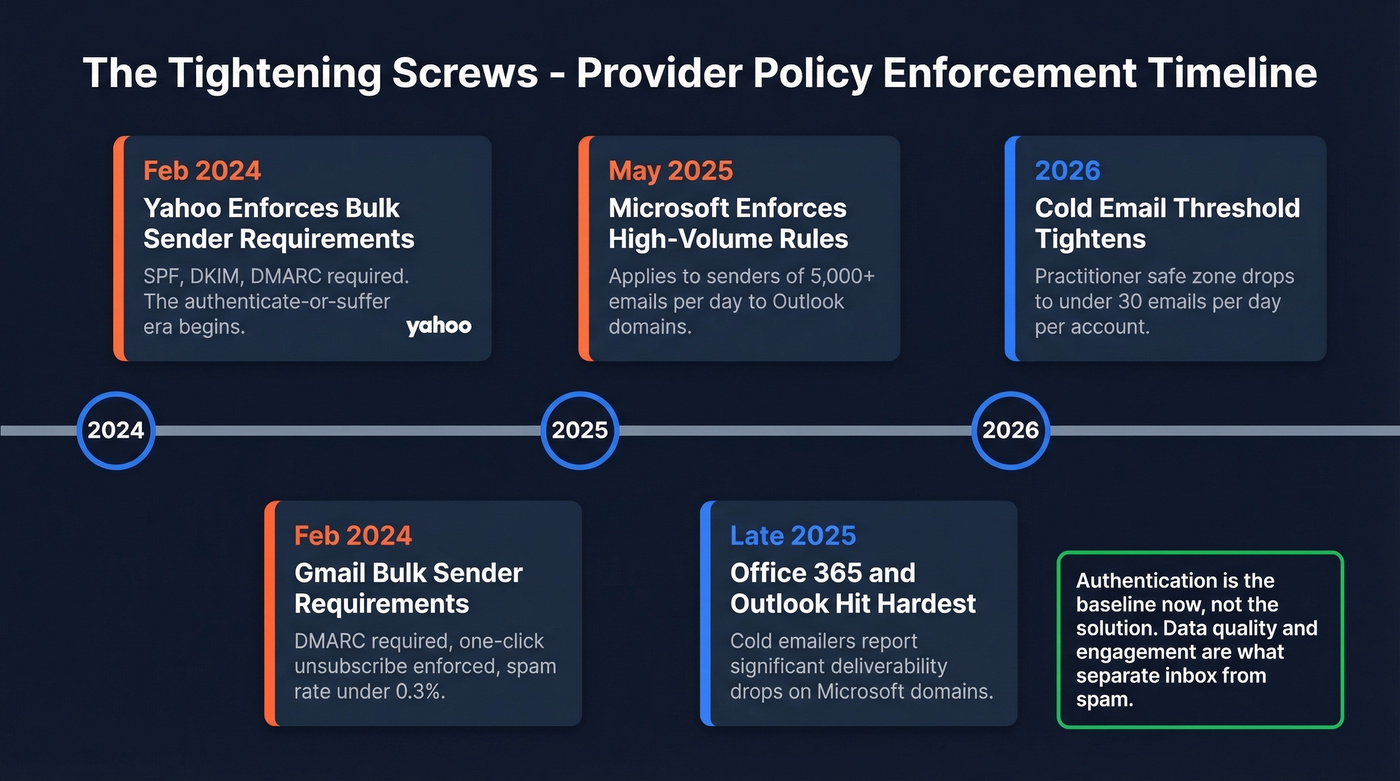
This is the most common email deliverability nightmare in 2026, and it's happening because most diagnostic guides start with authentication when the real #1 cause is bad data. Authentication is the baseline - it's been the baseline since Yahoo began enforcing its bulk sender requirements in February 2024 and the broader "authenticate or suffer" era kicked off. The delivery problems teams actually face today are upstream: invalid addresses torching sender reputation, silent spam placement that doesn't generate a bounce, and provider policy changes that tightened the screws while nobody was watching.
Let's fix all of it.
What's Actually Wrong (Start Here)
Before you dig into root causes, match your symptoms to the most likely culprit. If your bounce rate is the symptom, bad data is usually the cause - and no amount of authentication tuning will fix it.
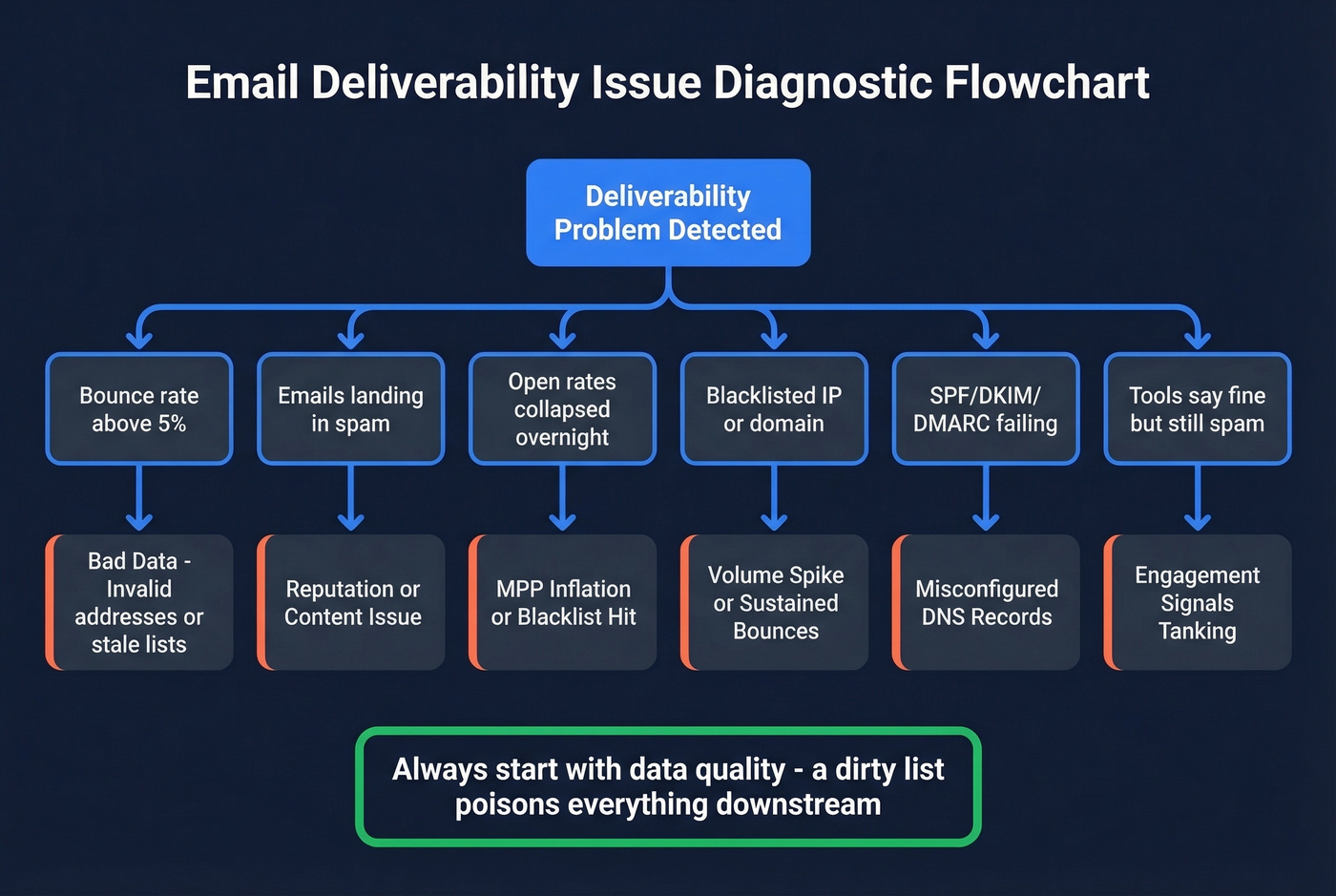
| Symptom | Likely Cause | Jump To |
|---|---|---|
| Bounce rate above 5% | Invalid addresses / stale data | Bad Data |
| Emails landing in spam | Reputation or content issue | Sender Reputation |
| Open rates collapsed overnight | MPP inflation / blacklist | Open Rate Caveat |
| Blacklisted IP/domain | Volume spike or sustained bounces | Sending Volume |
| SPF/DKIM/DMARC failing | Misconfigured DNS records | Authentication |
| "Tools say I'm fine" but spam | Engagement signals tanking | Diagnosis |
If multiple symptoms apply, start with the data quality check. A dirty list poisons everything downstream - authentication, reputation, engagement metrics. Fix the data first, then work through the rest.
What Good Deliverability Looks Like
Here's the thing: most teams don't actually know what "good" looks like. They assume their 85% delivery rate is fine because emails aren't bouncing. It's not fine.
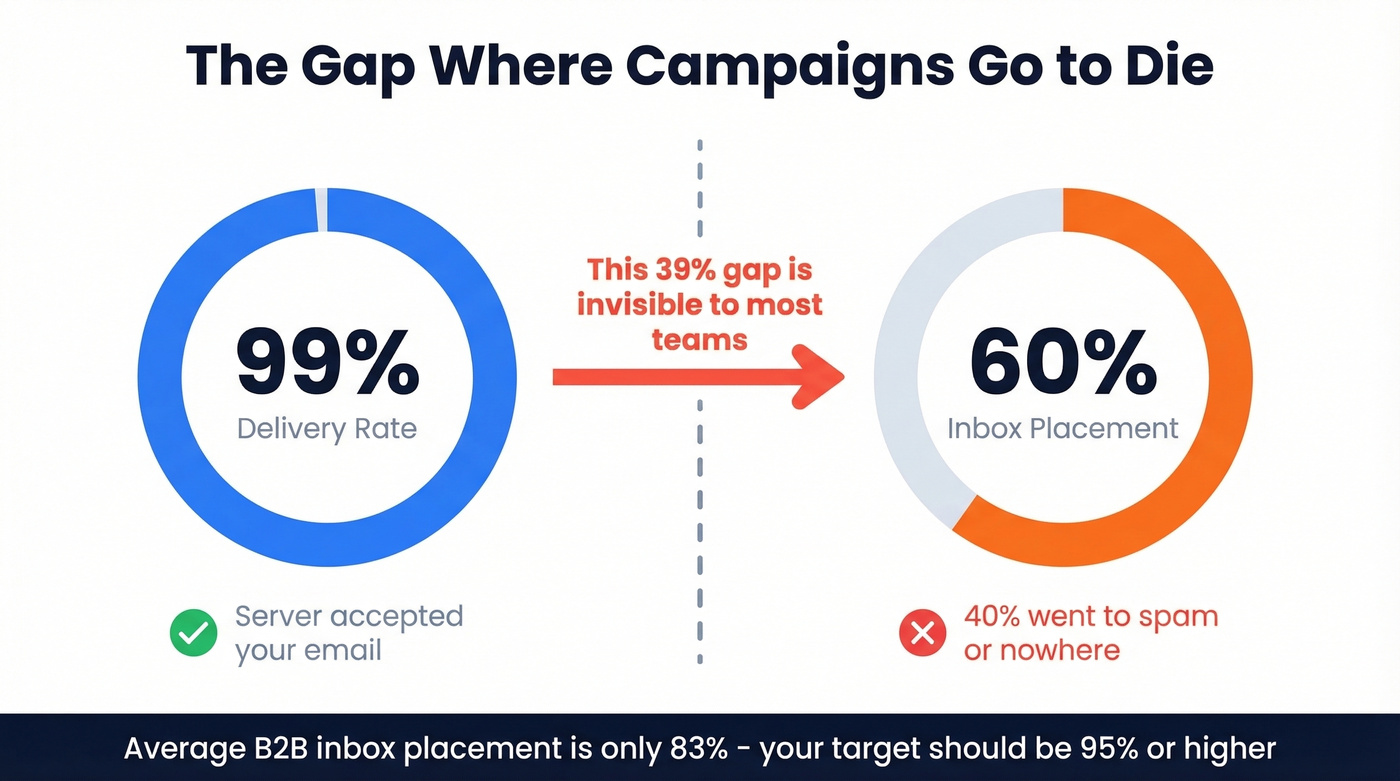
Delivery rate measures whether the receiving server accepted your email. Deliverability - inbox placement - measures whether it reached the inbox versus spam. You can have 99% delivery and 60% inbox placement. That gap is where campaigns go to die, and it's the core of most email delivery problems teams overlook.
The average B2B email deliverability rate is roughly 83%. That means nearly one in five emails never reaches the inbox. Your target should be 95%+ inbox placement rate.
Mailchimp's industry benchmarks give useful context for engagement rates:
| Industry | Open Rate | Click Rate | Unsub Rate |
|---|---|---|---|
| Business & Finance | 31.35% | 2.78% | 0.15% |
| Ecommerce | 29.81% | 1.74% | 0.19% |
| Education | 35.64% | 3.02% | 0.18% |
| All Users Average | 35.63% | 2.62% | 0.22% |
One massive caveat: these open rates are inflated by Apple Mail Privacy Protection. Mailchimp's own page acknowledges this. If you're benchmarking against these numbers and feeling good, you're comparing real engagement against artificially inflated averages.
Why Your Open Rates Are Lying
Apple Mail Privacy Protection, rolled out in 2021, preloads tracking pixels via Apple's proxy servers. The email registers as "opened" whether the recipient read it, glanced at it, or never touched it. MPP blocks your ability to see IP addresses, open timestamps, geolocation, and device type.
This isn't a minor distortion. Apple Mail drives around half of all email opens, and nearly 50% of subscribers are affected by MPP. Your open rate is a blend of real human engagement and automated Apple preloads - and you can't tell which is which.
The practical damage goes beyond vanity metrics. Open-based follow-up sequences fire on phantom opens. A/B tests using open rates as the success metric are measuring noise. Segmentation based on "engaged" vs. "unengaged" subscribers becomes unreliable when half your "engaged" segment never actually read anything.
Replace open rates with intentional engagement signals: click-through rate, reply rate, conversion rate. These require a human to do something deliberate. They're harder to game and impossible for Apple to fake. (If you want a deeper KPI breakdown, see our click-through rate guide.)
The 7 Root Causes Behind Inbox Placement Failures
Bad Data and Invalid Addresses
This is the root cause that most deliverability guides bury under authentication and content tips. It shouldn't be buried. It should be first.
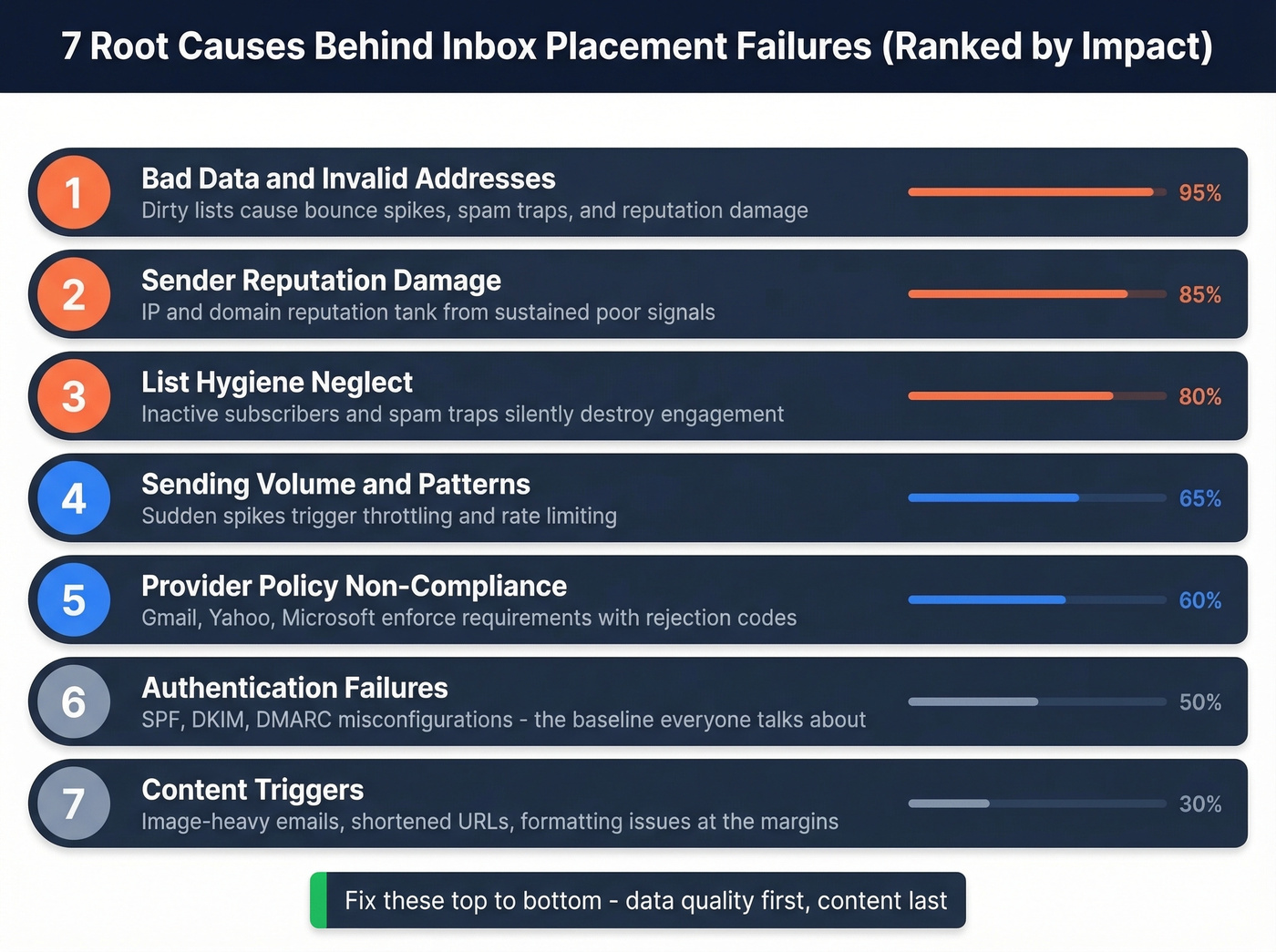
Here's how the spiral works. You import a list - maybe from a conference badge scan, maybe from a purchased database, maybe from a form without double opt-in. A chunk of those addresses are invalid. You send your campaign. Those invalid addresses bounce. Your bounce rate spikes above 5%. Your sending IP and domain take a reputation hit. Gmail and Microsoft start routing your emails to spam - not just for the bad addresses, but for your legitimate subscribers too. (For bounce thresholds and what they mean, see email bounce rate.)
It gets worse. Some of those invalid addresses aren't just dead - they're spam traps. Recycled traps are old addresses that mailbox providers reactivated specifically to catch senders with dirty lists. Pristine traps are addresses that were never real; they exist only on scraped lists. Hit enough of these and you're blacklisted, not just filtered. (If you suspect traps, use this spam trap removal playbook.)
Verify every address before it touches your sending list. Prospeo's 5-step verification process catches spam traps, honeypots, and catch-all domains, with the database refreshing every 7 days versus the 6-week industry average. Stack Optimize, an outbound agency, built from $0 to $1M ARR using this approach - 94%+ deliverability with under 3% bounce rate and zero domain flags across all their clients. If you're comparing tools, start with our Bouncer alternatives roundup.
Authentication Failures
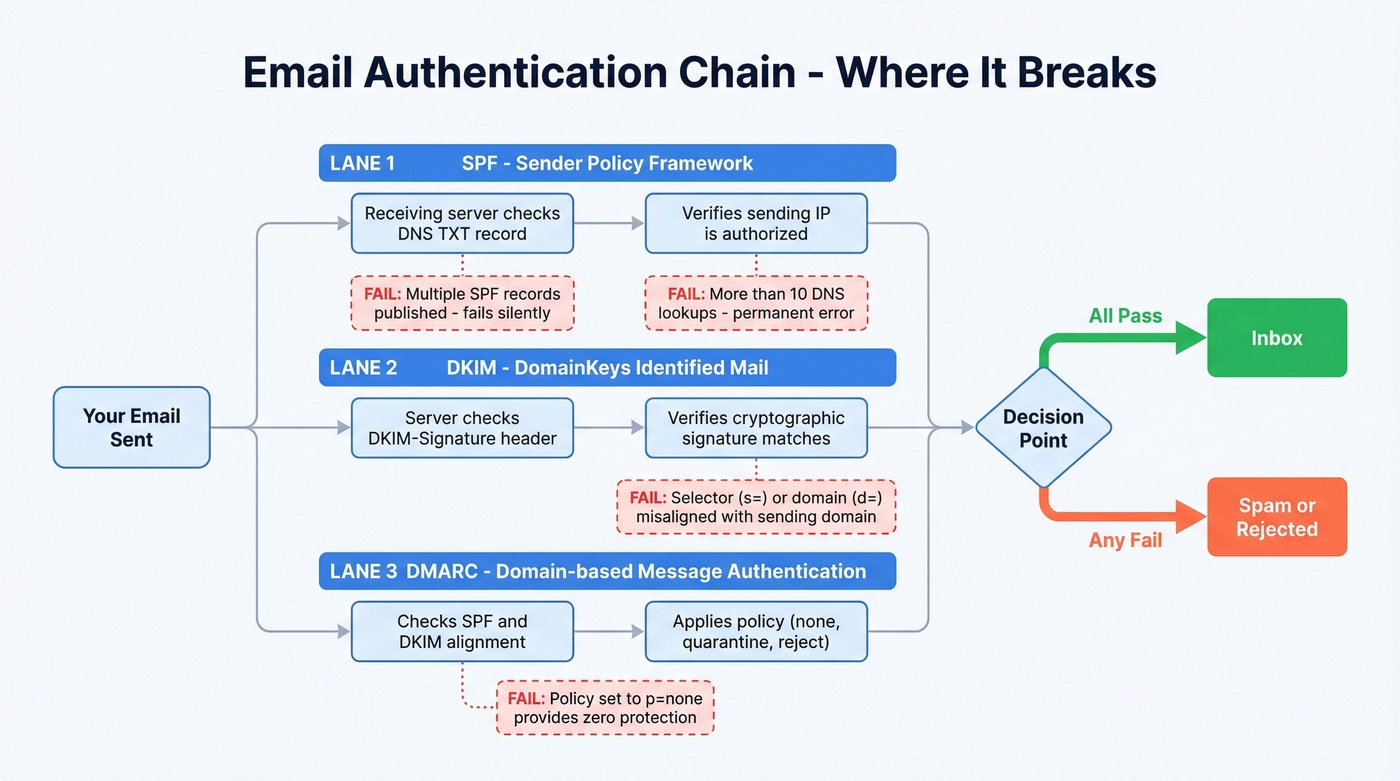
SPF, DKIM, and DMARC are non-negotiable in 2026. But getting them right is trickier than most guides suggest. (For a deeper technical breakdown, see DMARC alignment.)
Check your SPF record from the terminal:
dig +short TXT yourdomain.com | grep spf
You should see something like v=spf1 include:mailgun.org ~all. Two critical rules most teams violate:
- You can't publish multiple SPF records. If you have two TXT records starting with
v=spf1, SPF fails silently. Merge allinclude:mechanisms into a single record. (More examples: SPF record examples.) - SPF has a 10 DNS lookup limit. Every
include:triggers lookups. Exceed 10 and SPF evaluates as a permanent error - effectively unauthenticated. Microsoft explicitly flags this. Use dedicated subdomains per sending service or SPF flattening tools to stay under the limit.
For DKIM troubleshooting, inspect the raw email headers. Find the DKIM-Signature header - the selector is in s= and the signing domain is in d=. If these don't match your sending domain, DKIM alignment fails even if the signature itself is valid. (Step-by-step: how to verify DKIM is working.)
BIMI (Brand Indicators for Message Identification) is an emerging standard worth watching. It displays your brand logo in the inbox and doesn't directly affect deliverability, but it signals legitimacy to recipients.
Sender Reputation Damage
There are two reputations that matter: IP reputation and domain reputation. IP reputation is what your ESP or sending infrastructure carries. Domain reputation is yours - it follows your domain regardless of which IP you send from.
The gap between what test tools show and your actual reputation is real. We've seen teams score 9/10 on Mail-tester while Gmail's Postmaster Tools shows their domain reputation as "Low." Google Postmaster Tools is the most important dashboard for Gmail reputation. If you're not checking it weekly, you're flying blind. Microsoft SNDS provides similar visibility for Outlook domains, Yahoo Sender Hub covers Yahoo/AOL, and Sender Score from Validity gives you a quick cross-provider reputation snapshot. (If you're actively repairing damage, use this guide on how to improve sender reputation.)
Content Triggers
Modern spam filters don't reject emails because you wrote "free" or "limited time offer." That's a myth from 2010. They use engagement signals - how recipients interact with your emails over time - far more than keyword scanning. (If you need a quick pre-send check, see email spam checker.)
That said, content still matters at the margins. Image-heavy emails with minimal text trigger filters. Excessive links, especially shortened URLs, raise flags. And if you're getting SMTP code 554 5.7.5, that's a spam-filter rejection - often a combination of formatting, links, and low sender reputation amplifying each other. For initial cold outreach, stick to plain text with no images, tracking pixels, or shortened links.
Sending Volume and Patterns
Sudden volume spikes are one of the fastest ways to trigger throttling. If you normally send 500 emails a day and suddenly blast 10,000, expect 421 4.7.0 responses - that's the receiving server rate-limiting you. (More on safe limits: email velocity.)
For cold email specifically, the practitioner safe zone in 2026 is under 30 emails per day per sending account. The consensus on r/coldemail is that this threshold tightened significantly through 2025, with Office 365 and Outlook domains hit hardest. Consistent sending patterns matter more than total volume - mailbox providers reward predictability.
List Hygiene Neglect
Spam traps come in two flavors. Recycled traps are abandoned email addresses that providers reactivate after a dormancy period - if you're still sending to an address that's been dead for two years, you're hitting a trap. Pristine traps are addresses that never belonged to a real person; they only exist on scraped or purchased lists.
Beyond traps, inactive subscribers silently destroy your engagement metrics. Providers notice when large portions of your list stop engaging. Implement a sunset policy: re-engagement campaign at 90 days of inactivity, suppression at 120 days. It feels counterintuitive to shrink your list, but a smaller, engaged list outperforms a bloated, disengaged one every time.
Provider Policy Non-Compliance
Yahoo began enforcing major sender requirements in February 2024, and Microsoft started enforcing new high-volume sender requirements in May 2025. These aren't suggestions - they're enforced requirements with specific rejection codes. Even teams with fully aligned SPF/DKIM/DMARC can still see deliverability dips, confirming that authentication alone doesn't guarantee inbox placement.

Every invalid email you send chips away at your sender reputation. Prospeo's 5-step verification - with spam-trap removal, honeypot filtering, and catch-all handling - delivers 98% email accuracy on a 7-day refresh cycle. Stack Optimize used it to maintain 94%+ deliverability with zero domain flags across every client.
Stop diagnosing deliverability issues caused by data you should never have sent.
2024-2026 Provider Policy Changes
The major mailbox providers now enforce similar baseline requirements, but the details and enforcement timelines differ. Microsoft's requirements are the newest and most overlooked.
| Requirement | Gmail | Yahoo | Microsoft |
|---|---|---|---|
| Applies to | Bulk senders | Bulk senders | 5,000+ emails/day |
| SPF + DKIM | Required for bulk senders | Required | Required |
| DMARC | Required for bulk senders | p=none minimum |
p=none minimum |
| Complaint ceiling | Keep complaints very low | 0.3% | Not specified (low) |
| One-click unsub | Required for bulk senders | Required (RFC 8058) | Recommended |
| Enforcement | In effect since Feb 2024 | In effect since Feb 2024 | In effect since May 2025 |
| Rejection code | Various | Various | 550 5.7.515 |
Yahoo requires bulk senders to support one-click unsubscribe via List-Unsubscribe; the RFC 8058 POST method is recommended, and mailto: is acceptable. Yahoo also mandates honoring unsubscribe requests within 2 days. Relaxed DMARC alignment is acceptable - the From domain just needs to align with either the SPF or DKIM domain, not both.
Microsoft's enforcement is the one catching teams off guard. If you're sending to Outlook.com, Hotmail, or Live.com addresses and your DMARC doesn't pass, you'll get 550 5.7.515 Access denied, sending domain does not meet the required authentication level. Microsoft also explicitly warns about the SPF 10 DNS lookup limit - exceed it and they'll treat your authentication as failed.
Look, Yahoo's 0.3% complaint ceiling sounds generous until you realize that's 3 complaints per 1,000 emails. One bad campaign to a cold list can blow through that in hours. Practitioners on Reddit report that staying under 0.1% is the real safe zone - 0.3% is the cliff, not the target.
If your average deal size is under $10K, you probably can't afford the reputation risk of cold emailing unverified lists at all. The math doesn't work - one domain burn costs more in lost pipeline than a year of verification tools.
How to Diagnose and Fix Delivery Problems
Stop guessing. Run through these five diagnostic metrics in order:
- Bounce rate by ISP - Are bounces concentrated at one provider? That points to a provider-specific block, not a universal problem.
- Provider-specific open rates - Compare Gmail vs. Outlook vs. Yahoo. A drop at one provider with stable rates elsewhere means a targeted reputation issue.
- Complaint rates by campaign - Which specific send triggered the spike? Isolate the campaign, not the channel.
- Engagement velocity - Track opens and clicks at 1-hour, 6-hour, and 24-hour intervals. Fast engagement signals relevance; slow or absent engagement tells providers your emails aren't wanted.
- Reply rates - The strongest positive signal you can send to mailbox providers. If reply rates dropped, your content or targeting changed. (If you're rebuilding outbound performance, see sales prospecting techniques.)
When you hit a wall, SMTP codes tell you exactly what happened:
| Code | Meaning |
|---|---|
550 5.7.1 |
Blocked - policy/reputation |
421 4.7.0 |
Throttled - slow down |
550 5.1.1 |
Invalid address |
554 5.7.5 |
Spam-filter rejection |
550 5.7.515 |
Microsoft auth failure |
Free monitoring tools you should already be using: Google Postmaster Tools for Gmail domain reputation, Microsoft SNDS for Outlook visibility, and Yahoo Sender Hub for Yahoo/AOL. Note that Microsoft SNDS now requires authentication for network access, complaint reports use ARF format, and automated report links expire after 30 days.
How to Warm Up (or Re-Warm) Your Infrastructure
Whether you're launching a new domain or recovering from a reputation hit, warm-up follows the same principle: start small, prove engagement, scale gradually.
IP warm-up matters if you're on a dedicated IP, which typically applies to enterprise senders. Domain warm-up matters for everyone - and domain reputation is the long-term driver that follows you regardless of infrastructure changes.
Use a subdomain for cold outreach like outreach.yourdomain.com. This isolates cold sending reputation from your main domain's newsletter and transactional email reputation. Wait 24-48 hours after purchasing a new domain before configuring any sending. (If you're doing this at scale, see our guide to unlimited email warmup.)
| Week | Daily Volume | Notes |
|---|---|---|
| Week 1 | 10-20 | Send to most engaged contacts only |
| Week 2 | 40-60 | Expand to recent openers/clickers |
| Week 3 | 100-200 | Add broader segments |
| Week 4 | 300-500 | Monitor bounce/complaint rates |
| Week 5-6 | Scale to target | Full volume if metrics hold |
A full warm-up takes 4-6 weeks manually. AI-powered warm-up tools can compress this to around 2-3 weeks by simulating engagement patterns, but we've found the manual approach gives you better visibility into what's actually happening at each stage.
Deliverability Tools Worth Using
You don't need ten tools. You need one from each category, matched to your actual problem.
Monitoring (free)
| Tool | Price | Use Case |
|---|---|---|
| Google Postmaster Tools | Free | Gmail domain reputation |
| Microsoft SNDS | Free | Outlook IP reputation |
| Yahoo Sender Hub | Free | Yahoo/AOL visibility |
| Sender Score (Validity) | Free | Cross-provider reputation score |
Testing
| Tool | Price | Use Case |
|---|---|---|
| GlockApps | From $85/mo | Inbox placement testing |
| Mail-tester | Free (basic) | Quick spam score check |
| MXToolbox | $129-$399/mo | DNS/blacklist monitoring |
Skip MXToolbox if you're a small team - the free tier is limited and the paid plans are steep for what you get. GlockApps gives you more actionable data per dollar.
Warm-Up
| Tool | Price | Use Case |
|---|---|---|
| MailReach | ~$25/mo per inbox | Best balance of automation and visibility |
| Warmup Inbox | From $15/mo per inbox | Budget warm-up |
| TrulyInbox | From $29/mo | Cold email warm-up |
| InboxAlly | From $149/mo | Enterprise warm-up |
For most teams, MailReach is the right pick at around $25/month per inbox. InboxAlly is overkill unless you're managing 50+ inboxes at the enterprise level.
Verification
| Tool | Price | Use Case |
|---|---|---|
| Prospeo | Free (75/mo), ~$0.01/email | 98% accuracy, spam-trap removal |
| ZeroBounce | From $49/mo | Bulk list cleaning |
Most providers refresh data every 6 weeks. In that gap, people change jobs, addresses go stale, and your bounce rate creeps past 5%. Prospeo refreshes 300M+ profiles every 7 days - so the emails you pull today are still valid when you send tomorrow. At $0.01 per email, clean data costs less than one spam complaint.
Fix your deliverability at the source - start with data that's actually fresh.
Prevention Checklist
Fixing deliverability is painful. Preventing it from breaking is straightforward.
Weekly: Check Google Postmaster Tools for domain reputation changes. Review bounce rates by provider from your last 7 days of sends.
Monthly: Run list hygiene - suppress hard bounces, flag inactive subscribers approaching 90 days, remove role-based addresses.
Quarterly: Send re-engagement campaigns to inactive segments. Anyone who doesn't engage gets sunset.
Every import: Verify all new email imports before they touch your sending list. Build verification into the workflow via API or native CRM integrations so it's automatic, not an afterthought. (If you're standardizing your stack, compare data enrichment services too.)
Always: Maintain complaint rate under 0.1% - not 0.3%, that's the cliff, not the target. Use a subdomain for cold outreach. Monitor SMTP codes for early warning signs.
The teams that never have deliverability crises aren't lucky. They're disciplined about these five habits.
FAQ
What's a good inbox placement rate?
Target 95%+ inbox placement. The average B2B deliverability sits around 83%, meaning roughly one in five emails misses the inbox entirely. If you're below 90%, start with list verification and sender reputation checks before touching anything else.
Why do emails land in spam with valid SPF/DKIM/DMARC?
Authentication is the minimum requirement, not a guarantee of inbox placement. In 2026, providers weigh engagement signals and data quality far more heavily. You can have perfect DNS records and still land in spam if your list contains stale addresses or recipients aren't interacting with your messages.
How long does sender reputation recovery take?
Minor damage from a single bad campaign typically recovers in 2-4 weeks of clean sending. Severe damage from blacklisting or sustained high bounce rates takes 6-12 weeks of disciplined warm-up, list cleaning, and engagement-focused sends. Expect the full timeline if your domain reputation shows "Low" in Google Postmaster Tools.
How do I fix recurring delivery problems?
Recurring problems almost always point to a process gap, not a one-time mistake. Verify every list import before sending, enforce a sunset policy for inactive contacts at 120 days, and monitor provider-specific reputation dashboards weekly. Automating verification on import - so bad addresses never reach your sending list - eliminates the most common relapse trigger.
How do I verify my email list before sending?
Upload your list to a verification tool that checks for invalid addresses, spam traps, honeypots, and catch-all domains, then remove anything that fails. Prospeo's 5-step process handles all of these checks with 98% accuracy, and the free tier at 75 emails per month lets you test the workflow before committing.