

How to Write a Booking an Appointment Email That Gets a Reply
You found the perfect prospect, crafted what felt like a thoughtful email, and heard nothing. Then you checked - the email bounced. Your appointment email never arrived, your sender reputation took a hit, and you're back at square one.
The average professional receives 121 emails per day, and cold email response rates sit around 7-10%. Generic templates, sender-focused language, and vague value props make it worse. Here's the thing: copying a template won't save you. You need to fix the system underneath it.
Anatomy of an Appointment Email That Works
Most guides jump straight to templates. That's backwards. Understand the structure first, then fill it in.
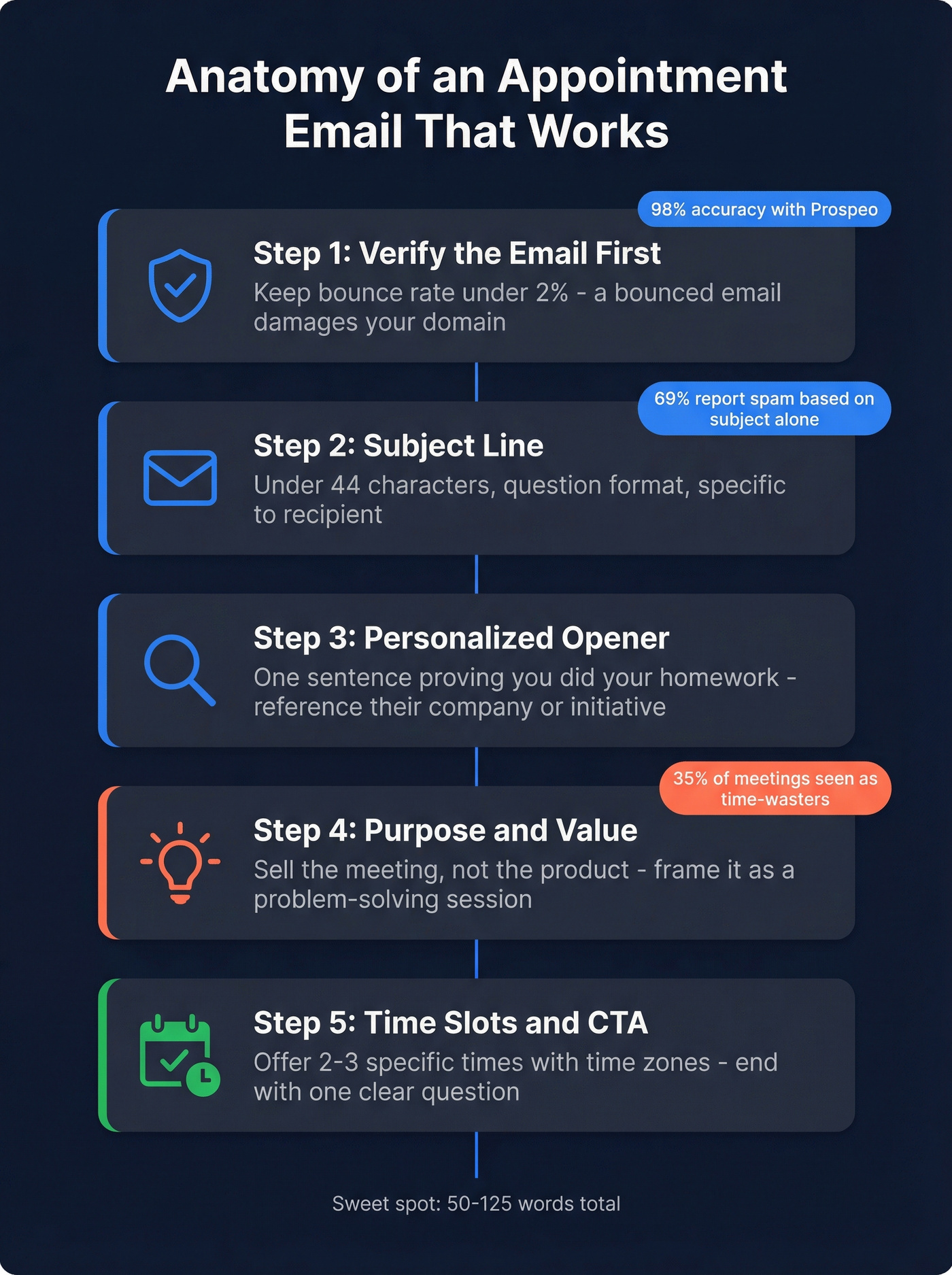
Personalized emails get 29% higher open rates, and the sweet spot for length is 50-125 words. Here's a framework we've seen work consistently across outbound campaigns.
Verify the Email Address First
A bounced meeting request wastes your time and damages your sender reputation. Keep your cold email bounce rate under 2% - anything above 5% risks your domain.
Prospeo verifies emails in real time with 98% accuracy, so you know the address is live before you hit send. Its 5-step verification catches catch-all domains, spam traps, and honeypots that other tools miss. If you want a deeper breakdown of tools and accuracy benchmarks, start with an email validator comparison.

Subject Line
This is your entire pitch in under 44 characters. Question-style subject lines tend to outperform statements, and 69% of recipients will report an email as spam based on the subject line alone. Make it specific to the recipient - and avoid common email subject line spam triggers.
Personalized Opener
One sentence that proves you did your homework. Reference their company, a recent initiative, or a shared connection. Skip "I hope this finds you well." (If you need better options, use these "I hope this email finds you well" alternatives.)
Purpose and Value
Sell the meeting, not the service. A survey found 35% of meetings are seen as time-wasters due to poor planning. Frame the conversation as a problem-solving session, not a demo. One sentence on what they'll get from the 15 minutes. This is also where strong sales email structure matters most.
Time Slots and CTA
"Anytime that works" is a decision burden. Offer two or three concrete options with time zones, then close with one question. "Do any of these work?" beats "Let me know if you're interested" every time.
End with a clean signature - name, title, company, phone. No inspirational quotes.
Subject Lines That Get Opened
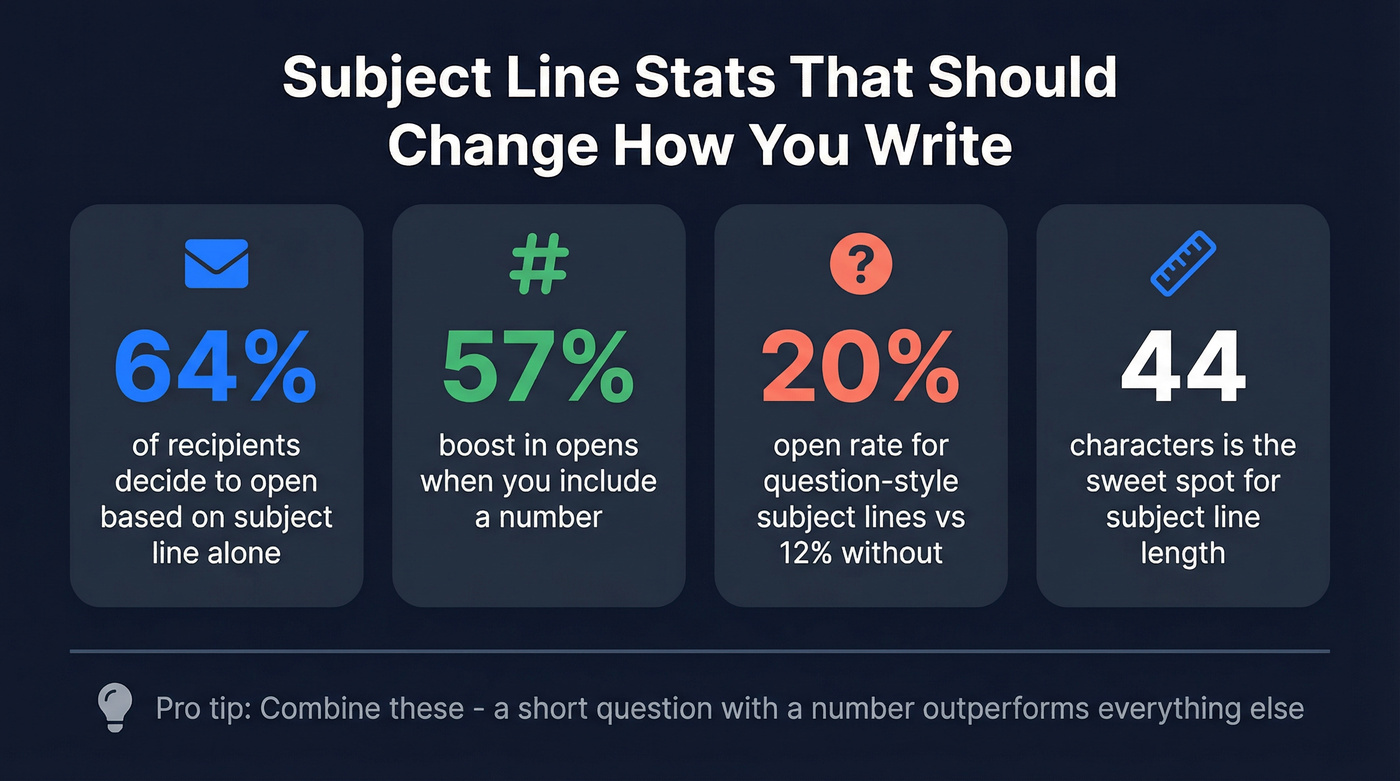
64% of recipients decide whether to open based on the subject line alone. Subject lines with a question mark hit roughly 20% open rates versus 12% without one, including a number boosts opens by 57%, and shorter wins - 44 characters is the sweet spot. For more examples you can swipe, see these subject lines for follow-up emails.
| Subject Line Example | Why It Works |
|---|---|
| Quick question about [initiative] | Question format, specific |
| 15 min to discuss [pain point]? | Low-friction ask, relevant |
| [Name], time for a quick sync? | Personalized, casual |
| Following up on [topic] | Clear context, direct |
| Can we meet [day] at [time]? | Specific, easy to answer |
| [Mutual connection] suggested we talk | Social proof, curiosity |

A perfectly written appointment email is worthless if it never arrives. Prospeo's 5-step verification catches catch-all domains, spam traps, and honeypots - delivering 98% email accuracy so your meeting requests land in real inboxes.
Stop losing meetings to bounced emails. Verify before you send.
5 Ready-to-Use Appointment Email Templates
Template 1: Cold Outreach Request
Use when: You've never spoken to this person and need to earn the meeting.
Subject: Quick question about [specific challenge]
Hi [First Name],
I noticed [company] recently [specific observation - new hire, funding round, product launch]. We've helped similar teams [one-sentence result].
Would a 15-minute call make sense? I'm free [Day 1] at [Time] or [Day 2] at [Time] - happy to work around your schedule.
Best, [Your Name]
This is the most common appointment request sample you'll find online, but the difference between one that works and one that doesn't comes down to the personalized opener. A lazy "I noticed your company is growing" won't cut it - reference something specific enough that they know you actually looked. If you want more variations, pull from a proven outreach email template library.
Template 2: Existing Client or Warm Contact
Use when: You have an existing relationship and need to schedule a check-in or upsell conversation.
Subject: Time for a quick check-in, [First Name]?
Hi [First Name],
It's been [timeframe] since we last connected, and I wanted to touch base on [specific topic]. I have a few ideas that might help with [goal].
Are you free [Day] at [Time] or [Day] at [Time] for 20 minutes?
Thanks, [Your Name]
Template 3: Internal Meeting Request
For healthcare or professional services, swap "quick sync" for "brief consultation" and add any intake instructions. For everyone else, keep it casual.
Subject: 15 min to align on [project/topic]?
Hey [First Name],
I want to sync on [specific deliverable or decision] before [deadline]. Should take 15 minutes max.
Does [Day] at [Time] work, or would [Day] at [Time] be better?
Thanks, [Your Name]
Template 4: Follow-Up After No Response
60% of replies come after the first follow-up, and 70% of responses arrive between the 2nd and 4th email. Don't give up after one send. If you're building a full sequence, use a repeatable sales cadence instead of improvising.
Subject: Re: Quick question about [topic]
Hi [First Name],
I know things get buried - just bumping this up. I'd love 15 minutes to discuss [value prop].
Would [Day] at [Time] work? If the timing's off, just let me know what looks better.
Best, [Your Name]
Template 5: Confirmation and Next Steps
Don't send this:
Looking forward to chatting! Let me know if anything changes.
Send this instead:
Subject: Confirmed: [Day] at [Time]
Hi [First Name],
Looking forward to our call on [Day] at [Time] ([Time Zone]). I'm planning to cover:
- [Bullet 1]
- [Bullet 2]
If anything changes, reschedule here: [link]. Talk soon.
Best, [Your Name]
The difference? An agenda and a calendar invite reduce no-shows. A vague "looking forward to it" doesn't.
When to Use a Scheduling Link
If you're booking with someone who already knows you, skip the back-and-forth. 68% of customers prefer businesses that offer online scheduling.
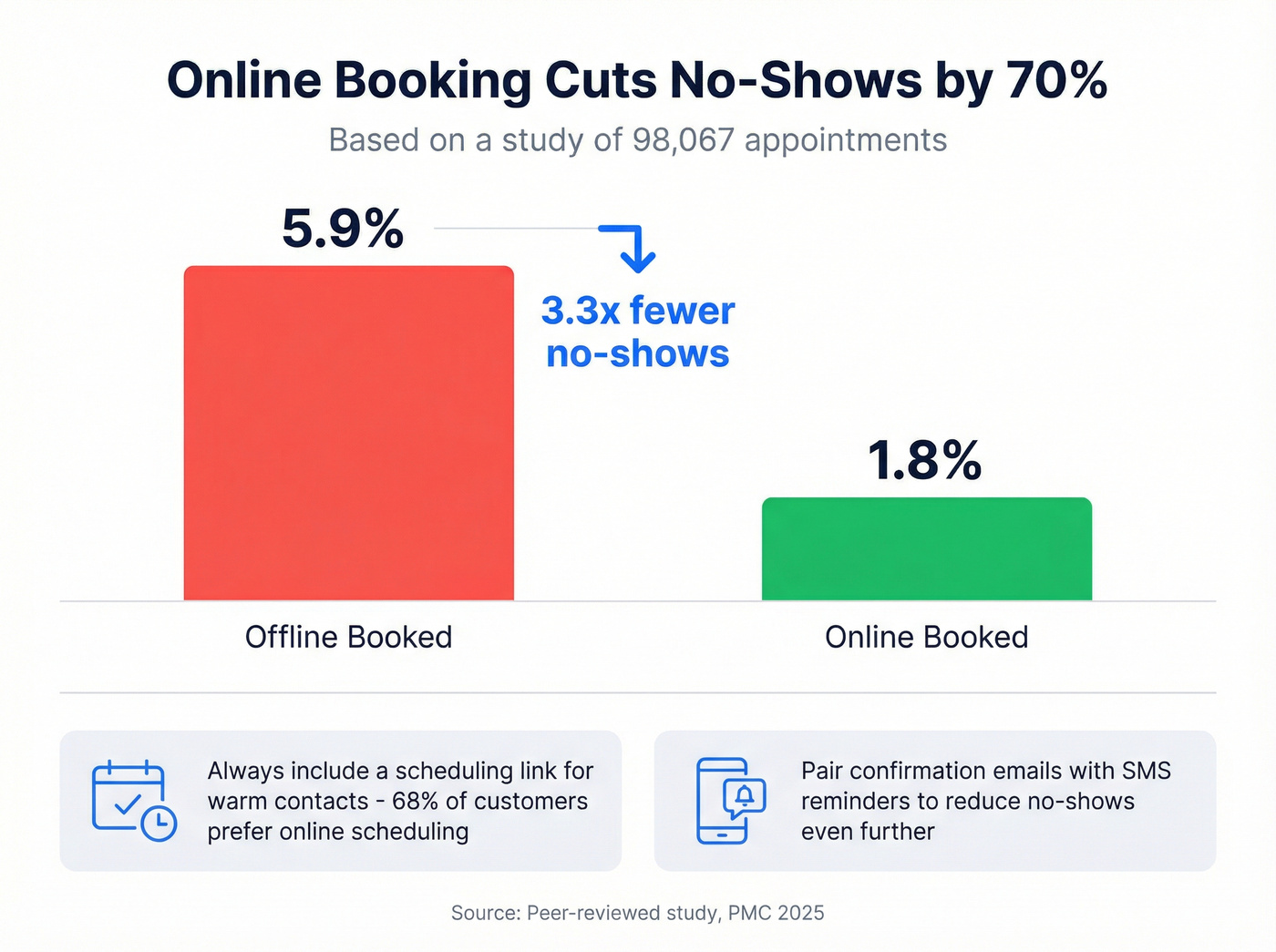
The no-show problem is real. A review of 105 studies found the average no-show rate across appointments is 23%. A peer-reviewed study of 98,067 appointments in healthcare settings showed online-booked appointments had a 1.8% no-show rate versus 5.9% for offline-booked ones in the practice setting studied, though results varied in hospital settings (study link). Pair your confirmation email with an SMS reminder - the same study found SMS reminders significantly reduced no-shows in the hospital setting.
| Tool | Free Tier | Paid From |
|---|---|---|
| Calendly | Yes | $12/user/mo |
| Cal.com | Yes (individuals) | $15/user/mo |
| Reclaim | Yes | $10/user/mo |
| zcal | Yes | $9.50/user/mo |
Send your appointment email Tuesday or Thursday, between 9:30-11:00 AM or 1:30-3:00 PM in the recipient's time zone. Those windows consistently outperform other slots. If you want a broader benchmark view, compare against the best time to send prospecting emails.
Building a Follow-Up Cadence
Most people send one email and quit. That's a mistake.
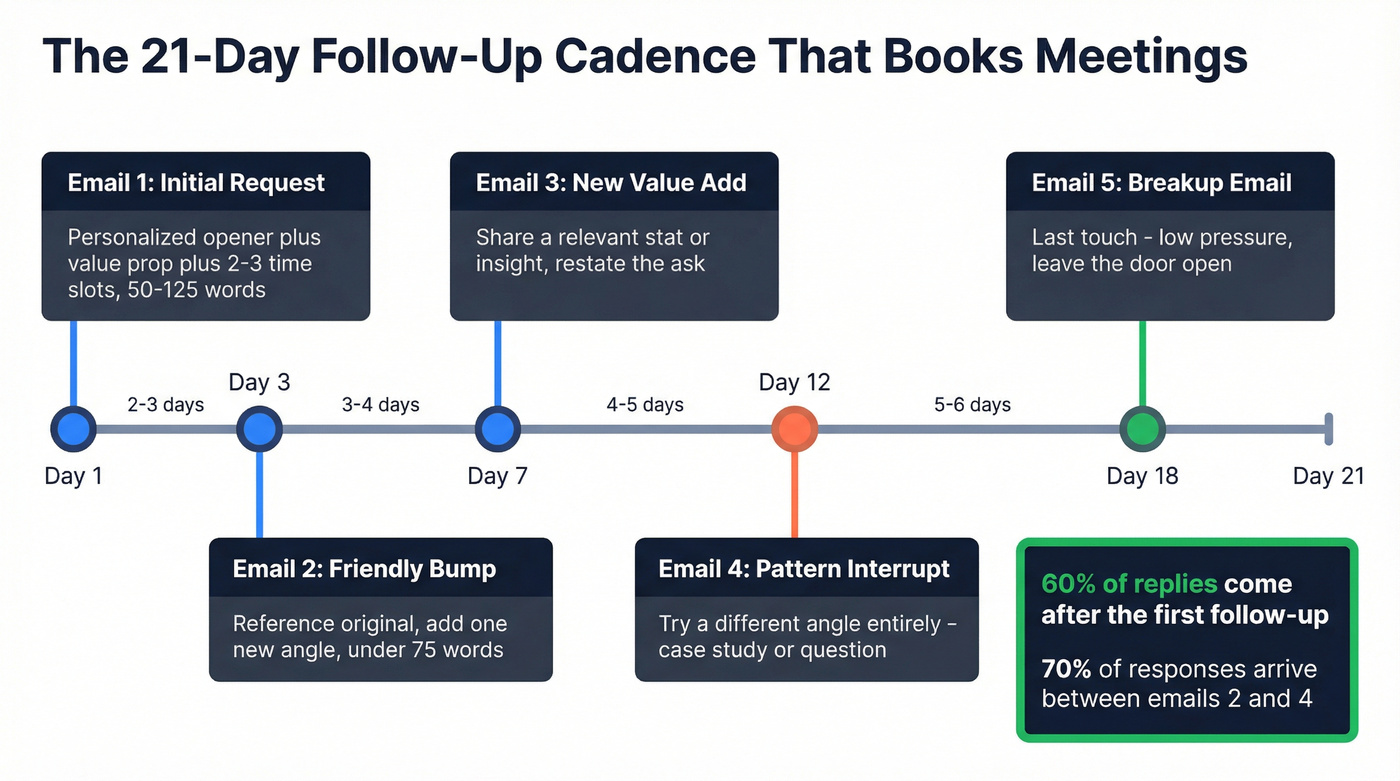
High-performing cold sequences run 4-7 emails over 14-21 days, and quality messaging can push response rates above 20%. In our experience, the second email outperforms the first nearly every time - people genuinely don't see the first one, or they see it and forget. The consensus on r/sales backs this up: persistence isn't pushy if each touch adds something new.
Wait 2-3 days after your initial email, then send a short, friendly bump. Don't rewrite the whole pitch - reference the original and add one new angle. Keep it under 75 words.
Here's a copy-paste follow-up for email #2 in your sequence:
Subject: Re: [Original subject]
Hi [First Name],
Quick follow-up - I came across [new relevant insight or stat] that made me think of [their company]. Worth a 10-minute conversation?
[Day] at [Time] still works on my end.
Best, [Your Name]
Let's be honest about something: if your average deal size is under $8k, you don't need a seven-email sequence with custom video thumbnails. Two well-written follow-ups to a verified email address will outperform a bloated sequence sent to a dead inbox every single time. The biggest appointment email killer isn't the copy - it's sending to an address that doesn't exist. We've watched teams obsess over A/B testing subject lines while 15% of their list bounces silently in the background.
Skip the elaborate cadence if you haven't verified your list first. Fix deliverability, then worry about copywriting. If you need the full deliverability stack (auth, infra, monitoring), use this email deliverability checklist.
If your scheduling request is longer than 125 words, you're making it harder to get a reply. Brevity isn't just polite - it's strategic.
Writing appointment emails at scale? You need verified contacts, not guesses. Prospeo gives you 143M+ verified emails refreshed every 7 days - so every meeting request reaches a real person at just $0.01 per email.
Book more appointments with data that actually connects you to buyers.
FAQ
How long should an appointment request email be?
Keep it between 50 and 125 words. Emails in that range get the highest response rates according to cold outreach benchmarks. Lead with value, offer two specific time slots, and stop. Anything longer forces the reader to work harder than they should.
How many follow-ups should I send?
At least one - 60% of replies come after the first follow-up. For cold outreach, plan 4-7 emails over 14-21 days. Space them 2-3 days apart early on, then stretch to 4-5 days for later touches. Each follow-up should add a new angle, not repeat the original pitch.
What's the best way to verify emails before sending?
Use a real-time verification tool before every send. Prospeo checks deliverability with 98% accuracy and catches invalid, catch-all, and spam-trap addresses - its free tier includes 75 verifications per month. Keeping bounce rates under 2% protects your domain reputation and ensures your meeting requests actually land.
Should I include a calendar invite in my appointment email?
Yes. Online-booked appointments had a 1.8% no-show rate versus 5.9% for those scheduled offline in one peer-reviewed study. Once someone agrees to meet, send a calendar invite immediately with a brief agenda and a reschedule link. Pair it with an SMS reminder for even lower no-show rates.