

Catchy Sales Email Subject Lines: What Actually Works in 2026
A practitioner on r/b2bmarketing ran 20+ A/B tests across three warmed domains, sent over 1,000 emails, and still landed at a 2% open rate. Twenty rewrites didn't move the needle. That's because the subject line wasn't the problem - and it often isn't.
What follows is built on data from 5.5M cold emails, device-level truncation tests, and reply-rate benchmarks. Not just another list of catchy sales email subject lines you'll rewrite next week.
Here's the contrarian truth nobody in your Slack channel is saying: in 2026, "catchy" means the opposite of what you think. The subject lines pulling 46% open rates read like a message from a colleague, not a marketer. Short. Quiet. Relevant. The era of clever wordplay is dead - the lines that actually convert today sound human, not performative.
The Quick Version
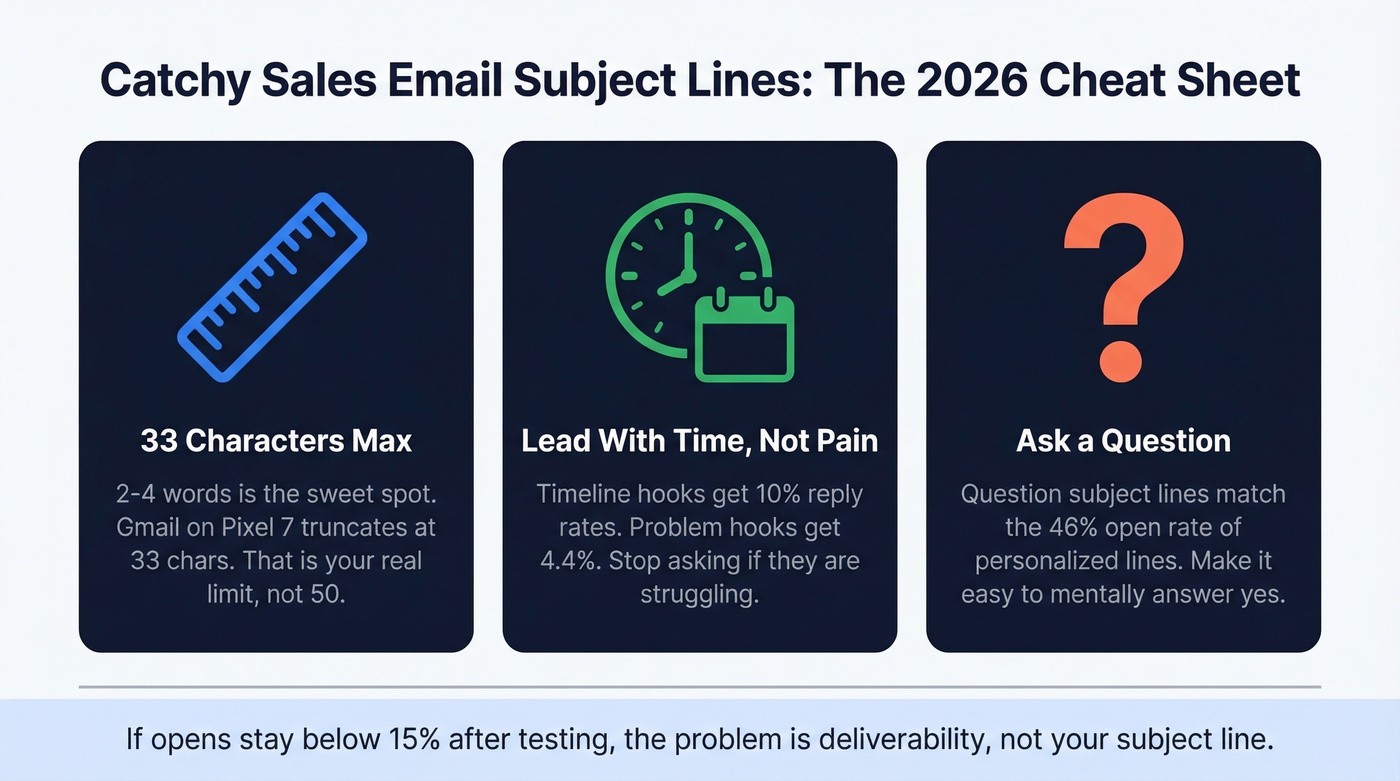
- Keep subject lines to 2-4 words / under 33 characters. That's the data-backed sweet spot for both opens and mobile visibility.
- Use question hooks and timeline hooks. Questions are top-tier for opens, and timeline hooks beat problem hooks by 2.3x on reply rate.
- If opens stay below 15% after testing, stop rewriting. The problem is email deliverability, not your copy.
What 5.5M Cold Emails Reveal
A Belkins study analyzing 5.5M cold emails sent between January and December 2024 gives us the clearest picture of what's working right now. The headline finding: personalized subject lines hit a 46% open rate versus 35% without - a 31% lift. Reply rates doubled, jumping from 3% to 7%.
But "personalized" doesn't mean slapping {{first_name}} into a template. The lines that performed used relevance triggers tied to the prospect's company, role, or situation. If you want a deeper playbook on this, see personalized outreach. Generic greetings like "Hello, friend" and urgency words like "ASAP" pushed opens below 36%.
Question-framed subject lines averaged 46% opens, matching the personalization lift. Length mattered too: 2-4 word subject lines hit that same 46% mark, while anything beyond 9-10 words dropped to 34-35%. Numbers in subject lines didn't help - 27% opens with numbers versus 28% without. So much for the "use a stat in your subject line" advice.
One data point that surprised us: timeline hooks (referencing deadlines, quarters, or specific dates) pull a 10.01% reply rate versus 4.39% for problem hooks like "struggling with X?" That's a 2.3x gap on replies and 3.4x on meetings booked. Keep that in your back pocket - it matters more than any individual template.
Short, relevant, question-based lines win. Hype loses.
The Real Character Limits
Most guides say "keep it under 50 characters." That's too generous. EmailToolTester ran actual device tests, and the results are tighter than you'd expect.
| Device / Client | Subject Line | Preheader |
|---|---|---|
| Gmail (Pixel 7) | 33 chars | 37 chars |
| Gmail (Samsung S22) | 36 chars | 40 chars |
| Gmail (iPhone 14) | 37 chars | 39 chars |
| Apple Mail (iPhone) | 48 chars | 99 chars |
| Apple Mail (iPad) | 39 chars | 75 chars |
| Outlook desktop | ~51 chars | varies |
| Gmail desktop | ~88 chars | varies |
The safe universal limit is 33 characters. That's not a lot - roughly "Quick question about [Company]" and you're already pushing it. Character width matters too; a subject line full of "M"s and "W"s truncates sooner than one with "i"s and "l"s.
With 55% of emails opened on mobile, truncation isn't an edge case. It's the default reading experience. Twilio SendGrid's Cyber Week dataset confirms the length finding: the average subject line was 6 words, but the best performers were 2-4.
Your preheader is a second subject line. On Gmail mobile (Pixel 7), you get 37 characters of preheader text. Use it. Front-load your hook in the subject, expand the context in the preheader. For more on this, see Email Preview Text A/B Testing.
40+ Subject Line Examples by Scenario
You don't need 100 templates - you need 40 that follow the data. Every subject line below is short, relevant, and hype-free. (If you want a bigger swipe file, see cold email subject line examples.)
Cold Outreach (First Touch)
Saw [Company]'s Q3 numbers- relevance trigger, implies researchQuestion about [team/dept]- question format, 46% open rate benchmark[Mutual connection] said to reach out- social proof, instant credibilityHiring [role]? Quick thought- tied to a live signal they can verify[Company] + [your company]?- curiosity gap, under 25 charactersWrong approach to [pain point]?- question + pattern interrupt
Follow-Up (No Response)
Following up (30 sec read)- sets time expectation, reduces frictionBumping this - new data- timeline hook, implies fresh valueWorth 2 minutes Tuesday?- specific day creates urgency without hypeTried you last week- honest, human, shortStill thinking about [topic]?- question format, re-engages
Timeline hooks drive a 10.01% reply rate versus 4.39% for problem hooks. Use them in follow-ups especially. If you need full sequences, borrow from these sales follow-up templates.
Meeting Request
Meeting requests are the one scenario where brevity matters most - every extra word is friction between the prospect and a "yes." (More scripts here: email wording to schedule a meeting.)
| Subject Line | Characters | Why It Works |
|---|---|---|
15 min this week? |
19 | Fully visible on every device |
Coffee chat - [topic]? |
~24 | Casual tone, low commitment |
Got 10 minutes Thursday? |
26 | Specific day, easy to answer |
[Name], brief chat? |
~18 | Personalized, ultra-short |
Sync on [initiative]? |
~22 | Ties to something they care about |
Every one of these is a question. That's not a coincidence.
Referral / Warm Intro
[Name] suggested I reach out- social proof, high-trust opener[Name] thought we should connect- warm, implies mutual valueReferred by [Name] - quick q- combines referral + question[Name] said you'd know- flattery + social proof in five words
Re-Engagement (Gone Cold)
The breakup email is the most underrated format in cold outreach. When someone has gone dark, self-awareness beats persistence.
"Did I lose you?" is 16 characters. It's a pattern interrupt that forces a binary response. "Should I stop reaching out?" works for the same reason - it hands control to the prospect, and people who feel in control respond more. We've seen this consistently across our own outbound testing.
Other re-engagement lines that pull replies: "Closing the loop on this" implies finality and triggers FOMO. "Changed my approach" is self-aware and earns a second look. "New angle on [topic]" signals fresh value instead of a repeat pitch.
Urgency / Timeline
Offer ends Friday- deadline-based, 17 charactersSpots filling for Q2- scarcity without "URGENT" or "ACT NOW"Price changes March 1- specific date, factual urgencyBefore your renewal- tied to their calendar, not yours
Timeline hooks drive meeting rates of 2.34% versus 0.69% for problem hooks - a 3.4x gap. Urgency works when it's tied to a genuine deadline. Manufactured urgency gets you flagged.

Personalized subject lines hit 46% open rates - but only if they land in real inboxes. Prospeo's 98% email accuracy and 7-day data refresh mean your carefully crafted subject lines reach actual decision-makers, not dead addresses.
Stop perfecting subject lines for emails that bounce.
Hook Types That Drive Replies
Not all hooks are equal, and the gap is wider than most teams realize.
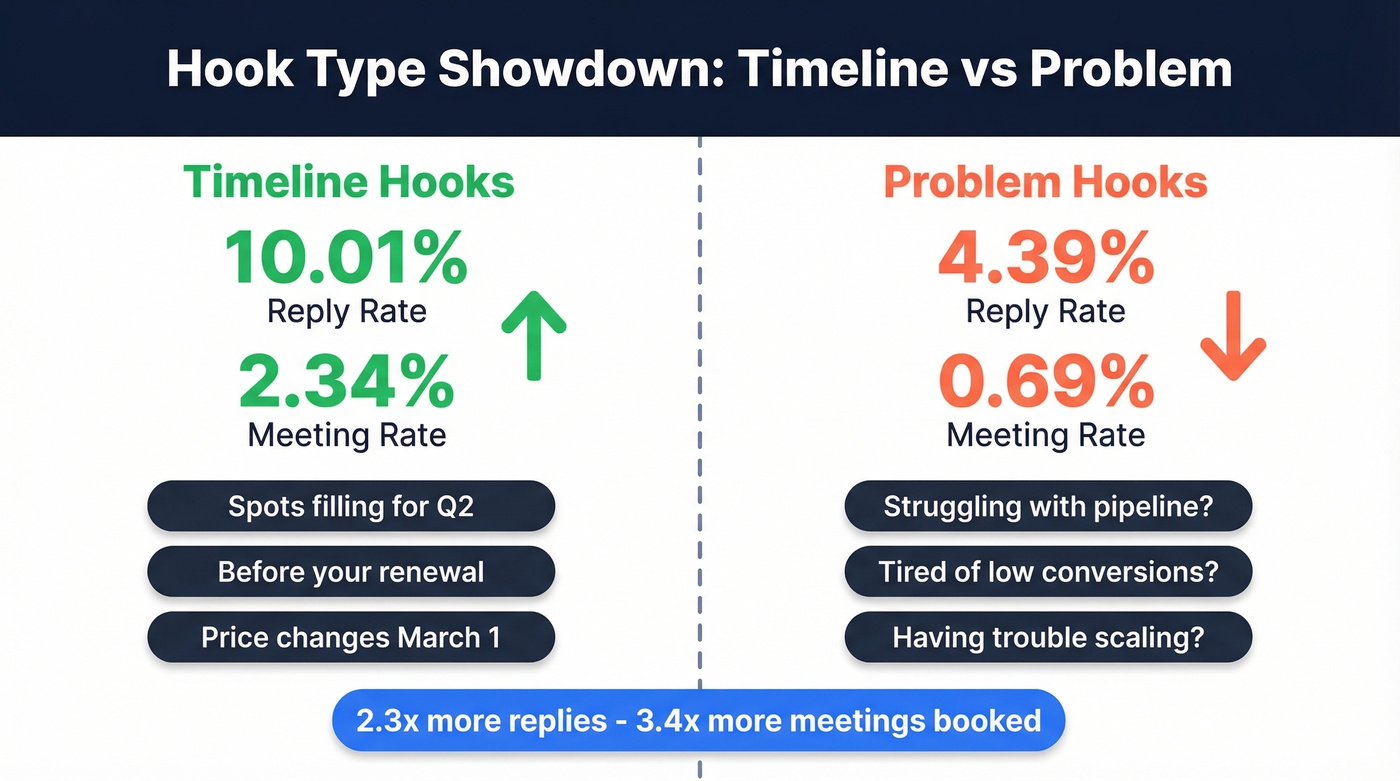
Timeline hooks pull a 10.01% reply rate. Problem hooks land at 4.39%. That's a 2.3x difference on replies and a 3.4x difference on meetings booked. If you take one thing from this article, let it be this: stop leading with pain and start leading with time.
Cadence matters too. A Day 1-3-10 follow-up sequence captures 93% of replies by Day 10. Segmenting your lists into cohorts of 50 contacts or fewer lifts reply rates by 2.76x. Smaller batches let you personalize at a level that mass sends can't touch. (More on building sequences: B2B cold email sequence.)
Words That Land You in Spam
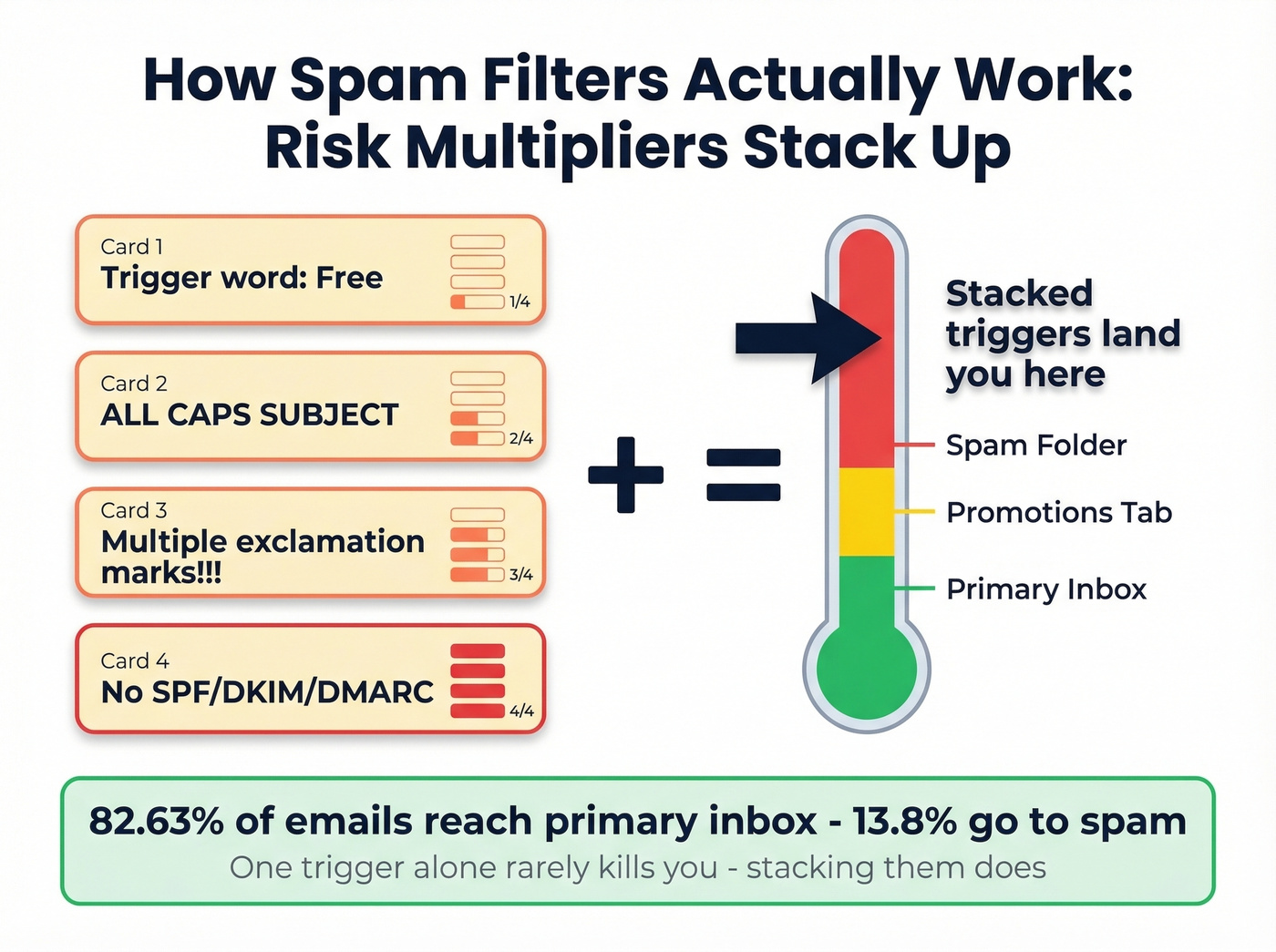
Modern spam filters don't blacklist individual words - they use what Clearout calls "risk multipliers." A single "free" in your subject line won't kill you. But stack "free" with ALL CAPS, three exclamation marks, and a sending domain with no SPF record, and you're headed straight to spam. Only 82.63% of emails land in the primary inbox; 13.8% go to spam.
| Spam Trigger | Use Instead |
|---|---|
| Free | Complimentary |
| Guarantee | Proven results |
| Click here | View details |
| Act now | Worth a look this week |
| URGENT | Drop it entirely |
| Buy now | See how it works |
| No obligation | No commitment needed |
| Limited time offer | Available through [date] |
Beyond word choice, your authentication stack matters. SPF tells receiving servers which IPs can send for your domain. DKIM verifies the message wasn't altered in transit. DMARC sets the policy when either fails. If you haven't configured all three, no subject line optimization will save you. (If you want to go deeper, start with DMARC alignment.)
With roughly 160 billion spam emails sent daily, filters are aggressive - and they should be. Even the most compelling catchy sales email subject lines won't reach a prospect if your technical setup is broken. Use an email spam checker to catch issues before you send.
When the Subject Line Isn't Your Problem
Let's go back to that Reddit case. A practitioner tested 20+ subject line variants, warmed three domains, sent 25 emails per day, and still sat at 2% opens. That's not a copy problem. That's a deliverability problem.
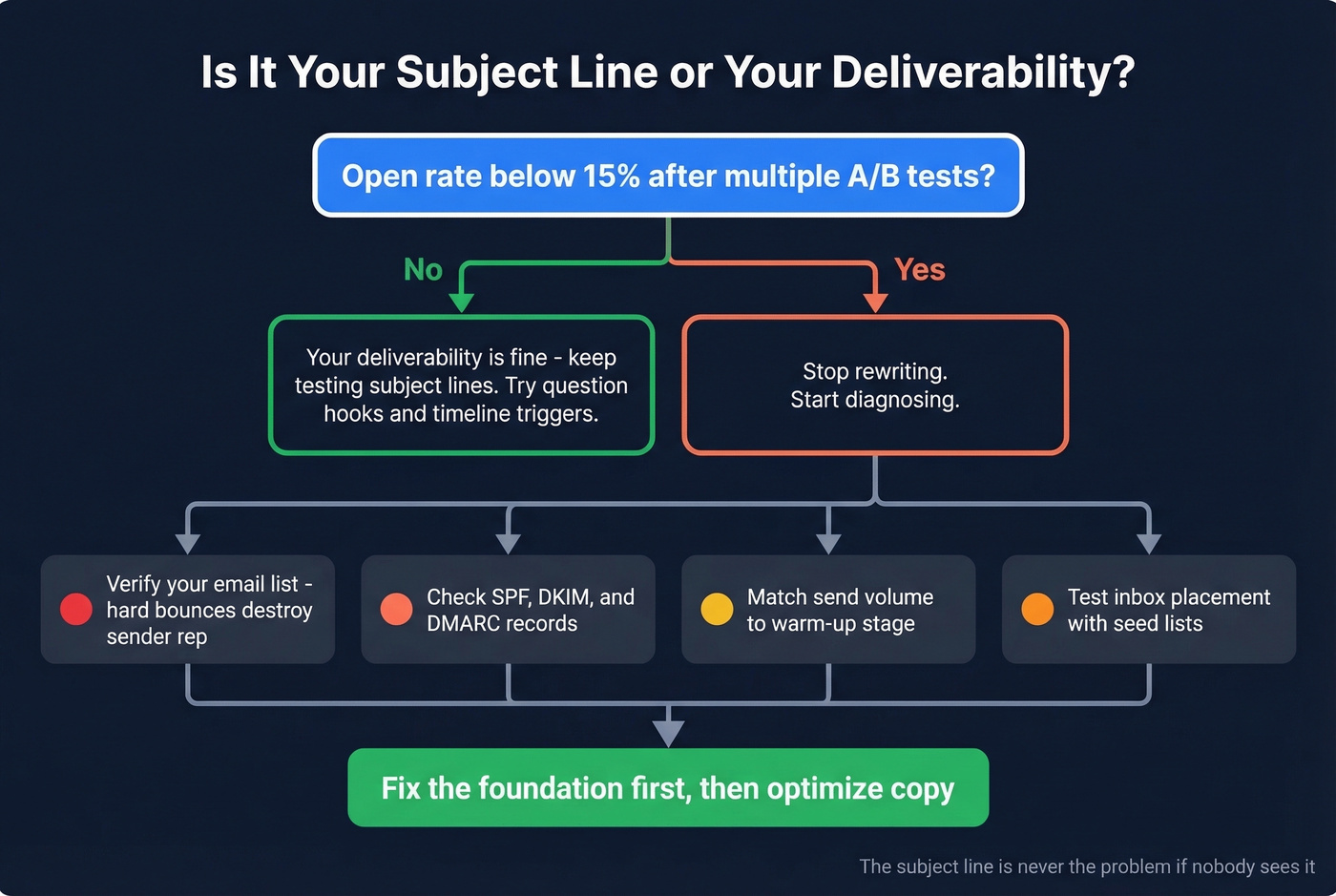
The benchmark is clear: if opens stay below 15% after multiple tests, stop rewriting and start diagnosing.
Deliverability Diagnostic
- Run your list through a verification tool - hard bounces destroy sender reputation
- Check SPF, DKIM, and DMARC records on your sending domain
- Confirm your sending volume matches your domain's warm-up stage
- Review your email content for spam trigger stacking
- Test inbox placement with a seed list across Gmail, Outlook, and Apple Mail
The most common culprit? Bad data. Invalid email addresses generate hard bounces, hard bounces destroy sender reputation, and a damaged sender reputation means even your best subject line lands in spam - or never arrives at all. If you're seeing this, start with email bounce rate benchmarks and fixes.

Look - run your list through a verification tool before rewriting another subject line. Snyk's 50-person sales team went from 35-40% bounce rates to under 5% after switching to verified data, and AE-sourced pipeline jumped 180%. The subject line didn't change. The data did.
The data is clear: relevance triggers beat clever copy. Prospeo gives you 30+ filters - job changes, hiring signals, funding rounds - so every subject line you write is backed by a real reason to reach out.
Turn prospect signals into subject lines that earn replies.
How to A/B Test Without Wasting Sends
A few rules that'll save you from drawing bad conclusions.
Minimum 250 contacts per variant. Anything less and your results are noise, not signal.
Measure reply rate, not opens. Apple Mail Privacy Protection pre-loads tracking pixels, inflating open rates across the board. Mailchimp's benchmark across billions of emails shows a 35.63% average open rate for permission-based lists - but that includes Apple MPP inflation. Cold outbound on warmed lists should target 40-60% opens, with reply rate as the real north star. In our experience, teams that switch to reply rate as their primary metric make better decisions within two test cycles.
One variable at a time. If you change the subject line and the opening sentence simultaneously, you won't know which moved the needle.
Benchmarks to calibrate against: 40-60% opens on properly warmed lists, 4% average response rate, and 5%+ positive reply rate is strong. Below those numbers after clean tests? Revisit your targeting and list quality before blaming the copy. (More on outbound fundamentals: sales prospecting techniques.)
AI Tools for Subject Lines
AI generators are useful for one thing: speed of variant generation. They won't write your strategy, but they'll give you 20 options in 30 seconds instead of staring at a blank line for 10 minutes. Skip them if you're sending fewer than 50 emails per week - the manual iteration will teach you more about what resonates with your specific audience. If you're building a full workflow, see AI cold email outreach.
- CoSchedule - $19/mo (freemium available), solid for quick scoring and headline analysis
- ActiveCampaign - $15-589/mo, built-in subject line testing within broader email automation
- Seventh Sense - $80+/mo, send-time optimization layered on top of subject line testing
- Persado - $3K+/mo, enterprise-grade language optimization
- Jacquard - $95K-190K/year, enterprise AI for brand-consistent messaging at scale
Vendor marketing loves to claim "50% open rate lift" from AI-optimized subject lines. The real value is iteration speed, not magical performance gains.
FAQ
What's the ideal subject line length for cold emails?
Two to four words, or under 33 characters for full mobile visibility. The Belkins 5.5M-email study found 2-4 word subject lines hit 46% opens. Gmail on a Pixel 7 truncates at 33 characters - the tightest major cutoff point.
Do personalized subject lines actually work?
Yes - 46% opens versus 35% without, and reply rates double from 3% to 7% across 5.5M emails. Personalization means relevance to the prospect's situation, not just mail-merging {{FirstName}}. A subject line referencing their company's recent funding round beats "Hey Sarah" every time.
How do I write subject lines that get replies, not just opens?
Lead with timeline hooks, not pain points. Timeline-based subject lines drive a 10.01% reply rate versus 4.39% for problem hooks. Keep it under 33 characters, frame it as a question, and reference something specific to the prospect's company or role. If opens are fine but replies are low, the subject line is doing its job - your email body is the problem.
What's a good open rate for cold outbound?
Target 40-60% on warmed lists. Below 15% signals a deliverability issue, not a copy issue. Reply rate matters more - 3-5% average, 5%+ is strong. Apple Mail Privacy Protection inflates open tracking, so don't over-index on that metric.
How can I tell if bad data is hurting my email performance?
If bounce rates exceed 5%, your sender reputation is taking damage regardless of how good your subject lines are. Verify your list before testing new copy. Snyk cut bounce rates from 35-40% to under 5% and saw AE-sourced pipeline jump 180% - without changing a single subject line.