

The Cold Email Guide That Actually Works in 2026
One founder sent 147,000 cold emails and got a 1.2% positive reply rate - 40 sales calls from six figures' worth of sending infrastructure and effort. That founder eventually pivoted to joining existing conversations and saw reply rates jump to 34%. But cold email still works when the infrastructure is right. A practitioner on r/Entrepreneur rebuilt their entire approach - new domains, strict daily caps, shorter copy, verified lists - and watched reply rates climb from 3% back to 6%.
The difference wasn't talent or luck. It was infrastructure and data quality. Most cold email guides skip straight to subject line hacks and "power words." That's like optimizing your golf swing before checking if you're on the right course. This guide starts where your results actually get determined - the technical foundation - and works forward to copy, sequences, and benchmarks.
Here's the thing: if you're selling deals under $5K, you probably don't need cold email at all. But if you're targeting $10K+ contracts to specific buyer roles, there's still no channel with better unit economics - roughly $36 ROI per $1 spent. The catch is that the bar for execution has never been higher.
What You Need (Quick Version)
Cold email in 2026 comes down to three things: infrastructure (authentication + warmup), data quality (verified emails, bounce rate under 2%), and short, personalized copy. Most guides obsess over #3. We're starting with #1 and #2 because they determine most of your results before anyone reads your subject line.
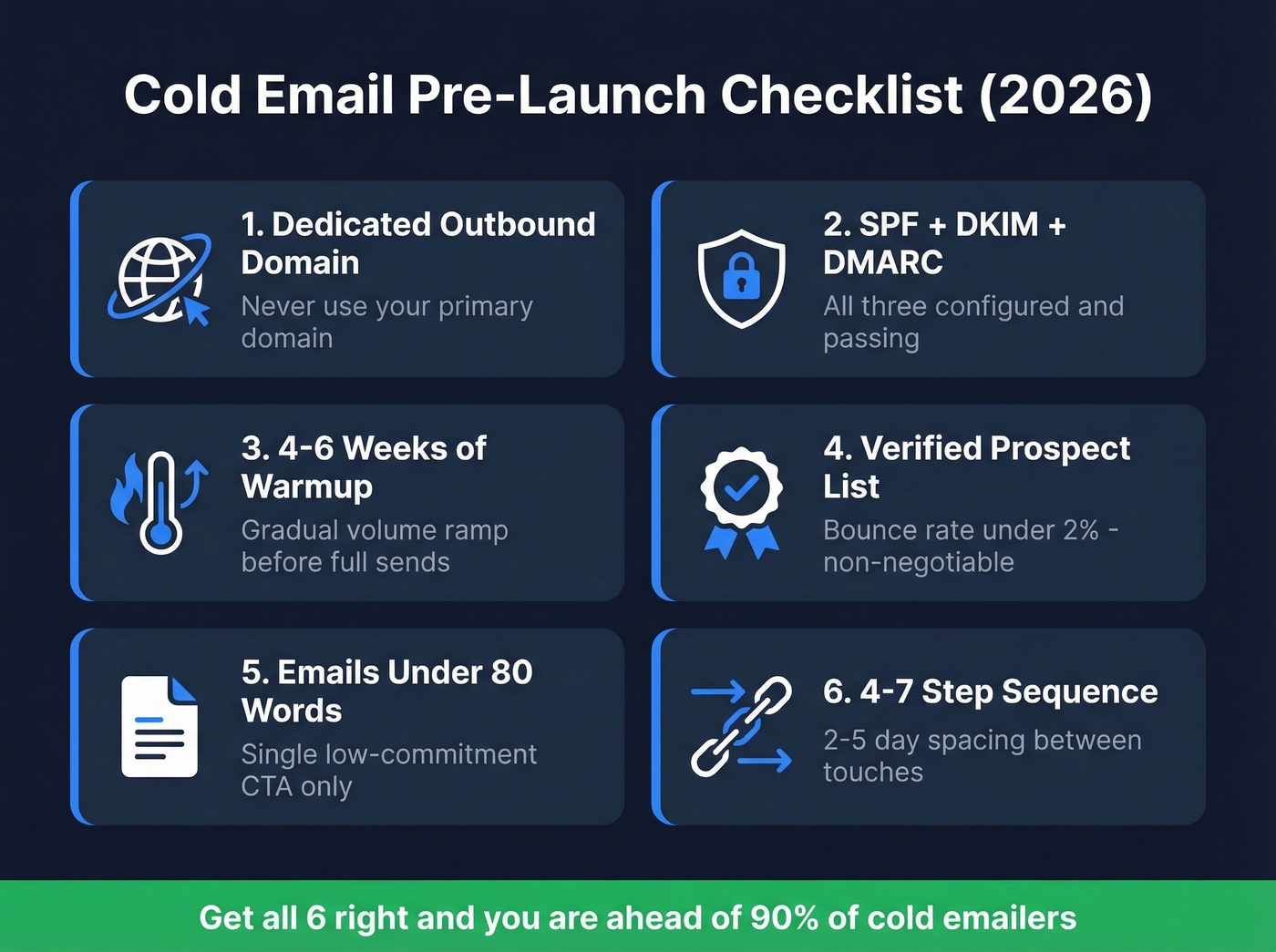
Your pre-launch checklist:
- Dedicated outbound domain (never your primary)
- SPF, DKIM, and DMARC records configured and passing
- 4-6 weeks of warmup before full volume
- Verified prospect list with bounce rate under 2%
- Emails under 80 words with a single, low-commitment CTA
- 4-7 step sequence with 2-5 day spacing between touches
If you've got all six, you're ahead of most cold emailers. Let's break down each one.
What Changed in 2024-2026
Deliverability rules shifted hard in a short window. Gmail and Yahoo rolled out mandatory DMARC requirements for bulk senders in February 2024. Microsoft followed with its own enforcement in early 2025. By late 2025, Gmail escalated to SMTP-level rejections for non-compliance - non-compliant emails don't just land in spam, they get rejected before they ever reach an inbox. Google's admin documentation spells out the full authentication requirements.
The result: average global deliverability sits at 83.1%. Roughly one in six emails never reaches the inbox. For cold outreach - where you don't have an existing sender-recipient relationship - that number is worse unless your authentication and reputation are airtight.
Yes, cold email at scale can become spam. The line is whether you're sending relevant, personalized messages to people who'd plausibly benefit, or blasting thousands of identical pitches. This guide is for the former. And if you're still running outbound without proper DNS records and warmup, you're sending into a wall.
Email Authentication Setup
Authentication is the price of admission. Without SPF, DKIM, and DMARC, your emails are dead on arrival.
SPF Records
SPF tells receiving servers which IP addresses can send email on behalf of your domain. Add a TXT record to your DNS:
v=spf1 include:_spf.google.com include:sendgrid.net -all
Replace the include: entries with your actual sending services. Use -all for cold email - it tells servers to reject anything not on the list. Only use ~all during initial testing.
Critical constraint: SPF has a hard 10 DNS lookup limit. Exceed it and your SPF fails entirely - as if you have no record at all. Run your domain through MXToolbox's SPF Lookup to check your count. If you're over, flatten your record by replacing nested includes with direct IP ranges.
DKIM Configuration
DKIM adds a cryptographic signature to every outgoing email, proving it hasn't been tampered with in transit. Your sending service generates a key pair; you publish the public key as a DNS TXT record:
selector._domainkey.yourdomain.com TXT "v=DKIM1; k=rsa; p=YOUR_PUBLIC_KEY"
Use 2048-bit keys. 1024-bit is considered weak. Set up DKIM for every sending service on your domain, not just your primary email provider. If you're using Google Workspace plus a cold email tool, both need their own DKIM selectors. (If you want a quick checklist, see How to Verify DKIM Is Working.)
DMARC Rollout
DMARC ties SPF and DKIM together and tells receiving servers what to do when authentication fails. Don't jump straight to enforcement - roll it out in stages.
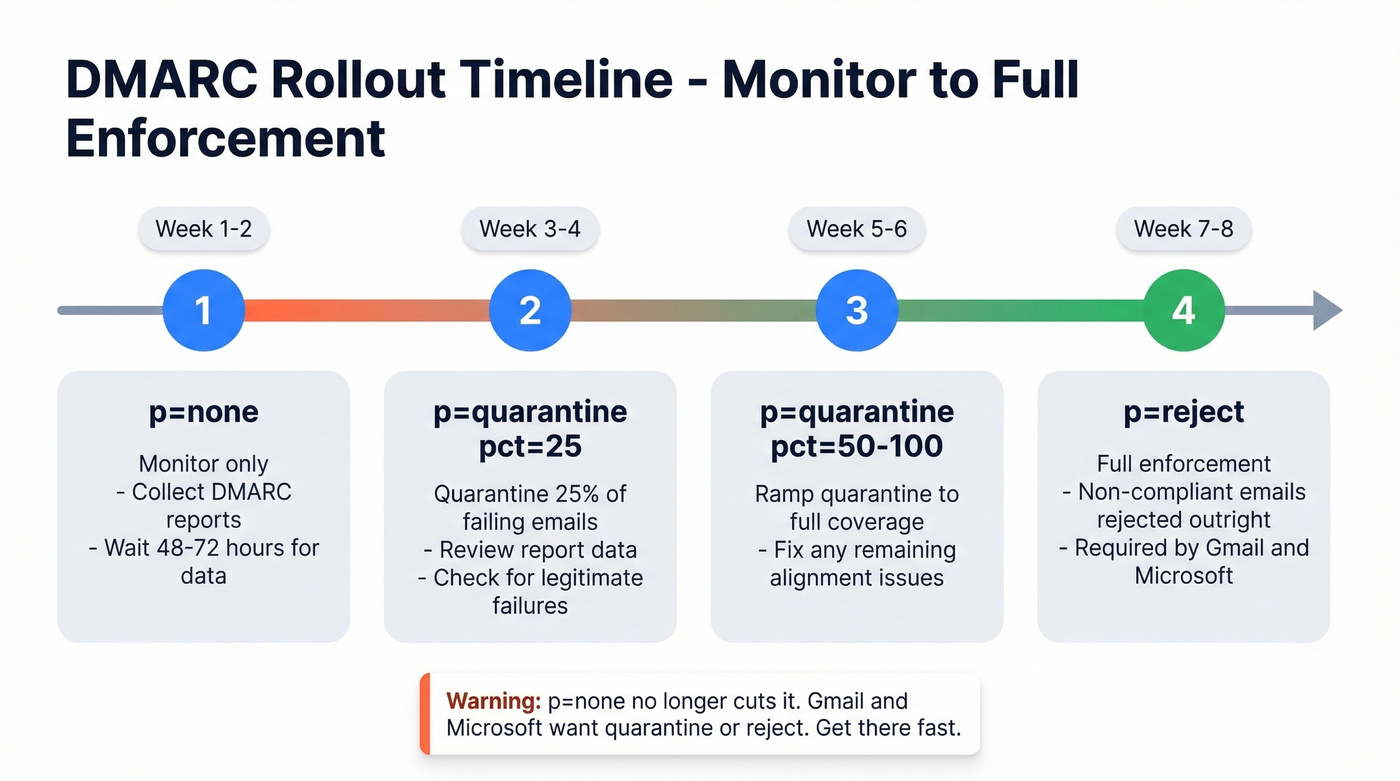
Start with this record:
_dmarc.yourdomain.com TXT "v=DMARC1; p=none; sp=none; pct=100; aspf=r; adkim=r; rua=mailto:dmarc@yourdomain.com"
The aspf=r and adkim=r flags set relaxed alignment - essential for cold email, where strict alignment can break with subdomains and third-party senders. Reports typically arrive within 48-72 hours.
Move from p=none (monitor only) to p=quarantine; pct=25 (quarantine 25% of failing emails), then ramp pct to 50, then 100, and finally p=reject for full enforcement. Target full enforcement within 6-8 weeks. Look - p=none no longer cuts it for serious sending. Gmail and Microsoft want to see quarantine or reject. Get there fast. (If you want the nuance, read DMARC alignment.)
Infrastructure: Domains, Warmup, and Volume
Domain Strategy
Never send cold email from your primary domain. One spam complaint wave can tank your main domain's reputation, affecting everything - transactional emails, marketing, even internal delivery. If your company is acme.com, register something like tryacme.com for outbound.
The r/Entrepreneur practitioner scaled from 3 domains to 7, each with its own inbox. More domains means more sending capacity without pushing any single domain past safe thresholds.
Custom Tracking Domains
Set up a custom tracking domain - a CNAME record pointing your subdomain to your email tool's tracking server. Default shared tracking domains are often blacklisted because hundreds of senders share them. Most tools - Instantly, Smartlead, Lemlist - walk you through this in settings. Skip this step and you're inheriting every other sender's reputation problems. (More detail: tracking domain.)
Warmup Schedule
New domains have zero reputation. You need to build it gradually.
| Week | Emails/Day/Inbox | Notes |
|---|---|---|
| 1 | 10-20 | Warmup tool only |
| 2 | 20-35 | Mix warmup + real |
| 3 | 35-50 | Mostly real sends |
| 4 | 50-70 | Monitor bounces |
| 5-6 | 70-100 | Full volume if clean |
Increase volume 10-20% per week while monitoring bounce rates and spam complaints. Minimum warmup period: 4-6 weeks before full volume. Avoid blackhat warmup services using fake or low-quality accounts - providers detect these patterns, and the short-term speed isn't worth the reputation damage. (Tool options: Best Unlimited Email Warmup Tools.)
Daily Send Caps
Keep each inbox under 20-30 emails per day for cold outreach. The practitioner who hit 6% reply rates capped at 26 emails per inbox per day. Scale by adding domains and inboxes, not by pushing volume through a single account.
Your guardrails: spam rate under 0.1% (Google's ceiling is 0.3% - don't get close), bounce rate under 2%. Verify every email before it enters your sequence. One bad batch can set you back weeks. (Related: Email Velocity and Email Bounce Rate.)

Building a Clean Prospect List
Bounce rate is the single fastest way to kill a cold email campaign. The r/Entrepreneur practitioner saw their bounce rate drop from 11% to under 2% after switching from purchased lists to verified contacts. That one change - list quality - was the foundation everything else was built on.
We've seen this pattern across dozens of outbound teams we've worked with: the ones obsessing over subject lines while sending to unverified lists are fighting the wrong battle. Stack Optimize, an outbound agency, built from zero to $1M ARR running client campaigns with 94%+ deliverability, bounce rates under 3%, and zero domain flags across all clients. Their edge wasn't clever copy. It was clean data.

Prospeo runs 300M+ professional profiles through a 5-step verification process that includes catch-all domain handling, spam-trap removal, and honeypot filtering - the kinds of bad addresses that silently destroy sender reputation. Email accuracy hits 98%, and the database refreshes every 7 days versus the 6-week industry average. That freshness matters because people change jobs, emails get deactivated, and stale data means bounces. You can search by 30+ filters - job title, industry, company size, technographics, buyer intent - and export verified contacts directly into Instantly, Smartlead, or Lemlist through native integrations. The free tier gives you 75 verified emails per month to test the workflow, and credits cost roughly $0.01 per email at volume. (If you’re comparing providers, see Best Email List Providers and data enrichment services.)

You just read that one in six emails never reaches the inbox. The #1 fix? Verified data. Prospeo delivers 98% email accuracy through 5-step verification with catch-all handling, spam-trap removal, and honeypot filtering - so your cold emails actually land.
Stop burning domains on bad data. Start sending to verified inboxes.
Writing Emails That Get Replies
Subject Lines
A Belkins study analyzing 5.5 million emails produced the clearest subject line data we've found:
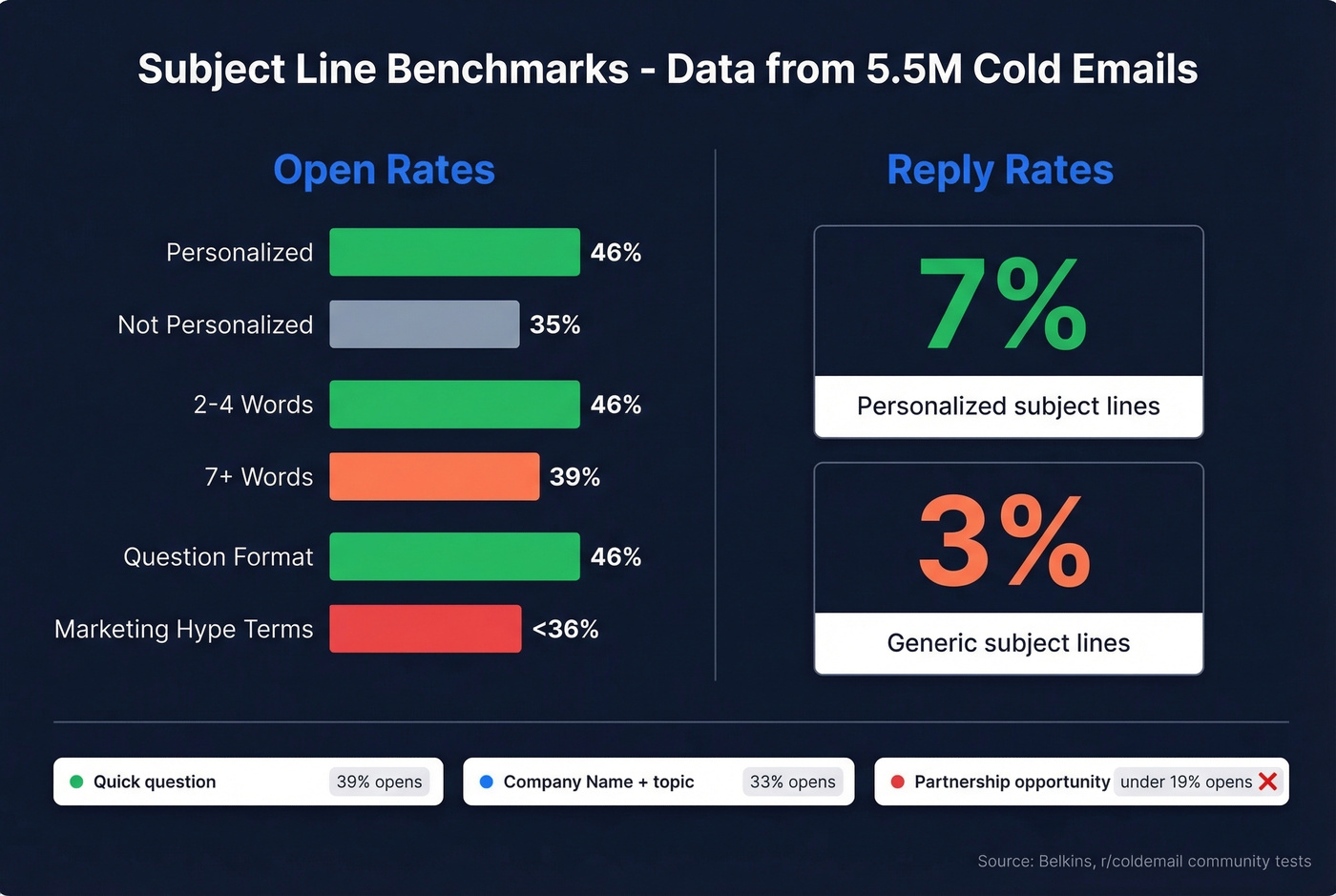
| Factor | Open Rate | Reply Rate |
|---|---|---|
| Personalized | 46% | 7% |
| Not personalized | 35% | 3% |
| 2-4 words | 46% | - |
| 7+ words | 39% | - |
| Question format | 46% | - |
| Marketing hype terms | <36% | - |
Community testing on r/coldemail confirms this pattern: "Quick question" pulled 39% opens. Company-name subject lines hit 33%. "Partnership opportunity" - the kind of generic phrase that screams mass email - landed below 19%.
Keep subject lines to 2-4 words. Use the prospect's company name or a question. Avoid anything that sounds like a marketing blast. (If you want swipeable options, see email subject line examples.)
Email Body Structure
The Instantly benchmark report found that best-performing campaigns keep emails under 80 words. In the r/Entrepreneur rebuild, cutting emails from 141 words to under 56 was one of the changes that helped lift reply rates back to 6%.
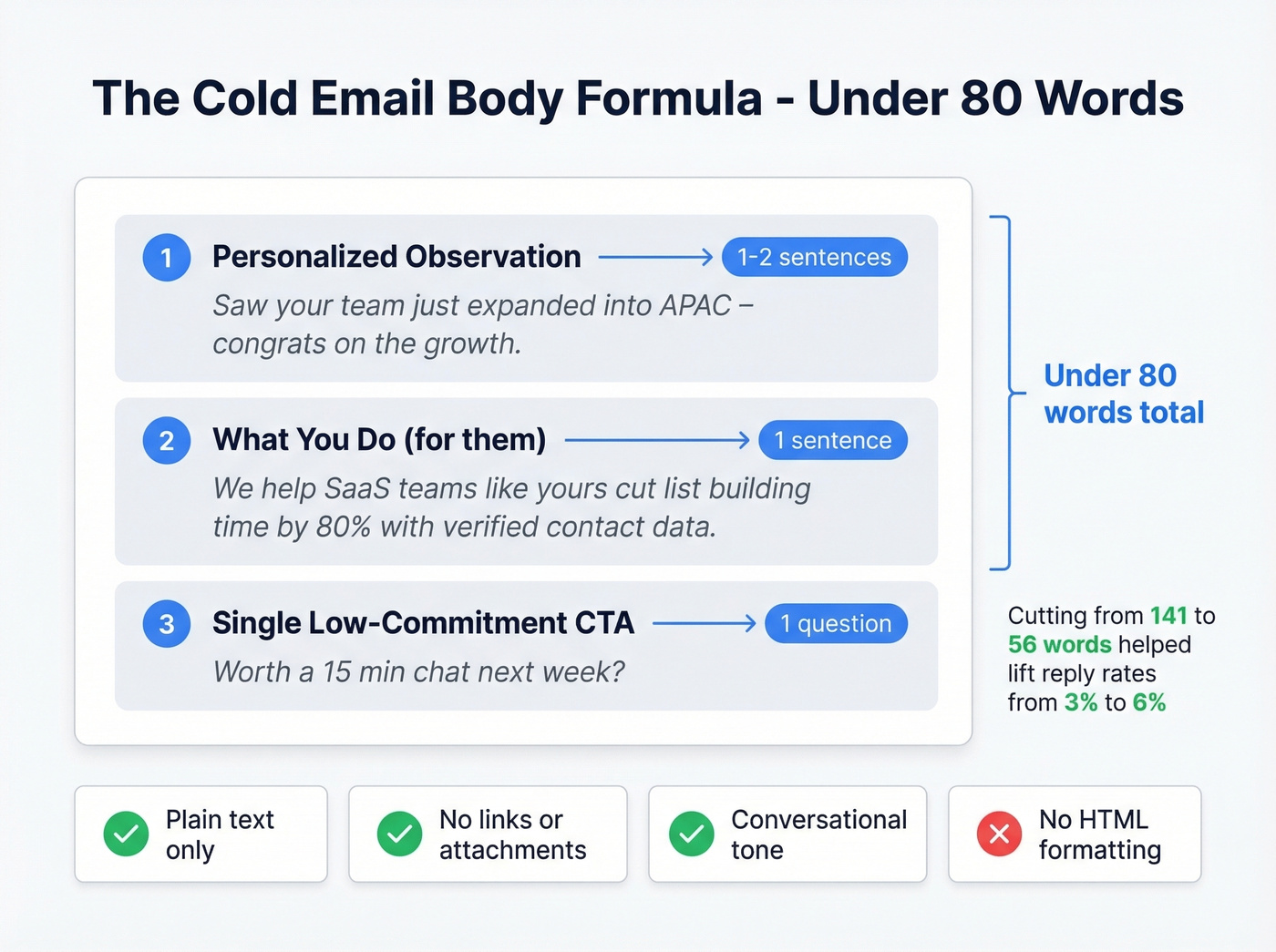
The formula: one observation about the prospect (personalized), one sentence about what you do, one low-commitment CTA. No links, no attachments, no HTML formatting. Write it like you'd write a quick note to a colleague - conversational, direct, easy to reply to.
Single CTA only. "Would a 15-minute call next week make sense?" works. "Check out our case study, visit our website, and book a demo" doesn't. Every additional ask reduces the chance of any action. (More on CTAs: Email Call to Action.)
Personalization at Scale
Manual research doesn't scale past 20-30 prospects a day. The AI workflow that's actually working right now: scrape a prospect's recent professional activity or company news, run it through GPT-4o mini to generate a custom first line, then merge it into your sequence via a {{custom_message}} variable.
One practitioner on r/SaaS reported roughly 3x response rate lift using this approach versus generic templates. The key is using real signals - a recent post, a company announcement, a job listing. AI-generated first lines only work when they reference something genuine. A GPT-written line about a prospect's actual conference talk lands. A GPT-written line that says "I love your company's mission" is worse than no personalization at all. (Related: AI Cold Email Outreach.)
Follow-Up Sequences
Most replies don't come from your first email. Instantly's data shows 58% of replies come from step 1, but that means 42% come from follow-ups you'd miss if you stopped after one touch. Cleverly found 60% of replies come after the second follow-up.
The sweet spot is 4-7 touchpoints:
| Step | Day | Type |
|---|---|---|
| 1 | Day 1 | Initial email |
| 2 | Day 3 | Reply-style follow-up |
| 3 | Day 7 | New angle or value add |
| 4 | Day 14 | Breakup email |
Space sends 9-14 minutes apart within each batch to mimic natural sending patterns. Send Tuesday through Thursday - Wednesday shows the highest reply rates.
One tactic that consistently outperforms: write follow-ups that look like replies, not new emails. "Hey - just bumping this up" beats a formal restatement of your value prop by roughly 30%. In our experience, the breakup email on Day 14 often pulls the highest-quality replies because it creates urgency without being pushy. (If you want plug-and-play copy, see Cold Email Follow-Up Templates.)
Benchmarks: What Good Looks Like
Here's what the data says across multiple sources, so you're not benchmarking against a single vendor's cherry-picked numbers:
| Metric | Average | Top Quartile | Elite |
|---|---|---|---|
| Reply rate | 3.43% | 5.5%+ | 10%+ |
| Open rate (SaaS) | 20-30% | 35-50% | - |
| Positive reply rate | 0.5-1.5% | 2-4% | - |
| Bounce rate | 2-5% | <2% | <1% |
SaaS-specific reply rates tend to run 1-3% average, with top quartile at 4-8%.
Open rates are increasingly unreliable since Apple Mail Privacy Protection started pre-loading tracking pixels. Focus on reply rate and positive reply rate as your primary metrics. If you're above 3.43% reply rate, you're beating the average. Above 5.5%, you're in the top quartile. Above 10%, you're elite.
Multi-channel sequences - email plus social touches - outperform email-only by 15-25% on positive reply rate. Don't treat cold email as your only channel; treat it as the backbone of a multi-touch sequence.
Staying Legal
Cold email is legal in most jurisdictions. But the rules vary, and getting them wrong is expensive.
| Requirement | US (CAN-SPAM) | EU (GDPR) | Canada (CASL) | UK (PECR) |
|---|---|---|---|---|
| Prior consent needed? | No | Legitimate interest (B2B) | Implied only | Legitimate interest |
| Physical address | Required (P.O. box OK) | Required | Required | Required |
| Unsubscribe deadline | 10 business days | Prompt | 10 business days | Prompt |
| Penalty per violation | $51,744-$53,088 per email | Up to 4% revenue | Up to $10M CAD | Variable |
| Opt-out records | Recommended | Required | 3 years minimum | Required |
For GDPR, the lawful basis for B2B cold email is Article 6(1)(f) - legitimate interest. Document a Legitimate Interest Assessment covering purpose, necessity, and balancing tests before you start sending. This isn't optional paperwork; it's your legal defense if someone complains.
Deceptive subject lines - fake "Re:" prefixes, "Invoice past due" - are explicit CAN-SPAM violations. Don't do it. Beyond legality, they destroy trust the moment someone opens the email. Every cold email needs a footer with your legal sender name, physical mailing address, and a one-click unsubscribe link. Australia's unsubscribe deadline is the tightest at 5 working days, so if you're sending internationally, build your systems to that standard.
Mistakes That Kill Campaigns
Infrastructure problems masquerade as messaging problems. If you're doing even two of these, fix them before touching your copy or subject lines.
- Sending from your primary domain instead of a dedicated outbound domain
- Skipping warmup or cutting it short - 4-6 weeks minimum, no shortcuts
- Not setting up SPF, DKIM, and DMARC before sending a single email
- Using unverified lists with bounce rates above 2%
- No unsubscribe link in the footer
- Multiple CTAs in one email - pick one ask, stick with it
- Sending 50+ emails per inbox per day without established reputation
- No custom tracking domain - shared defaults are often blacklisted
- HTML-heavy emails with images, links, and formatting that scream "marketing blast"
- Scaling volume without scaling infrastructure
I can't stress this enough: we've watched teams spend weeks A/B testing subject lines while their SPF record was broken. Fix the foundation first.
Your Cold Email Tool Stack
You need three layers: data and verification, sending, and warmup. Here's what a practical stack looks like:
| Category | Tool | Starting Price | Key Strength |
|---|---|---|---|
| Data & Verification | Prospeo | Free (75 emails/mo) | 98% accuracy, 7-day refresh |
| Sending | Instantly | ~$97/mo | Unlimited sending accounts |
| Sending | Smartlead | ~$39-$94/mo | Multi-inbox rotation |
| Sending | Lemlist | ~$39-$99/mo per user | Personalization features |
| All-in-one | Apollo | Free; $59+/mo paid | Database + sequences |
| Gmail-native | GMass | $25-$55/mo | Simple, low learning curve |
The practitioner running 7 domains at 26 emails/day spent roughly $420/month on their full stack and generated 16 qualified leads per month. That's about $26 per qualified lead - hard to beat in B2B.
Skip GMass if you're planning to scale past 100 emails a day; it's great for solo founders but hits a ceiling fast. For teams running multi-domain setups, Instantly or Smartlead paired with a verified data source is the combination the consensus on r/coldemail keeps coming back to. (If you’re evaluating platforms, see SDR tools.)
The founder who hit 6% reply rates rebuilt everything: new domains, strict caps, and verified lists. Prospeo gives you 143M+ verified emails at $0.01 each - with a 7-day refresh cycle so your list stays clean long after you build it.
Clean data is the infrastructure most cold emailers skip. Don't.
FAQ
How many cold emails should I send per day?
Cap at 20-30 per inbox after completing a 4-6 week warmup. Scale by adding domains and inboxes, not by increasing per-inbox volume. The practitioners getting the best results run 5-7 domains at 25-30 emails each rather than pushing 200 through a single account.
What's a good reply rate for cold email?
The average reply rate is 3.43% according to Instantly's benchmark data. Top performers hit 5.5%+, and elite campaigns exceed 10%. Focus on positive reply rate rather than opens - open tracking is unreliable post-Apple MPP.
Is cold email legal?
Yes, in most jurisdictions. CAN-SPAM allows unsolicited B2B email as long as you include a physical address and one-click unsubscribe. GDPR requires a documented legitimate interest basis. CASL is stricter - you need implied consent, typically through an existing business relationship within 24 months.
How do I stop cold emails going to spam?
Set up SPF, DKIM, and DMARC on a dedicated outbound domain. Warm up for 4-6 weeks minimum. Verify your list to keep bounces under 2%. Send under 30 per inbox per day and avoid HTML, multiple links, and attachments.
What tools do I need for cold email?
Three layers: a verified data source for clean prospect lists, a sending platform like Instantly or Smartlead for multi-inbox sequences, and a warmup tool (often built into your sender). Budget $100-$500/month depending on volume.