

The Best Cold Email Tools in 2026: What to Actually Buy (and What It Really Costs)
Your SDR just pinged you: 12% of yesterday's batch bounced. That's not a minor inconvenience - that's domain reputation damage that'll haunt your outreach for weeks. Roughly one in six emails never reach the inbox globally, and every bounced message makes that ratio worse for your domain specifically.
Here's the thing most roundups won't tell you: the cold email tool you pick matters less than the stack you build around it. We've tested these tools across real outbound campaigns, tracked deliverability metrics, and mapped true costs - including every add-on the pricing pages conveniently leave out.
Our Picks (TL;DR)
Cold email isn't a single-tool problem. You need data, verification, and a campaign sender working together.
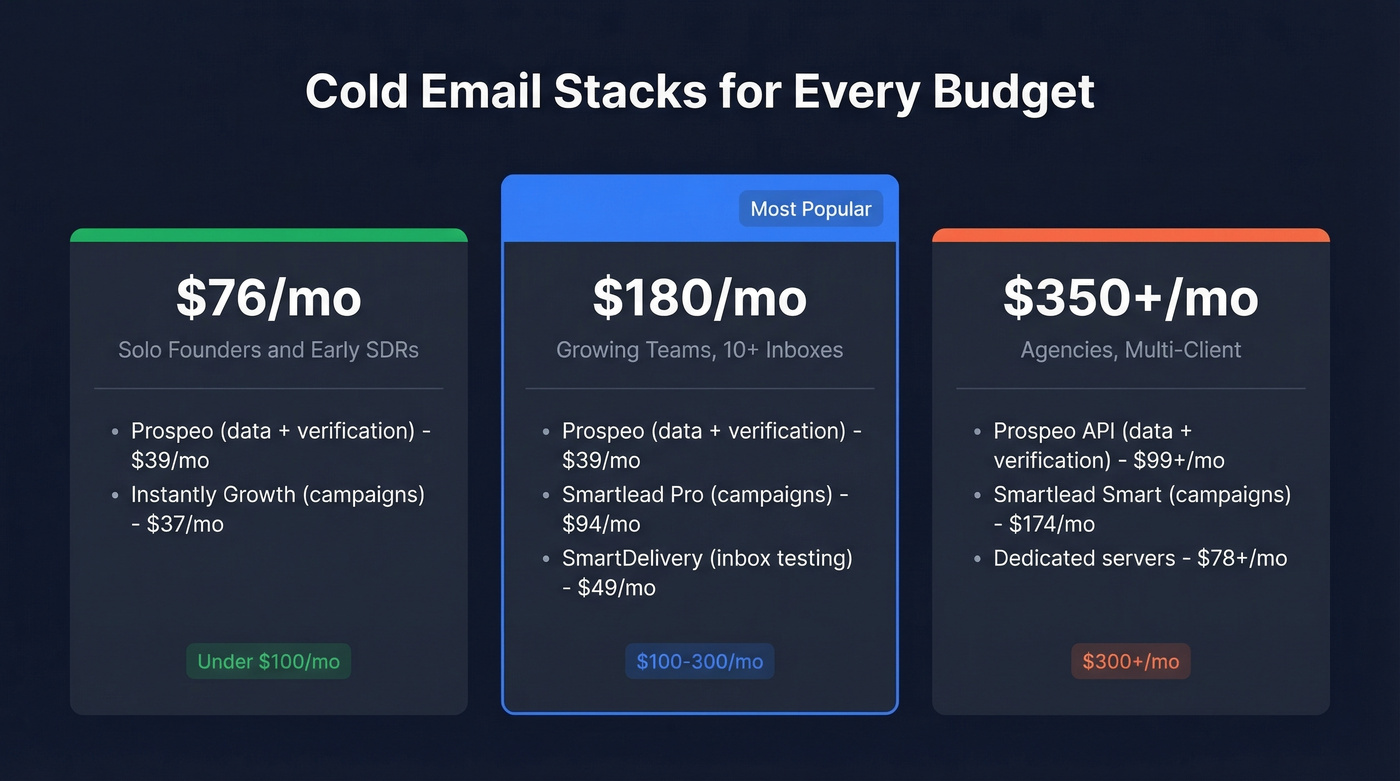
| Budget | Stack | Monthly Cost | Best For |
|---|---|---|---|
| Under $100/mo | Prospeo + Instantly Growth | ~$76/mo | Solo founders, early SDRs |
| $100-300/mo | Prospeo + Smartlead Pro + SmartDelivery | ~$180/mo | Growing teams, 10+ inboxes |
| $300+/mo (agency) | Prospeo API + Smartlead Smart + dedicated servers | ~$350+/mo | Multi-client campaigns |
Your campaign tool is only as good as the contacts you feed it. A 98% email accuracy rate with a 7-day refresh cycle keeps bounce rates low enough that your sending domains stay healthy.
Does Cold Email Still Work in 2026?
Yes, but the gap between good and bad execution has never been wider.
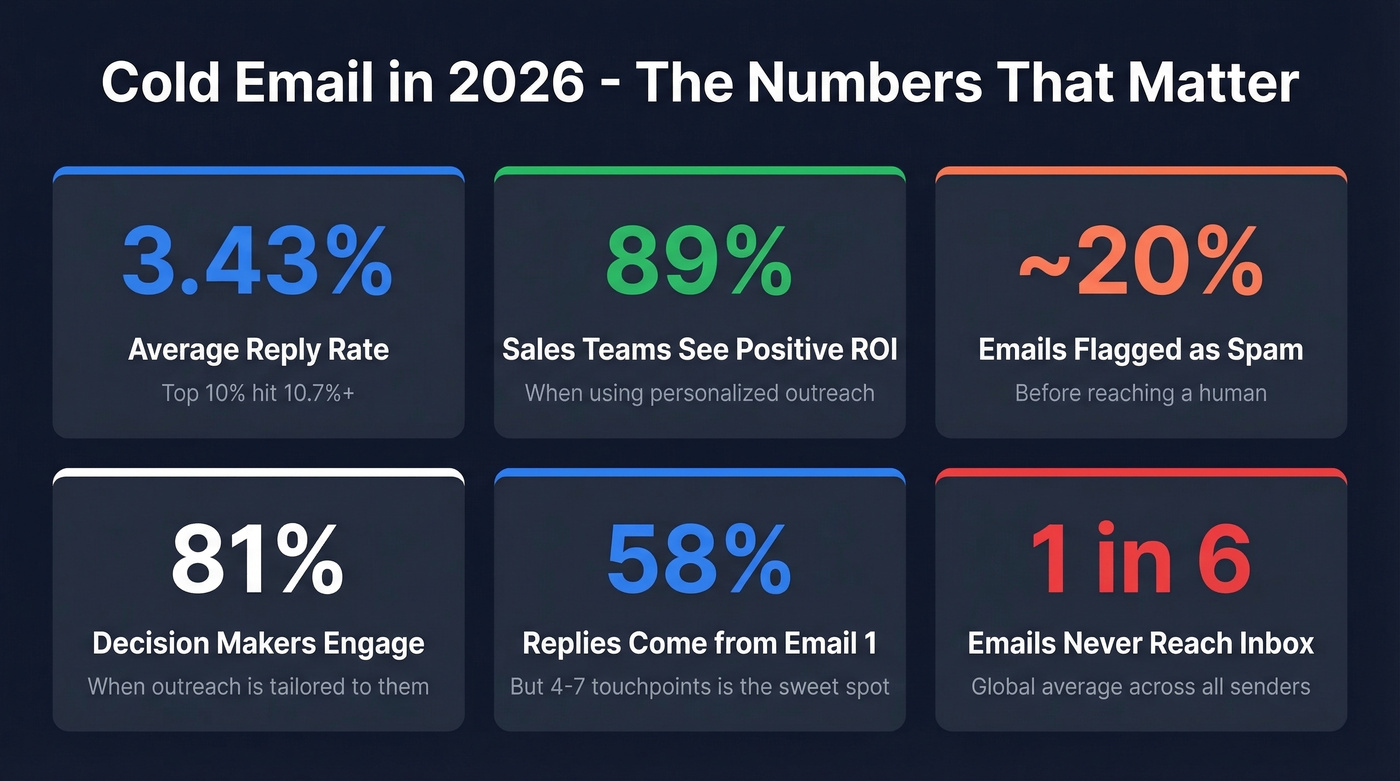
The average reply rate sits at 3.43%, and the top 10% of campaigns hit 10.7%+. That's a 3x difference driven almost entirely by data quality, copy, and deliverability hygiene. Broader engagement rates average 5.1% when you include all response types beyond strict replies. Personalized cold emails deliver positive ROI for nearly 9 in 10 sales teams, and 81% of decision-makers engage with cold outreach when it's tailored to them. 58% of replies come from step one of a sequence, but the sweet spot for total touchpoints is 4-7 - your first email does the heavy lifting, and follow-ups close the gap.
Almost 20% of cold emails get flagged as spam before they ever reach a human. That stat alone should tell you why verification matters more than subject lines.
If your average deal size is under $5K, you probably don't need a $300/mo stack. A $76/mo setup with clean data and tight copy will outperform an expensive platform fed with garbage contacts every single time.
The consensus on r/coldemail is consistent on two things: cold email works, but costs add up fast when you're scaling - and deliverability varies wildly by platform.
Why One Tool Isn't Enough
Experienced cold emailers think in layers, not features.
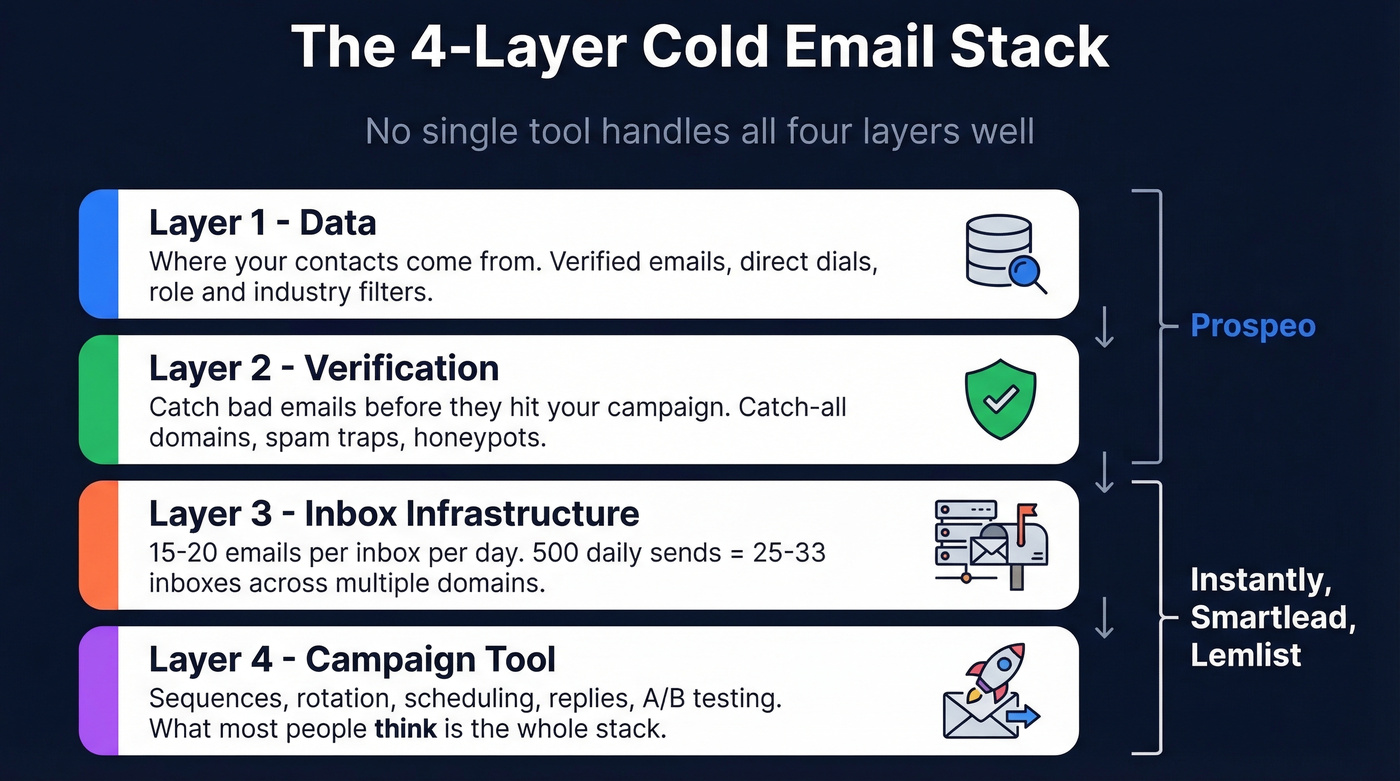
Layer 1 - Data
Where your contacts come from. A database with verified emails and direct dials, filtered by role, industry, intent signals, and technographics. Garbage in, garbage out.
Layer 2 - Verification
Even "verified" databases decay. You need a verification step that catches catch-all domains, spam traps, and honeypots before they hit your campaign tool. Any bounce rate above 1.5% is a red flag.
Layer 3 - Inbox Infrastructure
The inboxes you send from. The rule of thumb is 15-20 emails per inbox per day. For 500 daily sends, you need 25-33 inboxes across multiple domains. Some sending platforms let you provision these internally; others require third-party providers.
Layer 4 - Campaign Tool
The email sequence software that manages rotation, scheduling, replies, and A/B testing. This is what most people think of as "the cold email tool," but it's only one piece.
No single tool handles all four layers well. Prospeo covers layers one and two - 300M+ professional profiles with 98% verified email accuracy and a 7-day refresh cycle - and integrates natively with Instantly, Smartlead, and Lemlist so verified contacts flow directly into your campaign layer. Its 5-step verification process includes catch-all handling, spam-trap removal, and honeypot filtering, which means contacts are campaign-ready before they ever touch your sending infrastructure.
Top Cold Email Tools Reviewed
Instantly - Best for Scaling Campaigns
Use this if you need unlimited email accounts and warmup on a single subscription and you're scaling past 50 inboxes. Instantly's Growth plan runs $37/mo for 1,000 uploaded contacts and 5,000 emails/month. Hypergrowth jumps to $97/mo for 25K contacts and 100K emails.
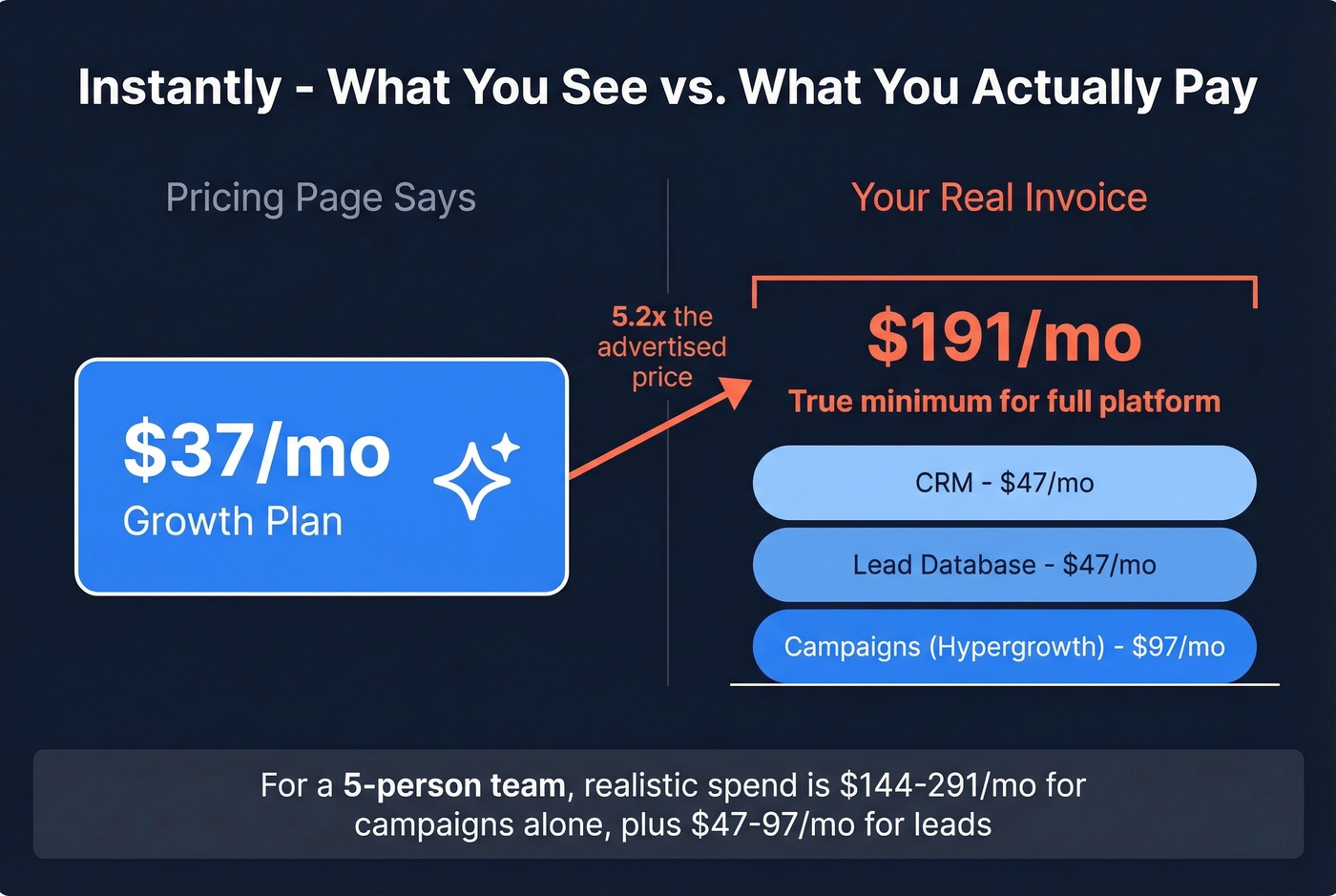
Here's what the pricing page doesn't make obvious: Leads ($47/mo) and CRM ($47/mo) are separate products. If you want Instantly's database and campaign tool and CRM, your true minimum is $131/mo - not the $37 you see in the headline.
Skip this if you're running fewer than 10 inboxes or you need multichannel beyond email. The shared infrastructure on lower tiers is a legitimate deliverability concern that practitioners flag regularly.
Realistic cost for a 5-person team: $97-194/mo for campaigns alone, plus $47-97/mo if you want their lead database.
Smartlead - The Infrastructure Play
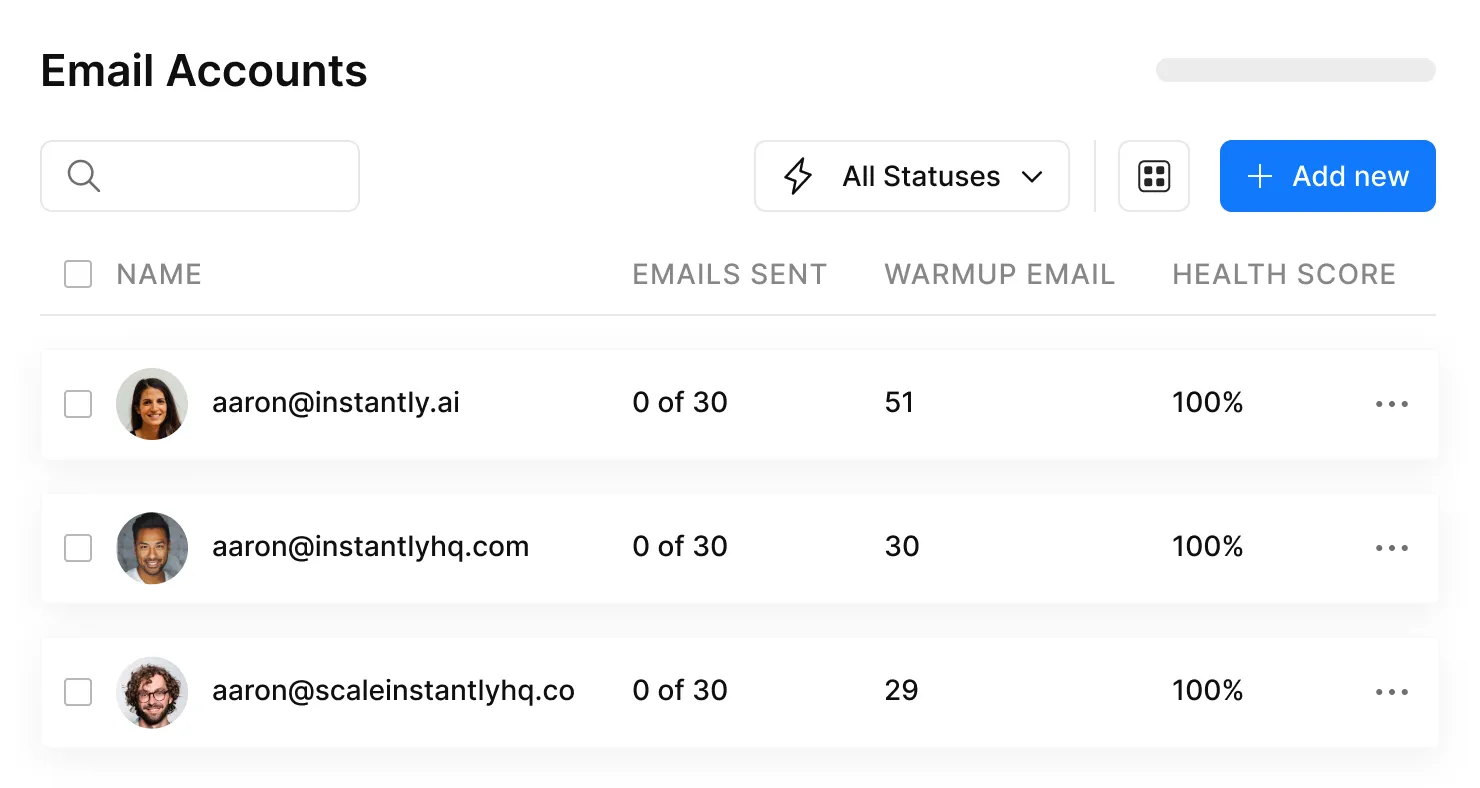
We watched an agency team migrate to Smartlead last year specifically for the infrastructure add-ons. The deliverability numbers improved within two weeks - but the invoice grew just as fast. Base plan starts at $39/mo (2,000 contacts, 6,000 sends), Pro runs $94/mo (30,000 contacts, 90,000 sends). Unlimited mailboxes and warmup on every plan.
The add-ons are where your budget actually goes. SmartDelivery (inbox placement testing) adds $49-599/mo. SmartServers (dedicated IP) run $39/server/month. SmartSenders (mailbox provisioning) cost ~$3.99-$6/mailbox/month. A realistic agency setup - Pro plan, SmartDelivery Growth, a couple of servers - lands around $170-200/mo before you've bought a single domain.
This is the right platform if you're an agency managing 20+ inboxes and deliverability is your competitive advantage. Solo founders sending 50 emails a day should look elsewhere.
Lemlist - Per-Seat Pricing Adds Up Fast
The team math is the story here. Email Pro runs $79/mo per user ($63 yearly), and Multichannel Expert - which unlocks LinkedIn automation and a built-in dialer - costs $109/mo per user ($87 yearly).
Three users on Multichannel Expert = $261-327/mo depending on billing cycle. Add $9/mo per extra sending email and $20/mo per user for deliverability protection, and a 3-person team easily crosses $350/mo. Per-user pricing scales painfully compared to flat-rate platforms like Instantly or Smartlead.
The personalization features are genuinely strong - custom images, dynamic landing pages, liquid syntax. If multichannel is your strategy and you have the budget, Lemlist earns its price. If you only need email, you're overpaying for every seat.
Apollo - Great Database, Mediocre Campaign Tool
Apollo's database covers 210M+ contacts from 35M+ companies globally, and for US-focused prospecting, it's a solid starting point. The free plan gives you 100 credits/month. Paid plans start around $59/user/mo, with the Organization tier commonly requiring a 3-user minimum.
The accuracy problem is real, though. Apollo email accuracy often drops to around 60-72% outside the US - great for North American prospecting, unreliable for EMEA or APAC campaigns. And the sequencing features feel bolted on rather than purpose-built. Use this if you're US-focused and want one login for prospecting + sequences. Skip it if deliverability is your top priority or you're selling internationally.
Realistic cost for a 5-person team: $237-357/mo depending on tier.
Saleshandy - Budget Entry Point
Saleshandy starts at $36/mo on monthly billing, or $25/mo on annual billing for the Starter plan. Pro is $69/mo (annual), and Scale is $139/mo (annual). It includes a 7-day free trial and supports unlimited email accounts.
Saleshandy works fine for small-volume campaigns. But let's be honest: the cheapest tool that tanks your deliverability is the most expensive tool you'll ever use. Pair it with a proper verification layer before scaling past a few hundred sends per day.
Reply.io - Multichannel + AI SDR
Reply.io's Email Volume plan starts at $49/user/mo, and Multichannel runs $89/user/mo. LinkedIn automation adds $69/mo per account, Calls & SMS adds $29/mo. A single user on Multichannel with one LinkedIn automation account = $158/mo. Active-contacts-based pricing means costs scale with your list size, not just seat count. Budget carefully.
Woodpecker - Simple & SMB-Friendly
Starts at $20-29/mo per email slot depending on billing, with warmup at $5/inbox/month extra. Clean UI, straightforward sequences, no learning curve. You'll outgrow it past 10 inboxes, but for a 2-3 person team sending a few hundred emails a day, it's hard to beat on ease of use.
Hunter - Best for Beginners
Free plan available, paid tiers from $49/mo, Business at $499/mo (limited to 20 email accounts). Hunter's free plan is limited - 25 email searches and 50 verifications per year - but it lets you run a 500-recipient campaign. Good starting point for founders sending their first cold emails, but most teams outgrow it within 3-6 months.
GMass - Gmail-Native
GMass lives inside Gmail, which is both its strength and its ceiling. Free trial up to 50 emails/day, paid from $25/mo, Professional $55/mo, Teams $120/mo for 5 users. If your entire workflow lives in Gmail and you're sending under 200 emails a day, GMass is surprisingly capable.
Smartreach.io, Klenty & QuickMail
Smartreach.io (~$29/mo) is a popular pick for operators who care about timezone-based sending and a smoother workflow around domains and inboxes. Klenty ($50/user/mo Startup, $70/user/mo Growth, 14-day trial) offers genuinely useful AI sequence generation. QuickMail (starting around $49/mo) is built specifically for agencies managing multiple client accounts with separate sending infrastructure.
We excluded Mailshake (no free trial) and Snov.io (better as a standalone email finder than a full campaign tool). Both appear in competitor roundups, but neither earned a spot in our recommended stacks.

This article proves it: bounce rates kill cold email campaigns faster than bad copy. Prospeo's 5-step verification - with catch-all handling, spam-trap removal, and honeypot filtering - keeps bounce rates under 4%.
Feed your Instantly or Smartlead campaigns contacts that actually land in inboxes.
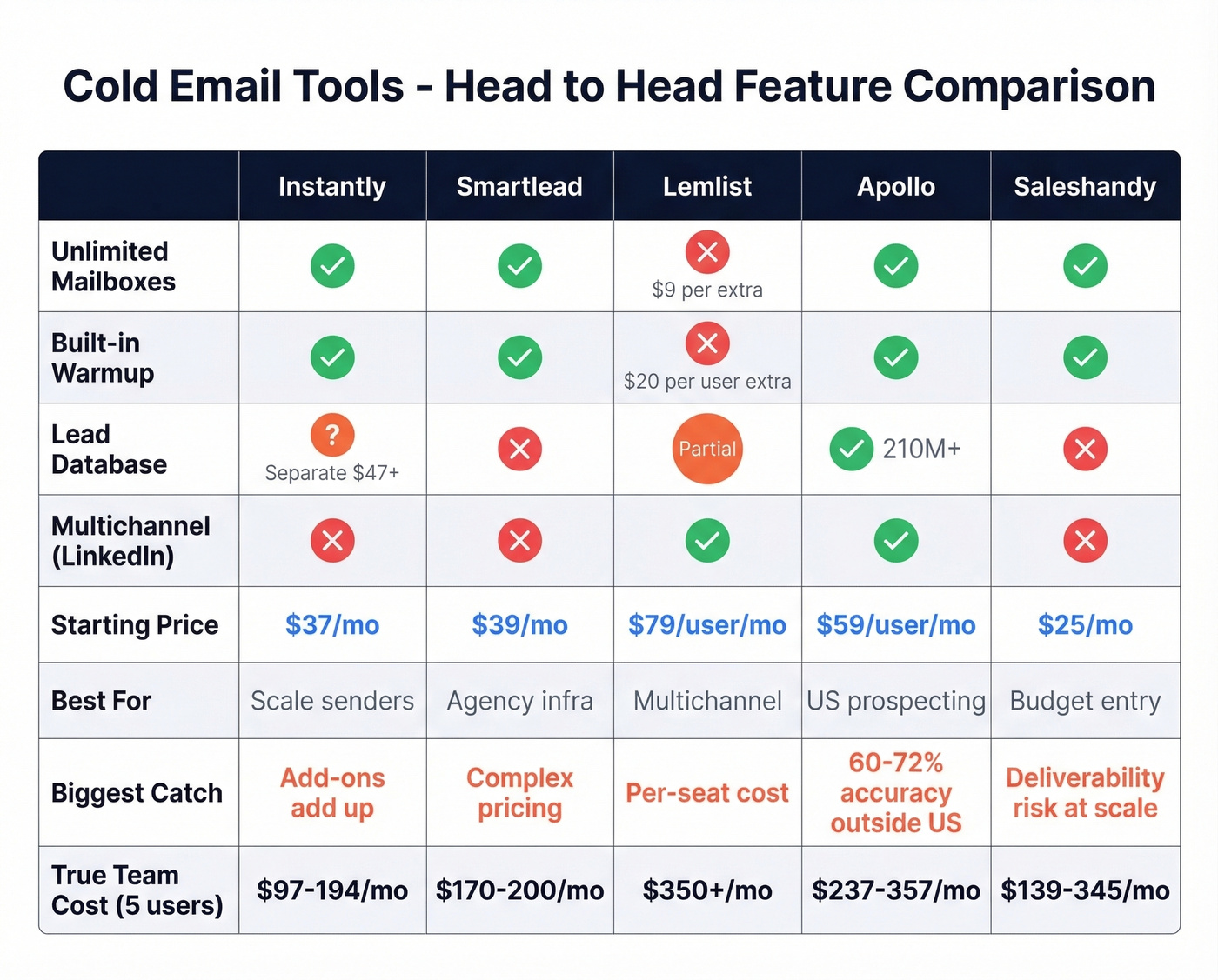
Feature Comparison: Top 5 Platforms
| Feature | Instantly | Smartlead | Lemlist | Apollo | Saleshandy |
|---|---|---|---|---|---|
| Unlimited Mailboxes | Yes | Yes | No ($9/ea) | Yes | Yes |
| Built-in Warmup | Yes | Yes | Yes ($20/user) | Yes | Yes |
| Built-in Lead Database | Separate ($47+) | No | Partial | Yes (210M+) | No |
| Multichannel (LinkedIn) | No | No | Yes | Yes | No |
| Inbox Placement Testing | No | Yes ($49+) | No | No | No |
| Dedicated IP Option | No | Yes ($39/server) | No | No | No |
| Best For | Volume scaling | Deliverability control | Personalization | All-in-one prospecting | Budget teams |
What It Actually Costs
Every tool advertises "starts at $29/mo." None tell you what a realistic setup costs for a team actually doing outbound at scale.
| Tool | Entry Price | Realistic Monthly (5-person team) | Includes Data? | Includes Verification? |
|---|---|---|---|---|
| Instantly | $37/mo | ~$131-194/mo | Separate ($47+) | No |
| Smartlead | $39/mo | ~$170-200/mo | No | Partial |
| Lemlist | $79/user/mo | ~$435+/mo | Partial | Partial |
| Apollo | Free tier | ~$295-357/mo | Yes | Partial |
| Saleshandy | $25/mo (annual) | ~$69-139/mo | No | No |
| Reply.io | $49/user/mo | ~$445+/mo | No | No |
The pattern is unmistakable. Smartlead's $39 becomes ~$180 once you add SmartDelivery and servers. Instantly's $37 becomes $131 when you need leads and CRM. Lemlist's $79/user becomes $435+ for a 3-person team with add-ons.
Every campaign tool on this list still needs a verified data source upstream - and that's where most teams either overpay or cut corners and wreck their domains. If you're comparing providers, start with data enrichment services and a reliable sales prospecting database.

Stop overpaying for your cold email data layer. At $0.01 per email with 98% accuracy and a 7-day refresh cycle, Prospeo replaces the $47/mo lead databases bolted onto your campaign tool - with better data.
Stack Optimize built a $1M agency on this data. Your stack deserves the same foundation.
Deliverability Rules That Matter
The Gmail/Yahoo bulk sender requirements that rolled out in 2024 reshaped cold email infrastructure, and enforcement has continued tightening through 2026. The non-negotiable checklist:
- SPF/DKIM + DMARC on every sending domain. No exceptions. (If you need a quick audit, start with DMARC alignment and SPF record examples.)
- Spam complaints below 0.3% - Gmail recommends staying under 0.10%.
- One-click unsubscribe via List-Unsubscribe header (RFC 8058), with opt-outs processed within 2 days.
- Plain-text preferred. Heavy formatting, logos, and banners reduce trust. One hyperlink max on first-touch emails. Keep them under 80 words.
The ISP breakdown tells the real story: Gmail delivers 87.2% to inbox, but Microsoft only hits 75.6%. If you're selling B2B and your prospects use Outlook, nearly 1 in 4 of your emails lands in spam or disappears entirely.
Common mistakes that kill deliverability: Sending from your primary domain (never do this). Skipping email warmup and blasting 500 emails on day one. Using unverified lists where bounce rates spike above 3%. Ignoring catch-all domains that silently accept everything then flag you as spam. Each of these compounds - one bad week of bounces can take months to recover from. For a deeper playbook, see our email deliverability guide and how to improve sender reputation.
Unverified emails lead to bounces, bounces lead to complaints, complaints lead to domain damage. Verification isn't optional. It's the foundation everything else depends on.
How to Choose the Right Stack
Three questions will narrow your decision faster than any feature matrix.
1. What's your monthly budget? Under $100, you're looking at a solid data layer plus Instantly Growth. Between $100-300, Smartlead Pro with deliverability add-ons opens up. Above $300, you can run a proper agency setup with dedicated servers and API enrichment.
2. How many inboxes do you need? Under 10, Woodpecker or Saleshandy will do. For 10-50, Instantly or Smartlead. Past 50, you want Smartlead with SmartServers or a dedicated SMTP provider.
3. Do you already have a verified data source? If not, solve that first. The best cold email tools in the world can't fix a 15% bounce rate, and rebuilding domain reputation takes months. We've seen teams burn through three domains before realizing the problem was upstream of their campaign tool the entire time. If you're building sequences from scratch, use a proven B2B cold email sequence and keep your follow-ups tight with these cold email follow-up templates.
FAQ
Is cold email legal in 2026?
Yes. CAN-SPAM (US) and GDPR (EU) both allow cold B2B email with proper sender identification, opt-out mechanisms, and - in GDPR's case - a legitimate interest basis. Compliance is about execution, not prohibition. Use real sender names, include a physical address, and honor unsubscribes within 2 days.
What's a good cold email reply rate?
The average is 3.43%, and top performers hit 10.7%+. The biggest lever is data quality - verified emails reach inboxes, unverified emails bounce and damage your domain. Copy and targeting matter, but they can't compensate for bad data.
Do I need a separate email verification tool?
Yes, if your campaign tool's built-in database has accuracy below 95%. Most platforms either don't verify or use basic checks that miss catch-all domains and spam traps. Prospeo's 5-step verification hits 98% accuracy with catch-all handling and spam-trap removal, which prevents the bounce spikes that kill domain reputation. Hunter and Snov.io also offer standalone verification, though with less comprehensive catch-all coverage.
How many email accounts do I need for cold outreach?
Plan for 15-20 emails per inbox per day. For 500 emails/day, you need 25-33 inboxes across multiple domains. Most tools support unlimited domain connections - the constraint is provisioning and warming those inboxes, which takes 2-3 weeks per batch.
Can I use my main domain for cold email?
Never. Always use secondary domains to protect your primary domain's reputation. If a sending domain gets flagged, you retire it and spin up a new one. If your primary domain gets flagged, your entire company's email - including customer communication - suffers.