

CRM Integration for Sales Teams: The Playbook for Integrations Reps Actually Use
Your CRM has 15 integrations and reps still keep "the real notes" in a spreadsheet. Your VP of Sales pulls up pipeline and half the contacts have no phone, no email, and a job title from 2023.
CRM integration for sales teams isn't a tooling problem - it's a workflow and data problem. Reps toggle between up to six different systems to update a single deal, and Salesforce's own research shows they spend 60% of their time on non-selling tasks. The average company uses 1,000+ apps. Roughly 70% of those apps don't talk to each other. So teams "integrate" everything, then drown in duplicate records, noisy activity timelines, and fields nobody trusts.
We've seen integrations "work" technically and still fail in production because reps didn't get less work. They got more tabs.
What You Actually Need
You need 5 integrations that reduce rep admin, not 15 that technically sync. Ranked by impact:
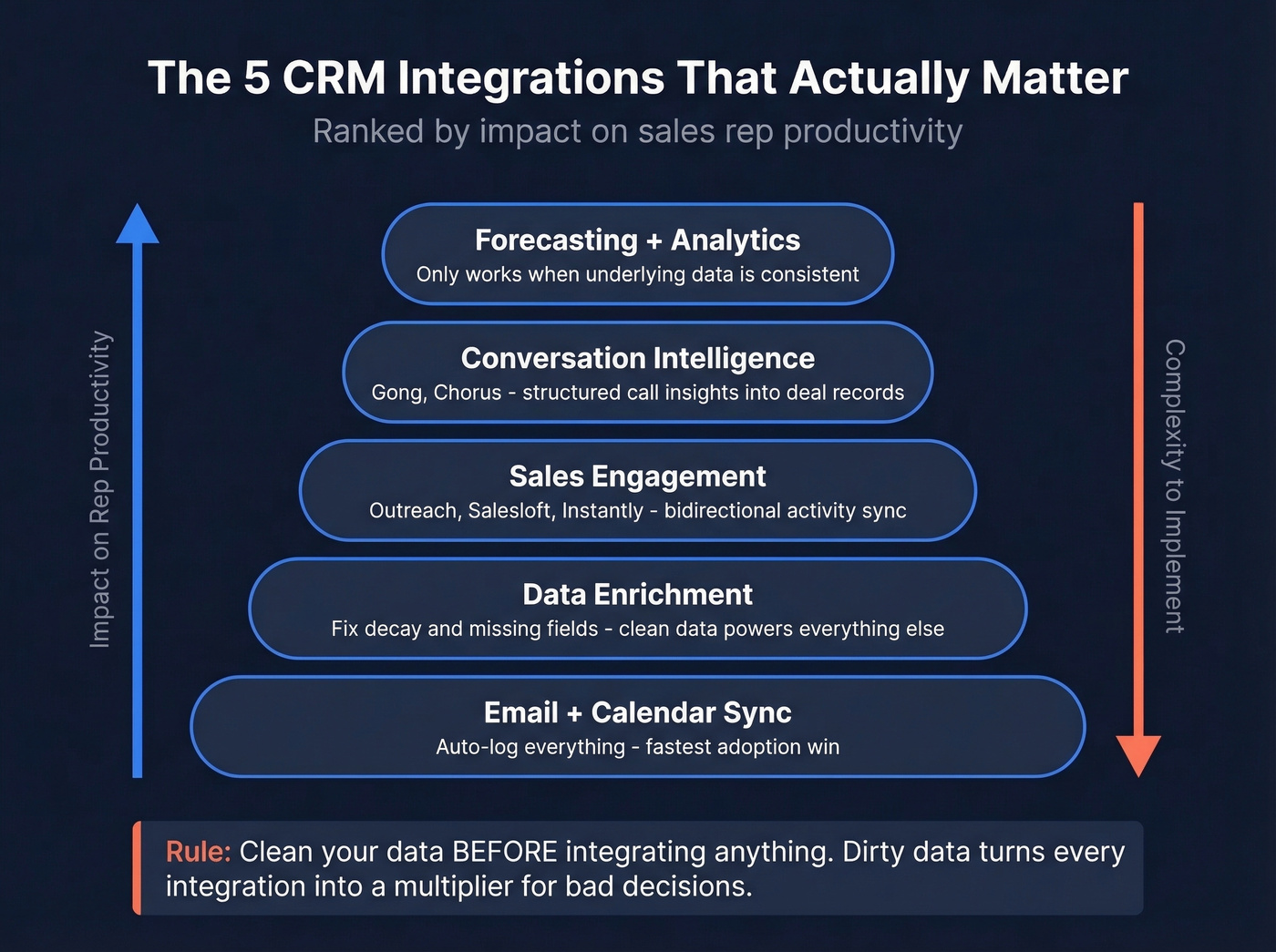
- Email + calendar sync - auto-logging is the fastest adoption win.
- Data enrichment - fix decay and missing fields so every other integration has clean data to work with.
- Sales engagement - Outreach, Salesloft, or Instantly activity should sync both ways, cleanly.
- Conversation intelligence - Gong or Chorus should push call insights into the right deal and contact records.
- Forecasting + analytics - Clari-style rollups only work when the underlying data is consistent.
One thing to fix before integrating anything: clean your data first. Dirty data turns every new integration into a multiplier for bad decisions.
What Workflow Integration Actually Means
Most teams treat "CRM integration" as data sync: shove contacts and activities from Tool A into the CRM. That's table stakes.
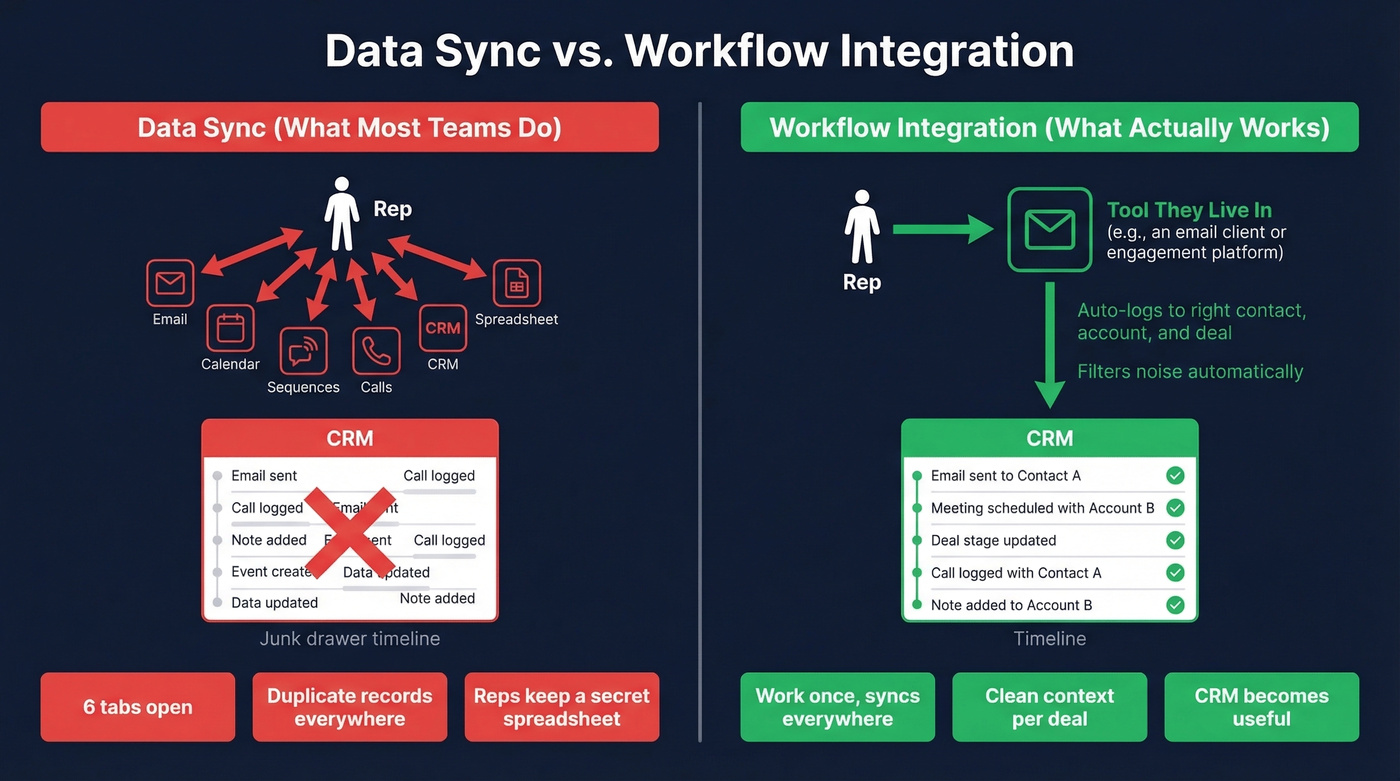
What you actually need is workflow integration - the rep does the work once, in the tool they live in, and the CRM gets the right artifacts automatically without noise, duplicates, or field conflicts. More integrations don't mean better outcomes. They often mean more places for truth to diverge. If you want the broader framework, see our CRM integration guide.
The r/CRM community nails the real issue: integration alone doesn't create usable context. Conversations stay fragmented across inboxes, meetings, calls, and notes, so reps keep manual tracking anyway because the CRM timeline becomes a junk drawer. The core theme is basically: "cool, it syncs... but it doesn't help me sell."
The 5 Sales CRM Integrations That Matter
Email and Calendar Sync
Use this if: you want immediate CRM adoption lift without a big project. Skip this if: you're okay with reps manually logging activity. You're not.
Auto-logging email and meetings is the single biggest adoption win because it kills context switching. When it's done right, reps stop copy-pasting notes and the CRM stops being "extra work." The only nuance: don't flood timelines. The best setups associate activity to the right contact, account, and deal while filtering noise - otherwise reps stop trusting the record entirely. If you're evaluating options, start with email CRM tools.
Data Enrichment
CRM data decays roughly 30% per year. That's why your "integrated" stack still can't route leads, score accounts, or personalize sequences reliably - the underlying records rot. Here's the kicker: 74% of sales teams already using AI tools prioritize data hygiene first, because every AI feature you bolt on is only as good as the data underneath it.
Prospeo handles this well, enriching CRM contacts with 50+ data points per record at a 92% API match rate and 98% email accuracy on a 7-day refresh cycle, with native Salesforce and HubSpot integrations. One proof point: Snyk took bounce rates from 35-40% to under 5% after rolling it out. (If you want the operating checklist, use these CRM data hygiene best practices.)

Sales Engagement Platforms
Salesloft, Outreach, and Instantly are worth integrating when you set up bidirectional activity sync. Tasks, emails, calls, and outcomes should land in the CRM, and CRM ownership or stage changes should flow back to the engagement tool.
One-way sync is how you end up with "sent 14 emails" logged but no idea which deal it influenced. Tie activity to the right objects, or you're just generating noise. Sales automation done right can increase productivity up to 30% - but only when the CRM reflects what actually happened, not a partial picture. For a deeper breakdown of platforms, see our sales engagement software roundup.
Conversation Intelligence
Gong and Chorus work when they auto-capture call insights into deal records: next steps, objections, competitor mentions, and risk flags. The win isn't the transcript. It's that the CRM gets structured signals managers can actually inspect.
We've tested stacks where conversation intelligence was "installed" but not mapped to the right opportunity fields, so it became a separate reporting island. Don't do that. If your team doesn't record calls or won't enforce it, skip this category entirely until that changes. (Related: sales call mapping to standardize what gets captured.)
Forecasting and Analytics
Forecasting tools don't fix forecasting. They expose whether your process is real.
CRM adoption tends to improve forecasting, and one benchmark shows a 42% improvement in forecasting accuracy post-CRM implementation. Tools like Clari can push this further, but only when your CRM has consistent stage definitions, clean ownership, and reliable activity capture. If your pipeline stages and close dates are basically vibes, no tool will save you. If you're comparing options, use our best sales forecasting tools guide.
This is also where AI enters the picture. Clean, integrated CRM data is the prerequisite for AI agents that can draft follow-ups, score deals, or flag at-risk opportunities. Sellers who partner with AI sales tools are 3.7x more likely to meet quota - but that multiplier is zero when the AI is trained on stale records and missing fields.

CRM data decays 30% per year - and every integration you add just syncs that rot faster. Prospeo enriches your CRM contacts with 50+ data points at a 92% match rate, 98% email accuracy, and a 7-day refresh cycle. Native Salesforce and HubSpot integrations mean clean data flows in without extra tabs.
Stop integrating on top of dirty data. Fix the foundation first.
How to Integrate Your CRM Step by Step
Define Objectives With Numbers
Pick outcomes you can measure, not "better visibility." Two examples that work: increase lead-to-win by 15% in 12 months, or raise active CRM adoption to 90% in 6 months. Then tie every integration to one of those numbers. If it doesn't move a metric, it's a distraction. (If you need a scorecard, use our guide on how to measure CRM success.)
Audit Your Stack and Data
About 55% of CRM initiatives fail to meet their intended purpose, and dirty data is the most common driver. Audit before you connect anything - duplicates, missing required fields, inconsistent picklists, broken ownership rules, and "unknown" values everywhere. A bulk enrichment pass on your existing contacts before connecting another tool means you're not syncing garbage faster. Getting your data house in order is where any successful implementation starts. Start with CRM deduplication so you’re not syncing duplicates across tools.
Map and Standardize Data Fields
Decide what's the system of record per field. This is where most teams get lazy, then spend months untangling conflicts.
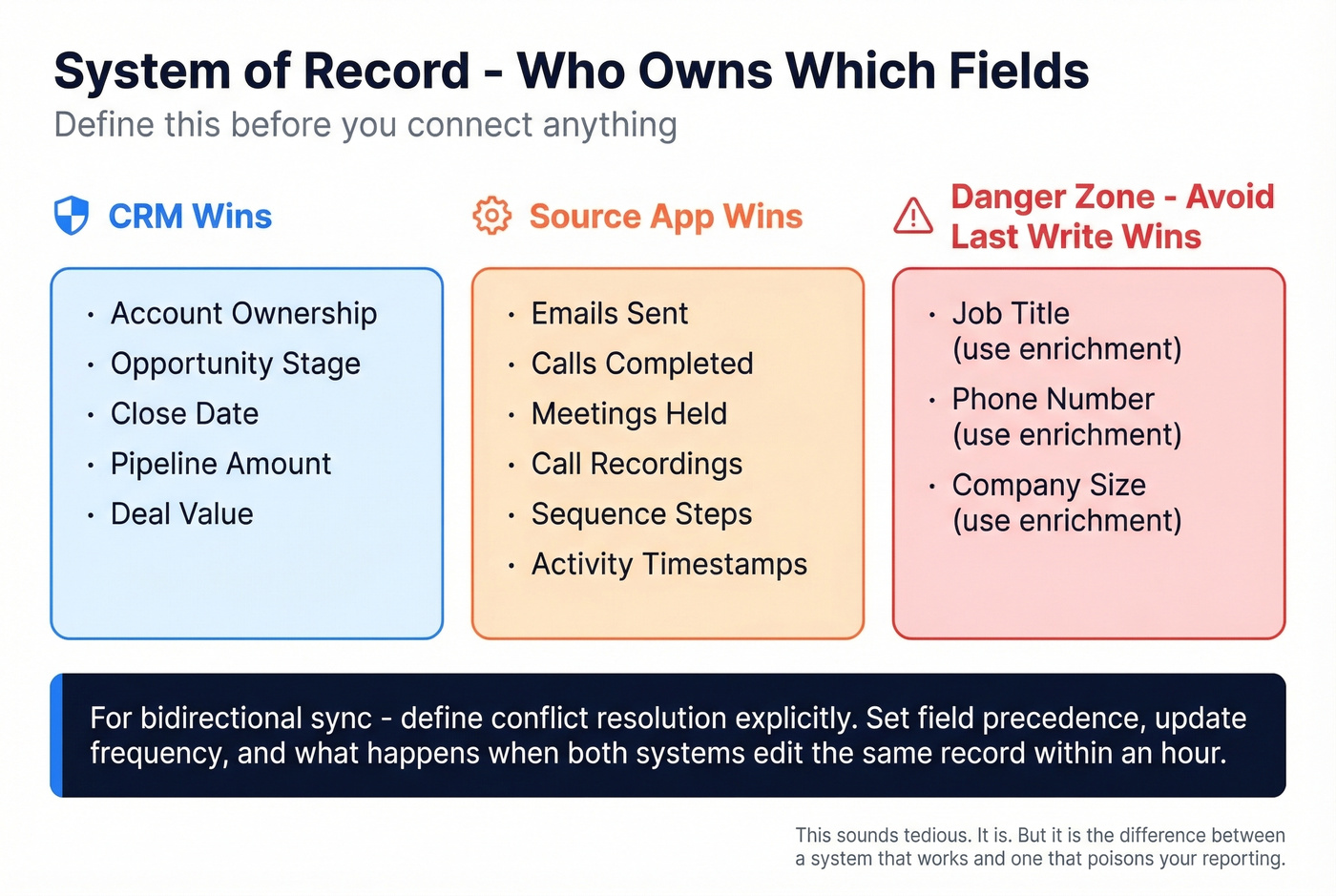
Here's how to assign system-of-record ownership:
- CRM wins for account ownership, opportunity stage, close date, pipeline amount
- Source app wins for event artifacts like emails sent, calls completed, meetings held, recordings, and sequence steps
- Avoid "last-write-wins" except for low-risk fields like non-critical tags
For bidirectional sync, define conflict resolution explicitly. Set field precedence, update frequency, and what happens when a record is edited in both systems within the same hour. This sounds tedious. It is. But it's the difference between a system that works at scale and one that slowly poisons your reporting over six months. For the governance layer behind this, see CRM data management.

Deploy in Stages With Sandbox Testing
Don't big-bang this into production. A realistic phased timeline:
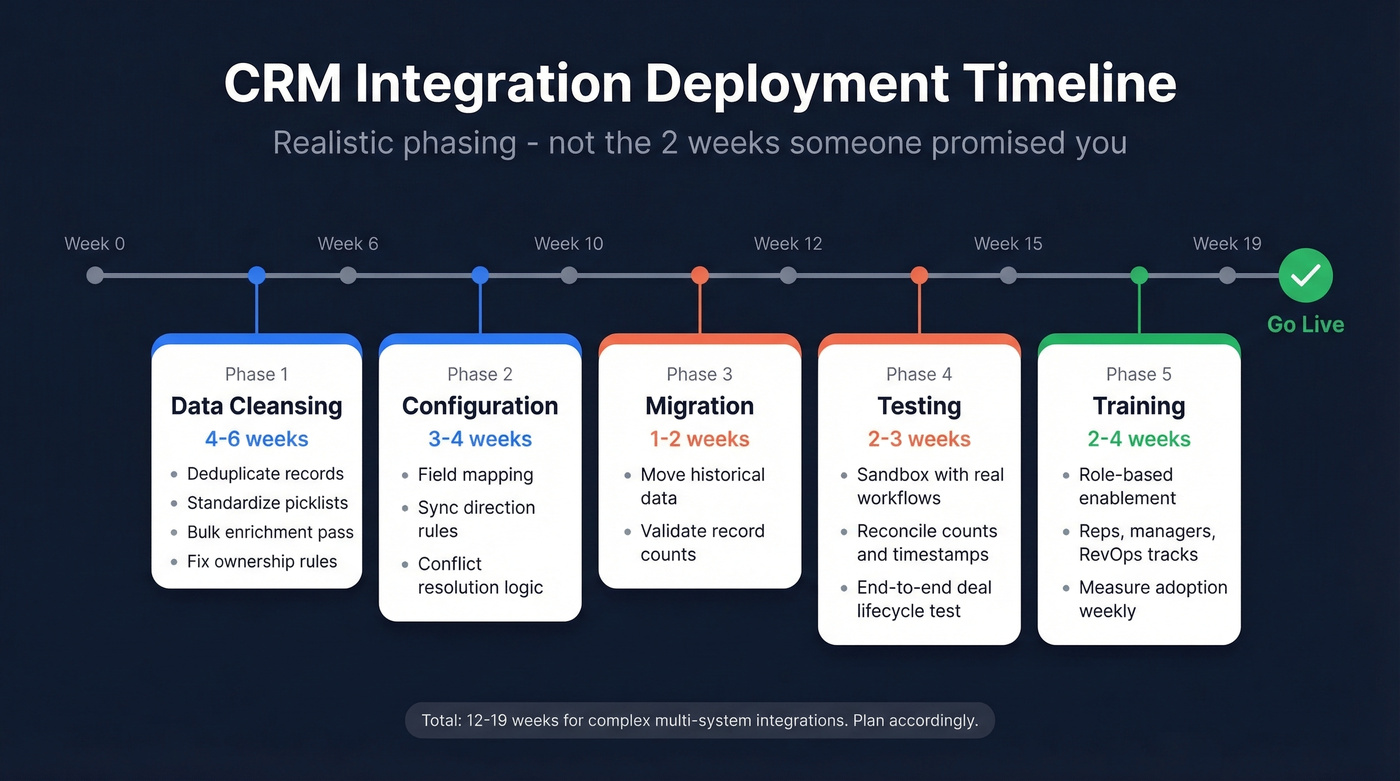
- Data cleansing: 4-6 weeks
- Configuration: 3-4 weeks
- Migration: 1-2 weeks
- Testing: 2-3 weeks
- Training: 2-4 weeks
Run sandbox tests with real workflows - create lead, convert, sequence, meeting, call, opportunity update, forecast rollup. Reconcile counts, owners, and timestamps so you don't "pass" testing while breaking reporting.
Train by Role and Measure Adoption
Generic training fails because reps, managers, and ops use the CRM differently. Reps need short weekly enablement for 3-4 weeks focused on "less admin" workflows. Managers need pipeline inspection and coaching workflows. RevOps needs field governance, sync monitoring, and error handling.
Track adoption like a product team: active usage rate weekly, field completion rate on required fields, and pipeline velocity from stage to stage. I've watched teams celebrate "integration complete" and ignore that only 40% of reps were logging anything. That's not complete. That's a silent failure. If you’re building the reporting layer, use these sales dashboard examples to pick KPIs that actually drive behavior.
Native vs iPaaS vs Custom API
Native integrations are great when they're deep - field mapping, bidirectional sync, error logs, and sane defaults. When native doesn't exist or you need multi-step logic, you're in iPaaS territory. Custom API is for unique logic, scale, or security constraints.
| Tool | Best For | Connectors | Pricing | Rating |
|---|---|---|---|---|
| Zapier | SMB, simple workflows | 6,000+ | Free-$69/mo | 4.5/5 (G2) |
| Make | SMB, visual builders | 1,800+ | Free-$29/mo | 4.7/5 (G2) |
| n8n | Technical teams, self-hosted | 400+ | Free / ~$20/mo | 4.6/5 (G2) |
| Workato | Mid-market, complex logic | 1,200+ | ~$10K+/yr | 4.7/5 (G2) |
| MuleSoft | Enterprise, API-led | 300+ pre-built | ~$50K+/yr | 4.4/5 (Capterra) |
Small teams do fine with Zapier or Make for straightforward workflows. Mid-market complexity calls for Workato or Boomi when you need governance and solid logic. Enterprise teams should look at MuleSoft for API-led control.
Let's be honest: Zapier is fine for 5 reps. At 50 reps running core revenue workflows on Zapier, you've got a scaling problem.
5 Integration Mistakes That Kill Adoption
- No clear objectives - Pick 2-3 metrics and tie every integration to them.
- Integrating dirty data - Deduplicate, standardize, and enrich first, or you'll sync chaos faster.
- No employee involvement - Pull in 2-3 reps and a frontline manager as design partners before you configure anything.
- Shallow integration depth - Use bidirectional sync with field precedence rules, not one-way pushes.
- No scalability planning - Design for new tools, new teams, and higher volume from day one.
Most complex, multi-system integrations take 3-6 months end-to-end. When someone promises "two weeks," what they mean is "two weeks until you discover the real work."
Measuring CRM Integration ROI
CRM integration pays when it reduces admin and improves decision-making - not when it adds dashboards.
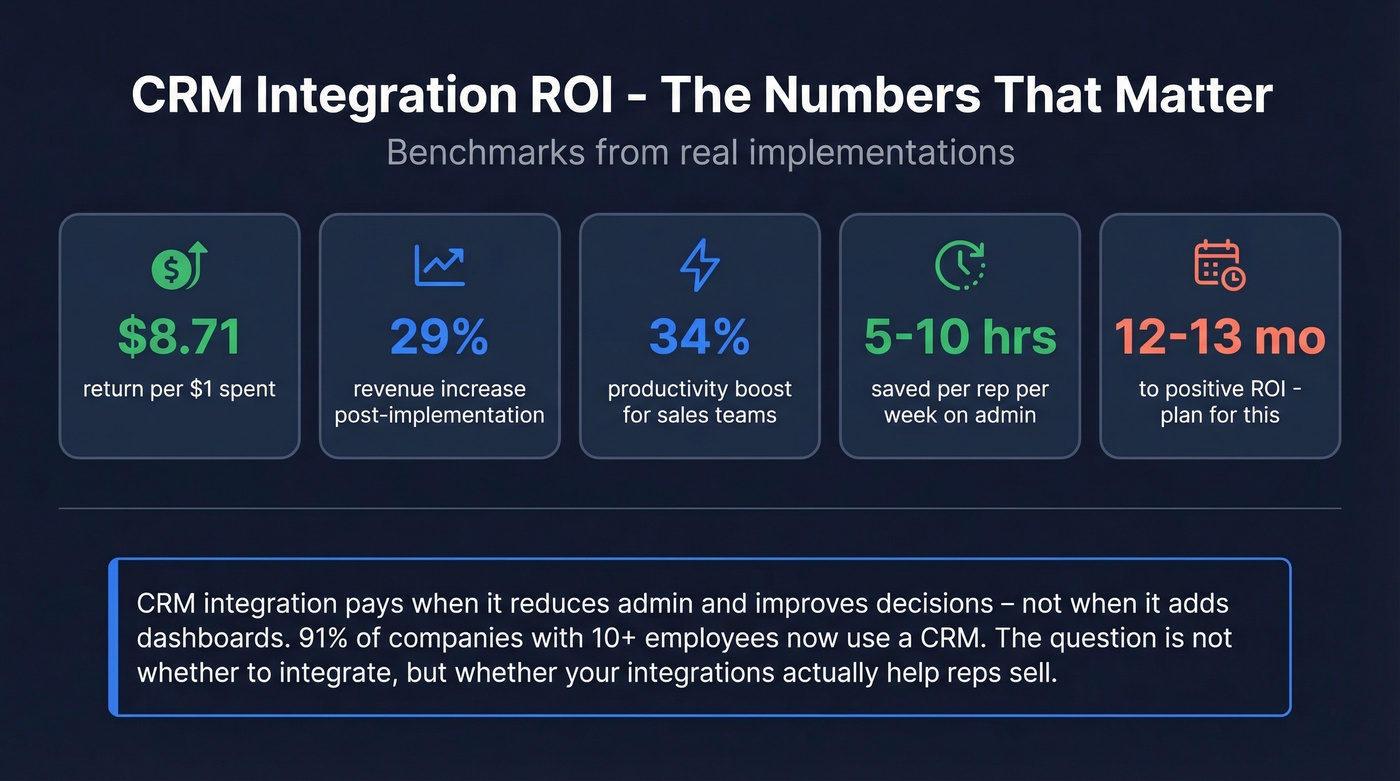
The benchmarks are blunt: CRM returns $8.71 per $1 spent, with a 29% revenue increase and 34% productivity boost after implementation. Teams report saving 5-10 hours per week through workload reduction. Positive ROI tends to show up within 12-13 months. If you want the math and levers, see our CRM ROI guide.
CRM isn't optional anymore - 91% of companies with 10+ employees use one. The competitive advantage is whether yours is trusted.
Here's our hot take: if your average deal size is under $10K and your team is under 10 reps, you probably don't need the full Salesforce stack. A lighter CRM with tight integrations will outperform an enterprise platform that nobody uses properly.
Snyk's 50 AEs went from 35-40% bounce rates to under 5% and generated 200+ new opportunities per month - because their CRM finally had contacts reps could trust. Prospeo plugs into your existing CRM and keeps every record verified at $0.01 per email, no contracts required.
Give your reps CRM data they'll actually use to close deals.
FAQ
What's the most important CRM integration for a sales team?
Email and calendar auto-logging delivers the highest ROI with the least effort because it removes the biggest source of manual CRM work immediately. When reps stop doing admin just to prove activity, adoption jumps and reporting becomes reliable. Start here before adding engagement or intelligence tools.
How long does a full CRM integration take?
Simple native integrations take days, but complex multi-system setups take 3-6 months including data cleansing, configuration, migration, testing, and training. Timelines usually slip when field mapping and conflict resolution rules aren't defined upfront.
How do I get reps to actually use the CRM?
Role-specific training, simplified workflows, and integrations that remove work drive adoption. If the CRM creates more admin than it eliminates, reps revert to spreadsheets regardless of how many connectors you've installed. Measure weekly active usage, not just "integration complete."
How do I keep CRM data accurate over time?
CRM data decays roughly 30% annually, so you need ongoing enrichment - not a one-time cleanup. Automated enrichment tools that run on a weekly refresh cycle with high email accuracy handle decay without manual intervention, keeping your integrations reliable over time.
Do I need an iPaaS or are native integrations enough?
For teams under 20 reps running standard CRM-plus-engagement stacks, native integrations usually cover the basics. iPaaS tools like Zapier or Make become necessary when you need custom logic, multi-step workflows, or connections between tools without native support.