

Customer Relationship Management (CRM) System: The Vendor-Neutral Guide for 2026
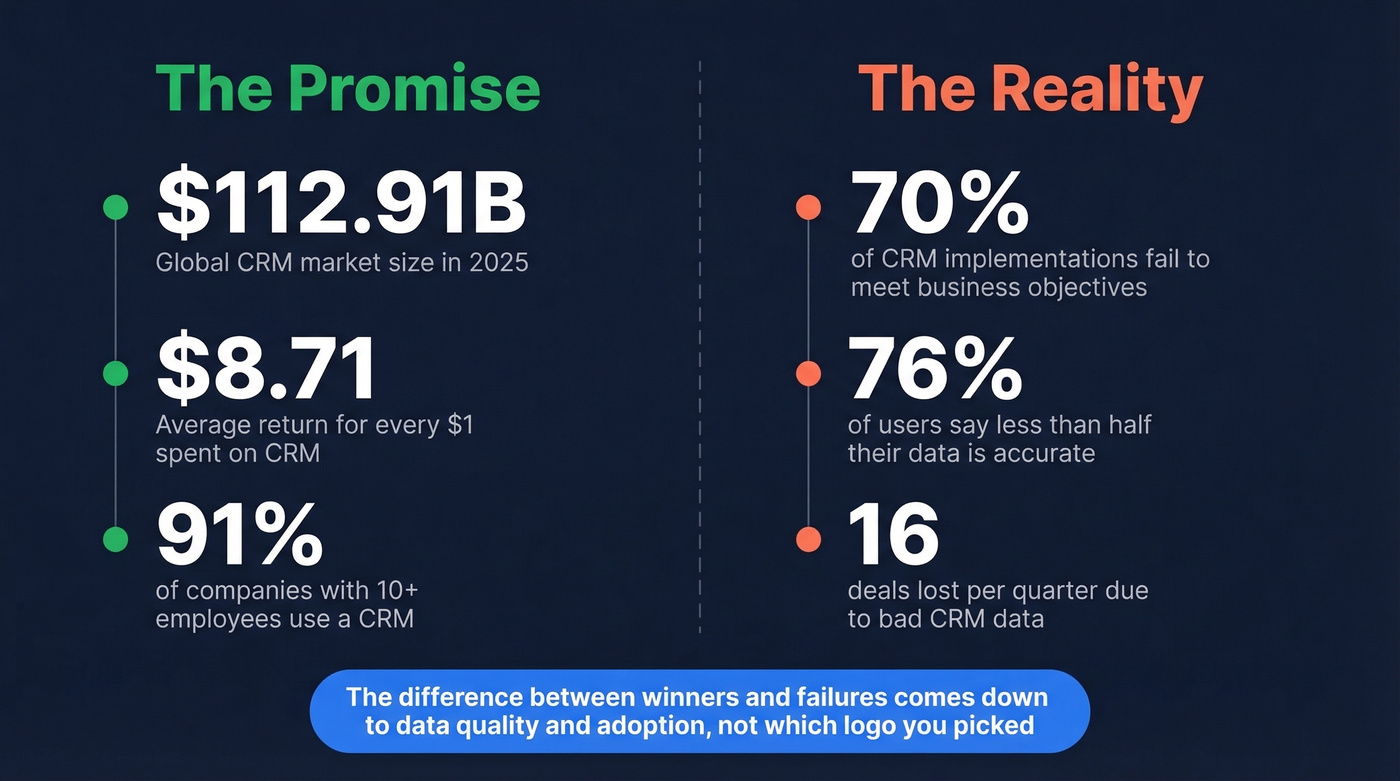
Your sales rep just spent 45 minutes updating a contact record with a dead email and a disconnected phone number. That's not a CRM problem - it's a data problem wearing a CRM costume. We've seen it over and over: the customer relationship management (CRM) system you pick matters far less than the data you put into it. The biggest challenge isn't choosing the right software. It's that 76% of CRM users say less than half their data is accurate.
Every vendor guide you'll read is a sales pitch pretending to be education. Let's fix that.
What Is a CRM System?
A CRM system is software that centralizes every interaction your company has with prospects and customers - emails, calls, deals, support tickets, marketing touches - into a single, searchable record. That's it. Everything else vendors bolt on is gravy on top of that core function.
CRM refers to both a business discipline and the technology that supports it. Most people mean the technology, so that's our focus here.
The market for this gravy has gotten enormous. The global CRM market hit $112.91B in 2025 and is projected to reach $262.74B by 2032. About 91% of companies with 10+ employees now use one, making it the most widely adopted category of business software outside of email and spreadsheets. Salesforce owns roughly 21% of that market, followed by Microsoft Dynamics at ~5.2%, Oracle at ~4.1%, Adobe at ~3.4%, and SAP at ~3.1%.
The ROI case is straightforward: businesses see an average of $8.71 back for every $1 spent on CRM. But that number hides a brutal reality - [70% of implementations fail](https://www.bain.com/about/media-center/press-releases/20252/70-of-companies-struggle-to-integrate-their-sales-plays-into-crm-and-revenue-technologies-finds-bain - company-survey/) to meet their business objectives. The difference between the winners and the failures almost always comes down to data quality and adoption, not which logo you picked.
What You Need (Quick Version)
CRM in one sentence: software that gives every customer-facing team a shared, real-time record of every prospect and customer interaction.
Best CRM by use case:
- Best value: Zoho CRM (PCMag's Editors' Choice, starts around $14-$15/user/mo)
- Easiest start: HubSpot (free tier for up to 2 users)
- Sales-focused: Pipedrive ($14/user/mo billed annually, built around pipeline management)
- Enterprise: Salesforce ($25-$165/user/mo, one of the most integrated platforms)
What you'll pay:
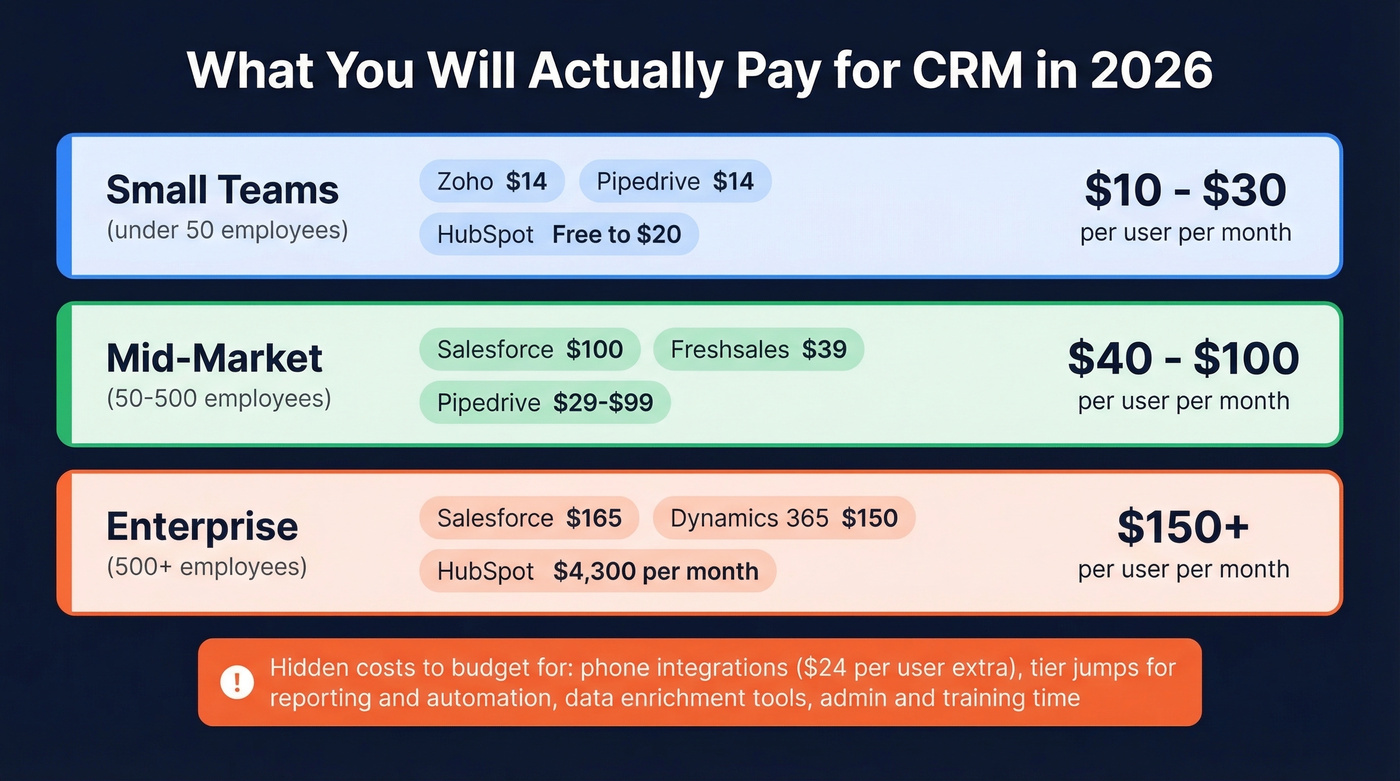
- Small teams: $10-$30/user/mo
- Mid-market: $40-$100/user/mo
- Enterprise: $150+/user/mo
The thing nobody tells you: budget for data enrichment, not just software. Bad data costs companies 16 lost deals per quarter. Your CRM is only as useful as the data inside it.
How CRM Systems Work
Every CRM, regardless of vendor, follows the same four-step loop: collect, unify, automate, analyze.
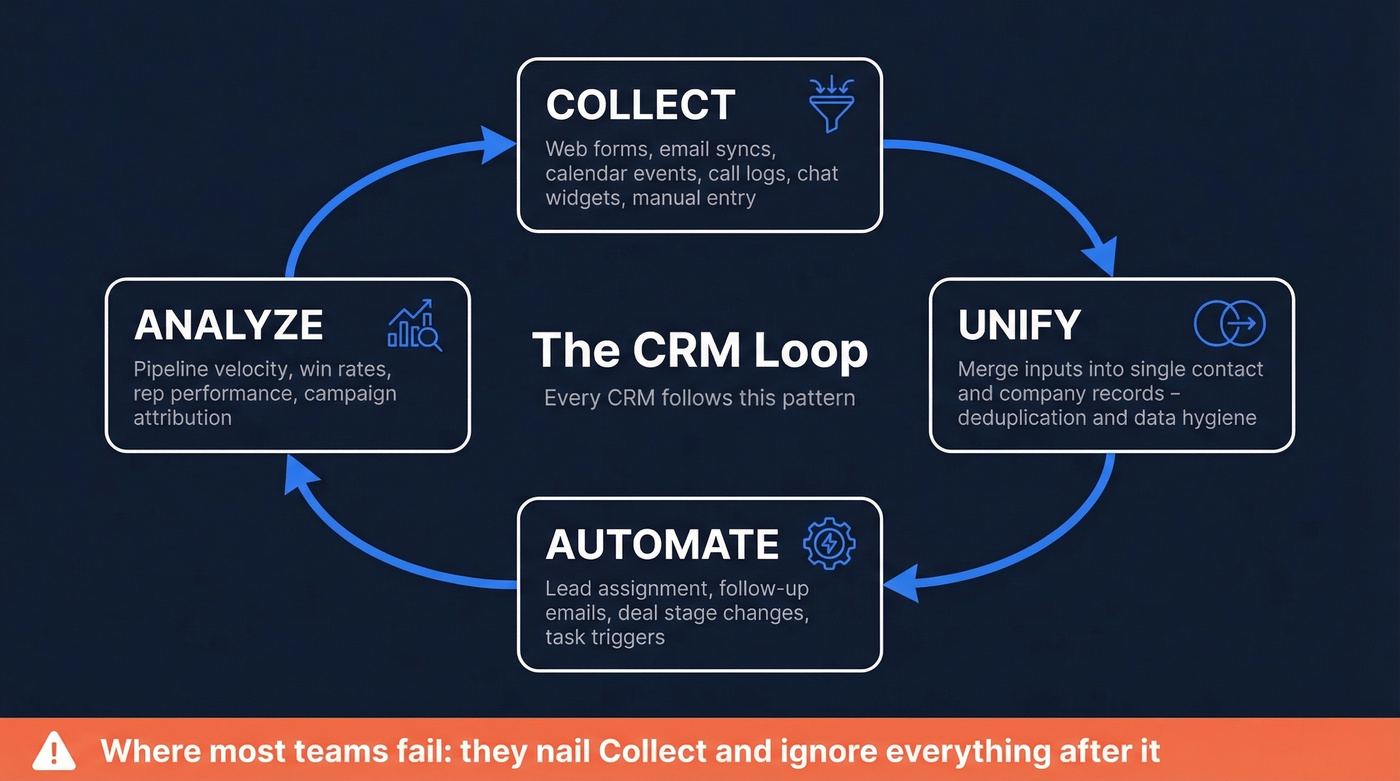
Collect. Data flows in from web forms, email syncs, calendar events, call logs, chat widgets, and manual entry. 87% of CRMs are now cloud-based, which means this collection happens in real time across devices and locations.
Unify. The system merges those inputs into a single contact or company record. One view per person, one view per deal. This is where deduplication and data hygiene matter - and where most platforms start to break down if nobody's maintaining them.
Automate. Rules trigger actions: a new lead gets assigned to a rep, a follow-up email fires three days after a demo, a deal moves stages when a contract is signed. Sales teams using CRM automation see 20-30% productivity gains and up to 42% improvement in forecast accuracy.
Analyze. Dashboards, reports, and forecasts turn raw activity into decisions. Pipeline velocity, win rates, rep performance, campaign attribution - all of it lives here.
The loop sounds simple. The execution isn't. Most failures happen because teams nail the "collect" step and then ignore everything after it.
Types of CRM
Operational CRM
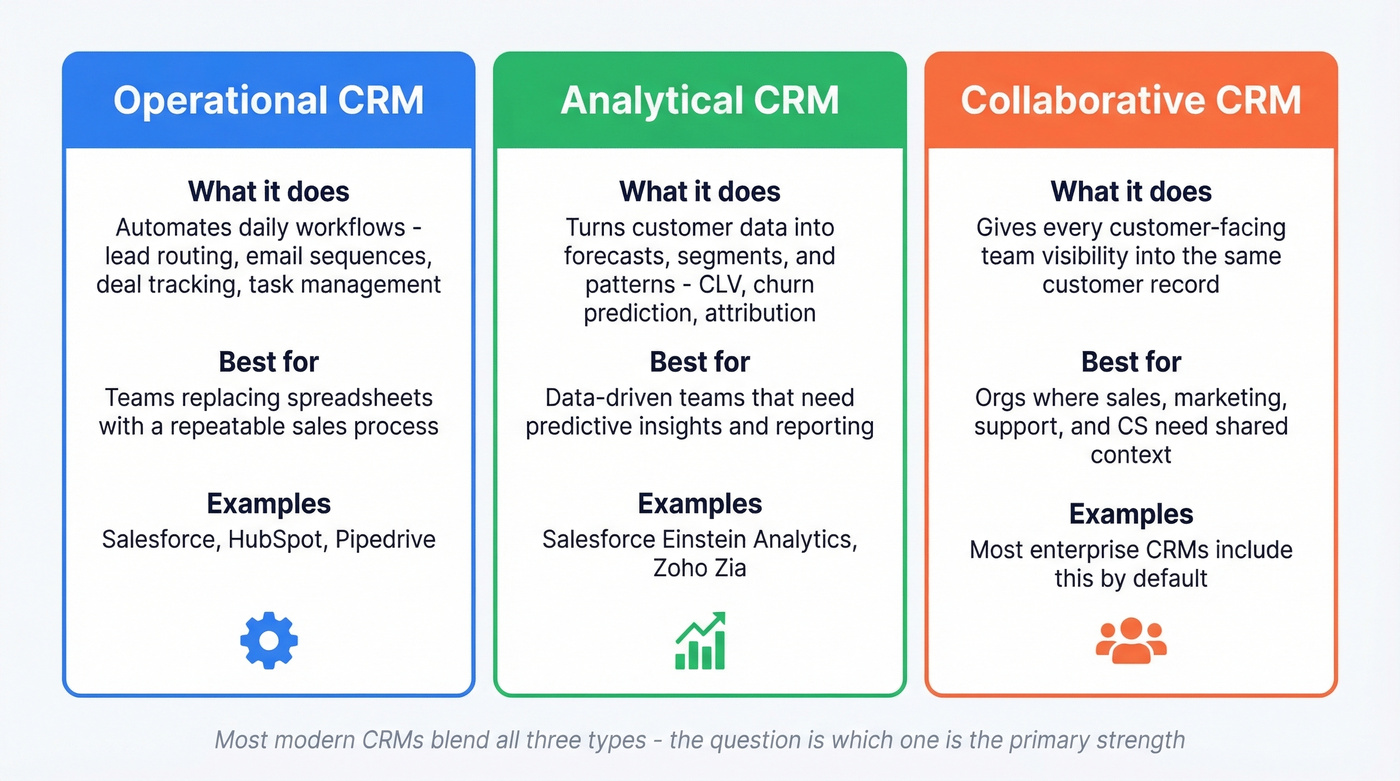
This is what most people mean when they say "CRM." Operational systems automate the daily grind - lead routing, email sequences, deal tracking, task management, support ticketing. Salesforce, HubSpot, and Pipedrive all live here. If your primary goal is getting reps to stop using spreadsheets and start following a repeatable sales process, you need an operational CRM.
Analytical CRM
Analytical CRMs turn your customer data into forecasts, segments, and patterns - sales forecasting models, customer lifetime value calculations, churn prediction, and campaign attribution. In practice, most modern platforms bundle analytical features into their mid-tier and enterprise plans rather than selling them separately. Salesforce's Einstein Analytics and Zoho's Zia are good examples: they layer analytical capabilities on top of operational workflows.
Collaborative CRM
Collaborative CRMs solve the "sales doesn't talk to support" problem. They give every customer-facing team - sales, marketing, CS, support - visibility into the same customer record. When a support rep can see that a customer just renewed a $200K contract, they handle that ticket differently. When marketing can see which accounts are in active sales cycles, they stop sending cold nurture emails to warm prospects.
Most enterprise CRMs include collaborative features by default; the question is whether your team actually uses them.
Key Features to Evaluate
Not every feature matters equally. Here's what to prioritize, roughly in order of impact:
Contact and company management. The foundation. Every CRM does this, but quality varies wildly - look for automatic deduplication, merge tools, and activity timeline views that show you what happened with a contact without clicking through five screens. (If you're comparing tools, start with a shortlist of contact management options too.)
Sales automation. Deal stages, pipeline views, automated task creation, and follow-up reminders. Pipedrive and HubSpot excel here. If your reps are manually moving deals between stages, you're leaving money on the table.
Reporting and dashboards. Custom reports, pipeline forecasts, rep activity metrics. The gap between vendors is huge. Salesforce's reporting is incredibly powerful but takes an admin to configure, while Pipedrive's is simpler but limited.
Marketing automation. Email campaigns, lead scoring, form builders, landing pages. HubSpot bundles this natively; Salesforce requires Marketing Cloud, a separate and expensive product. Decide whether you want marketing and sales in one platform or best-of-breed tools connected via integrations.
AI capabilities. Lead scoring, email drafting, conversation intelligence, forecasting. More on this below - but AI features are standard in 2026, not a rare add-on. (If you're building this out, treat lead scoring as a system, not a toggle.)
Integrations and data management. Your CRM connects to email, calendar, phone, marketing tools, enrichment platforms, and billing systems. The integration ecosystem matters more than the feature list. Enrichment tools like Prospeo keep contact records current by pushing fresh data into Salesforce and HubSpot natively - without that layer, your CRM data decays fast. If you're wiring up outbound, use a clean playbook to connect outreach tool to CRM.

76% of CRM users say less than half their data is accurate. Prospeo's CRM enrichment pushes 50+ verified data points per contact directly into Salesforce and HubSpot - with 98% email accuracy and a 7-day refresh cycle. Bad data costs you 16 deals per quarter. Stop feeding your CRM dead emails.
Enrich your entire CRM for $0.01 per email. No contracts.
AI in CRM - What's Real in 2026
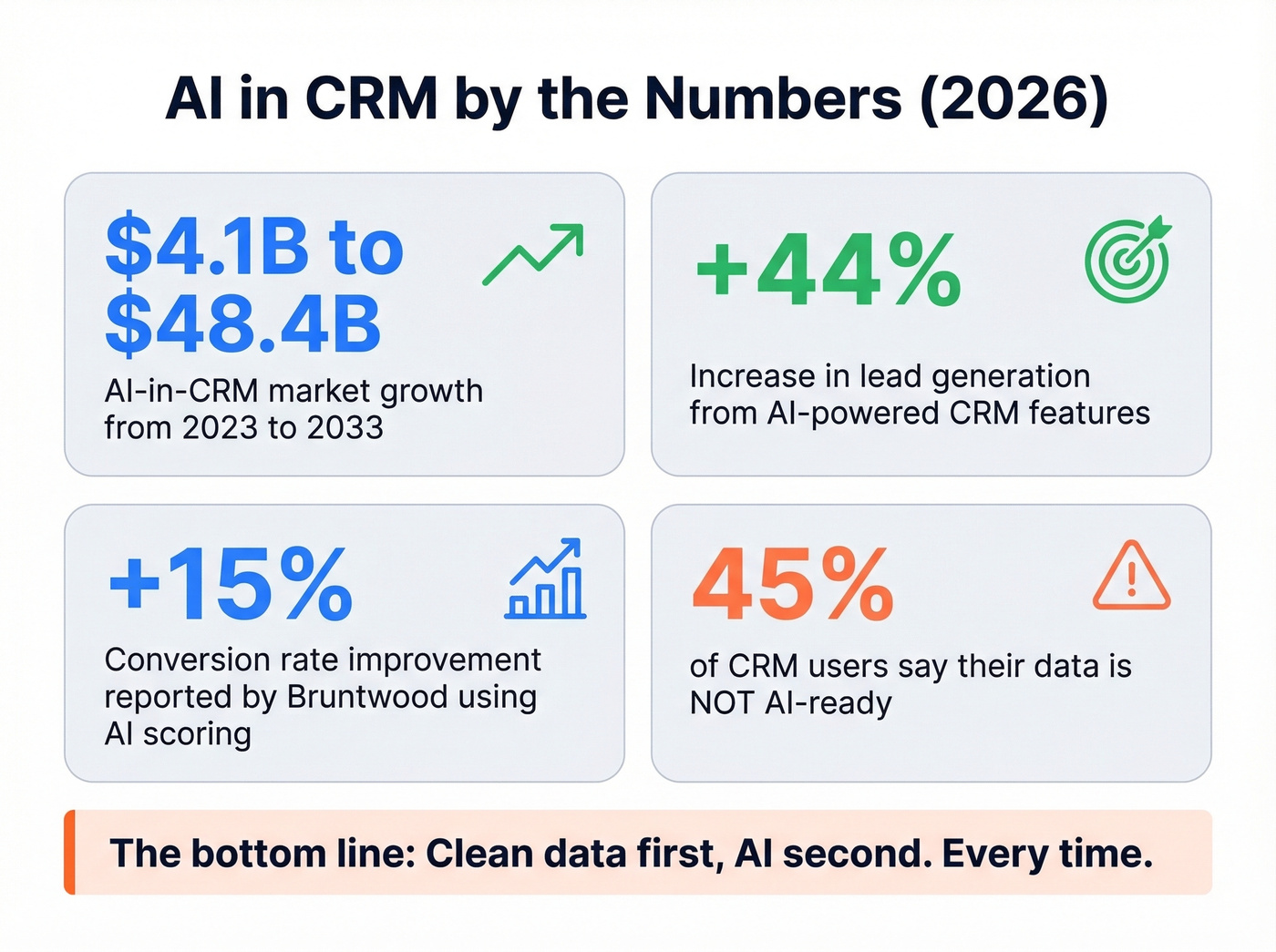
The AI-in-CRM market grew from $4.1B in 2023 to a projected $48.4B by 2033. Every major vendor now ships an AI product. The question is which ones actually do something useful versus which ones are just a chatbot bolted onto a search bar.
| Vendor | AI Product | What It Does |
|---|---|---|
| Salesforce | Einstein + Agentforce | Lead scoring, forecasting, agentic workflows |
| Microsoft | Copilot | Email drafts, summaries, next actions |
| HubSpot | Breeze | Content gen, conversation intelligence |
| Zoho | Zia | Predictions, anomaly detection, voice assistant |
| SAP | Joule + CX AI Toolkit | Deal intelligence, agent routing |
Salesforce Einstein + Agentforce is one of the most mature AI-in-CRM implementations as of 2026, with well-documented production outcomes. Bruntwood reported a +15% conversion rate after deploying Salesforce-based AI scoring. 1-800Accountant cut seasonal hires by 50% using Agentforce for automated customer service workflows. Early adopters across the market report a 44% increase in lead generation from AI-powered features.
Here's the thing, though: AI features are only as good as the data feeding them. That 45% of users who say their data isn't AI-ready? They're going to get garbage predictions from even the best models. Clean data first, AI second. Every time. (If you're operationalizing this, borrow from data-driven selling instead of chasing shiny features.)
How Much Does a CRM Cost?
Let's skip the "it depends" and get to numbers.
| Tool | Free Tier | Entry | Mid-Tier | Enterprise |
|---|---|---|---|---|
| HubSpot | Yes (2 users) | $20/user/mo | $1,300/mo | $4,300/mo (7 users) |
| Salesforce | - | $25/user/mo | $100/user/mo | $165/user/mo |
| Zoho CRM | Yes (10 users) | $14/user/mo | $23/user/mo | $40/user/mo |
| Pipedrive | - | $14/user/mo (annual) | $29/user/mo | $99/user/mo |
| Freshsales | Yes | $9/user/mo | $39/user/mo | $59/user/mo |
| EngageBay | Yes | $14.99/user/mo | $64.99/user/mo | - |
| Monday CRM | - | $15/user/mo | $20/user/mo | Custom |
| Dynamics 365 | - | ~$65/user/mo | - | ~$150/user/mo |
| Zendesk Sell | - | $55/user/mo | - | - |
The sticker price is never the full story. Pipedrive's phone integration runs an extra $24/user/month. HubSpot's jump from free to paid is steep - you go from $0 to $20/user/mo for basic features, and mid-tier pricing hits $1,300/mo. Salesforce's entry plan looks reasonable at $25/user/mo until you realize that reporting, forecasting, and workflow automation are gated behind the $100+ tiers.
Most teams with deal sizes under $15K don't need Salesforce-level infrastructure. Zoho or Pipedrive will cover 90% of what you actually use, at a third of the cost. Salesforce is the best all-in-one platform - but most teams don't need all-in-one. If you want a broader shortlist, start with examples of a CRM and narrow from there.
On r/smallbusiness, a common theme in CRM shopping threads is that "best of" lists over-index on shiny AI features when small teams mostly need the basics - and even "basics" often start around ~$25/user. That frustration is valid.
How to Choose by Company Size
Small Teams (Under 50 Employees)
Start with HubSpot's free tier or Zoho CRM's free plan (up to 10 users). Both give you contact management, deal tracking, and basic reporting without spending a dollar. For more pipeline management muscle, Pipedrive at $14/user/mo is purpose-built for sales teams that live in their pipeline view.
Key criteria: low configuration overhead, tight email and calendar integration, and cost sensitivity. Implementation should take 2-6 weeks. If it's taking longer, you're overcomplicating it. (A simple 30-60-90 day plan for sales reps helps drive adoption fast.)
Skip Salesforce at this stage. You don't need it, and the admin overhead will eat you alive.
Mid-Market (50-1,000 Employees)
This is where the CRM becomes your source of truth, not just a sales tool. HubSpot Pro, Salesforce Pro, and Pipedrive's higher tiers all work here. The deciding factor is usually whether you need marketing automation bundled in (HubSpot) or prefer best-of-breed tools connected to a flexible platform (Salesforce).
Look for scalable reporting, role-based access controls, no-code workflow builders, and segmentation by region or business unit. Implementation runs 2-4 months. Budget for a part-time admin from day one - mid-market CRMs don't run themselves. Bruntwood, a mid-market property company, saw measurable conversion lifts only after pairing their Salesforce deployment with dedicated data hygiene workflows. The platform alone wasn't enough. (This is also where a dedicated RevOps Manager starts paying for itself.)
Enterprise (1,000+ Employees)
Salesforce Enterprise or Microsoft Dynamics 365. That's the realistic shortlist.
Enterprise CRM is less about features and more about infrastructure: multi-region data residency, multi-currency support, audit trails, custom object modeling, enterprise SLAs, and SSO/SAML. Implementation takes 6-18 months. We've seen enterprise rollouts drag past two years when scope creeps. The biggest risk isn't picking the wrong platform - it's underestimating the change management required to get 1,000+ people to actually use it.
Why CRM Implementations Fail
70% of CRM implementations fail to meet business objectives. That's not a scare stat - it's the reality we've watched play out across dozens of organizations. The failure modes are predictable:
Poor user adoption. Reps won't use a system that adds friction to their day. If data entry takes longer than the actual selling, they'll revert to spreadsheets. Leadership buy-in and a clean UI matter more than feature depth.
Bad data quality. The silent killer. Companies lose an estimated 16 deals per quarter from inaccurate CRM data. Duplicate records, stale emails, disconnected phone numbers - garbage in, garbage out.
Weak integrations. A CRM that doesn't sync with your email, calendar, phone system, and marketing tools creates data silos instead of eliminating them. Non-real-time sync is almost as bad as no sync.
Misaligned strategy. Buying a CRM without defining what success looks like - pipeline velocity? forecast accuracy? rep activity? - means you'll never know if it's working. (If you're setting targets, use pipeline health metrics, not vibes.)
Over-complicated workflows. Over-customization is a trap. Every extra required field, every unnecessary approval step, every custom object that only one person understands reduces adoption.
These failure modes compound each other. Scalability issues hit when the system that worked for 20 reps collapses at 200 - plan for where you'll be in 18 months, not where you are today. Hidden costs from add-ons, per-user overages, premium support tiers, and implementation consulting can double your year-one spend. And weak security controls without role-based access, encryption, and audit logs put you one misconfigured permission away from a compliance violation.
The fix for most of these? Start smaller than you think, get adoption right before adding complexity, and treat data quality as an ongoing operational expense - not a one-time cleanup project.
Keeping Your CRM Data Clean
Here's the stat that should keep every RevOps leader up at night: 76% of CRM users say less than half their CRM data is accurate or complete. And 37% report losing revenue directly because of poor data quality. Only 28% of organizations actively enrich their CRM data using third-party sources.
Data decays constantly. People change jobs, companies get acquired, emails bounce, phone numbers go stale. A contact record that was perfect six months ago can be completely useless today. And if 45% of CRM data isn't ready for AI use, all those fancy AI features you're paying for are running on a broken foundation.
The solution isn't a quarterly cleanup project - it's a continuous refresh cycle that keeps records current without manual effort. Prospeo plugs directly into Salesforce and HubSpot, enriching contact records with 50+ data points at an 83% enrichment match rate across 300M+ professional profiles. Records get refreshed on a 7-day cycle (the industry average is six weeks), with 98% email accuracy and 143M+ verified emails in the database. The free tier gives you 75 emails per month to test the workflow before committing. (If you're designing the process, start with a clear lead enrichment workflow.)

You just read that 70% of CRM implementations fail - and the root cause is almost always data quality. Prospeo's native Salesforce and HubSpot integrations automatically keep contact records current with verified emails, direct dials, and 50+ data points. 83% match rate on enrichment. Your reps stop wasting 45 minutes on dead records.
Give your CRM the data layer it's been missing since day one.
CRM Security and Compliance
Before you sign a contract, run through this checklist with your vendor. Security and compliance aren't afterthoughts - they're deal-breakers, especially for mid-market and enterprise buyers handling sensitive customer data.
GDPR (if you touch EU data):
- Explicit consent mechanisms - no pre-checked boxes
- Right to deletion (actual deletion, not just archiving)
- Data portability (CSV export at minimum)
- Breach notification procedures
- Privacy by design with access limited by default
Most major CRMs - Salesforce, HubSpot, Zoho, Dynamics 365 - offer GDPR tooling out of the box, but the configuration is on you. Default settings are rarely compliant.
HIPAA (if you store protected health information):
- Role-based access controls
- Audit logs for every record access
- Encryption in transit and at rest
- A signed Business Associate Agreement (BAA) with the vendor
For any SaaS CRM: require SOC 2 Type II certification as a baseline trust standard. It covers security, availability, processing integrity, confidentiality, and privacy. If a vendor can't produce a current SOC 2 report, that's a red flag.
FAQ
What does CRM stand for?
CRM stands for customer relationship management - software that centralizes customer data and automates sales, marketing, and service workflows. The global CRM market is projected to exceed $260B by 2032, making it one of the largest enterprise software categories.
How much does a CRM cost for a small business?
Most small teams pay $10-$30/user/month. Zoho CRM starts at $14/user/mo, Freshsales at $9/user/mo, and HubSpot offers a free tier for up to 2 users. Budget an extra 20-30% for add-ons, integrations, and data enrichment tools that keep your records accurate.
What's the difference between operational and analytical CRM?
Operational CRMs automate daily workflows - lead routing, email sequences, deal tracking. Analytical CRMs focus on data analysis: forecasting, segmentation, and attribution. Most modern platforms like Salesforce and Zoho bundle both into their mid-tier plans.
Why do CRM implementations fail?
70% fail to meet objectives, usually due to poor user adoption, bad data quality, weak integrations, or misaligned business goals. Data quality is the silent killer - companies lose an estimated 16 deals per quarter from inaccurate records. Investing in data governance from day one dramatically improves success rates.
How do I keep my CRM data accurate?
Use enrichment tools that plug into your CRM and refresh records automatically - look for platforms with a weekly refresh cycle rather than the industry-standard six weeks. Only 28% of companies actively enrich with third-party sources; the other 72% are flying blind.