

Email Campaign Management: The 2026 Practitioner Guide
Most email campaign management guides read like product pages wearing a trench coat. They tell you to "segment your audience" and "write compelling subject lines" - advice so generic it could've been written in 2014. Meanwhile, it's 5x more expensive to acquire a new customer than retain one, and teams are still sending campaigns to lists that bounce hard because nobody bothered to verify the data upstream.
Here's the thing: the ESP you pick accounts for maybe 10% of your campaign performance. The other 90% is data quality, authentication, and not annoying your subscribers.
What Actually Moves the Needle
Email campaign management isn't a software category. It's an operational discipline - the repeatable process of planning, building, sending, measuring, and optimizing every email your company sends. Whether you're running marketing for a SaaS product or managing B2B outreach at scale, three things matter more than everything else combined:
- Clean data. Verify your list before every send. High bounce rates aren't a platform problem - they're a data problem. (If you need a deeper playbook, start with an email deliverability audit.)
- Proper authentication. SPF, DKIM, and DMARC configured correctly, or nothing else you do matters.
- Measure clicks, not opens. Apple Mail Privacy Protection made open rates fiction. Click-to-open rate (CTOR) tells you whether your content actually resonates.
Do those three things and you'll outperform most email marketers regardless of your content strategy.
The Campaign Lifecycle
Every campaign follows the same five-phase loop: Plan, Build, Send, Measure, Optimize. Teams that run this loop deliberately - rather than blasting emails when marketing needs "a send this week" - compound results over time.
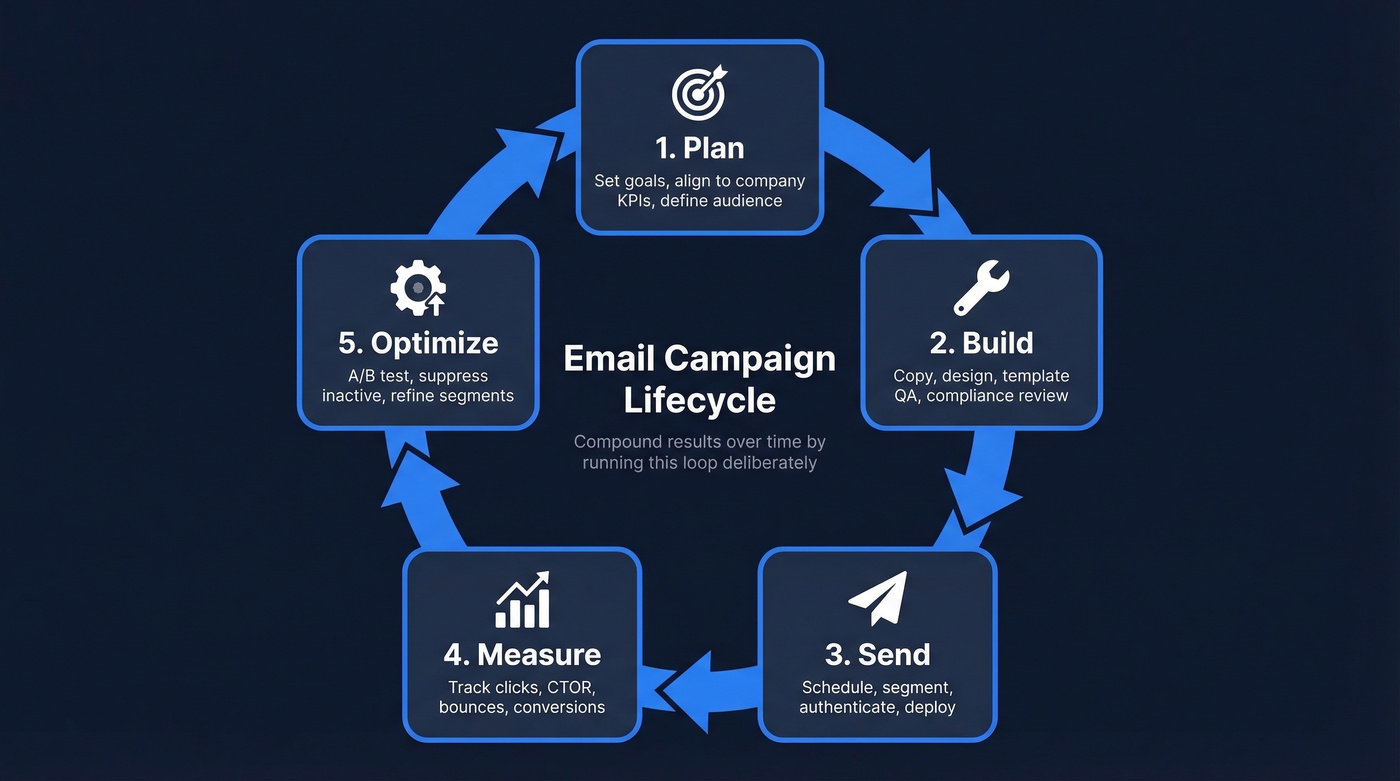
Litmus recommends aligning every campaign to a goal ladder: company goals feed team goals, which feed channel goals, which feed the individual campaign goal. If your company goal is 20% revenue growth, your email channel goal might be "increase repeat purchase rate by 15%," and a specific campaign goal becomes "drive 500 clicks to the loyalty program page by March 15."
Before any email goes out, run it through a governance workflow: brief, copy/design, QA, compliance review, schedule, post-send analysis. Most teams skip QA and compliance, which is how you end up sending a broken template to 50,000 people on a Tuesday morning. Solid template management - versioning, approval gates, a shared library - prevents those misfires. (If you're running multi-touch outbound, this same discipline applies to sequence management.)
Build a Clean List First
Every ESP on the market works fine when the list is clean. Problems start when a meaningful chunk of your contacts are invalid, abandoned, or spam traps. Your bounce rate spikes, ISPs throttle your sending domain, and suddenly your perfectly crafted welcome sequence is landing in spam for everyone - including the good addresses.
Before you touch a subject line or design a template, run your list through verification. The best tools check syntax validation, domain verification, mailbox existence, catch-all domain handling, and spam-trap removal. Prospeo handles all five steps at 98% email accuracy for roughly $0.01 per email, with a 7-day data refresh cycle that keeps contacts from going stale between campaigns. We've seen the results firsthand: Meritt dropped their bounce rate from 35% to under 4% after switching to Prospeo for verification, and Stack Optimize maintains 94%+ deliverability with bounce rates under 3% across all their clients. (More on benchmarks and fixes in our email bounce rate guide.)
Enrichment - appending firmographic and behavioral data to each contact - makes your sends more relevant and reduces the chance of landing in spam. When recipients see content tailored to their role and industry, they engage instead of flagging you. If you're evaluating vendors, compare options in our roundup of data enrichment services.
Segmentation Beyond {First_Name}
Dropping someone's first name into a subject line isn't personalization. It's 2016. Real segmentation operates on three tiers, and most teams only use the first one.
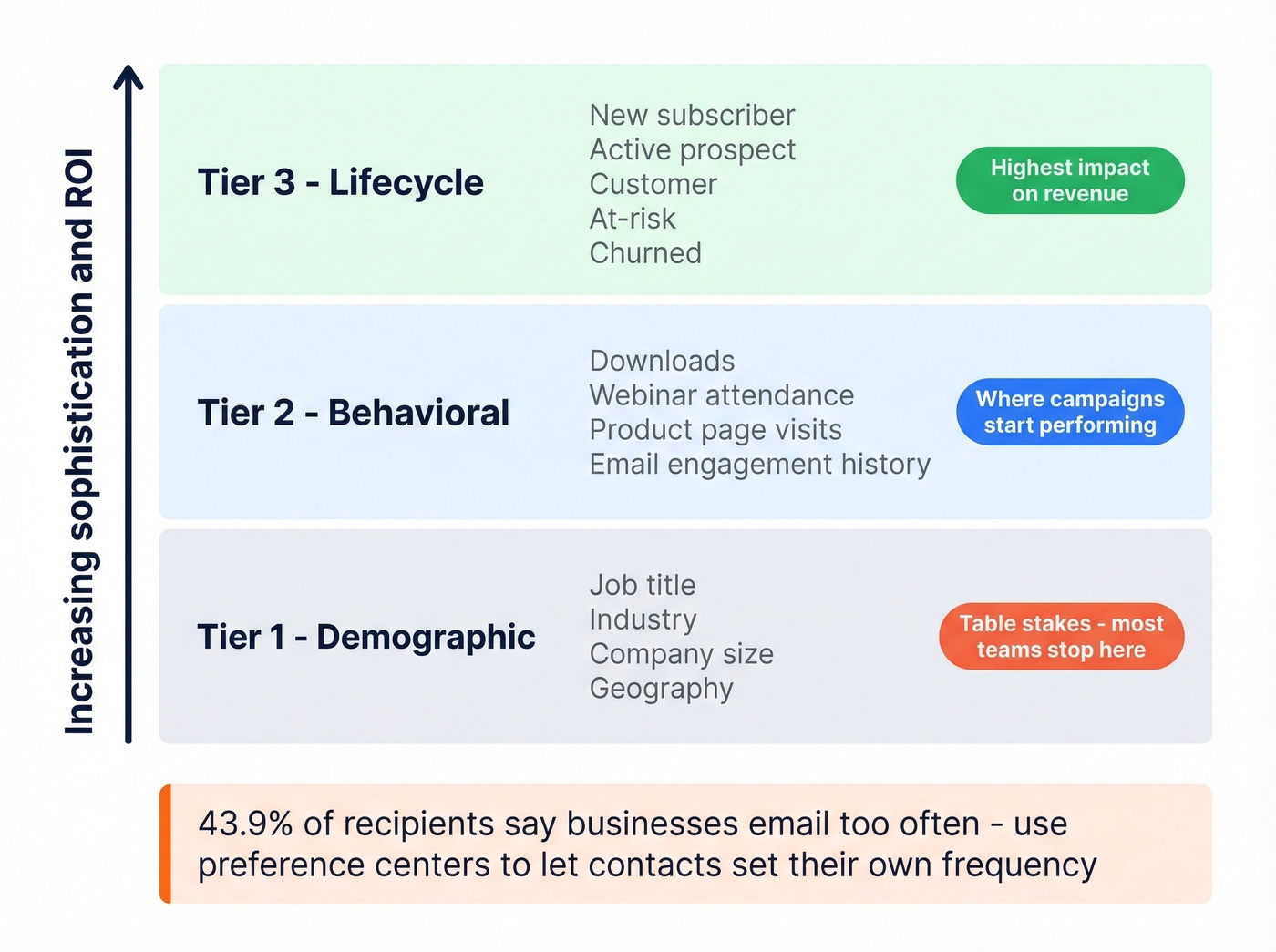
Demographic segmentation covers the basics: job title, industry, company size, geography. Table stakes. Behavioral segmentation is where campaigns start performing - segmenting by downloads, webinar attendance, product page visits, and email engagement history. A SaaS company should send a different follow-up to someone who attended last week's pricing webinar than to someone who downloaded a top-of-funnel ebook six months ago. Lifecycle segmentation maps to where the contact sits in your pipeline: new subscriber, active prospect, customer, at-risk, churned. Building templates for each behavioral cohort saves time and ensures consistency across all three tiers.
Let's talk about preference centers. Go beyond "unsubscribe." Let contacts choose between product updates, educational content, and events - and set their own frequency from weekly to monthly. Include a pause option. 43.9% of email recipients say businesses should send fewer emails. A preference center turns potential unsubscribes into frequency adjustments, which is a critical tactic for combating subscriber fatigue.
One more thing most guides skip: design for accessibility and dark mode. Use 14px minimum fonts, add alt text to every image, use large tap targets for mobile, and test your templates in dark mode. Your carefully chosen brand colors might become invisible against a dark background.
Deliverability and Authentication Setup
Authentication is the technical foundation that determines whether your emails reach inboxes or spam folders. Without it, nothing else matters. Setup takes 15-30 minutes. DNS propagation can take up to 24 hours, but the actual work is straightforward.
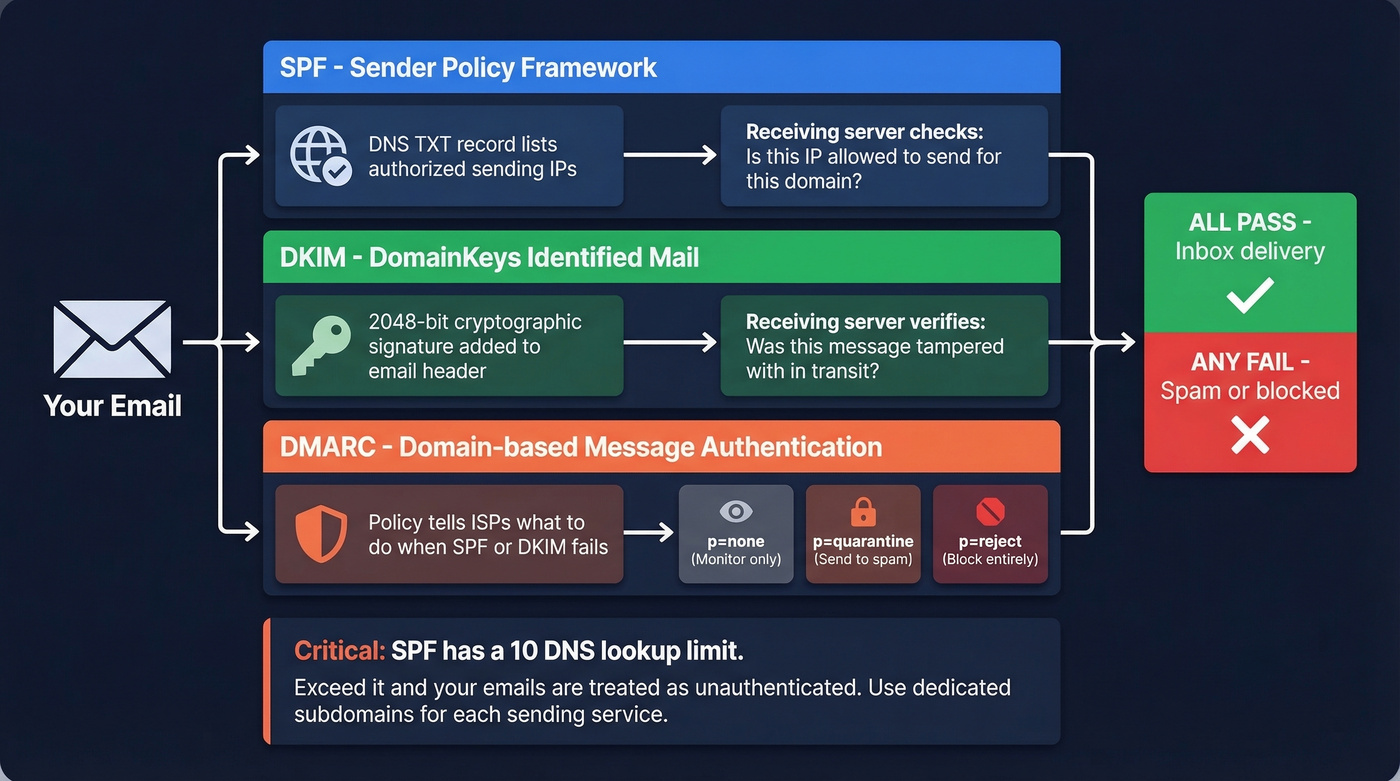
SPF (Sender Policy Framework) tells receiving servers which IP addresses can send email on behalf of your domain. Add a single TXT record to your DNS:
v=spf1 include:mailgun.org include:_spf.google.com -all
Critical warning: SPF has a 10 DNS lookup limit. Exceed it and your emails get treated as unauthenticated. If you're using multiple sending services, use dedicated subdomains for each to keep SPF records simple. SPF flattening tools exist but can introduce their own issues - dedicated subdomains are the cleaner solution. (Need examples? See these SPF record examples.)
DKIM (DomainKeys Identified Mail) adds a cryptographic signature proving the message wasn't tampered with in transit. Use 2048-bit keys and rotate them annually. If you're troubleshooting, follow our steps on how to verify DKIM is working.
DMARC ties SPF and DKIM together and tells ISPs what to do when authentication fails. Start with p=none (monitor only), then move to p=quarantine, then p=reject as you confirm everything's passing. (If you want to go deeper, read our guide to DMARC alignment.)
_dmarc.yourdomain.com TXT "v=DMARC1; p=quarantine; rua=mailto:dmarc@yourdomain.com; aspf=r; adkim=r"
Verify your setup by sending a test email to Gmail and clicking "Show Original" - you should see SPF, DKIM, and DMARC all showing PASS.

Bad data is the silent killer of email campaigns. Prospeo's 5-step verification catches invalid addresses, spam traps, and catch-all domains before they wreck your sender reputation - at 98% accuracy and a 7-day refresh cycle so contacts never go stale between sends.
Stop sending campaigns to dead inboxes. Verify your list first.
Automation Workflows Worth Building
Not every email needs a human pressing "send." These four workflows run in the background and drive disproportionate results.
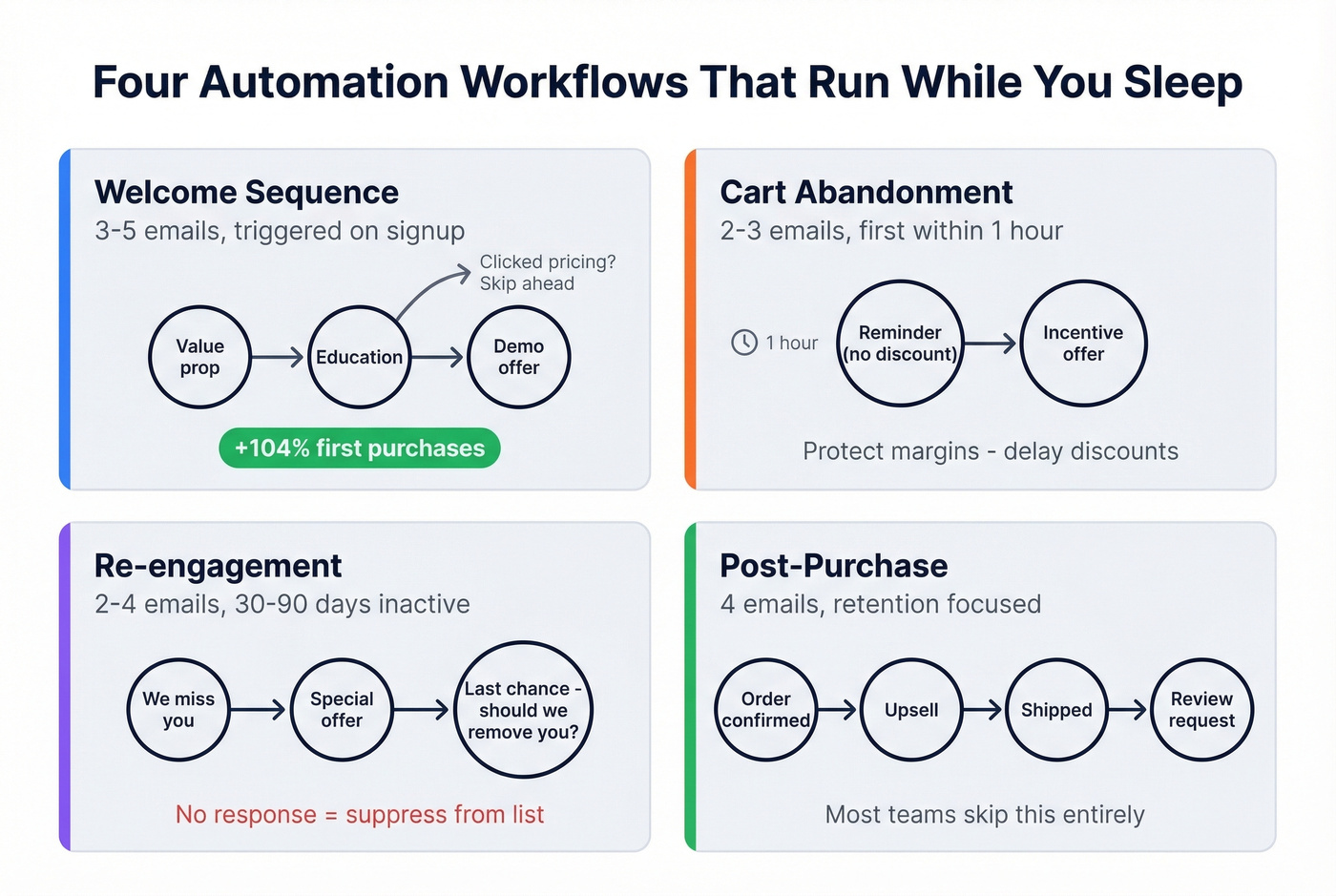
Welcome Sequence (3-5 Emails)
Trigger on signup. Adapt based on subscriber actions - if they click the pricing link in email two, skip the educational content and fast-track to a demo offer. Adaptive welcome journeys work: one implementation drove a 104% increase in first purchases. Lead with the value proposition in email one and save feature details for later. (If you're stuck on copy, steal from these email subject line examples.)
Cart Abandonment (2-3 Emails)
Send the first reminder within one hour - waiting a full day often loses the sale. Picture an ecommerce brand sending "Still thinking about the [Product Name]?" with the product image front and center, no discount. Offer an incentive only after the first reminder to protect margins.
Re-engagement (2-4 Emails)
Target contacts inactive for 30-90 days, depending on your typical buying cycle. A B2B SaaS company might trigger this after 45 days of no login: "Your dashboard misses you" followed by a special offer, then "Should we remove you from this list?" Contacts who don't respond get suppressed. They're hurting your deliverability.
Post-Purchase (4 Emails)
Order confirmation, pre-shipment upsell, shipping confirmation, post-delivery review request. This sequence is pure retention automation, and it's the one most teams skip entirely.
Dynamic Content and Integration
Dynamic content lets you swap sections of an email - hero images, CTAs, product recommendations - based on segment data without building separate templates for every audience. Most modern ESPs support conditional content blocks. Use them to personalize at scale without multiplying your production workload.
Content integration is another underused lever. Repurposing assets - pulling stats from a recent case study, embedding a blog excerpt, or referencing third-party research to build credibility - makes each send more valuable to the reader. In our experience, SDRs who weave relevant content into outreach consistently outperform those sending generic pitches. The goal is earning the click, not earning the spam button. (For a systems view, see our guide to personalized drip campaigns.)
Automated newsletter digests are a natural extension. Curate your best-performing blog posts, product updates, and industry insights into a recurring send that keeps your brand top-of-mind without requiring manual assembly every week.
Measuring What Matters
Open rates are unreliable. Apple Mail holds 46% of email client market share, and Apple Mail Privacy Protection pre-loads tracking pixels - making every email appear "opened" regardless of whether anyone read it. A study of 80,000+ accounts showed open rates rose 18 points in the six months after MPP rolled out. That's not engagement improving. That's data breaking.
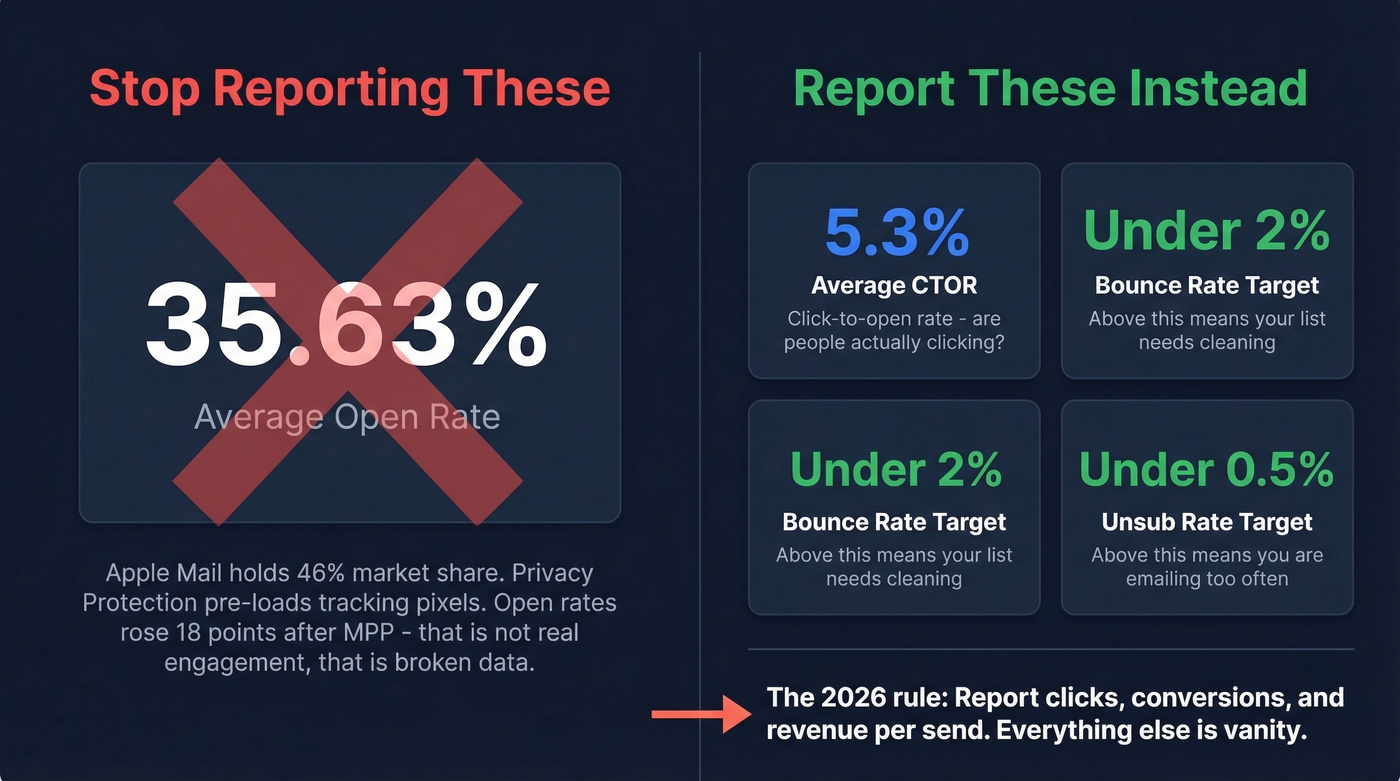
The metric that matters is click-to-open rate (CTOR) - the percentage of people who opened and then clicked. The average CTOR across industries is 5.3%. Above that, your content is resonating. Below it, your subject lines are writing checks your email body can't cash. (If you want the math, use this click rate formula in email marketing.)
Mailchimp benchmarks for context (campaigns to 1,000+ subscribers):
| Industry | Open Rate | Click Rate | Unsub Rate |
|---|---|---|---|
| All Users | 35.63% | 2.62% | 0.22% |
| Ecommerce | 29.81% | 1.74% | 0.19% |
| Non-Profits | 40.04% | 3.27% | 0.18% |
| Biz & Finance | 31.35% | 2.78% | 0.15% |
Two guardrails: keep bounce rate under 2% and unsubscribe rate under 0.5%. If you're reporting open rates to leadership in 2026, you're reporting fiction. Report clicks, conversions, and revenue per send instead.
Mistakes That Tank Campaigns
These are the errors we see repeatedly, ranked by damage:
- No email authentication. SPF/DKIM/DMARC aren't optional. Without them, you're sending from an unverified domain and ISPs treat you accordingly.
- Skipping list verification. Sending to a dirty list once can damage your sender reputation for months. (If you're cleaning lists regularly, compare tools in our Bouncer alternatives guide.)
- Over-sending. 45.8% of recipients flag emails as spam because the sender emails too often. Two to three sends per week is the ceiling for most audiences.
- No preference center. If the only option is "unsubscribe," you'll lose people who just wanted fewer emails.
- Skipping segmentation. Sending the same email to your entire list is the fastest way to train ISPs that your emails aren't relevant.
- Reporting open rates to leadership. A "high open rate" campaign that drove zero clicks isn't a success - it's Apple MPP inflating your numbers.
- Ignoring transactional emails. Receipts, password resets, and shipping confirmations get the highest engagement of any email type. Neglecting their design and branding is a missed opportunity.
B2B Strategies That Scale
For sales teams, email campaign management extends beyond marketing newsletters. Business development outreach requires tighter personalization, faster iteration, and closer alignment with CRM data. Referencing a prospect's recent funding round, citing a mutual connection, or leading with a metric relevant to their industry moves pipeline faster than any template. (If you're building outbound motions, start with these sales prospecting techniques.)
Remarketing campaigns in B2B follow a similar logic: re-engage prospects who visited your pricing page or attended a webinar but didn't convert. Pair remarketing with behavioral triggers and you create a system that surfaces the right message at the right moment. For smaller teams, the list is smaller, but the need for relevance is even higher because every contact counts.
Consistent design, voice, and sending cadence train recipients to recognize and trust your emails before they even read the subject line. This is especially important in B2B SaaS, where buying cycles are long and staying top-of-mind between touchpoints determines whether you make the shortlist.
Choosing a Platform
The ESP you pick matters less than the data you feed it. That said, here's how the major platforms stack up in 2026:
| Platform | Start Price | At 10K Contacts | Free Plan | Best For |
|---|---|---|---|---|
| ActiveCampaign | $15/mo | $149/mo | No | Automation depth |
| HubSpot | $20/mo | ~$1,492/mo | Yes (limited) | CRM integration |
| Brevo | $8.08/mo | Volume-based | 300/day, 100K contacts | Budget + volume |
| MailerLite | $9/mo | $73/mo | 1K subs, 12K emails/mo | Beginners |
| Mailchimp | $26.50/mo | $110/mo | No | Brand recognition |
| Moosend | $7/mo | Not public | 30-day trial | Lowest cost |
ActiveCampaign is the best overall for teams that care about automation. Its visual workflow builder is genuinely powerful, and $149/mo at 10K contacts is fair for what you get.
HubSpot is excellent if you're already in the HubSpot CRM ecosystem. But that pricing curve is brutal - going from $20/mo to nearly $1,500/mo at 10K contacts isn't a typo. It's HubSpot's contact-based pricing model punishing growth. Skip it unless you're already locked into their CRM.
Brevo's free plan is one of the most generous in the market. MailerLite is the best on-ramp for beginners. Mailchimp is coasting on brand recognition. Moosend is the budget pick if cost is the primary constraint. If you're a startup scaling past 5K contacts, run the numbers before you commit to any of them.
Segmentation only works when your contact data is rich enough to segment on. Prospeo enriches every lead with 50+ data points - job title, company size, industry, tech stack, intent signals - so your campaigns hit the right person with the right message every time.
Turn thin contact records into fully segmented campaign fuel.
FAQ
How often should I send campaigns?
Two to three times per week is the sweet spot for most audiences. Beyond that, you risk the spam button - 45.8% of recipients flag emails as spam specifically because of frequency. Set up a preference center so subscribers choose their own cadence.
What's a good click-through rate in 2026?
The average CTOR across industries is 5.3% - that's the metric to track, not open rate. Apple MPP has inflated opens by roughly 18 points across 46% of email clients. Consistently above 5.3% means your content and targeting are working.
How do I reduce bounce rates?
Verify your list before every campaign. Check syntax, domain, mailbox existence, catch-all handling, and spam traps in one pass. Target a bounce rate under 2% - anything higher signals to ISPs that your list hygiene needs work, and they'll throttle deliverability accordingly.
What's the difference between marketing and transactional emails?
Marketing emails are promotional - newsletters, product launches, nurture sequences. Transactional emails are triggered by a user action: order confirmations, password resets, account alerts. Both deserve strong design and clear branding, but transactional sends typically see 2-3x higher engagement because the recipient is expecting them.
How do I write sales emails that get replies?
Reference something specific to the prospect - a recent company milestone, a shared connection, or a pain point common in their industry. Keep the email under 125 words, lead with value, and include a single clear CTA. Relevance beats volume every time.