

Email Deliverability Monitoring: The 2026 Playbook
Your open rates have been sliding for three months. Nobody flagged it. Nobody panicked. By the time someone noticed, your primary domain was sitting at a "low" reputation in Google Postmaster Tools and 30% of your outbound was landing in spam.
That's the quiet failure problem - and it's far more common than most teams realize.
An Unspam.email analysis of millions of email tests found that only 60% of emails reached a visible inbox location. 36% landed in spam. 4% were blocked outright. Those numbers aren't from sketchy senders - they're the global average. If you aren't running email deliverability monitoring, you're flying blind into those odds.
What You Need (Quick Version)
Set up these three tools today:
- Google Postmaster Tools - free, covers Gmail reputation and spam rates
- GlockApps - inbox placement testing, starting at $59/mo
- MXToolbox - blacklist and DNS checks, free tier available
Memorize these three thresholds:
- Bounce rate: under 2%
- Spam complaint rate: under 0.1%
- Inbox placement rate: above 80%
The upstream fix most teams skip: Verify your contact data before you send. Bad emails create bounces, bounces tank reputation, and reputation kills deliverability. Run every list through a verification tool before it touches your sending infrastructure. The monitoring tools above catch problems after they happen - clean data prevents them. (If you need a deeper baseline, start with our email deliverability guide.)
Delivery vs. Deliverability: The Distinction That Matters
Let's clear up something that trips up even experienced ops teams.
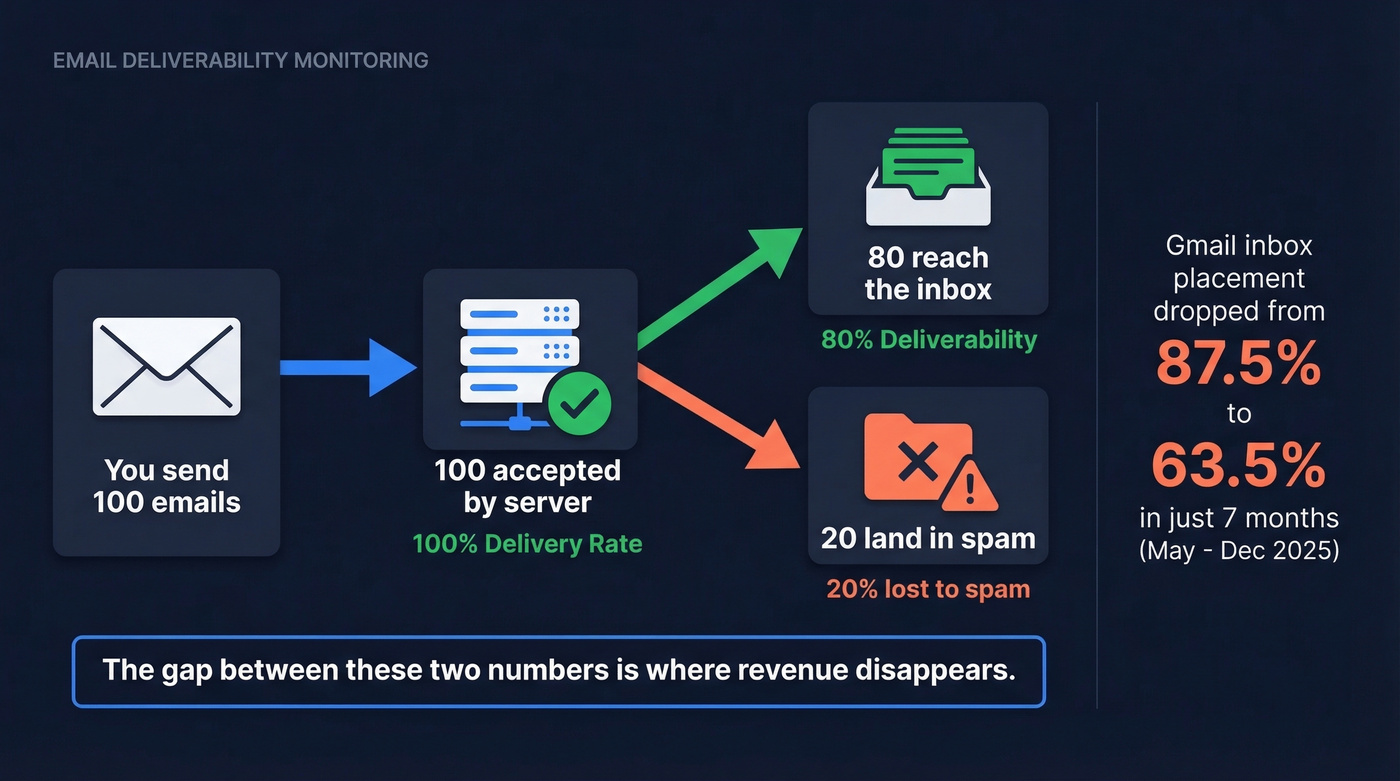
Delivery means the receiving server accepted your email - it didn't bounce. Deliverability means the email actually reached the inbox, not the spam folder. Send 100 emails, all 100 get accepted, but 20 land in spam? That's 100% delivery and 80% deliverability. The gap between those two numbers is where revenue disappears.
Authentication is necessary but nowhere near sufficient. SPF adoption sits at 92%, DKIM at 88%, and DMARC at 69% across tested senders. Yet spam placement still exceeds 30%. ISPs care far more about how recipients interact with your emails - opens, clicks, replies, complaints - than whether your SPF record passes. (If you're troubleshooting records, these SPF record examples help.)
Here's a number that should alarm you: Gmail inbox placement peaked at 87.5% in May 2025 and declined to 63.5% by December - a 24-point drop in seven months. If you weren't actively tracking inbox placement, you wouldn't have seen it coming. That's the entire case for deliverability monitoring in one data point.
One more thing most guides miss: deliverability isn't a marketing ops problem. It's a cross-functional responsibility spanning marketing, engineering, product, and legal. The team that owns your DNS records isn't the team that writes your email copy, and neither team is watching complaint rates. Assign ownership explicitly or nobody owns it.
The 7 Metrics You Must Monitor
Not all metrics carry equal weight. Here's what matters, ranked by how fast each one can wreck your sending reputation.
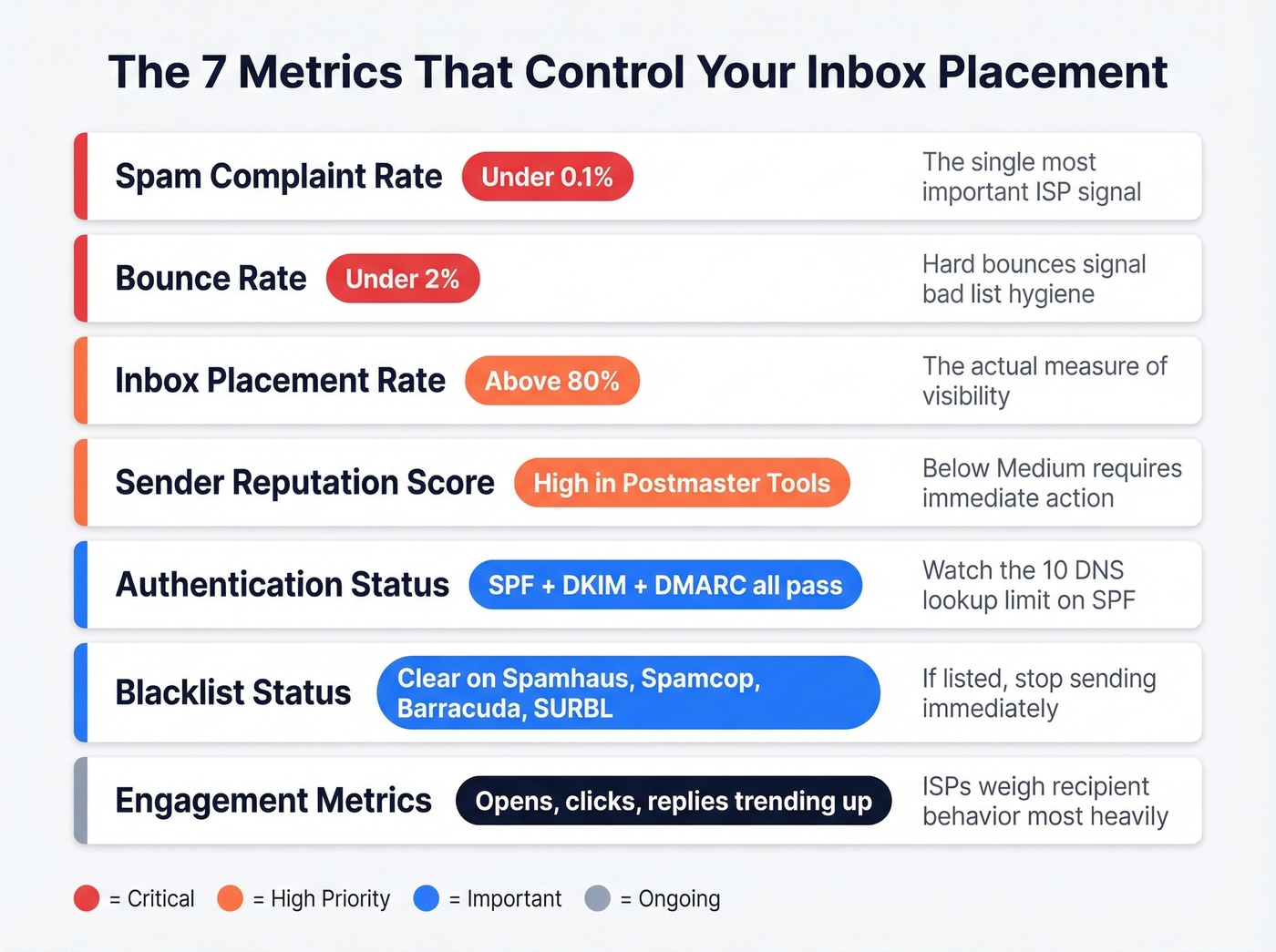
| Metric | Threshold | Why It Matters |
|---|---|---|
| Spam complaint rate | Under 0.1% | The single most important ISP indicator |
| Bounce rate | Under 2% | Hard bounces signal bad list hygiene |
| Inbox placement rate | Above 80% | The actual measure of visibility |
Spam complaint rate is the metric ISPs weight most heavily, per ExpertSender's 2026 analysis. Google and Yahoo's bulk sender requirements set the hard ceiling at 0.3% - that's 3 complaints per 1,000 messages - but by the time you hit 0.3%, damage is already accumulating. Treat 0.1% as your real threshold.
Bounce rate needs to stay under 2%. Hard bounces signal bad list hygiene. Soft bounces in volume suggest reputation issues. ISPs notice either way. (Benchmarks and fixes: email bounce rate.)
Inbox placement rate measures the percentage of delivered emails that actually reach the inbox. Aim for 80%+ on opt-in programs. Cold outreach will run lower, but anything below 60% means something's broken. For industry context: Travel and Hospitality averages 68%, Retail and E-commerce 62%, Software and Technology 58%, and Financial Services 57%. If you're below your industry average, you have work to do.
Sender reputation score - Google Postmaster Tools grades this as High, Medium, Low, or Bad. You want High. Anything below Medium requires immediate action. (More tactics: how to improve sender reputation.)
Authentication status - SPF, DKIM, and DMARC should all pass. Watch for SPF's 10-DNS-lookup limit; exceed it and SPF auto-fails, which cascades into DMARC failures. We see this more than almost any other technical pitfall. Don't forget PTR/reverse DNS and TLS either - ISPs check these and failures create silent delivery problems. (If you want the technical deep dive, see DMARC alignment.)
Blacklist status - check against Spamhaus, Spamcop, Barracuda, and SURBL. If you're listed on any of these, stop sending immediately. Other blacklists exist, but these four are the ones ISPs actually reference. (If you do get listed, start with Spamhaus blacklist removal.)
Engagement metrics - opens, clicks, and replies. These are the signals ISPs weigh most heavily when deciding whether your next email hits the inbox or the spam folder. Track them by domain if you're running multiple sending domains. (If your copy is the issue, use this email copywriting guide.)
How to Build a Monitoring Schedule
Most guides tell you what to monitor. Almost none tell you when. Here's the cadence that works, drawn from practitioner workflows on r/coldemail and our own testing.
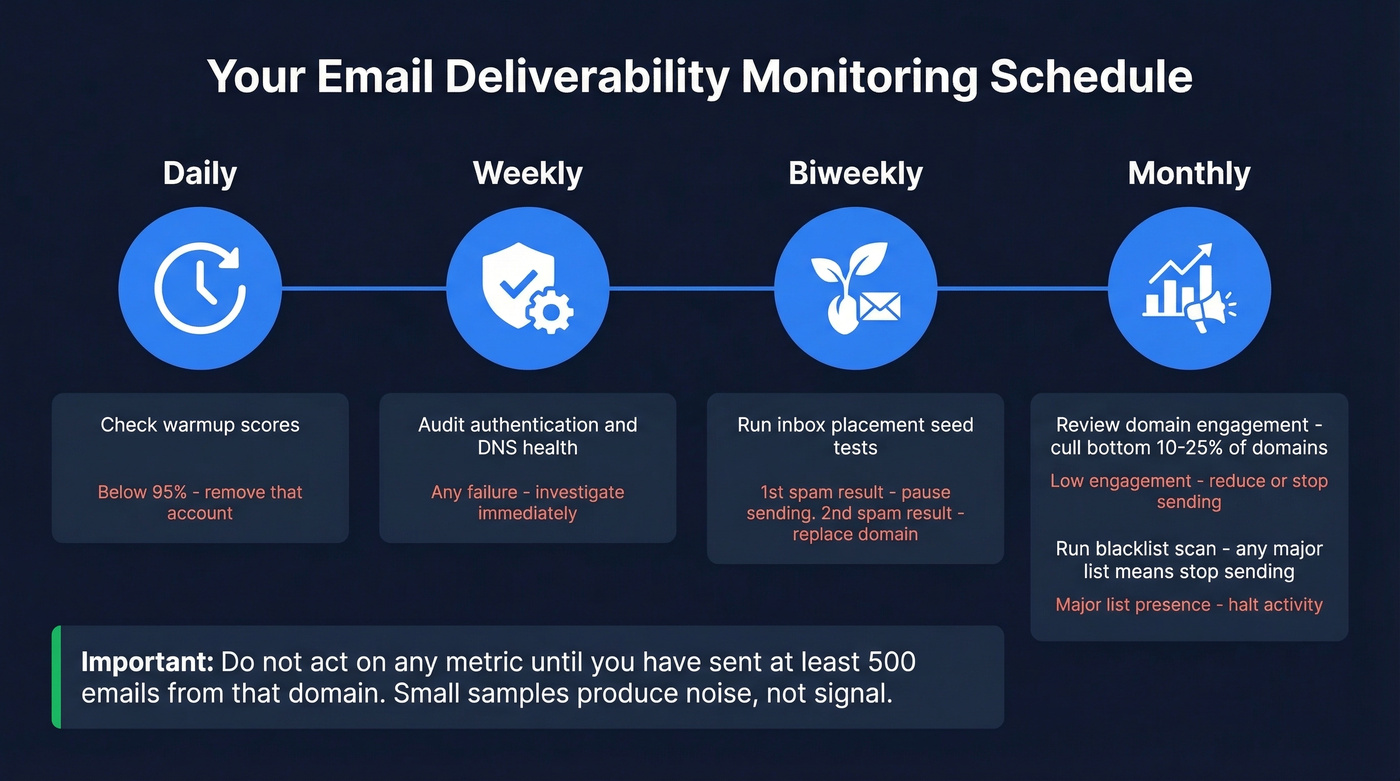
| Cadence | What to Check | Action Threshold |
|---|---|---|
| Daily | Warmup scores | Below 95% - remove account |
| Weekly | Authentication and DNS health | Any failure - investigate immediately |
| Biweekly | Inbox placement via seed test | First spam result - pause; second - replace domain |
| Monthly | Domain engagement | Cull bottom 10-25% of domains |
| Monthly | Blacklist scan | Any major list - stop sending |
A few critical notes on this schedule. Don't act on any metric until you've sent at least 500 emails from that domain. Small sample sizes produce noise, not signal. A 3% bounce rate on 50 sends means nothing. A 3% bounce rate on 2,000 sends means you have a data problem.
When ISPs apply restrictions, they observe your behavior over a 7-30 day window before lifting them. Panicking and changing everything at once resets that clock. Make one change, wait, measure, repeat.
Warmup pool scores deserve special skepticism. The consensus on r/coldemail is that warmup pools can be misleading because they continuously mark messages as "not spam," creating artificially high scores. A 100% warmup score doesn't prove you're inboxing with real recipients. Treat warmup as a baseline health check, not a deliverability guarantee. (Related: unlimited email warmup tools.)

You just read that bounce rates above 2% tank sender reputation. The fix isn't better monitoring - it's cleaner data upstream. Prospeo's 5-step email verification delivers 98% accuracy, catches spam traps and honeypots, and refreshes every 7 days so your lists never go stale.
Stop monitoring bad data. Start sending to verified contacts.
Free Tools Everyone Should Use
Three mailbox providers offer free monitoring tools. All three are worth setting up, and all three share the same limitation - they only show you data for their own ecosystem.
Google Postmaster Tools covers domain reputation, spam rate, authentication results, and delivery errors for Gmail. Given Gmail's market share, this is the single most important free tool for tracking inbox placement. Skip it only if your audience is entirely on corporate Outlook domains, which is unlikely.
Microsoft SNDS shows IP reputation and junk mail reporting for Outlook and Hotmail. The interface is dated, but the data matters for B2B teams since many corporate domains route through Microsoft.
Yahoo Sender Hub provides complaint rates and authentication status for Yahoo and AOL. Worth setting up if Yahoo represents more than 5% of your sends.
No free tool gives you a unified cross-provider dashboard. You're logging into three separate portals and mentally stitching the picture together. That's where paid tools justify their cost.
Best Paid Deliverability Tools
| Tool | Best For | Inbox Testing | Monitoring | Starting Price |
|---|---|---|---|---|
| GlockApps | Overall monitoring | Seed-based | BL + DMARC | Free / $59/mo |
| Mailgun Optimize | API-first teams | Seed-based | BL only | $49/mo |
| MXToolbox | DNS diagnostics | No | BL + DMARC | Free / $129/mo |
| Validity Everest | Enterprise scale | Seed-based | BL + DMARC | ~$20/mo (basic) |
| ZeroBounce | Validation + testing | Yes | BL only | Free / $49/mo |
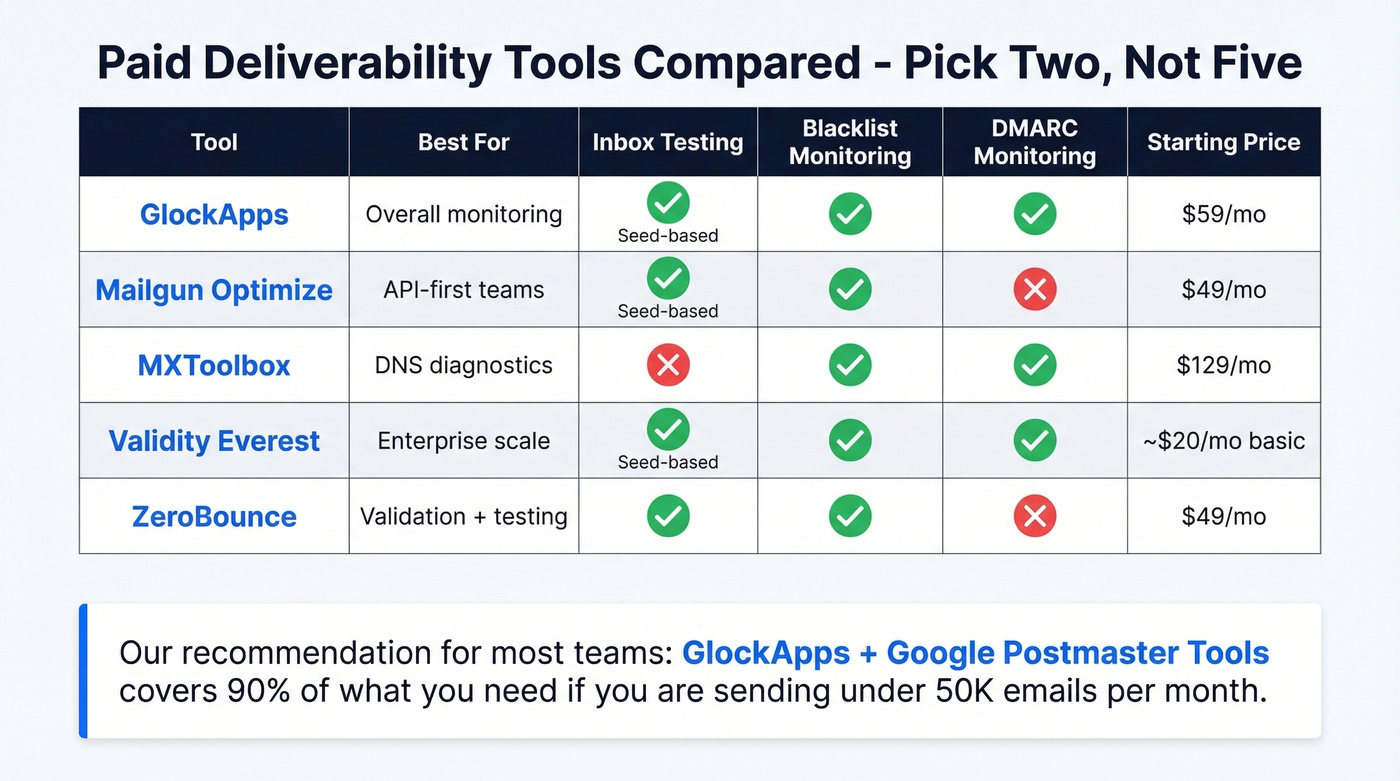
Look, you don't need five monitoring tools. You need two and a clean list. The biggest deliverability gains come from data quality, not dashboard quantity. If your deal sizes are modest and you're sending fewer than 50K emails per month, GlockApps plus Google Postmaster Tools covers 90% of what you need. (If you're scaling outbound, also watch email velocity.)
One important caveat on all seed-based testing: seed lists run about 100 mailboxes and behave like cold emails with no natural engagement history. Your real deliverability rate will be higher than what seed tests show. Don't panic over a single test - look for trends across multiple tests.
GlockApps
GlockApps is the best overall inbox placement tester for most teams. It runs seed-based tests across major ISPs and country-specific providers, checks against 50+ industry blocklists, and breaks down Gmail placement into Primary vs. Promotions - a distinction that matters enormously for cold outreach. The Gappie bot pushes alerts to Telegram and Slack, so you don't need to log in daily.
The free plan gives you 2 spam test credits and up to 10,000 DMARC messages per month - enough to evaluate the tool. Essential runs $59/mo with 360 spam test credits, Growth hits $99/mo, and Enterprise is around $129/mo. For most teams sending under 50K emails per month, Essential covers it. The ~100 mailbox seed list is the main limitation, so run biweekly and watch the trendline rather than obsessing over individual tests.
MXToolbox
Start here if your first question is "am I blacklisted?" The free tier handles quick lookups for SPF record validation, blacklist checks, and MX record analysis. Paid plans start at $129/mo for Delivery Center and $399/mo for Plus, which adds monitoring and alerting. MXToolbox doesn't do inbox placement testing, so pair it with GlockApps for a complete stack.
Mailgun Optimize
If your team thinks in API calls, this is your tool. It combines placement testing with email validation, and the API documentation is strong. Pilot plan starts at $49/mo, Starter at $99/mo. It covers fewer ISPs than GlockApps, making it better as a complement than a replacement if you need broad provider coverage.
Validity Everest
Everest is the enterprise suite in this category - the broadest feature set covering inbox placement, reputation monitoring, design testing, and competitive intelligence. Elements starts around $20/mo for basic features, Elements Plus from $525/mo, and Professional/Enterprise tiers run $1,000+/mo with custom pricing. Overkill for teams sending under 100K emails per month. Worth evaluating if you're a marketing team with six-figure monthly send volumes.
ZeroBounce
Validation-first tool with a deliverability testing add-on. Free tier includes 100 credits per month. Validation plans start at $18/mo, and the deliverability toolkit runs from $49/mo. Solid for teams that want verification and basic deliverability checks in one platform. Skip it if you already have a dedicated verification provider. (If you're comparing verifiers, see Bouncer alternatives.)
Which combination should you pick? For cold outreach teams under 50K sends: GlockApps Essential plus MXToolbox free tier. For API-first SaaS teams: Mailgun Optimize plus Google Postmaster Tools. For enterprise marketing at 100K+ monthly volume: Validity Everest plus MXToolbox Plus.
Setting Up DMARC Monitoring
DMARC adoption jumped from under 43% in 2023 to roughly 54% in 2024, with high-volume senders reaching about 70%. But 75% of organizations with DMARC are stuck at p=none. That's not monitoring - that's ignoring the data you're collecting.
Start with this record if you don't have DMARC set up:
v=DMARC1; p=none; rua=mailto:dmarc-reports@yourdomain.com; aspf=r; adkim=r
Two report types will start flowing in. RUA aggregate reports arrive daily and summarize which IPs are sending on your behalf, whether SPF and DKIM passed, and how receivers handled the messages. RUF forensic reports provide message-level failure details, though not all providers send them.
The raw XML reports are nearly unreadable. Use a DMARC monitoring tool - GlockApps includes DMARC monitoring, or dedicated services like DMARCeye or Valimail can parse and visualize the data.
The rollout path matters. Start at p=none to collect data without affecting delivery. Once you've confirmed all legitimate sending sources pass authentication, move to p=quarantine. The end goal is p=reject - as Yahoo's Marcel Becker put it, "The end goal is ideally a policy of p=reject." Most organizations never get there. Be the exception.
The Data Quality Problem Most Teams Ignore
Here's the thing: the biggest deliverability problem isn't your ESP, your authentication, or your content. It's your data.
The chain reaction is simple. Bad email addresses generate bounces. Bounces damage sender reputation. Damaged reputation tanks inbox placement. By the time your monitoring flags the problem, the damage is done. You're spending weeks recovering from something that should've been prevented with a 5-minute verification step. (If you're building lists, how to generate an email list is a good starting point.)

We've seen this pattern play out dozens of times. Snyk's sales team of 50 AEs was running bounce rates of 35-40% with their previous data provider - after switching to Prospeo's verified data, bounces dropped to under 5% and AE-sourced pipeline increased 180%. Stack Optimize built from $0 to $1M ARR while maintaining 94%+ deliverability and sub-3% bounce rates across all their clients by verifying every list before it sends. These aren't edge cases. They're what happens when you fix the upstream problem.
The broader hygiene bar is shockingly low. Only 14% of senders are compliant with List-Unsubscribe headers, and 74% fail HTML best-practice checks - emails with poor HTML structure are 18-25% more likely to land in spam. One in 8 emails contain broken or unreachable links. Verifying your data and cleaning your templates puts you ahead of most senders before you even think about content or timing. (For more diagnostics, use an email spam checker.)
Stack Optimize built a $1M agency with sub-3% bounce rates and zero domain flags - all on Prospeo data. When 36% of emails globally land in spam, the teams that win are the ones verifying contacts before they ever hit send. At $0.01 per email, clean data costs less than one wrecked domain.
Your deliverability monitoring dashboard should be boring. Clean data makes it that way.
When Monitoring Catches a Problem
Monitoring is only useful if you know what to do when something breaks. Here are the four most common incidents and the response playbook for each.
You're blacklisted. Stop sending from the affected IP or domain immediately. Identify the cause - usually a spam trap hit, a sudden volume spike, or a complaint surge. Submit delisting requests to each blacklist; Spamhaus, Spamcop, and Barracuda each have their own process. Timeline varies: some delist within hours, others take days. A spam trap hit can take 6-12 months to fully recover from, which is why prevention matters so much more than remediation. (If you suspect traps, start with spam trap removal.)
Spam complaint rate spikes above 0.1%. Pause active campaigns. Audit the last 48 hours of sends - what changed? New list segment? Different content? Broken unsubscribe link? Check authentication records for any DNS changes that broke SPF or DKIM. Fix the root cause before resuming.
Sender reputation drops to Medium or Low. Reduce sending volume immediately. Shift to your most engaged segments only - people who've opened or clicked in the last 30 days. ISPs observe your behavior over a 7-30 day window before lifting restrictions. Patience matters here. Don't blast your way out of a reputation problem.
Authentication failure detected. Check DNS records first. The most common culprit is exceeding SPF's 10-DNS-lookup limit after adding a new sending service. DKIM key rotation can also cause temporary failures if the new key hasn't propagated. Verify alignment - your From domain must match the domain in your SPF or DKIM pass for DMARC to succeed.
The recovery principle across all four scenarios: diagnose first, fix the root cause, then gradually ramp volume back up. Rushing the ramp-up is the most common mistake we see teams make.
FAQ
What's the difference between email delivery and deliverability?
Delivery means the receiving server accepted your email without bouncing it. Deliverability means it reached the actual inbox rather than spam. You can have 100% delivery and 80% deliverability - 100 emails accepted, 20 routed to spam. Track both, because delivery alone tells you nothing about visibility.
How often should I check inbox placement?
Run seed-based inbox placement tests biweekly and review Google Postmaster Tools domain reputation weekly. Don't act on any single metric until you've sent at least 500 emails from that domain - small samples produce misleading signals.
Are free deliverability tools enough?
Google Postmaster Tools, Microsoft SNDS, and Yahoo Sender Hub cover the basics at no cost. Once you exceed 10K monthly sends, add a paid tool like GlockApps at ~$59/mo for cross-provider inbox placement data that free tools can't provide.
Why do emails land in spam after setting up SPF, DKIM, and DMARC?
Authentication prevents spoofing but doesn't guarantee inbox placement. ISPs weigh engagement signals, complaint rates, and sender reputation far more heavily. Over 30% of emails land in spam globally despite passing authentication. Your records get you in the door - reputation determines which room.
What's the fastest way to prevent bounce-related reputation damage?
Verify every email address before sending. A 5-step verification process that catches invalid addresses, spam traps, and honeypots eliminates the bounces that trigger reputation damage in the first place. Pair pre-send verification with ongoing email deliverability monitoring for full coverage.
If this felt like a lot, go back to the Quick Version at the top. Set up Google Postmaster Tools, run your first GlockApps test, and verify your next send list. Those three steps take under an hour and put you ahead of 80% of senders.