

Email Introduction Etiquette: The Only Rules You Actually Need
You're staring at a blank compose window, cursor blinking after "Hi." You know what you want to say - you just don't know how to start saying it without sounding stiff, desperate, or like a bot. With 392.5 billion emails sent daily in 2026, your subject line has less than three seconds to earn the open. Email etiquette introduction basics shouldn't require a style guide, but the rules feel unwritten because they mostly are.
We've sent thousands of introduction emails over the years. Here's what actually works.
The Cheat Sheet
If you're in a rush:
- Default greeting: "Hi [First Name]."
- Default sign-off: "Best," or "Thanks,"
- First sentence: State why you're writing. Skip "I hope you're well."
- Total length: 50-150 words.
That covers most professional introductions. The rest of this guide handles edge cases, templates, and cross-cultural norms that separate forgettable emails from ones that get replies.
Anatomy of a Strong Introduction Email
A solid business introduction email follows six parts, whether you're reaching out cold or joining a new team.
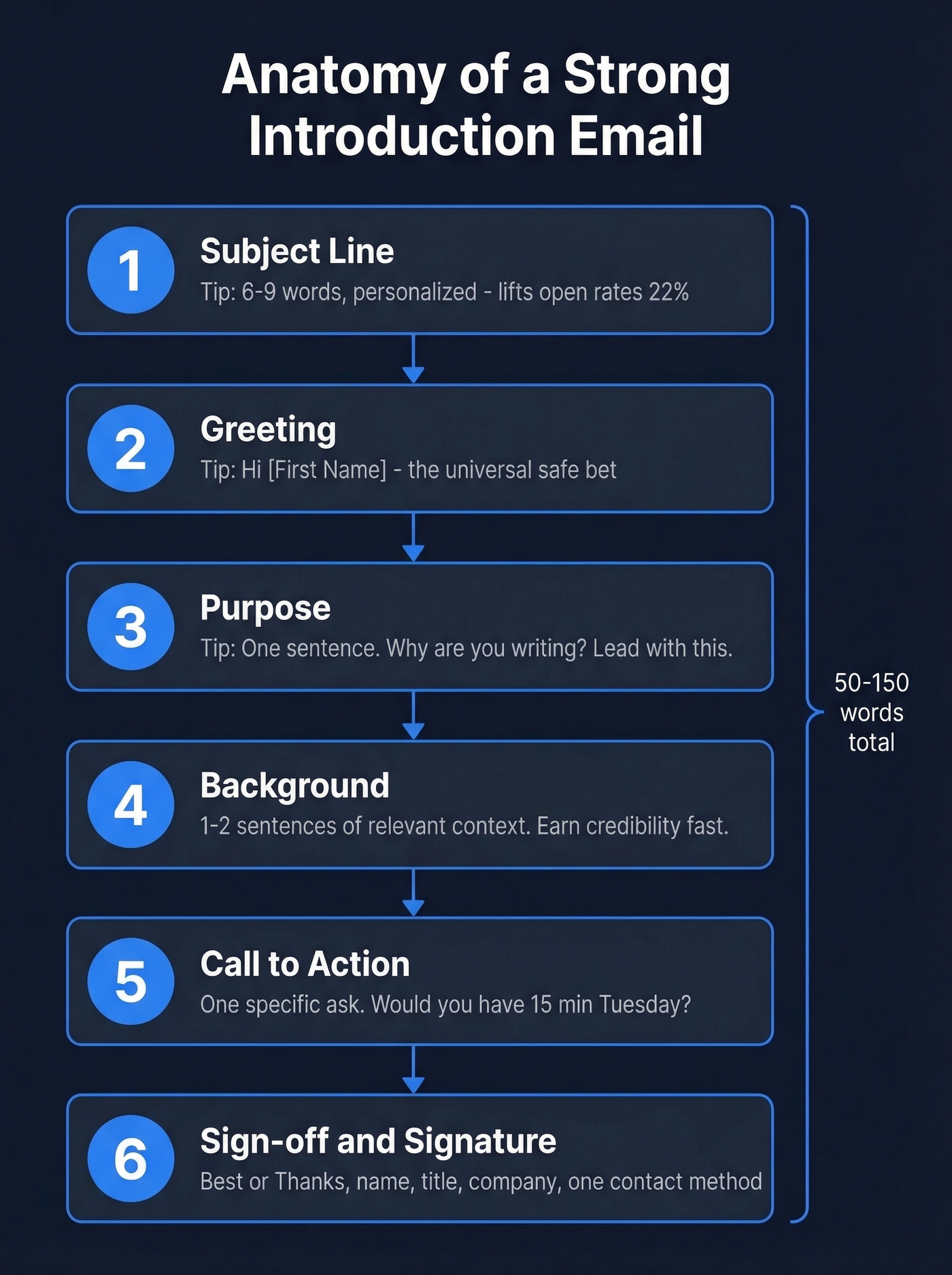
1. Subject line. 47% of recipients open based on the subject line alone. Keep it 6-9 words. Personalization - dropping in a name, company, or shared context - can lift open rates by up to 22%. If you want swipeable ideas, use these subject line examples.
2. Greeting. "Hi [First Name]" is the universal safe bet. More on this below.
3. Purpose. One sentence. Why are you writing? Lead with this, not your life story.
4. Background. One to two sentences of relevant context: who you are, what you do, why it matters to them. This is where you earn credibility without writing an autobiography.
5. Call to action. A single, specific ask. "Would you have 15 minutes next Tuesday?" beats "Let me know if you'd ever want to chat." The difference between those two sentences is the difference between getting a meeting and getting archived. If you want to go deeper on asks, see CTA best practices.
6. Sign-off and signature. "Best," "Thanks," or "Looking forward to hearing from you." Pick one and move on. Your signature should include name, title, company, and one contact method. Skip the inspirational quotes.
Greetings That Actually Work
The consensus on r/work is clear: starting an email with just someone's name - "John," - feels curt. A simple "Hi" or "Good morning" before the name goes a long way. Executive assistants who send dozens of formal emails daily point out that norms vary wildly, but defaulting to "Hi" keeps you safe.
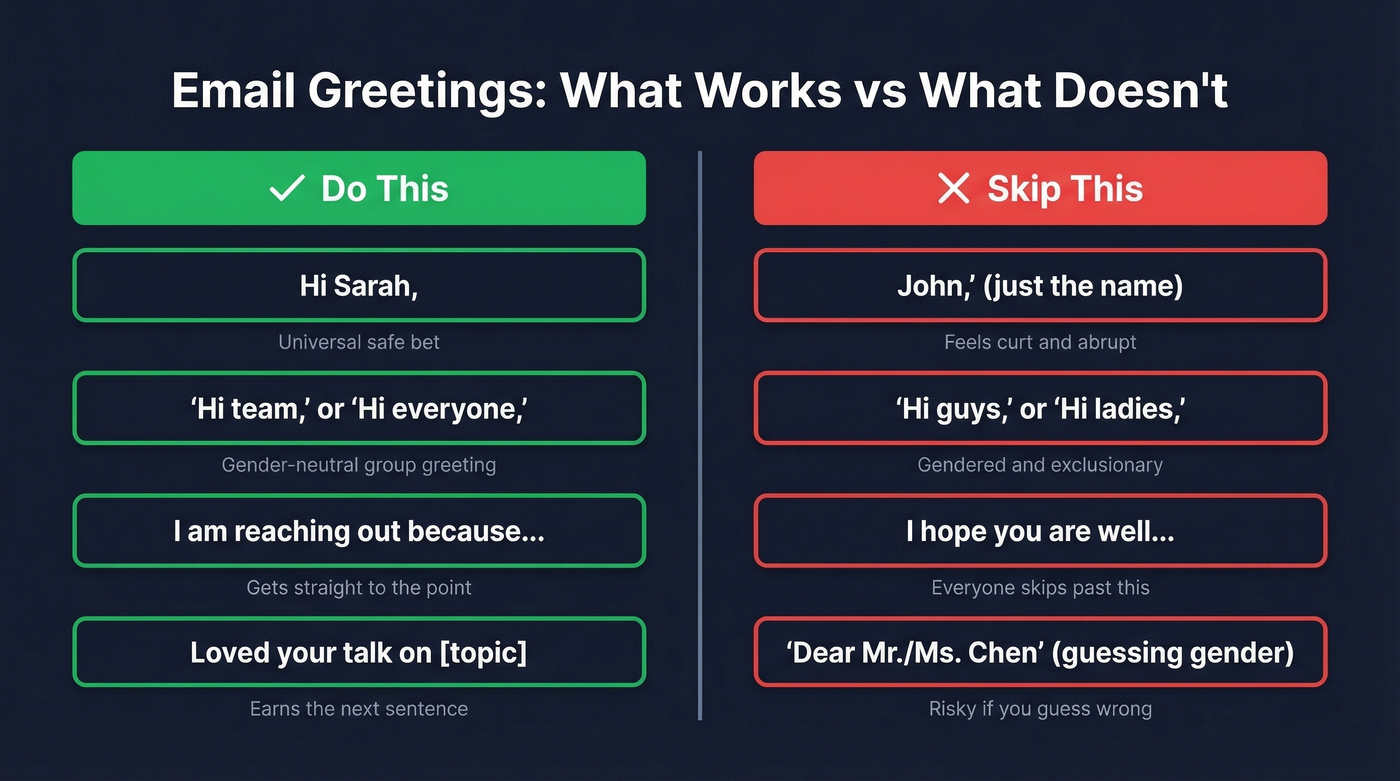
Here's the thing: "I hope you're well" has become the email equivalent of elevator small talk. It's not wrong, but most people skip right past it. Replace it with something that earns the next sentence:
- "I'm reaching out because..."
- "Quick question about [specific topic]."
- "Loved your [talk / post / article] on [topic]."
- "We have a mutual connection in [Name] - they suggested I write."
For group emails, "Hi everyone" or "Hi team" avoids the "Hi guys" / "Hi ladies" trap entirely. And if you're unsure of someone's gender or preferred title, skip gendered honorifics. "Hi Alex Chen" is always safer than guessing wrong with "Dear Mr./Ms. Chen."
Copy-Paste Templates
Cold Outreach Introduction
When to use this: You've never met the person and have no mutual connection. This is your bread-and-butter cold email. If you're building a full sequence, pair this with sales follow-up templates.
Subject: [Specific reason] - quick intro from [Your Name]
Hi [First Name],
I'm [Your Name], [role] at [Company]. I'm reaching out because [one sentence on why this matters to them].
[One sentence of relevant background - a specific result, or context on your work.]
Would you have 15 minutes this week to [specific CTA]?
Best, [Your Name]
New Team Introduction
When to use this: You're starting a new role and want to introduce yourself to the broader team. Keep it warm and brief - people will Google you anyway.
Subject: Excited to join [Company] - [Your Name], new [Job Title]
Hi team,
I'm [Your Name], and I'm joining as [role] starting [date]. I'll be working on [brief scope]. Before this, I was at [Company] doing [one line].
Looking forward to meeting everyone - feel free to reach out anytime.
Best, [Your Name]
Mutual Connection Referral
Subject: [Mutual Contact] suggested I reach out
Hi [First Name],
[Mutual Contact] mentioned you'd be a great person to talk to about [topic]. I'm [Your Name] at [Company] - would you be open to a quick call next week?
Thanks, [Your Name]
Before you send a cold introduction, make sure you actually have the right email address. A bounced intro is worse than no intro - it's a wasted first impression. We run every address through Prospeo's email finder before hitting send, and it catches bad addresses before they tank our sender reputation. If you need more options, compare email search tools or a dedicated email ID finder.

A perfect introduction email means nothing if it bounces. Prospeo's email finder delivers 98% accuracy across 143M+ verified addresses - so your carefully crafted first impression actually reaches the inbox.
Stop wasting great introductions on bad email addresses.
Introducing Two People Over Email
Most email introductions between two people are done wrong. The standard move - throwing both parties on a thread and hoping for the best - puts the recipient in an awkward spot.
The better approach is the double opt-in. Email each person privately first. Explain why the connection benefits them specifically. Ask permission. Only after both say yes do you create the shared thread. This framework comes from networking best practices and it works because nobody feels ambushed.
Three exceptions where a direct intro is fine: you're certain the connection has clear value for both sides, you're close enough with both people that they'd welcome it, or you're a known connector and both parties expect this from you.
Once the intro thread is live, the person who requested the introduction responds first - ideally within one business day. Don't make the connector chase you. If you need a next-step message, use an email after introduction framework.
Cross-Cultural Email Greetings
If you're emailing internationally, your default "Hi [First Name]" will land wrong in certain cultures.
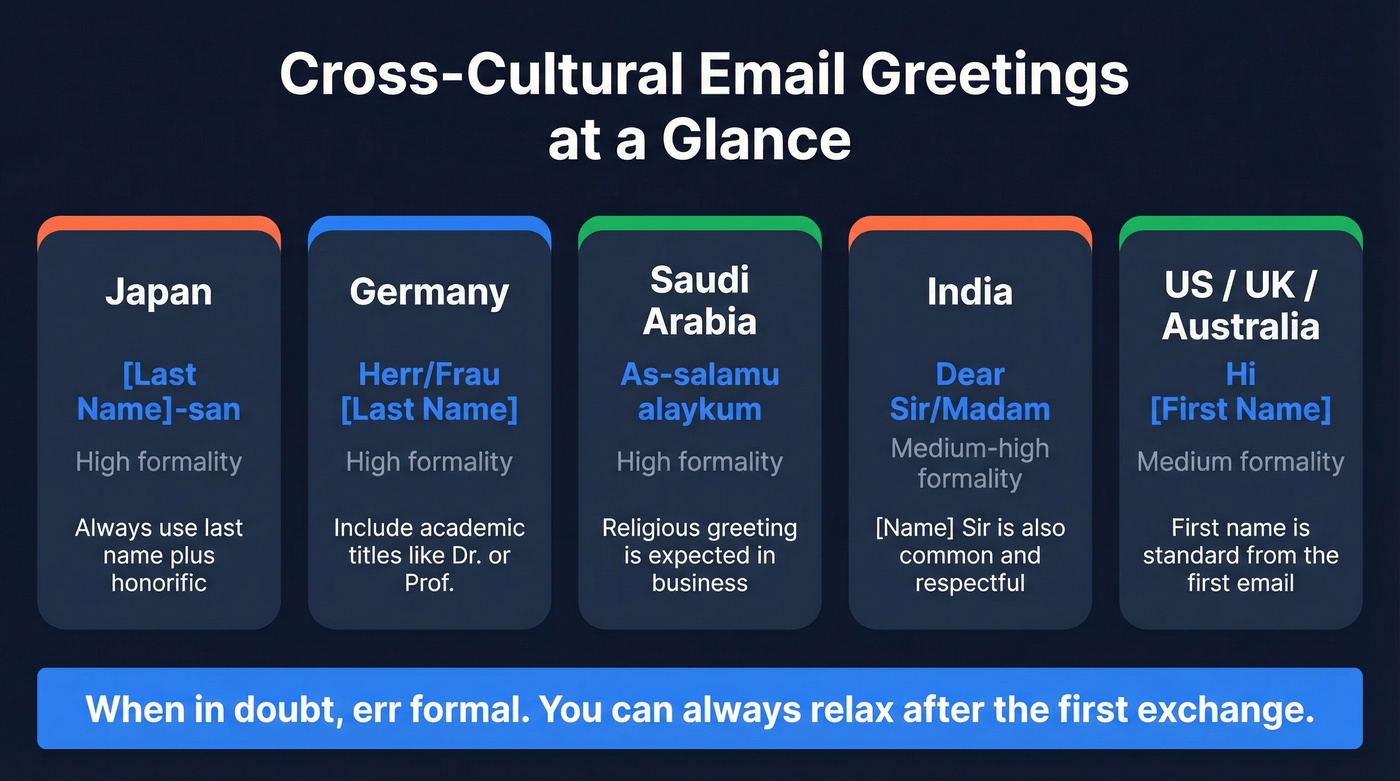
| Country | Greeting | Formality | Key Rule |
|---|---|---|---|
| Japan | [Last Name]-san | High | Last name + honorific always |
| Germany | Herr/Frau [Last Name] | High | Include academic titles |
| Saudi Arabia | As-salamu alaykum | High | Religious greeting expected |
| India | Dear Sir/Madam | Medium-High | "[Name] Sir" also common |
| US/UK/Australia | Hi [First Name] | Medium | First name is standard |
When in doubt, err formal. You can always relax after the first exchange, but you can't un-send a greeting that felt disrespectful. For a deeper dive, Bubbles Translation has a solid breakdown of B2B email norms across regions.
Generational Gaps and Mobile Formatting
Email remains a cornerstone of workplace communication, but how people use it is shifting fast. 76% of workers aged 45-54 still rely on email as their primary work tool. Meanwhile, 36% of Gen Z employees have over 1,000 unread emails sitting in their inbox.
The practical implication: your introduction email is competing against a wall of unread messages, and 50-60% of recipients will read it on a phone screen. Format for scanning, not reading. Short paragraphs. One clear ask. No walls of text. If your intro requires scrolling on mobile, it's too long.
For teams that default to Slack or Teams, an email introduction signals formality - use it when you want the message to carry weight. If you're doing outbound at scale, these sales prospecting techniques help you pick the right channel.
Let's be honest: if the stakes are low, you probably don't need a perfectly crafted introduction email. A three-sentence DM on the platform where your buyer already lives will outperform a polished email they never open. Save the formal email introduction for moments that justify the formality - a new client relationship, a senior executive, a partnership pitch where tone matters. For more structure, borrow from emails that get responses.
Mistakes That Kill Your First Impression
"I'm not sure if you're the right person, but..." This opener tells the recipient you didn't bother to research them. It's the fastest way to get ignored.
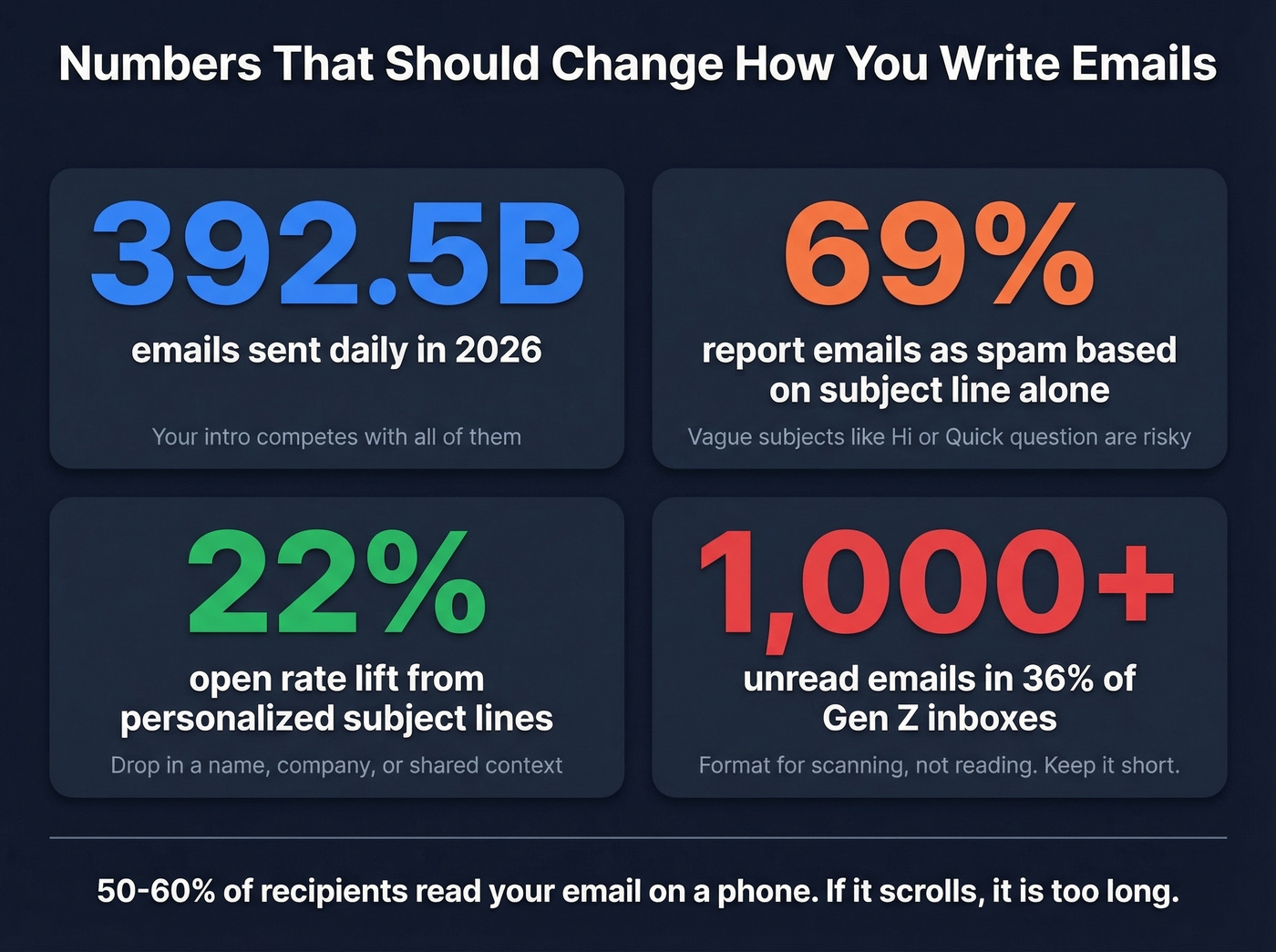
Vague subject lines. "Hi" or "Quick question" can trigger spam reports - 69% of people report emails as spam based on the subject line alone. Be specific. If you're testing deliverability and engagement, track your email reputation alongside opens.
The wall of text. Three paragraphs about your background before you get to the point. Nobody reads this. State your purpose in sentence one.
Misspelling the recipient's name. If you can't get their name right, nothing else in the email matters. Triple-check before sending, especially names with uncommon spellings. I once sent an introduction to a VP of Sales and spelled her last name wrong in the subject line. She replied with just the correction. No meeting.
Sending to the wrong address. The biggest etiquette mistake isn't tone - it's sending your introduction to a dead inbox. Your first impression doesn't get a second chance if it never arrives. If this keeps happening, fix it at the source with an email deliverability guide.
No clear ask. "Let me know your thoughts" isn't a CTA. "Would you have 15 minutes on Thursday?" is.
Forgetting that email isn't private. Every introduction you send can be forwarded, screenshotted, or surfaced in a legal discovery. Write every email as if it could be read by anyone in the company - because it can be.
You just nailed the six-part framework, the greeting, and the CTA. Now scale it. Prospeo gives you verified contact data for decision-makers at $0.01 per email - so every introduction you send connects with a real person.
Send introductions that land. Start with data you can trust.
FAQ
What's the best greeting for a professional email?
"Hi [First Name]" works in 90% of professional situations - warm without being overly casual. Reserve "Dear" for legal correspondence or first contact with senior executives in conservative industries. When emailing internationally, default to last-name honorifics until the recipient signals otherwise.
How long should an introduction email be?
Aim for 50-150 words. State who you are, why you're writing, and one clear ask. Over half of all emails are opened on mobile - if your message scrolls past one screen, cut something. The six-part anatomy above keeps you within range every time.
Is "I hope you're well" unprofessional?
Not unprofessional, but widely treated as filler that recipients skip. Replace it with a purpose-led opener like "I'm reaching out because..." or a specific compliment about their recent work. Leading with intent earns attention faster than a pleasantry.
How do you introduce two people over email?
Use the double opt-in method: email each person privately, explain why the connection benefits them, and ask permission before creating a shared thread. The person who requested the introduction responds first, within one business day. This prevents the awkwardness of unsolicited three-way threads.
How do you find someone's email before sending an introduction?
Use a verified contact database. Always verify the address before sending - a bounced email wastes your first impression and can damage your sender reputation over time. Most tools offer free tiers so you can test accuracy before committing.