

The 8 Best Email Lookup Services in 2026
You upload 500 prospects to your sequencer on Monday morning. By Wednesday, 40 have hard bounced, your domain reputation is flagged, and half your outreach lands in spam for the next two weeks. That's not a hypothetical - it's what happens when your email lookup service delivers 7-8% bounce rates instead of staying under the 2% threshold that protects your sender reputation.
The tool you use to find emails matters more than the copy you write in them.
Our Top Picks
| Pick | Tool | Why |
|---|---|---|
| Best overall | Prospeo | 98% accuracy, 7-day refresh, 75 free emails/mo |
| Best for simplicity | Hunter.io | Clean domain search, 50 free credits/mo |
| Best pay-per-valid model | Anymail Finder | Only charges for verified emails, 77.5% accuracy |
| Best for reverse lookup | Reverse Contact | Email-to-identity specialist for OSINT |
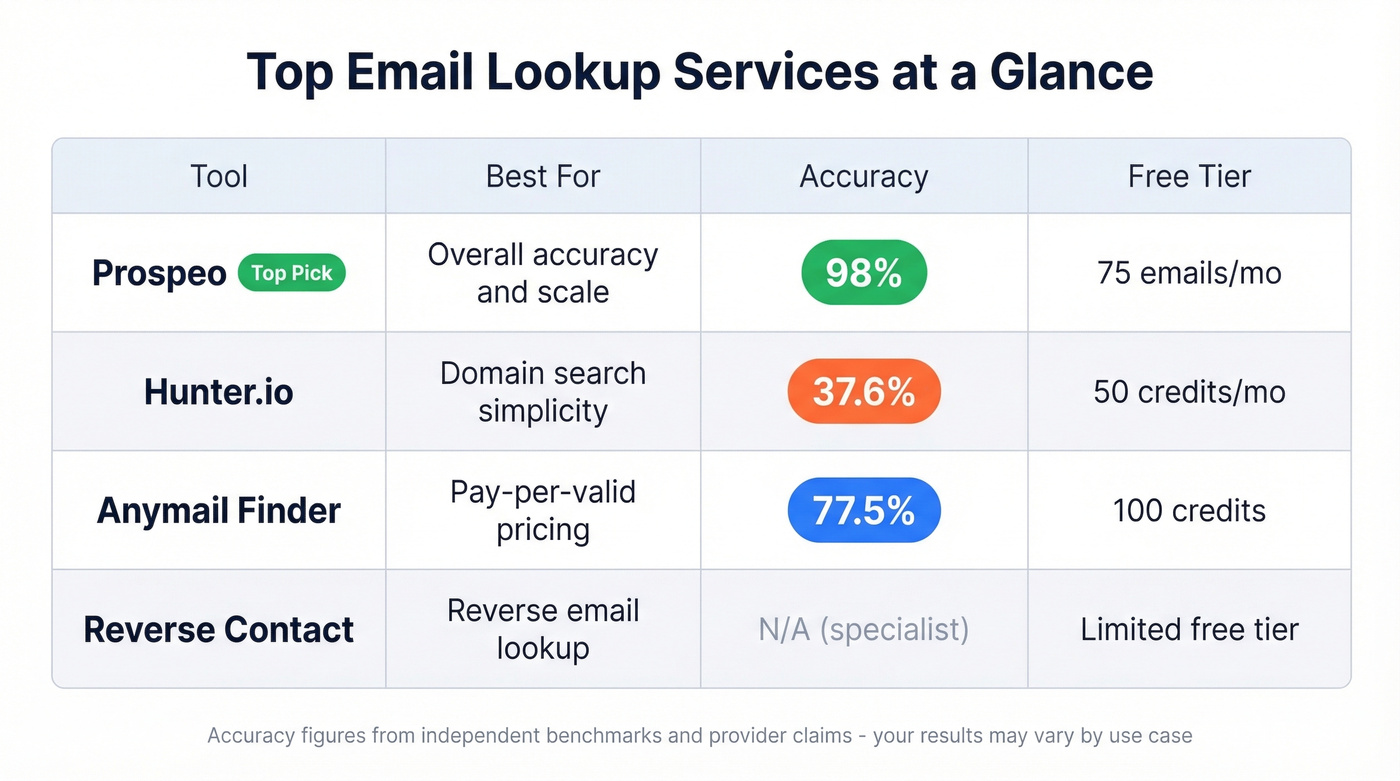
Prospeo earns the top spot because 98% email accuracy on a 7-day refresh cycle isn't something most tools come close to matching. The free tier gives you 75 emails and 100 Chrome extension credits per month - enough to actually evaluate the data before committing a dollar.
Hunter.io is the tool you already know. Domain search is its core strength, and the free plan is genuinely usable for light prospecting. Anymail Finder's pay-per-valid model is the fairest pricing structure in the category - you don't pay for garbage results.
A note on scope: You'll notice Apollo.io isn't on this list. Apollo is a full sales engagement platform that happens to include email finding. We're focused on dedicated email lookup tools where finding and verifying emails is the primary job, not a feature buried inside a CRM. If you want an all-in-one platform, Apollo is worth evaluating. If you want the best email data, keep reading.
Forward vs. Reverse Lookup
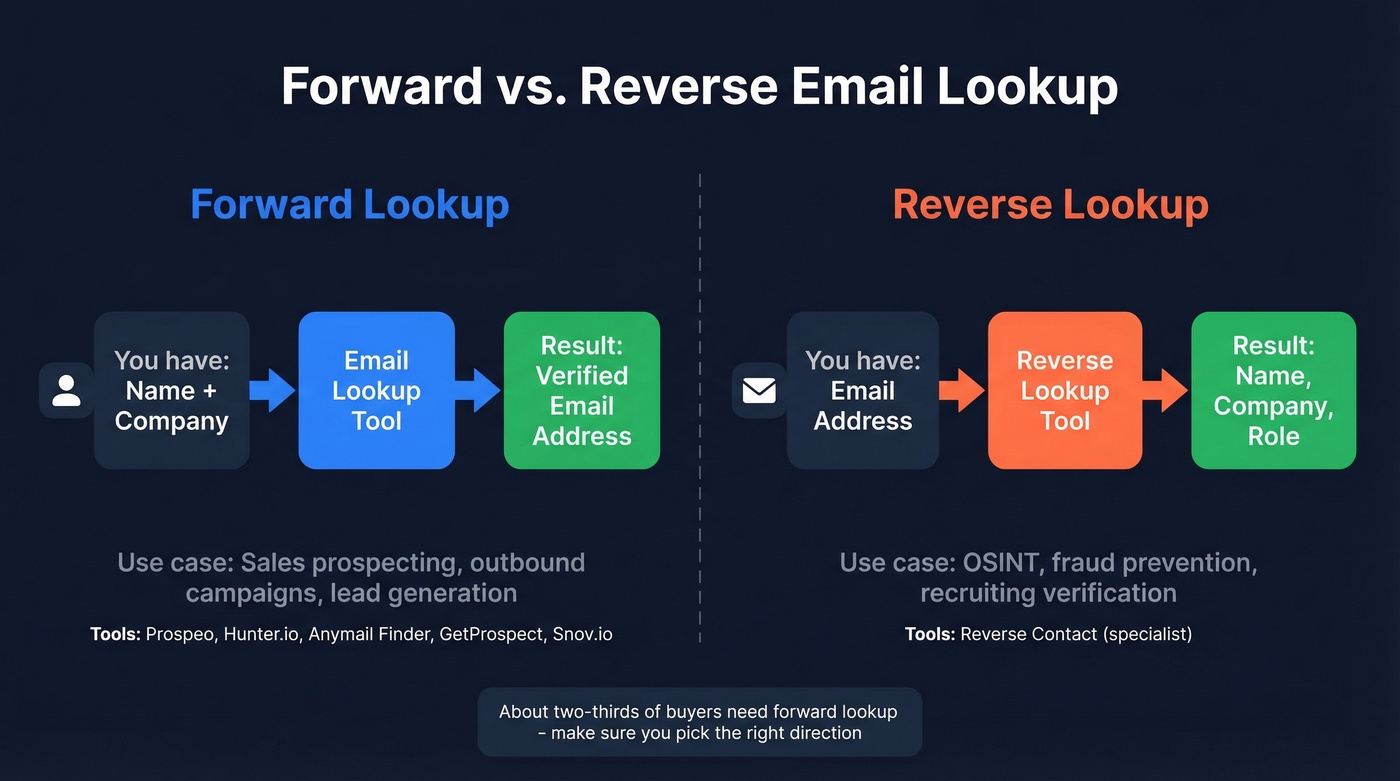
Before picking a tool, you need to know which direction you're searching. About two-thirds of people looking for an email finder want forward lookup - and the distinction matters because most tools only do one well.
Forward Lookup
You have a name and a company. You need their email. This is the standard sales and marketing workflow: build a prospect list, find contact info, push it into your sequencer. Every sales-focused tool on this list handles forward lookup, though accuracy varies wildly. If you're building lists at scale, it's worth understanding the broader sales prospecting techniques that keep volume from killing quality.
Reverse Lookup
You have an email address. You need to know who it belongs to. This is common in OSINT, fraud prevention, and recruiting verification. Reverse Contact is the specialist here; most sales-focused tools don't do this well at all. If you're evaluating this workflow, start with the basics of reverse lookup.
Why Accuracy Beats Database Size
A tool that finds 10,000 emails at 40% accuracy gives you 4,000 usable contacts. A tool that finds 7,000 emails at 80% accuracy gives you 5,600. The second tool has a smaller database and delivers more value. Yet most buyers still compare tools by database size first. That's backwards.
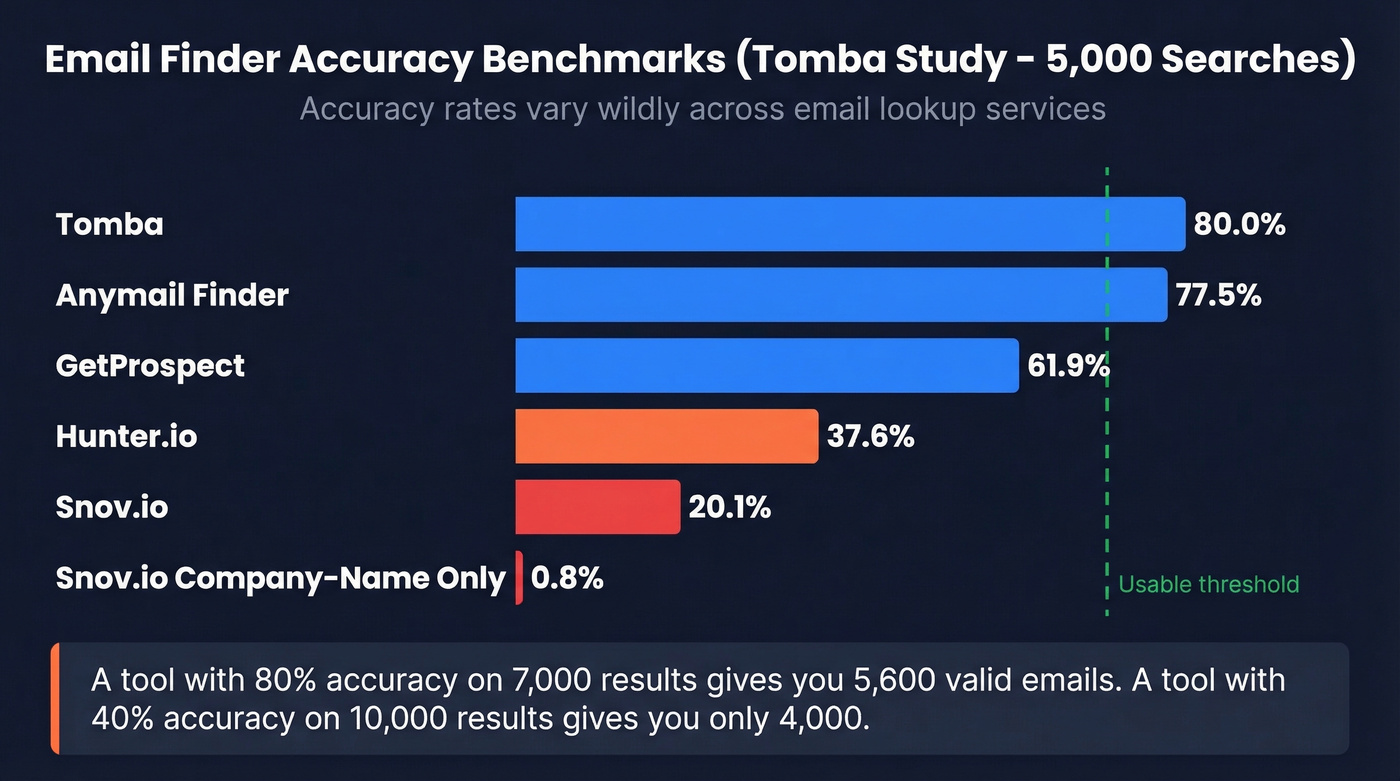
The benchmarks tell a brutal story. A Tomba study testing 9 tools on 5,000 searches found accuracy ranged from 20% to 80% across providers. Snov.io collapsed to 0.8% accuracy on company-name-only searches - 19 valid results out of 2,500 attempts. Hunter.io, a tool most people assume is reliable, came in at 37.6%.
A separate Dropcontact benchmark tested 15 email finders against 20,000 real contacts using live email delivery, not just SMTP pings. The results were revealing: Dropcontact led with a 54.9% effective enrichment rate and just 0.9% hard bounces, Findymail hit 39.9% enrichment with 1.1% bounces, and Enrow managed 40.9% enrichment but with a higher 2.3% bounce rate. The spread between the best and worst performers was enormous - and these were tools marketed as highly accurate.
Here's the number that should scare you: wrong-domain rates ran 1-8% across tools. That means your "found" email goes to the right person at the wrong company. Your carefully personalized outreach lands in a stranger's inbox.
Hot take: If your average deal size is under $10k, you probably don't need a massive database. You need a small, accurate one. We've seen teams with 5,000 verified contacts outperform teams blasting 50,000 unverified ones - because deliverability compounds. Every bounce makes your next email more likely to land in spam. If you're trying to fix this systematically, start with an email deliverability guide and work backward into your data sources.
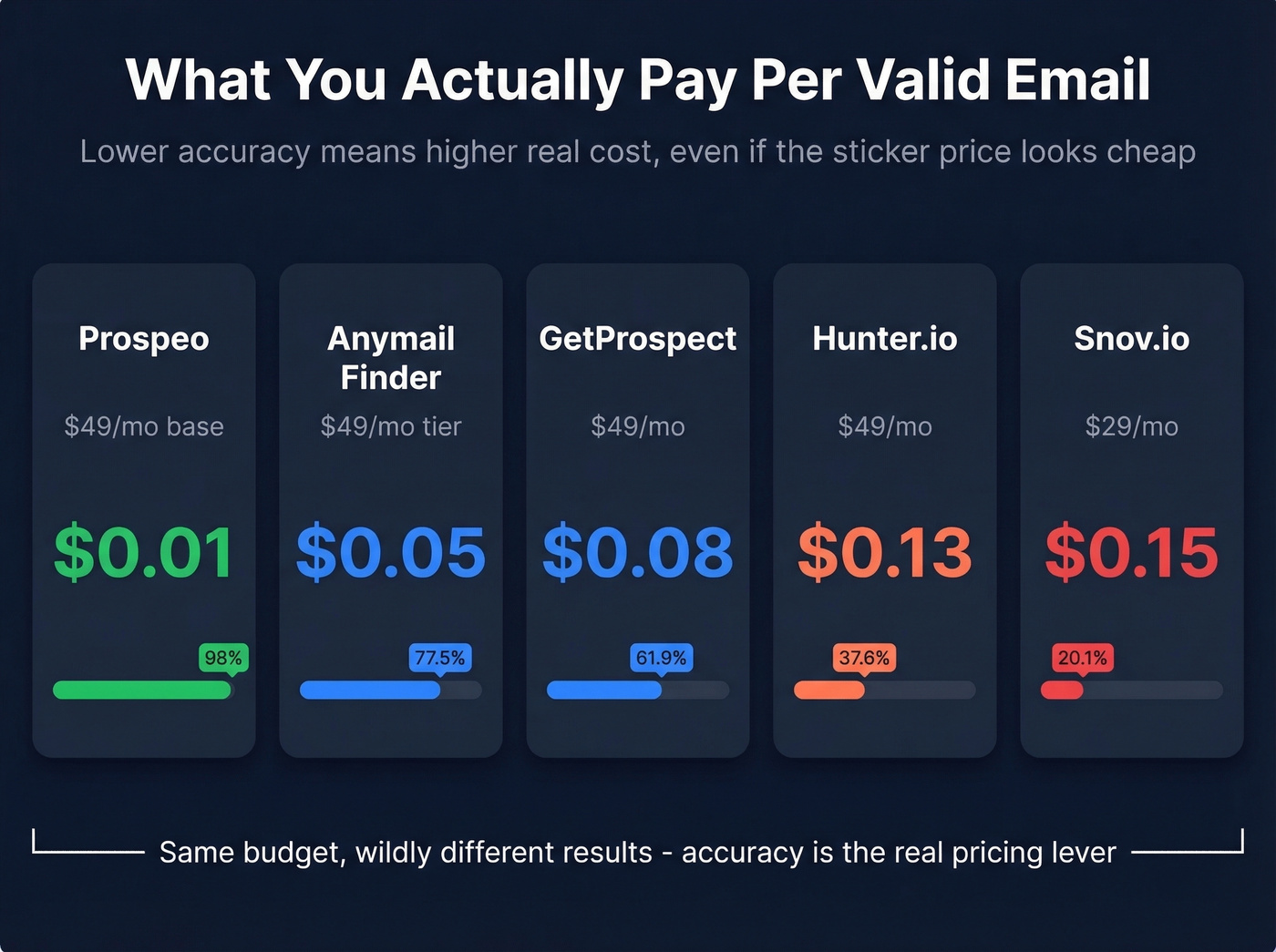
Let's do the cost math. A $49/month tool at 37% accuracy costs you roughly $0.13 per valid email. That same $49/month at 80% accuracy drops to $0.06. Double the accuracy, half the cost per usable contact.

Then there's the catch-all problem. A big chunk of B2B email addresses sit on catch-all domains - servers that accept mail to any address, valid or not. Standard SMTP verification can't distinguish real addresses from made-up ones on these domains. Tools without catch-all handling mark them all as "valid," and you eat the bounces. If you want to go deeper on verification workflows, see our breakdown of how to check if an email exists.
One more consideration that rarely gets discussed: if your team is based in the EU or sells to European companies, the Dropcontact benchmark emphasizes EU-based processing and highlights GDPR transfer risk when providers validate data outside the EU. Worth asking your vendor where their infrastructure lives.

You just read the math: 37% accuracy costs $0.13 per valid email. Prospeo's 98% accuracy drops that to roughly $0.01 - with 5-step verification, catch-all handling, and a 7-day refresh cycle that keeps your data fresh while competitors serve you 6-week-old records.
Get 75 free email lookups and see the accuracy difference yourself.
The 8 Best Email Lookup Services
1. Prospeo
Use this if: You need the highest email accuracy available without signing an enterprise contract and you're running outbound at scale where bounces can tank your domain.
Prospeo's database covers 300M+ professional profiles with 143M+ verified emails and 125M+ verified mobile numbers. The 98% email accuracy comes from a proprietary email-finding infrastructure - it doesn't rely on third-party email providers - combined with a 5-step verification process that includes catch-all handling, spam-trap removal, and honeypot filtering. Data refreshes every 7 days, compared to the 6-week industry average.
That difference matters. An email verified six weeks ago has substantially higher bounce risk than one verified last Tuesday. We've seen this play out repeatedly - Meritt tripled their pipeline from $100K to $300K per week after switching, with bounce rates dropping from 35% to under 4%. If you're diagnosing bounce spikes, this email bounce rate guide breaks down what to look for.
The Chrome extension (40,000+ users) works across company websites and professional profiles for one-click prospecting. CRM enrichment returns 50+ data points per contact at a 92% API match rate. For ABM teams, there's intent data covering 15,000 Bombora topics layered on top. If you're comparing broader enrichment stacks, see our roundup of data enrichment services.
Pricing runs about $0.01 per email. The free tier gives you 75 emails and 100 Chrome extension credits monthly - no credit card, no contract.

Skip this if: Your primary need is reverse email lookup (email to identity). Prospeo is purpose-built for forward lookup and enrichment - the workflow 90% of sales teams need.
2. Hunter.io
Use this if: You already know the prospect's domain and want a fast, clean contact finder that your whole team can use in five minutes with zero training.
Hunter.io's domain search is one of the best in the category for a specific workflow: paste in a company domain, get a list of associated email addresses with confidence scores. It's elegant and fast. The free plan gives you 50 credits/month, and verification costs just 0.5 credits per email. Paid plans start at $49/month (or $34/month billed annually) for 2,000 credits, scaling to $299/month for 25,000 credits. If you're shopping around, our Hunter alternatives list is a good next read.
The limitation is real, though. In the Tomba benchmark, Hunter scored 37.6% accuracy across 5,000 searches - and accuracy dropped significantly on company-name-only lookups where no domain was provided. If your workflow always starts with a domain, Hunter is solid. If you're working from a name-and-company list without domains, you'll hit a wall.

Skip this if: You're prospecting from company names without domains, or you need phone numbers alongside emails.
3. Anymail Finder
Use this if: You're budget-conscious and refuse to pay for unverified garbage.
Anymail Finder's core differentiator is its pay-per-valid-email model. You only get charged for emails the system marks as valid - risky and not-found results don't cost you credits. In the Tomba benchmark, it hit 77.5% accuracy, second only to Tomba itself. Strong showing.
The tool clearly distinguishes "valid" from "risky" emails, which is more transparency than most competitors offer. You get 100 free credits to test it, and paid plans start at $14/month. There's also a $49/month tier that includes 1,000 valid emails.
Their operational blog is genuinely useful - they recommend verifying emails within a month of finding them and separating sending infrastructure for risky addresses.
Skip this if: You need a full prospecting platform with enrichment, intent data, or deep CRM integrations. Anymail Finder does one thing well - it's not trying to be an all-in-one.
4. GetProspect
GetProspect is a solid mid-tier option for teams that want a browser-based prospecting workflow without much setup. The Chrome extension lets you pull emails directly from professional profiles, and the interface is clean enough that non-technical reps can use it immediately.
The Tomba benchmark placed it at 61.9% accuracy - middle of the pack, but meaningfully better than Hunter or Snov.io in that same test. Free tier gives you 50 emails/month. Paid plans start at $49/month for 1,000 valid emails plus 2,000 verifications, or $34/month on annual billing. It won't wow you with advanced features, but for straightforward email prospecting at a reasonable price, it gets the job done. If you're building a full outbound stack, this pairs well with other outbound lead generation tools.
5. Snov.io
Here's the honest truth about Snov.io: the accuracy numbers are bad. The Tomba benchmark put it at 20.1% overall, and it collapsed to 0.8% on company-name searches. That's essentially non-functional for that use case.
So why is it on this list? Because Snov.io tries to be everything - email finder, verifier, and outreach platform - and if you're already running sequences through it, keeping your email finding in the same tool reduces friction. The Starter plan runs $29.25/month (annual) with 1,000 credits; Pro is $74.25/month with 5,000 credits. Credits are shared across finding and verification, so budget accordingly.
The other gotcha: automation add-ons aren't included and cost $69/month extra per slot. That can double your effective cost quickly. Use Snov.io if you're already embedded in its ecosystem and value convenience over accuracy. For everyone else, the data quality isn't there.
6. ContactOut
Recruiters swear by ContactOut, and for good reason - it surfaces personal email addresses and direct dials that most sales-focused tools ignore entirely. Where other tools focus exclusively on corporate emails, ContactOut finds personal Gmail and Outlook addresses alongside work emails. That's the difference between reaching a passive candidate and never getting a response.
Free tier gives you 5 credits per day. Paid plans start at $49/month for heavier usage. If you're in recruiting, it belongs on your shortlist. For B2B sales targeting corporate addresses, other tools on this list will serve you better. If you're deciding whether you need a finder or a verifier, this AI email checker guide can help clarify the workflow.
7. Voila Norbert
Voila Norbert offers 50 free credits for new users and plans from $49/month for 1,000 credits. The Tomba benchmark placed it at 36% accuracy - below average for the category. The interface is clean and approachable, making it a reasonable choice for freelancers or solo operators doing light-volume prospecting who value simplicity over raw performance. Don't rely on it for high-volume campaigns.
8. Reverse Contact
Reverse Contact is the specialist pick for reverse email lookup - feed it an email address and it returns identity data, company info, and social profiles. This is a fundamentally different capability from every other tool on this list, and Reverse Contact does it better than any general-purpose email finder trying to bolt on reverse lookup as an afterthought. It offers 20 free trial requests, and paid plans scale with usage volume. Built for OSINT, fraud prevention, and verifying who's behind an anonymous email address.
Pricing Comparison
All eight tools side by side.
| Tool | Free Tier | Starting Price | Credits Included | Pay-per-Valid? |
|---|---|---|---|---|
| Prospeo | 75 emails/mo | ~$0.01/email | Scales with plan | Yes |
| Hunter.io | 50 credits/mo | $49/mo | 2,000/mo | No |
| Anymail Finder | 100 credits | $14/mo | Varies by plan | Yes |
| GetProspect | 50 emails/mo | $49/mo | 1,000 valid + 2,000 verifications/mo | No |
| Snov.io | Trial credits | $29.25/mo* | 1,000 shared/mo | No |
| ContactOut | 5/day | $49/mo | Varies by plan | No |
| Voila Norbert | 50 credits | $49/mo | 1,000/mo | No |
| Reverse Contact | 20 requests | Scales with usage | Varies by plan | Credits consumed only on verified results |
*Snov.io: Automation add-ons cost $69/month per slot - not included in base price.
Getting More From Your Tool
Picking the right email lookup service is half the battle. How you use it determines whether your outreach actually lands.
Verify close to send time. Email data decays fast. People change jobs, companies restructure, domains expire. An email that was valid 60 days ago has substantially higher bounce risk. We've tested tools with 6-week refresh cycles against tools with weekly refreshes, and the bounce rate difference is stark - often 3-5x higher on the stale data.
Understand "verified" vs. "risky" classifications. Many tools return both. Risky emails bounce at 3-5x the rate of verified ones. Don't dump both into the same sequence and hope for the best - treat them as separate segments with different sending strategies. If you're building sequences around this, use these cold email follow-up templates as a starting point.
Handle catch-all domains deliberately. If your tool doesn't specifically address catch-all domains, you're sending blind to a large chunk of B2B addresses. Look for providers with catch-all handling built into their verification process. Many competitors skip this entirely, and you pay for it in bounces.
Don't stack two mediocre verifiers. This is counterintuitive, but running found emails through a second verification tool can reduce your valid list by up to 20% due to differences in catch-all handling and false-negative rates. In our experience, teams that consolidate onto a single high-accuracy provider see better results than teams running a patchwork of cheaper tools. If you're comparing verification vendors specifically, see Bouncer alternatives.
Separate your sending infrastructure. Use your primary domain for verified emails only. Route risky or unverified emails through a secondary domain or IP. This protects your main domain's reputation if a batch goes sideways. For a step-by-step, see how to improve sender reputation.
Meritt went from 35% bounce rates to under 4% and tripled their pipeline to $300K/week. The difference wasn't strategy - it was switching to an email lookup service with proprietary verification infrastructure instead of recycled third-party data.
Find verified emails from 300M+ profiles without signing a contract.
Free Methods That Still Work
Before you pay for anything, a few manual approaches still produce results for one-off lookups.
Google exact-match search is surprisingly effective. Try "firstname lastname" "@company.com" and you'll often surface email addresses from conference speaker pages, press releases, or old forum posts. Company website pattern guessing works too - most organizations use firstname@, f.lastname@, or firstname.lastname@ formats, and you can test these manually with a free verification tool. If you're doing this often, it's worth learning the more reliable name to email workflows.
The limitations are obvious: these methods don't scale, they don't verify, and they'll eat hours of your week for a handful of addresses. They work for 5-10 lookups. For anything beyond that, you need a dedicated tool - the time cost alone makes the $30-50/month investment worthwhile.
FAQ
What's the difference between an email finder and an email verifier?
An email finder discovers addresses from a name and company. An email verifier checks whether an existing address is deliverable. Many quality email lookup services include both, so you're not exporting unverified data into your sequences.
Are free email lookup tools accurate enough for outreach?
Free tiers are useful for testing accuracy, not for running production campaigns. At 25-75 credits per month, you'll evaluate data quality but won't sustain real outreach. Expect to pay $14-50/month minimum for usable volume with any serious provider.
How many emails should I expect to bounce?
Keep total bounces below 2% to protect your sender reputation. The industry average for cold email sits at 7-8%, which means most teams are using tools that don't verify properly or are sending on stale data. Tools with weekly data refreshes and catch-all handling consistently stay under that 2% line.
What is a catch-all domain and why does it matter?
A catch-all domain accepts email to any address - valid or fabricated - making standard SMTP verification useless. Tools without catch-all handling mark these as "valid," and you absorb the bounces. Look for providers that specifically flag or filter catch-all addresses during verification.
Can I use an email lookup service for reverse lookups?
Some tools specialize in reverse lookup, like Reverse Contact. Most sales-focused tools do forward lookup (name to email). Check which direction you need before choosing - they're fundamentally different capabilities, and few tools excel at both.