

Email Opening Sentences: A Data-Backed Guide to Lines That Get Replies
The average office worker receives 121 emails a day. Poorly written emails cost businesses $1.2 trillion annually. And here's the number that should change how you write email opening sentences: 58% of all replies come from the first email in a sequence. If your opener doesn't land, the rest of your sequence is fighting uphill.
What Actually Works (Quick Version)
Three opener types consistently outperform everything else:
- Observation-based: Reference something specific about the recipient's company, role, or recent work.
- Problem call-out: Name a challenge their company likely faces - specific enough to feel researched, not templated.
- Achievement-based: Congratulate or reference a recent win like a funding round, product launch, or promotion.
A Woodpecker analysis of 20M+ emails found that campaigns using advanced personalization hit a 17% response rate versus 7% for non-personalized sends. That's not a marginal lift. It's the difference between a pipeline and a dead channel.
What the 2026 Data Says
Instantly's 2026 benchmark report analyzed billions of cold email interactions across thousands of active workspaces. Here's what reply rates actually look like:
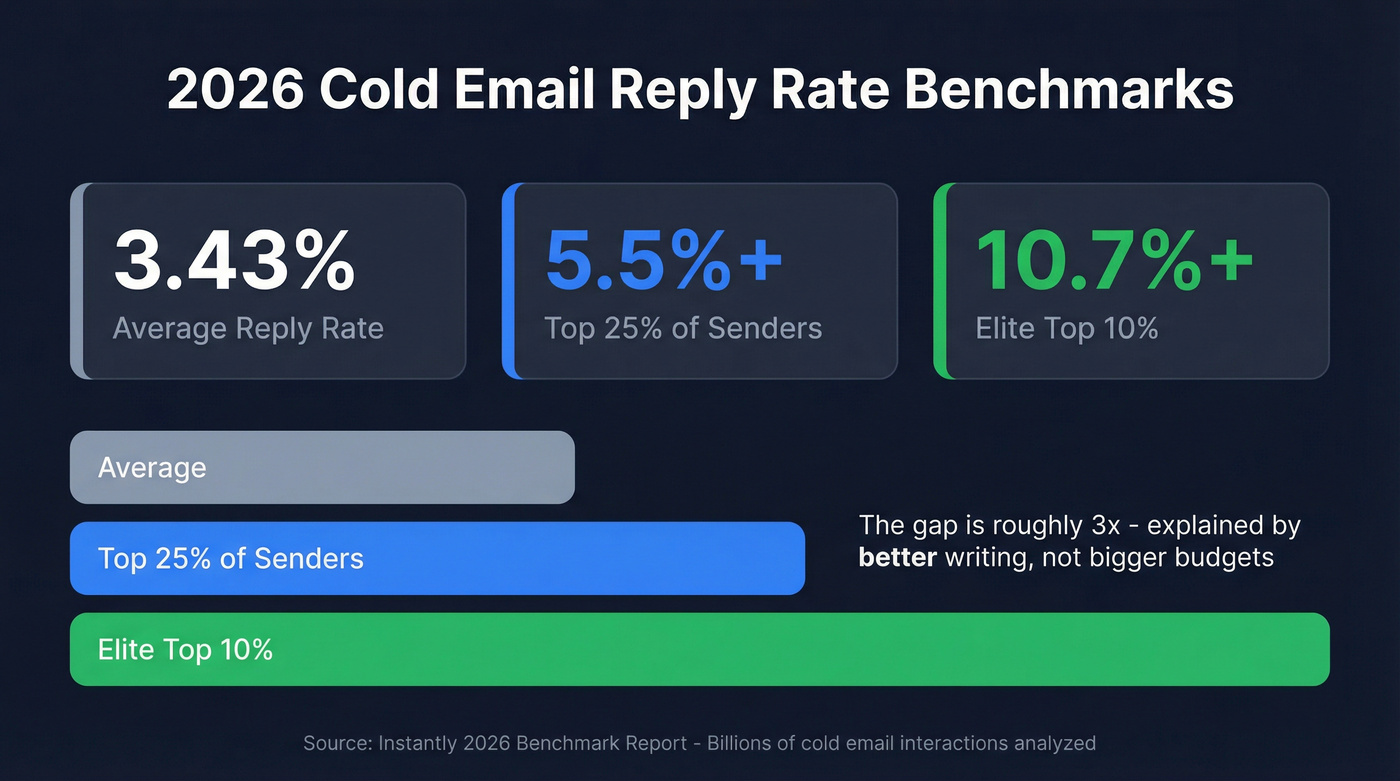
- Average: 3.43%
- Top quartile: 5.5%+
- Elite (top 10%): 10.7%+
The gap between average and elite is about 3x, and it isn't explained by better products or bigger budgets. It's explained by better writing - specifically, better first lines in outbound email.
Personalized emails get more than twice as many replies as non-personalized ones. Emails with personalized preview text see a 29.3% higher open rate compared to those without. That second stat matters more than most people realize, because your opening line usually becomes your preview text. With professionals spending 28% of their workday on email and volume up 57% for remote workers since 2020, standing out in the inbox has never been harder or more valuable.
Your First Line Is Your Preview Text
Most people obsess over subject lines and then throw away the first sentence. That's backwards. In every major email client, the preview text - the snippet visible before opening - pulls from your email's first line of body text.
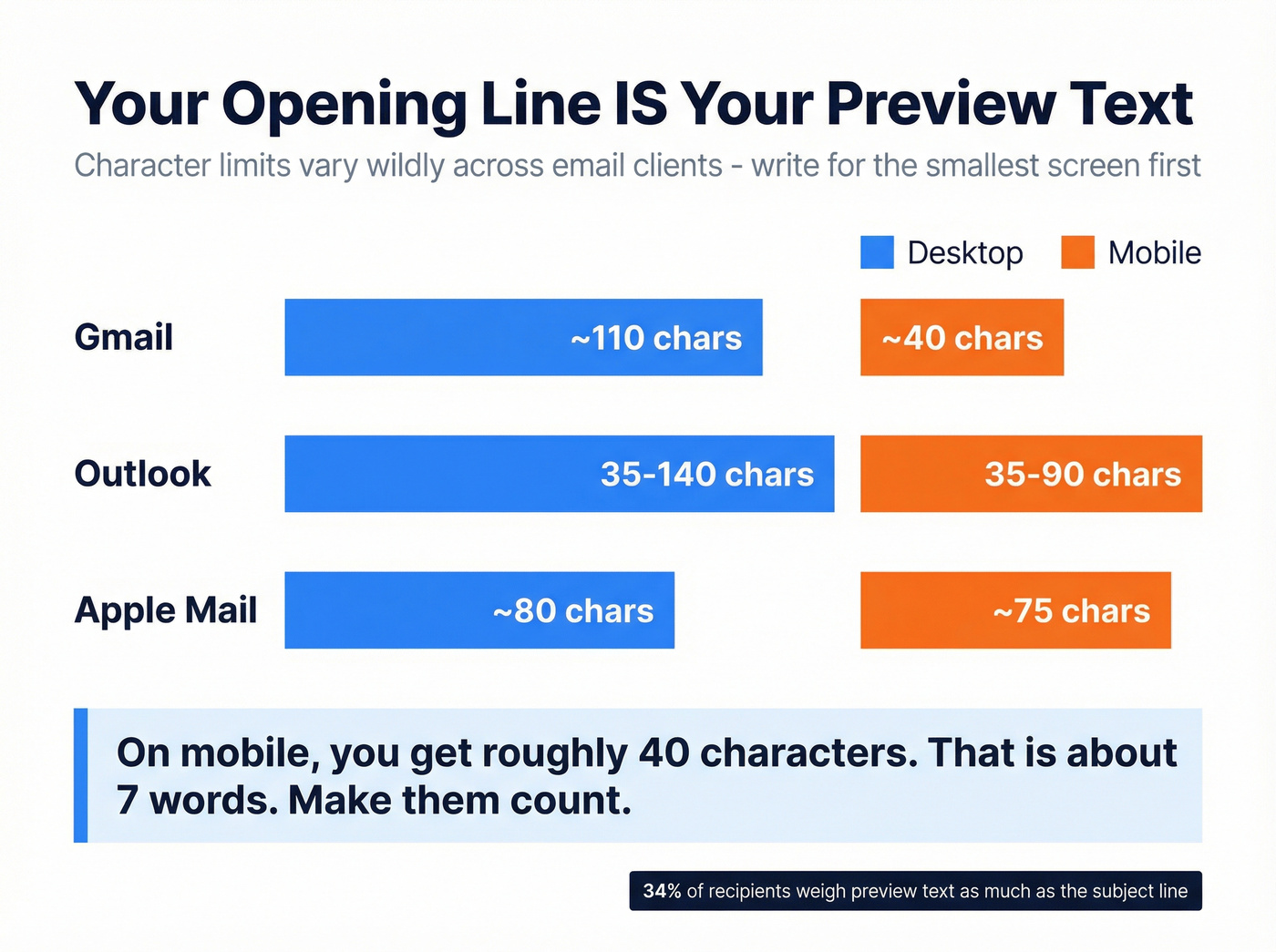
Here are practical preview-text character ranges:
| Email Client | Desktop | Mobile |
|---|---|---|
| Gmail | ~110 chars | ~40 chars |
| Outlook | ~35-140 chars | ~35-90 chars |
| Apple Mail | ~80 chars | ~75 chars |
A LinkedIn poll found that 34% of recipients weigh preview text nearly as much as the subject line when deciding whether to open. On mobile, you've often got roughly 40 characters to work with. That's about seven words. Make them count.
One Opener Change, 2x Reply Rate
This A/B test makes the point better than any stat. A business broker ran a cold email campaign through Mailshake targeting 206 prospects. The campaign generated a 65% open rate, a 30% reply rate (64 replies), and produced 30+ meetings.
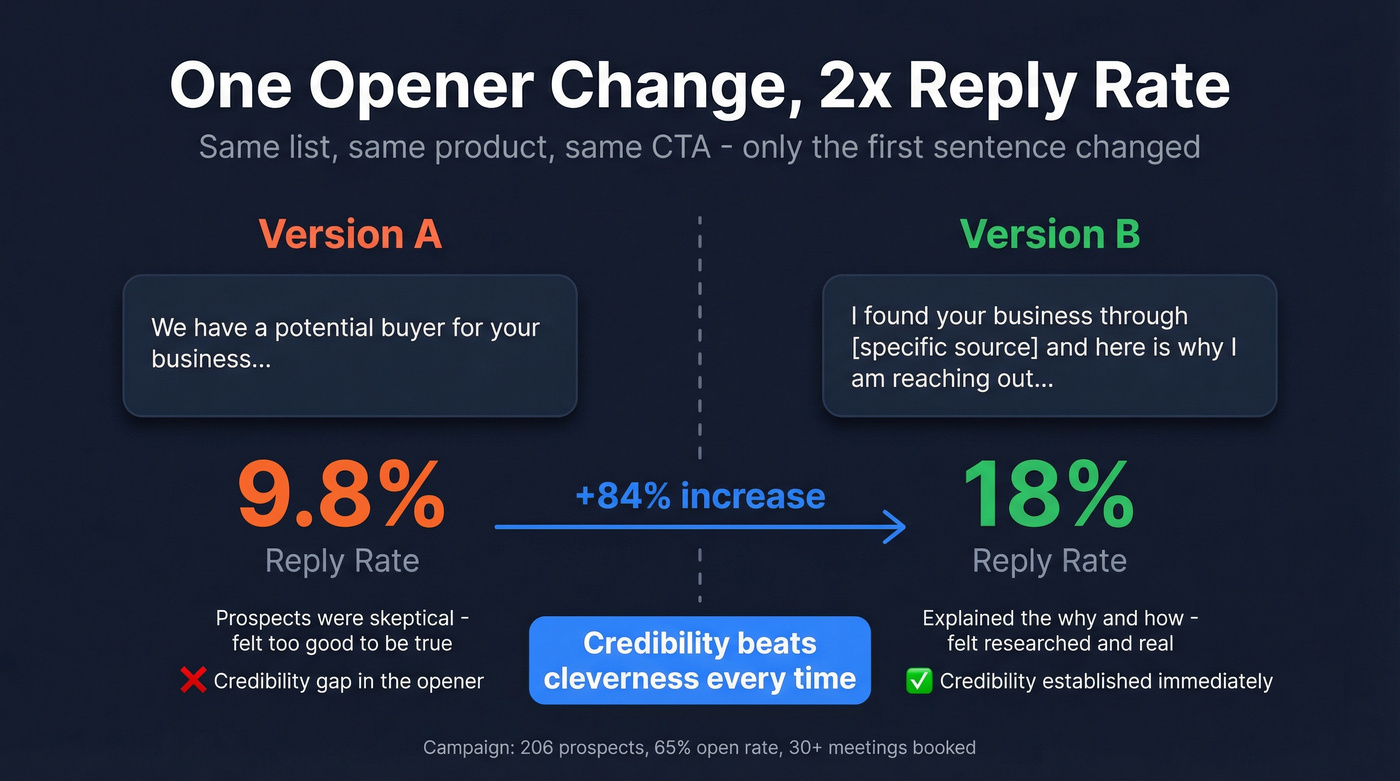
The "A" variation opened with a claim about having a "potential buyer" for the recipient's business. That version hit a 9.8% reply rate - decent by most standards.
But the negative replies told a story. Prospects were skeptical. The claim felt too good to be true. So the team revised the opener to explain why they were reaching out and how they identified the recipient. Same offer, different framing.
The revised version hit an 18% reply rate. Same list, same product, same CTA. The only change was closing the credibility gap in that first sentence - and it nearly doubled conversions. We've seen this pattern across dozens of campaigns: credibility beats cleverness every time. Your opener doesn't just need to be interesting. It needs to be believable. If the reader's first reaction is "yeah, right," you've already lost.

Personalized openers need accurate contact data to land. Prospeo gives you 98% verified emails across 300M+ profiles - so your carefully crafted first lines actually reach real inboxes, not bounce logs.
Stop perfecting openers that bounce. Start with emails that arrive.
Examples by Situation
Not every email is a cold outreach. The right opener depends on context, relationship, and what you're asking for.
Cold Outreach (First Touch)
Use this if you're emailing someone who doesn't know you. Skip this section if you have any prior relationship - it'll feel impersonal.
Observation-based: "Noticed your team just rolled out [specific feature] - the approach to [detail] stood out." This proves you did research. It's impossible to mass-send.
Problem call-out: "Most [role] at [company stage] companies are dealing with [specific problem] right now - especially after [industry event]." Naming the problem creates instant relevance.
Achievement-based: "Congrats on the Series B - scaling the sales team from 5 to 20 reps in six months is no joke." Specific flattery doesn't feel like flattery. It feels like awareness.
Follow-Up (After No Reply)
Reference the previous email, but add new value. Instantly's data shows that step-2 emails written to feel like replies outperform formal follow-ups by roughly 30%.
Try: "Sent this last Tuesday - wanted to add one thing: [new insight or resource]."
This works because it doesn't guilt-trip; it gives a reason to re-engage. Ask any outbound rep and they'll tell you the same thing: "just checking in" is the fastest way to get archived. Every follow-up needs to justify its own existence with new information. If you want more patterns, start with an outreach email template you can adapt.
Professional & Workplace Emails
Etiquette expert Jacqueline Whitmore recommends matching the tone of the person you're replying to. If they wrote "Dear [Name]," respond formally. If they wrote "Hey," you can be casual. For non-native English speakers, mirroring tone is especially useful because it removes the guesswork around formality levels.
For internal emails to your boss, lead with the decision or update, not context. "Quick update on the Q3 pipeline review - we're tracking 12% ahead of target" beats "I wanted to give you an update on something we discussed last week." Note that professional and workplace emails can run 50-125 words; the under-80-word rule applies specifically to cold outreach.
Networking & Relationship-Building
Reference shared context and be specific. "Great meeting you at [event] - your point about [specific topic] stuck with me" works because it's verifiable. Mutual connections are powerful but only if you name them: "Sarah Chen suggested I reach out" beats "a mutual friend suggested."
Job Application & Career
One sentence: role + relevant experience + value. "Applying for the Senior PM role - I've shipped three B2B products from 0 to $5M ARR and your job post reads like my last two years."
The Superhuman 5 Cs framework - Clear, Concise, Correct, Complete, Courteous - is especially useful here. Hiring managers scan hundreds of introductions. Brevity is respect.
Apology & Sensitive Context
Acknowledge directly. No hedging, no preamble. "We missed the deadline on the Q2 deliverable. Here's what happened and what we're doing to fix it." The instinct is to soften with context first. Resist it. State the issue, then the resolution. Recipients trust directness more than diplomacy.
Openers to Avoid
| Don't Write This | Write This Instead |
|---|---|
| "I hope this email finds you well" | "Saw your team just hit 500 customers - congrats" |
| "My name is X and I work at Y" | "[Specific observation about their company]" |
| "Just checking in" | "One thing I forgot to mention:" |
| "Sorry to bother you" | "Quick question about [topic]:" |
| "I'm reaching out because" | "[Problem relevant to their role]" |
| "As per my last email" | "Building on the Q3 numbers I sent Tuesday:" |
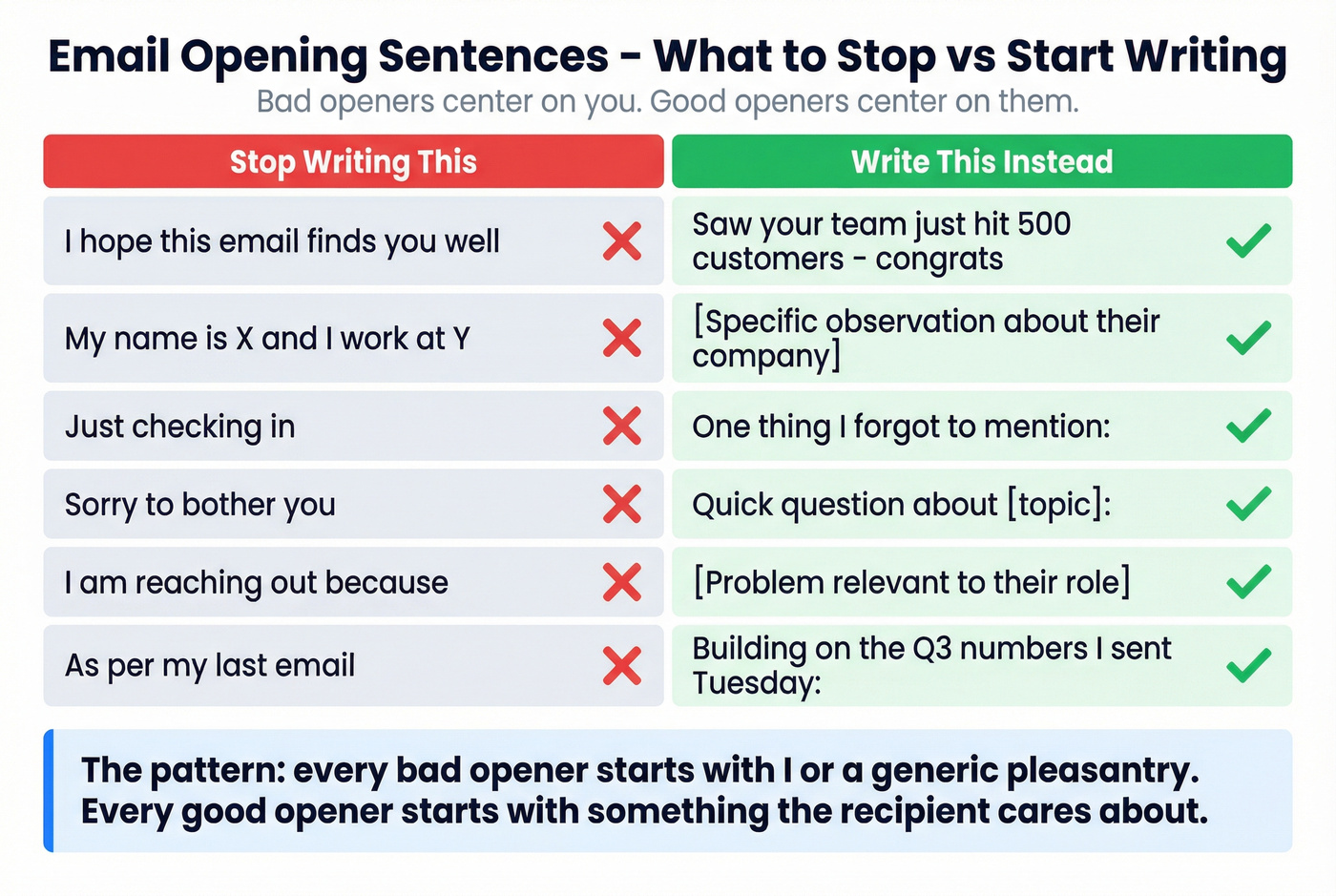
The pattern is clear: bad openers center on you, good openers center on them. Every line in the left column starts with "I" or a generic pleasantry. Every line on the right starts with something the recipient cares about. If you’re still tempted to use “I hope this email finds you well,” see these alternatives.
Here's the thing: most cold email icebreakers fail not because the writing is bad, but because the writer knows nothing real about the recipient. If you can't find something specific to say in your first line, you haven't done enough research to earn the send. A simple pre-send research checklist helps you find real details fast.
The Personalization Prerequisite
Every piece of advice above requires knowing something real about the person you're emailing - their recent company news, their role, their tech stack, their funding stage. You can't personalize what you can't verify. If you’re building this into a repeatable motion, use a personalization framework instead of ad-hoc “icebreakers.”
A brilliant opening line sent to a dead email address wastes your best work. And a personalized opener sent to the wrong person because your data is six weeks stale is worse than no email at all. In our experience, teams that verify their prospect lists before sending see reply rate improvements within the first week. Prospeo's 98% email accuracy and 7-day data refresh cycle means the contact records you're personalizing against are current, not stale. The free tier gives you 75 verified emails per month - enough to test whether better data actually moves your reply rates. If you’re comparing vendors, start with these email ID validators and email checker tools.

Before You Hit Send
Run through this before every cold email:
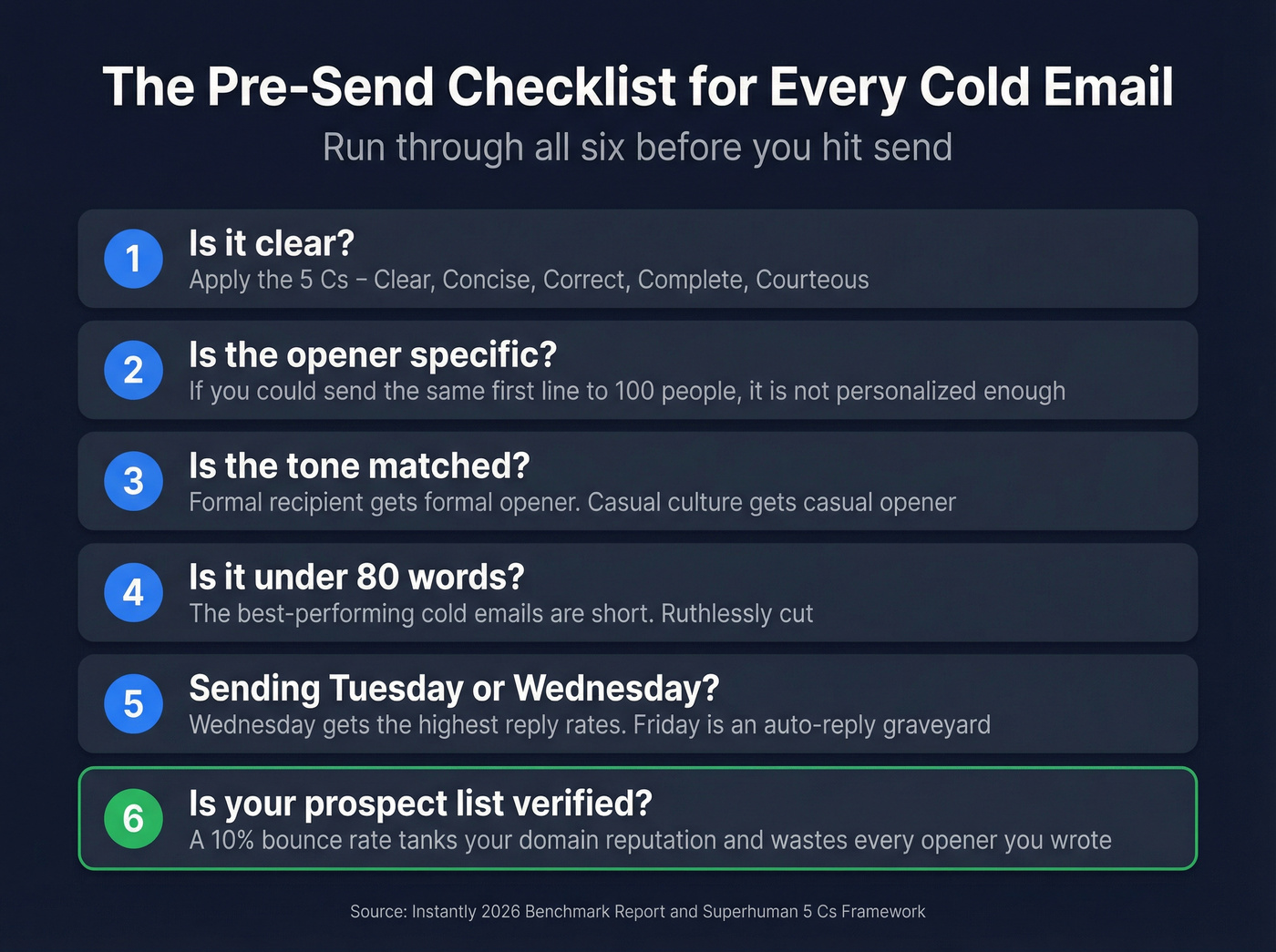
- Is it clear? Apply the 5 Cs framework: Clear, Concise, Correct, Complete, Courteous.
- Does the opener reference something specific? If you could send the same first line to 100 people, it's not personalized enough.
- Is the tone matched? Formal recipient, formal opener. Casual culture, casual opener.
- Is it under 80 words? The best-performing cold emails are short. Ruthlessly cut.
- Sending Tuesday-Wednesday? Instantly's data shows Wednesday gets the highest reply rates. Friday is an auto-reply graveyard. (More detail: best time to send prospecting emails.)
- Is your prospect list verified? A 10% bounce rate tanks your domain reputation, and every opener you wrote for those bounced addresses was wasted effort. Run your list through an email verification tool before launching. If you’re troubleshooting bounces, start with hard bounce basics.
The data is clear: credibility beats cleverness. But even the best opening sentence is worthless if it's sent to a stale or invalid email. Prospeo refreshes every record every 7 days - not every 6 weeks like competitors.
Great copy deserves fresh data. Get both for $0.01 per email.
FAQ
How long should an email opening sentence be?
One sentence, ideally under 20 words. The best-performing cold emails are under 80 words total, so your opener needs to leave room for context and a clear ask. Treat it like a headline - every word should earn its place.
What's a good opening line for a cold email?
Reference something specific about the recipient - a recent achievement, a challenge their company faces, or a mutual connection. Personalized openers get 17% reply rates versus 7% for generic ones. The more verifiable your reference, the higher your response rate.
Should I personalize every email opener?
Yes, if you want replies. Personalized emails get more than twice the response rate of generic sends. The key is having accurate, current prospect data so personalization scales - tools with high verification rates and frequent data refreshes make this practical even for high-volume outbound.
Is "I hope this email finds you well" a good opener?
No. It's the most overused professional email opener and signals a generic, low-effort message. Recipients' mental spam filters activate immediately. Replace it with a specific reference to the recipient's work, a shared context, or the direct reason you're writing.