

Email Sequencing CRM: Which Tools Actually Deliver (and What They Really Cost)
You just upgraded to HubSpot Starter at $9/seat, feeling good about the price. Then you realize sequences aren't included. That feature lives behind the $90/seat Professional tier - plus a $1,500 mandatory onboarding fee. Your five-person team just went from $540/year to $6,900/year before you've sent a single automated follow-up.
This is the pricing trap nobody warns you about when shopping for an email sequencing CRM. And it's not just a HubSpot problem.
The gap between "this CRM has sequences" and "this CRM has sequences you can actually afford" is enormous. One Reddit user put it bluntly: HubSpot sequences "sucked" - and they were already paying for the platform. Others describe CRM drip sequences as feeling "robotic" while manual customization takes "hours."
We've spent weeks pulling apart the real pricing, tier-gating, and deliverability tradeoffs across nine CRMs. Here's what we found.
Quick Verdict
- Best for most SMB teams: Pipedrive Growth ($39/seat) - sequences included, no onboarding fees, no surprises
- Best budget option: Nimble ($24.90/user) - every feature included, zero tier-gating
- Best ecosystem play: HubSpot Professional ($90/seat) - powerful but expensive, and you'll feel it
Running cold outbound? Don't use your CRM. Use a standalone tool like Instantly, Lemlist, or Smartlead and sync positive replies back. Your deliverability depends on it.
What Email Sequencing in a CRM Actually Means
Email sequencing is a series of pre-written, timed emails that fire automatically based on triggers - a new deal stage, a form fill, a manual enrollment. The prospect replies, the sequence stops. That auto-unenroll on reply is table stakes. Any tool without it isn't worth considering.
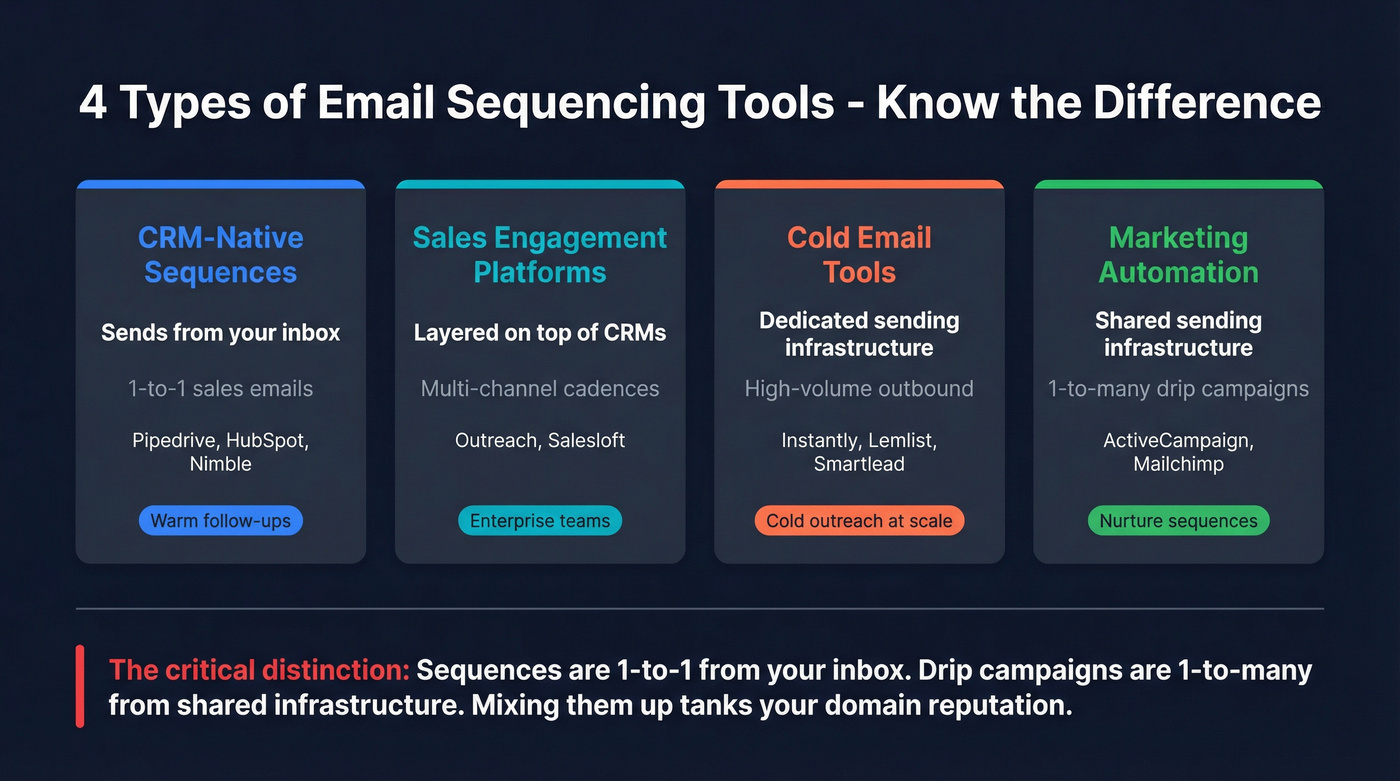
Four categories get lumped under "sequencing":
- CRM-native sequences - built into your CRM, send from your personal inbox (Pipedrive, HubSpot, Nimble)
- Sales engagement platforms - dedicated tools layered on top of CRMs (Outreach, Salesloft)
- Cold email tools - purpose-built for high-volume outbound with warmup and rotation (Instantly, Lemlist, Smartlead)
- Marketing automation - drip campaigns for nurture, not 1-to-1 sales conversations (ActiveCampaign, Mailchimp)
The critical distinction: sequences are 1-to-1 sales emails sent from your inbox. Drip campaigns are 1-to-many marketing emails sent from shared infrastructure. Mixing them up is how teams tank their domain reputation.
Quick Comparison - Best CRMs for Email Sequencing in 2026
| CRM | Plan for Sequences | Cost/Seat/Mo | Verdict |
|---|---|---|---|
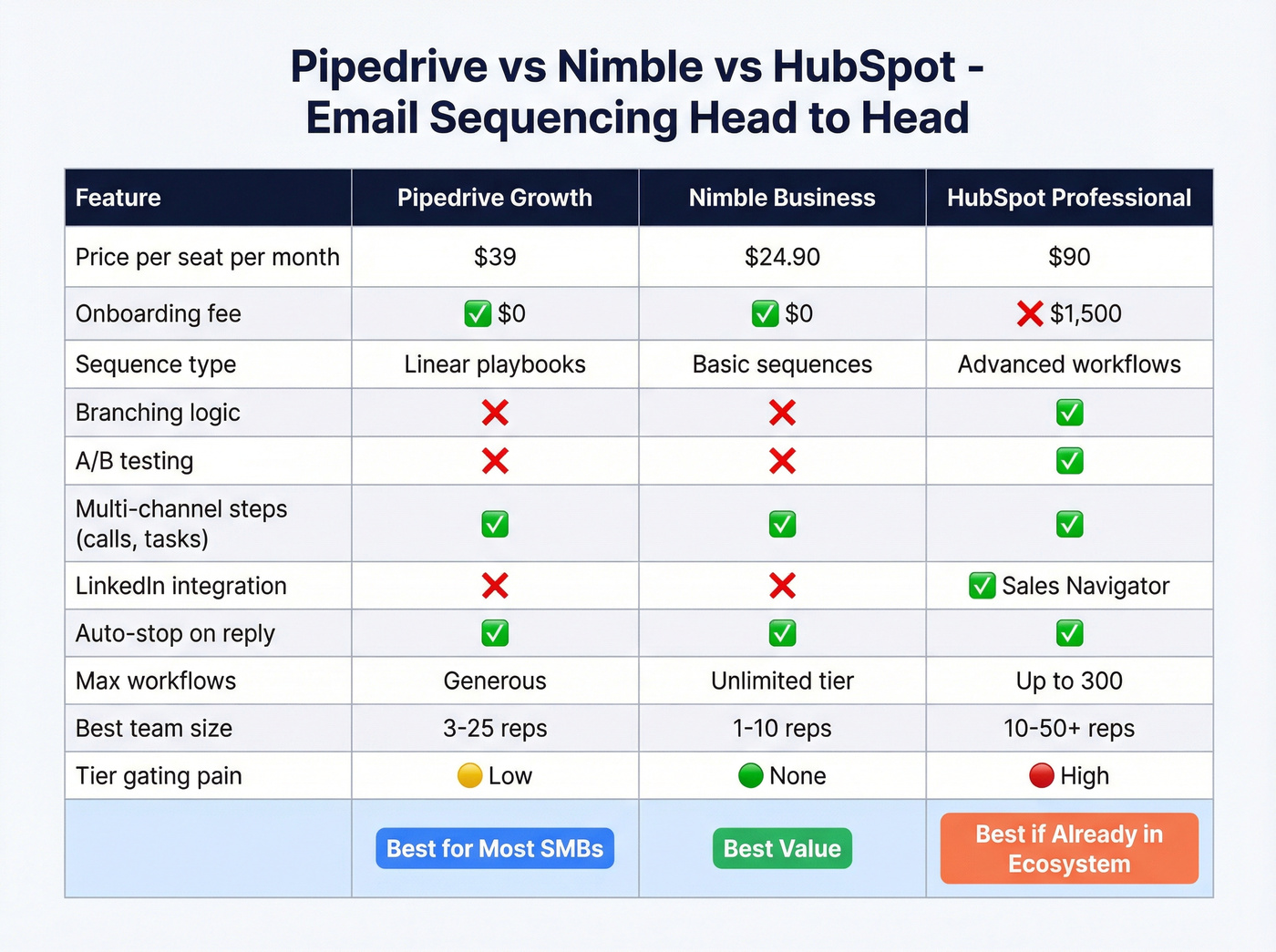
| Pipedrive | Growth | $39 | Best all-around for SMBs |
| Nimble | Business (only plan) | $24.90 | Best value, zero gating |
| HubSpot | Professional | $90 + $1,500 setup | Powerful but painful pricing |
For cold outbound at scale, none of these are the right answer. CRM sequences send through Gmail or Outlook - you're capped at 500/day (Gmail) or 2,000/day (Workspace), with no inbox rotation or dedicated warmup. Use a standalone cold email tool and keep your CRM for warm follow-ups.

You're comparing CRMs for sequencing - but the biggest deliverability killer isn't your tool, it's bad contact data. Prospeo's 98% email accuracy and 7-day refresh cycle mean your sequences actually land. At $0.01 per verified email, you'll spend less on data than the gap between Nimble and HubSpot's onboarding fee.
Stop paying $90/seat for sequences that bounce. Fix the data first.
The Real Cost of CRM Sequencing
Here's what every CRM actually charges for the tier that includes sequences:
| CRM | Plan Required | $/Seat/Mo | Onboarding | Free Trial |
|---|---|---|---|---|
| Nimble | Business | $24.90 | $0 | 14 days |
| Pipedrive | Growth | $39 | $0 | 14 days |
| Zoho CRM | Enterprise | ~$40 | $0 | 15 days |
| Nutshell | Pro | ~$42-49 | $0 | 14 days |
| Streak | Pro | $49 | $0 | 14 days |
| Salesforce | Cloud + Engagement | ~$75-115+ | Varies | 30 days |
| HubSpot | Professional | $90 | $1,500 | 14 days |
| Monday CRM | Pro + Campaigns | ~$32+ | $0 | 14 days |
| Pipeliner | Unlimited | ~$65-100+ | $0 | 14 days |
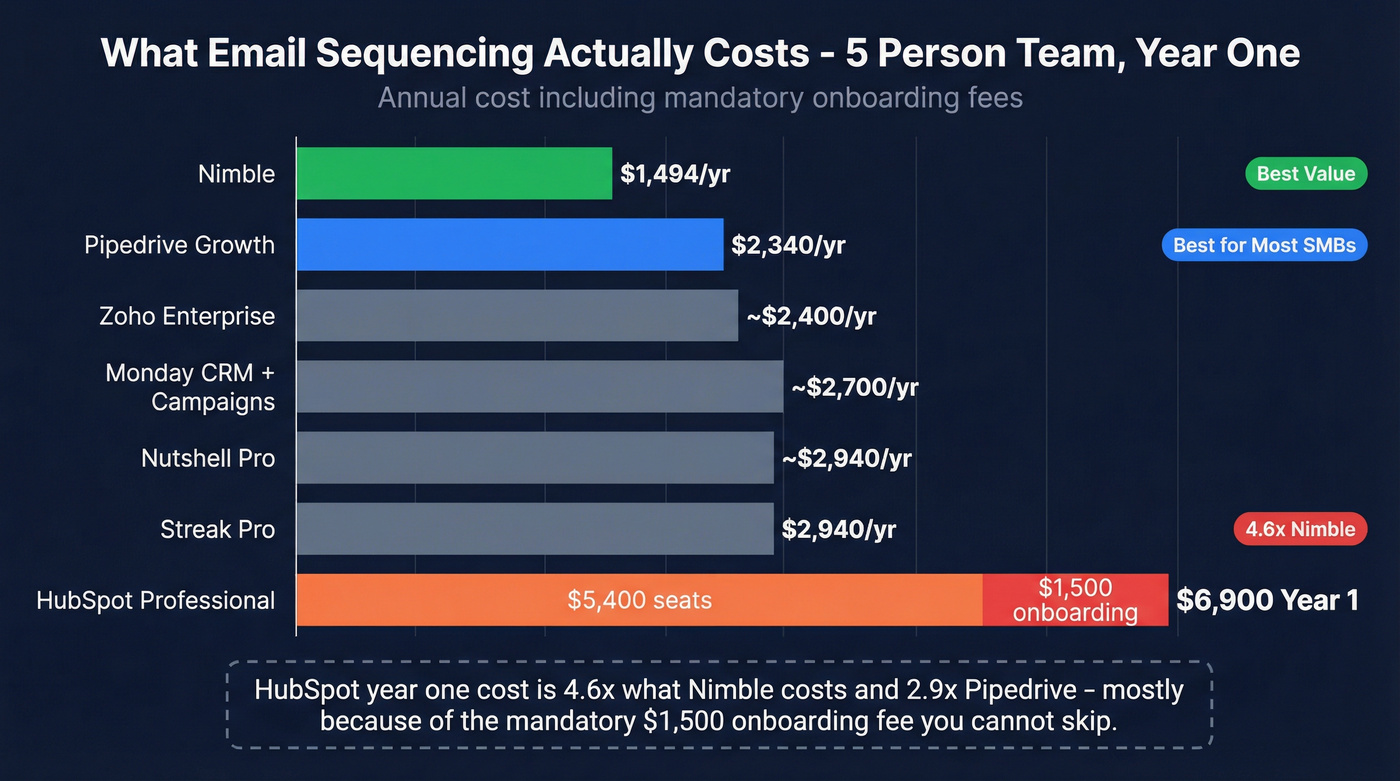
Now let's do the math that matters - a team of five, billed annually:
- Nimble: $1,494/year. That's it. No onboarding, no add-ons.
- Pipedrive Growth: $2,340/year. Still reasonable.
- HubSpot Professional: $5,400/year + $1,500 onboarding = $6,900 in year one. That's 4.6x what Nimble costs.
The HubSpot onboarding fee is the part that stings. It's mandatory. You can't skip it. And if you later upgrade to Enterprise, there's another $3,500 onboarding fee waiting.
Gmail caps you at 500 emails/day on a free account and 2,000/day on Google Workspace. Outlook's practical ceiling for sequences is 300-500/day. These limits apply regardless of which CRM you're using, because CRM sequences send through your actual inbox.
CRM-by-CRM Breakdown
Pipedrive
Use this if: You're an SMB sales team that wants email sequencing automation CRM-side without complexity. You don't need branching logic or multi-channel cadences - you need a repeatable playbook that fires emails and creates follow-up tasks.
Skip this if: You need conditional branching ("if opened, send version B") or you're running cold outbound at scale.
Pipedrive's "Pulse" sequences are available on the Growth plan at $39/seat/month. They combine manual and automatic emails with scheduled tasks like calls - think linear playbooks, not decision trees. Over 100,000 sales teams use Pipedrive, and sequences are one of the reasons the Growth tier is their most popular plan.
The limitation is real: Pulse sequences are linear only. No "if/then" branching, no behavioral triggers. If a prospect opens but doesn't reply, you can't automatically route them to a different follow-up path. For most SMB teams running 3-5 step sequences, this doesn't matter. For complex enterprise sales motions, it will.

Nimble
Use this if: You're a solopreneur or small team that refuses to pay for features behind tier gates. One price, all features, done.
Skip this if: You need deep reporting, complex automation workflows, or enterprise-grade admin controls.
Nimble's single Business plan at $24.90/user/month includes everything - sequences, automation, contact enrichment, pipeline management. No "upgrade to Pro to unlock sequences" nonsense. It's the most underrated option for teams that want sequencing and CRM in one package, and I've seen teams overlook it simply because it doesn't have the marketing budget of HubSpot or Pipedrive.
The tradeoff is scale. Nimble works beautifully for teams under 10. Beyond that, you'll start wanting more granular permissions, reporting, and workflow complexity than it offers.
HubSpot Sales Hub
Use this if: Your entire company already runs on HubSpot (marketing, service, CMS) and the cost of switching ecosystems outweighs the cost of the Professional upgrade.
Skip this if: You're buying HubSpot specifically for sequences. The price doesn't justify it unless you're using the full platform.
Here's the thing: HubSpot's sequences are genuinely good. Up to 300 workflows, solid A/B testing, tight integration with their CRM data. The sequence analytics give you open rates, click rates, bounce rates, and reply rates in one dashboard. HubSpot sequences also support LinkedIn Sales Navigator tasks (InMail, connection requests) and embedded workflow triggers for auto-enrollment - features that justify the price for teams running multi-channel enterprise cadences.
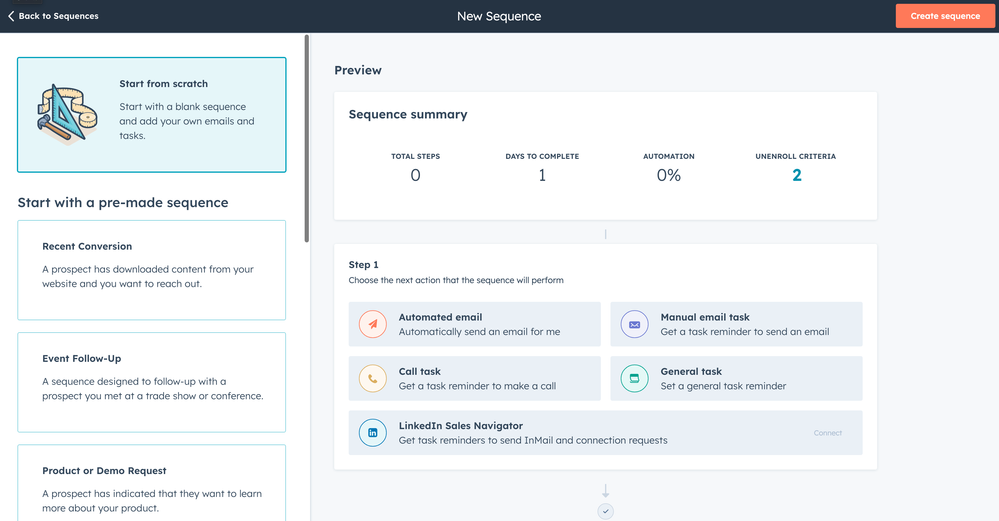
The question is whether the $6,900 year-one cost for a five-person team is worth it when Pipedrive delivers 80% of the functionality at less than half the price. In our experience, it rarely is - unless you're already deep in the HubSpot ecosystem and the switching cost would be worse.
Streak
Use this if: Your team lives entirely in Gmail and refuses to leave.
Skip this if: You need multi-channel sequences, your team uses Outlook, or you need more than a Gmail-native CRM.
Streak lives inside Gmail - literally. No separate app, no tab switching. The Pro plan at $49/user/month gets you mail merge sequences with automatic follow-ups, capped at 1,500/day. Pro+ at $69/user adds automations and an AI Co-Pilot for deal summaries and autofill. Over 750,000 professionals use Streak, but it's a niche play. The Gmail-native angle is either exactly what you want or completely irrelevant.
Salesforce Sales Engagement
Use this if: You're an enterprise team with 20+ reps already on Salesforce and dedicated admins to manage the implementation.
Skip this if: You're a team under 15 reps, don't have a Salesforce admin, or want to be sending sequences within a week.
Salesforce's Sales Engagement is a $50/user/month add-on on top of your Sales Cloud subscription ($25-$500/user depending on edition), putting realistic total cost at $75-115+/user/month minimum. G2 reviews tell the story: steep learning curve, "too many clicks," heavy dependence on admins for customization. The feature set is deep - Sales Cadences, Lead Scoring, Einstein Conversation Insights - but the implementation cost is brutal.
One common workaround enterprise teams use: add leads to email sequence Salesforce-side via Sales Cadences, then let the platform handle enrollment and step progression automatically. It works, but configuring those enrollment rules requires admin-level access and familiarity with Salesforce Flow - not something you'll set up in an afternoon.
If you're a 5-person sales team evaluating Salesforce for sequences, you're solving the wrong problem.
The Rest (Quick Hits)
Zoho CRM - "Cadences" feature requires the Enterprise plan at ~$40/user/month. Multi-channel sequences across email, calls, and social. Best for teams already embedded in Zoho's ecosystem. If you're not already a Zoho shop, there's no compelling reason to start here for sequences alone.
Nutshell - Pro plan runs ~$42-49/user/month and includes personal email sequences that send through your actual email server. Auto-stops on reply, tracks opens, and can trigger enrollment based on pipeline stage. Solid mid-market option that doesn't get enough attention.
Pipeliner CRM - The standout feature is conditional logic in sequences - behavioral triggers like "if email not opened" or "if no reply within 3 days" that route prospects down different paths. This is the branching capability Pipedrive lacks. Available on the Unlimited tier only (expect $65-100+/user/month).
Monday CRM - Starts cheap ($12-19/seat) but doesn't include a dedicated sequence builder. You're cobbling together automations and the separate Campaigns add-on (~$13/month) to approximate what Pipedrive does natively. Monday is excellent for visual pipeline management - it's just not a sequencing tool.
When CRM Sequences Aren't Enough - The Deliverability Problem
Here's where most comparison articles stop. They compare features and pricing, declare a winner, and move on. They skip the part that actually determines whether your emails get read.
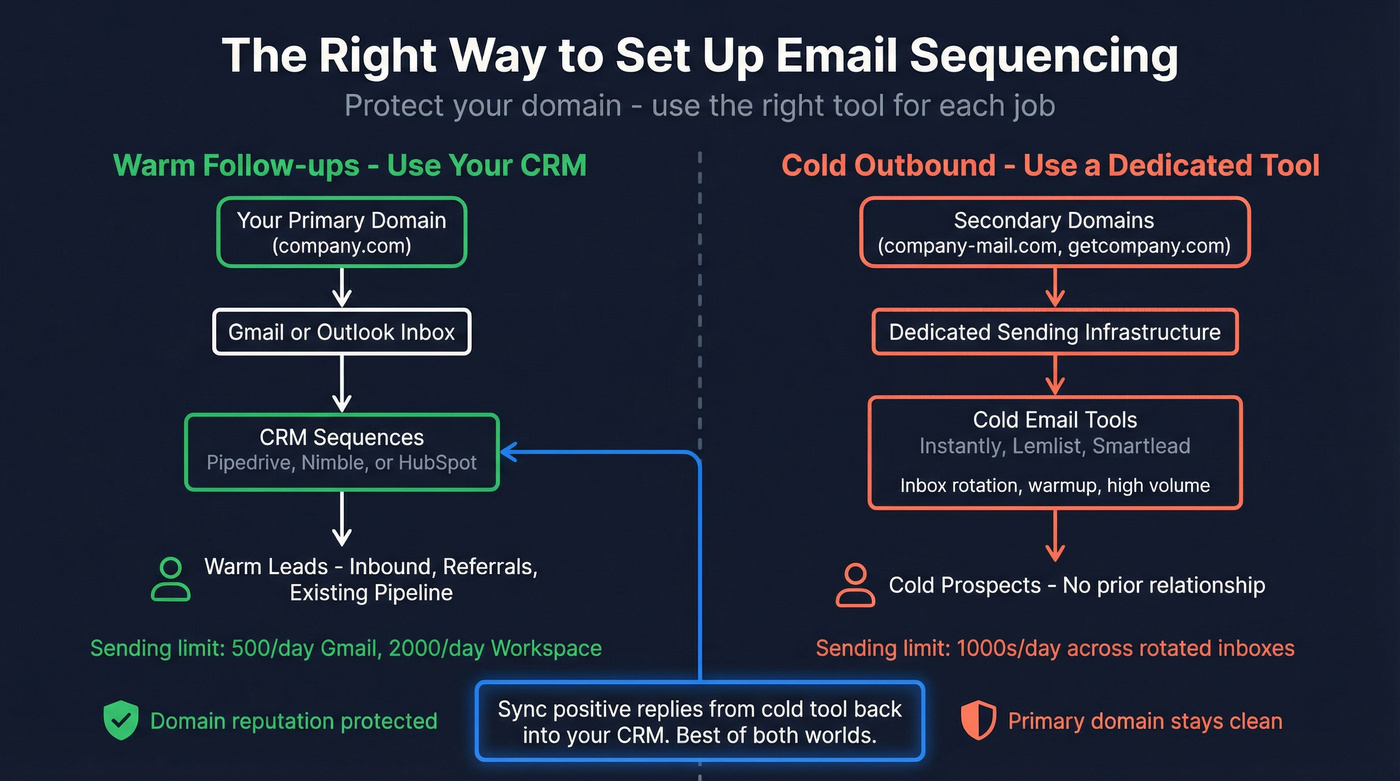
An Allegrow analysis put it well: HubSpot is "exceptional for permission-based, inbound email, and risky for scaled cold outreach." This isn't a HubSpot-specific problem - it applies to every CRM that sends through your primary domain.

The reason is simple. Mailbox providers judge your domain, not individual departments. When your sales sequences start generating bounces and spam complaints, it doesn't just hurt future sequences. It drags down your marketing newsletters, your service notifications, your transactional emails. Everything sent from that domain takes a hit.
One Reddit practitioner learned this the hard way - burned a domain running cold outbound through their CRM and had to shift strategy entirely. Their solution: "Send fewer emails from ACTUAL inbox, let AI personalize each one, avoid sequences entirely." That's an overreaction, but the underlying lesson is sound.
The hybrid approach works best: use your CRM for warm email follow-up sequences - demo follow-ups, trial nurtures, existing relationships - and a standalone tool for cold outbound. Instantly, Lemlist, and Smartlead all offer inbox rotation, dedicated warmup, and infrastructure designed for cold email. Sync positive replies back to your CRM so your sales team works from one system.
Before contacts enter either system, verify them. Prospeo integrates natively with Instantly, Lemlist, Smartlead, and HubSpot - so you can clean your list before it touches any sending infrastructure.
If your deals average under $10k, you almost certainly don't need CRM-native sequences at all. A $30/month cold email tool plus a free CRM tier will outperform a $90/seat platform with built-in sequences - because the cold email tool has warmup, rotation, and deliverability infrastructure the CRM never will.
One more thing most teams skip: SPF, DKIM, and DMARC authentication. Brands see up to 10% deliverability improvement after DMARC enforcement. It's free to set up and takes 30 minutes. There's no excuse for skipping it. (If you need the exact DNS steps, see our SPF DKIM & DMARC setup guide.)
The Data Quality Problem Nobody Talks About
Every sequence optimization article talks about subject lines, send times, and personalization. Almost none talk about the thing that matters most: whether the email address is real.
A practitioner running 100K+ cold emails per month laid out the hierarchy of what actually moves results:
- Deliverability
- List quality
- Relevance
- Offer
- Personalization
Notice where personalization lands? Dead last. "Personalization only moves the needle when something else in the equation is off." List quality - whether your contacts are valid, current, and correctly targeted - sits at #2, right behind deliverability (which bad data also destroys).
Here's the chain reaction: bad data leads to bounced emails, which spike your spam score, which sends your marketing newsletters to junk, which means your support team's password reset emails go to spam. One bad import can poison months of legitimate email.
The Instantly benchmark report sets the target: keep bounce rates under 2%. Anything above that and you're actively damaging your sender reputation. (If you're building a cleaning workflow, start with an email verification list SOP.)
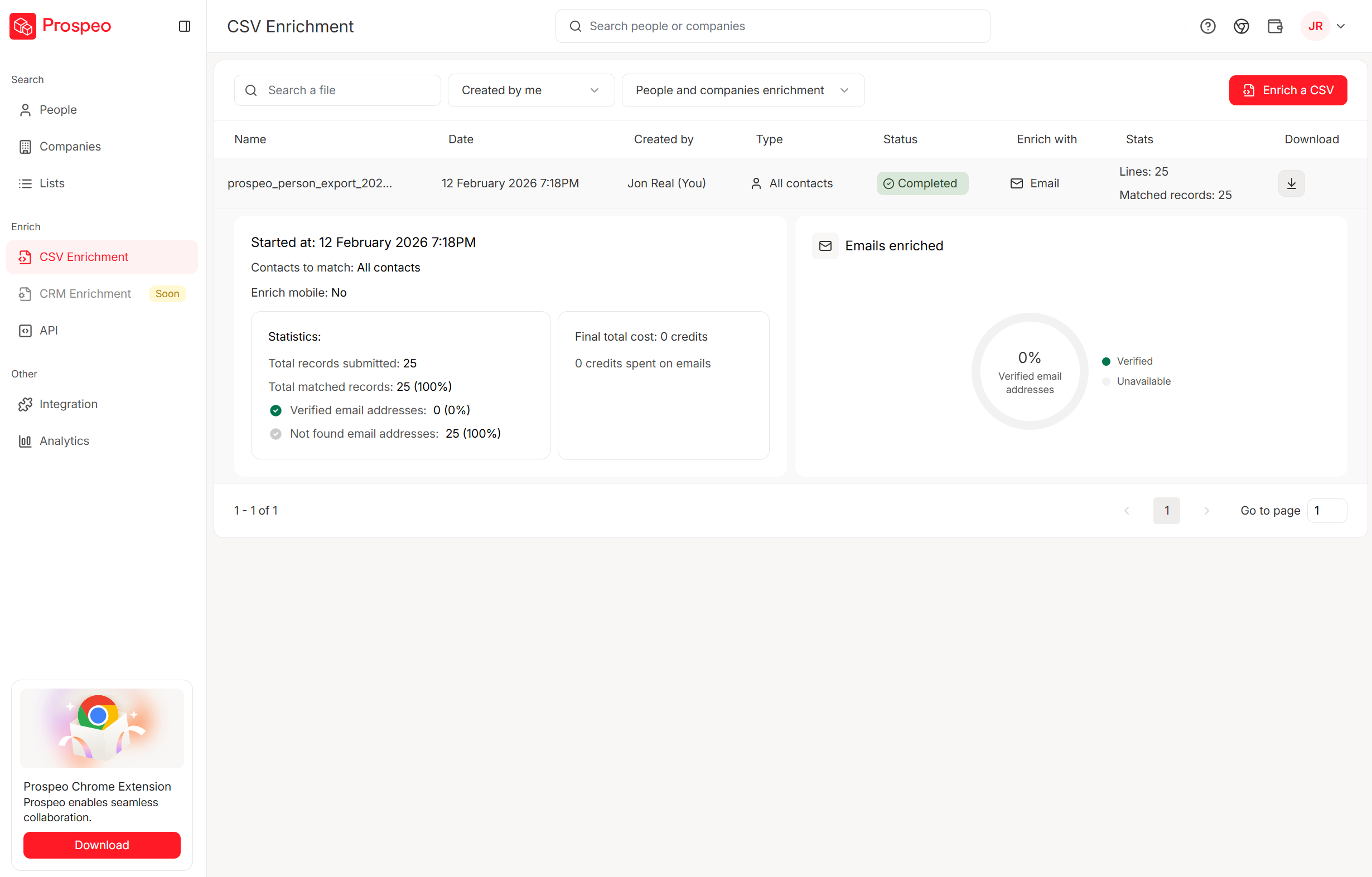
The proof is in production: Stack Optimize keeps client deliverability above 94% with bounce rates under 3% and zero domain flags across all clients using Prospeo-verified data. Meritt dropped their bounce rate from 35% to under 4%. These aren't marginal improvements - they're the difference between sequences that work and sequences that get your domain blacklisted.
2026 Benchmarks - What Good Sequences Look Like
Before you optimize anything, you need to know what "good" looks like. Instantly analyzed billions of emails across thousands of workspaces:
| Metric | Average | Top 10% |
|---|---|---|
| Reply rate | 3.43% | 10.7%+ |
| Replies from 1st email | 58% | - |
| Replies from follow-ups | 42% | - |
| Optimal email length | Under 80 words | - |
| Optimal sequence length | 4-7 touches | - |
That 3.43% average reply rate is across all cold email - including terrible campaigns dragging the number down. The top 10% hit 10.7%+, which means the gap between mediocre and excellent is massive.
Expected reply rates vary dramatically by sequence type:
- Cold outbound: 8-15% reply rate, 1-3% meeting rate
- Warm inbound follow-up: 20-30% reply rate, 8-12% meeting rate
- Customer expansion: 25-40% reply rate, 15-20% meeting rate
- Win-back/re-engagement: 10-18% reply rate, 2-5% meeting rate
If your CRM sequences are hitting below these ranges, the problem isn't your CRM - it's your data, your targeting, or your copy. (For a proven structure, use this B2B cold email sequence framework.)
58% of all replies come from the first email. If your opener doesn't create interest, stacking six follow-ups on top of a bad message just annoys people faster. Follow-ups framed as replies (same thread, casual tone) outperform formal "just checking in" reminders by roughly 30%.
Multi-channel sequences - mixing email, phone, and social touches - see 2x higher response rates than email-only. The recommended structure: 8 touches over 21 days. Monday is best for launching sequences; Wednesday sees peak engagement.
Sample 5-Step Cold Sequence:
| Day | Touch | Format |
|---|---|---|
| 1 | Initial email - one pain point, one question | Plain text, under 80 words |
| 4 | Follow-up as reply - new angle or proof point | Same thread, casual tone |
| 7 | New subject line - different value prop | Plain text, single CTA |
| 14 | Breakup email - "should I close your file?" | Short, low-pressure |
| 21 | Final touch - phone call or social message | Multi-channel |
One rule I've seen consistently ignored: overhaul your sequences every 6 months. Messaging goes stale. Market conditions shift. What worked in Q1 won't work in Q3. If the reply rate on your last step is still above 3%, your sequence isn't long enough - add more steps.
Mistakes That Kill Your Email Follow-Up Sequences
Not verifying email lists before loading them. This is mistake #1 for a reason. Every bounced email chips away at your domain reputation. Verify first, sequence second. Always.
Using your primary domain for cold outbound. Set up a secondary domain (e.g., team.yourcompany.com) for cold sequences. If it gets flagged, your main domain stays clean.
Sending emails over 80 words. The data is clear: shorter emails get more replies. Your prospect doesn't want your life story. One pain point, one question, one CTA.
Including multiple CTAs. "Want to book a call? Or check out our case study? Or reply with your thoughts?" Pick one.
No follow-up plan. 42% of replies come from follow-ups. If you're sending one email and moving on, you're leaving almost half your results on the table.
Skipping SPF/DKIM/DMARC setup. Free to configure, takes 30 minutes, improves deliverability by up to 10%.
No A/B testing. If you aren't testing subject lines, email length, and send times, you're optimizing based on gut feel. Your gut is wrong more often than you think. (Use this A/B testing framework to keep it clean.)
Over-following up. There's a line between persistent and annoying. 4-7 touches is the sweet spot. Beyond that, you're burning goodwill.
HTML-heavy emails with too many links. Spam filters flag rich HTML, embedded images, and multiple links. Plain text with one link outperforms designed templates for sales sequences every time.
As one Reddit practitioner put it: "Deliverability isn't something you set up once and forget. It's ongoing maintenance." Treat it like hygiene, not a one-time project.
Running cold outbound through a separate tool like Instantly or Lemlist? Smart move. But those tools need clean contact data to protect your domain reputation. Prospeo integrates natively with Instantly, Lemlist, and Smartlead - push 98% verified emails directly into your sequences with zero manual exports.
Feed your cold email tool verified data. Your domain reputation depends on it.
FAQ
What's the difference between email sequences and drip campaigns?
Sequences are 1-to-1 sales emails sent from your personal inbox that stop when the prospect replies. Drip campaigns are 1-to-many marketing emails sent from shared infrastructure on a fixed schedule. Sequences feel personal; drips feel automated. Most CRMs offer both, but they serve completely different purposes and use different sending infrastructure.
Can I run cold outbound through my CRM's sequence tool?
Technically yes, but you shouldn't at scale. CRM sequences send through your primary Gmail or Outlook inbox, so bounces and spam complaints affect all email from your domain - including marketing and support. Use a standalone tool like Instantly or Lemlist for cold outbound, then sync positive replies back to your CRM.
How many follow-ups should a sales sequence include?
Four to seven touchpoints is the sweet spot based on 2026 data. 42% of replies come from follow-ups, so stopping after one email leaves nearly half your results behind. Space touches 3-4 days apart. If your last step still gets above a 3% reply rate, add more steps - the sequence isn't long enough.
Which CRM has the cheapest built-in email sequencing?
Nimble at $24.90/user/month with zero tier-gating - every feature ships in their single plan. Pipedrive Growth at $39/seat is the next best value. Monday CRM looks cheaper ($12-19/seat) but doesn't include a real sequence builder; you'd need the Campaigns add-on and custom automations to approximate one.
How do I keep my sequence emails from bouncing?
Verify every address before it enters your sequence - bounce rates above 2% actively damage sender reputation. Prospeo's 5-step verification catches invalids, spam traps, and catch-all domains at 98% accuracy across 143M+ emails. Remove bad addresses first, then load into your CRM or cold email tool. It takes minutes and prevents months of deliverability damage.