

Email Subject Line Spam Checkers: What They Actually Do (And What They Miss)
Your SDR's cold emails are landing in spam. You pull up a subject line spam checker, swap out "guaranteed" for "proven," and send again. Still spam. The problem was never the word - it was the 200 invalid addresses they blasted last week that cratered your domain reputation.
Litmus found that 70% of emails show at least one spam-related issue. Sounds alarming until you realize most of those "issues" have nothing to do with subject lines. They're authentication gaps, reputation problems, and list hygiene failures. Subject line spam checkers help with a narrow slice of the puzzle, but they aren't deliverability tools - and treating them like one is how teams waste weeks optimizing copy while the real problem festers underneath.
What You Need (Quick Version)
- Subject line spam checkers are a 30-second sanity check - not deliverability tools. They match words against a dictionary and check character count. That's it.
- Use Omnisend (no sign-up, fast) or ZeroBounce (transparent scoring) for a quick check before you hit send.
- If you're still landing in spam after a green score, the problem is sender reputation, authentication, or list quality - not your word choice. (If you need a broader tool, see our email spam checker breakdown.)
- Fix the root cause: verify your email list, set up SPF/DKIM/DMARC, and monitor your domain reputation with Google Postmaster Tools.
How Subject Line Spam Checkers Work
An email subject line spam checker takes your text, runs it against a dictionary of known "spam trigger words," and spits out a score. ZeroBounce's tool is the most transparent about its methodology - it calculates a ratio of spam trigger words to "safe-for-use" words and highlights the matches. That's the core mechanic behind nearly every tool in this category.
Some add readability scoring (Flesch-Kincaid), character count checks, or emoji analysis. A few generate AI-powered alternative suggestions. But the engine underneath is fundamentally keyword matching against a curated list.
Here's what these tools don't do:
- Simulate real spam filters (Gmail, Outlook, Yahoo)
- Check your sender reputation or domain health (use dedicated email reputation tools)
- Test SPF/DKIM/DMARC authentication
- Measure recipient engagement history
- Predict actual inbox placement
That last point matters most. A subject checker can't tell you whether your email will land in the inbox because inbox placement depends on dozens of signals that have nothing to do with your subject line.
Best Free Tools for 2026
Mailtrap's comparison of these tools nailed it: they're "all quite similar." The differences are marginal - sign-up requirements, UI polish, whether they show a mobile preview. Don't overthink this.
| Tool | Best For | Sign-Up? | Key Differentiator |
|---|---|---|---|
| Omnisend | Quick sanity check | No | Instant, no friction |
| Mailmeteor | Spam word flagging | No | AI subject line generator |
| SubjectLine.com | Benchmark comparison | No | 3B+ email messages tracked, 800+ rules |
| SendCheckIt | Competitive scoring | Yes | Compares to 100K+ emails |
| MailerLite | Mobile preview | No | Deletes input immediately; checks length/readability/spam signals |
| Warmup Inbox | Cold email lines | No | B2B-focused AI suggestions |
| ZeroBounce | Spam word detection | No | Explicit ratio scoring |
| YouniqMail | Simple pass/fail | No | Minimal, fast interface |
| CoSchedule | Headline analysis | Yes | Emotional scoring algorithm |
All of these have free subject line testers; some (like CoSchedule and SendCheckIt) require a free account. There's also a community-built checker floating around, though it lacks the polish of established tools.
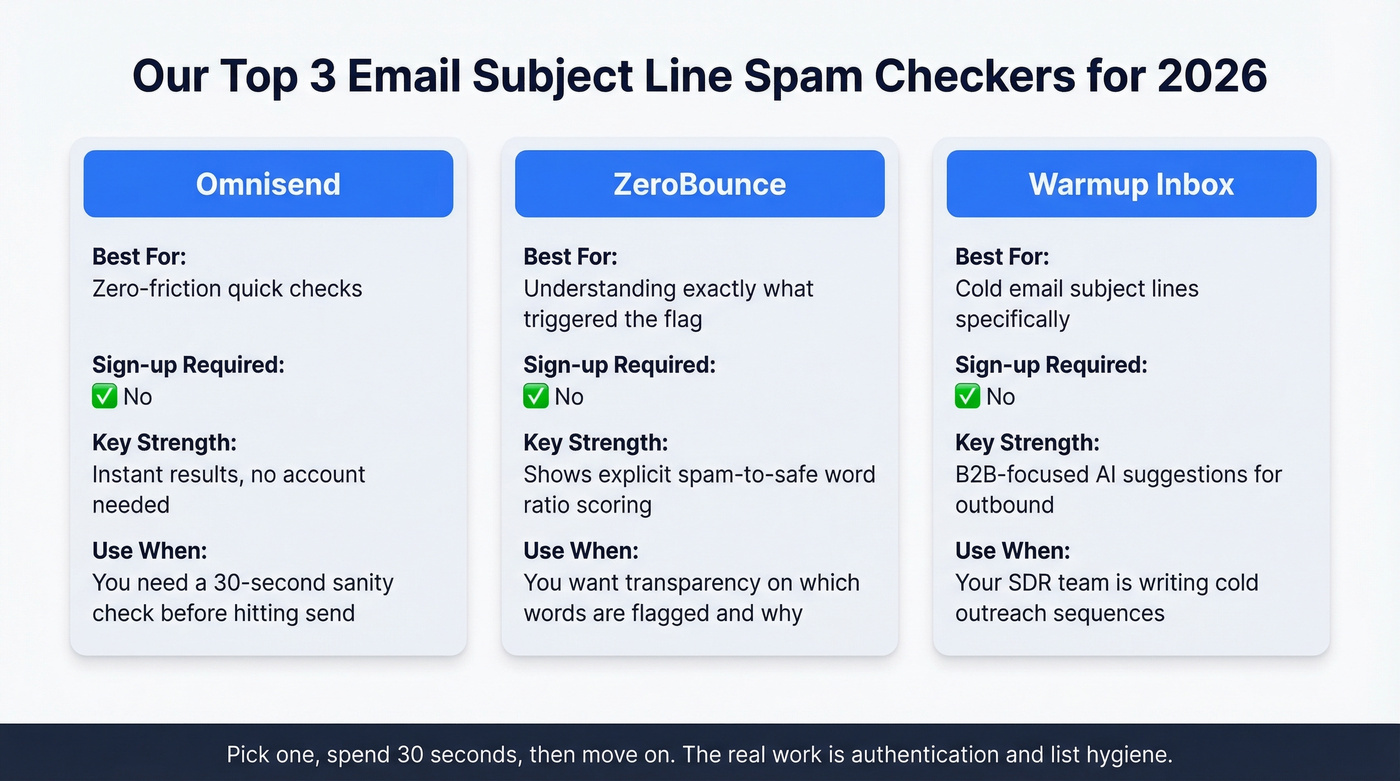
Our recommendations: Omnisend for zero-friction checks, ZeroBounce if you want to see exactly which words triggered the flag, and Warmup Inbox if you're writing cold email subject lines specifically. Pick one, spend 30 seconds on it, and move on. The real work starts next. (If you want more options, see our roundup of the best free subject line testers.)

Subject line checkers can't save you from a 15% bounce rate. Prospeo's 5-step email verification delivers 98% accuracy - the same data that dropped Snyk's bounce rate from 35% to under 5% across 50 AEs.
Clean data beats clever copy. Verify your list before your next send.
Spam Trigger Words (Categorized)
Mailmeteor maintains a list of 349+ spam trigger words, and Snov.io publishes an even larger A-Z database of 550+. We've merged and categorized the most common ones below. Mailtrap's caveat is worth repeating: a definitive list isn't possible because spam tactics evolve constantly. Treat this as directional guidance, not gospel.
| Category | Common Trigger Words |
|---|---|
| Financial/Monetary | $$$, 50% off, earn cash, free trial, money-back, refinance, save $, no fees, debt, investment, loan |
| Urgency/Scarcity | Act now, limited time, expires, urgent, now or never, before it's too late, action required, last chance, hurry |
| Marketing/Promotions | Buy now, free, special offer, giveaway, risk-free, order now, exclusive deal, best price, bonus, unbeatable offer |
| Health/Pharma | Viagra, weight loss, cure, prescription, miracle pill, anti-aging, supplement, pharmacy, diagnosis |
| Personal/Confidential | Confidential, selected, secret, pre-approved, you've been chosen, private, personal, for your eyes only |
| Exaggerated Hype | Miracle, unbelievable, life-changing, #1, 100% guaranteed, amazing, incredible, once in a lifetime |
| Spammy Greetings | Dear friend, congratulations, attention, hello dear, you won, winner, valued customer |
| Suspicious Links/Attachments | Click here, download now, file attached, open immediately, click below, see attachment, 0% risk, 100% free |
Here's the thing: these words aren't automatic spam triggers. A SaaS company with strong sender reputation sends "free trial" emails every day and lands in the inbox. Dropbox does it. HubSpot does it. The difference isn't the word - it's the reputation behind it. An unknown sender with a fresh domain and a 15% bounce rate will hit spam regardless of whether they use "free" or not.
How Modern Spam Filters Actually Work
An estimated 160 billion spam emails are sent daily across all providers. Modern filters don't work by checking subject lines against a blocklist. They use layered machine learning that evaluates signals in a specific hierarchy, and understanding that hierarchy is the difference between fixing your deliverability and endlessly tweaking copy. (For the full playbook, see our email deliverability guide.)
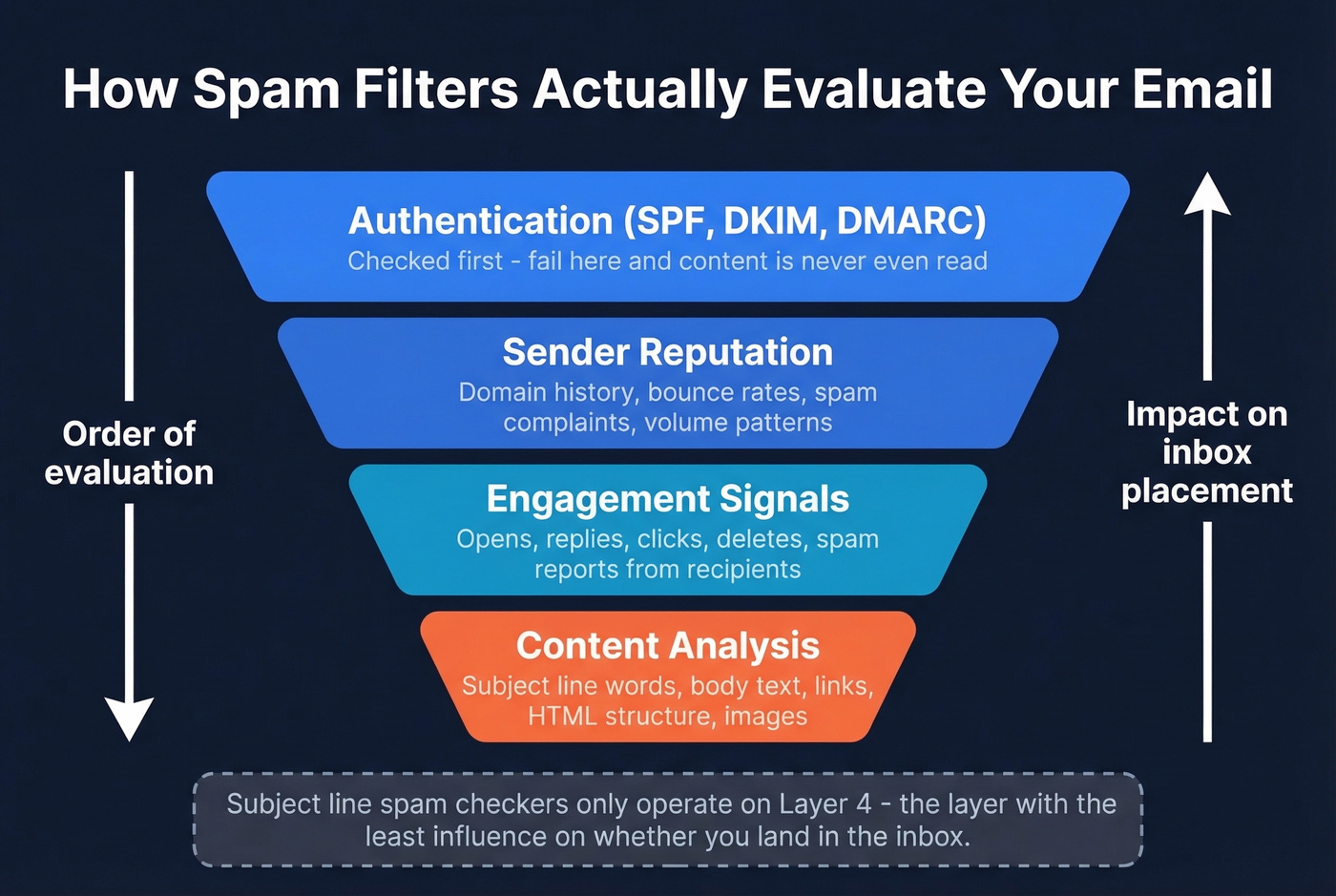
Authentication comes first. Does the sending domain have valid SPF, DKIM, and DMARC records? SPF confirms the sending server is authorized. DKIM cryptographically signs the message. DMARC ties them together and tells receiving servers what to do with failures. Fail this layer and your email gets rejected at the SMTP level before content is even evaluated. (If you're troubleshooting, use this guide on how to verify DKIM is working.)
Sender reputation comes second. Gmail tracks your domain's history - bounce rates, spam complaints, sending volume patterns. Bulk senders who exceed a 0.3% spam complaint threshold face filtering or outright rejection. This is the layer that matters most for ongoing deliverability. (More: how to improve sender reputation.)
Engagement signals come third. Do recipients open, reply, or click? Or do they delete without reading and hit "report spam"? Reply behavior is a major positive signal. Consistent delete-without-open is a negative one.
Content analysis comes last. This is where subject line words finally enter the picture - and they're evaluated alongside body text, HTML structure, link patterns, image-to-text ratio, salutation style, and header formatting. Not in isolation.
So subject line checkers operate on the layer with the least influence on inbox placement. Gmail doesn't maintain a blocklist of forbidden words. It uses machine learning trained on billions of messages. Your sender reputation and engagement history matter 10x more than whether you used the word "free."
The distinction Litmus draws between delivery and deliverability is critical. Delivery means the mail server accepted your message. Deliverability means it actually landed in the inbox instead of spam or promotions. You can have 99% delivery and 40% deliverability - and no subject line checker will tell you that.
Cold Email vs. Marketing Email
Cold Email Rules
Cold email subject lines play by different rules because you have zero engagement history with the recipient. Every signal starts at neutral or negative. Keep subject lines to 40-50 characters, front-load the key words (mobile truncates aggressively), and avoid anything that looks templated. (Need ideas? Use these cold email subject line examples.)
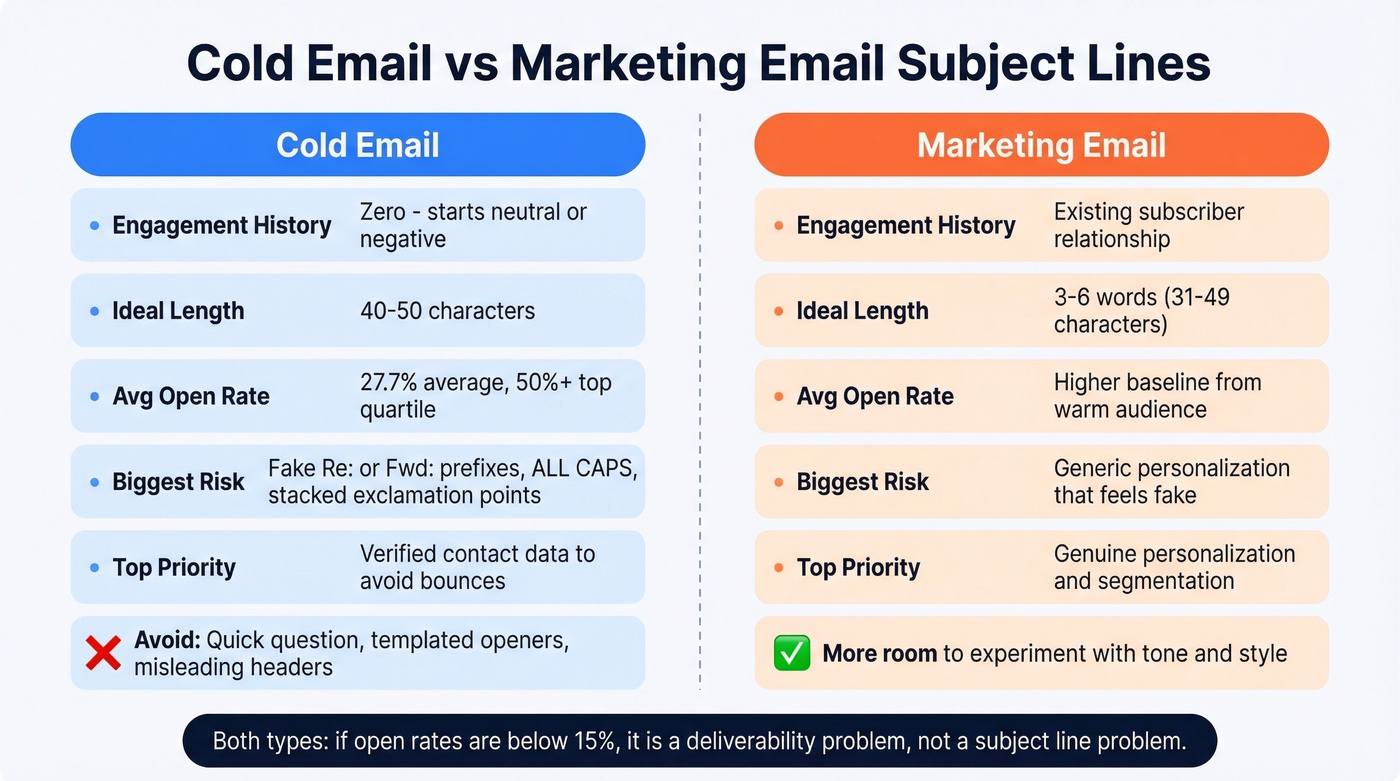
The mistakes that actually hurt, per Instantly's analysis: fake "Re:" or "Fwd:" prefixes (CAN-SPAM risk for misleading headers), overused openers like "Quick question," ALL CAPS, and stacking exclamation points. These don't just look spammy - they generate spam complaints that compound into domain reputation damage over time.
Average cold email open rates sit around 27.7%. Top-quartile performers hit 50%+. If you're below 15%, that's not a subject line problem - it's a deliverability problem. Start with verified contact data so bounces don't tank your domain reputation before your subject line even matters. (Benchmarks: what is a good email open rate and email bounce rate.)
Marketing Email Rules
Marketing emails benefit from existing subscriber relationships and engagement history, so you have more room to experiment. Axios HQ's analysis of 69,000+ sends found 3-6 words (31-49 characters) optimal for engagement. Personalization helps, but only when it's genuine - a first name token in a mass blast isn't fooling anyone in 2026. (More tactics: subject lines that get opened.)
What Actually Fixes Deliverability
Let's be honest: if you're closing deals under $10k and spending more than 30 seconds on a subject line checker, you're optimizing the wrong thing. Fix your data and authentication first. The subject line is the garnish, not the meal.
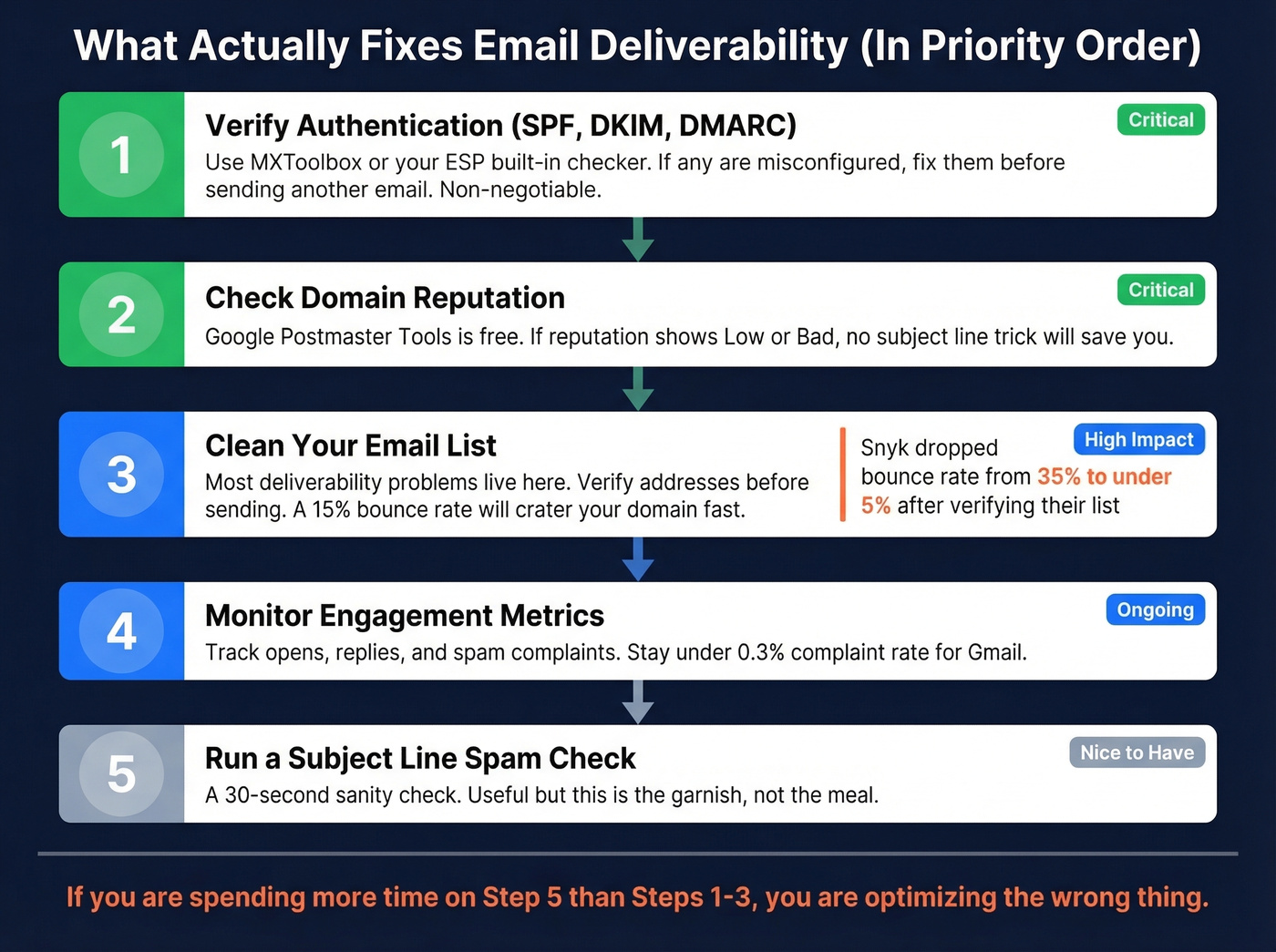
A green score from any spam checker is step zero. Here's what actually moves the needle:
1. Verify authentication (SPF/DKIM/DMARC). Use MXToolbox or your ESP's built-in checker. If any of these are misconfigured, fix them before you send another email. Non-negotiable.
2. Check domain reputation. Google Postmaster Tools is free and shows you exactly how Gmail views your sending domain. If reputation is "Low" or "Bad," no subject line optimization will save you. Litmus found that marketers running successful email programs are 22% more likely to actively monitor deliverability metrics.
3. Clean your email list. This is where most deliverability problems live. Snyk's SDR team was bouncing 35-40% of their cold emails before they started verifying addresses - that dropped to under 5% after switching to verified data. Prospeo's Email Finder runs a 5-step verification process with catch-all handling, spam-trap removal, and honeypot filtering, and the free tier covers 75 email verifications per month to start. (If you're building lists at scale, see our guide to how to generate an email list.)
4. Warm up new domains before volume sends. Don't blast 500 cold emails from a domain you registered last week. Start with 10-20 per day and ramp over 2-4 weeks. (Related: email velocity.)
5. Monitor engagement beyond open rates. Reply rates, click rates, and spam complaint rates tell you more than opens, which are increasingly unreliable due to privacy features like Apple's Mail Privacy Protection. Litmus recommends investigating if inbox placement drops below 90%.
6. A/B test with real data. Run a 10% split test, measure actual engagement (not spam checker scores), and send the winner to the remaining 90%. Real-world performance beats any predictive score.
We've seen teams spend weeks rewriting subject lines when the real culprit was a 20% bounce rate quietly destroying their sender reputation. Skip the subject line rabbit hole if you haven't nailed steps 1-3 first.
You just read that sender reputation matters more than word choice. Every invalid email you send tanks that reputation. Prospeo refreshes 300M+ profiles every 7 days - not 6 weeks - so your list never goes stale. Starting at $0.01 per email.
Stop optimizing subject lines for a domain that's already flagged.
FAQ
Do spam trigger words automatically send emails to spam?
No. Modern filters use machine learning that weighs sender reputation, authentication, and engagement far more than individual words. A trusted sender can use "free" without issues. An unknown sender with poor domain reputation will hit spam regardless of word choice.
What's a good subject line spam score?
There's no universal standard - each tool uses its own scoring rubric. A subject line scoring 90/100 on Omnisend might score 60 on Mailmeteor. Focus on avoiding obvious red flags (ALL CAPS, excessive punctuation, fake Re: prefixes) rather than chasing a perfect number.
Does the subject line matter more than sender reputation?
Not even close. Sender reputation is the single most important factor in inbox placement. Authentication, bounce rates, and engagement history all outweigh subject line content. The consensus on r/coldemail and r/sales echoes this - most deliverability problems trace back to list quality and domain health, not copy.
How many characters should a subject line be?
Axios HQ's analysis of 69,000+ sends found 31-49 characters (3-6 words) optimal. For mobile, keep under 40 characters to avoid truncation. For cold email, 40-50 characters with front-loaded key words performs best.
Can bad email data cause spam folder placement?
Absolutely - it's one of the most overlooked causes. Sending to invalid addresses causes bounces, which destroy sender reputation fast. Even a 10% bounce rate signals to mailbox providers that you aren't maintaining your list. Verify addresses before sending to keep bounce rates under 5%, and you'll do more for your inbox placement than any subject line rewrite ever could.