

How to Extract Email from URL: 5 Methods That Work in 2026
You pasted a company's URL into an extractor, hit "scan," and got back three results: info@, support@, and a webmaster address from 2019. The VP of Engineering you actually need to reach? Nowhere in the output.
That's the core frustration when you try to extract email from URL - most tools only find what's already visible on the page, and modern websites are very good at hiding the emails that matter. Testing across 100 company websites, basic extractors found 623-681 emails while obfuscation-aware tools pulled 847 from the same pages. That's 40-70% of contacts left on the table. And the emails you do get are unverified, often generic, and frequently stale.
What You Need (Quick Version)
- One-off check (single URL): Use Mailmeteor or ContactSwing - paste the URL, scan, copy results. Free, no signup needed for ContactSwing.
- Bulk extraction (hundreds or thousands of URLs): Build a Firecrawl + n8n automation pipeline, or run an Apify actor at $20/month + usage.
Extractors vs. Finders: Know the Difference
This distinction matters more than most people realize, and it determines whether you waste hours scraping or get results in seconds.
| Extractor | Finder | |
|---|---|---|
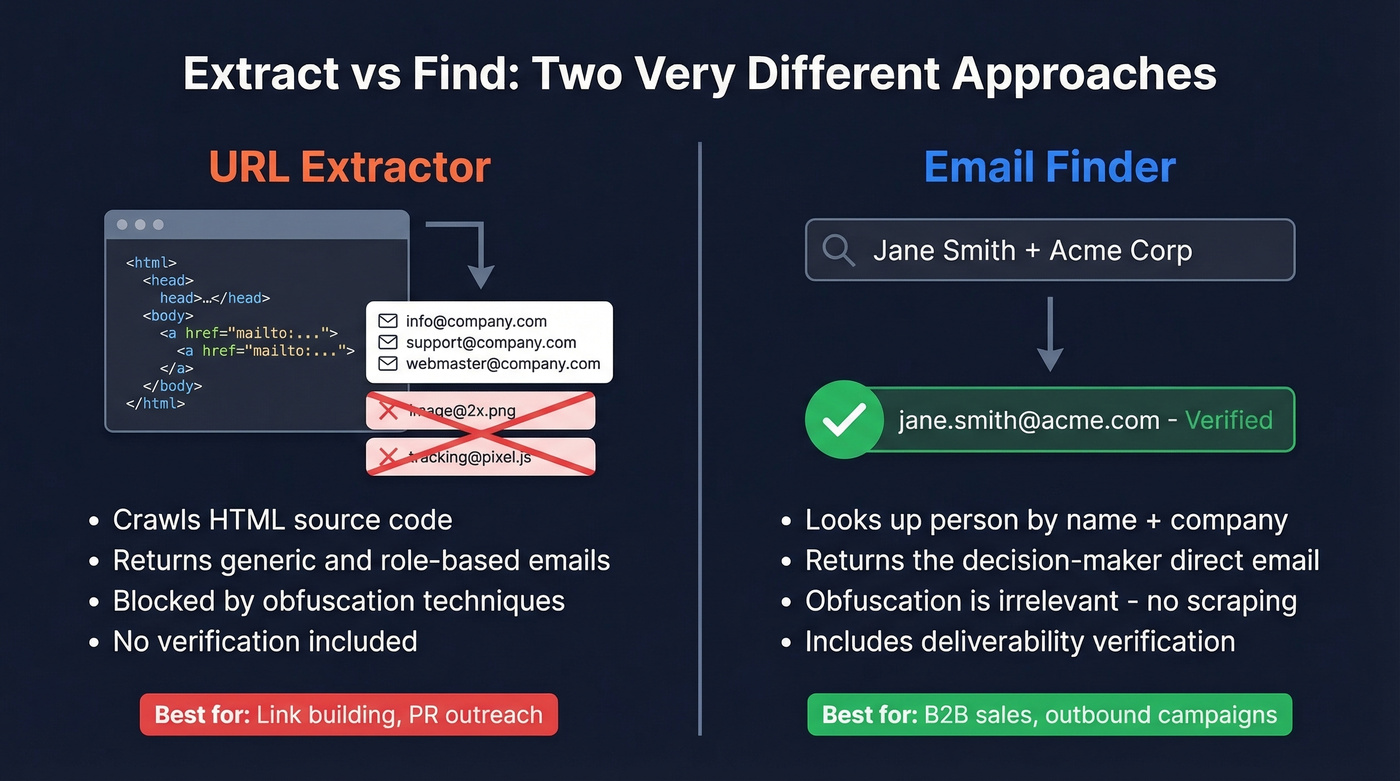
| How it works | Crawls HTML, pulls anything that looks like an email | Looks up a person's email from name + company |
| What you get | info@, support@, webmaster@ | The CFO's direct, verified email |
| Obfuscation | Blocked by most techniques | Irrelevant - doesn't scrape pages |
| Best for | Link building, PR outreach | B2B sales, outbound campaigns |
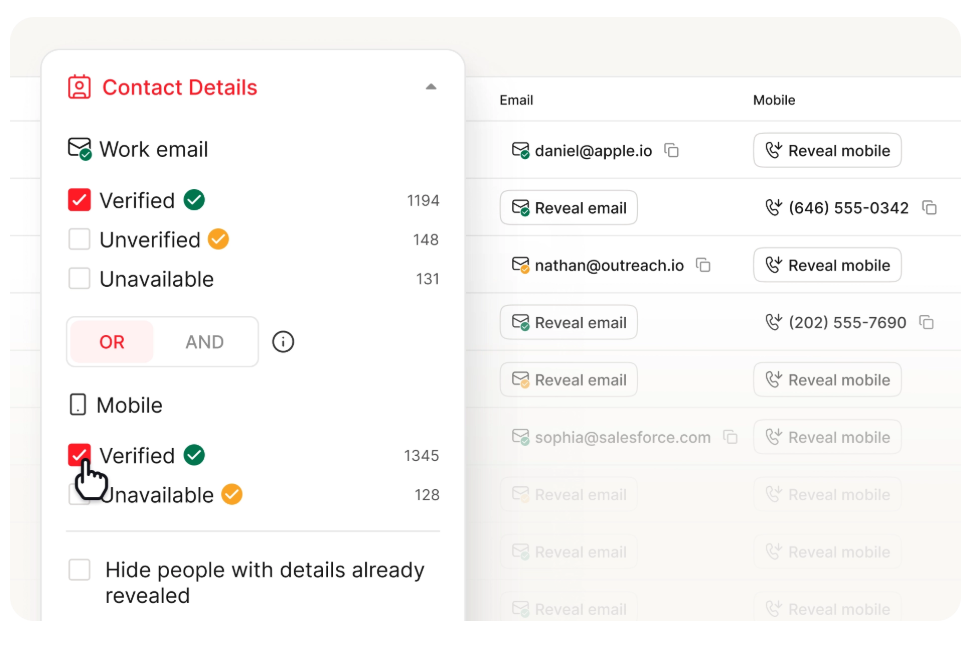
A URL-based email extractor crawls pages and returns whatever it can parse. A finder sidesteps the page entirely. If you're running outbound sales, skip extraction and go straight to a finder - you'll save time and actually reach the people who matter. (If you’re building lists, see sales prospecting techniques that work without scraping.)
Why Most Web Page Extractors Fail
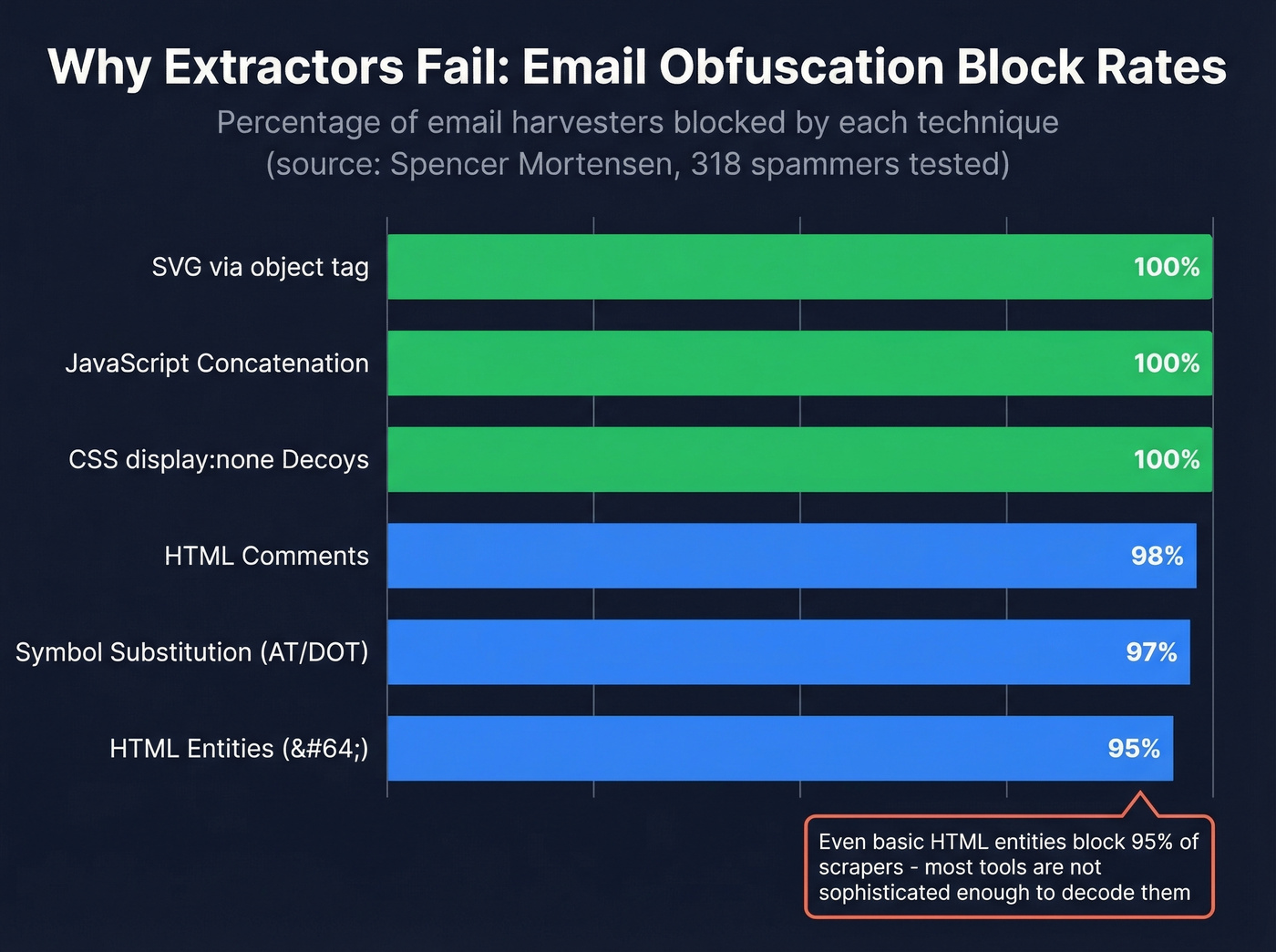
Websites don't want their email addresses scraped. Spencer Mortensen's research testing 318 spammers against common obfuscation methods tells the story:
| Obfuscation Technique | Spammers Blocked |
|---|---|
| HTML entities (@) | 95% |
| HTML comments | 98% |
| Symbol substitution (AT/DOT) | 97% |
| CSS display:none decoys | 100% |
| JavaScript concatenation | 100% |
SVG via <object> |
100% |
That HTML entities result is the wild one. Most parsing libraries auto-decode entities, so this technique should be worthless - and yet it still stops 95% of harvesters. The tools just aren't that sophisticated.
Then there's the false-positive problem. Standard regex patterns match anything resembling something@something.something, which means your results include garbage like image@2x.png, CSS class references, and tracking pixels. As one frustrated user on r/nocode put it, most webpage extractors simply "can't handle" modern obfuscation - and the gap between what they find and what actually exists on the page is the difference between a useful list and a waste of time. (If you want a deeper breakdown of how these tools work, see email crawlers.)

URL extractors miss 40-70% of contacts and return unverified junk like info@ and support@. Prospeo's email finder skips the page entirely - look up any decision-maker by name and company, and get a verified email with 98% accuracy. No obfuscation, no regex, no false positives.
Stop scraping. Start finding the people who actually matter.
5 Methods to Pull Emails from Any URL
1. Free Web Tools (Single URL)
Use this if you need emails from a single URL right now and don't care about verification.
Skip this if you're building prospect lists or need more than one URL at a time.
Mailmeteor, lemlist's free extractor, and ContactSwing all do the same basic thing: paste a URL, get back whatever email addresses are visible on the page. ContactSwing doesn't require signup. Mailmeteor uses advanced rendering for JavaScript-heavy sites - if an email is visible to a human on screen, it can usually find it - though obfuscated emails still slip through. None of these tools verify deliverability, so you'll need a separate step before sending to anything you find (use an AI email checker or a dedicated verifier).
The limitation is obvious: single URL, no bulk processing, no obfuscation handling. Fine for a quick check. Useless at scale.
2. Chrome Extensions
Thunderbit and similar extensions work directly in your browser, scraping the page you're viewing. Easy setup, no coding required, and Thunderbit handles dynamic sites reasonably well.
The catch? Thunderbit's Trustpilot reviews - 4.1 out of 5 from 21 reviewers - reveal a pattern: scraping stops after 10-21 pages on larger jobs, even when you've given it 100+ URLs. Billing complaints are common too, with users reporting annual charges when they expected monthly and support going quiet during cancellation attempts. For anything beyond casual use, extensions hit a ceiling fast. Budget $10-$30/month for a typical paid tier. (If you’re evaluating options, compare against other email scraper Chrome extensions.)
3. Python + Regex (DIY)
If you're comfortable with code, the httpx + BeautifulSoup stack is the standard approach. Install with pip install httpx bs4, fetch the page, and run this regex:
([a-zA-Z0-9._%+-]+@[a-zA-Z0-9.-]+\.[a-zA-Z]{2,})
You can also parse mailto: links directly using BeautifulSoup's findAll("a", attrs={"href": re.compile("^mailto:")}). This catches emails that are hyperlinked but not displayed as text.
Here's the thing: this approach handles zero obfuscation. If the site uses HTML entities, JavaScript concatenation, or CSS hiding, your script sees nothing. And that regex will happily match image@2x.png as a valid email. For a quick one-off scrape of a simple site, it works. For production use, it's a maintenance headache you don't want. (If you keep running into missing contacts, see email not found fixes.)
4. Bulk Automation (Hundreds of URLs)
For hundreds or thousands of URLs, you need a pipeline. Here's the workflow that's gained traction on r/n8n:
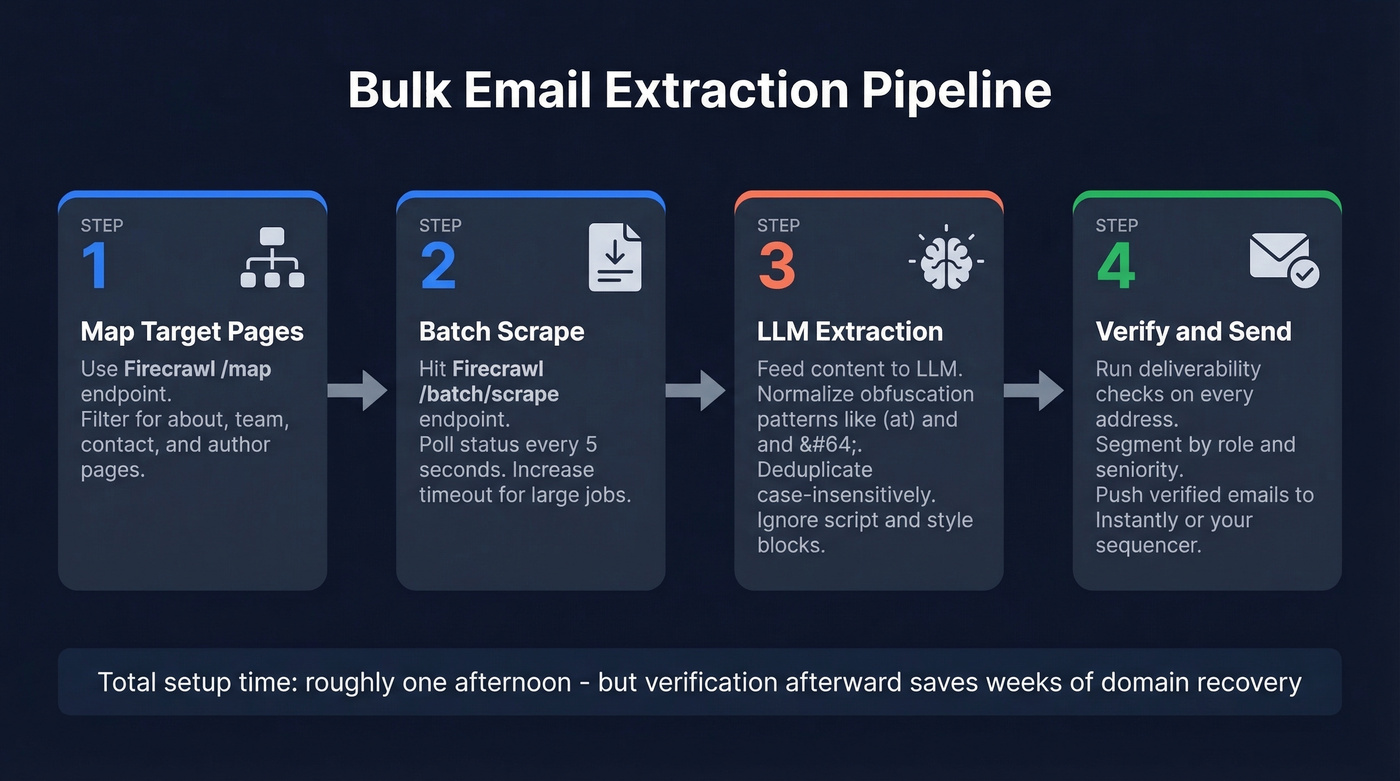
- Map target pages: Use Firecrawl's
/mapendpoint to crawl each domain and return URLs likely to contain emails - filter for pages with "about," "team," "contact," or "author" in the path. - Batch scrape: Hit Firecrawl's
/batch/scrapeendpoint with those URLs. Poll status every 5 seconds, increase timeout for larger jobs. - LLM extraction: Feed scraped content into an LLM prompt that normalizes obfuscation patterns -
(at),[at],{at},@and their dot equivalents. Ignore addresses in<script>and<style>blocks. Deduplicate case-insensitively. - Push to outreach: Route extracted emails into Instantly or your sequencer via API. (For list-building workflows, see Clay list building.)
As one r/n8n user noted after building this exact pipeline, the extraction step took an afternoon - but the verification step afterward saved weeks of domain recovery. Apify offers pre-built actors for email extraction at $20/month + usage if you want something faster to deploy.
5. Email Finder Platforms
Let's be honest: if you're doing B2B prospecting, scraping emails from websites is solving the wrong problem. You don't need every email on a page. You need the right person's verified email.
We've run enrichment API calls against domain lists of 5,000+ companies and consistently seen that the gap between scraped and verified lists is massive. For B2B, finding verified emails for specific decision-makers beats scraping webpage after webpage every single time. (This is where data enrichment services and email search tools typically outperform scraping.)
Tool Comparison
| Tool | Type | Verifies | Free Tier | Best For |
|---|---|---|---|---|
| Hunter.io | Finder | ✅ | 50 credits/mo | Domain search |
| Mailmeteor | Extractor | ❌ | Free | Quick single URL |
| Thunderbit | Extractor | ❌ | Free tier available | Browser scraping |
| Apify | Extractor | ❌ | Trial | Dev-friendly bulk |
| lemlist | Extractor | ❌ | Free | Quick single URL |
| Email Hippo | Verifier | ✅ | Limited | Verification only |
| ContactSwing | Extractor | ❌ | Free | No-signup check |
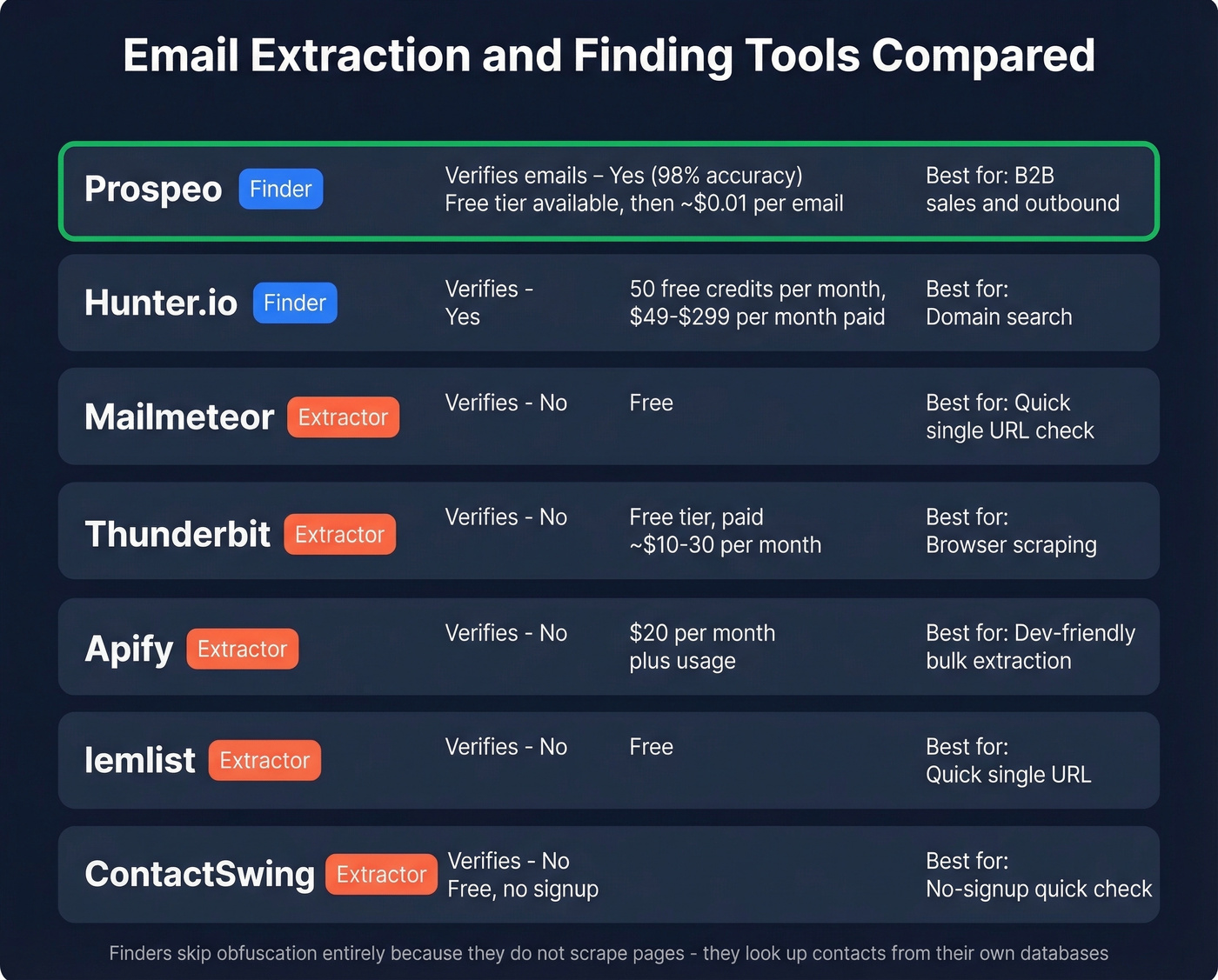
Pricing snapshot: Prospeo starts free and runs ~$39/month paid, with emails at roughly $0.01 each. Hunter.io ranges from $49-$299/month. Apify runs $20/month + usage. Mailmeteor, lemlist, and ContactSwing are free for basic extraction.
Finders don't need to handle obfuscation because they aren't scraping pages - they're looking up contacts from their own databases. That's a fundamental architectural advantage. (If you’re choosing between vendors, see Hunter alternatives.)
From Extraction to Outreach
Sending to unverified scraped lists is how you tank a domain. Raw extraction lists bounce heavily, and once your sender reputation drops, even your emails to warm leads start hitting spam folders. We've seen teams burn through domains in weeks because they skipped this step. (If you’re troubleshooting, start with email bounce rate and improve sender reputation.)
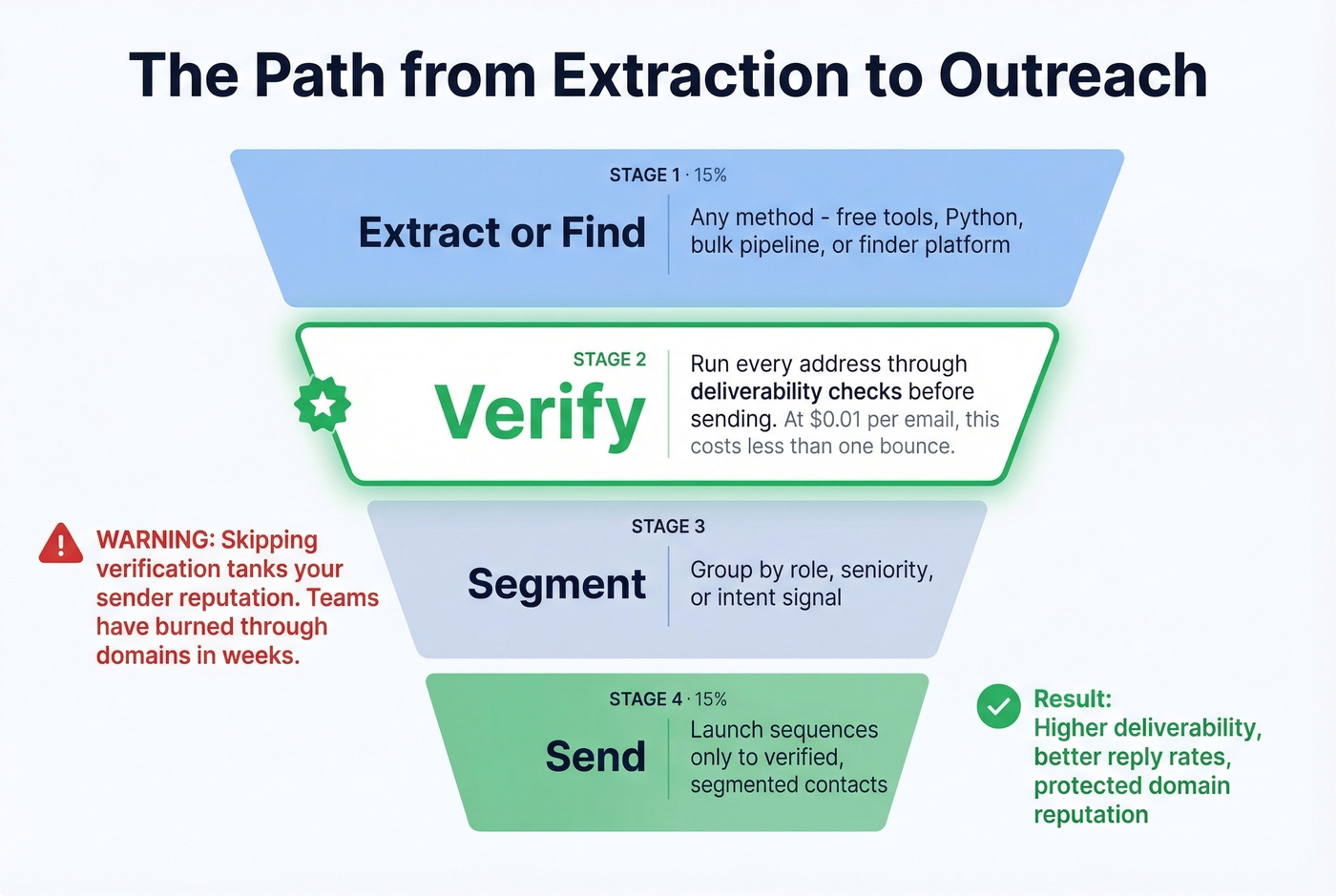
Follow this sequence every time:
- Extract or find - use any method above to collect emails
- Verify - run every address through deliverability checks before touching your sequencer (see email deliverability guide)
- Segment - group by role, seniority, or intent signal
- Send - launch sequences only to verified, segmented contacts
The extraction step is the easy part. Verification is where the actual value lives. At $0.01/email, verification costs less than a single bounced email costs your sender reputation.
You just read about building a Firecrawl + n8n + LLM pipeline that takes an afternoon to set up and still needs a verification step. Prospeo returns verified emails at 98% accuracy for $0.01 each - with native integrations for Instantly, Clay, n8n, and Make already built in.
Skip the pipeline. Get verified emails in seconds, not afternoons.
Is It Legal? Quick Checklist
Email extraction sits at the intersection of multiple legal frameworks. Here's what matters by jurisdiction.
GDPR (EU/UK): Email addresses that identify a person - like firstname.lastname@company.com - are personal data. Public visibility doesn't equal consent. An email on a website doesn't mean you can add it to your marketing database. Legitimate interest can apply for B2B outreach, but you need a documented balancing test. Maximum penalties reach EUR 20 million or 4% of global annual revenue, whichever is higher.
CAN-SPAM (US): US law focuses more on how you use emails than how you collect them. Sending requires truthful headers, accurate subject lines, clear sender identification, and a working unsubscribe mechanism. Honor opt-outs within 10 business days.
Regardless of jurisdiction: Record provenance for every email - URL, date, extraction method. Document your lawful basis in writing before sending. Include an unsubscribe link in every outreach email. Respect website terms of service, because aggressive scraping can trigger legal issues beyond privacy law.
FAQ
Can I extract email addresses from a URL for free?
Yes - Mailmeteor and ContactSwing pull visible emails from any single URL at zero cost, no signup required for ContactSwing. Free tools skip verification and can't handle obfuscation, so expect incomplete lists. Run results through a verifier before sending, or use Prospeo's free tier (75 verified emails/month) to skip scraping entirely.
Why did the extractor find zero emails on a page I know has them?
Most likely email obfuscation. Techniques like HTML entities, CSS hiding, and JavaScript concatenation blocked 95-100% of harvesters in Mortensen's testing. The email exists on the page - your tool just can't parse through the protection layer. Try an LLM-powered pipeline or switch to a finder platform.
Is scraping emails from websites legal?
Under GDPR, scraped emails are personal data requiring a lawful basis like legitimate interest, with fines up to EUR 20 million or 4% of revenue. Under CAN-SPAM, collection is less regulated but sending requires truthful headers and a working unsubscribe link. Always document your source URL, date, and method for every address.
What's the difference between an email extractor and an email finder?
An extractor scrapes emails already visible on a webpage - typically generic addresses like info@ or support@. A finder discovers a specific person's email from their name and company, even when it's unpublished. For B2B prospecting, finders deliver verified decision-maker contacts at 98% accuracy versus the 60-70% hit rate of basic extractors.
How do I extract emails from thousands of URLs at once?
Build an automation pipeline: Firecrawl maps and scrapes URLs in bulk, an LLM prompt deobfuscates and normalizes results, and a tool like Instantly pushes leads into campaigns. Apify offers pre-built actors at $20/month + usage. Or skip scraping and use Prospeo's enrichment API - it processes bulk domain lists at a 92% match rate and returns verified contacts directly.