

How to Write a Follow Up Email After Presentation (With Templates)
The VP said "this looks great, let's circle back next week." It's now Friday. Your inbox is empty. You're staring at a blank compose window wondering how to nudge without sounding desperate.
We've all been there. You spent hours on that deck, nailed the delivery, got nods around the room - and then silence. The follow up email after presentation shouldn't be harder than the presentation itself, but somehow it always feels that way. Here's how to write one that actually gets a reply.
What You Need (Quick Version)
- Send within 24 hours (same day if you can). Reference something specific from the presentation. Keep it under 150 words.
- Use a 2-4 word personalized subject line. A study of 5.5M emails found these hit a 46% open rate vs 35% for generic lines.
- Three follow-ups, max. Each one must add something new - a case study, an answer to a question raised, a relevant data point. (If you want more plug-and-play options, see these sales follow-up templates.)
The 4-Part Structure Every Follow-Up Needs
Here's a trick: draft the skeleton of your follow-up before the presentation. Fill in the callback and action items right after, and you'll send in minutes instead of hours.
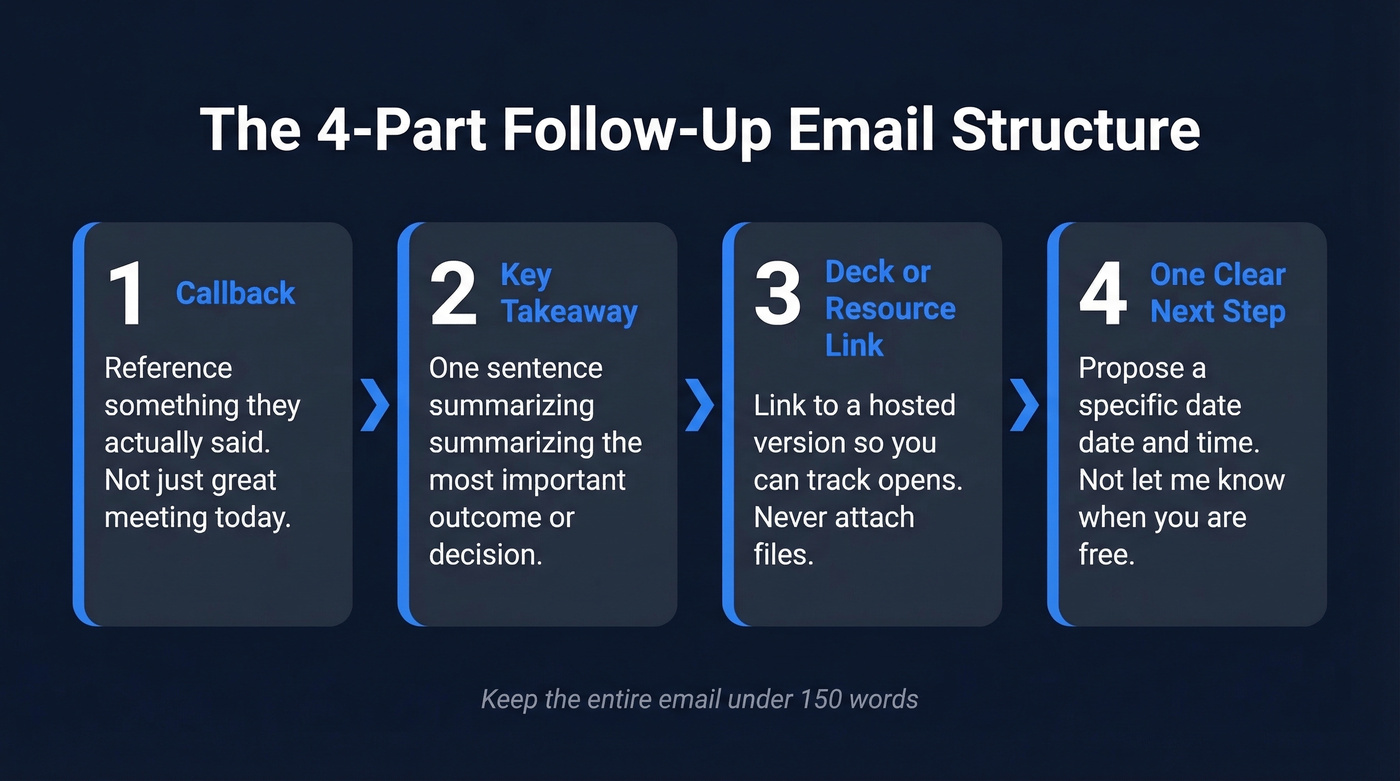
Every effective post-presentation email hits four beats. Keep it under 150 words, use bullets or bold for scannability, and note that this structure works for follow-ups - not formal meeting minutes or standalone thank-you notes.
- Callback - reference something the prospect or stakeholder actually said. "You mentioned your team's struggling with X" beats "Great meeting today" every time.
- Key takeaway - one sentence summarizing the most important outcome or decision point.
- Deck or resource link - don't attach the file (more on that in the FAQ). Link to a hosted version so you can track opens and update the deck after sending. (If you use a digital sales room, this gets even easier.)
- One clear next step with a date - "Does Thursday at 2pm work to review the proposal?" Not "Let me know when you're free." (More examples: email wording to schedule a meeting.)
Subject Lines That Get Opened
That same study of 5.5M emails found performance drops past 7 words, with 10-word lines landing around 34%. Question-format lines are the top performer overall. (For more ideas, browse these email subject line examples.)
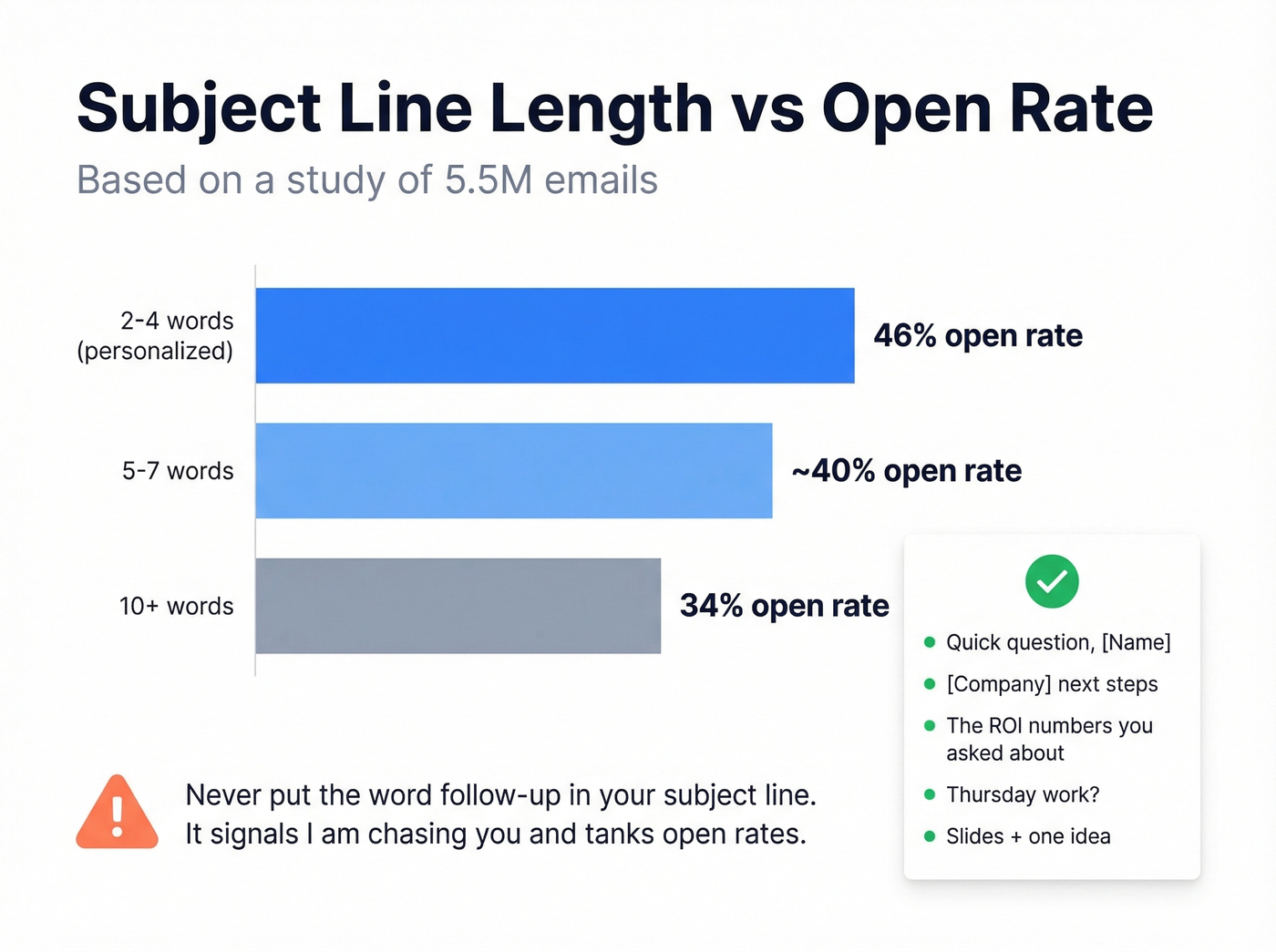
One hard rule: never put the word "follow-up" in your subject line. It screams "you're ignoring me" and tanks opens. (More data-backed guidance: subject lines that get opened.)
Lines that work after a presentation:
- "Quick question, [Name]"
- "[Company] next steps"
- "The ROI numbers you asked about"
- "Thursday work?"
- "Slides + one idea"
Short. Personal. No "Following up on our presentation" - ever.

You nailed the presentation. Don't let a bad email address kill the deal. Prospeo verifies emails with 98% accuracy so your follow-up actually reaches the decision-maker - not their old inbox or a catch-all black hole.
Stop crafting perfect follow-ups that bounce. Verify first.
Templates by Presentation Type
After a Sales Demo
Hi [Name],
You mentioned [pain point] is costing your team roughly [X hours/dollars] per quarter - that stuck with me. Here's the deck with the workflow we discussed: [link]
I mapped out how the implementation would look for your team. Can we walk through it Thursday at 2pm?
Best, [Your name]
Send this within 24 hours of the demo. The callback to their specific pain point is what separates this from the "great meeting!" emails they'll ignore. (If you want to tighten your demo flow, use a product demo checklist.)
After an Internal Proposal
Hi [Name],
Recapping from today's presentation: the proposal requires a go/no-go decision on [initiative] by [date] to hit our Q3 timeline. Deck is here: [link]
The two open items are [item 1] and [item 2] - happy to pull additional data on either. Can we lock 15 minutes Friday to finalize?
This works for budget approvals, strategy pitches, or any internal presentation where someone else holds the decision. The deadline framing creates urgency without being pushy.
After a Conference or Event Talk
Hi [Name],
Great connecting after the [talk topic] session at [event]. As promised, here are the slides: [link]
You asked about [question from the conversation] - I put together a quick breakdown that might help: [link or one-liner answer]. Worth a 15-minute call next week?
Reference the talk topic and something they actually said. Generic "nice to meet you" emails from conferences get deleted in bulk - we've watched it happen in real time.
After a Client Deliverable Walkthrough
Hi [Name],
Thanks for the time today. Here's the full report: [link]
Key outcomes: [metric 1] improved by [X%], and [metric 2] is trending [direction]. I've flagged two areas for the next sprint on page 4. Our next review is scheduled for [date] - let me know if that still works.
Link to everything, attach nothing. Confirm the next review date so there's no ambiguity about what happens next.
The "No Response" Second Touch
Hi [Name],
I'm finalizing my schedule for next week and wanted to see if [proposed date] works to continue the conversation from [presentation topic].
In the meantime, here's a case study from [similar company] that hit [result] using the approach we discussed: [link]
Send this on Day 3. The "finalizing my schedule" framing - a favorite on r/sales - gives a concrete reason for the email without sounding needy. The case study adds new value so you're not just bumping the thread.
The 3-Touch Cadence
More follow-ups don't mean more replies. A study of 16.5M emails found that sending 4+ emails in a sequence more than triples unsubscribe and spam complaint rates. (If you're building sequences at scale, see sequence management.)
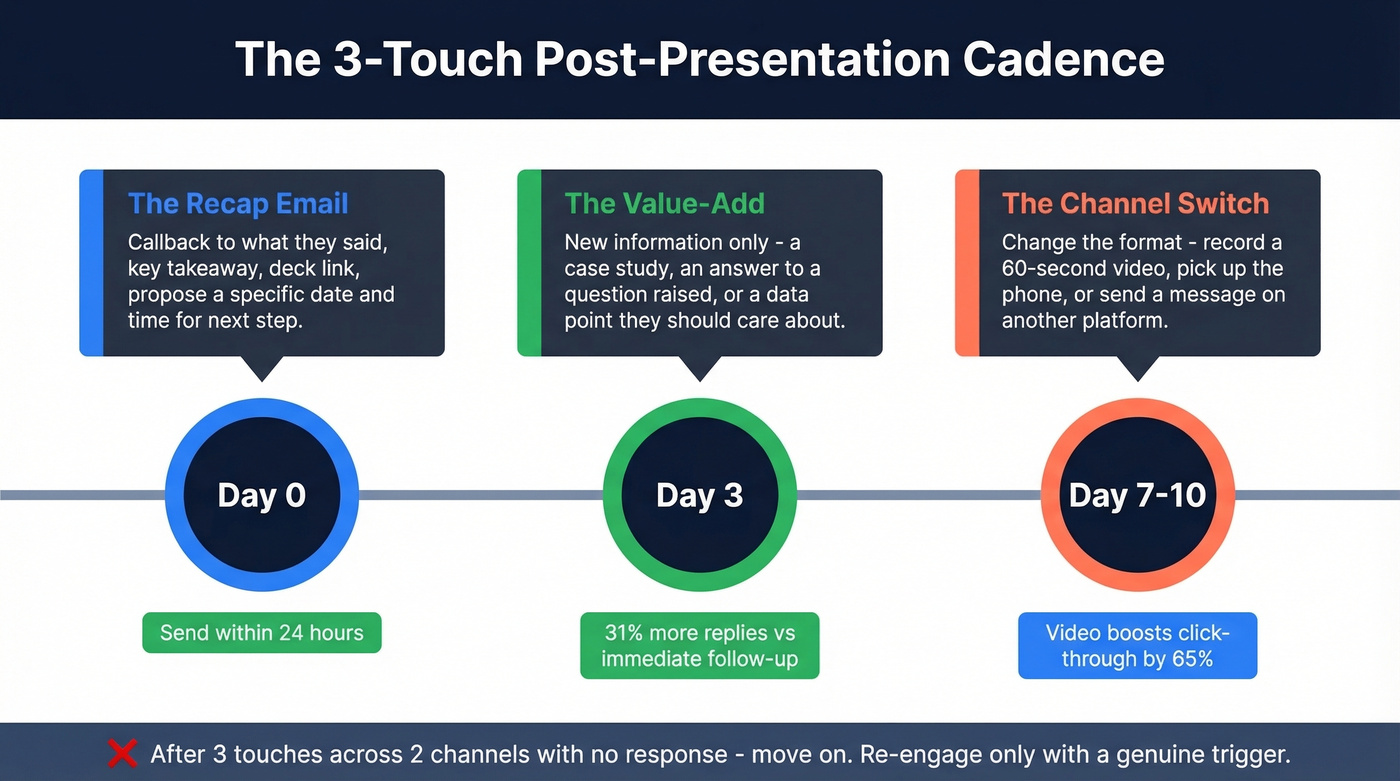
Three touches, max. Yes, most deals take 5-12 touchpoints to close, but touchpoints aren't all emails. Calls, videos, social touches, and in-person meetings count. Three emails is enough - spread the rest across channels.
Day 0 (within 24 hours): The recap email. Callback, takeaway, deck link, next step.
Day 3: The value-add. New information - a case study, an answer to a question raised, a data point they didn't ask for but should care about. Waiting 3 business days yields 31% more replies than following up immediately.
Day 7-10: The channel switch. Don't send a third email that reads like the first two. In our experience, the third touch works best as a format change - record a 60-second video recap, pick up the phone, or send a brief message on another platform. Follow-up emails with embedded video boost click-through rates by 65%. (If you're using Loom, this Loom video cold email approach translates well to warm follow-ups too.)
If you haven't heard back after three touches across two channels, move on. Re-engage when you have a genuine trigger - a new case study, a product update, a relevant industry shift.
Mistakes That Kill Your Follow-Up
"Just checking in" with no new information. We've all sent it. The classic "Hey, just following up, did you receive our quote?" is the fastest way to get archived. Every touch must add something the recipient didn't have before. (Better phrasing here: how to say just checking in professionally.)
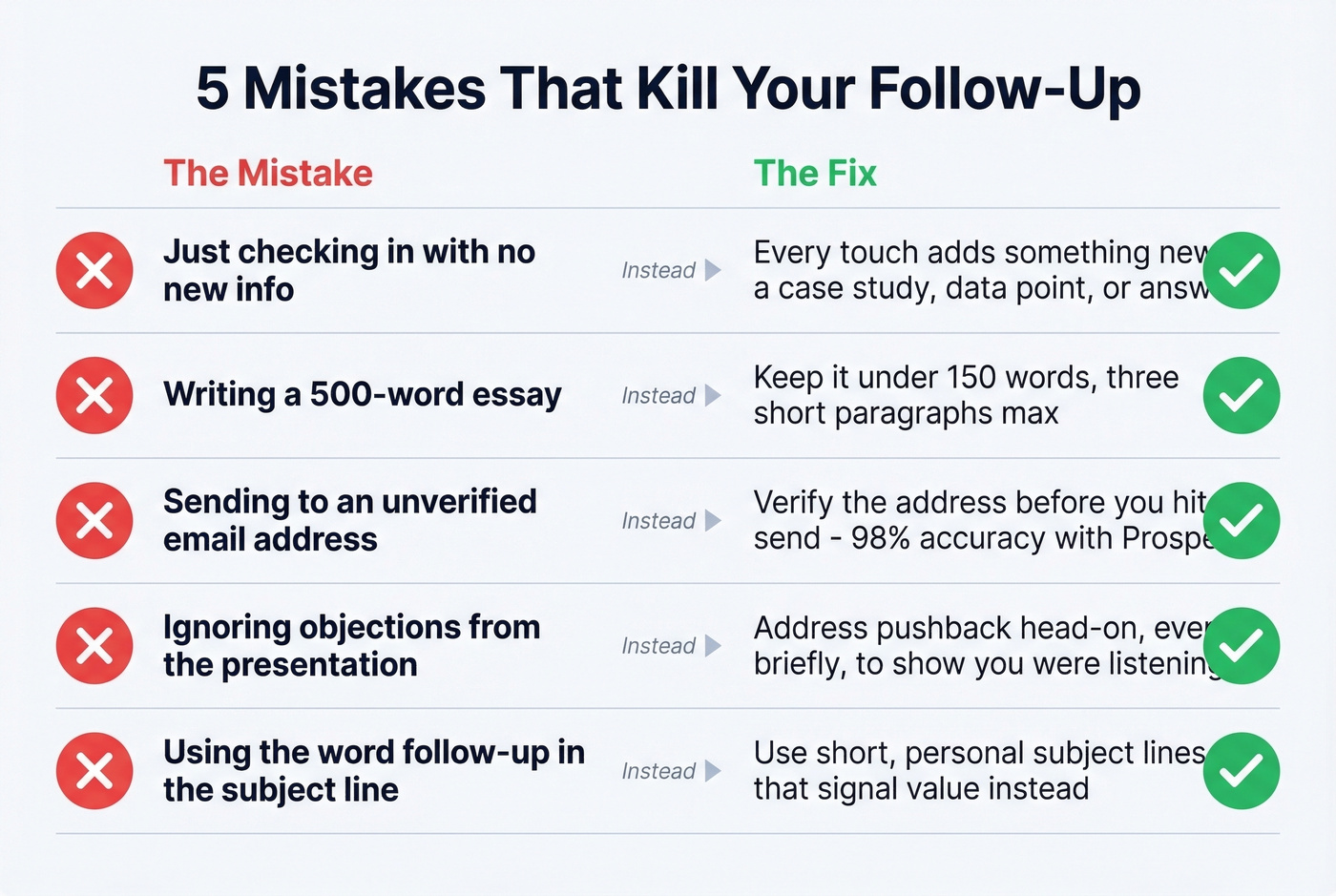
Writing a 500-word essay. Your follow-up isn't a second presentation. Keep it under 150 words. Three short paragraphs, max.
Sending to an unverified email address. Here's the thing - your carefully crafted follow-up is worthless if it bounces. You grabbed a generic address from a business card, or the contact gave you their old email. Tools like Prospeo verify addresses in real time with 98% accuracy, and the free tier covers 75 verifications per month, so there's no excuse to skip this step before hitting send. (If you're troubleshooting bounces, start with email bounce rate.)

Ignoring objections raised during the presentation. If someone pushed back on pricing or timeline and your follow-up pretends it didn't happen, you've lost credibility. Map each follow-up to the objections that surfaced. Address them head-on, even briefly - it shows you were listening.
Using "follow-up" in the subject line. It signals "I'm chasing you" instead of "I have something valuable." Skip it. Always.
Let's be honest: if your deal size is under $10k, you probably don't need a five-email nurture sequence. Send one great post-presentation recap, one value-add on Day 3, switch channels on Day 7, and move on. Overengineering the follow-up is just procrastinating on the next meeting.
When your third touch gets no reply, you need the right direct dial - not another email. Prospeo gives you 125M+ verified mobile numbers with a 30% pickup rate, so your channel switch actually connects.
Find their verified phone number and make touch three count.
FAQ
How soon should I send a follow up email after presentation?
Within 24 hours for sales demos and pitches - same day is ideal. For client walkthroughs and internal proposals, next business day at the latest. A 3-sentence email sent fast beats a polished recap sent 3 days later, since 90% of buyer responses come within two days of the last exchange.
Should I attach the deck or link to it?
Link to it - Google Slides, a digital sales room, or a hosted PDF. Attachments hurt deliverability, inflate email size, and give you zero visibility into whether the recipient actually opened the file. Hosted links also let you update the deck after sending without re-emailing everyone.
What if I don't have the right contact's email?
Use a verified data tool before you send. Prospeo's Chrome extension lets you find and verify professional emails from any company website in one click, with 98% accuracy. The free tier includes 100 extension credits per month - enough to confirm every stakeholder from a single presentation.
How many follow-ups should I send after a presentation?
Three, maximum. That study of 16.5M emails shows 4+ emails in a sequence more than triple spam complaint rates. Each touch must add new value. If three touches across two channels don't get a response, park the lead and re-engage when you have a genuine trigger.