

How to Follow Up an Email Without Getting Ignored
You sent the proposal three days ago. Read receipt: opened. Response: nothing. Now you're staring at the compose button, trying to sound professional without sounding desperate.
Following up an email is one of those deceptively simple tasks that most people get wrong. The uncomfortable truth? The follow-up itself usually isn't the problem. Your first email - and the infrastructure behind it - probably are.
The Short Version
- Two to three follow-ups is the sweet spot for most B2B. A Belkins study of 16.5M cold emails found the highest reply rate (8.4%) comes from a single well-crafted email. The 4th follow-up more than triples unsubscribe and spam complaint rates.
- Tuesday through Thursday, 10 AM recipient timezone, wait 2-3 business days. This pattern shows up consistently in modern outbound playbooks.
- Every follow-up earns its place with new value. "Just checking in" is dead. If you don't have something new to say, don't send it.
Why Most Follow-Up Messages Fail
The Belkins dataset is one of the largest public studies on follow-up performance, and the headline finding is counterintuitive: reply rates don't climb with more emails. They peak at 8.4% with one email and decline from there. Open rates hit 45.37% on the first send, then erode. In our experience, the third follow-up rarely moves the needle - and the fourth actively hurts you.
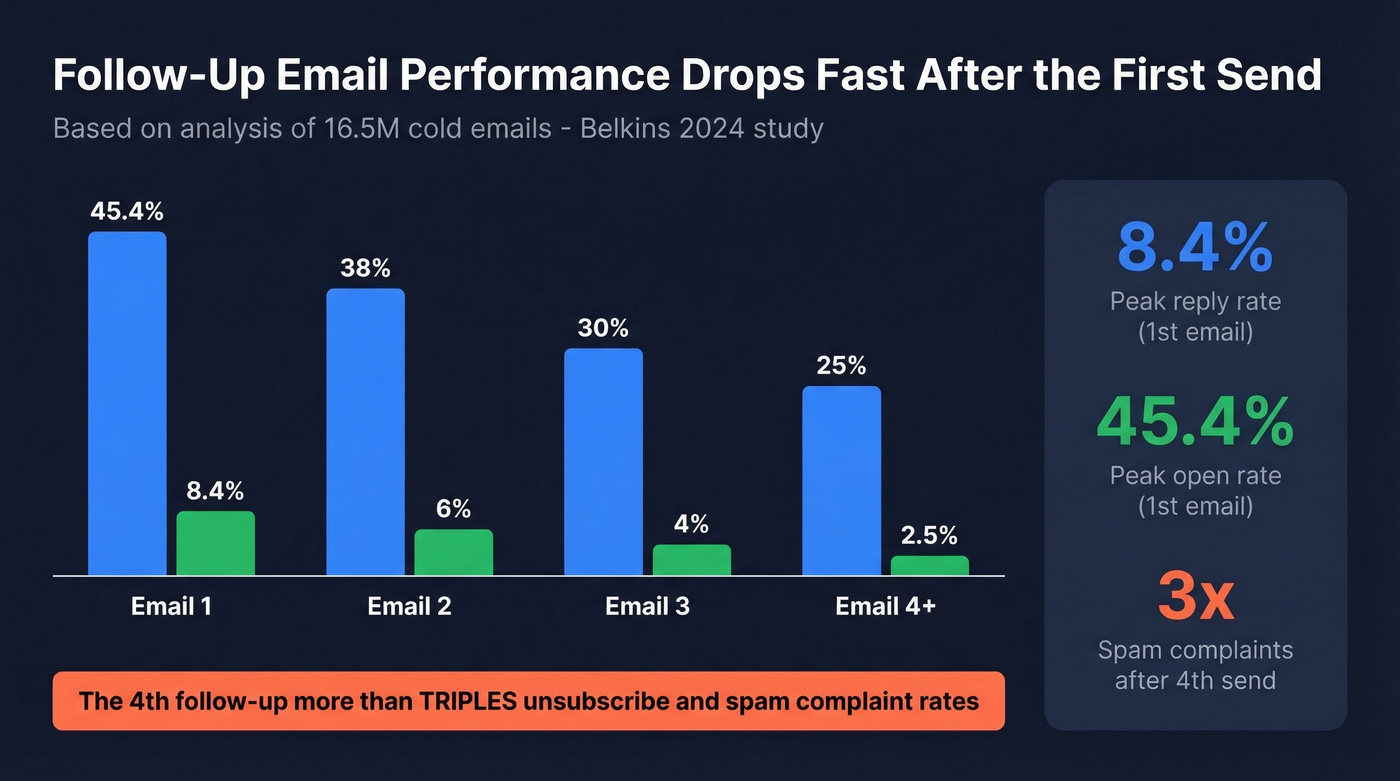
The damage compounds fast. That 4th follow-up more than triples unsubscribe and spam complaint rates. Enterprise contacts ghost quickly and punish persistence.
But there's a bigger problem lurking underneath all of this: roughly 1 in 6 emails never reach the inbox at all. Your carefully crafted follow-up might be sitting in a spam folder or bouncing off a dead address. You're not being ignored - you're being filtered.
Belkins also found that adding LinkedIn touches to an email sequence pushed reply rates above 5%, with a message-plus-profile-visit combo hitting 11.87%. Multi-channel beats email-only follow-ups every time.
The Five-Part Follow-Up Formula
Every effective follow-up has five elements. Miss one and you're gambling.
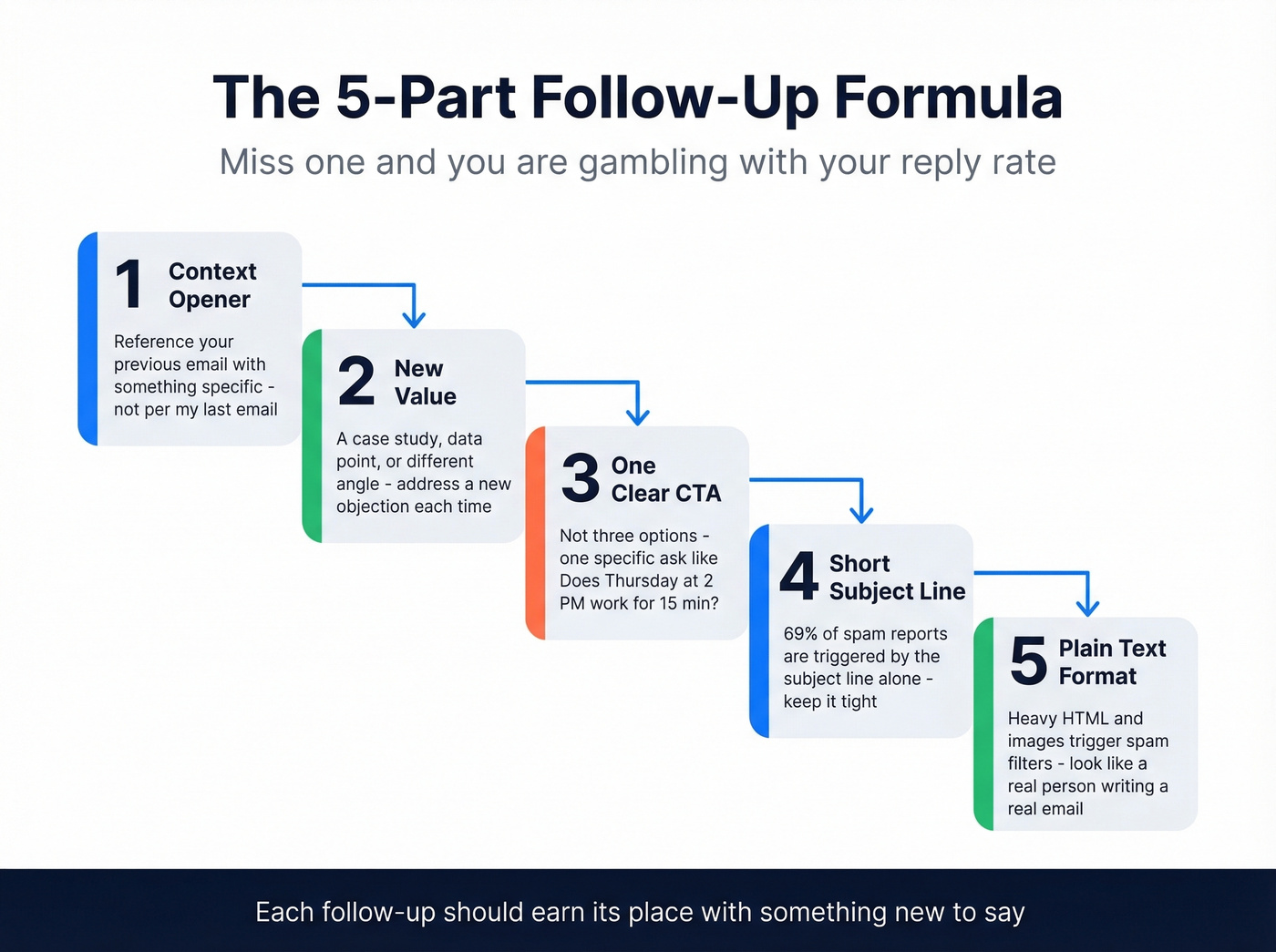
- Context opener referencing your previous email. Not "per my last email" - something specific. "I sent over the Q3 proposal on Tuesday" gives them a mental anchor without making them dig through their inbox.
- New value or a different angle. A relevant case study, a fresh data point, a different way to frame the problem. Each message should address a different objection: no perceived need, unclear value, no urgency, skepticism, or lack of trust - this is what separates a good follow-up from one that gets deleted instantly. (If you need a system for this, borrow a few ideas from how to add value in each touch.)
- One clear CTA. Not three options. Not "let me know your thoughts." A specific ask: "Does Thursday at 2 PM work for 15 minutes?" (More examples in our email call to action guide.)
- Short subject line. 69% of spam reports are triggered by the subject line alone. One Reddit practitioner tested this directly: "Quick question" pulled 39% opens, company-name subjects hit 33%, and "Partnership opportunity" landed under 19%. If you want swipeable options, see these email subject line examples.
- Plain text formatting. Heavy HTML and lots of embedded images increase filtering risk. Your message should look like a real email from a real person.

1 in 6 emails never reach the inbox. If your follow-ups are bouncing off dead addresses, no template or timing trick will save you. Prospeo's 5-step verification and 7-day data refresh ensure 98% email accuracy - so your follow-ups actually land.
Stop following up with addresses that don't exist.
Best Timing for Each Scenario
Timing depends entirely on context:
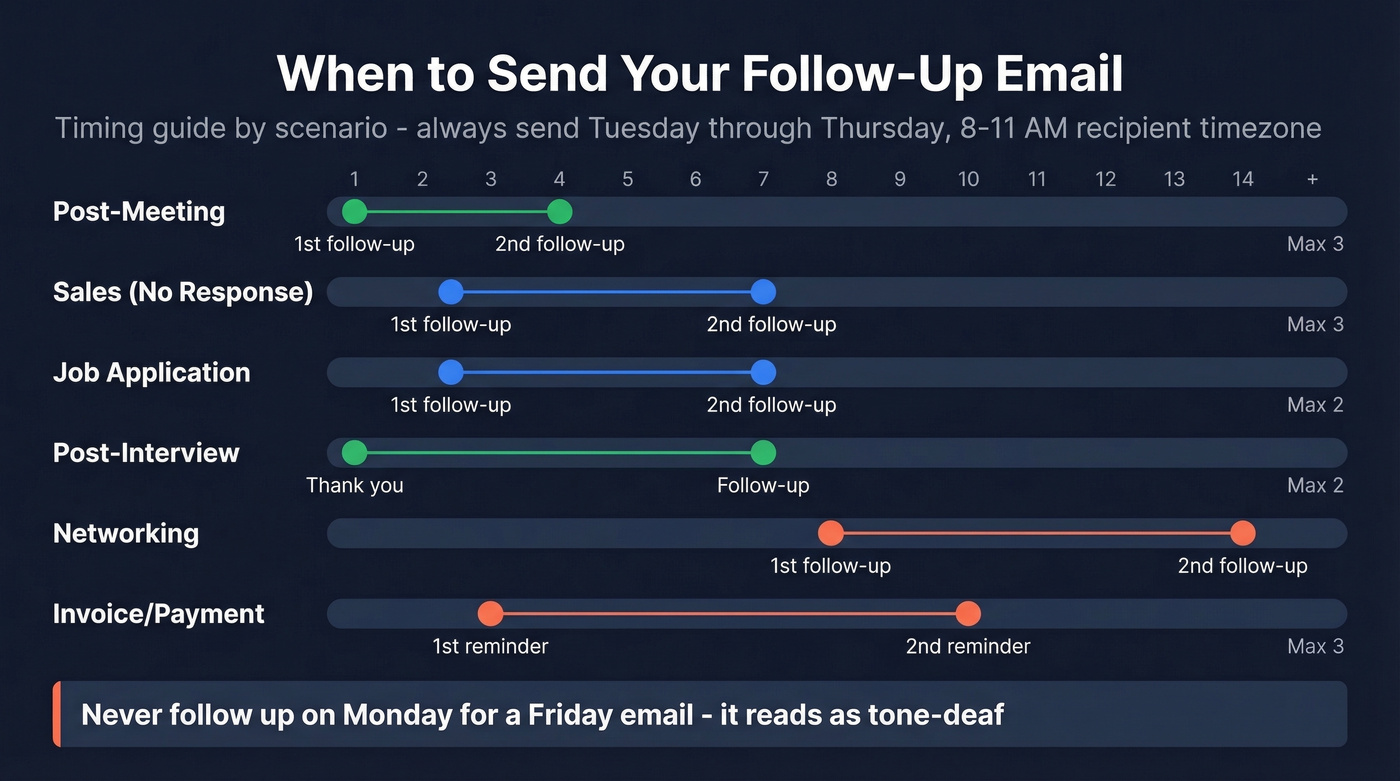
| Context | First Follow-Up | Second Follow-Up | Max Follow-Ups |
|---|---|---|---|
| Post-meeting | 24 hours | 3-5 days | 3 |
| Sales (no response) | 2-3 biz days | 5-7 days | 3 |
| Job application | 48-72 hours | 1 week | 2 |
| Post-interview | 24 hours | 1 week | 2 |
| Networking/freelance | ~8 days | 2 weeks | 2 |
| Invoice/payment | 3 days | 1 week | 3 |
Forbes suggests roughly 8 days as the sweet spot for networking follow-ups - long enough to not feel pushy, short enough to stay relevant. Two rules apply everywhere: never follow up on Monday for a Friday email (it reads as tone-deaf), and always send Tuesday through Thursday between 8-11 AM in the recipient's timezone. (For a deeper breakdown, see best time to send cold emails.)
Templates That Get Replies
Sales Follow-Up (No Response)
Subject: Quick question about [specific topic from first email]
Hi [Name], I sent over [specific deliverable] on [day]. Wanted to share one thing I missed - [new data point, case study, or angle that addresses a different objection]. Would [specific day] at [specific time] work for a quick call? Happy to adjust.
If you want more variations, here are sales follow-up templates you can copy/paste.
Post-Interview Follow-Up
Subject: Following up - [role title]
Hi [Name], thanks again for the conversation on [day]. You mentioned [specific challenge or goal they shared] - I've been thinking about how my experience with [relevant skill] maps directly to that. I'd love to continue the conversation. Any updates on next steps?
Use what they told you. A hiring manager who's conducted 1,000+ interviews says this kind of personalization is what separates callbacks from the rejection pile.
Networking / Freelance Follow-Up
Subject: [Their name] - quick follow-up
Hi [Name], I reached out about [topic] last week. I came across [relevant article, resource, or connection] and thought of you. Would you be open to a 15-minute call on [day]? No pressure either way.
Invoice / Payment Reminder
Subject: Invoice #[number] - due [date]
Hi [Name], just a heads-up that invoice #[number] for [amount] was due on [date]. I've reattached it here for convenience. Could you confirm receipt and expected payment timing?
The Breakup Email
Subject: Should I close this out?
Hi [Name], I've followed up a couple of times on [topic] and haven't heard back - totally understand if the timing isn't right. I'll close this out on my end, but if things change, I'm here.
The breakup email works because it removes pressure. We've seen it pull replies from contacts who ignored three previous messages. Something about "closing the file" triggers a response that polite persistence never does.
Mistakes That Kill Reply Rates
The biggest follow-up killer is sending "just checking in" with no new value. If your entire message is "wanted to circle back," you've wasted a send and trained the recipient to ignore you. One Reddit practitioner cut email length from 141 to 56 words and watched reply rates double. Shorter emails with real value always win.
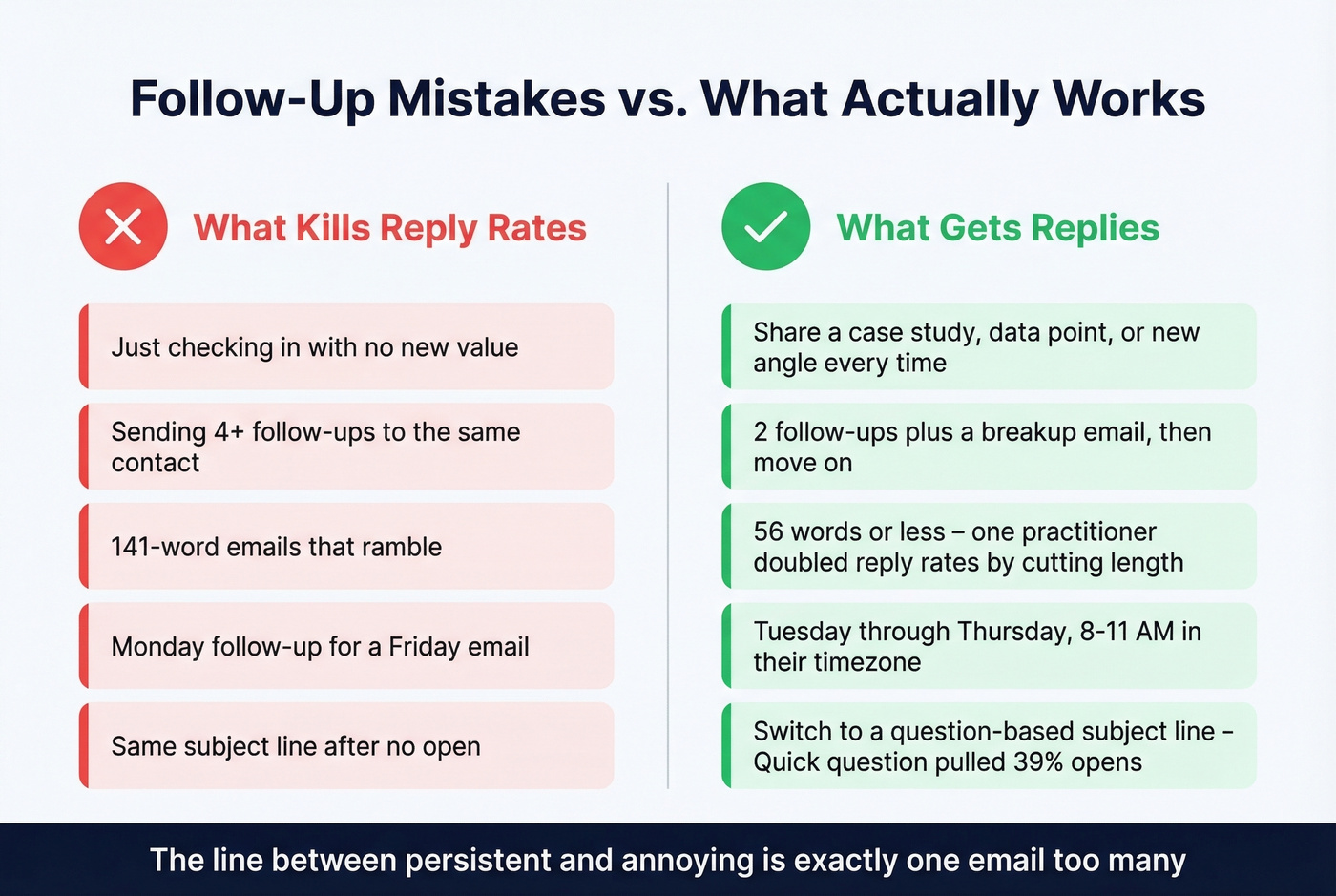
Following up on Monday for a Friday email signals you don't respect their time. And if they didn't open the first one, the subject line failed - change it. A question-based subject pulls significantly better than a statement. (If you keep getting filtered, run a quick check with an email spam checker before you send again.)
Here's the thing: skip automated sequences until your deliverability is clean. Automation just scales your mistakes faster. Two follow-ups plus a breakup is the sweet spot for most B2B contexts - three is already pushing it. The Belkins data is unambiguous on this. As one r/sales poster put it, the line between "persistent" and "annoying" is exactly one email too many.
Why Your Follow-Ups Never Arrive
Your follow-up strategy is only as good as your contact data. Office 365 inbox placement dropped from 77.4% to 50.7% year-over-year. Gmail and Yahoo now require bulk senders to keep spam complaints under 0.3% - the operational target should be under 0.1%.
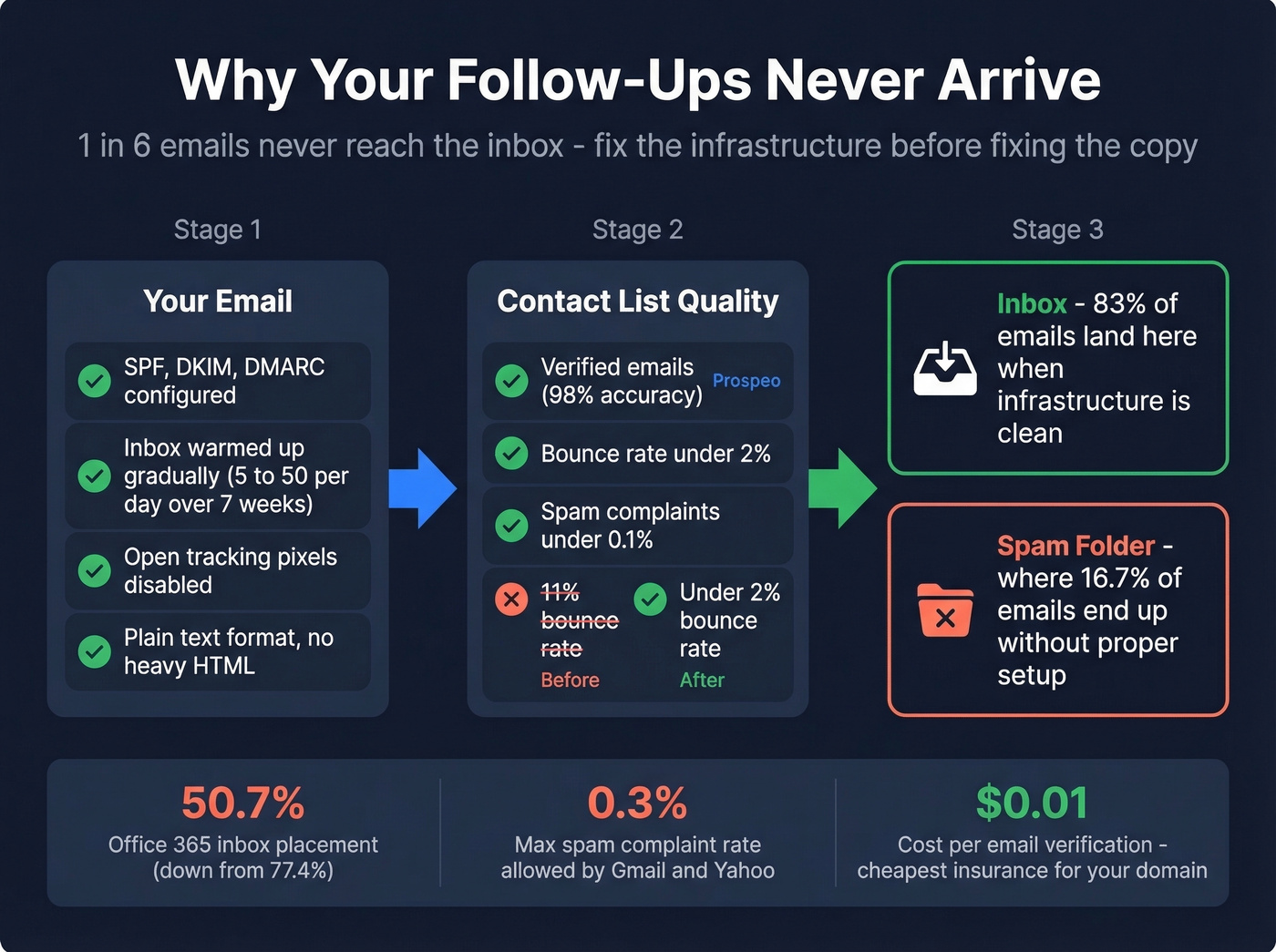
A practitioner on r/Entrepreneur documented their full rebuild: they went from 3 domains to 7, capped each at 26 emails per day, dropped their bounce rate from 11% to under 2%, and watched reply rates double. The infrastructure changes mattered more than the copy changes. Let's be honest - most people obsess over word choice when the real problem is that half their list is dead addresses.
If your bounce rate is above 2%, your domain reputation erodes with every send. We run our lists through Prospeo's verification before any follow-up sequence - its 5-step process catches invalid addresses, spam traps, and catch-all domains at 98% accuracy, and the free tier covers 75 emails per month. You can't fix deliverability with better subject lines if you're sending to dead addresses. (Benchmarks and fixes: email bounce rate.)
The non-negotiable deliverability checklist before any follow-up sequence:
- Authenticate your domains. SPF, DKIM, and DMARC properly configured improves inbox placement by 5-10 percentage points. (If you want to validate the setup, use this guide on how to verify DKIM is working.)
- Warm up new inboxes gradually. Start at 5-10 emails per day, ramp to 15-20 by week three, don't exceed 50 per day per inbox until week seven. (More on safe sending limits in email velocity.)
- Verify every contact before sending. At roughly $0.01 per email, verification is the cheapest insurance your domain reputation can buy.
- Keep bounce rate under 2%, spam complaints under 0.1%.
- Disable open tracking pixels. They trigger spam filters and the data isn't reliable anyway.
For automating follow-up sequences once your deliverability is solid, HubSpot Sequences runs sales cadences inside HubSpot, Woodpecker specializes in cold email automation with built-in deliverability controls, and Mailshake supports multi-channel outreach. Pick whichever fits your stack - but don't turn anything on until your list is clean. (If you're comparing options, start with follow up email software.)
The data is clear: multi-channel follow-ups crush email-only sequences. Prospeo gives you verified emails and direct mobile numbers for 300M+ professionals - so you can pair that follow-up email with a LinkedIn touch or a direct dial that actually connects.
Turn ignored follow-ups into booked meetings at $0.01 per email.
FAQ
How many follow-up emails should I send?
Two to three for most professional contexts. Belkins' study of 16.5M emails shows reply rates decline after the first email, and the 4th follow-up more than triples unsubscribe and spam complaint rates. Campaigns with even one follow-up convert roughly 22% more prospects than those without. Send a breakup email after your second or third attempt and move on.
How long should I wait before following up?
Two to three business days for sales and job applications. About a week for networking and freelance outreach. For post-interview thank-yous, send within 24 hours. Never send a Monday follow-up for a Friday message.
How do I follow up without sounding desperate?
Add new value in every message - a relevant article, a different angle on your proposal, or a specific question. Avoid "just checking in" or "circling back." Keep it under 60 words. If you're providing something useful, you're not being annoying - you're being helpful.
What's the best free tool for verifying emails before follow-ups?
Prospeo's free tier includes 75 email verifications per month with 98% accuracy and catch-all domain handling - enough for small teams running real campaigns. Hunter offers 25 free searches monthly but caps enrichment features. For high-volume senders, paid verification at ~$0.01 per email pays for itself by protecting domain reputation.