

Best Free AI Email Generators in 2026 (and How to Get Good Output)
It's 4:47 PM. You've got eleven emails to write before end of day - a follow-up to a prospect who went dark, a recap for your VP, three vendor replies, and a cold sequence that was due yesterday. A free AI email generator should fix this. UK workers spend almost nine hours per week writing emails, and roughly 40% of professionals already use or plan to use AI for email. The tools exist. The problem is that most people try one, get a draft that reads like a corporate chatbot from 2019, and give up.
The tool wasn't the issue. The prompt was.
We tested eight free AI email writer tools, ranked them by what actually matters, and built a prompting framework that makes any of them produce output worth sending. If you want a broader roundup beyond the free tier, see our full guide to the AI email writer landscape.
Our Picks (Quick Version)
If you don't want to read 2,000 words, here's the short answer:
- QuillBot - best truly free option for everyday professional emails. No paywall on the email writer, 5M+ Chrome extension users, works right in your inbox.
- ChatGPT - most flexible for complex or custom emails. Free tier gets you GPT-3.5; $20/mo for Plus. Handles any tone, any format, any scenario - if you know how to prompt it.
- Mailmeteor - best for Gmail users who send in volume. 50 emails/day free, Chrome extension, privacy-focused design.
Those three cover 90% of use cases. The rest of this article is for the other 10% - and for making any of these tools produce output that doesn't sound like a robot.
Top Free AI Email Writers Compared
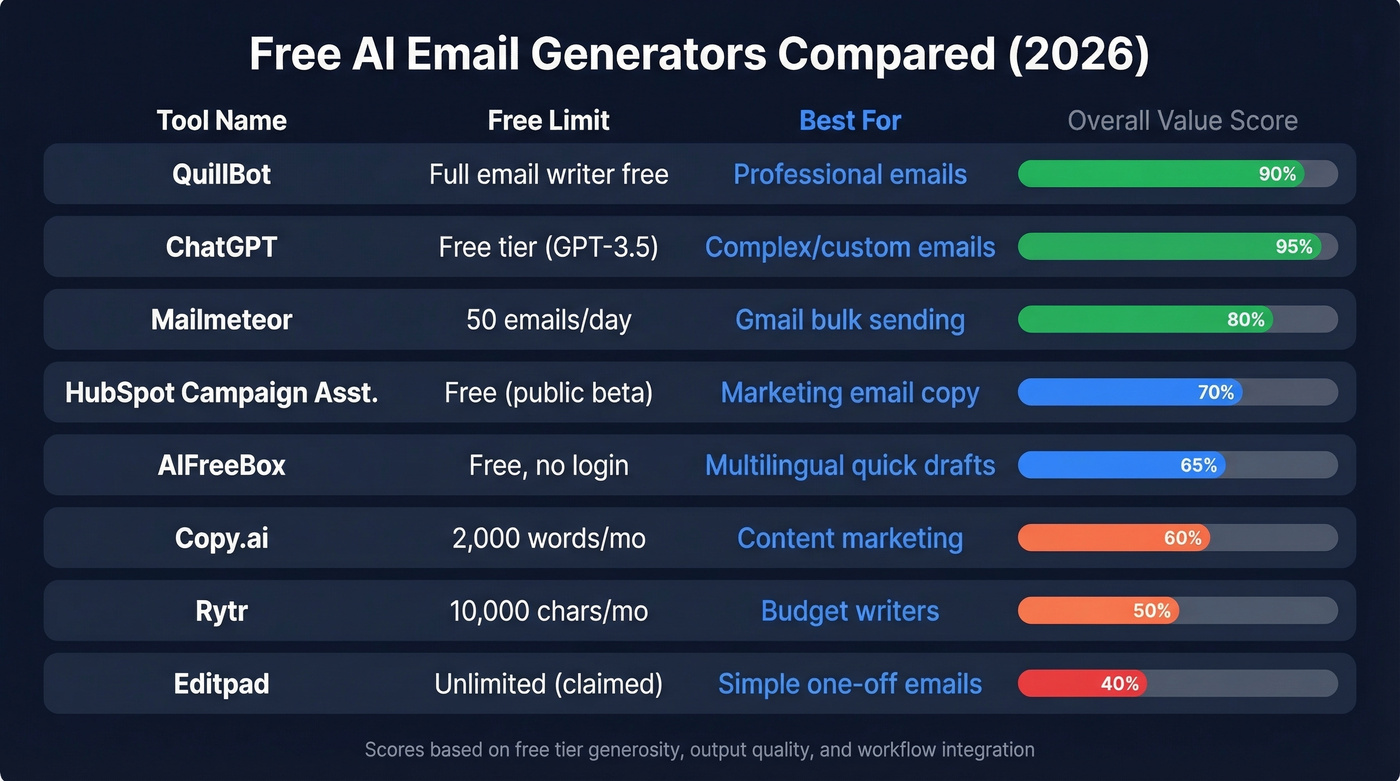
We tested or evaluated each tool on three criteria: how generous the free option actually is, whether it integrates with your inbox, and output quality on a standard follow-up email prompt. If you're building a full outbound workflow, pairing a writer with outbound email automation is usually where the real time savings show up.
| Tool | Free Limit | Paid From | Best For | Languages |
|---|---|---|---|---|
| QuillBot | Full email writer free | Premium available | Professional emails | 10+ |
| ChatGPT | Free tier (GPT-3.5) | $20/mo | Complex/custom emails | 50+ |
| Mailmeteor | 50 emails/day | $4.99/mo | Gmail bulk sending | English-focused |
| HubSpot Campaign Asst. | Free (public beta) | Paid HubSpot plans | Marketing email copy | English-focused |
| AIFreeBox | Free, no login | "Ultra" available | Multilingual quick drafts | 33 |
| Copy.ai | 2,000 words/mo | $24/mo | Content marketing | 25+ |
| Rytr | 10,000 chars/mo | $7.50/mo | Budget writers | 30+ |
| Editpad | Unlimited (claimed) | $5.99/week | Simple one-off emails | Multiple |
QuillBot
QuillBot's email writer is the rare AI tool that's actually, fully free - no character cap, no daily limit on the email generator itself. You type a prompt, pick a formality level, and get a draft. The Chrome extension (4.7/5 rating, 5M+ users) lets you generate emails right inside Gmail or Outlook without switching tabs.
The catch is subtler than a paywall. QuillBot's paraphraser caps free users at 125 words, and the email writer's output feels generic if your prompt is vague. "Write a follow-up email" gives you something bland. "Write a follow-up to a VP of Marketing who attended our webinar on ABM but hasn't replied to my demo request - keep it under 80 words, casual tone" gives you something usable. The tool is free; the skill is in the input.
If you're writing follow-ups all day, it also helps to have a real cadence plan; our follow up email sequence strategy guide breaks down timing and structure.
ChatGPT
ChatGPT is the Swiss Army knife. It handles cold outreach, internal updates, apology emails, negotiation replies - anything you can describe in a prompt. The free tier runs GPT-3.5, which is good enough for most email tasks. Plus at $20/mo is a meaningful upgrade for people who write a lot of emails and want better output quality.
The tradeoff: zero inbox integration out of the box. You're copying and pasting unless you bolt on a third-party extension. And it requires real prompt skill - we've seen people get frustrated because they type "write me a sales email" and get something that sounds like a LinkedIn post from 2017. The prompting section below fixes that.
ChatGPT is the most powerful free option available, but only if you learn to drive it. For more on making AI output feel human, see AI email personalization.

Mailmeteor
Mailmeteor lives inside Gmail. Install the Chrome extension, and you get an AI email writer free of the usual tab-switching friction - it generates drafts directly in your compose window. The free plan gives you 50 emails per day, generous enough for most individual senders. Paid plans start at $4.99/mo.
The privacy angle is real: Mailmeteor sends emails without needing to read your inbox, which is unusual for Gmail add-ons. If you're not in the Gmail/Google Workspace ecosystem, skip this one - a standalone generator will serve you better. (If you are in Workspace, make sure your setup is solid; this Google Workspace email setup guide covers the basics.)
HubSpot Campaign Assistant
HubSpot's Campaign Assistant is a free public beta that generates marketing email copy - subject lines, body text, CTAs - and loads the output directly into HubSpot email templates. It's the best option if you're already running campaigns in HubSpot's ecosystem.
The limitation is scope. You need a HubSpot account (the free CRM works), and the tool is designed for marketing emails, not 1:1 sales correspondence. If you're comparing CRM ecosystems, our CRM automation software breakdown can help.
AIFreeBox
No account required. Open AIFreeBox's email generator, type your prompt, and get two versions - one concise, one detailed. It supports 33 languages and 20+ tone styles, with a creativity slider you can dial from conservative to wild. No Chrome extension, no inbox integration, so you're in copy-paste territory. Think of it as the fastest path from "I need an email" to "here's a draft" when you don't want to log into anything.
Copy.ai
Copy.ai is strong for content marketing emails - newsletters, drip sequences, product announcements. The free tier gives you 2,000 words per month plus 200 one-time workflow credits. Paid plans start at $24/mo.
Here's the thing: 2,000 words burns through fast. That's maybe 8-10 emails before you're gated. If you're writing daily, you'll hit the wall by week two. It's a trial disguised as a free plan. If you're sending newsletters or promos, you may also want these email blast templates to avoid starting from scratch.
Rytr
Rytr offers 10,000 characters per month on the free tier - roughly 2-3 full emails - with paid plans from $7.50/mo. It supports 30+ languages and is the budget option if you outgrow free tools but don't want to pay $20/mo for ChatGPT Plus. Not much depth here, but it fills a gap.
Editpad
Editpad claims unlimited free email generations with no login. Output quality is inconsistent - some drafts are usable, others read like they were translated through three languages. Premium pricing at $5.99/week adds up to about $26/month, which is steep for what you get. Worth a quick test, not a commitment.
ChatGPT vs. Dedicated Tools
This is the question everyone asks: should you just use ChatGPT for everything, or do dedicated email generators add real value?
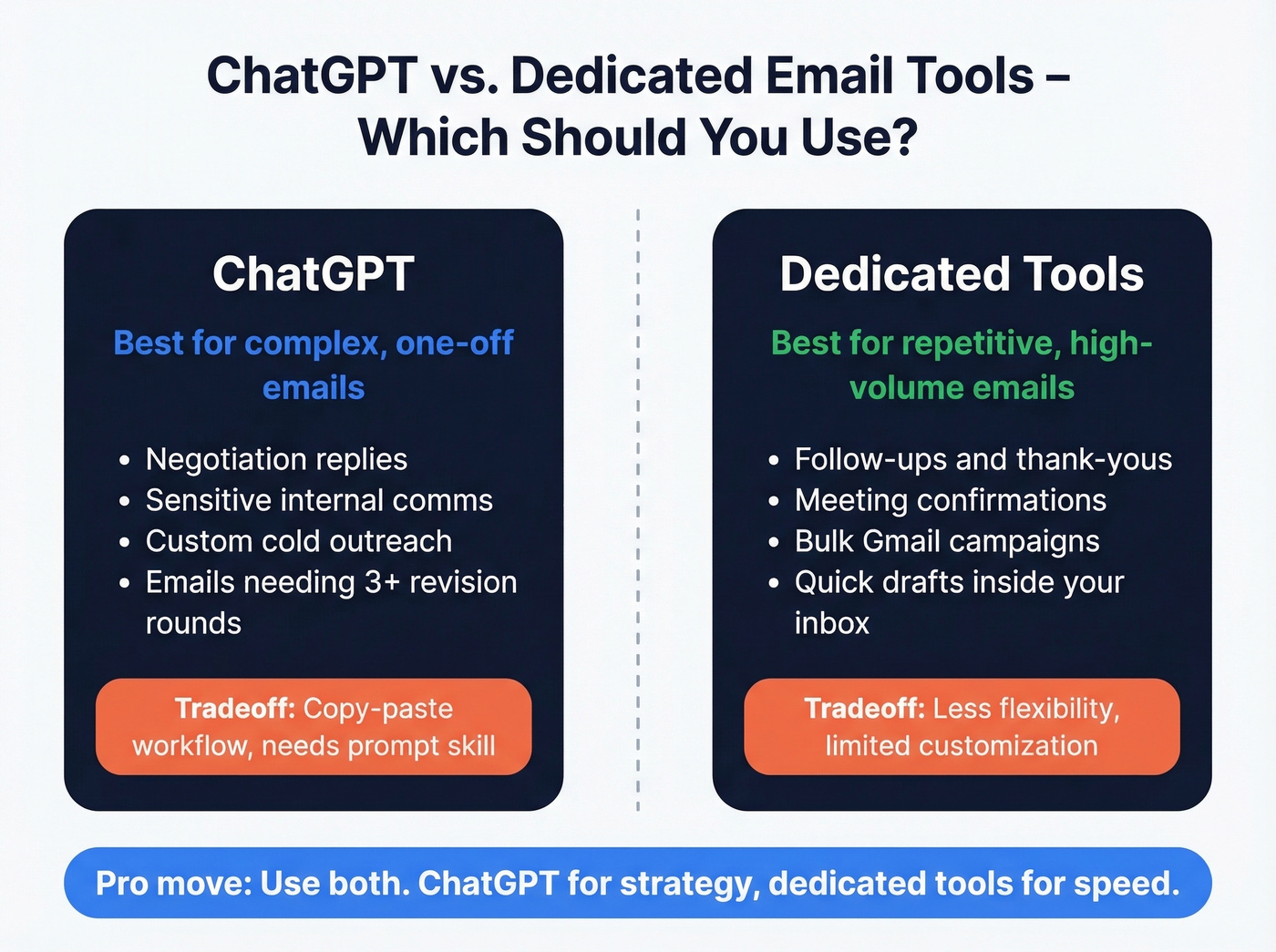
ChatGPT wins on flexibility. You can write any email type, in any tone, for any audience. You can iterate on a draft five times in the same conversation, adjusting length, formality, and specifics. No dedicated tool matches that range.
Dedicated tools win on speed and workflow. QuillBot generates an email in your inbox without switching tabs. Mailmeteor sends 50 emails a day from Gmail. HubSpot loads copy directly into your campaign templates. These tools eliminate the copy-paste friction that makes ChatGPT feel clunky for repetitive tasks.
Our recommendation: use ChatGPT for complex, one-off emails where you need nuance - negotiation replies, sensitive internal communications, custom cold outreach. Use a dedicated tool for repetitive email types like follow-ups, thank-yous, and meeting confirmations, where speed matters more than customization.
One concern that comes up often: AI detection. Tools like GPTZero and Copyleaks exist, and there are roughly 20 tell-tale signs of AI-written text. But detection tools aren't reliable, and most recipients don't run your emails through a classifier. The real risk isn't detection - it's generic tone. A bad AI email doesn't get flagged by software. It gets ignored by humans.
Prompts That Produce Usable Drafts
You don't need ten AI email tools. You need one good generator and one good prompt template. Here's the four-part framework from Forbes that we've adapted for sales and business emails:
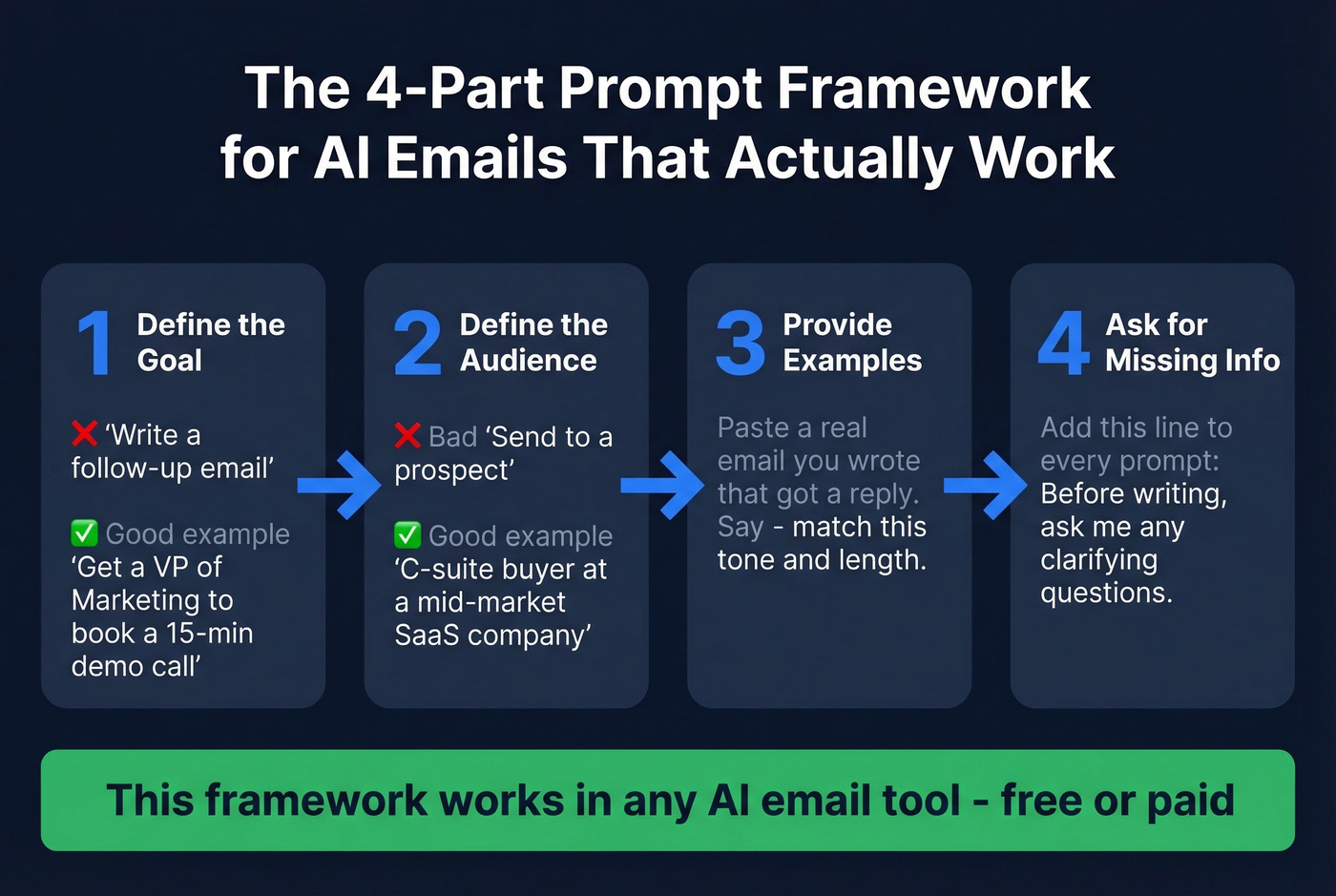
1. Define the goal. "Write a follow-up email" is vague. "Write a follow-up email that gets a VP of Marketing to book a 15-minute demo call" is specific. Fuzzy objectives produce fuzzy output.
2. Define the audience. Your tone for a C-suite prospect is different from your tone for a peer at a partner company. Tell the AI who's reading. (If you're still tightening targeting, start with an ideal customer profile.)
3. Provide examples. Paste in an email you've written that got a reply. Say "match this tone and length." This single step eliminates a huge chunk of the "sounds robotic" problem.
4. Tell it to ask for missing info. Add this line to any prompt: "Before writing, ask me any clarifying questions." This reduces hallucination and forces the AI to gather context instead of guessing.
Two templates you can copy right now:
Follow-up prompt: "Write a 60-word follow-up email to [Name], [Title] at [Company]. They attended our webinar on [topic] last Tuesday but haven't replied to my demo request. Tone: friendly, not pushy. End with a specific time suggestion, not an open-ended 'let me know.'"
Cold outreach prompt: "Write a cold email to a Director of Sales Operations at a mid-market SaaS company. We sell [product]. Lead with a pain point about [specific problem], not a product pitch. Keep it under 90 words. No 'I hope this finds you well.' Match this tone: [paste example]."
These prompts work in any AI email tool, free or paid. The framework is tool-agnostic. If you want more structure for first-touch emails, use this best sales introduction email framework.

A perfect AI-generated email is worthless if it bounces. Prospeo gives you 143M+ verified email addresses with 98% accuracy - so every draft your AI writes actually reaches a real inbox. At $0.01 per email, you'll spend less on contacts than on your ChatGPT Plus subscription.
Write the email with AI. Find the recipient with Prospeo.
Mistakes That Ruin AI Emails
Every AI email generator page says "write professional emails in seconds." None of them mention that the default output sounds like it was written by a committee. Here are the five mistakes that actually matter:
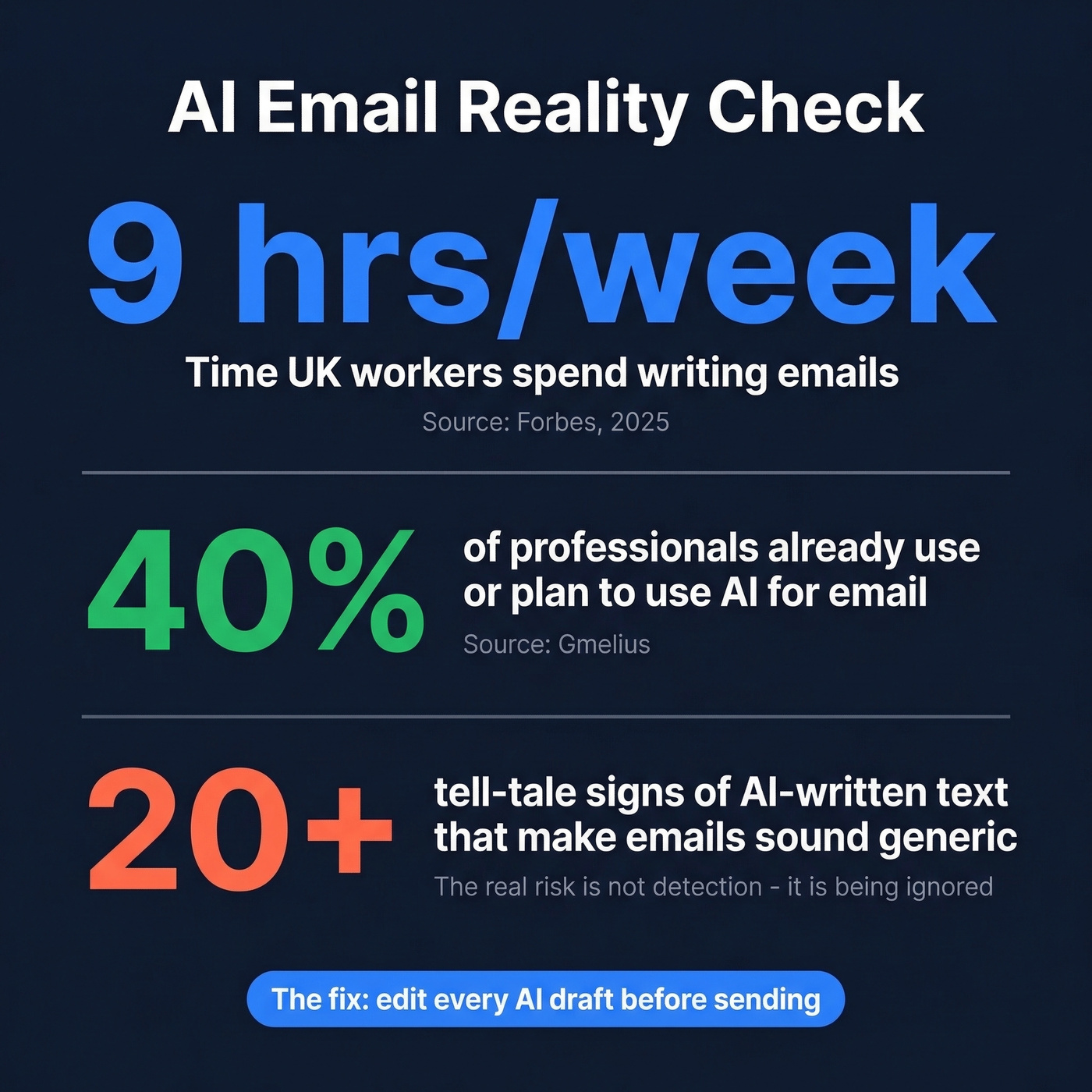
Sending the first draft. AI gives you a starting point, not a finished product. If you're not editing for tone, specificity, and your actual voice, you're sending generic emails that read like everyone else's generic emails. We've A/B tested this internally - edited AI drafts outperform raw ones by a wide margin on reply rates.
Trusting AI-generated facts. Hallucination is real. An AI might write "According to the 2023 report from the Ministry of the Environment..." - a report that doesn't exist. Always verify any statistic, name, or reference the AI includes.
Generic personalization. "I noticed your company is doing great things in the [industry] space" isn't personalization. It's a template with a bracket. Real personalization references something specific - a recent hire, a product launch, a LinkedIn post, a public announcement. For practical tactics, see how to personalize cold emails.
Set-and-forget campaigns. AI-generated drip sequences go stale. Review and refresh your automated emails every few weeks. What worked in January sounds dated by March.
The Privacy Risk Nobody Mentions
When you paste email content into a free AI tool, that text is processed on their servers. Your content is decrypted, analyzed, and used to generate a response - and depending on the tool's terms, it could be stored or used for model training.
The risk compounds with third-party integrations. Connecting an AI email tool to your inbox means granting access to a developer outside your email provider. That's two companies with access to your communications instead of one. The consensus on r/productivity and r/sales is pretty clear: people are wary of granting "random AI apps" access to their inbox versus trusting established providers. Gartner predicts that by 2028, 40% of large enterprises will use AI to monitor employee moods and behaviors - your email content could feed those systems.
Don't paste confidential information - deal terms, salary details, legal discussions - into free AI tools. If you're in a regulated industry, check whether the tool is GDPR/CCPA compliant before connecting it to your inbox. For sensitive emails, draft locally or use an enterprise-grade tool with clear data handling policies. (For a deeper compliance checklist, see our GDPR compliant database guide.)
Does AI Email Hurt Deliverability?
Spam filters don't care whether a human or an AI wrote your email. They evaluate authentication, sender reputation, and engagement signals. That's it.
What actually matters: your domain needs SPF, DKIM, and DMARC authentication configured correctly. Gmail enforces a spam complaint threshold between 0.1% and 0.3% - exceed that and your deliverability craters. Large senders need one-click unsubscribe, processed within two days. Apple Mail on iOS 18.2+ now uses on-device AI to sort emails into Primary, Transactions, Updates, and Promotions tabs, which affects visibility regardless of who wrote the email.
The deliverability problem isn't AI-generated content. It's sending to bad addresses, skipping authentication, and ignoring engagement metrics. If you need a full setup walkthrough, start with sender authentication.
Bad Contact Data Kills AI Emails
Let's be honest about where most AI email workflows actually break down. It's not the writing. It's the list.
You craft a sharp sequence, personalize every line, nail the tone - then 23% of your emails bounce because the addresses were stale. Your domain reputation takes a hit, and the remaining emails start landing in spam. We've watched this happen to teams that spent weeks on copy and zero minutes on verification.
Prospeo verifies email addresses before you send, with 98% accuracy across 143M+ verified emails. The free tier gives you 75 email verifications per month - enough to clean a small outbound list. Upload a CSV, get results in minutes, and only send to addresses that won't bounce. For teams running larger campaigns, paid plans run about $0.01 per email with no annual contracts. If you're comparing providers, our best email verifier guide is a good starting point.
The best AI-written email in the world is worthless if it never reaches the inbox.
You just saved hours generating emails with AI. Now stop wasting those hours hunting for the right email addresses to send them to. Prospeo's Chrome extension lets 40,000+ users find verified emails and direct dials in one click - right from LinkedIn, company sites, or your CRM.
Generate the copy with AI. Find every contact with Prospeo.
Are AI-generated emails detected by recipients?
Detection tools like GPTZero exist but aren't reliable enough to consistently flag AI-written emails. The real risk is generic tone, not software detection. Recipients don't scan your message through a classifier - they just ignore it if it reads like every other templated pitch in their inbox. Edit every draft for your voice before sending.
What's the best free AI email generator for sales?
ChatGPT's free tier is the strongest option for custom sales sequences - you can iterate on tone, length, and specificity in one conversation. QuillBot handles quick one-off follow-ups well. For Gmail-based volume sending, Mailmeteor is ideal. Start with ChatGPT and the four-part prompting framework above.
Can I use AI generators for cold email campaigns?
Yes, but the AI draft is your starting point, not your finished product. Personalize beyond what the generator produces, verify your list to keep bounces under 4%, and hold spam complaints below 0.3%. Generic AI cold emails at scale will damage sender reputation fast.
Are free AI email tools safe for business use?
Your content is processed on external servers - decrypted, analyzed, and potentially stored for model training. Don't paste confidential deal terms, salary details, or legal discussions into free tools. Review each tool's privacy policy before connecting it to your inbox, especially under GDPR or CCPA.
How do I make sure AI emails actually get delivered?
Configure SPF, DKIM, and DMARC authentication on your domain first. Clean your contact list to eliminate bounces. Keep spam complaints under 0.3%, include one-click unsubscribe for bulk sends, and monitor engagement metrics weekly. The writing quality matters far less than the infrastructure behind it.