

Free Email Tracking for Outlook: What Actually Works in 2026
You sent a proposal last Tuesday. Radio silence. Outlook's read receipt popped up on your prospect's screen asking "Do you want to send a read receipt?" and they clicked No. Every time.
Now you need free email tracking for Outlook, and every guide lists ten tools - half of which only work in Gmail. Outlook users are second-class citizens in the email tracking world, and it's time someone was honest about it.
Three Paths, Quick
Depending on what you actually want:
- Truly free, no install: Outlook's built-in read receipts. Limited, but zero cost and zero setup beyond a checkbox.
- Free tracker with caveats: Mailsuite gives you free open tracking but stamps a branding signature on every email. Intelliverse is free with a $4.99/month upgrade path.
- Outlook-native with real features: Boomerang (10 free credits/month) or Yesware (24-hour free lookback window).
Before you pick any of these, know this - open tracking data is noisy in 2026. Between Apple's Mail Privacy Protection, Gmail's image proxying, and corporate environments that block external images, your "opened" notification might be a machine, a proxy server, or nothing at all.
How Email Tracking Works
Every email tracker uses the same trick: a tiny, invisible 1x1 pixel image embedded in your email. When the recipient's email client loads that image, the tracker's server logs it as an "open" and records the timestamp.
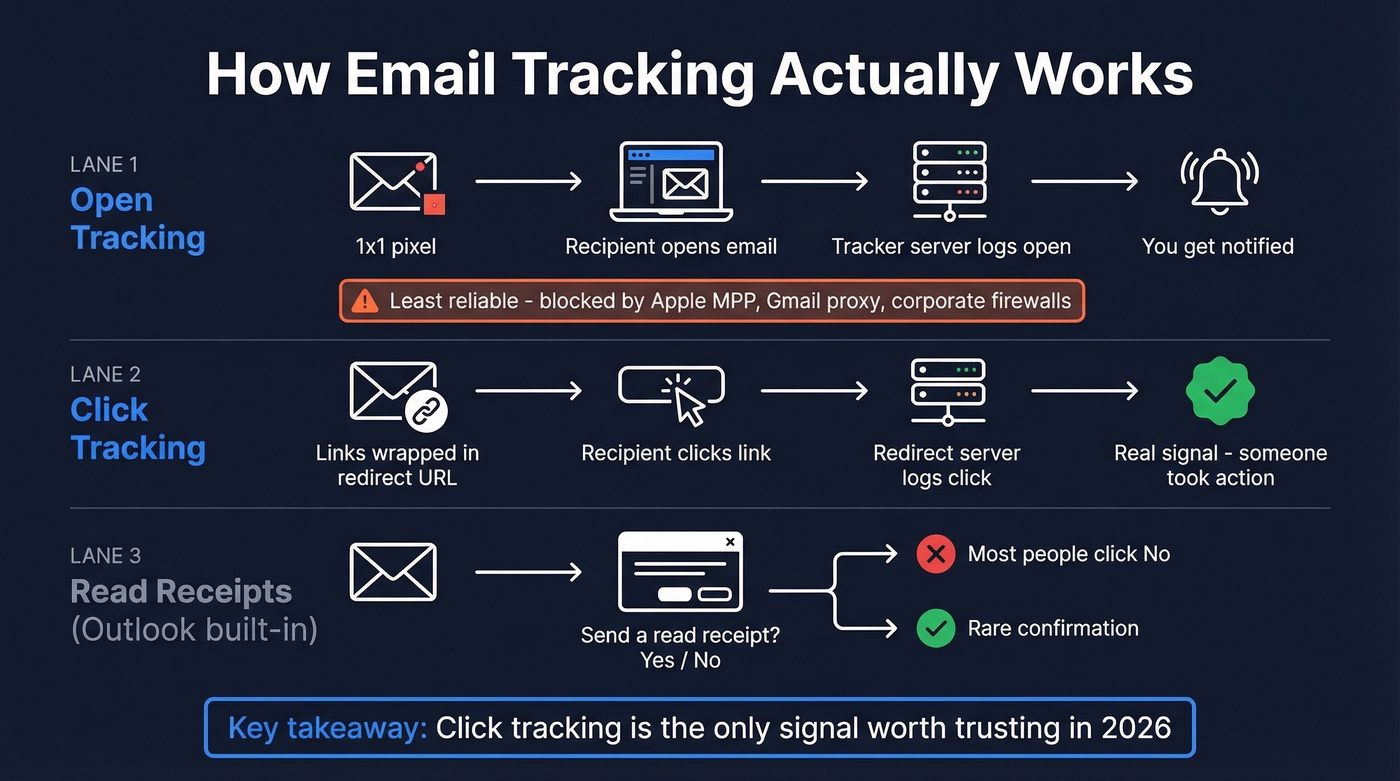
That's open tracking. Click tracking works differently - it wraps your links through a redirect URL so the tracker knows when someone clicks. Attachment tracking monitors when someone downloads or views a file. Most free plans only give you open tracking, which is the least reliable of the three.
The key distinction from Outlook's built-in read receipts: tracking pixels are invisible and automatic. Read receipts trigger a pop-up that the recipient can decline. One is silent; the other announces itself.
Outlook's Built-In Read Receipts
Use this if you're sending internal emails or communicating with people who won't mind the pop-up. It's free, built in, and requires zero add-ins.
Setup: Compose a new email, go to the Options tab, and check "Request a Read Receipt." That's it.
Skip this if you're doing any kind of sales outreach. The recipient sees a prompt asking whether they want to confirm they read your email. Most people click No or ignore it entirely. Some email servers don't support read receipts at all. Outlook has no built-in open or click tracking - read receipts are the only native option, and for prospecting, they're useless. That's exactly why most sales teams turn to third-party add-ins.
Why Open Data Isn't Reliable Anymore
Open tracking was a solid signal five years ago. Now it's directional at best.
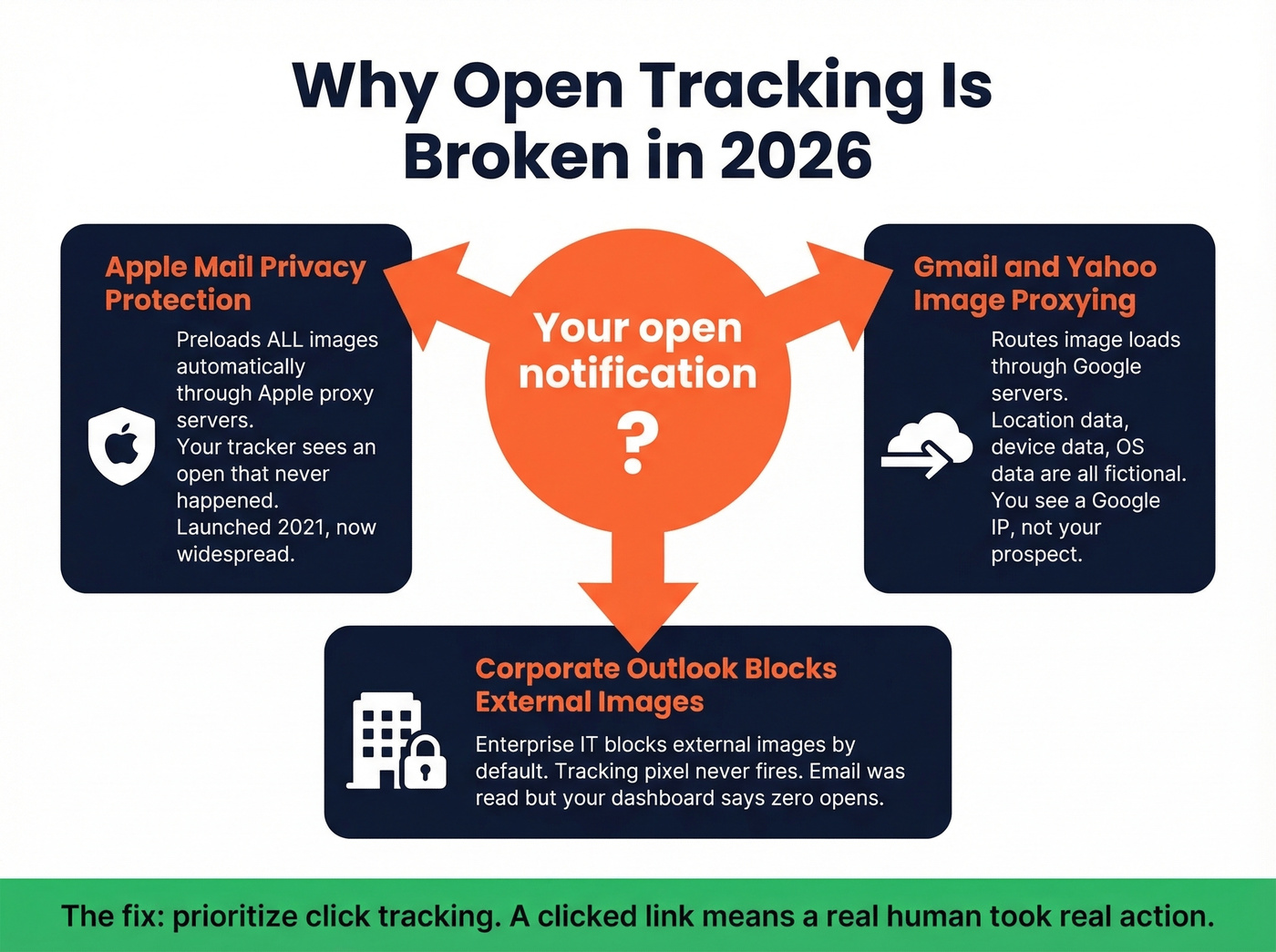
Apple Mail Privacy Protection launched in 2021 and fundamentally broke open tracking for Apple Mail users. MPP preloads images - including tracking pixels - through Apple's proxy servers, generating "machine opens" that look identical to real ones. Your tracker says the email was opened. It wasn't. Apple's servers just fetched the pixel automatically. Enough users have opted in to make open data unreliable for any serious workflow.
Gmail and Yahoo image proxying compounds the problem. Gmail routes image loads through Google Image Proxy, so your tracker sees an "open" from a Google server - not from your prospect. Location data, device data, and OS data from open tracking are essentially fictional at this point.
Many corporate Outlook environments block external images by default. Lots of enterprise setups won't load external images unless the recipient manually clicks "Download Pictures." If your prospect's IT team has this locked down, your tracking pixel never fires. The email was read. Your tracker says it wasn't.
There's also a deliverability angle worth knowing about: tools using shared tracking domains can increase your spam risk. If the tracking domain has been abused by other users, your emails inherit that reputation.
Here's the thing - prioritize click tracking over opens. A clicked link is a real signal. An "open" might be a machine, a proxy, or nothing.
If you want the technical deep dive, start with tracking pixels and how a tracking domain impacts reputation.

Open tracking is broken. The real signal is whether you're reaching the right person at a real address. Prospeo delivers 98% email accuracy with a 7-day refresh cycle - so you skip the pixel-watching and go straight to replies.
Replace noisy open data with emails that actually land.
What "Free" Actually Means
Most "free" Outlook email trackers aren't free in any useful sense.
Mailsuite appends "Sent with Mailsuite - Unsubscribe" to every email on the free plan - you can manually remove it each time, but that defeats the purpose of automation. Click tracking requires Pro at EUR 2.99/user/month. SalesHandy markets "free unlimited tracking," but that's Gmail only; Outlook users need the Outreach Starter plan at $25-36/mo depending on billing cycle.
The rest follow the same pattern. Boomerang gives you 10 credits per month, and tracking, scheduling, and reminders all draw from the same pool. HubSpot Sales free tracks opens only, capped at 200 notifications per month, with no click tracking. Yesware's free tier gives you a 24-hour lookback window with a 40-event limit. Every one of these has a catch. The question is which catch you can live with.
If you're trying to improve outcomes (not just collect signals), pair tracking with better email subject lines and tighter sales follow-up.
Best Free Trackers for Outlook
We evaluated each tool on three criteria: whether the free tier actually works in Outlook, what tracking features are included at no cost, and whether the tool creates deliverability risk.
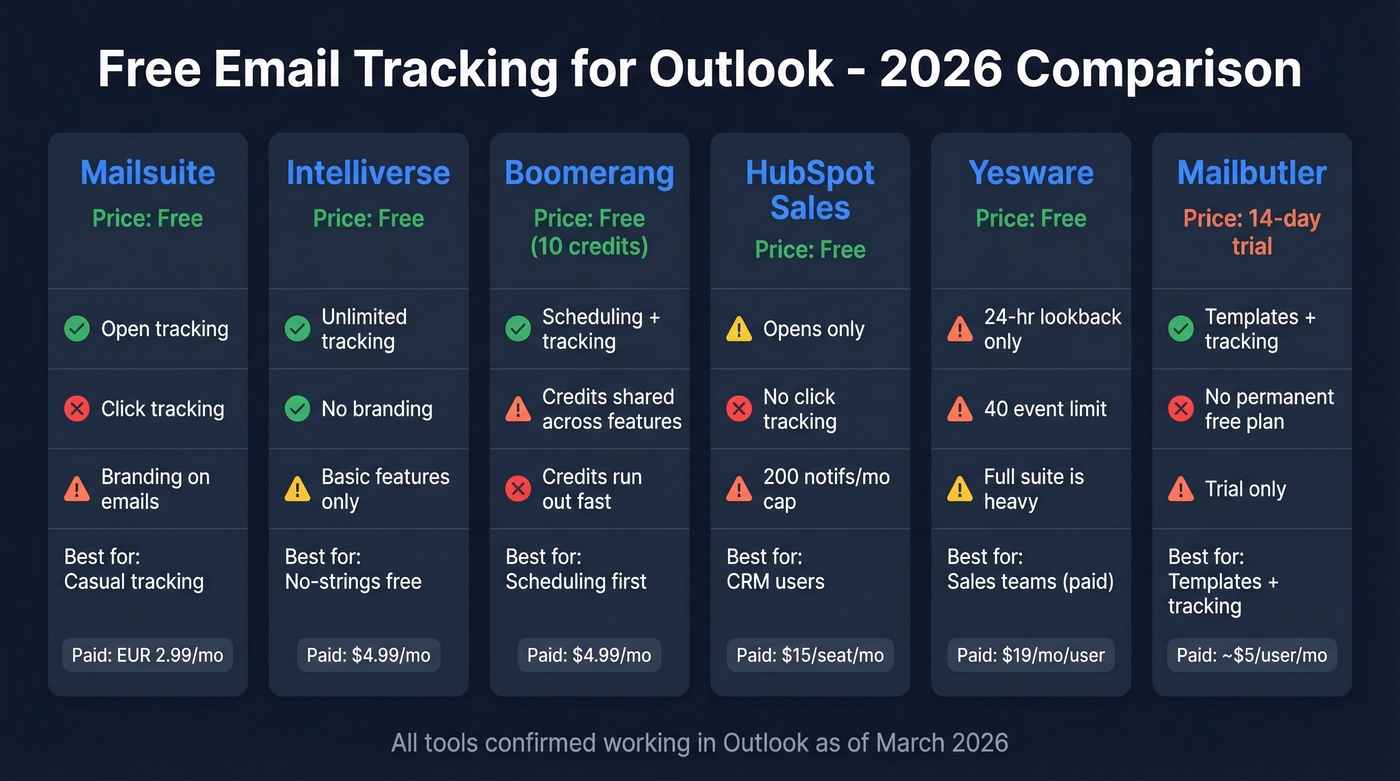
| Tool | Free Plan | Outlook? | Best For | Key Limitation | Deliverability Risk | Paid From |
|---|---|---|---|---|---|---|
| Mailsuite | Free open tracking | Yes | Casual tracking | Branding signature | Medium (shared domain) | Pro: EUR 2.99/user/mo |
| Intelliverse | Unlimited tracking | Yes | No-strings free | Basic features | Low | $4.99/mo |
| Boomerang | 10 credits/mo | Yes | Scheduling + tracking | Credits run out fast | Low | $4.99/mo |
| HubSpot Sales | Opens only | Yes | CRM users | 200 notifs/mo, no clicks | Low | $15/seat/mo |
| Yesware | 24-hr lookback, 40 events | Yes | Sales teams (paid) | Data limits on free | Low | $19/mo/user |
| Mailbutler | 14-day trial | Yes | Templates + tracking | No permanent free plan | Low | ~$5/user/mo |

Mailsuite (Formerly Mailtrack)
Mailsuite is one of the most popular free Outlook email trackers for a reason: you can get open tracking without paying. The free plan's big tradeoff is the visible signature on every email - "Sent with Mailsuite - Unsubscribe" - which screams "I'm tracking you" to anyone who notices.
Click tracking, full history, and priority support all require Pro at EUR 2.99/user/month. Mobile support is limited too; this is primarily a desktop/browser workflow. For casual tracking where the branding doesn't matter, it's a strong free option. For anything client-facing, pay the EUR 2.99.
Intelliverse Email Tracker
Intelliverse is the most honest "free" option in this space. Unlimited tracking at $0/month, with a paid tier at $4.99/month that adds pin, search, filter, and stop-tracking features. It's less well-known than Mailsuite, which means fewer reviews and a smaller community - but it also means no branding signature cluttering your emails.
Intelliverse has no access to the subject or body of your email and stores user details in US data centers. If you want simple open notifications without the gotchas, try this one first.
Boomerang for Outlook
Boomerang is the best Outlook add-in for people who don't primarily need tracking. Its real strength is the scheduling workflow - send-later, follow-up reminders, response tracking - and open tracking is a bonus feature baked in. If scheduling is half your problem, this is your tool.
The free plan's 10 credits per month get consumed by any Boomerang feature, though. We've seen people burn through their monthly allotment in two days. The Personal plan starts at $4.99/month and increases limits substantially.
HubSpot Sales (Free Tier)
If you're already in HubSpot's CRM, the free tracking tier feeds open data directly into contact records. The Office 365 add-in is the recommended path - HubSpot's Outlook desktop add-in is in maintenance mode and won't get new features.
Let's be real, though: free tier gives you open tracking only - no click tracking, which is the signal that actually matters. Capped at 200 notifications per month. Paid starts at $15/seat/month. It's a CRM upsell funnel, not a tracking solution.
If you're evaluating tools like this, it helps to understand examples of a CRM and what belongs in contact management software vs what belongs in an outreach stack.
Yesware
Yesware is a full sales engagement platform, and it can feel heavy if you just need tracking. The free tier confirms that: tracking details are limited to emails sent in the last 24 hours, with a 40-event limit. Pro runs $19/month/user. Unless you're buying the full suite, skip the free tier.
Mailbutler
No permanent free plan - just a 14-day trial. After that, pricing starts around ~$5/user/month. Works with Outlook and includes smart templates alongside tracking. Worth a look if you want both, but don't confuse the trial with a free tier.
Tools That Don't Work in Outlook
Every guide lists these. Half don't work in Outlook. We're not doing that - but we do want to save you the research time.
| Tool | Works in Outlook? | Reality |
|---|---|---|
| SalesHandy (free) | No | Free = Gmail only |
| Mailtrack (Chrome) | No | Chrome extension is Gmail-focused |
| Streak | No | Gmail only |
SalesHandy marketing "free unlimited tracking" without mentioning it's Gmail-only is exactly the kind of thing that wastes an hour of your afternoon. Outlook users need the Outreach Starter plan at $25-36/mo.
Verify Before You Track
Nobody asks this before installing a tracker: are your emails actually reaching inboxes?
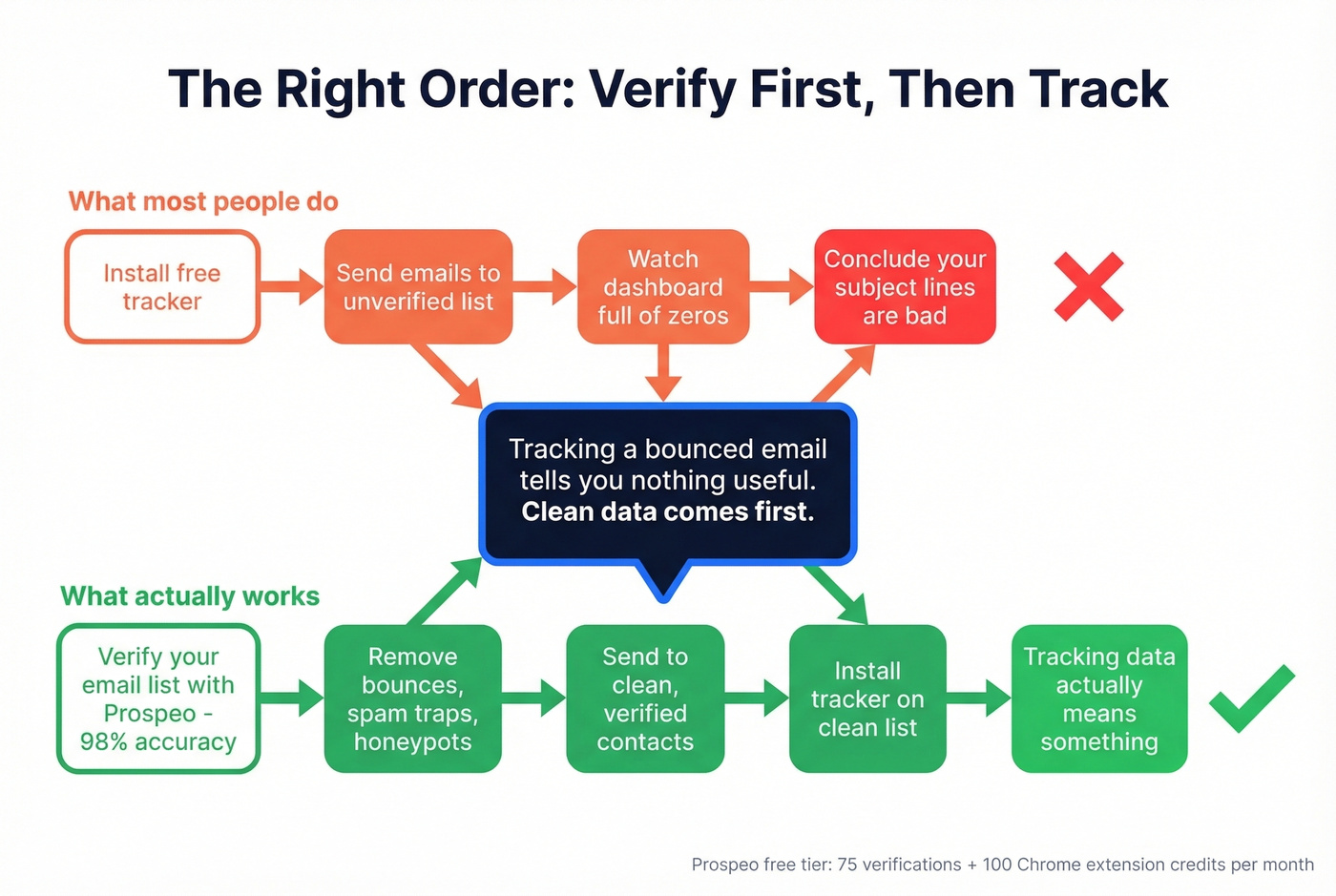
If a meaningful chunk of your list has bad data - outdated addresses, typos, spam traps - then tracking opens on those emails is wasted effort. You're watching a dashboard full of zeros and concluding your subject lines are bad, when the real problem is deliverability. Tracking a bounced email tells you nothing useful.
In our experience, this is where email verification matters more than email tracking. Prospeo runs a 5-step verification process with catch-all handling, spam-trap removal, and honeypot filtering - 98% email accuracy. The free tier gives you 75 email verifications plus 100 Chrome extension credits per month. Clean your list before you install any tracker, and the tracking data you do get will actually mean something.
If you want to go deeper on the inbox side, start with an email deliverability guide, then monitor your email bounce rate and run an email spam checker.

Free trackers tell you someone maybe opened your email. Prospeo gives you 143M+ verified emails and 125M+ direct dials so you skip the guesswork entirely. At $0.01 per email, it costs less than the time you spend refreshing open notifications.
Stop tracking opens. Start getting replies.
FAQ
Is email tracking legal?
Email tracking is legal in most jurisdictions - it logs an image load, not a wiretap. That said, GDPR and CCPA require transparency about data collection. If you're sending to EU contacts, your privacy policy should cover tracking pixels. Some organizations also prohibit tracking in internal email policies, so check with your compliance team if you're in a regulated industry.
Can recipients detect tracking pixels?
Tracking pixels are invisible in the email body, so most recipients won't notice them. Tech-savvy users can inspect the HTML source and spot them. Mailsuite's free plan adds a visible "Sent with Mailsuite" signature, which is a dead giveaway. Some email clients also flag or auto-block known tracker domains - the consensus on r/sales is that savvy prospects notice more often than you'd think.
Does tracking hurt deliverability?
It can. Tools using shared tracking domains inherit the reputation of every other user on that domain - if spammers share the same infrastructure, your emails get flagged by association. Tools with dedicated or custom tracking domains are safer. The pixel itself is tiny, but the domain it loads from is what spam filters evaluate.
What's the best free tracker for Outlook?
Mailsuite if you don't mind the branding signature. Intelliverse if you want truly no-strings-attached tracking. Boomerang if you also need scheduling. None of the free tiers are complete - they all push you toward a paid plan within a week of real usage.
Should I verify emails before tracking them?
Yes. Tracking opens on invalid addresses is pointless. Cleaning even a small outbound list before you start monitoring engagement means the data you collect reflects real human behavior, not bounces and dead ends. Mailchimp's research consistently shows that list hygiene is the single biggest factor in deliverability - and deliverability is what makes tracking data worth looking at in the first place.