

Friendly Reminder Email Examples That Get Replies, Not Eye Rolls
The average professional gets 121 emails a day. Your reminder isn't gentle - it's invisible. Or worse, it lands and the recipient rolls their eyes before archiving it.
Average cold email reply rates dropped from 6.8% to 5.8% year-over-year, which means every follow-up counts more than it did twelve months ago. Here are 15 friendly reminder email examples that actually get responses, plus the data behind why most reminders fail.
The Short Version
Drop "gentle reminder" from your vocabulary. It reads as passive-aggressive to most recipients and adds zero information.
For cold outreach, keep your reminder under 200 words and 6-8 sentences - that's the length pulling the highest reply rate across a 16.5 million email study. For internal or transactional reminders, shorter is better: aim for 50-100 words. Send one follow-up, maybe two, max three. The first follow-up lifts replies by 49%. By the fourth, spam complaints jump from 0.5% to 1.6%.
What the Data Says About Follow-Ups
Belkins analyzed 16.5 million cold emails sent across 93 business domains during 2024. The headline numbers are worth internalizing before you write a single reminder.
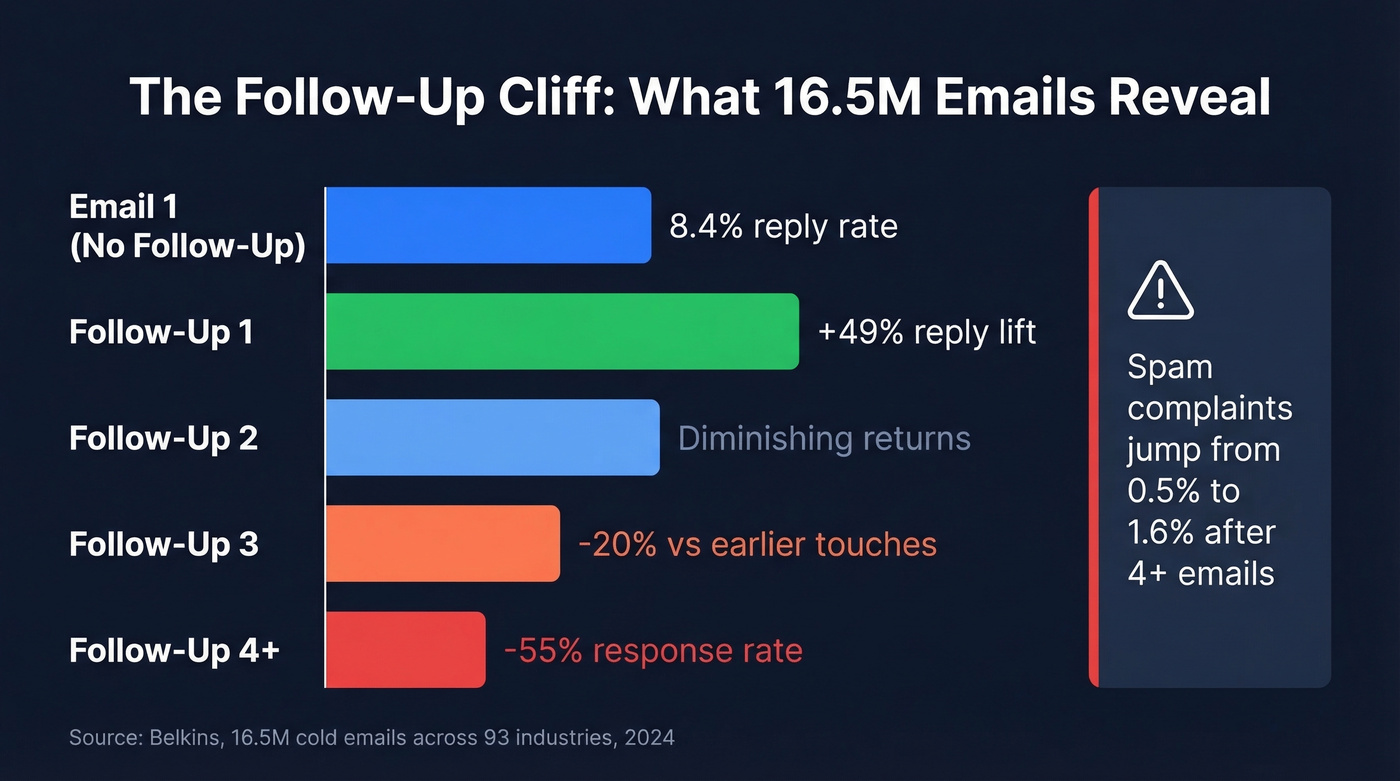
The first follow-up is where the biggest lift happens - reply rates jumped up to 49% after that initial nudge. But the curve drops fast. The third email brought 20% fewer responses. By follow-up number four, response rates cratered 55% compared to earlier touches, and spam complaint rates climbed from 0.5% to 1.6%.
This cuts both ways: campaigns with just one email had the highest reply rate at 8.4%. That doesn't mean you should never follow up - it means your first email needs to be strong enough to stand alone, and your follow-ups need to add value, not just repeat the ask.
Roughly 17% of cold emails never reach the inbox at all. So before you blame your wording, consider that the recipient never saw your message in the first place.
Why "Gentle Reminder" Makes People Cringe
There's a Reddit thread in r/clinicalresearch where someone puts it bluntly: "There are no friendly reminders." Another user in r/auscorp describes their boss starting every email with "a gentle reminder" and says the emails feel "ominously less gentle than pure reminders."
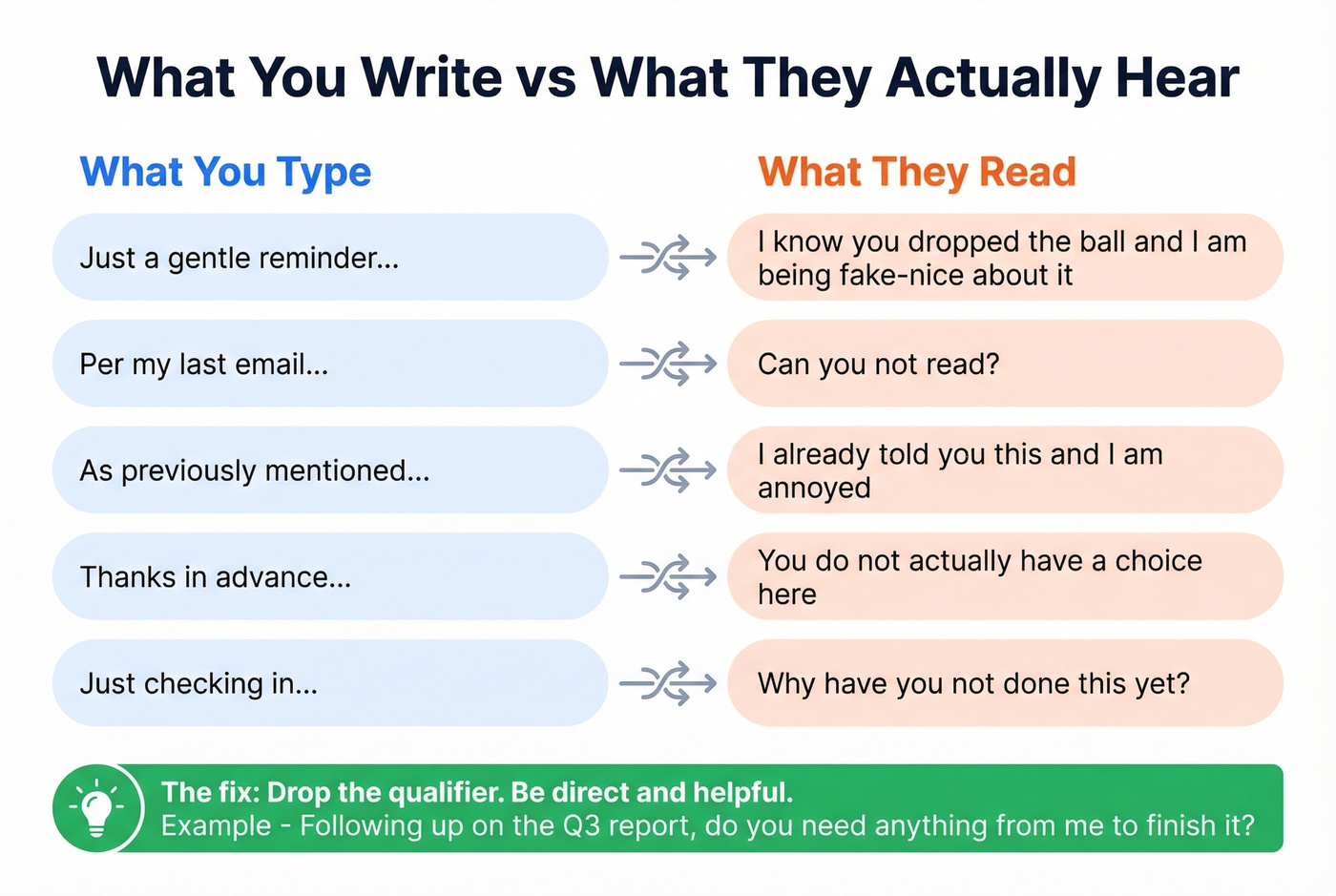
Here's the thing: the problem isn't politeness. It's the gap between what you mean and what the reader hears. When you write "just a reminder," the recipient hears "I know you dropped the ball and I'm being performatively nice about it." The qualifier doesn't soften the message. It highlights the power dynamic.
The same goes for the rest of the passive-aggressive phrase hall of fame: "Per my last email." "As previously mentioned." "Thanks in advance." Each one signals frustration wrapped in fake courtesy. Your recipient isn't fooled.
The fix is simple. Drop the qualifier entirely. "Following up on the Q3 report - do you need anything from me to finish it?" is direct, helpful, and doesn't trigger anyone's passive-aggression radar.
How to Write Reminders That Get Replies
Five rules. Tape them to your monitor.
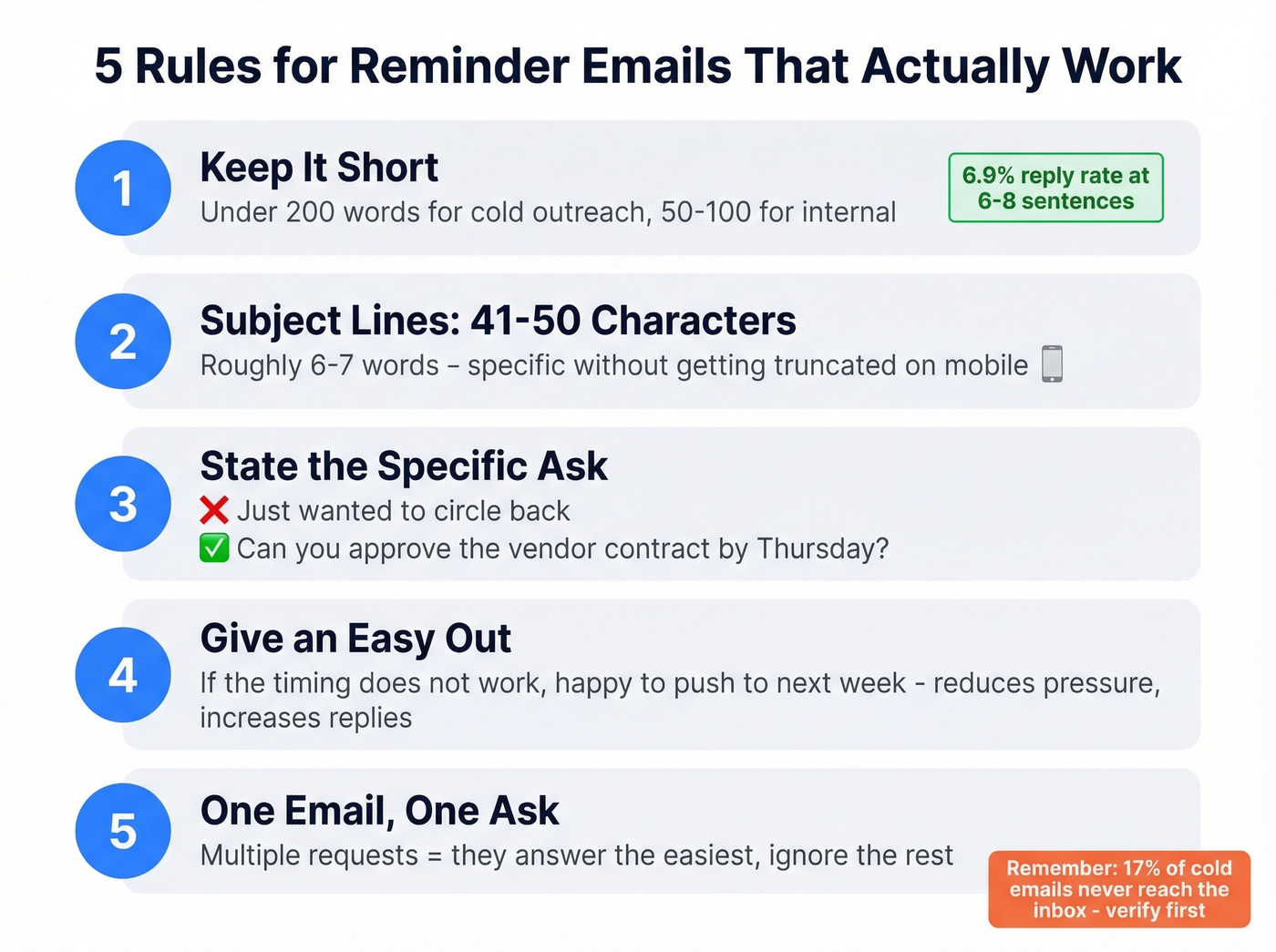
- Keep it short. Under 200 words for cold outreach, 50-100 for internal asks. The 16.5M-email study showed a 42.67% open rate and 6.9% reply rate for 6-8-sentence emails. Longer emails don't signal thoroughness; they signal you're making the reader work. If you need more structure, borrow from proven sales follow-up templates.
- Subject lines: 41-50 characters. That's roughly 6-7 words - enough to be specific without getting truncated on mobile. For more options, swipe from these email subject line examples.
- State the specific thing you need. "Can you approve the vendor contract by Thursday?" beats "Just wanted to circle back on our earlier conversation." (More on writing a crisp email call to action.)
- Give an easy out. "If the timing doesn't work, happy to push to next week" reduces pressure and, paradoxically, increases response rates. People reply faster when they don't feel cornered.
- One email, one ask. Don't bundle three requests into a reminder. The recipient will answer the easiest one and ignore the rest.

17% of cold emails never reach the inbox. Your perfectly crafted reminder is worthless if the email address is wrong. Prospeo's 5-step verification delivers 98% email accuracy - so your follow-ups land in real inboxes, not the void.
Stop writing reminders to addresses that don't exist.
Subject Lines That Get Opened
Most reminder emails die in the inbox because the subject line is either too vague or too aggressive. Test two subject lines per campaign - even swapping one word can change results. If you want a deeper playbook, see our guide to subject lines that get opened.
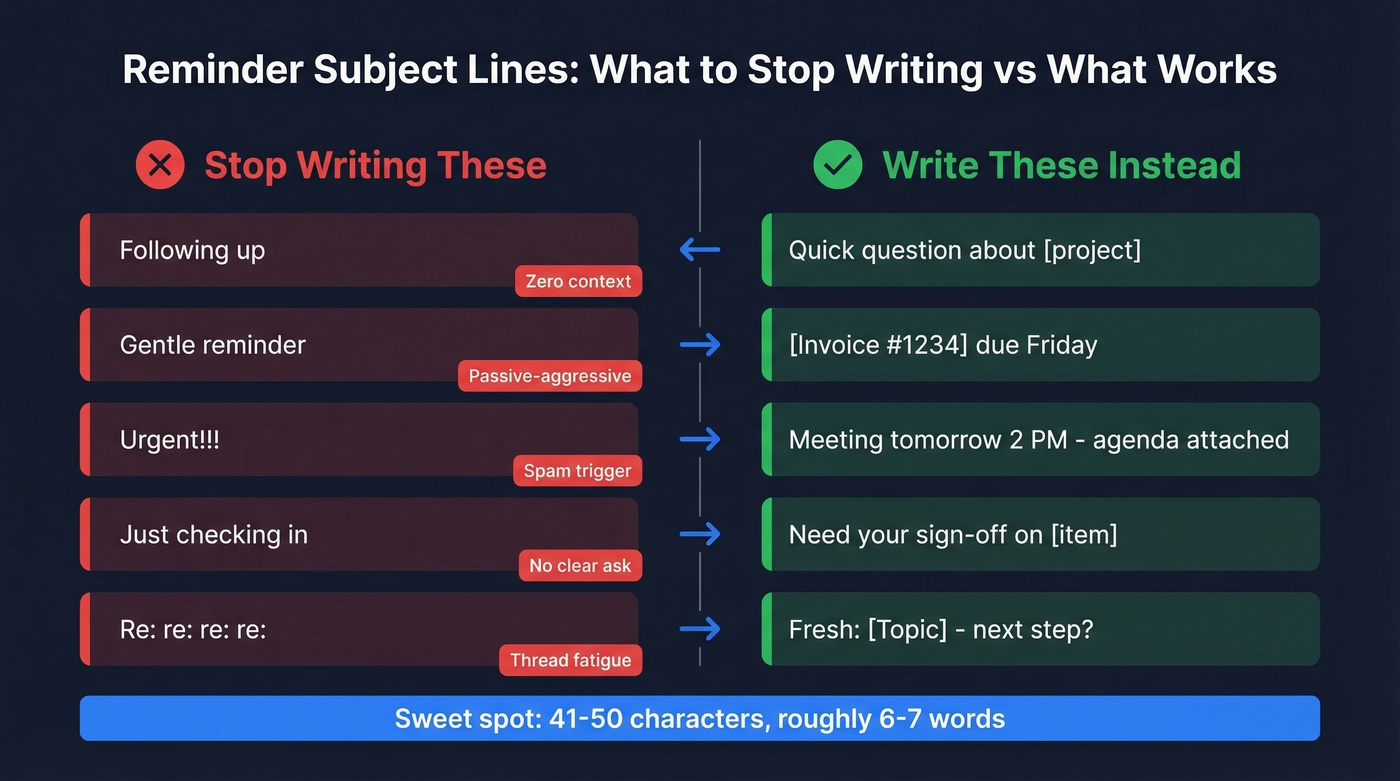
| Weak Subject Line | Why It Fails | Optimized Version |
|---|---|---|
| Following up | Zero context - gets buried | Quick question about [project] |
| Gentle reminder | Reads as passive-aggressive | [Invoice #1234] due Friday |
| Urgent!!! | Spam trigger, erodes trust | Meeting tomorrow 2 PM - agenda |
| Just checking in | No clear ask | Need your sign-off on [item] |
| Re: re: re: re: | Thread fatigue | Fresh: [Topic] - next step? |
A few more subject lines worth stealing:
- "Still need your input on [deliverable]"
- "[Name], quick follow-up on Thursday's call"
- "Payment due [date] - invoice attached"
- "Can we confirm [meeting] for tomorrow?"
- "Closing the loop on [project name]"
15 Polite Reminder Templates You Can Copy
Each template includes a subject line, body, and a note on when to use it. Copy, customize, send.
No Response (Warm Lead)
Subject: Quick follow-up on [topic] from [day]
Hi [Name], wanted to follow up on the pricing discussion from [day]. I know things get buried - if now isn't the right time, just let me know and I'll follow up in [timeframe]. If you're still interested, [specific next step] works on my end.
The easy out reduces pressure. Swap in the actual topic and a concrete next step - "a 15-minute call Thursday" beats "connecting soon."
No Response (Cold Lead)
Most people don't ignore you out of malice. They skimmed, meant to reply, and forgot. Your job is to make replying effortless. If you’re building a full cadence, start with a solid B2B cold email sequence.
Subject: [Name], re: [original email topic]
Hi [Name], I sent a note last [day] about [one-sentence value prop]. If [specific pain point] is on your radar, I'd love 10 minutes to show you [specific outcome]. Worth a look?
Reference their company or role to prove you did your homework. Generic follow-ups get generic silence.
Payment Reminders: A Two-Step Sequence
These work best sent as a pair. The first is a heads-up; the second is a firm nudge with a deadline.
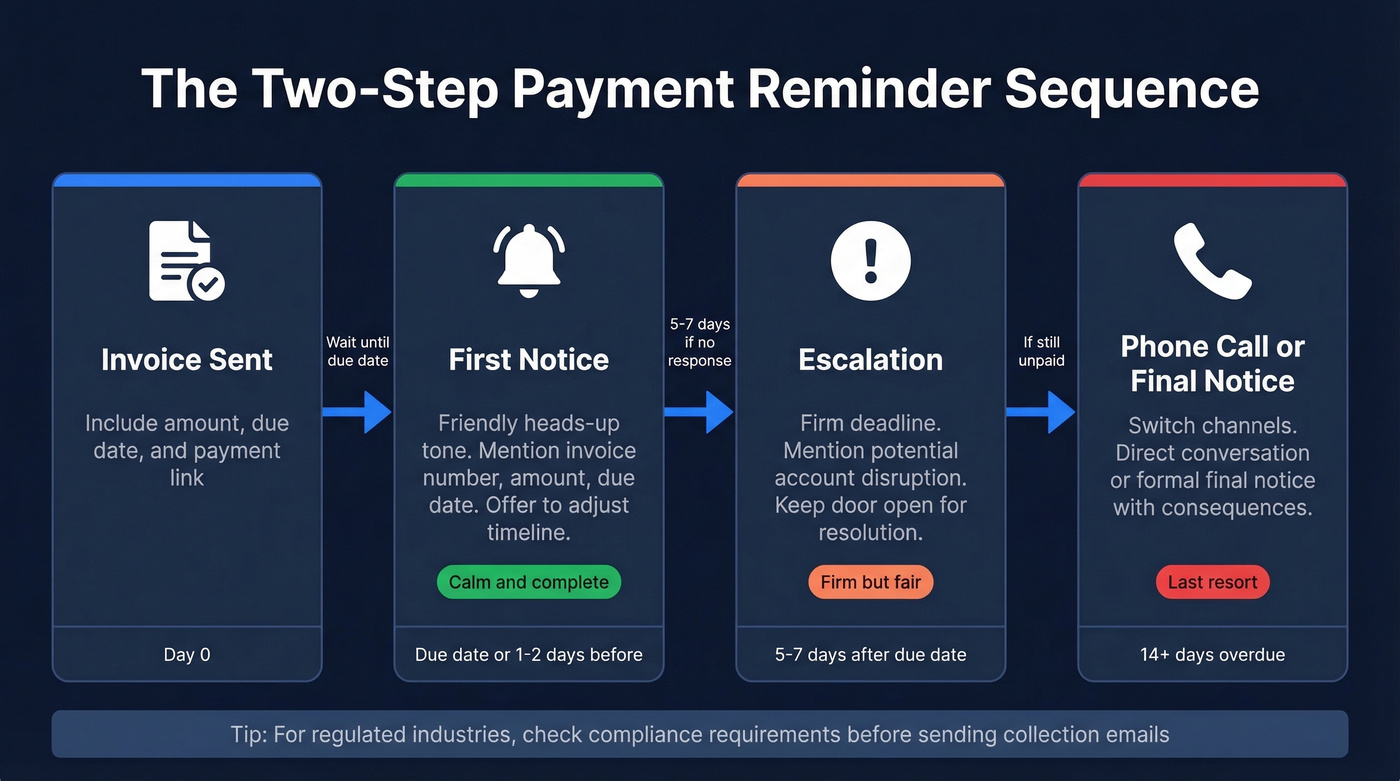
First Notice Subject: Invoice #[1234] - due [date]
Hi [Name], heads-up that invoice #[1234] for [$amount] is due on [date]. Pay directly here: [payment link]. Let me know if you have questions or need to adjust the timeline.
Escalation Subject: Overdue: Invoice #[1234] - action needed by [date]
Hi [Name], invoice #[1234] for [$amount] was due on [original date] and remains unpaid. To avoid any disruption to your account, please process payment by [new deadline]. If there's an issue, I'm happy to resolve it - just reply here. [Payment link]
The first email is calm and complete. The escalation adds a firm deadline without threats. For regulated industries, check your compliance requirements before sending.
Meeting Reminder
Subject: Confirming [meeting name] - [date] at [time]
Hi [Name], confirming our meeting on [date] at [time] [timezone]. Here's the [Zoom link / location]. Agenda: [1-2 bullet points]. Can you confirm, or should we reschedule?
Everything they need in one glance. The confirm/reschedule CTA eliminates no-shows. If you’re sending this after a call, use a tighter sales meeting follow-up email format.
Deadline Approaching
Subject: [Deliverable] due [date] - anything you need?
Hi [Name], quick reminder that [specific deliverable] is due by [date]. If you need anything from my end to get it across the line, let me know today and I'll prioritize it.
Offering help reframes the reminder as collaborative, not nagging. Name the downstream impact if you're waiting on their output: "I need it by Thursday to hit the Friday board deck."
Reminder to Your Boss
Subject: Need your input on [item] - blocking [task]
Hi [Name], I know your plate is full - flagging that [specific item] is blocking [downstream task/deadline]. Happy to reprioritize if something else takes precedence. What works best?
In our experience, this format works because it acknowledges their workload, names the blocker, and offers to flex. Vague urgency reads as crying wolf.
Proposal / Contract Follow-Up
Bad version: "Just checking in on the proposal I sent over. Let me know your thoughts!"
Good version:
Subject: Any questions on the [proposal/contract]?
Hi [Name], following up on the [proposal/contract] I sent on [date]. If anything needs adjusting - scope, timeline, pricing - I'm happy to revise. What questions can I answer?
Inviting edits lowers the bar for response. "Any questions?" outperforms "What do you think?" because it's less open-ended. If you need more phrasing options, see how to say just checking in professionally.
Appointment Reminder (Healthcare)
No-shows cost the U.S. healthcare system over $150 billion annually. A double-touch strategy - 24-48 hours before plus day-of - can reduce cancellations by up to 30%.
Subject: Your appointment on [date] at [time] - please confirm
Hi [Name], this is a reminder for your [appointment type] on [date] at [time] at [location]. Please confirm by replying "yes" or reschedule here: [link]. If you need to cancel, let us know at least 24 hours in advance.
Add parking or check-in instructions for first-time patients.
Event / Webinar Reminder
Subject: [Event name] is tomorrow - here's your link
Hi [Name], [event name] kicks off tomorrow at [time]. Join here: [link]. Can't make it? We'll send the recording, but the live Q&A is worth showing up for.
Mention a specific speaker or topic they'd care about. That's what reminds them why they registered in the first place.
Trial Expiration
Subject: Your [product] trial ends [date]
Hi [Name], your free trial of [product] expires on [date]. After that, [specific thing they lose - data, access, saved workflows]. Want to keep going? [One-click upgrade link].
Specificity about what they lose beats generic "don't miss out" language. Reference their actual usage - "You've built 12 workflows" hits harder than "you've been using our product."
Internal Team Reminder
Subject: [Task] - need this by [date]
Hi [Name], following up on [specific task]. Can you get this to me by [date]? I need it for [downstream reason]. Let me know if something's in the way.
Direct, collaborative, and sent to the individual - not the whole team. Blanket reminders when one person is the bottleneck embarrass them and annoy everyone else.
Soft Nudge (Personal / Non-Work)
Subject: No rush - just bumping this up
Hey [Name], just wanted to give you a nudge in case you meant to reply but it slipped. Zero pressure - whenever you get a chance. (Re: the dinner plans for Saturday.)
The "little nudge... intending to reply but forgot" framing acknowledges that life happens without making it a thing.
The Break-Up Email
Subject: Closing the loop on [topic]
Hi [Name], I've reached out a couple of times about [topic] and haven't heard back - totally fine. I'll assume the timing isn't right and close this out on my end. If anything changes, my door's open.
We've seen the break-up email outperform the fourth follow-up almost every time. Walking away often prompts a reply. Keep it short - resist the urge to re-pitch.
Escalation Reminder (The 7th Email)
Subject: [Task] - escalating to ensure resolution by [date]
Hi [Name], I've followed up [X] times on [specific request] since [original date]. I've copied [manager/VP name] for visibility. To keep [project] on track, I need [specific action] by [hard deadline]. Please confirm receipt and expected completion date.
This is the Reddit scenario - employee, two managers, and a VP all CC'd. It's firm but HR-safe. Only escalate after you've genuinely exhausted direct communication. Jumping to CC-the-VP on email two burns political capital fast.
How Many Reminders to Send
Three. For most scenarios, that's the ceiling.
The first follow-up is the big one - up to 49% more replies. The second still adds value. By the third, you're in diminishing-returns territory with 20% fewer responses than earlier touches. Push past four and you're actively hurting yourself: response rates drop 55% and spam complaints rise from 0.5% to 1.6%. If you want more benchmarks, see follow-up email reply rate.
For sales-specific outreach, some teams run a longer cadence - Streak recommends Day 3, 7, 11, 15, 19, and 22. That's aggressive and only works if each touch adds new value. For invoices, internal requests, and most business scenarios, three is the ceiling.
Let's be honest: if your average deal size is under five figures, you probably don't need a six-touch email cadence. Two follow-ups and a break-up email will get you 90% of the replies you'd ever get. The teams running seven-email sequences are usually compensating for weak first emails.
When Email Isn't Enough, Switch Channels
If three emails get silence, don't send a fourth. A two-sentence Slack message, a quick SMS, or even a brief voice note often breaks through where email can't. We've seen teams increase response rates by moving to a different channel after the second email - the message can be identical, but the medium changes the dynamic. (If you’re adding SMS to your stack, review cold texting risks and best practices.)
Quick SMS template: "Hi [Name], sent you an email about [topic] - wanted to make sure it didn't get buried. Any thoughts?"
Slack/Teams template: "[Name] - quick flag: [specific item] needs your input by [date]. Happy to hop on a 5-min call if easier."
Timing Matters
Thursday pulls the highest reply rate at 6.87%. Evenings between 8-11 PM and mornings between 7-11 AM are the sweet spots. Don't send reminders at 2 PM on a Monday - that's when everyone's drowning. For a deeper breakdown, see the best time to send cold emails.
Five Mistakes That Kill Your Reminder
- Using "gentle reminder" or any passive-aggressive qualifier. Just state what you need.
- Sending to the whole team when one person is the bottleneck. That's public shaming disguised as process.
- Following up too soon. Give it at least 3 business days. Anything less feels like surveillance.
- No clear CTA. "Just checking in" gives the recipient nothing to act on. Ask a specific question.
- Vague ask with no context. "Following up" on what, exactly? Reference the specific item, date, or deliverable.
Make Sure the Email Actually Arrives
Sometimes your reminder didn't fail because of bad wording. It failed because the email address was wrong, or your domain authentication is broken. Make sure your domain has SPF, DKIM, and DMARC records configured - without them, even the best-written follow-up lands in spam. If you’re troubleshooting, start with an email deliverability guide.
With 17% of cold emails never reaching the inbox, "no response" and "email bounced" look identical from your end. Before you agonize over phrasing, verify the address. Prospeo runs 98% email accuracy with a 7-day refresh cycle, so you're not sending follow-ups to stale data from six months ago. The free tier gives you 75 verifications per month - enough to clean a prospect list before launching any sequence.

Reply rates drop 55% by the fourth follow-up. Every touch matters - which means you can't afford a single bounce. Prospeo gives you verified contact data refreshed every 7 days at $0.01 per email, so each reminder reaches the right person.
Make every follow-up count with data that's never stale.
FAQ
Is "gentle reminder" rude?
Most recipients perceive it as passive-aggressive, even when you mean well. Drop the qualifier entirely and write "following up on [specific thing]" instead. Direct language is more respectful than performatively soft phrasing.
How long should I wait before following up?
Wait at least three business days. Thursday mornings and evenings (7-11 AM, 8-11 PM) pull the highest reply rates based on the 16.5M-email study. For payment reminders, send the first nudge one day before the due date.
How do I remind my boss without being annoying?
Acknowledge their workload, name the specific blocker, and offer to reprioritize. "I know you're slammed - [item] is blocking [downstream task]. Want me to shift priorities?" gives them an out while making the urgency concrete.
What if three reminders get no response?
Send a break-up email closing the loop - "I'll assume the timing isn't right and close this out" often prompts a reply. If that fails, switch channels. A two-sentence Slack message or quick SMS breaks through where email can't.
How do I make sure my reminder doesn't bounce?
Verify the email address before sending. Prospeo's free tier lets you check 75 emails per month at 98% accuracy. A bounced reminder damages your sender reputation and guarantees you'll never reach that inbox again - worse than sending nothing.