

Gmail Email Finder: What Actually Works in 2026
You've got a name, maybe a company, and you need a Gmail address. The problem is that Google built Gmail to be private, and most of the tricks that worked three years ago don't anymore. If you're looking for a Gmail email finder that actually delivers, here's the reality - and when you should stop guessing Gmail addresses entirely and use a proper email finder instead.
What "Gmail Email Finder" Really Means
People searching for this want three very different things, and conflating them wastes everyone's time.
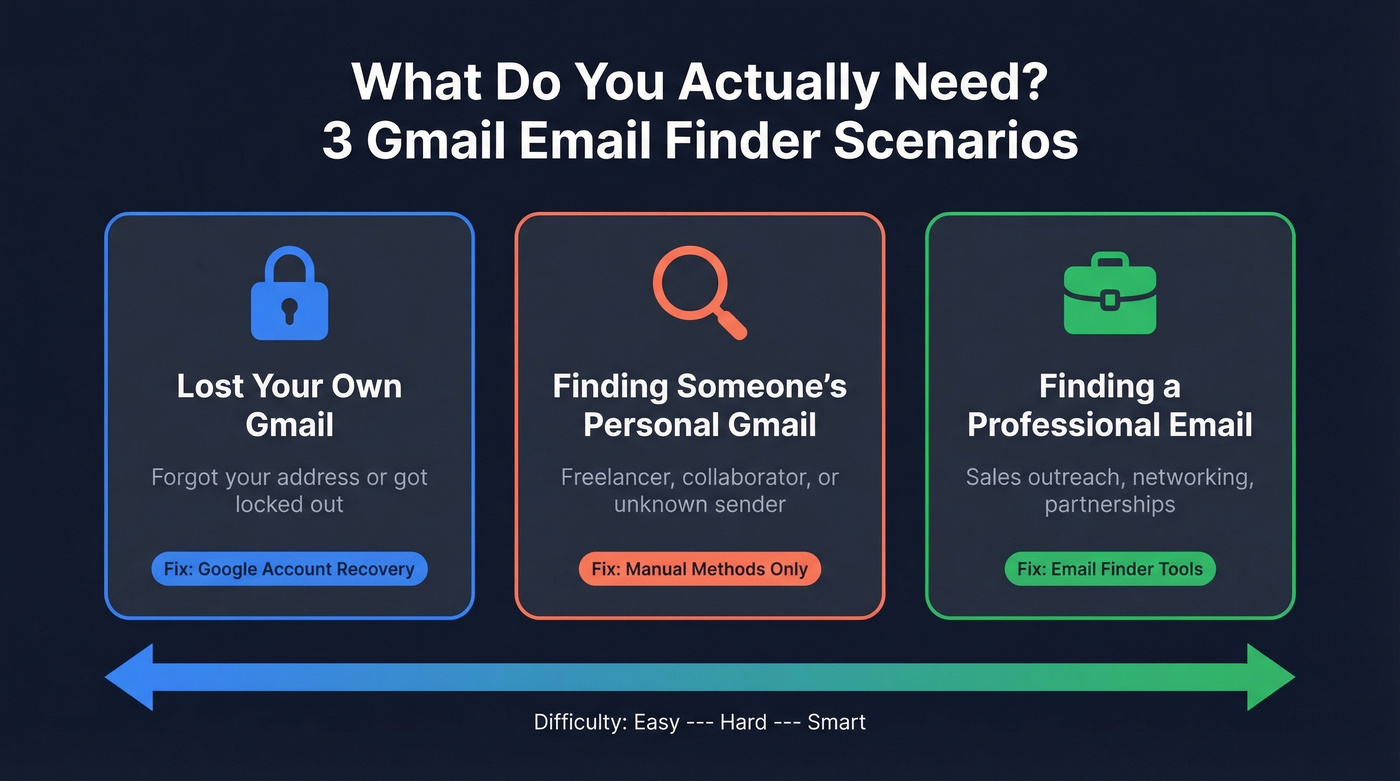
Scenario 1: You lost access to your own Gmail. You forgot which address you used, or you're locked out. That's an account recovery problem, not an email-finding problem. Google's own recovery flow handles it in minutes.
Scenario 2: You want to find someone's personal @gmail.com address. Maybe it's a freelancer, a potential collaborator, or someone who emailed you from an address you can't trace back. Reddit threads on r/Gmail and r/OSINT show people trying to identify who owns a specific Gmail account - and most of them hit dead ends.
Scenario 3: You need someone's professional email for sales outreach or networking. You don't actually need their Gmail. You need their work email - the one that'll land in their inbox and not bounce. This is where dedicated email finder tools shine, and where guessing @gmail.com addresses is a waste of your afternoon.
What You Need (Quick Version)
Recovering your own Gmail? Go straight to Google Account Recovery. Verify your identity and get back in. Done.
Finding someone's personal @gmail.com? Manual methods are your only real option. Google search operators, permutation guessing, and social media profile inspection. We walk through each below - but set expectations: there's no tool that reliably finds personal Gmail addresses at scale.
How to Find a Personal Gmail Address
Google Search Operators
The simplest approach is letting Google do the work. Using search operators is free and surprisingly effective when someone has posted their address publicly. Try these exact queries:
"firstname lastname" "@gmail.com""firstname lastname" "gmail" contact"firstname lastname" email site:twitter.com OR site:github.com
You're looking for public pages - forum posts, conference speaker bios, GitHub profiles, personal websites - where someone listed their Gmail. Get creative with site-specific filters for niche communities. We've found addresses buried in conference slide decks and old Meetup event pages that never show up in a standard search.
Permutation Guessing + the Dots Trick
Gmail has a quirk that most people don't know about: dots don't matter in Gmail addresses. johnsmith@gmail.com, john.smith@gmail.com, and j.o.h.n.s.m.i.t.h@gmail.com all route to the same inbox. So you only need to guess the base characters, not the dot placement.
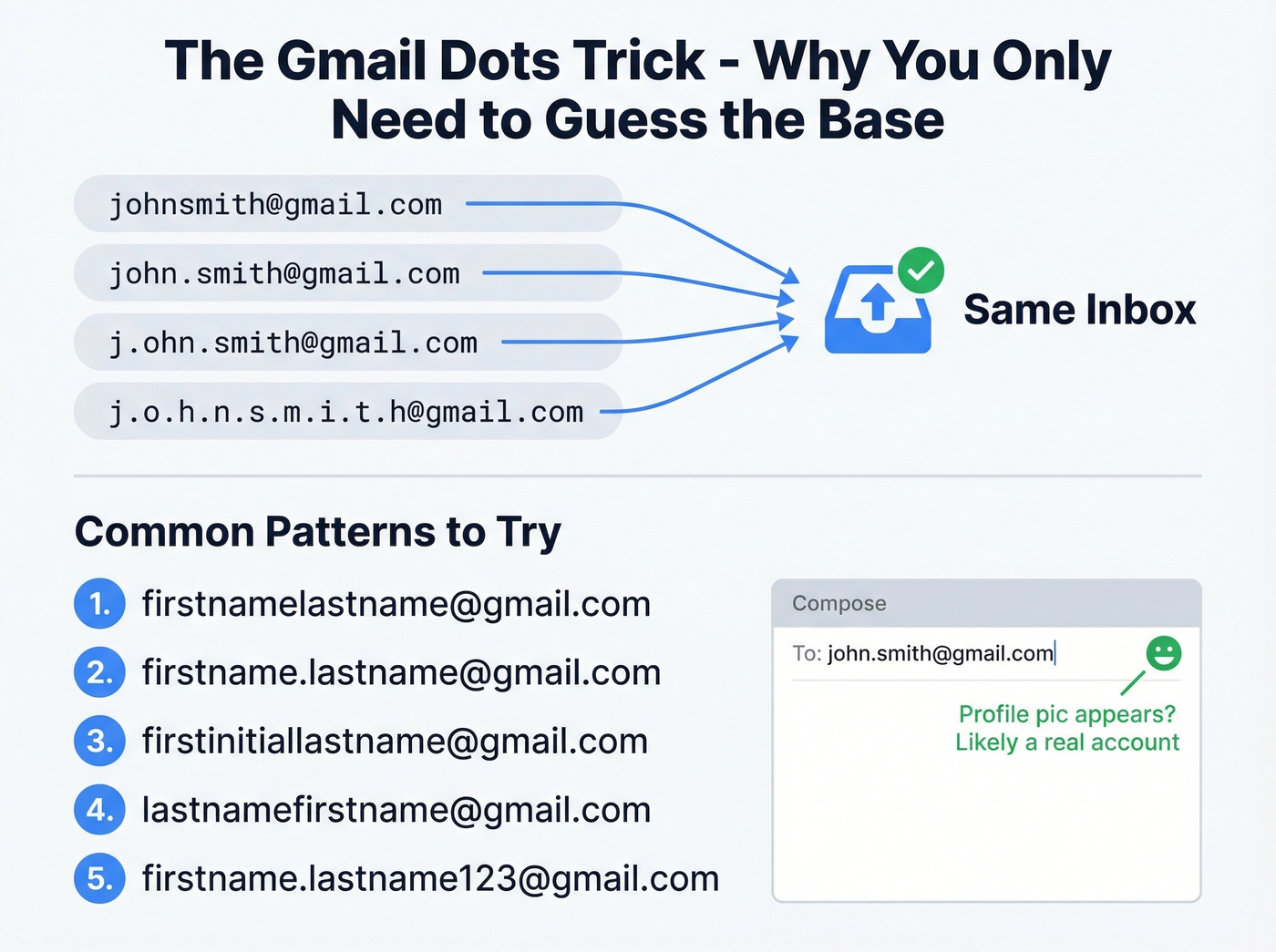
Common patterns to try: firstnamelastname, firstname.lastname, firstinitiallastname, lastnamefirstname, and firstname.lastname123. Once you've got a candidate, paste it into Gmail's "To:" field and hover over the address. If a profile picture appears, you've likely found a real account. We've used this method dozens of times - it's not foolproof, but it's the closest thing to validation you'll get without actually sending an email.
If you’re doing this for outreach, it’s usually smarter to switch to a name to email workflow for corporate domains instead of guessing.
Social Media Profile Inspection
Check the obvious places: Twitter/X bios, GitHub profiles, personal websites, and "About" pages on blogs. Freelancers and developers especially tend to list a Gmail address publicly - searching GitHub repos and profile READMEs can surface addresses that don't appear anywhere else.
What Doesn't Work Anymore
Let's save you some time. In one r/OSINT thread, the poster tried every classic Gmail-owner lookup approach - calendar/hover methods, people-search tools like BeenVerified, reverse WHOIS - and still couldn't get a useful identity match.
These methods commonly fail now:
- The calendar/hover trick in Gmail
- People-search tools like BeenVerified and PeopleSearch
- Reverse WHOIS lookups
If someone hasn't publicly shared their Gmail address, you're not finding it through any automated method. Full stop.
Can Email Finder Tools Locate @gmail.com Addresses?
Here's the thing: most of them can't, and they're not built for that job. Reputable email finder tools focus on company domains - finding john@company.com, not john.smith@gmail.com. Free-provider addresses from Gmail, Outlook, and Yahoo have minimal coverage because there's no company domain to anchor the search.
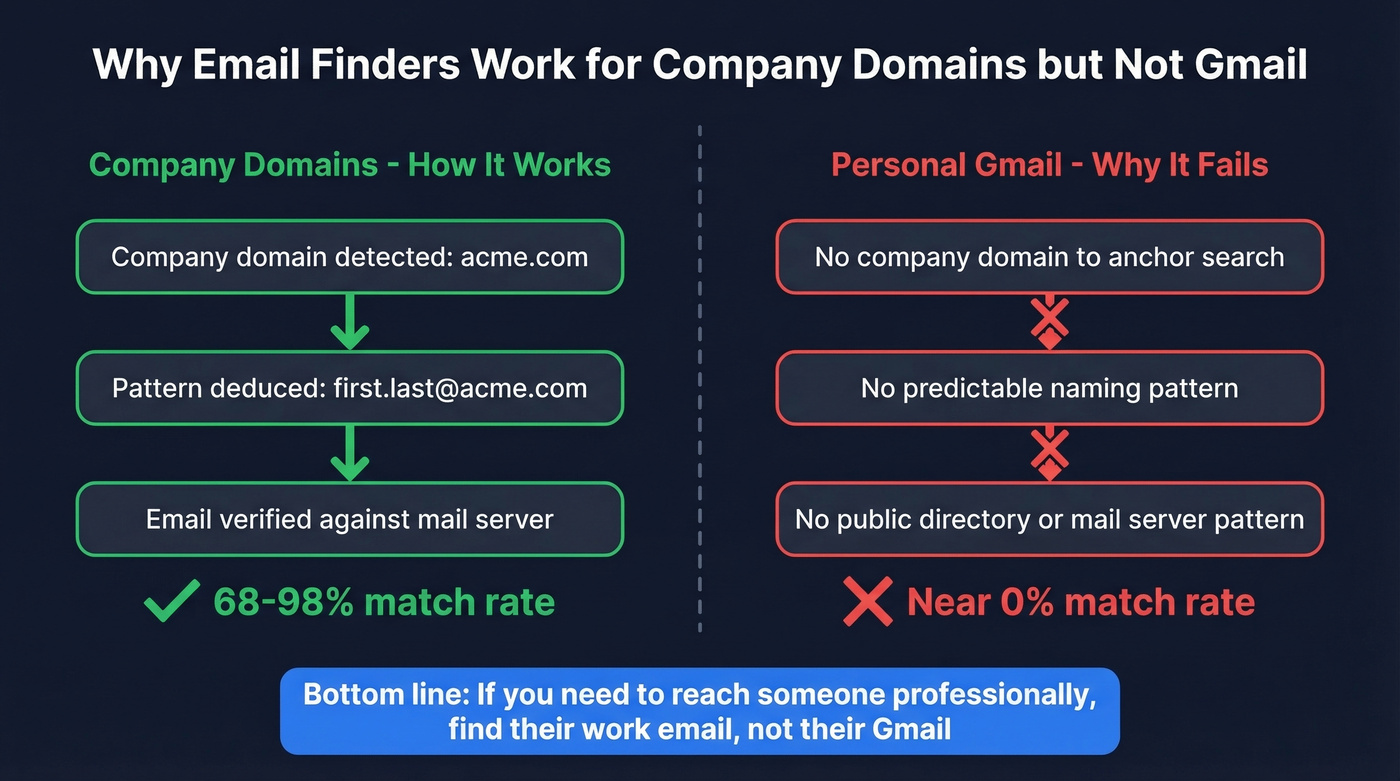
This makes sense when you think about how these tools work. They use databases, public web sources, and email pattern deduction for company domains, then verify the results against confidence scores. There's no equivalent "company-domain pattern" infrastructure for personal Gmail addresses, which is why even the best tools return nothing for @gmail.com lookups.
The broader email quality picture reinforces this. Nearly 28% of all emails checked in 2024 were invalid or risky - and that's for emails going through verification workflows. Personal Gmail discovery rates are a different and harder problem entirely.
If your average deal size is under five figures, you probably don't need to find anyone's personal Gmail at all. A verified work email from a $49/month tool will outperform a guessed Gmail address every single time.
If you’re building lists at scale, treat this as a sales prospecting techniques problem, not a Gmail problem.

Guessing Gmail permutations and hoping for a profile picture is not a prospecting strategy. Prospeo gives you 143M+ verified professional emails at 98% accuracy - refreshed every 7 days, not 6 weeks. At $0.01/email, one verified work address outperforms a hundred guessed @gmail.com attempts.
Skip the Gmail guessing game. Get emails that actually connect.
Best Tools for Professional Emails
Once you accept that guessing Gmail addresses is a dead end for outreach, the right move is a dedicated tool for professional contacts.
Prospeo
The database covers 300M+ professional profiles with 143M+ verified emails, and the accuracy numbers back it up: 98% verified email accuracy through a proprietary 5-step verification process that includes catch-all handling, spam-trap removal, and honeypot filtering. Data refreshes every 7 days, while the industry average sits at 6 weeks - a gap that matters more than most people realize when you're running campaigns at scale.
Search by name, company, role, or any of 30+ filters, and you'll get verified emails in seconds. The Chrome extension (40,000+ users) lets you find emails from any website or CRM page without leaving your browser. Pricing is transparent and self-serve: free tier gives you 75 emails/month, paid plans run about $0.01/email with no contracts.
If you’re comparing options, see our breakdown of email search tools and email address directory platforms.

Hunter
Hunter is the tool most people try first, for good reason. It combines database lookups with email pattern deduction: it checks its index first, and if there's no match, it deduces the most likely email format for that company domain and verifies it. Every result gets either a green "Verified" shield or a confidence score.
In an independent August 2025 benchmark of 1,000 contacts, Hunter hit a 68% verified match rate with 97% verification accuracy. Not the highest match rate, but you're unlikely to get bounces on the emails it does find. The Chrome extension is massive: 4.7 rating from 12,000+ reviews and 600,000+ users. Free plan gives you 50 searches/month. Paid plans start at $49/mo (Starter) or $34/mo billed annually, scaling to $299/mo for 25,000 credits.
If you’re shopping around, our Hunter alternatives guide covers the best swaps by use case.

GetProspect
Use this if you're running bulk operations and hate wasting credits on dead ends. GetProspect only charges for verified contacts - unverified results don't cost you anything. Credits roll over month to month (up to one monthly allowance), which is a nice touch for teams with uneven prospecting volume. The platform can also export up to 2,500 leads at a time, making it strong for high-volume list building. Chrome extension sits at a 4.8 rating with 1,300+ reviews.
Skip this if you need the highest possible match rates. In independent testing, GetProspect landed at 65%.
Free tier: 50 valid emails. Starter: $49/mo for 1,000 valid emails. Growth: $99/mo for 5,000.
If you’re pairing finding + enrichment, consider how data enrichment services fit into your stack.
Mailmeteor and Name2Email
Mailmeteor is a free reverse email lookup tool and a Gmail mail merge product - good for casual users who need to look up an occasional address or send personalized bulk emails from Gmail. It works best with professional/corporate email addresses; personal Gmail lookups often return limited information.
Name2Email is a free Chrome extension that generates email permutations from a name and company. Handy for one-off lookups when you don't want to leave your inbox.
For a deeper dive into this approach, see our guide on direct email address discovery.
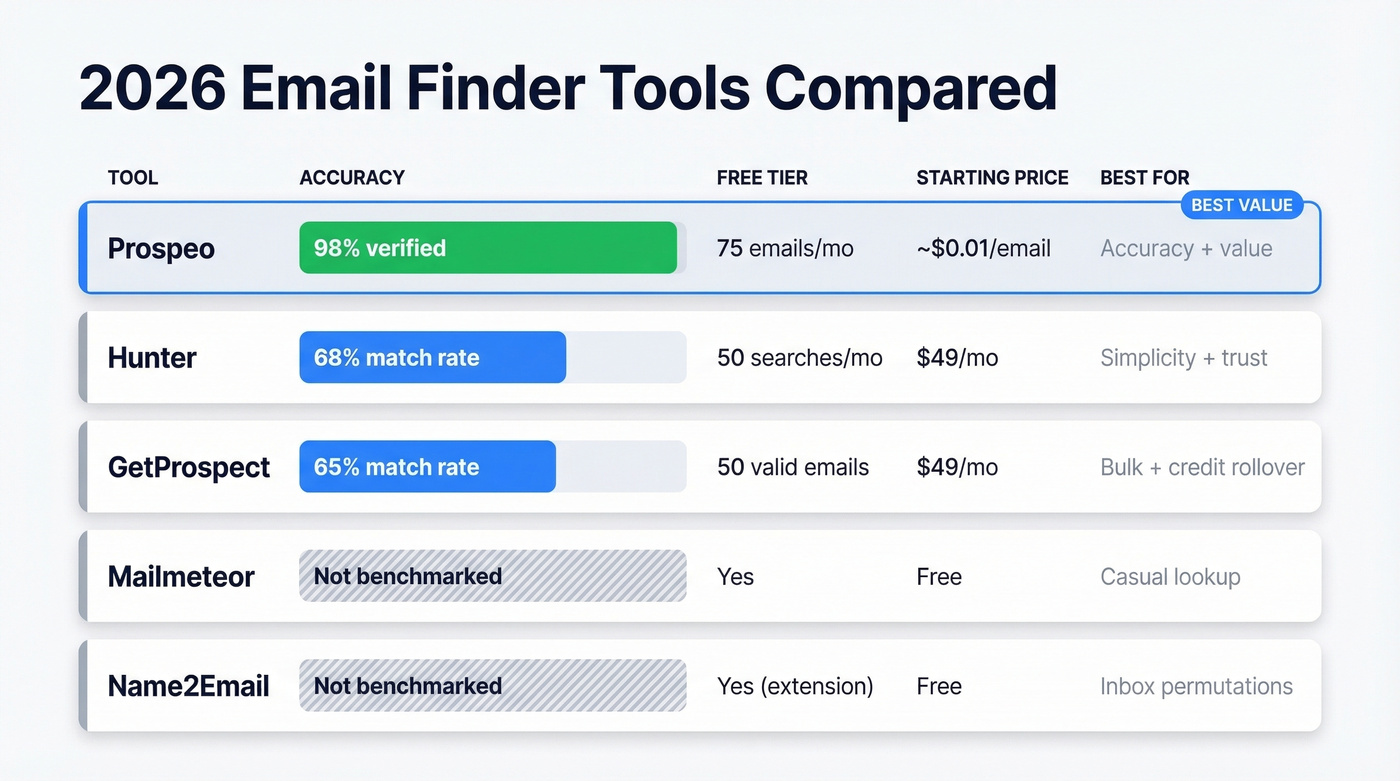
Comparison Table
| Tool | Accuracy | Free Tier | Starting Price | Best For |
|---|---|---|---|---|
| Prospeo | 98% verified | 75 emails/mo | ~$0.01/email | Accuracy + value |
| Hunter | 68% match rate | 50 searches/mo | $49/mo | Simplicity + trust |
| GetProspect | 65% match rate | 50 valid emails | $49/mo | Bulk + credit rollover |
| Mailmeteor | Not benchmarked | Yes | Free | Casual / reverse lookup |
| Name2Email | Not benchmarked | Yes (extension) | Free | Inbox-based permutations |
No email finder tool reliably locates personal Gmail addresses - but you don't need them. Prospeo's 300M+ profile database with 30+ filters finds the verified work email that lands in your prospect's inbox, not their spam folder. 75 free emails/month, no contracts, no sales calls.
Find the email that matters - their professional one, verified and ready.
Email Finder Accuracy Benchmarks
Accuracy claims are everywhere, but independent benchmarks tell a different story than vendor marketing pages.
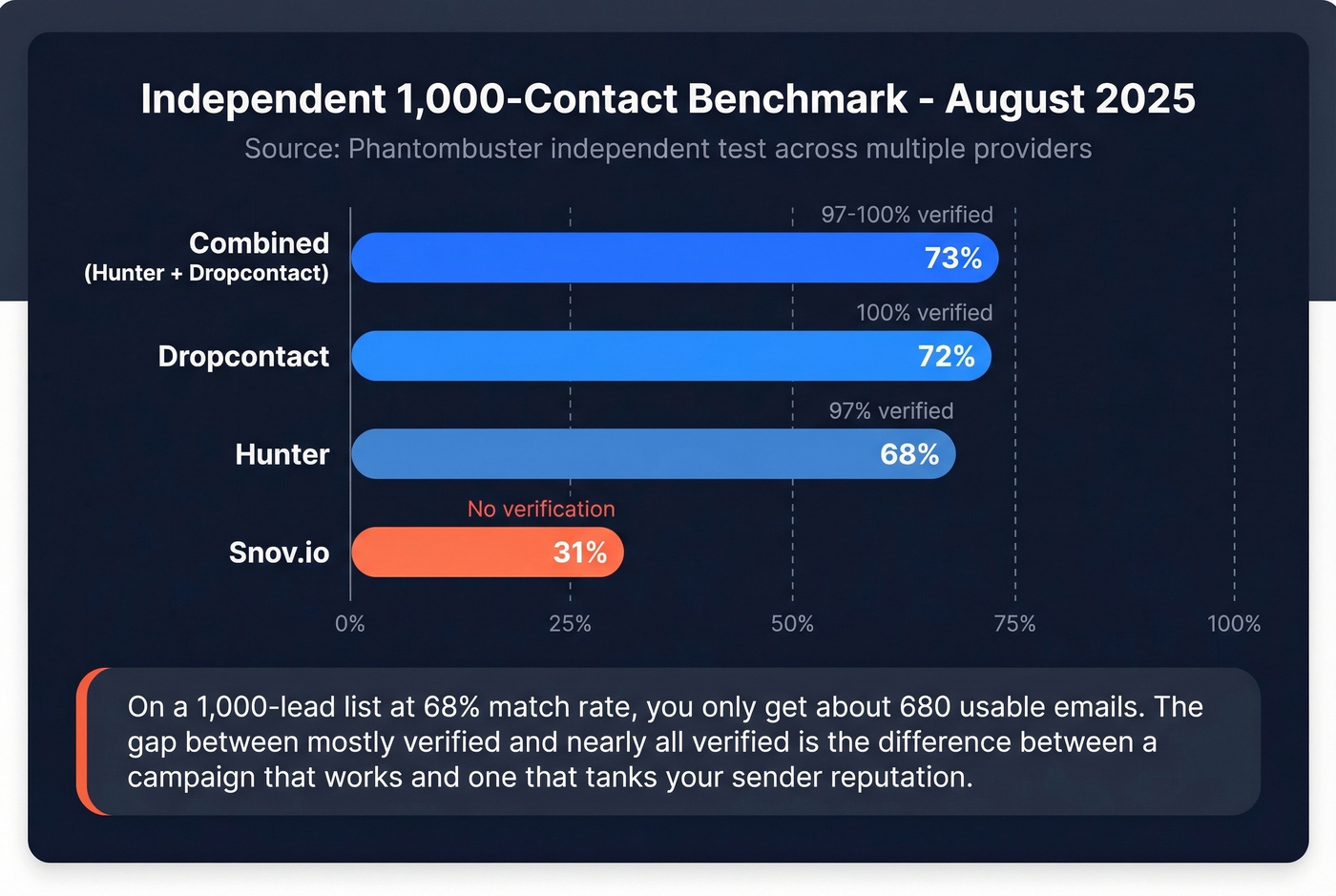
An independent 1,000-contact test run in August 2025 across multiple providers:
| Provider | Match Rate | Verification | Speed |
|---|---|---|---|
| Dropcontact | 72% | 100% verified | ~8 sec/lead |
| Hunter | 68% | 97% verified | ~1 sec/lead |
| Snov.io | 31% | No verification | ~2 sec/lead |
| Combined (Hunter + Dropcontact) | 73% | 97-100% | ~3 sec/lead |
The Dropcontact benchmark covering 20,000 contacts tells a similar story - most tools cluster in the 60-75% range for verified matches.
We've run our own campaigns using tools at both ends of this spectrum, and the gap between "mostly verified" and "nearly all verified" is the difference between a campaign that works and one that tanks your sender reputation. On a 1,000-lead list at a 68% match rate, you're only getting about 680 emails found in the first place. Then verification quality determines how many of those are actually deliverable. With 98% verified accuracy, you dramatically reduce bad addresses and protect deliverability at scale - something that compounds over months of outreach.
If deliverability is a priority, pair this with an email deliverability guide and the right email reputation tools.

How to Verify Before You Send
Even with a good tool, verification before sending is non-negotiable. That nearly-28% invalid/risky rate across all emails checked isn't just a stat - it's what happens to your sender reputation when you skip this step.
- Run your list through a verification tool before loading it into your sequencer
- Remove invalid, risky, and catch-all addresses - or at least segment catch-alls separately
- Re-verify any list older than 30 days - people change jobs, emails get deactivated, and spam traps accumulate
If you want the mechanics, start with how to check if an email exists and email bounce rate troubleshooting.
Legal Rules for Finding Emails
The legal side of email finding has teeth, and ignoring it is expensive.
GDPR can fine you up to EUR 20M or 4% of annual global turnover - whichever is higher. Under UK GDPR and PECR specifically, generating personal email addresses by combining publicly available names with guessed patterns constitutes processing personal data without a lawful basis. One UK legal analysis concludes this practice is flatly illegal, even when the source data is public.
CAN-SPAM carries penalties up to $46,517 per email. The requirements are straightforward but absolute: accurate headers, non-deceptive subject lines, a physical mailing address, a clear unsubscribe mechanism, and you must honor opt-outs within 10 business days.
Your compliance checklist for any email outreach:
- Have a lawful basis for contacting the person (consent or legitimate interest)
- Include an unsubscribe link in every email - no exceptions
- Add your physical business address to the email footer
- Honor opt-outs within 10 business days (sooner is better)
- Don't use deceptive subject lines or misleading sender information
- Use verified B2B tools rather than guessing personal email addresses from public data
This is another reason to use professional email finders for outreach rather than guessing personal Gmail addresses. B2B tools pull from business contexts with proper compliance frameworks. Guessing someone's personal Gmail and cold-emailing them is legally riskier and practically less effective.
For more on staying on the right side of outreach, see is it illegal to buy email lists.
FAQ
Can I find someone's Gmail address just from their name?
Sometimes, but no tool does it reliably. Google search operators ("name" "@gmail.com") and permutation guessing work when the person has posted their address publicly. For everyone else, you're guessing - tools are built for corporate domains, not personal @gmail.com addresses.
Do email finder tools work for @gmail.com addresses?
No. Tools like Hunter and GetProspect are built for corporate-domain emails - they're great at finding john@company.com but have minimal coverage for personal @gmail.com addresses. If you need someone for business purposes, their work email is the better target anyway.
What's the most accurate email finder in 2026?
Prospeo leads with 98% verified email accuracy across 143M+ emails. In independent testing, Hunter scored 68% and Dropcontact scored 72% on a 1,000-lead sample. The gap matters most for deliverability and domain reputation at scale.
Is it legal to look up someone's email address?
Finding publicly available addresses is generally legal, but generating personal emails from guessed patterns can violate GDPR/PECR. Sending unsolicited emails without an unsubscribe option violates CAN-SPAM with penalties up to $46,517 per email. Use verified B2B tools and follow compliance rules.
Are free email finder tools reliable?
Free tiers are useful for testing but limited in volume. Hunter offers 50 searches/month, while Prospeo's free plan includes 75 emails with full verification - better for small teams running real campaigns. For serious outreach, paid plans start around $49/mo.