

How Does a Cold Email Actually Work? The Complete Mechanics Explained
You send 500 cold emails. Two replies - both asking to unsubscribe. Your domain reputation tanks, your sequences stall, and you're left wondering if cold email even works anymore. It does. But what just happened wasn't cold email. It was unverified data blasted through an unprepared inbox with no system behind it.
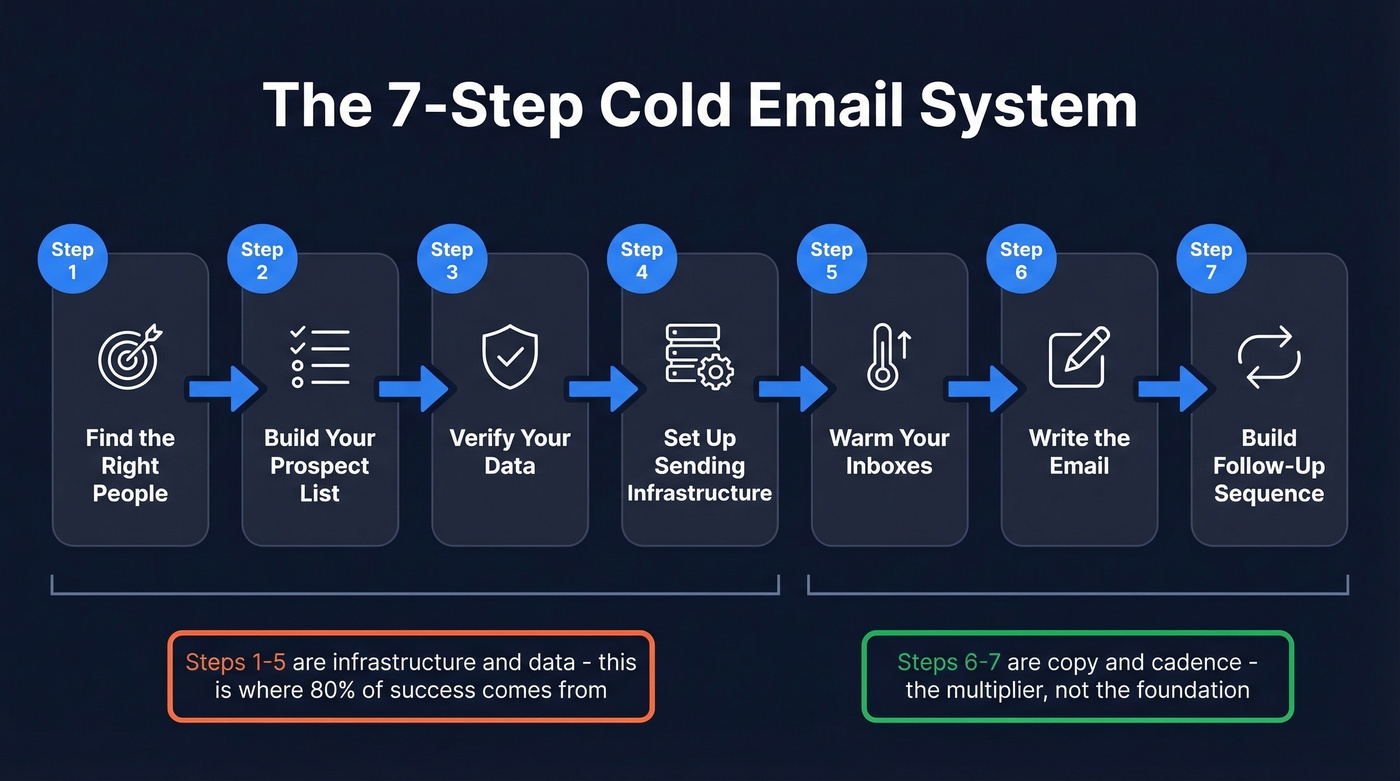
Here's what's actually happening under the hood when cold email works - and the 7-step system that separates campaigns pulling 5%+ reply rates from the ones that crater on day one.
The Quick Version
Cold email is a 7-step system, not a writing exercise. Most of the success comes from infrastructure and data quality; copy is the multiplier, not the foundation.
You need secondary domains with proper DNS authentication, verified contact data, a warmup period of at least two weeks, short first emails under 65 words, and a 4-touch follow-up sequence. A solid campaign produces a 2-4% reply rate. If your bounce rate is above 2%, nothing else matters - fix your data first.
What Is a Cold Email (and What Isn't)
A cold email is a targeted, one-to-one message sent to a specific prospect you haven't communicated with before. It's not spam. It's not a newsletter blast. And it's not the same as email marketing.
The distinction matters legally and practically. Under CAN-SPAM, cold email operates on an opt-out model - you can send it without prior consent, as long as you include a real identity, physical address, and working unsubscribe mechanism. Spam skips all of that. Email marketing goes to people who opted in. Cold email sits in between: unsolicited but targeted, commercial but personal.
Does it actually work? A Copyhackers case study showed 328 cold emails generating a 56% open rate, 9% positive reply rate, and nearly $20k in revenue from a single thread. That's not spray-and-pray - that's a system built on relevance and precision. The goal isn't to sell in the first message. It's to start a conversation with the right person at the right time.
The 7-Step Cold Email System
Every cold email guide leads with subject lines and templates. That's backwards. The system starts long before you write a single word.
Step 1: Find the Right People
The best cold emailers don't start with an ICP - they start with a timing signal. A timing signal is an event that makes a prospect likely to buy in the next 30-60 days: a new VP of Sales hire, a Series B announcement, a job posting for SDRs, a tech stack migration, an acquisition.
These signals transform cold outreach from "random interruption" into "relevant message at the right moment." Without them, you're guessing. With them, you're showing up when the problem is already top of mind.
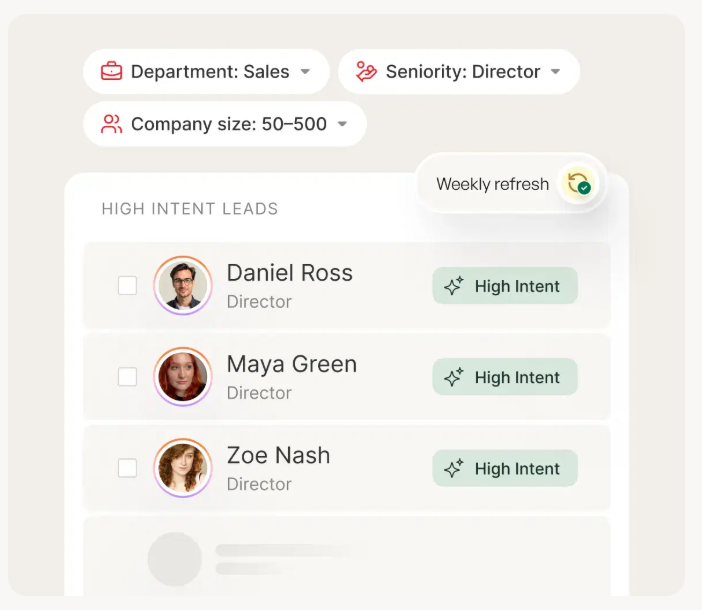
The shift from "who fits my ICP" to "who fits my ICP and is actively in-market right now" is one of the fastest ways to lift reply rates without increasing volume.
Step 2: Build Your Prospect List
Here's where most people go wrong: they build lists of thousands. Don't.
Target 80-150 contacts per weekly send batch. Small, curated batches let you personalize meaningfully, monitor deliverability closely, and iterate on messaging before scaling. Laura Lopuch built a consulting business sending 40 emails instead of 4,000, reporting 86% open rates and 48% positive replies. That's an extreme example, but the principle holds: a list of 100 perfect-fit prospects beats a list of 5,000 "maybes" every time.
Apollo is a solid starting point for ICP filters - job title, company size, industry, tech stack. Its free tier gives you enough to build initial lists. But the list itself isn't the asset. The verified, enriched version of that list is.
Step 3: Verify Your Data
This is where campaigns live or die.
The problem is simple: email databases decay fast. People change jobs, companies restructure, domains expire. By the time you send, a meaningful chunk of your list is already stale. Bounce rates climb, inbox providers flag your domain, and suddenly even your good emails land in spam.
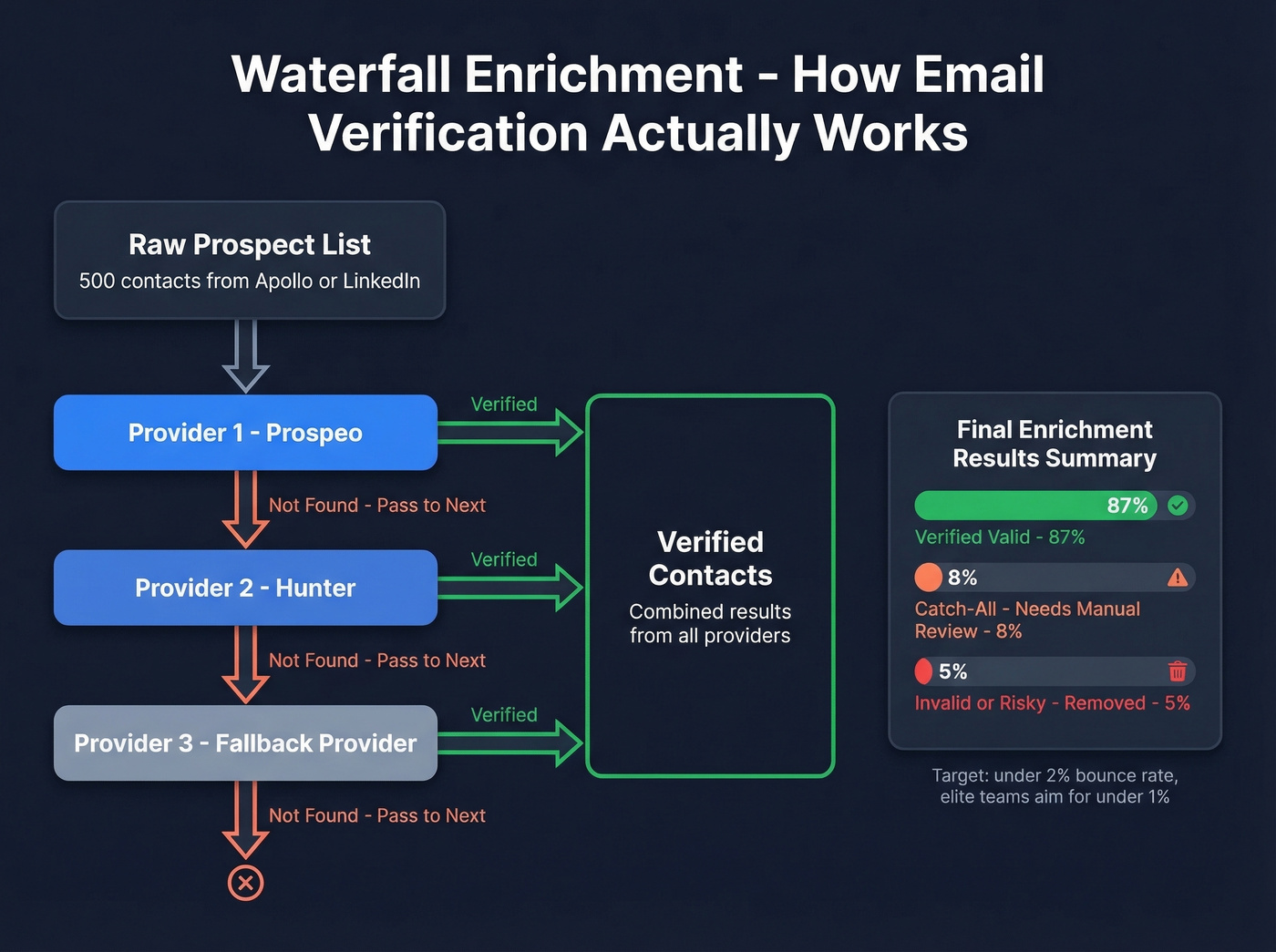
The solution is waterfall enrichment - running contacts through multiple verification providers in sequence until you get a confirmed valid address. Practitioners build these workflows in Clay, checking providers like Prospeo and Hunter in sequence until a verified address surfaces. Catch-all domains, which accept any address format, need special handling because they won't bounce but may not reach a real person.
Your target: under 2% bounce rate. Many operators aim for under 1%. Meritt, an outbound agency, saw their bounce rate drop from 35% to under 4% after switching to verified data - and their pipeline tripled from $100K to $300K per week. Stack Optimize built to $1M ARR running client campaigns at 94%+ deliverability with sub-3% bounce rates and zero domain flags.
Step 4: Set Up Sending Infrastructure
Never send cold email from your primary domain. Full stop.
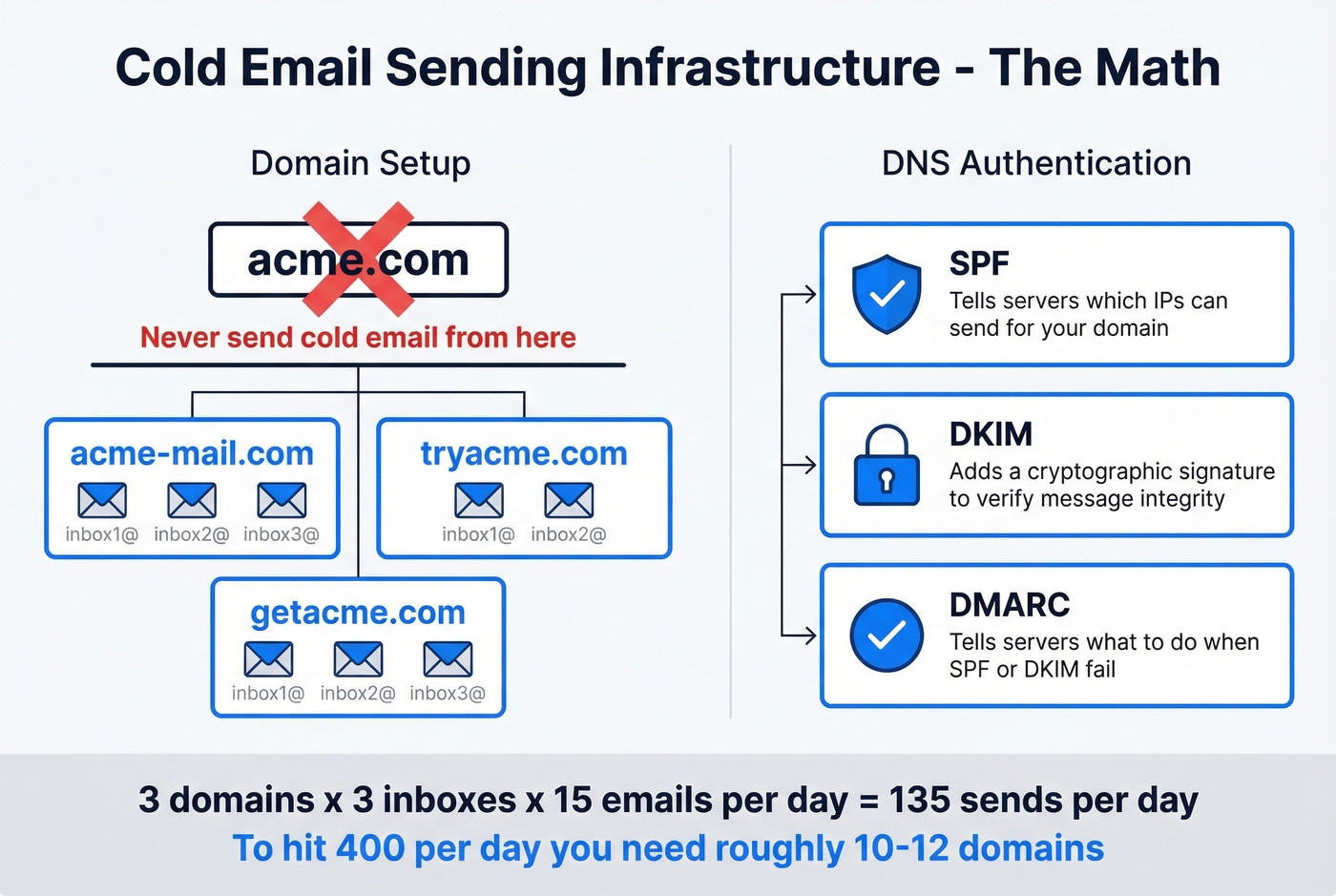
If your company domain is acme.com, your cold outreach goes from acme-mail.com or tryacme.com. This protects your core business email reputation if something goes sideways. Every guide tells you to "set up SPF, DKIM, and DMARC" like that's a single afternoon task. Let's actually break down what those mean:
- SPF (Sender Policy Framework) tells receiving servers which IP addresses are authorized to send email on behalf of your domain. It's a DNS TXT record listing your approved senders. (If you want examples and syntax, see SPF record setups.)
- DKIM (DomainKeys Identified Mail) adds a cryptographic signature to every email you send. The receiving server checks this signature against a public key in your DNS to verify the message wasn't tampered with in transit. (You can also verify DKIM is working after setup.)
- DMARC (Domain-based Message Authentication, Reporting & Conformance) tells receiving servers what to do when SPF or DKIM checks fail. Set it to
p=noneat minimum;p=quarantineis better for active campaigns. (More on DMARC alignment if you're troubleshooting.)
For volume, plan on 2-3 inboxes per domain, sending 10-15 cold emails per day per inbox to start. That gives you roughly 30-45 sends per domain daily. To hit 400 emails per day, you need approximately 10-12 domains. Sounds like a lot, but it's the math that keeps you out of spam.
One more detail most guides skip: set up a custom tracking domain via CNAME record. Default tracking pixels from sending platforms use shared domains that inbox providers already flag. A branded tracking domain protects deliverability. DNS propagation can take up to 72 hours, so do this early. (Full walkthrough: tracking domain.)
Step 5: Warm Your Inboxes
A brand-new inbox sending 25 cold emails on day one will get flagged fast. Inbox providers watch for sudden volume spikes from new domains - it's one of the clearest spam signals.
The warmup process simulates normal email activity: your inbox sends and receives emails from a network of other warming accounts, building a history of engagement. Minimum warmup period is 14 days. We recommend 21 days before any cold send hits a prospect's inbox. And here's what most people miss: keep warmup running after you launch campaigns. The ongoing engagement signals help maintain your sender reputation.
Instantly and Smartlead both have warmup built into their platforms, which is one reason they've become the default sending tools in the cold email space. (If you're comparing options, see unlimited email warmup tools.)
Step 6: Write the Email
After all that infrastructure work, the actual email is almost anticlimactic. Keep your first email under 65 words. The best-performing cold emails in 2026 clock in under 80 words total.
The formula: one pain point relevant to the prospect's situation, one value proposition that addresses it, one clear call to action. That's the entire email. No company history, no feature lists, no "I hope this finds you well." (If you need a deeper framework, use this email copywriting guide.)
Avoid spam trigger words - "guarantee," "free," "profit," "limited time" - that filters treat as risk signals. And don't confuse personalization with relevance. Mentioning someone's alma mater or recent podcast appearance is superficial. Referencing a specific challenge their company faces based on a timing signal? That's relevance.
One warning: modern spam filters detect template fingerprinting. If 500 emails share the same sentence structure with only a {{first_name}} swap, providers recognize the pattern. Write 3-4 completely different email angles and rotate them across your list - different openings, different proof points, different CTAs. Not just different names.
Step 7: Build Your Follow-Up Sequence
58% of replies come from the first email. That means 42% come from follow-ups. If you're sending one email and moving on, you're leaving almost half your results on the table.
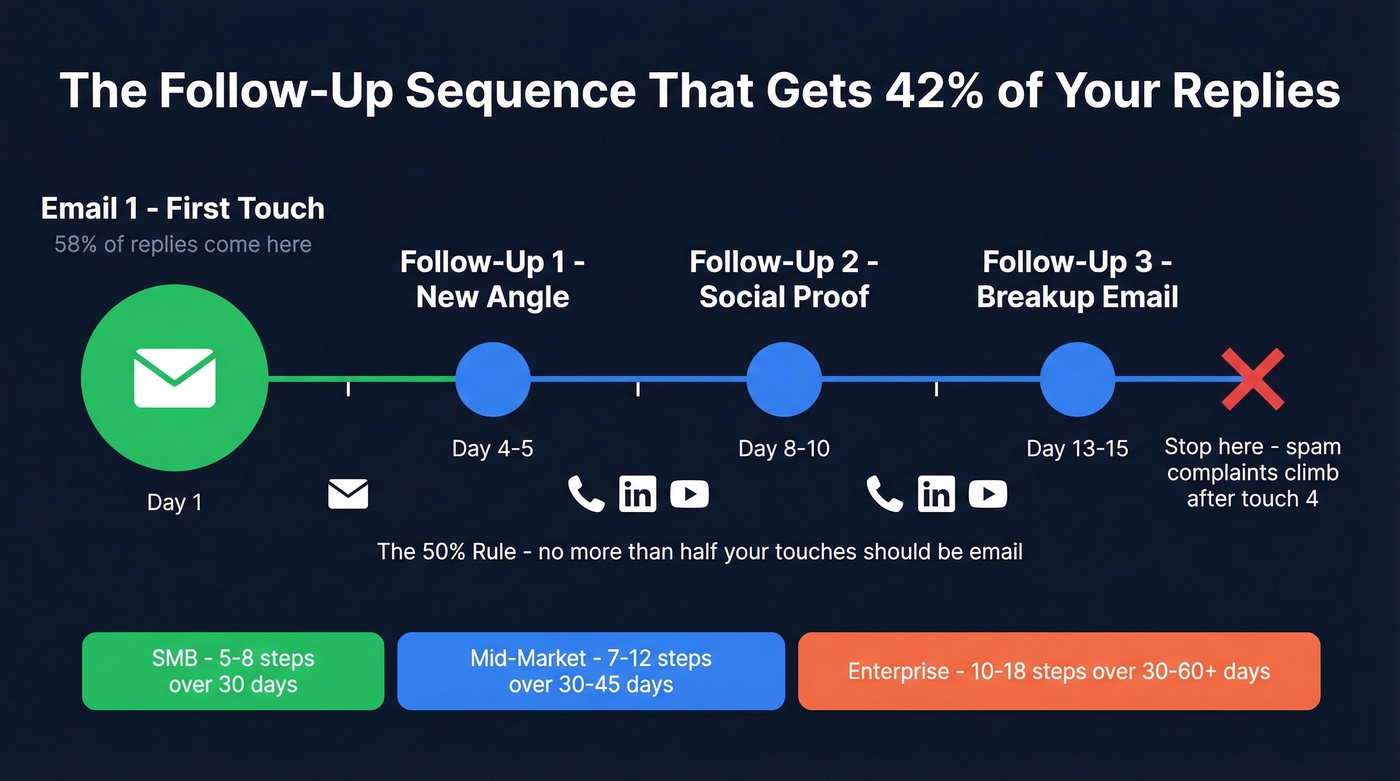
The cadence that works: follow up at days 4-5, then 8-10, then 13-15. Stop at 4 total touches. Marginal returns after the fourth email are near zero, and spam complaints start climbing. (If you want plug-and-play copy, use these cold email follow-up templates.)
The 50% rule is worth internalizing: no more than half of your touches in a sequence should be email. The rest should be calls, video messages, or social touches. This isn't just a deliverability play - it's a conversion play. Different people respond to different channels.
How you structure sequences should vary by segment:
| Segment | Total Steps | Email Touches | Timeline |
|---|---|---|---|
| SMB | 5-8 | 2-4 max | ~30 days |
| Mid-market | 7-12 | 3-6 | 30-45 days |
| Enterprise | 10-18 | 5-9 | 30-60+ days |
Enterprise deals require more patience and more channel diversity. SMB sequences should be shorter and more direct. The mistake is running the same 5-email sequence for a $5k deal and a $500k deal.
2026 Benchmarks: What Good Looks Like
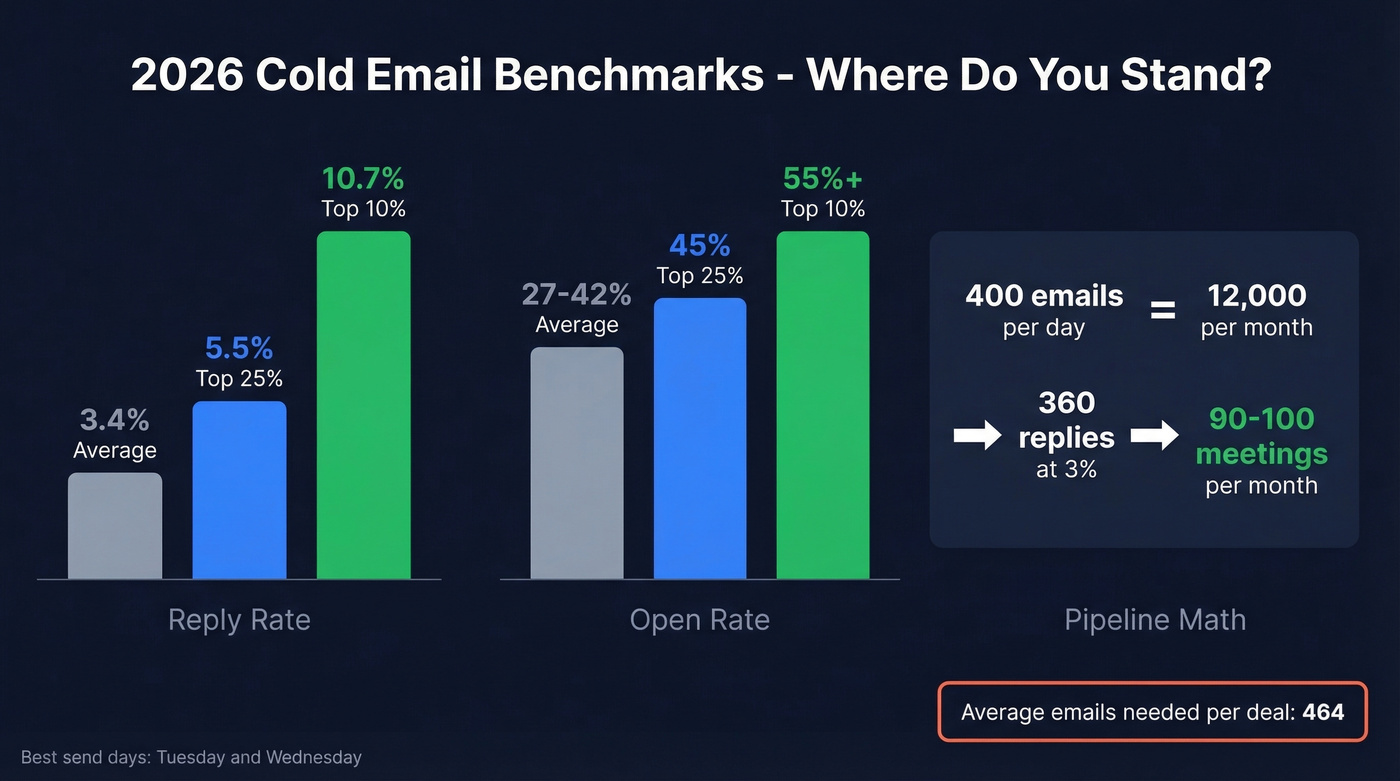
Numbers without context are useless. The Instantly benchmark report - based on billions of cold email interactions - shows where the bar sits:
| Metric | Average | Top Quartile | Elite (Top 10%) |
|---|---|---|---|
| Reply rate | 3.43% | 5.5%+ | 10.7%+ |
| Open rate | 27-42% | 45%+ | 55%+ |
| Best send days | Tue-Wed | Wed peak | - |
| Emails per deal | ~464 | - | - |
Let's run the conversion math. If you're sending 400 emails per day across your domain infrastructure, that's roughly 12,000 per month. At a 3% reply rate, you get 360 replies. If 50-60% are genuinely interested and half of those convert to meetings, you're looking at 90-100 meetings per month. That's a real pipeline engine.
Tuesday and Wednesday consistently produce the highest reply rates. Monday inboxes are cluttered; Thursday and Friday attention drops. Time your sequences accordingly. (More data: best time to send cold emails.)
Here's our hot take: if your average deal size is under $8k, you probably don't need a 15-step enterprise sequence or $2,000/month in tooling. A $200/month stack with verified data and disciplined volume will outperform most bloated setups. Cold email rewards precision, not budget.


Step 3 is where most cold email campaigns fail. Prospeo's 5-step verification process delivers 98% email accuracy with catch-all handling, spam-trap removal, and a 7-day data refresh cycle - so your list never goes stale. Meritt dropped their bounce rate from 35% to under 4% and tripled pipeline to $300K/week.
Fix your data before you write a single subject line.
Why Cold Emails Land in Spam
Google and Yahoo now enforce explicit bulk sender rules: spam complaints must stay under 0.3% - that's 3 complaints per 1,000 emails - bounces under 2%, and SPF/DKIM/DMARC authentication is mandatory. Fail any of these and your deliverability gets throttled fast.
But authentication is table stakes. The subtler killers are velocity detection and template fingerprinting. If your sending platform fires 25 emails at 9:01 AM every day with identical sentence structures, inbox providers recognize the robotic pattern. Randomize send times. Vary your copy genuinely. Use different angles across sequences. (If you're trying to stay safe while scaling, track email velocity.)
Here's the thing most people miss: legal compliance and deliverability are completely different problems. CAN-SPAM says you can send cold email. Gmail says it'll put your cold email in spam if your data is bad. The consensus on r/coldemail is clear: "infrastructure is where almost everyone screws up." Data quality is the single biggest deliverability factor, and a 7-day refresh cycle versus the 6-week industry average is the difference between a clean sender reputation and a domain penalty.
Is Cold Email Legal?
Yes, with rules. The legal framework varies by jurisdiction, and getting it wrong carries real penalties.
United States (CAN-SPAM): Cold email is explicitly legal without prior consent. You must include accurate sender information, a truthful subject line, a physical mailing address (a P.O. box works), and a working unsubscribe link honored within 30 days. Penalties run $51,744-$53,088 per non-compliant message.
European Union (GDPR): B2B cold email is permissible under legitimate interest, Article 6(1)(f). You need to document a Legitimate Interest Assessment covering your purpose, why email is necessary, and a balancing test against the recipient's rights. Keep that documentation - regulators ask for it.
Canada (CASL): The strictest of the three. Consent-first model, but implied consent exists for existing business relationships within the past 24 months or conspicuously published business addresses with role relevance. Unsubscribe requests must be honored within 10 business days. Keep opt-out records for at least 3 years.
Across all jurisdictions, the non-negotiables are: real identity, physical address, working opt-out, and honest subject lines. Build these into your sending platform templates so they're automatic, not afterthoughts.
Tools You Need in 2026
Cold email requires three layers of tooling: data sourcing, verification, and sending. Here's the stack that works:
| Function | Tool | Starting Price | Why It's Here |
|---|---|---|---|
| Data sourcing | Apollo | Free; paid from ~$59/mo | Best ICP filters, huge database |
| Enrichment | Clay | Custom pricing | Waterfall enrichment engine |
| Verification | Hunter | ~$49/mo | Domain search, solid alternative |
| Sending | Instantly | ~$30-40/mo | Built-in warmup, simple UI |
| Sending | Smartlead | ~$40-50/mo | Multi-inbox rotation, warmup |
| Sending | Saleshandy | $25/mo (billed annually) | Budget-friendly sequences |
| Sending | Lemlist | ~$40-60/mo | Personalization features |
| Sending | Gmass | ~$25/mo | Gmail-native, budget option |
Prospeo integrates natively with Instantly, Smartlead, and Lemlist, so verified contacts flow directly into your sequences without CSV exports or manual imports.
Look, the tool matters less than the system. We've seen teams with a $200/month stack outperform teams spending $2,000/month because they nailed the fundamentals - verified data, proper infrastructure, disciplined volume. Pick tools that integrate cleanly and skip anything that overcomplicates your workflow.
Mistakes That Kill Campaigns
These are the errors we see repeatedly, roughly in order of damage:
- Sending from your primary domain. One spam flag and your entire company's email reputation is compromised. Use secondary domains. Always.
- Skipping warmup. New domains sending cold volume on day one get flagged fast. Budget 2-3 weeks minimum.
- Using unverified data. A 7.5% bounce rate - the industry average per Warmforge - will destroy your sender reputation in days. Verify every single email. (If you're diagnosing issues, start with email bounce rate.)
- Writing 300-word emails. Nobody reads them. Under 65 words for the first touch.
- Not following up. 42% of replies come from follow-ups. One-and-done is leaving money on the table.
- Buying $3 inboxes from resellers. As one r/coldemail practitioner put it: "$3 per inbox resellers are $3 for a reason." Shared IPs, mass suspensions, dead accounts. Pay for proper Google Workspace or Microsoft 365 inboxes.
- Blasting identical templates. Template fingerprinting is real. Write 3-4 genuinely different email angles and rotate them - not just merge fields in the same skeleton.
The article mentions timing signals as the fastest way to lift reply rates. Prospeo tracks 15,000 intent topics via Bombora, layered with job change alerts, headcount growth, and technographic filters - so you reach prospects who are actively in-market, not just ICP-adjacent. All starting at $0.01 per email.
Stop guessing who's ready to buy. Let intent data tell you.
FAQ
How does a cold email work in practice?
It's a 7-step system: identify prospects using timing signals, build a small curated list, verify every email address, set up secondary domains with proper DNS authentication, warm those inboxes for 2-3 weeks, write a short relevant first message, then follow up 3-4 times over two weeks. Skip one step and the whole campaign suffers.
How many cold emails should I send per day?
Start at 10-15 per inbox across 2-3 inboxes per domain, scaling toward 15-25 per inbox. Most practitioners target 200-400 total sends per day across 8-12 domains. Scale by adding domains, not blasting more from one account.
What's a good reply rate in 2026?
The average is 3.43% per the Instantly benchmark report. Top quartile hits 5.5%+, and elite campaigns push past 10%. If you're consistently below 2%, revisit your targeting and data quality before tweaking copy.
Is cold email the same as spam?
No. Spam is unsolicited bulk email with no targeting and no opt-out. Cold email is targeted outreach to specific prospects with a clear unsubscribe option and real sender identity - legally distinct under CAN-SPAM, GDPR, and CASL.